buttons SKODA OCTAVIA 2005 1.G / (1U) Owner's Manual
[x] Cancel search | Manufacturer: SKODA, Model Year: 2005, Model line: OCTAVIA, Model: SKODA OCTAVIA 2005 1.G / (1U)Pages: 315, PDF Size: 11.8 MB
Page 12 of 315
Cockpit11
Using the systemSafetyDriving TipsGeneral MaintenanceBreakdown assistanceTechnical Data
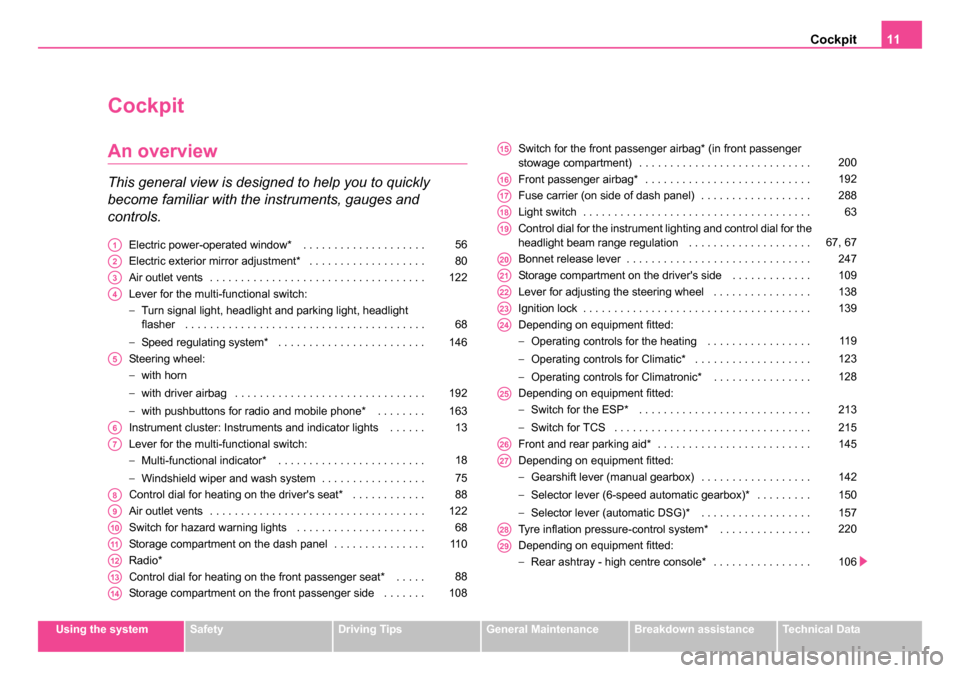
Cockpit
An overview
This general view is designed to help you to quickly
become familiar with the instruments, gauges and
controls.
Electric power-operated window* . . . . . . . . . . . . . . . . . . . .
Electric exterior mirror adjustment* . . . . . . . . . . . . . . . . . . .
Air outlet vents . . . . . . . . . . . . . . . . . . . . . . . . . . . . . . . . . . .
Lever for the multi-functional switch:
−Turn signal light, headlight and parking light, headlight
flasher . . . . . . . . . . . . . . . . . . . . . . . . . . . . . . . . . . . . . . .
− Speed regulating system* . . . . . . . . . . . . . . . . . . . . . . . .
Steering wheel:
− with horn
− with driver airbag . . . . . . . . . . . . . . . . . . . . . . . . . . . . . . .
− with pushbuttons for radio and mobile phone* . . . . . . . .
Instrument cluster: Instruments and indicator lights . . . . . .
Lever for the multi-functional switch:
− Multi-functional indicator* . . . . . . . . . . . . . . . . . . . . . . . .
− Windshield wiper and wash system . . . . . . . . . . . . . . . . .
Control dial for heating on the driver's seat* . . . . . . . . . . . .
Air outlet vents . . . . . . . . . . . . . . . . . . . . . . . . . . . . . . . . . . .
Switch for hazard warning lights . . . . . . . . . . . . . . . . . . . . .
Storage compartment on the dash panel . . . . . . . . . . . . . . .
Radio*
Control dial for heating on the front passenger seat* . . . . .
Storage compartment on the front passenger side . . . . . . . Switch for the front passenger airbag* (in front passenger
stowage compartment) . . . . . . . . . . . . . . . . . . . . . . . . . . . .
Front passenger airbag* . . . . . . . . . . . . . . . . . . . . . . . . . . .
Fuse carrier (on side of dash panel) . . . . . . . . . . . . . . . . . .
Light switch . . . . . . . . . . . . . . . . . . . . . . . . . . . . . . . . . . . . .
Control dial for the instrument lighting and control dial for the
headlight beam range regulation . . . . . . . . . . . . . . . . . . . .
Bonnet release lever . . . . . . . . . . . . . . . . . . . . . . . . . . . . . .
Storage compartment on the driver's side . . . . . . . . . . . . .
Lever for adjusting the steering wheel . . . . . . . . . . . . . . . .
Ignition lock . . . . . . . . . . . . . . . . . . . . . . . . . . . . . . . . . . . . .
Depending on equipment fitted:
−
Operating controls for the heating . . . . . . . . . . . . . . . . .
− Operating controls for Climatic* . . . . . . . . . . . . . . . . . . .
− Operating controls for Climatronic* . . . . . . . . . . . . . . . .
Depending on equipment fitted:
− Switch for the ESP* . . . . . . . . . . . . . . . . . . . . . . . . . . . .
− Switch for TCS . . . . . . . . . . . . . . . . . . . . . . . . . . . . . . . .
Front and rear parking aid* . . . . . . . . . . . . . . . . . . . . . . . . .
Depending on equipment fitted:
− Gearshift lever (manual gearbox) . . . . . . . . . . . . . . . . . .
− Selector lever (6-speed automatic gearbox)* . . . . . . . . .
− Selector lever (automatic DSG)* . . . . . . . . . . . . . . . . . .
Tyre inflation pressure-control system* . . . . . . . . . . . . . . .
Depending on equipment fitted:
− Rear ashtray - high centre console* . . . . . . . . . . . . . . . . A156
A280
A3122
A4
68
146
A5
192
163
A613
A7
18
75
A888
A9122
A1068
A1111 0
A12
A1388
A14108
A15200
A16192
A17288
A1863
A1967, 67
A20247
A21109
A22138
A23139
A24
11 9
123
128
A25
213
215
A26145
A27
142
150
157
A28220
A29
106
s24s.book Page 11 Thursday, November 24, 2005 12:27 PM
Page 47 of 315
Unlocking and locking
46
So long as the child safety lock is switched on it is not possible to open the
door from the inside with the door opening lever. In this case the door can
be opened only from the outside.
Central locking system
Description
Unlocking or locking the vehicle causes all the doors and the fuel filler
flap* to be unlocked or locked at the same time by the central locking
system. The boot lid is unlocked when opening. It can be opened by
pressing the hand grip above the licence plate ⇒page 50, fig. 30 .
Operation of the central locking system is possible:
•from the outside using the vehicle key ⇒page 47,
•using the buttons for the central locking system ⇒page 48,
•by using the remote control ⇒page 52.
Indicator light in the driver's door on vehicles without anti-theft
alarm system
After the car is locked, the indicator light flashes after 2 seconds.
After the car is locked with the deactivated safe securing system, the indi-
cator light flashes only after 30 seconds.
Indicator light in the driver's door on vehicles with anti-theft alarm
system
After locking the vehicle the indicator light flashes for 2 seconds fast, then
more slowly.
If the vehicle is locked and the safe securing system ⇒page 47 is not oper-
ating, the indicator light in the driver door flashes for about 2 seconds fast,
goes out and starts to flash slowly after about 30 seconds. If the indicator light first of all flashes fast for about 2 seconds, afterwards
lights up for about 30 seconds and then flashes slowly, there is a fault in
the system of the central locking or the interior monitor*
⇒page 55.
Contact a specialist garage to obtain assistance.
Convenience operation of windows
One can open and close the electrically powered windows when unlocking
and locking the vehicle ⇒page 58, “Convenience operation of windows”.
Opening a single door*
This function allows one to just unlock the driver's door. The other doors
and the fuel filler flap* remain locked and are only unlocked after repetitive
unlocking.
If you wish, you can have your Škoda Dealer activate the function of the
single door opening mode.
Automatic locking*
All the doors and the boot lid are locked automatically once the car
reaches a speed of about 15 km/h.
If the ignition key is withdrawn, the car is then automatically unlocked
again. In addition, it is possible for the driver to unlock the car by pressing
the central locking button
or by pulling the door opening lever.
If you wish, your Škoda Dealer can activate the function of the automatic
locking mode.
WARNING
Locking the doors prevents involuntary opening in an exceptional
situation (an accident). Locked doors prevent unwanted entry into
the vehicle from outside, for example at road crossings. Locked
doors do, however, make it more difficult for rescuers to get into
the vehicle in an emergency - danger to life!
s24s.book Page 46 Thursday, November 24, 2005 12:27 PM
Page 49 of 315
Unlocking and locking
48
– Turn the key in the lock of the driver's door to the left into the opening position ⇒page 47, fig. 27.
– Pull on the door handle and open the door.
•All the doors (only the driver's door on vehicles with anti-theft alarm
system) and the fuel filler flap* are unlocked.
•The boot lid is then unlocked.
•The switched on interior lights come on over the door contact.
•The safe securing system is deactivated.
•The windows are opened provided the key is held in the opening posi-
tion*. On vehicles fitted with anti-theft alarm system the window operation
is only possible 45 seconds after deactivation of the warning system.
•The indicator light in the driver's door stops flashing if the vehicle is not
fitted with an anti-theft alarm system* ⇒page 54.
Note
If the vehicle is equipped with an anti-theft alarm system*, you must
unlock the vehicle by inserting the key into the driver door you then have
to insert the key into the ignition lock and switch the ignition on within 15
seconds after opening the door. The alarm will be triggered if you do not
switch on the ignition within 15 seconds.
Closing the vehicle with the key
– Turn the key in the lock of the driver door to the right into the
closing position ⇒page 47, fig. 27 .
•The doors, the boot lid and the fuel filler flap* are locked.
•The switched on interior lights will switch off over the door contact.
•The windows and the electric sliding/tilting roof* are closed provided
the key is held in the locking position.
•The safe securing system is activated immediately.
•The indicator light in the driver door begins flashing.
Note
The opened driver door cannot be locked. It must be locked separately
after closing it.
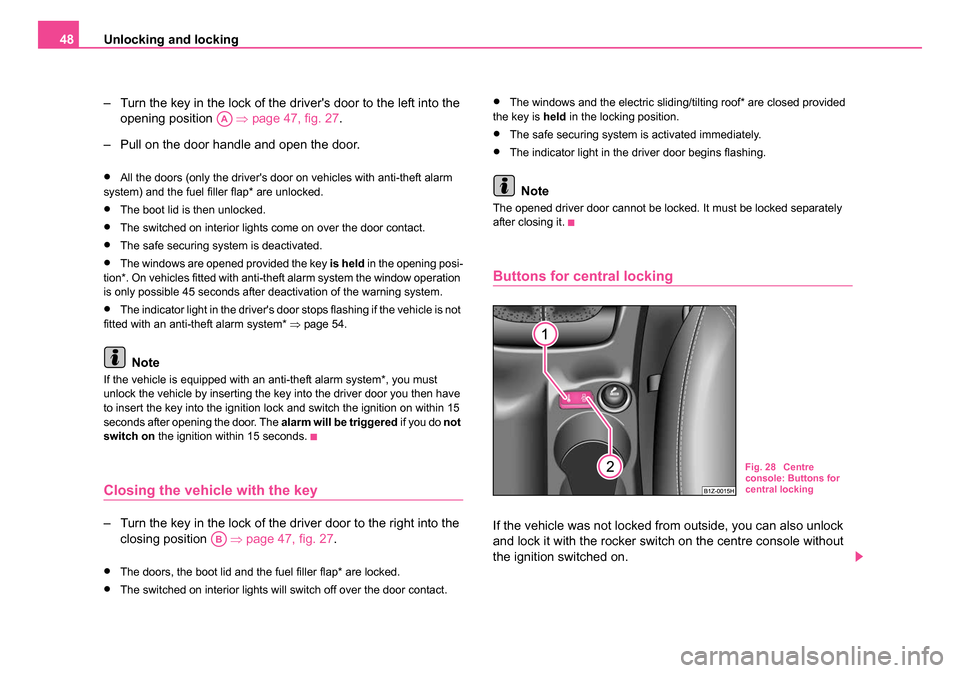
Buttons for central locking
If the vehicle was not locked from outside, you can also unlock
and lock it with the rocker switch on the centre console without
the ignition switched on.
AA
AB
Fig. 28 Centre
console: Buttons for
central locking
s24s.book Page 48 Thursday, November 24, 2005 12:27 PM
Page 50 of 315
Unlocking and locking49
Using the systemSafetyDriving TipsGeneral MaintenanceBreakdown assistanceTechnical Data
Locking all doors and the boot lid
– Press button ⇒page 48, fig. 28 . The symbol
in the button
comes on.
Unlocking all doors and the boot lid
– Press button ⇒page 48, fig. 28 . The symbol
goes out in
the button.
The following applies if you have locked your vehicle using the button :
•It is not possible to open the doors or the boot lid from the outside
(safety feature, e.g. when stopping at traffic lights etc.).
•You can unlock the doors individually from the inside and open them
by pulling the door opening lever.
•If the driver door is opened, it cannot be locked, in order to avoid inad-
vertently being locked out of the vehicle You then have to lock a door
separately after closing it.
•In the event of an accident in which the airbags are deployed, the
locked doors are automatically unlocked from the inside in order to enable
rescuers to gain access to the vehicle.
If the ignition is switched off, you can conveniently close or open the
windows by pressing and holding the button or ⇒page 58.
WARNING
The central locking system also operates if the ignition is switched
off. All the doors and the boot lid are locked. Children should never
be left unattended in the vehicle since it is difficult to provide
assistance from the outside when the doors are locked. Locked
doors make it difficult for rescuers to get into the vehicle in an
emergency - hazard!
Note
The door opening lever and the buttons for the central locking system do
not operate if the safe securing system is activated.
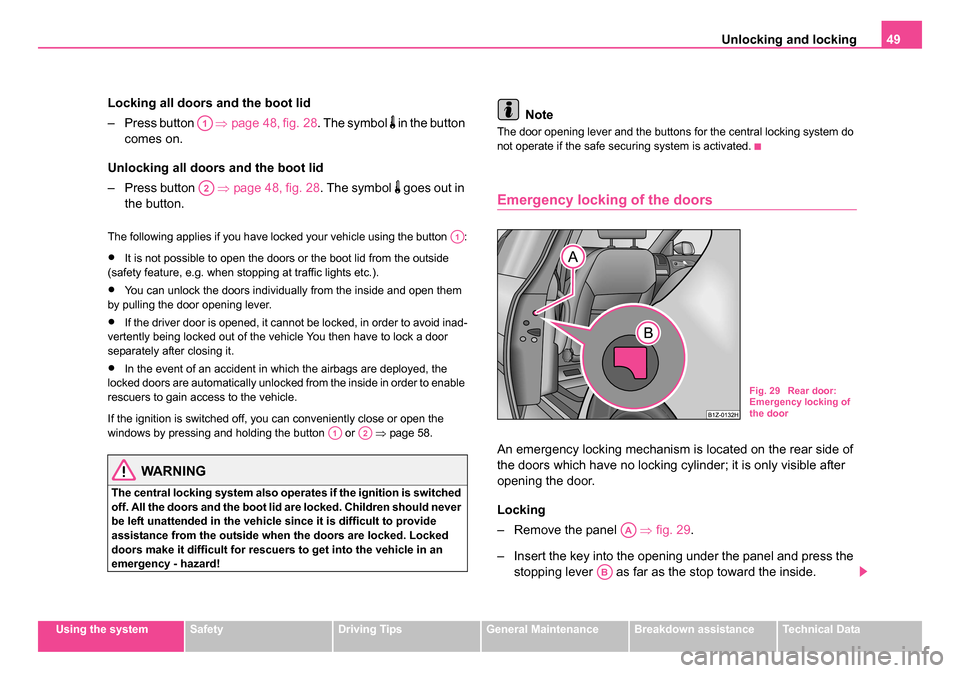
Emergency locking of the doors
An emergency locking mechanism is located on the rear side of
the doors which have no locking cylinder; it is only visible after
opening the door.
Locking
– Remove the panel ⇒ fig. 29.
– Insert the key into the opening under the panel and press the stopping lever as far as the stop toward the inside.
A1
A2
A1
A1A2
Fig. 29 Rear door:
Emergency locking of
the door
AA
AB
s24s.book Page 49 Thursday, November 24, 2005 12:27 PM
Page 54 of 315
Unlocking and locking53
Using the systemSafetyDriving TipsGeneral MaintenanceBreakdown assistanceTechnical Data
Folding out of the key
– Press button .
Folding up of the key
– Press button and collapse the key bit in the housing.
The turn signal lights flash twice as confirmation that the vehicle has been
unlocked. The vehicle will lock again automatically if you unlock the
vehicle using button but do not open a door or the boot lid within the
next 30 seconds. This function is intended to prevent the car being
unlocked unintentionally.
In addition, when the car is unlocked, the power seats and exterior
mirrors* move into the position assigned to this key. The stored setting of
driver seat and exterior mirrors is retrieved.
The turn signal lights flash once to confirm that the vehicle has been
correctly locked. If the turn signal lights do not flash, check the doors,
bonnet and boot lid again to ensure that they are closed. If the doors, the
bonnet or the boot lid remain open when the anti-theft alarm system is
activated, the turn signal lights do not flash until after they have been
closed.
When the vehicle is unlocked or locked, the interior lights in the door
contact are automatically switched on or off.
WARNING
If the vehicle is locked from the outside and the safe securing
system is activated, there must not be any person in the vehicle as
it is then not possible to open either a door or a window from the
inside. The locked doors make it more difficult for rescuers to get
into the vehicle in an emergency - hazard!
Note
•Operate the radio remote control only when the doors and boot lid are
closed and you have visual contact with the vehicle.
•Once in the car, you must not press the lock button of the radio
remote control before inserting the key into the ignition lock in order to
avoid the car being inadvertently locked and, in addition, the anti-theft
alarm system* being switched on. Should this happen, press the unlock
button
of the radio remote control.
Synchonisation of the remote control
If the vehicle cannot be unlocked by actuating the remote control system
then it is possible that the code in the key and the control unit in the vehicle
are no longer synchronised. This can occur when the buttons on the radio-
operated key are actuated a number of times outside of the operative
range of the equipment or the battery on the remote control was replaced.
This means it is necessary to synchronise the code as follows:
•Press any button on the remote control.
•Pressing of the button means that the door will unlock with the key
within 1 minute.
A4
A4
A1
s24s.book Page 53 Thursday, November 24, 2005 12:27 PM
Page 57 of 315
Unlocking and locking
56
– Open the driver door.
– Press the button
at the centre colum on the driver side
⇒ page 55, fig. 35 , the symbol
lights up in the button.
– Lock the vehicle within 30 seconds.
The interior monitor is switched on again automatically the next time the
car is locked.
Power windows*
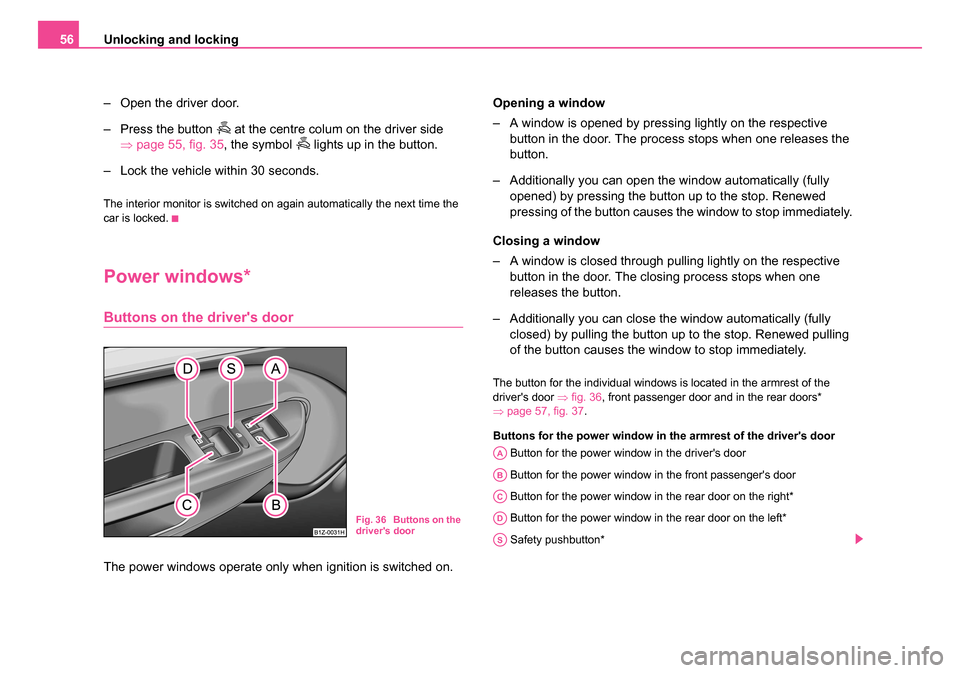
Buttons on the driver's door
The power windows operate only when ignition is switched on. Opening a window
– A window is opened by pressing lightly on the respective
button in the door. The process stops when one releases the
button.
– Additionally you can open the window automatically (fully opened) by pressing the button up to the stop. Renewed
pressing of the button causes the window to stop immediately.
Closing a window
– A window is closed through pulling lightly on the respective button in the door. The closing process stops when one
releases the button.
– Additionally you can close the window automatically (fully closed) by pulling the button up to the stop. Renewed pulling
of the button causes the window to stop immediately.
The button for the individual windows is located in the armrest of the
driver's door ⇒fig. 36 , front passenger door and in the rear doors*
⇒ page 57, fig. 37 .
Buttons for the power window in the armrest of the driver's door Button for the power window in the driver's door
Button for the power window in the front passenger's door
Button for the power window in the rear door on the right*
Button for the power window in the rear door on the left*
Safety pushbutton*
Fig. 36 Buttons on the
driver's door
AA
AB
AC
AD
AS
s24s.book Page 56 Thursday, November 24, 2005 12:27 PM
Page 58 of 315
Unlocking and locking57
Using the systemSafetyDriving TipsGeneral MaintenanceBreakdown assistanceTechnical Data
Safety pushbutton*
You can deactivate the buttons for the rear doors using the safety button
⇒ page 56, fig. 36 . The buttons for power windows at rear doors are
activated again by pressing the safety pushbutton again.
If the buttons for the rear doors are deactivated, the indicator light
in
the safety switch lights up.
WARNING
•If you lock the vehicle from the outside, do not leave any person
in the vehicle since it is no lo nger possible to open the windows
from the inside in an emergency.
•The system is fitted with a force limiter ⇒page 58. The closing
process will be stop if an obstruction is detected and the window
will open again. You should nevertheless take particular care when
closing the windows! A person may otherwise suffer severe inju-
ries as a result of getting an arm, for example, jammed in the
window!
•It is recommended to deactivate the electrically operated power
windows in the rear doors (safety pushbutton) ⇒page 56, fig. 36
when children are being transported on the rear seats.
Note
•After switching the ignition off, it is still possible to open or close the
windows for a further 10 minutes. The automatic window closing will not
operate during this time. The power windows are switched off completely
once you open the driver or front passenger door.
•When driving, use the existing heating, air conditioning and ventilation
system for ventilating the interior of the vehicle. If the windows are
opened, dust and other dirt can get into the vehicle. The wind noise is
more at certain speeds.
Switches in front passenger door and in rear doors
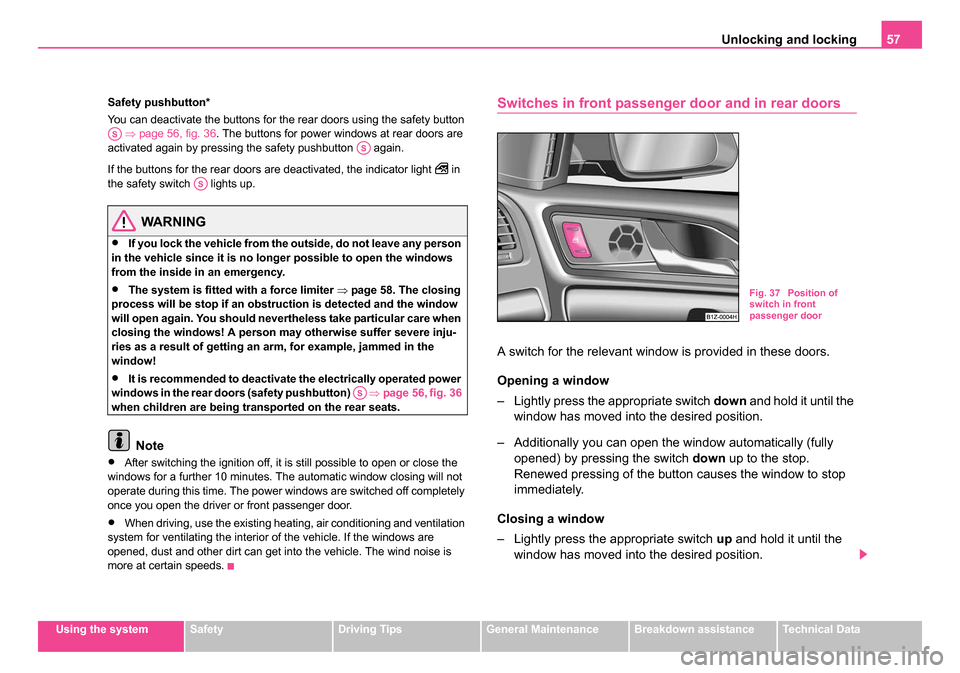
A switch for the relevant window is provided in these doors.
Opening a window
– Lightly press the appropriate switch down and hold it until the
window has moved into the desired position.
– Additionally you can open the window automatically (fully opened) by pressing the switch down up to the stop.
Renewed pressing of the button causes the window to stop
immediately.
Closing a window
– Lightly press the appropriate switch up and hold it until the
window has moved into the desired position.
ASAS
AS
AS
Fig. 37 Position of
switch in front
passenger door
s24s.book Page 57 Thursday, November 24, 2005 12:27 PM
Page 86 of 315
Seats and Stowage85
Using the systemSafetyDriving TipsGeneral MaintenanceBreakdown assistanceTechnical Data
Storing setting
Storing seat and exterior mirror settings for driving forward
– Switch on the ignition.
– Adjust the seat ⇒page 84.
– Adjust both exterior mirrors ⇒page 80.
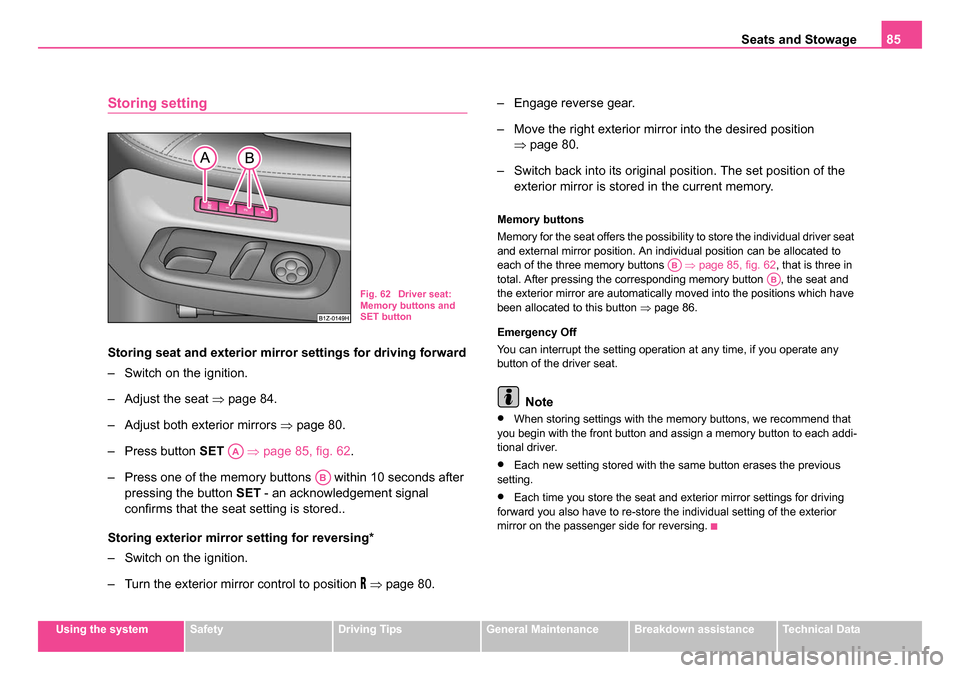
– Press button SET ⇒page 85, fig. 62 .
– Press one of the memory buttons within 10 seconds after pressing the button SET - an acknowledgement signal
confirms that the seat setting is stored..
Storing exterior mirror setting for reversing*
– Switch on the ignition.
– Turn the exterior mirror control to position
⇒ page 80. – Engage reverse gear.
– Move the right exterior mirror into the desired position
⇒page 80.
– Switch back into its original position. The set position of the exterior mirror is stored in the current memory.
Memory buttons
Memory for the seat offers the possibility to store the individual driver seat
and external mirror position. An individual position can be allocated to
each of the three memory buttons ⇒page 85, fig. 62 , that is three in
total. After pressing the corresponding memory button , the seat and
the exterior mirror are automatically moved into the positions which have
been allocated to this button ⇒page 86.
Emergency Off
You can interrupt the setting operation at any time, if you operate any
button of the driver seat.
Note
•When storing settings with the memory buttons, we recommend that
you begin with the front button and assign a memory button to each addi-
tional driver.
•Each new setting stored with the same button erases the previous
setting.
•Each time you store the seat and exterior mirror settings for driving
forward you also have to re-store the individual setting of the exterior
mirror on the passenger side for reversing.
Fig. 62 Driver seat:
Memory buttons and
SET button
AA
AB
ABAB
s24s.book Page 85 Thursday, November 24, 2005 12:27 PM
Page 87 of 315
Seats and Stowage
86
Assigning remote control to the memory buttons
After storing the settings of the seat and exterior mirrors, you
have 10 seconds in order to assign the remote control to the
appropriate memory button.
– Withdraw the ignition key.
– Press the button for unlocking the vehicle ⇒page 52. The
setting is stored with the memory button which you have
selected.
If you wish to be able to retrieve the settings which are stored in the
memory by also using the remote control, you have to assign the remote
control to a memory button in each case.
If you wish, you can obtain an additional key with radio remote control
from a Škoda dealer and then assign the radio remote control to another
memory button.
Note
•If the remote control had previously been assigned to another memory
button, this setting is then erased by the new assignment.
•If you assign the remote control to a memory button which has already
been assigned to a remote control, the old assignment is also replaced by
a new assignment in this case.
•The assignment of the remote control to a memory button is retained,
however, after reassigning the seats and exterior mirrors.
Retrieving settings of the seat and mirrors
You can retrieve the stored settings either with the
memory buttons or with the remote control*.
Retrieving settings with memory buttons
– In order to retrieve the stored setting, you have two possibili- ties:
– One-touch automatic memory: Briefly press the desired
memory button ⇒ page 85, fig. 62. The seat and exterior
mirror are moved automatically into the stored positions (this
applies only if the ignition is switched on and the speed is less
than 5 km/h).
– Memory keying : Press and hold the desired memory button
pressed long enough until the seat and the exterior mirror
are moved into the stored positions.
Retrieving settings with remote control
– If the driver door is closed and the ignition is switched off, briefly press the unlock button of the remote control ⇒page 52
and then open the driver door.
– The seat and exterior mirrors now move automatically into the stored positions.
Retrieving setting of ext erior mirror for reversing*
– Turn the rotary knob for the exterior mirror setting into the position
⇒ page 80 before engaging the reverse gear.
AB
AB
s24s.book Page 86 Thursday, November 24, 2005 12:27 PM
Page 130 of 315
Heating and air conditioning system 129
Using the systemSafetyDriving TipsGeneral MaintenanceBreakdown assistanceTechnical Data
The air inlet in front of the windscreen must be free of ice, snow or leaves
in order to ensure that the heating and cooling systems operate properly.
The AC compressor is switched off at a high coolant temperature in order
to provide cooling at a high load of the engine.
After switching on the cooling
Condensation from the evaporator of the
air conditioning may drip down and form a puddle below the vehicle. This
is quite normal and not an indication of a leak!
Recommended setting for all periods of the year:
•Set the temperature to 22 °C (72 °F).
•Press the button ⇒page 130, fig. 122 .
•Move the air outlet vents 3 and 4 so that the air flow is directed slightly
upwards ⇒page 133, fig. 123 .
Switching over between degrees Celsius and degrees Fahrenheit
Press and hold the buttons and ⇒page 130, fig. 122 . The
information in the desired temperature measuring unit appears in the
display.
WARNING
•For your own safety and that of other road users, ensure that all
the windows are free of ice, snow and misting. Please familiarize
yourself about how to correctly operate the heating and ventilation
systems, how to demist and defrost the windows, as well as with
the cooling mode.
•You should not leave recirculated air mode on over a longer
period of time. “Stale air” may result in fatigue in the driver and
passengers, reduce attention levels and also cause the windows to
mist up. The risk of having an accident increases. Switch recircu-
lated air mode off as soon as the windows begin misting up.
Note
•If the cooling system has not been switched on for a lengthy period,
odours may be produced at the evaporator because of deposits. Switch
the cooling system on at least once a month for approximately 5 minutes
at the highest blower stage - also during the cold season of the year - in
order to remove such odours. Also open a window for a short time.
•We recommend that you do not smoke in the vehicle when the recir-
culating air mode is operating since the smoke which is drawn at the evap-
orator from the interior of the vehicle forms deposits in the evaporator of
the air conditioning system. This produces a permanent odour when the
air conditioning system is operating which can only be eliminated through
considerable effort and expense (replacement of compressor).
•The used air streams out through the air removal openings in the
luggage compartment.
•The Information of the Climatronic is displayed on the display of the
radio*. You can also switch off this function - see operating instructions for
radio
•Using the cooling economically ⇒page 127.
•Operational problems ⇒page 128.
AUTO
ECONAUTO
s24s.book Page 129 Thursday, November 24, 2005 12:27 PM