low beam SKODA OCTAVIA 2005 1.G / (1U) Owner's Manual
[x] Cancel search | Manufacturer: SKODA, Model Year: 2005, Model line: OCTAVIA, Model: SKODA OCTAVIA 2005 1.G / (1U)Pages: 315, PDF Size: 11.8 MB
Page 31 of 315
Instruments and Indicator/Warning Lights
30
Warning lights
An overview
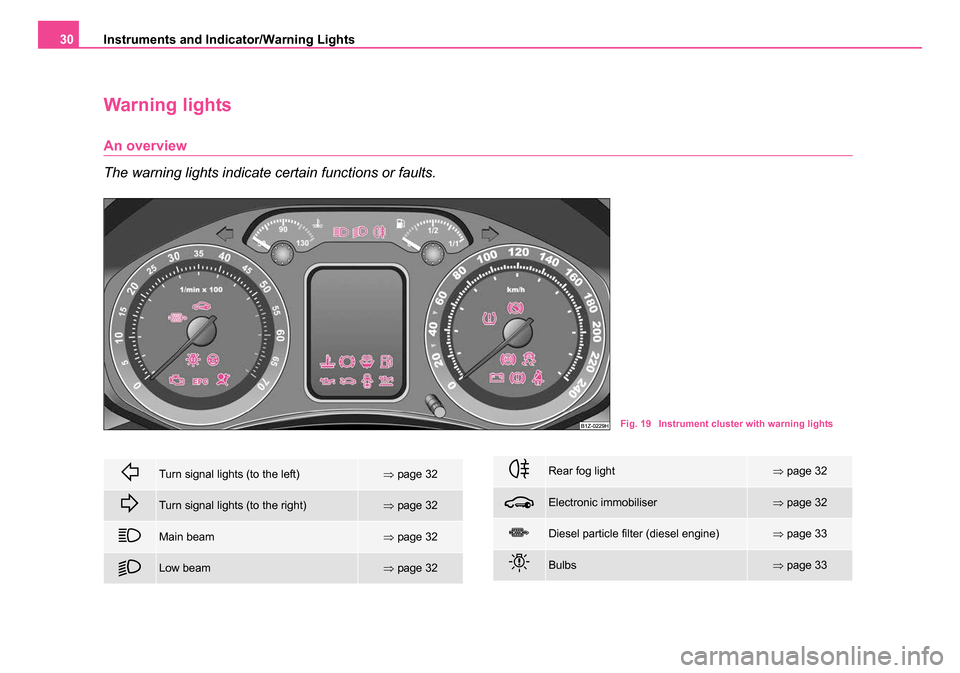
The warning lights indicate certain functions or faults.
Fig. 19 Instrument cluster with warning lights
Turn signal lights (to the left)⇒ page 32
Turn signal lights (to the right)⇒page 32
Main beam⇒page 32
Low beam⇒page 32
Rear fog light⇒page 32
Electronic immobiliser⇒page 32
Diesel particle filter (diesel engine)⇒page 33
Bulbs⇒page 33
s24s.book Page 30 Thursday, November 24, 2005 12:27 PM
Page 33 of 315
Instruments and Indicator/Warning Lights
32
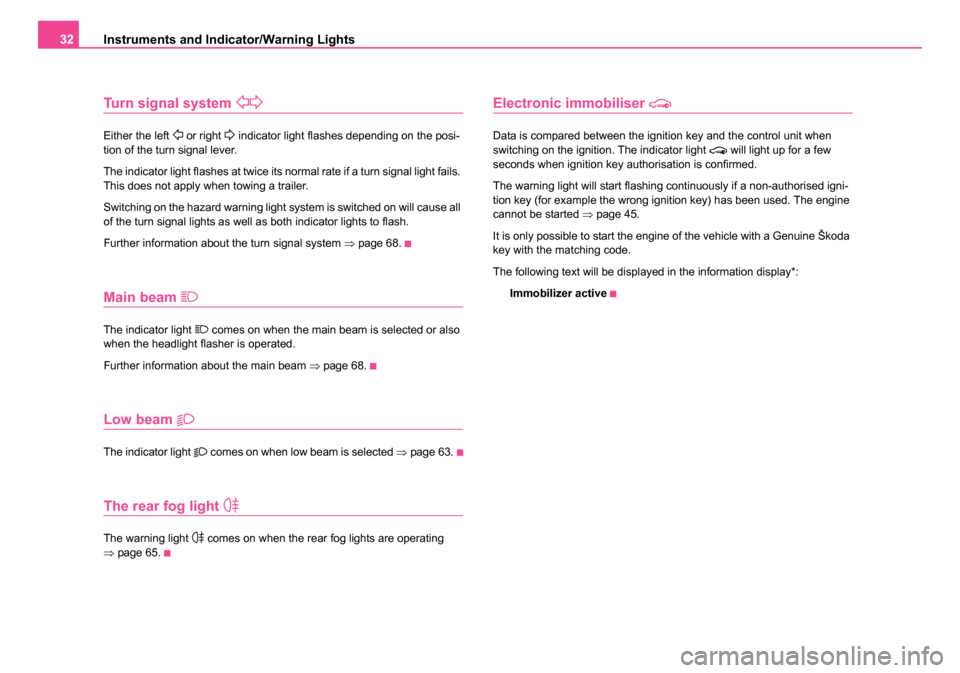
Turn signal system
Either the left or right indicator light flashes depending on the posi-
tion of the turn signal lever.
The indicator light flashes at twice its normal rate if a turn signal light fails.
This does not apply when towing a trailer.
Switching on the hazard warning light system is switched on will cause all
of the turn signal lights as well as both indicator lights to flash.
Further information about the turn signal system ⇒page 68.
Main beam
The indicator light comes on when the main beam is selected or also
when the headlight flasher is operated.
Further information about the main beam ⇒page 68.
Low beam
The indicator light comes on when low beam is selected ⇒page 63.
The rear fog light
The warning light comes on when the rear fog lights are operating
⇒ page 65.
Electronic immobiliser
Data is compared between the ignition key and the control unit when
switching on the ignition. The indicator light will light up for a few
seconds when ignition key authorisation is confirmed.
The warning light will start flashing continuously if a non-authorised igni-
tion key (for example the wrong ignition key) has been used. The engine
cannot be started ⇒page 45.
It is only possible to start the engine of the vehicle with a Genuine Škoda
key with the matching code.
The following text will be displayed in the information display*: Immobilizer active
s24s.book Page 32 Thursday, November 24, 2005 12:27 PM
Page 34 of 315
Instruments and Indicator/Warning Lights33
Using the systemSafetyDriving TipsGeneral MaintenanceBreakdown assistanceTechnical Data
Diesel particle filter (diesel engine)
In the diesel particle filter the resulting soot particles are
collected and burnt during the combustion of diesel fuel.
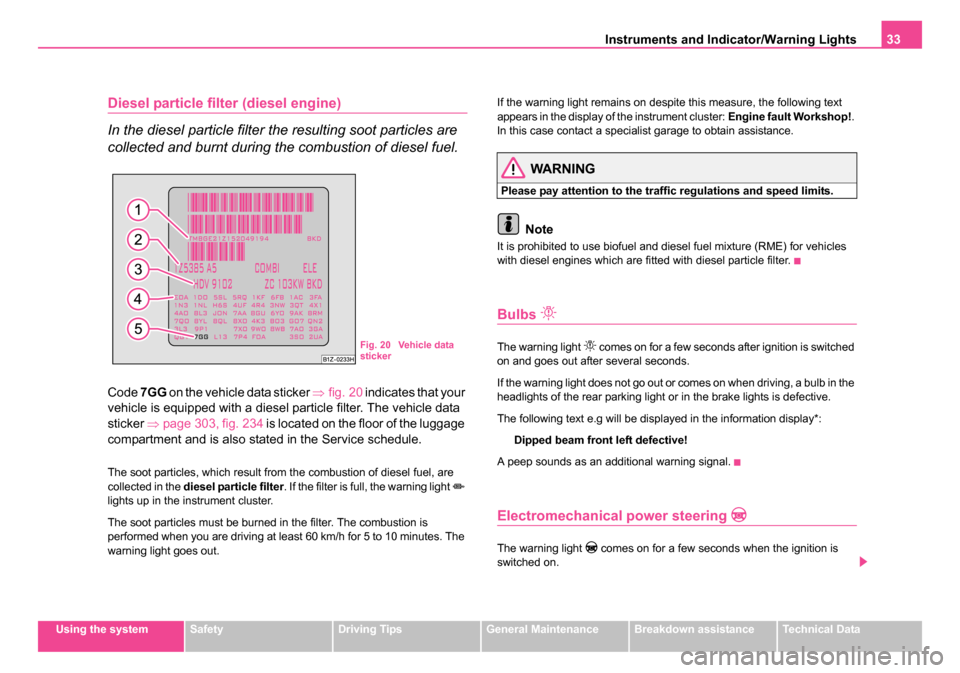
Code 7GG on the vehicle data sticker ⇒fig. 20 indicates that your
vehicle is equipped with a diesel particle filter. The vehicle data
sticker ⇒page 303, fig. 234 is located on the floor of the luggage
compartment and is also stated in the Service schedule.
The soot particles, which result from the combustion of diesel fuel, are
collected in the diesel particle filter . If the filter is full, the warning light
lights up in the instrument cluster.
The soot particles must be burned in the filter. The combustion is
performed when you are driving at least 60 km/h for 5 to 10 minutes. The
warning light goes out. If the warning light remains on despite this measure, the following text
appears in the display of the instrument cluster:
Engine fault Workshop!.
In this case contact a specialist garage to obtain assistance.
WARNING
Please pay attention to the traffic regulations and speed limits.
Note
It is prohibited to use biofuel and diesel fuel mixture (RME) for vehicles
with diesel engines which are fitted with diesel particle filter.
Bulbs
The warning light comes on for a few seconds after ignition is switched
on and goes out after several seconds.
If the warning light does not go out or comes on when driving, a bulb in the
headlights of the rear parking light or in the brake lights is defective.
The following text e.g will be displayed in the information display*:
Dipped beam front left defective!
A peep sounds as an additional warning signal.
Electromechanical power steering
The warning light comes on for a few seconds when the ignition is
switched on.
Fig. 20 Vehicle data
sticker
s24s.book Page 33 Thursday, November 24, 2005 12:27 PM
Page 64 of 315
Lights and Visibility63
Using the systemSafetyDriving TipsGeneral MaintenanceBreakdown assistanceTechnical Data
Lights and Visibility
Lights
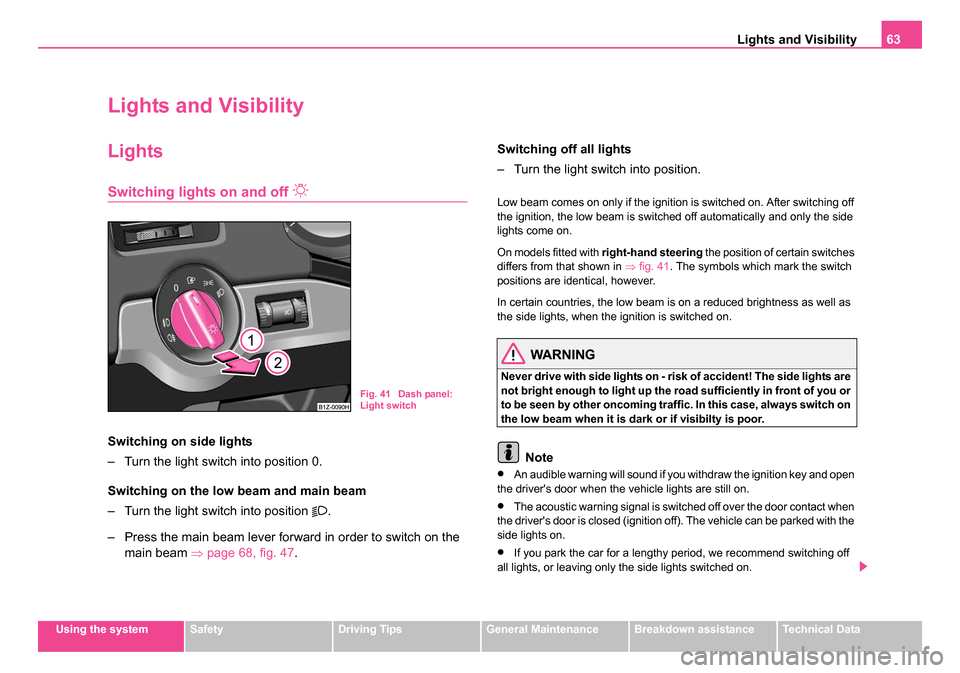
Switching lights on and off
Switching on side lights
– Turn the light switch into position 0.
Switching on the low beam and main beam
– Turn the light switch into position
.
– Press the main beam lever forward in order to switch on the main beam ⇒ page 68, fig. 47 . Switching off all lights
– Turn the light switch into position.
Low beam comes on only if the ignition is switched on. After switching off
the ignition, the low beam is switched off automatically and only the side
lights come on.
On models fitted with
right-hand steering the position of certain switches
differs from that shown in ⇒fig. 41 . The symbols which mark the switch
positions are identical, however.
In certain countries, the low beam is on a reduced brightness as well as
the side lights, when the ignition is switched on.
WARNING
Never drive with side lights on - risk of accident! The side lights are
not bright enough to light up the road sufficiently in front of you or
to be seen by other oncoming traffic. In this case, always switch on
the low beam when it is dark or if visibilty is poor.
Note
•An audible warning will sound if you withdraw the ignition key and open
the driver's door when the vehicle lights are still on.
•The acoustic warning signal is switched off over the door contact when
the driver's door is closed (ignition off). The vehicle can be parked with the
side lights on.
•If you park the car for a lengthy period, we recommend switching off
all lights, or leaving only the side lights switched on.
Fig. 41 Dash panel:
Light switch
s24s.book Page 63 Thursday, November 24, 2005 12:27 PM
Page 65 of 315
Lights and Visibility
64
•The switching on of the described lights should only be undertaken in
accordance with the legal requirements.
•If a fault occurs in the light switch, the low beam comes on automati-
cally
•In the event of cool or humid weather conditons, the headlights can be
misted up from inside.
−The temperature difference between interior and external area of
the headlight lenses is decisive.
− When the driving lights are switched on, the light outlet surfaces are
free from mist after a short period. The headlight lenses can possibly
mist up at the border areas.
− It also concerns reverse light and turn signal lights.
− This mist has no influence on the life of the lighting system.
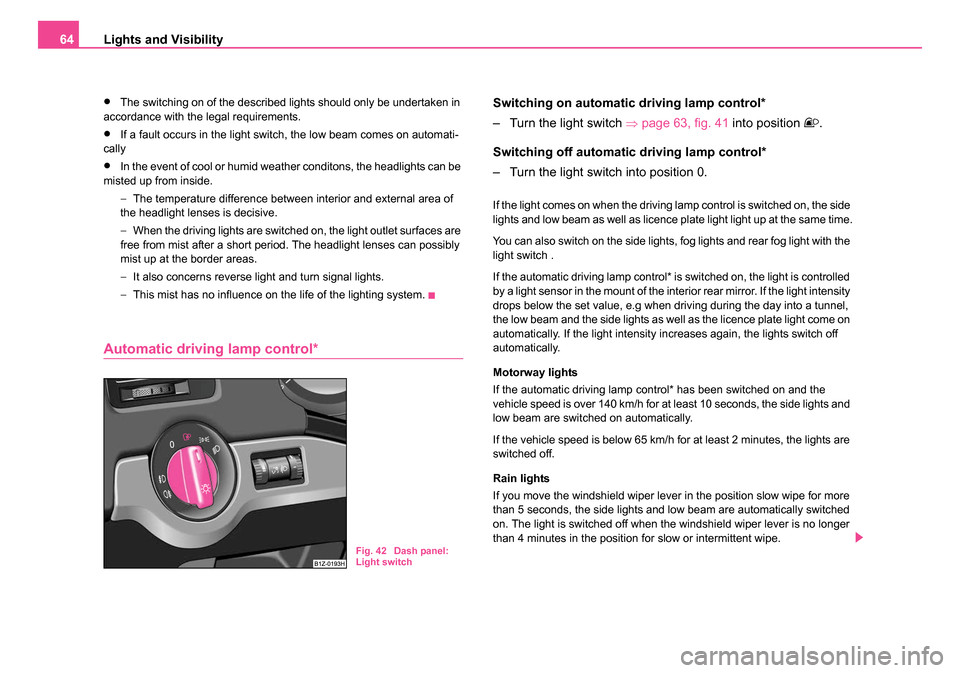
Automatic driving lamp control*
Switching on automatic driving lamp control*
– Turn the light switch ⇒page 63, fig. 41 into position
.
Switching off automatic driving lamp control*
– Turn the light switch into position 0.
If the light comes on when the driving lamp control is switched on, the side
lights and low beam as well as licence plate light light up at the same time.
You can also switch on the side lights, fog lights and rear fog light with the
light switch .
If the automatic driving lamp control* is switched on, the light is controlled
by a light sensor in the mount of the interior rear mirror. If the light intensity
drops below the set value, e.g when driving during the day into a tunnel,
the low beam and the side lights as well as the licence plate light come on
automatically. If the light intensity increases again, the lights switch off
automatically.
Motorway lights
If the automatic driving lamp control* has been switched on and the
vehicle speed is over 140 km/h for at least 10 seconds, the side lights and
low beam are switched on automatically.
If the vehicle speed is below 65 km/h for at least 2 minutes, the lights are
switched off.
Rain lights
If you move the windshield wiper lever in the position slow wipe for more
than 5 seconds, the side lights and low beam are automatically switched
on. The light is switched off when the windshield wiper lever is no longer
than 4 minutes in the position for slow or intermittent wipe.
Fig. 42 Dash panel:
Light switch
s24s.book Page 64 Thursday, November 24, 2005 12:27 PM
Page 66 of 315
Lights and Visibility65
Using the systemSafetyDriving TipsGeneral MaintenanceBreakdown assistanceTechnical Data
WARNING
The automatic driving lamp control only operates as a support. The
driver is not released from his responsibility to inspect the light
and if necessary to switch on the light depending on the light
conditions. The light sensor cannot detect for example rain or
snow. Always switch on the low beam
under these conditions
as well as when driving in the dark!
Note
•Do not affix any stickers in front of the light sensor, so that you do not
impair its function or put it out of operation.
•The same principles as for using the automatic driving lamp control
also apply to the light which is switched on manually ⇒page 63.
Fog lights*
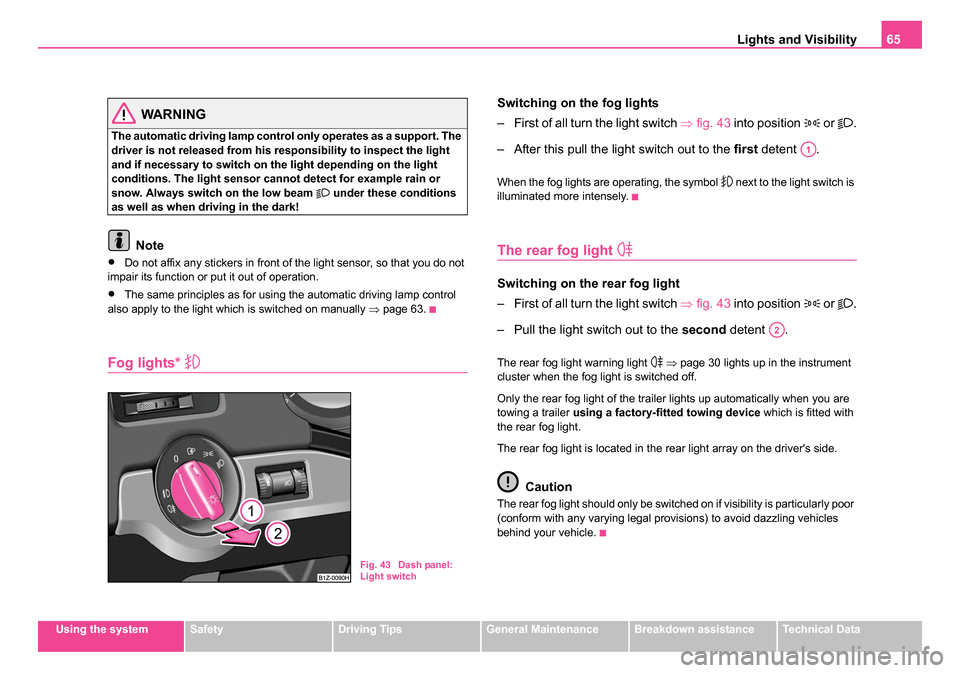
Switching on the fog lights
– First of all turn the light switch ⇒fig. 43 into position
or .
– After this pull the light switch out to the first detent .
When the fog lights are operating, the symbol next to the light switch is
illuminated more intensely.
The rear fog light
Switching on the rear fog light
– First of all turn the light switch ⇒fig. 43 into position
or .
– Pull the light switch out to the second detent .
The rear fog light warning light ⇒ page 30 lights up in the instrument
cluster when the fog light is switched off.
Only the rear fog light of the trailer lights up automatically when you are
towing a trailer using a factory-fitted towing device which is fitted with
the rear fog light.
The rear fog light is located in the rear light array on the driver's side.
Caution
The rear fog light should only be switched on if visibility is particularly poor
(conform with any varying legal provisions) to avoid dazzling vehicles
behind your vehicle.
Fig. 43 Dash panel:
Light switch
A1
A2
s24s.book Page 65 Thursday, November 24, 2005 12:27 PM
Page 67 of 315
Lights and Visibility
66
Coming/Leaving Home Function*
This function makes it possible to switch on the lights for a short
time after leaving the vehicle or when approaching the vehicle.
Switching on Coming Home Function
– Switch off the ignition once the low beam is switched on.
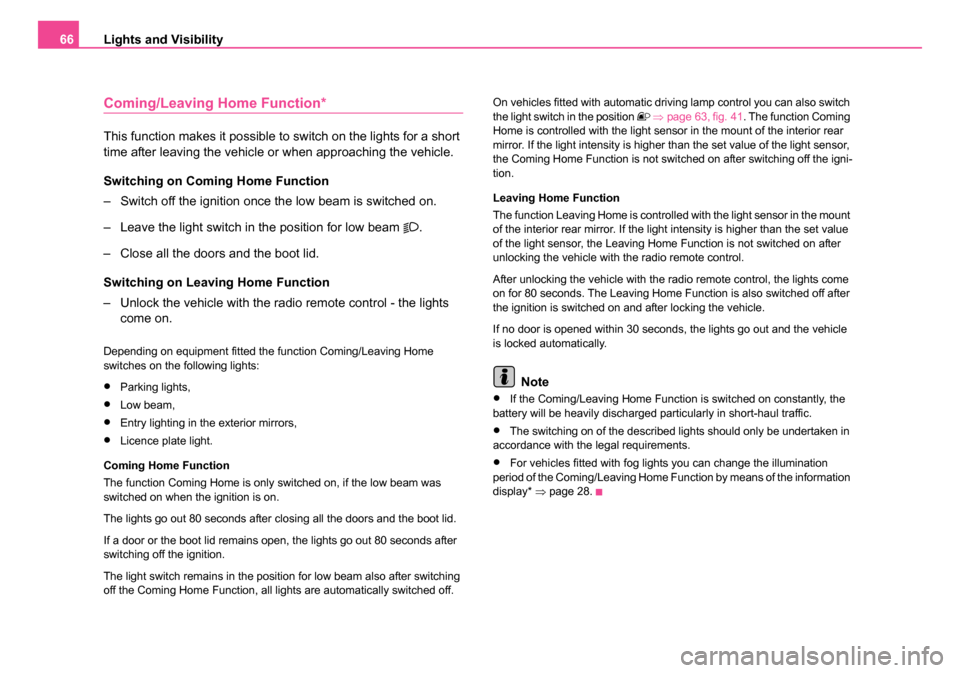
– Leave the light switch in the position for low beam
.
– Close all the doors and the boot lid.
Switching on Leaving Home Function
– Unlock the vehicle with the radio remote control - the lights come on.
Depending on equipment fitted the function Coming/Leaving Home
switches on the following lights:
•Parking lights,
•Low beam,
•Entry lighting in the exterior mirrors,
•Licence plate light.
Coming Home Function
The function Coming Home is only switched on, if the low beam was
switched on when the ignition is on.
The lights go out 80 seconds after closing all the doors and the boot lid.
If a door or the boot lid remains open, the lights go out 80 seconds after
switching off the ignition.
The light switch remains in the position for low beam also after switching
off the Coming Home Function, all lights are automatically switched off. On vehicles fitted with automatic driving lamp control you can also switch
the light switch in the position
⇒ page 63, fig. 41 . The function Coming
Home is controlled with the light sensor in the mount of the interior rear
mirror. If the light intensity is higher than the set value of the light sensor,
the Coming Home Function is not switched on after switching off the igni-
tion.
Leaving Home Function
The function Leaving Home is controlled with the light sensor in the mount
of the interior rear mirror. If the light intensity is higher than the set value
of the light sensor, the Leaving Home Function is not switched on after
unlocking the vehicle with the radio remote control.
After unlocking the vehicle with the radio remote control, the lights come
on for 80 seconds. The Leaving Home Function is also switched off after
the ignition is switched on and after locking the vehicle.
If no door is opened within 30 seconds, the lights go out and the vehicle
is locked automatically.
Note
•If the Coming/Leaving Home Function is switched on constantly, the
battery will be heavily discharged particularly in short-haul traffic.
•The switching on of the described lights should only be undertaken in
accordance with the legal requirements.
•For vehicles fitted with fog lights you can change the illumination
period of the Coming/Leaving Home Function by means of the information
display* ⇒page 28.
s24s.book Page 66 Thursday, November 24, 2005 12:27 PM
Page 68 of 315
Lights and Visibility67
Using the systemSafetyDriving TipsGeneral MaintenanceBreakdown assistanceTechnical Data
Instrument lighting*
You can adjust the brightness of the instrument lighting.
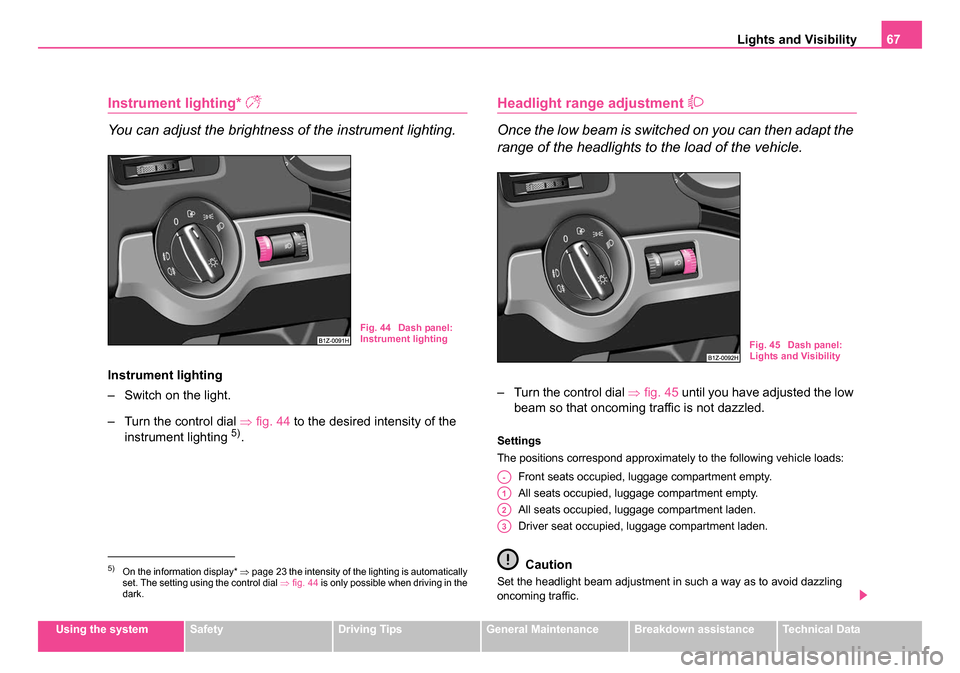
Instrument lighting
– Switch on the light.
– Turn the control dial ⇒fig. 44 to the desired intensity of the
instrument lighting
5).
Headlight range adjustment
Once the low beam is switched on you can then adapt the
range of the headlights to the load of the vehicle.
– Turn the control dial ⇒fig. 45 until you have adjusted the low
beam so that oncoming traffic is not dazzled.
Settings
The positions correspond approximately to the following vehicle loads:
Front seats occupied, luggage compartment empty.
All seats occupied, luggage compartment empty.
All seats occupied, luggage compartment laden.
Driver seat occupied, luggage compartment laden.
Caution
Set the headlight beam adjustment in such a way as to avoid dazzling
oncoming traffic.5)On the information display* ⇒page 23 the intensity of the lighting is automatically
set. The setting using the control dial ⇒fig. 44 is only possible when driving in the
dark.
Fig. 44 Dash panel:
Instrument lighting
Fig. 45 Dash panel:
Lights and Visibility
A-
A1
A2
A3
s24s.book Page 67 Thursday, November 24, 2005 12:27 PM
Page 70 of 315
Lights and Visibility69
Using the systemSafetyDriving TipsGeneral MaintenanceBreakdown assistanceTechnical Data
The turn signal and main beam lever perform the following func-
tions:
Right
and left turn signal light
– Push the lever upwards or downwards ⇒page 68, fig. 47 .
– If you only wish to flash three times* (the so-called conven- ience turn signal), push the lever briefly up to the upper or
lower pressure point and release it.
– Turn signal for changing lanes, in order to only flash briefly - move the lever up or down to the pressure point and hold it in
this position.
Main beam
– Switch on the low beam.
– Push the lever forwards.
– Pull the lever back into the initial position in order to switch the main beam off again.
Headlight flasher
– Pull on the lever of the steering wheel (sprung position) - the main beam and warning light in the instrument cluster come
on.
Parking light
– Switch off the ignition.
– Push the lever up or down - the right-hand or left-hand parking light is switched on.
Information concerning the function of the lights.
•The turn signal system only operates when the ignition is switched
on. The corresponding indicator light or in the instrument cluster also
flashes.
•The turn signal is automatically cancelled after negotiating a curve.
•The indicator light flashes at twice its normal rate if a bulb of the turn
signal light fails.
•The side light and rear light on the appropriate side of the vehicle are
switched on when the parking light is selected. The parking light function
only operates if the ignition is switched off.
•An acoustic warning signal will sound when the driver's door is opened
if the lever is not in the middle position after removing the ignition key. The
acoustic warning signal will stop just as soon as the driver's door is closed.
Caution
Use main beam or the headlight flasher only if this does not risk dazzling
other road users.
Note
•Use only in accordance with the legal requirements the described
lighting and signal systems.
s24s.book Page 69 Thursday, November 24, 2005 12:27 PM
Page 78 of 315
Lights and Visibility77
Using the systemSafetyDriving TipsGeneral MaintenanceBreakdown assistanceTechnical Data
Note
•If the slower or the faster wiper setting is switched on ⇒page 75,
fig. 55 and the vehicle speed decreases to below 4 km/h, the next lower
wiper step is switched on automatically. At a speed increase of more than
8 km/h the previous wiper setting is established again.
•If there is an obstacle on the windscreen, the wiper will try to push
away the obstacle. If the obstacle continues to block the wiper, the wiper
stops after 5 cycles, in order to avoid a damage to the wiper. Remove the
obstacle and and switch on the wiper again.
Headlight cleaning system*
The headlights are being cleaned after the windscreen has been sprayed
for the fifth time, the low beam or main beam are switched on and the
windscreen wiper lever was held in the position ⇒page 75, fig. 55 for
about 1 second.
The headlight washer nozzles are moved forward out of the bumper by the
water pressure for cleaning the headlights.
You should remove stubborn dirt (such as insect residues) from the head-
light lenses at regular intervals, for example when refuelling. Please refer
to the following guidelines ⇒page 237, “The headlight lenses”.
You should remove any snow from the fixtures of the washer nozzles and
clear ice in winter with a de-icing spray in order to ensure proper operation
of the cleaning system.
Replacing wiper blades for the windscreen wipers
One cannot fold out the wiper arms in the rest position from the
windscreen. Before replacing the wiper arms you must put them
into the service position.
Service position for changing wiper blades
– Close the bonnet.
– Switch the ignition on and then again off.
– Then press the windscreen wiper lever in the position ⇒page 75, fig. 55 within 20 seconds - the wiper arms move
into the service position.
Taking off the wiper blade
– Fold windscreen wiper arm away from the windscreen and position the wiper blade at right angles to the wiper arm ⇒.
A2A3
A5
Fig. 56 Wiper blades
for the windscreen
A4
s24s.book Page 77 Thursday, November 24, 2005 12:27 PM