AUX SKODA OCTAVIA 2006 Owner´s Manual
[x] Cancel search | Manufacturer: SKODA, Model Year: 2006, Model line: OCTAVIA, Model: SKODA OCTAVIA 2006Pages: 218, PDF Size: 5.48 MB
Page 92 of 218
Display warning light
Importance
Quickly flashes green for 2 seconds. The auxiliary heating is blocked, e. g
because the tank is nearly empty or
there is a fault in the auxiliary heating.
Flashes red for 2 seconds. The switch off signal was not received.
Lights up orange for 2 seconds, then
green or red. The battery is weak, however the
switching on or off signal was received.
Lights up orange for 2 seconds, then
flashes green or red. The battery is weak, however the
switching on or off signal was not re-
ceived.
Flashes orange for 5 seconds. The battery is discharged, however the
switching on or off signal was not re-
ceived.CAUTION
The radio remote control comprises electronic components and must therefore be
protected against water, severe impacts and direct sunlight. ÐChanging the battery of the radio remote control
First read and observe the introductory information and safety warn-
ings on page 87.
If the warning light on the radio remote control indicates a weak or discharged
battery, C
» Fig. 92 on page 89
, it must be replaced. The battery is located under
a cover B
» Fig. 92
on page 89 on the back of the radio remote control.
› Insert a flat, blunt object, such as a coin, into the gap on the battery cover, turn
the cover in the opposite direction of the arrow up to the mark and unlock it.
› Change the battery, replace the battery cover and lock it by moving it in the di-
rection of the arrow. For the sake of the environment
Dispose of the old battery in accordance with environmental regulations. Note
■ Pay attention to the correct polarity when changing the battery.
■ The replacement battery must have the same specification as the original bat-
tery. Ð
ä
90
Using the system
Page 121 of 218
Button Action
Radio, traffic information CD/CD changer/MP3 Navigation3
Press briefly
Changing to the previously stored radio station
Changing to the previously stored traffic information Interrupting the traffic report Changing to the previous title3 Press button for a
long period of time Interruption of the traffic report
Fast rewind4
Press briefly
changing the audio source5
Press briefly
Call up the main menu6
Press briefly
Interruption of the traffic report without function6
Turn upwards
Display of the stored/accessible stations
Scroll upwards
Interruption of the traffic report Changing to the previous title
without
function 6
Turn downwards
Display of the stored/accessible stations
Scroll downwards
Interruption of the traffic report Changing to the next titlea)
Only valid for the navigation system Columbus. Note
■ The loudspeakers in the vehicle are adjusted to the power output of the radio
and navigation system of 4x20°W. ■ The sound system equipment comprises loudspeakers that are adjusted to the
amplifier power output of 4x50°W + 6x25 W. ÐAUX-IN and MDI inputs
The AUX-IN input is located below the front armrest and is marked with .
The input MDI is located in the storage compartment on the front passenger side.
The AUX-IN and MDI inputs are used to connect external audio sources (e.g. iPod
or mp3 player) and to play back music from these devices via the factory-fitted ra-
dio or navigation system.
For a description of use, refer to the operating instructions for the relevant radio
or navigation system. Ð CD change
Fig. 109
The CD changer
The CD changer for the radio and navigation system is located in the left side
compartment of the boot.
Inserting the CD
› Touch the button C
» Fig. 109
and guide the CD (compact disc) into the CD-
case B
. The CD is automatically loaded onto the lowest free position in the CD
changer. The warning light in the corresponding button D
stops flashing.
£
119
Communication
Page 157 of 218
Inspecting and replenishing
Fuel
ä
Introduction
This chapter contains information on the following subjects:
Refuelling 155
Unleaded petrol 156
Ethanol E85 157
Diesel fuel 158
The correct type of fuel for your vehicle and the tyre size and inflation pressure
are specified on the inside of the fuel filler flap » Fig. 129 on page 155 - . WARNING
The national legal requirements must be observed if carrying a spare canister
in the vehicle. We do not recommend carrying any fuel canisters in your vehi-
cle for safety reasons. In the event of an accident, the canister might be dam-
aged and fuel may leak out - risk of fire! CAUTION
■ Never drive until the fuel tank is completely empty! The irregular supply of fuel
can cause misfiring, which can result in considerable damage to parts of the en-
gine and exhaust system. ■ Immediately remove any fuel that has spilled onto the vehicle's paintwork - risk
of paint damage! Ð Refuelling
Fig. 129
Right rear side of the vehicle: Open fuel filler flap/fuel filler flap
with cap unscrewed
First read and observe the introductory information and safety warn-
ings on page 155.
The filler flap is automatically unlocked or locked with the central locking.
Open fuel filler flap
›
Press in the middle of the left area of the fuel filler flap
» Fig. 129 - .
› Unscrew the filler cap by turning it to the left and place the cap onto the top of
the fuel filler flap » Fig. 129 - .
Closing the filler cap
› Turn the filler cap to the right until it clicks into place.
› Close the fuel filler flap until it clicks into place.
Check that the fuel filler flap is closed properly. CAUTION
■ Before refuelling it is necessary to switch off the auxiliary heating system (aux-
iliary heating and ventilation).
■ The fuel tank is full just as soon as the pump nozzle switches off for the first
time, provided the nozzle has been operated properly. Do not continue filling the
fuel tank otherwise the expansion volume is filled up. £
ä
155
Inspecting and replenishing
Page 164 of 218
Changing engine oil
First read and observe the introductory information and safety warn-
ings on page 158.
The engine oil must be changed at the intervals stated in the Service schedule or
according to the service interval indicator
» page 10, Service Interval Display.CAUTION
Additives must not be added to the engine oil - risk of causing considerable dam-
age to parts of the engine! Damage, which results from such product, are exclu-
ded from the warranty. Note
If your skin has come into contact with oil, it must be washed thoroughly. ÐCoolant
First read and observe the introductory information and safety warn-
ings on page 158.
The cooling system is filled with a coolant in the factory.
The coolant consists of water with a concentration of coolant additive of 40 %.
This mixture provides antifreeze protection down to -25
°C and also protects the
cooling and heating system from corrosion. It also prevents the formation of scale
and significantly increases the boiling point of the coolant.
The concentration of coolant must therefore not be reduced by adding water dur-
ing the summer months or in countries with a warm climate. The concentration of
coolant additive in the coolant must be at least 40 %. 40 %.
If a higher concentration of antifreeze is required for climatic reasons, the amount
of coolant additive can only be increased up to 60 % (antifreeze protection down
to approx. -40 °C). The antifreeze protection tails off above that concentration.
Vehicles exported to countries with a cold climate are already factory-filled with a
coolant which offers antifreeze protection down to about -35 °C. In these coun-
tries the concentration of coolant additive should be at least 50 %.
When refilling, we only recommend you use the same antifreeze written on the
antifreeze expansion tank » Fig. 135 on page 163.
ä
ä
Coolant capacity
Petrol engines Capacities (in litres)
1.2 ltr./77 kW TSI 7.7
1.4 l/59 kW 7.1
1.4 ltr./90 kW TSI 7.7
1.6 l/75 kW 7.4
1.8 ltr./112 kW TSI 8.6
1.8 ltr./118 kW TSI 8.6
2.0 ltr./147 kW TSI 8.6 Diesel engines
Capacities (in litres)
1.6 ltr./77 kW TDI CR 8.4
1.9 l/77 kW TDI PD 8.4
1.9 ltr./77 kW TD PD DPF 8.4
2.0 ltr./81 kW TDI CR 8.4
2.0 ltr/103 kW TDI CR DPF 8.4
2.0 ltr./125 kW TDI CR 8.4 CAUTION
■ Other coolant additives that do not comply with the correct specifications can
above all significantly reduce the anticorrosion effect.
■ Any faults resulting from corrosion may cause a loss of coolant and can conse-
quently result in major engine damage! Note
On vehicles that are fitted with an auxiliary heater (auxiliary heating and ventila-
tion), the coolant capacity is approx. 1 l larger. Ð
162 General Maintenance
Page 192 of 218
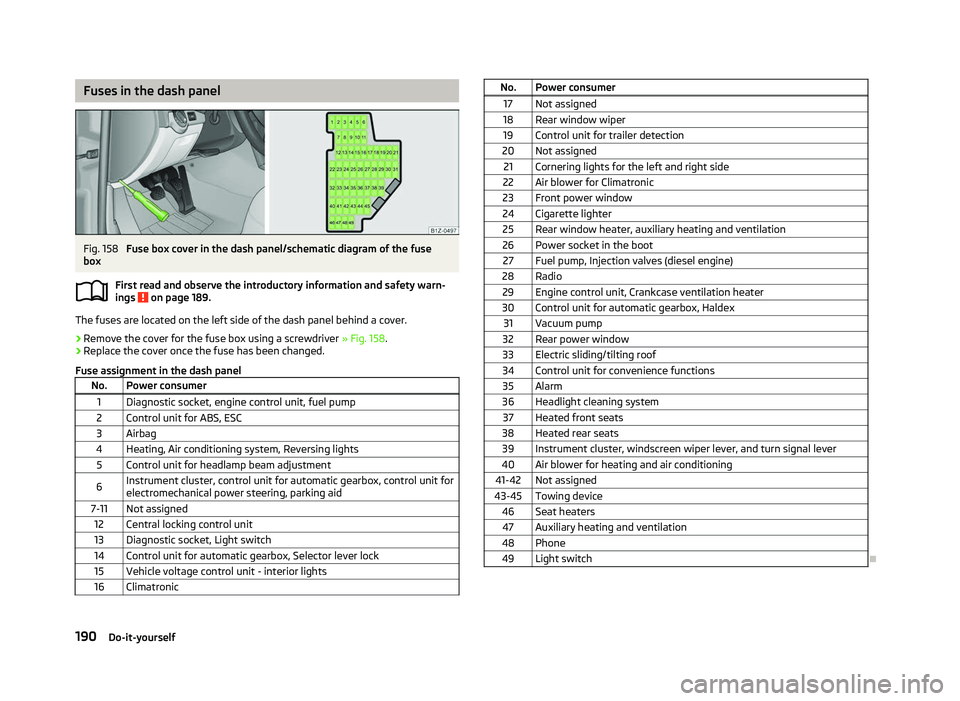
Fuses in the dash panel
Fig. 158
Fuse box cover in the dash panel/schematic diagram of the fuse
box
First read and observe the introductory information and safety warn-
ings on page 189.
The fuses are located on the left side of the dash panel behind a cover.
›
Remove the cover for the fuse box using a screwdriver
» Fig. 158.
› Replace the cover once the fuse has been changed.
Fuse assignment in the dash panel No. Power consumer
1 Diagnostic socket, engine control unit, fuel pump
2 Control unit for ABS, ESC
3 Airbag
4 Heating, Air conditioning system, Reversing lights 5 Control unit for headlamp beam adjustment
6 Instrument cluster, control unit for automatic gearbox, control unit for
electromechanical power steering, parking aid
7-11 Not assigned 12 Central locking control unit
13 Diagnostic socket, Light switch
14 Control unit for automatic gearbox, Selector lever lock 15 Vehicle voltage control unit - interior lights
16 Climatronic ä
No. Power consumer
17 Not assigned
18 Rear window wiper 19 Control unit for trailer detection
20 Not assigned 21 Cornering lights for the left and right side
22 Air blower for Climatronic
23 Front power window
24 Cigarette lighter 25 Rear window heater, auxiliary heating and ventilation
26 Power socket in the boot 27 Fuel pump, Injection valves (diesel engine)
28 Radio 29 Engine control unit, Crankcase ventilation heater
30 Control unit for automatic gearbox, Haldex 31 Vacuum pump
32 Rear power window
33 Electric sliding/tilting roof
34 Control unit for convenience functions 35 Alarm
36 Headlight cleaning system 37 Heated front seats
38 Heated rear seats 39 Instrument cluster, windscreen wiper lever, and turn signal lever
40 Air blower for heating and air conditioning
41-42 Not assigned
43-45 Towing device 46 Seat heaters47 Auxiliary heating and ventilation
48 Phone 49 Light switch Ð
190 Do-it-yourself
Page 193 of 218
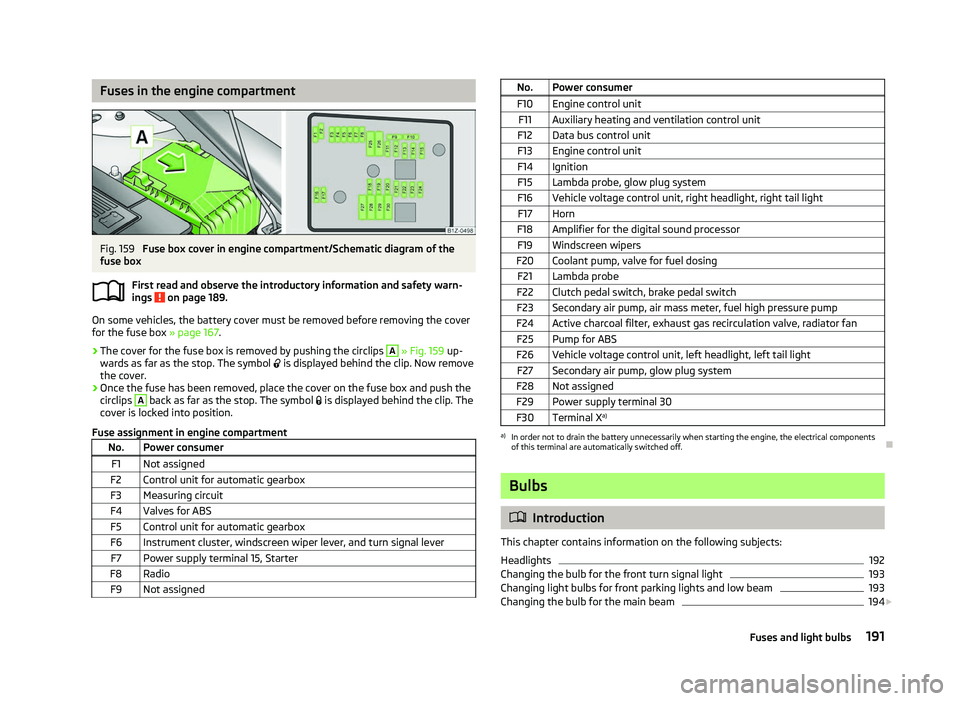
Fuses in the engine compartment
Fig. 159
Fuse box cover in engine compartment/Schematic diagram of the
fuse box
First read and observe the introductory information and safety warn-
ings on page 189.
On some vehicles, the battery cover must be removed before removing the cover
for the fuse box
» page 167.
› The cover for the fuse box is removed by pushing the circlips A
» Fig. 159
up-
wards as far as the stop. The symbol is displayed behind the clip. Now remove
the cover.
› Once the fuse has been removed, place the cover on the fuse box and push the
circlips A
back as far as the stop. The symbol
is displayed behind the clip. The
cover is locked into position.
Fuse assignment in engine compartment No. Power consumer
F1 Not assigned
F2 Control unit for automatic gearbox
F3 Measuring circuit
F4 Valves for ABS F5 Control unit for automatic gearbox
F6 Instrument cluster, windscreen wiper lever, and turn signal lever F7 Power supply terminal 15, Starter
F8 Radio F9 Not assigned ä
No. Power consumer
F10 Engine control unit F11 Auxiliary heating and ventilation control unit
F12 Data bus control unit
F13 Engine control unit
F14 Ignition F15 Lambda probe, glow plug system
F16 Vehicle voltage control unit, right headlight, right tail light F17 Horn
F18 Amplifier for the digital sound processor F19 Windscreen wipers
F20 Coolant pump, valve for fuel dosing F21 Lambda probe
F22 Clutch pedal switch, brake pedal switch
F23 Secondary air pump, air mass meter, fuel high pressure pump
F24 Active charcoal filter, exhaust gas recirculation valve, radiator fan F25 Pump for ABS
F26 Vehicle voltage control unit, left headlight, left tail light F27 Secondary air pump, glow plug system
F28 Not assigned F29 Power supply terminal 30
F30 Terminal X a) a)
In order not to drain the battery unnecessarily when starting the engine, the electrical components
of this terminal are automatically switched off. Ð Bulbs
ä
Introduction
This chapter contains information on the following subjects:
Headlights 192
Changing the bulb for the front turn signal light 193
Changing light bulbs for front parking lights and low beam 193
Changing the bulb for the main beam 194
£
191
Fuses and light bulbs
Page 210 of 218
Index
A
ABS 96
Warning light 22
Accessories 177
Active steering support 95
Adjusting Exterior mirror 52
Adjusting seats 122
Adjustment Seat 55
Aerial 149
see Radio reception 151
Airbag 129
Deployment 129
Front airbag 130
Head airbag 132
Side airbag 131
Airbag system 129
Air conditioning system Air outlet vents 80
Climatronic 85
Manual air conditioning system 82
Alarm 31
Anti-theft alarm system 31
Antilock brake system 96
Armrest Front 74
rear 60, 75
Ashtray 68
Assistance systems ESC 95
Assist systems ABS 22, 96
Cruise control systems (CCS) 99
EDS and XDS 97
ESC 22Parking aid 98
START/STOP 100
TCS 21, 96
Auto Check Control 17
Automatic driving lamp control 40
Automatic gearbox 102
Dynamic shift programme 105
Emergency programme 106
Information for driving 102
Kickdown 105
Manual shifting of gears on the multifunction steering wheel 104
Parking 103
Selector lever-emergency unlocking 106
Selector lever lock 105
Selector lever positions 103
Starting off 103
Stopping 103
Tiptronic 104
Automatic load deactivation 169
Auxiliary heating (auxiliary heating and ventila- tion) 87
Avoiding damage to your vehicle 143
B
Before setting off 121
Belt tensioners 128
Bonnet Closing 160
Opening 160
Warning light 20
Boot Class
N1 vehicles 61
Cover 63
Emergency unlocking 34
Fastening elements 61
Fixing nets 62
Fixing of the floor covering 63
foldable boot cover (Combi) 64
Light 47see Boot lid 33
Unlocking the boot lid 34
Variable loading floor 64
Boot lid 33
Automatic locking 33
Warning light 21
Brake booster 95
Brake fluid Checking 164
Brakes Brake assist systems 93
Handbrake 95
Running in 139
Warning light 19
Braking Brake fluid 164
Braking assistant 95
Breakdown kit 182
Bulbs Replacing 191
Button in the driver's door Electric power windows 34
C
Car computer see Multifunction display 12
Car jack 179
Carrier 66
Catalytic converter 139
CD changer 119
Central locking button 29
Central locking system 27
lock 29
unlock 28
Changes 177
Changing Engine oil 162
Wheel 179
Charging a vehicle battery 168
208 Index
Page 213 of 218
Manual dimming interior mirror 51
Vanity 47
Mobile phone 107, 109, 112
Connecting to the hands-free system 110, 113
Multifunction display Functions 12
Memory 12
Operation 13
Multimedia 118
AUX-IN 119
MDI 119
N
Net partition 65
O
Oil refer to Engine oil 161
Onboard computer see Multifunction display 12
Operation in winter De-icing windows 151
Diesel fuel 158
Vehicle battery 167
Outside temperature 13
Overview Engine compartment 160
Warning lights 18
P
Paint see Paint damage 150
Paint damage 150
Parking Parking aid 98
Parking ticket holder 77
Passive Safety 121
Periodic wiping 49Petrol
refer to Fuel 156
Polishing the paintwork refer to Taking care of your vehicle 150
Power steering 92
Power windows Button in the driver's door 35
Button in the front passenger door 36
Button in the rear doors 36
Operational faults 37
Preservation refer to Taking care of your vehicle 150
R
Radiator fan 164
Radio reception Aerial 151
Functional fault 151
Raise vehicle 181
Rear mirror Automatic dimming interior mirror 52
Exterior mirror 52
Manual dimming interior mirror 51
Recirculated air mode Climatronic 86
Manual air conditioning system 84
Recommended gear 11
Refuelling 155
Fuel 155
Regulation Headlight beam 44
Remote control 30
Synchronisation process 31
Remote control key Replacing the battery 26
Removable through-loading bag 76
Removing the seats 59
Replacement of parts 177Replacing
Bulbs 191
Fuses 189
Vehicle battery 168
Windscreen wiper blade 51
Replenishing Coolant 163
Engine oil 161
Windscreen washer fluid 165
Roof luggage rack Attachment points 67
Roof rack system Roof load 67
Running in Brake pads 139
Engine 139
The first 1
500 km 139
Tyres 139
S
Safe securing system 28
Safety 121
Child safety 135
Child safety seats 135
Head restraints 58
ISOFIX 137
TOP TETHER 137
Save electrical energy 140
Seat Adjusting 55
Seat belt Warning light 19
Seat belt height adjuster 128
Seat belts Belt tensioners 128
Cleaning 154
fastening and unfastening 127
Height adjustment 128
211
Index