AUX SKODA OCTAVIA 2006 Owner´s Manual
[x] Cancel search | Manufacturer: SKODA, Model Year: 2006, Model line: OCTAVIA, Model: SKODA OCTAVIA 2006Pages: 218, PDF Size: 5.48 MB
Page 5 of 218
Table of Contents
Abbreviations
Using the system
Cockpit 7
Overview 6
Instruments and warning lights 8
Instrument cluster 8
Multifunction display (onboard computer) 12
MAXI DOT (information display) 15
Warning lights 18
Unlocking and locking 26
Vehicle key 26
Child safety lock 27
Central locking system 27
Remote control 30
Anti-theft alarm system 31
Boot lid 33
Electric power windows 34
Electric sliding/tilting roof 37
Lights and visibility 39
Lights 39
Interior light 45
Visibility 47
Windscreen wipers and washers 48
Rear window 51
Seats and Stowage 54
Front seats 54
Seat heaters 57
Head restraints 58
Rear seats 59
Boot 60Variable loading floor in the boot 64
Net partition (Combi) 65
Roof rack system 66
Cup holder 68
Ashtray 68
Cigarette lighter, 12-volt power socket 69
Storage compartments 70
Clothes hooks 77
Parking ticket holder 77
Heating and air conditioning system 79
Heating and air conditioning system 79
Air outlet vents 80
Heating 80
Air conditioning system (manual air conditioning
system) 82
Climatronic (automatic air conditioning
system) 85
Auxiliary heating (auxiliary heating and
ventilation) 87
Starting-off and Driving 91
Starting and stopping the engine 91
Brakes and brake assist systems 93
Shifting (manual gearbox) 97
pedals 97
Parking aid 98
Cruise control system (CCS) 99
START/STOP 100
Automatic gearbox 102
Automatic gearbox 102
Communication 107
Mobile phones and two-way radio systems 107
Operating the phone on the multifunction
steering wheel 108
Symbols in the information display 109
Phone Phonebook 109
Universal telephone preinstallation GSM II 109
Universal telephone preinstallation GSM IIl 112Voice control 116
Multimedia 118
Safety
Passive Safety 121
General information 121
Correct seated position 122
Seat belts 125
Seat belts 125
Airbag system 129
Description of the airbag system 129
Front airbags 130
Side airbags 131
Head airbags 132
Deactivating airbags 133
Transporting children safely 135
Child seat 135
Driving Tips
Driving and the Environment 139
The first 1 500 km 139
Catalytic converter 139
Economical and environmentally friendly
driving 140
Environmental compatibility 142
Driving abroad 143
Avoiding damage to your vehicle 143
Driving through water on the street 144
Towing a trailer 145
Towing a trailer 145
General Maintenance
Taking care of and cleaning the vehicle 148
Taking care of your vehicle 148
3
Table of Contents
Page 18 of 218
■
Phone » page 107
■ Aux.
Heating » page 87
■ Assistants » page 41
■ Vehicle status » page 17
■ Settings » page 16
The menu items Audio and Navigation are only displayed when the factory-fitted
radio or navigation system is switched on.
The menu item Aux. heating is only displayed if a factory-fitted auxiliary heating
is installed.
The menu point Assistants is only then displayed, if the vehicle is fitted with cor-
nering lights. Note
■ If warning messages are shown in the information display, these messages
must be confirmed with the button B
» Fig. 7 on the windscreen wiper lever or
with the button D
on the multifunction steering wheel to call up the main menu.
■ If the information display is not activated at that moment, the menu always
shifts to one of the higher levels after approx. 10
seconds.ÐSettings
First read and observe the introductory information and safety warn-
ings on page 15.
You can change certain settings by means of the information display. The current
setting is shown on the information display in the respective menu at the top be-
low the line.
The following information can be selected (depending on the equipment installed
on the vehicle):
■ Language
■ MFD Data
■ Convenience
■ Lights & Vision
■ Time
■ Winter tyres
■ Units
■ Assistants
■ Alternative speed displayed
ä ■
Service
■ Factory setting
■ Back
Select the menu item Back to return to one level higher in the menu.
Language
You can set the language for the warning and information texts here.
MFD displays
Activate or deactivate certain displays of the multifunction display here.
Comfort
This is where the following functions can be activated, deactivated or adjusted:
Rain closing Switch on/off the function for automatically closing the
window and panoramic tilt/slide sunroof in a locked ve-
hicle when it starts raining
a)
. If the function is set and it
is not raining, the windows including the panoramic tilt/
slide sunroof will close automatically after approx.
12 hours.
Central locking Switch on/off the central locking and automatic locking
function.
ATA confirm Switch on/off the audible signal indicating activation of
the anti-theft alarm system.
Window op. Only convenience mode for the driver window or for all
of the windows can be adjusted here.
Mirror down Switch on/off the function for mirror lowering on the
front passenger side when engaging the reverse gear b)
.
Mirror adjust. Switch on/off the function for left and right exterior
mirror setting simultaneously.
Factory setting Restore the Convenience factory setting. a)
This function is only available on vehicles with a rain sensor.
b) This function is only available on vehicles with an electrically adjustable driver seat.
Lights and visibility
This is where the following functions can be activated, deactivated or adjusted:
Coming Home Switch on/off and adjust the light duration of the
COMING HOME
function.
Leaving Home Switch on/off and adjust the light duration of the
LEAVING HOME function. £16
Using the system
Page 49 of 218
WARNING
If the entry light is on, do not touch its cover - risk of burns! ÐBoot light
The light comes on automatically when the boot lid is opened. If the lid remains
open for more than about 10
minutes, the boot light switches off automatically. ÐVisibility
Rear window heater
Fig. 32
Switch for rear window heater
› The rear window heater is switched on or off by pressing the switch
»
Fig. 32 the warning light in the switch comes on or goes out.
The rear window heater only operates when the engine is running.
The rear window heater switches off automatically after 10 minutes. For the sake of the environment
The heating should be switched off as soon as the window is de-iced or free from
mist. The reduced current consumption will have a favourable effect on fuel econ-
omy »
page 142 , Saving electricity . Note
■ If the on-board voltage drops, the rear window heater switches off automatical-
ly, in order to provide sufficient electrical energy for the engine con-
trol » page 169, Automatic load deactivation .
■ The position and shape of the switch may vary according to the model. Ð Sun visors
Fig. 33
Sun visor/double sun visor
The sun visor for the driver or front passenger can be pulled out of the fixture and
swivelled towards the door in the direction of the arrow 1
» Fig. 33
.
The vanity mirrors in the sun visors are provided with covers. Push the cover in
the direction of the arrow 2
.
On vehicles that are equipped with a double sun visor, the auxiliary visor can be
unfolded in the direction of the arrow 3
after swivelling the sun visor towards
the door. WARNING
The sun visors must not be swivelled towards the side windows in the deploy-
ment area of the head airbags if any objects, such as ball-point pens, etc. are
attached to them. This might result in injuries to the occupants if the head air-
bag is deployed. Ð
47
Lights and visibility
Page 51 of 218
CAUTION
■ In cold temperatures and during the winter, check before the journey or before
switching on the ignition that the wiper blades are not frozen to the windscreen.
If the windscreen wipers are switched on when the blades are frozen to the
windscreen, this may damage both the blades and windscreen wiper motor!
■ If the ignition is switched off while the windscreen wipers are switched on, the
windscreen wipers will continue wiping in the same mode after the ignition is
turned back on. The windscreen wipers could freeze up in cold temperatures be-
tween the time the ignition was turned off and when it was turned back on again.
■ Carefully detach frozen wiper blades from the front or rear window.
■ Remove snow and ice from the windscreen wipers before driving.
■ If the windscreen wipers are handled carelessly, there is a risk of damage to the
windscreen.
■ Replace the windscreen wiper blades once or twice a year for safety reasons.
These can be purchased from a ŠKODA Service Partner.
■ The ignition must not be switched on if the front windscreen wiper arms are fol-
ded out. The wiper blades would move back into their rest position and while do-
ing so damage the paintwork of the bonnet. Note
■ If the slower 2
» Fig. 35 on page 49 or the faster 3
wiper setting is switched
on and the vehicle speed decreases to below 4 km/h, the lower wiper step is
switched on automatically. At a speed increase of more than 8 km/h the previous
wiper setting is established again.
■ If there is an obstacle on the windscreen, the wiper will try to push away the
obstacle. If the obstacle continues to block the wiper, the wiper stops automati-
cally after 5 attempts to eliminate the obstacle, in order to avoid a damage to the
wiper. Remove the the obstacle and switch the wiper on again. ■ The windscreen washer nozzles for the windscreen are heated when the en-
gine is running and the outside temperature is less than approx. +10
°C.
■ The content of the windscreen washer fluid reservoir is 3 litres. On vehicles fit-
ted with the headlight cleaning system, the volume is 5.5
litres. On vehicles fitted
with auxiliary heating, the content of the windscreen wiper reservoir is 4.5 litres.
■ The wiper blades should be cleaned on a regular basis with a windscreen clean-
er to avoid any smears. The wiper blades should be cleaned with a sponge or
cloth if they are heavily soiled by insect residues, for example. Ð Activating the windscreen wipers and washers
Fig. 35
Windscreen wiper lever
First read and observe the introductory information and safety warn-
ings on page 48.
Flick wipe
›
If you only wish to wipe the windscreen
briefly, push the lever into the spring-
tensioned position 4
» Fig. 35. If the lever is held in the lower position for more
than 1 second, the wiper wipes faster.
Periodic wiping
› Position the lever upwards into position 1
» Fig. 35.
› Set the desired break between the individual wiper strokes with the switch A
.
Slow wipe
› Position the lever upwards into position 2
» Fig. 35.
Fast wipe
› Position the lever upwards into position 3
» Fig. 35.
Automatic wipe/wash for windscreen
› Pull the lever towards the steering wheel into the spring-tensioned position 5
» Fig. 35, the washer system is activated immediately, while the windscreen
wipers start wiping a little later. The wash system and the windscreen wiper op-
erate simultaneously at a speed of more than 120
km/h.
› Release the lever. The windscreen wash system stops and the wiper continues
for another 3 - 4 wiper strokes (depending on the period of spraying of the
windscreen). At a speed of more than 2 km/h, the wiper wipes once again 5 sec-
onds after the last wiper stroke in order to wipe the last drops from the wind-
screen. This feature can be activated/deactivated by a
ŠKODA specialist garage.
Rain sensor
› Place the lever in position 1
» Fig. 35.
£
ä
49
Lights and visibility
Page 83 of 218
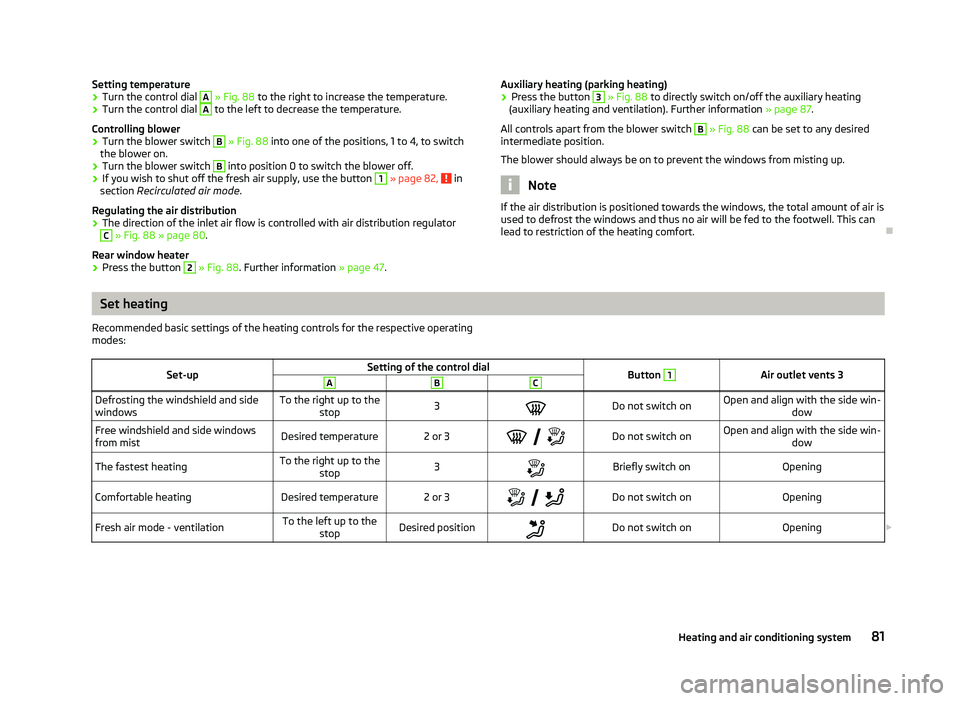
Setting temperature
›
Turn the control dial A
» Fig. 88 to the right to increase the temperature.
› Turn the control dial A
to the left to decrease the temperature.
Controlling blower
› Turn the blower switch B
» Fig. 88 into one of the positions, 1 to 4, to switch
the blower on.
› Turn the blower switch B
into position 0 to switch the blower off.
› If you wish to shut off the fresh air supply, use the button 1
» page 82,
in
section Recirculated air mode .
Regulating the air distribution
› The direction of the inlet air flow is controlled with air distribution regulator C
» Fig. 88
» page 80.
Rear window heater
› Press the button 2
» Fig. 88
. Further information » page 47. Auxiliary heating (parking heating)
›
Press the button 3
» Fig. 88
to directly switch on/off the auxiliary heating
(auxiliary heating and ventilation). Further information » page 87.
All controls apart from the blower switch B
» Fig. 88
can be set to any desired
intermediate position.
The blower should always be on to prevent the windows from misting up. Note
If the air distribution is positioned towards the windows, the total amount of air is
used to defrost the windows and thus no air will be fed to the footwell. This can
lead to restriction of the heating comfort. ÐSet heating
Recommended basic settings of the heating controls for the respective operating
modes:
Set-up Setting of the control dial
Button 1
Air outlet vents 3
A B C
Defrosting the windshield and side
windows
To the right up to the
stop 3
Do not switch on Open and align with the side win-
dow
Free windshield and side windows
from mist Desired temperature 2 or 3
Do not switch on Open and align with the side win-
dow
The fastest heating To the right up to the
stop 3
Briefly switch on
Opening
Comfortable heating Desired temperature 2 or 3
Do not switch on
Opening
Fresh air mode - ventilation To the left up to the
stop Desired position
Do not switch on
Opening£ 81
Heating and air conditioning system
Page 85 of 218
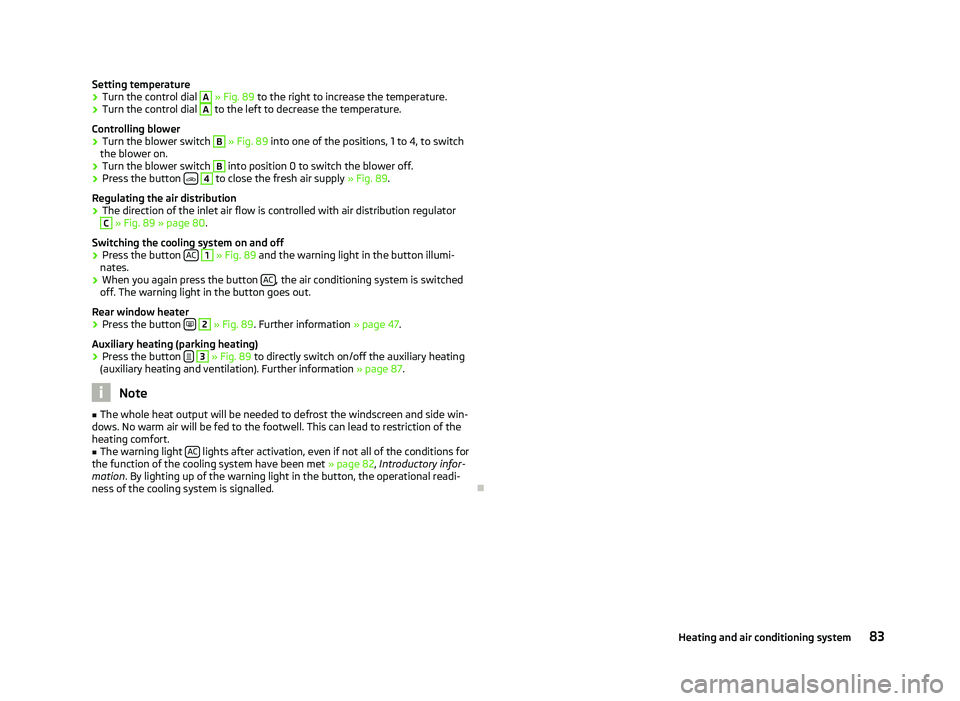
Setting temperature
›
Turn the control dial A
» Fig. 89 to the right to increase the temperature.
› Turn the control dial A
to the left to decrease the temperature.
Controlling blower
› Turn the blower switch B
» Fig. 89 into one of the positions, 1 to 4, to switch
the blower on.
› Turn the blower switch B
into position 0 to switch the blower off.
› Press the button
4
to close the fresh air supply
» Fig. 89.
Regulating the air distribution
› The direction of the inlet air flow is controlled with air distribution regulator C
» Fig. 89
» page 80.
Switching the cooling system on and off
› Press the button
AC 1
» Fig. 89 and the warning light in the button illumi-
nates.
› When you again press the button
AC , the air conditioning system is switched
off. The warning light in the button goes out.
Rear window heater › Press the button
2
» Fig. 89
. Further information » page 47.
Auxiliary heating (parking heating)
› Press the button
3
»
Fig. 89
to directly switch on/off the auxiliary heating
(auxiliary heating and ventilation). Further information » page 87. Note
■ The whole heat output will be needed to defrost the windscreen and side win-
dows. No warm air will be fed to the footwell. This can lead to restriction of the
heating comfort. ■ The warning light AC lights after activation, even if not all of the conditions for
the function of the cooling system have been met » page 82, Introductory infor-
mation . By lighting up of the warning light in the button, the operational readi-
ness of the cooling system is signalled. Ð 83
Heating and air conditioning system
Page 87 of 218
Climatronic (automatic air conditioning system)
Introductory information
The Climatronic maintains fully automatically a convenience temperature. This is
achieved by automatically varying the temperature of the air flow, the blower
stages and air distribution. The system also takes sunlight into account, which
eliminates the need to alter the settings manually. The automatic
mode » page 86
ensures maximum well-being of the occupants at all times of
the year.
Description of Climatronic system
The cooling system only operates if the following conditions are met:
› engine running;
› outside temperature above approx. +2 °C;
› AC 13
» Fig. 90 on page 85
switched on.
The AC compressor is switched off at a high coolant temperature in order to pro-
vide cooling at a high load of the engine.
Recommended setting for all periods of the year.
› Set the desired temperature, we recommend 22 °C.
› Press the button
AUTO 8
» Fig. 90
on page 85.
› Move the air outlet vents
3 » Fig. 86 on page 80 and 4 so that the air flow is
directed slightly upwards. Note
■ We recommend that you have the Climatronic system cleaned by a
ŠKODA spe-
cialist garage once every year. ■ On vehicles equipped with a factory-fitted radio or radio navigation system, the
Climatronic information is also shown on their displays. This function can be
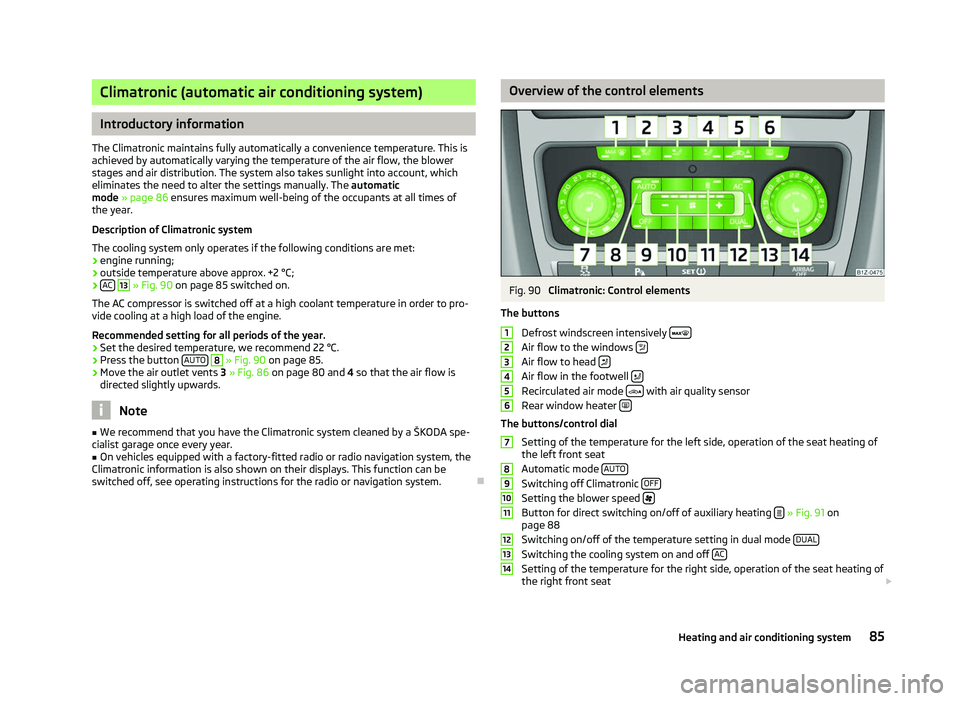
switched off, see operating instructions for the radio or navigation system. Ð Overview of the control elements
Fig. 90
Climatronic: Control elements
The buttons Defrost windscreen intensively Air flow to the windows
Air flow to head
Air flow in the footwell
Recirculated air mode
with air quality sensor
Rear window heater The buttons/control dial
Setting of the temperature for the left side, operation of the seat heating of
the left front seat
Automatic mode AUTO Switching off Climatronic
OFF Setting the blower speed
Button for direct switching on/off of auxiliary heating
» Fig. 91 on
page 88
Switching on/off of the temperature setting in dual mode DUAL Switching the cooling system on and off
AC Setting of the temperature for the right side, operation of the seat heating of
the right front seat £ 1
2
3
4
5
6
7
8
9
10
11
12
13
14
85
Heating and air conditioning system
Page 89 of 218

Switching recirculated air mode on
›
Repeatedly press the button
5
» Fig. 90
on page 85 until the warning
light on the left side of the button is illuminated.
Switch on automatic air distribution control
› Repeatedly press the button
5
» Fig. 90
on page 85 until the warning
light on the right side of the button is illuminated.
Switch off automatic air distribution control temporarily
› If the air quality sensor does not automatically switch on the air distribution
control in the event of an unpleasant odour, you can switch it on yourself by
pressing the button 5
» Fig. 90
on page 85. The warning light lights up in
the button on the left side.
Switching recirculated air mode off
› Press the button
AUTO 8
» Fig. 90
on page
85 or repeatedly press the button
5
» Fig. 90 on page 85
until the warning lights in the button go out.WARNING
Do not leave recirculated air mode on over a longer period of time, as “stale”
air can cause fatigue of the driver and passengers, reduce attention levels and
also cause the windows to mist up. The risk of having an accident increases.
Switch off recirculated air mode as soon as the windows start to mist up. Note
■ If the windscreen mists up, press the button 1
» Fig. 90 on page 85
. Press
the button AUTO 8
» Fig. 90
on page 85 when the windshield is demisted.
■ The automatic air distribution control operates only if the outside temperature
is higher than approx. 2 °C. ÐControlling blower
The Climatronic system controls the blower stages automatically in line with the
interior temperature. However, the blower stages can be manually adapted to
suit your particular needs.
› Repeatedly press the button
10
» Fig. 90
on page 85 on the left side (reduce
blower speed) or on the right side (increase blower speed).
If the blower is switched off, the Climatronic system is switched off.
The set blower speed is displayed above the button 10
» Fig. 90 on page 85
when the respective number of warning lights come on. WARNING
■ “
Stale air” may result in fatigue in the driver and occupants, reduce attention
levels and also cause the windows to mist up. The risk of having an accident
increases.
■ Do not switch off the Climatronic system for longer than necessary.
■ Switch on the Climatronic system as soon as the windows mist up. Ð Defrosting windscreen
Switching on › Press the button
1
» Fig. 90
on page 85.
Switching off
› Once again press the button
1
» Fig. 90 on page 85
or the button AUTO .
The temperature control is controlled automatically. More air flows out of the air
outlet vents 1 » Fig. 86 on page 80
. Ð Auxiliary heating (auxiliary heating and ventilation)
ä
Introduction
This chapter contains information on the following subjects:
Direct switching on/off 88
System settings 89
Radio remote control 89
Changing the battery of the radio remote control 90
Auxiliary heating (parking heating)
The auxiliary heater (parking heater) functions in connection with the air-condi-
tioning system or Climatronic.
It can be used when stationary, when the engine is switched off to preheat the
vehicle and while driving (e.g. during the heating phase of the engine).
The engine is also preheated, if the auxiliary heating is switched on when the ve-
hicle is stationary and the engine is switched off. £
87
Heating and air conditioning system
Page 90 of 218
The auxiliary heating (parking heating) warms up the coolant by combusting fuel
from the vehicle tank. The coolant warms up the air, which (if the blower speed is
not set to zero) flows into the passenger compartment.
Auxiliary ventilation
The auxiliary ventilation enables fresh air to flow into the vehicle interior by
switching off the engine, whereby the interior temperature is effectively de-
creased (e.g. with the vehicle parked in the sun).
WARNING
■ The auxiliary heating must never be operated in closed rooms - risk of poi-
soning! ■ The auxiliary heating must not be running during refuelling - risk of fire.
■ The exhaust pipe of the auxiliary heating is located on the underside of the
vehicle. Therefore, if you wish to operate the auxiliary heating, do not park the
vehicle in such a way that the exhaust gases from the auxiliary heating can
come into contact with highly flammable materials (e.g. dry grass) or easily in-
flammable substances (e.g. spilt fuel). Note
■ If the auxiliary heating runs, the fuel consumption comes from the vehicle tank.
The auxiliary heating automatically controls the filling level in the fuel tank. If only
a low quantity of fuel is present in the fuel tank, the function of the auxiliary
heating is blocked. ■ The exhaust pipe of the auxiliary heating, which is located on the underside of
the vehicle, must not be clogged and the exhaust flow must not be blocked.
■ If the auxiliary heating and ventilation is running, the vehicle battery discharges.
If the auxiliary heating and ventilation has been operated several times over a
longer period, the vehicle must be driven a few kilometres in order to recharge
the vehicle battery.
■ The auxiliary heating only switches the blower on, if it has achieved a coolant
temperature of approx. 50 °C.
■ At low outside temperatures, this can result in a formation of water vapour in
the area of the engine compartment. This is quite normal and is not an operating
problem.
■ After switching off the auxiliary heating, the coolant pump runs for a short peri-
od.
■ The auxiliary heating and ventilation does not switch on or comes on, if the ve-
hicle battery indicates a low loading state » page 169, Automatic load deactiva-
tion . ■
The auxiliary heating (parking heating) does not switch on, if the following was
shown in the information display or before switching off the ignition: Please re-
fuel! ■ The air inlet in front of the windscreen must be free of ice, snow or leaves in
order to ensure that the auxiliary heating operates properly.
■ So that warm air can flow into the vehicle interior after switching on the auxili-
ary heating, you must maintain the comfort temperature normally selected by
you, leave the fan switched on and leave the air outlet vents in an open position.
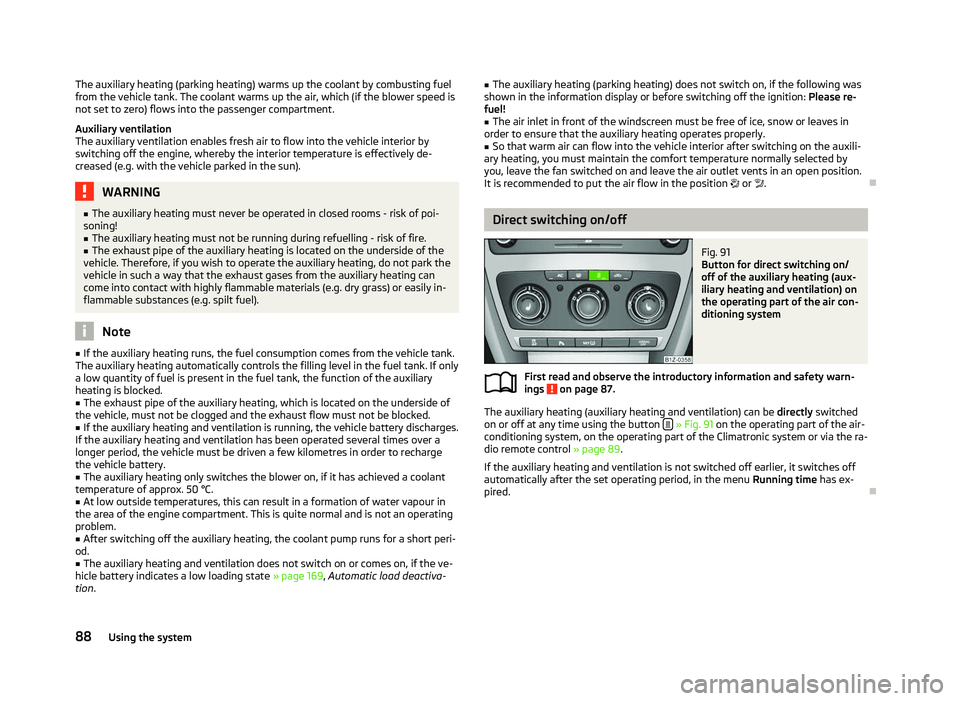
It is recommended to put the air flow in the position or .Ð Direct switching on/off
Fig. 91
Button for direct switching on/
off of the auxiliary heating (aux-
iliary heating and ventilation) on
the operating part of the air con-
ditioning system
First read and observe the introductory information and safety warn-
ings on page 87.
The auxiliary heating (auxiliary heating and ventilation) can be
directly switched
on or off at any time using the button » Fig. 91 on the operating part of the air-
conditioning system, on the operating part of the Climatronic system or via the ra-
dio remote control » page 89.
If the auxiliary heating and ventilation is not switched off earlier, it switches off
automatically after the set operating period, in the menu Running time has ex-
pired. Ð
ä
88 Using the system
Page 91 of 218
System settings
First read and observe the introductory information and safety warn-
ings on page 87.
The following menu items can be selected in the menu
Aux. heating in the infor-
mation display (depending on the equipment fitted in the vehicle):
■ Day of the wk. - Set the current weekday.
■ Time- Set the desired running time in 5
minute increments. The running time
can be 10 to 60 minutes.
■ Mode - Set the desired heating/ventilation mode.
■ Starting time 1-3 - In each pre-set time, the day and the time (hour and minute)
can be set for switching on the auxiliary heating and/or ventilation. An empty
position can be found between Sunday and Monday when selecting the day. If
this empty position is selected, the activation is performed without taking into
account the day.
■ Activate - Enable pre-set mode.
■ Dectivate - Disable pre-set mode.
■ Factory setting - Restore factory setting.
■ Back - Return to main menu.
Only one programmed pre-set time can be active.
The last programmed pre-set time remains active.
After the auxiliary heating activates at the set time, it is necessary to pre-set a
time again.
If the pre-set menu is closed by selecting the menu item Back or if no changes
are made on the display for more than 10 seconds, the set values are stored, but
the pre-set time is not activated.
An warning light on the button »
Fig. 91
on page 88 is illuminated when the
system is running.
The running system deactivates after expiration of the operating period or can be
deactivated earlier by pressing the button to directly switch on/off the auxiliary
heating » Fig. 91 on page 88
or by using the radio remote control. Ð
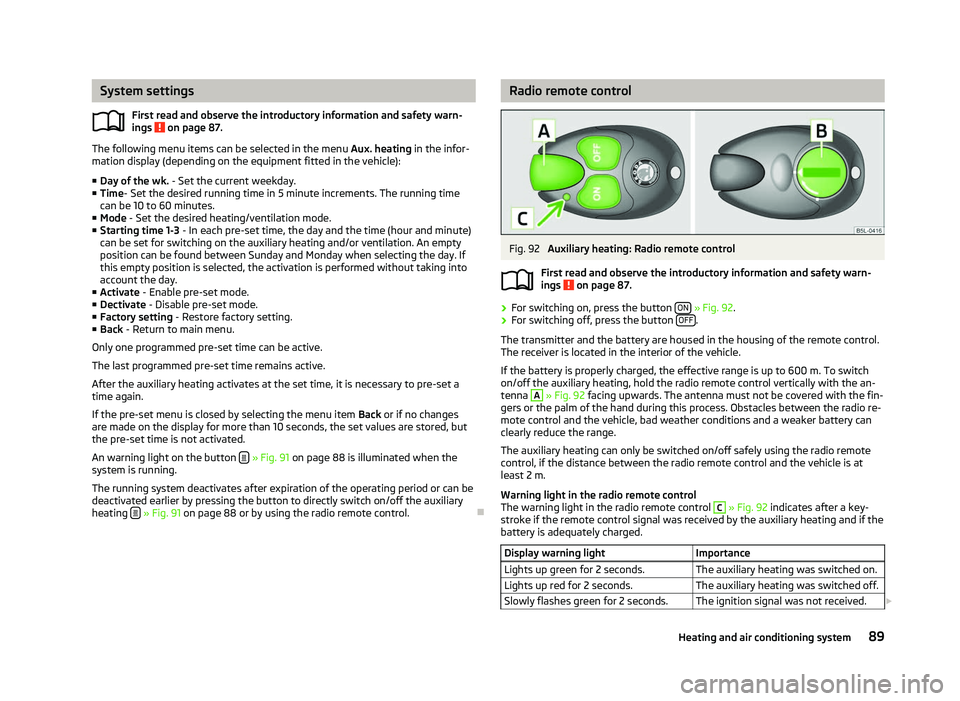
ä Radio remote control
Fig. 92
Auxiliary heating: Radio remote control
First read and observe the introductory information and safety warn-
ings on page 87.
›
For switching on, press the button
ON » Fig. 92.
› For switching off, press the button
OFF .
The transmitter and the battery are housed in the housing of the remote control.
The receiver is located in the interior of the vehicle.
If the battery is properly charged, the effective range is up to 600
m. To switch
on/off the auxiliary heating, hold the radio remote control vertically with the an-
tenna A
» Fig. 92 facing upwards. The antenna must not be covered with the fin-
gers or the palm of the hand during this process. Obstacles between the radio re-
mote control and the vehicle, bad weather conditions and a weaker battery can
clearly reduce the range.
The auxiliary heating can only be switched on/off safely using the radio remote
control, if the distance between the radio remote control and the vehicle is at
least 2
m.
Warning light in the radio remote control
The warning light in the radio remote control C
» Fig. 92 indicates after a key-
stroke if the remote control signal was received by the auxiliary heating and if the
battery is adequately charged.
Display warning light Importance
Lights up green for 2 seconds. The auxiliary heating was switched on.
Lights up red for 2 seconds. The auxiliary heating was switched off.
Slowly flashes green for 2 seconds. The ignition signal was not received. £ ä
89
Heating and air conditioning system