change time SKODA OCTAVIA 2006 Owner´s Manual
[x] Cancel search | Manufacturer: SKODA, Model Year: 2006, Model line: OCTAVIA, Model: SKODA OCTAVIA 2006Pages: 218, PDF Size: 5.48 MB
Page 114 of 218
Operate the telephone via the information display
The following menu points can be selected in the menu Phone.
■ Phone book
■ Dial number 1)
■ Call register
■ Voice mailbox
■ Bluetooth 1
)
■ Settings 2)
■ Back
Phone book
In the menu point Phone book is the list of the loaded contacts from the tele-
phone memory and the SIM card of the mobile phone.
Dial number
Any telephone number can be entered in the menu point Dial number. The re-
quired numbers must be selected one after the other using adjustment wheel
and confirmed by pressing the adjustment wheel. Numbers 0 - 9, symbols , , #
and the functions Cancel, Call, Delete can be selected.
Call register
The following menu items can be selected in the menu item Call register.
■ Missed calls
■ Dialled numbers
■ Received calls
Voice mailbox
In the menu Voice mailbox , it is possible to set the number of the voice mailbox 1 )
and then dial the number.
Bluetooth
The following menu items can be selected in the menu Bluetooth.
■ User - the overview of the stored users
■ New user - Search for new mobile phones that are in the reception range
■ Visibility - Switching on the visibility of the telephone unit for other devices ■
Media player
■ Active device
■ Paired devices
■ Search
■ Phone name - the possibility to change the name of the telephone unit (pre-set
SKODA UHV)
Settings
The following menu items can be selected in the menu Settings.
■ Phone book
■ Update 1
)
■ List
■ Surname
■ First name
■ Ring tone
Back
Return in the Start menu of the telephone. Ð Universal telephone preinstallation GSM IIl
Introductory information
The universal telephone preinstallation GSM
II (“hands-free system”) includes a
convenience mode for the mobile phone via voice control, the multifunction
steering wheel, the radio or navigation system.
The universal telephone preinstallation GSM III comprises the following functions.
› Phone Phonebook » page 109
.
› Convenience operation via the multifunction steering wheel
» page 108.
› Operation of the telephone via the information display
» page 114.
› Voice control of the telephone
» page 116.
› Music playback from the telephone or other multimedia units
» page 118.
› Internet connection
» page 115.
› Display of SMS messages » page 114.
£1)
On vehicles fitted with the Amundsen+ navigation system, this function can be accessed via the navi-
gation system menu; refer to the operating instructions for the Amundsen+ navigation system.
2) This function is not available in vehicles fitted with the Amundsen+ navigation system.
112 Using the system
Page 117 of 218
■
Media player
■ Active device
■ Paired devices
■Connect
■ Rename
■ Delete
■ Authorisation
■ Search - search for available media players
■ Visibility - Switching on the visibility of the hands-free system for media play-
ers in the vicinity
■ Extras
■Modem - overview of the active and paired devices for the connection to the
internet
■Active device
■ Paired devices
■ Phone name - the possibility to change the name of the hands-free system
(pre-set SKODA UHV)
Settings
The following menu items can be selected in the menu Settings.
■ Phone book
■ Update - scan the telephone book
■ Select memory
■ SIM & phone
■ SIM card
■ Mobile phone - Initial setting to also import contacts from the SIM card, it is
necessary to switch to the menu item SIM & phone
■ List
■ Surname
■ First name
■ Own number - optionally display your own telephone number on the display of
the device of the person you are calling (this function is network-dependent)
■ Network depnd. .
■ Yes
■ No
■ Signal settings
■ Ring tone
■ Volume
■Turn vol. up
■ Turn vol. down ■
Phone settings
■Select operator
■ Automatic
■ Manual
■ Network mode
■ GSM
■ Automatic
■ SIM mode - valid for telephones with the rSAP profile, that simultaneously
support the operation of two SIM cards - there is an option to choose which
SIM card should be connected to the hands-free system
■ Change
■ Phone Mode - Toggle between rSAP and HFP mode
■ Premium - rSAP mode
■ Hands-free - HFP mode
■ Off time - Setting in five-minute steps
■ Data - Settings for the Internet access point - ask network operator for details
■ Switch off ph. (Switch off ph.) - switches off the phone unit (phone remains
coupled)
Back
Return in the main menu of the information display. Ð Internet connection
A notebook can, for example, be connected to the Internet via the hands-free
system.
The control unit of the hands-free system supports the GPRS, EDGE and UMTS/3G
technologies.
An Internet can only be established via a telephone which is connected via the
rSAP profile.
The procedure for connecting to the Internet can vary depending on the type and
version of the operating system as well as the type of the device to be connected.
Successfully connecting to the internet requires appropriate knowledge of the
operating system for connecting the device .
Process of connection
› Connect the mobile phone with the hands-free system.
› Set the access point (depending on the operator, usually “Internet”) in the
menu Phone - Settings - Data .
› Switch on the visibility of the hands-free system for the other devices in the
menu Phone - Bluetooth - Visibility . £
115
Communication
Page 120 of 218
Multimedia
Music playback via Bluetooth
®
The universal telephone preinstallation makes it possible to play back music via
Bluetooth ®
from devices such as MP3 players, mobile phones or notebooks.
To ensure the music can be played back via Bluetooth ®
, it is necessary to connect
the terminal device with the hands-free system in the menu Phone - Bluetooth -
Media player. The music playback process is performed on the connected device.
The universal telephone preinstallation GSM II ensures that the music played back
via the hands-free system can be controlled with the remote control » page 117,
Voice commands - GSM II . Note
The device being connected must support the Bluetooth ®
A2DP profile; refer to
the operating instructions for the relevant device being connected. ÐOperating the radio and navigation system on the multifunction steering wheel
Fig. 108
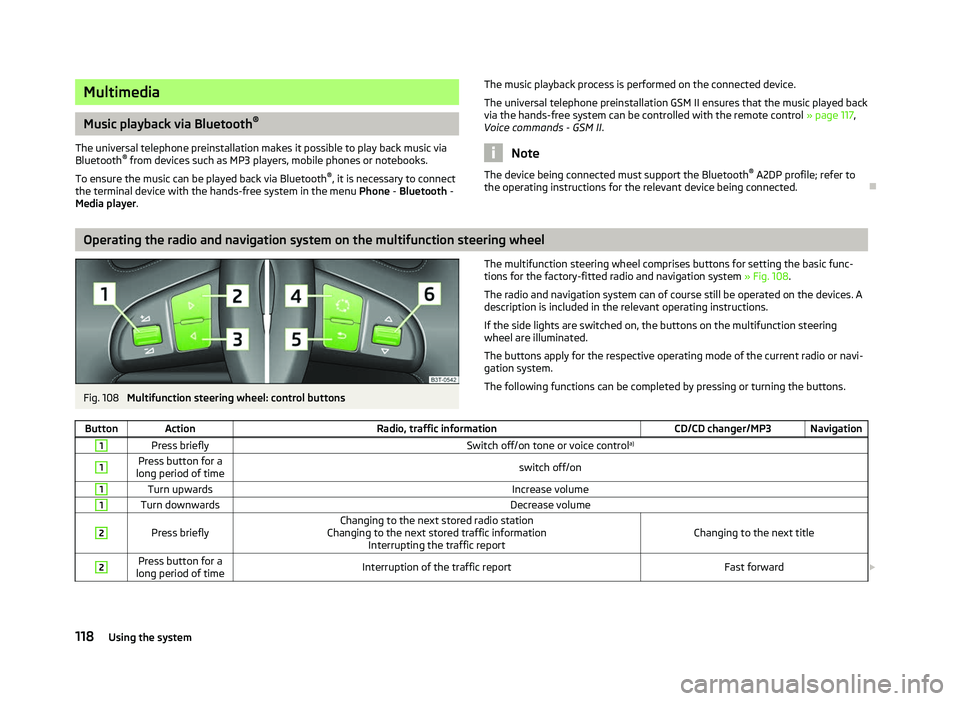
Multifunction steering wheel: control buttons The multifunction steering wheel comprises buttons for setting the basic func-
tions for the factory-fitted radio and navigation system » Fig. 108.
The radio and navigation system can of course still be operated on the devices. A
description is included in the relevant operating instructions.
If the side lights are switched on, the buttons on the multifunction steering
wheel are illuminated.
The buttons apply for the respective operating mode of the current radio or navi-
gation system.
The following functions can be completed by pressing or turning the buttons.
Button Action Radio, traffic information CD/CD changer/MP3 Navigation1
Press briefly
Switch off/on tone or voice controla)1 Press button for a
long period of time switch off/on1
Turn upwards
Increase volume1
Turn downwards
Decrease volume2
Press briefly
Changing to the next stored radio station
Changing to the next stored traffic information Interrupting the traffic report Changing to the next title2 Press button for a
long period of time Interruption of the traffic report
Fast forward£118
Using the system
Page 121 of 218
Button Action
Radio, traffic information CD/CD changer/MP3 Navigation3
Press briefly
Changing to the previously stored radio station
Changing to the previously stored traffic information Interrupting the traffic report Changing to the previous title3 Press button for a
long period of time Interruption of the traffic report
Fast rewind4
Press briefly
changing the audio source5
Press briefly
Call up the main menu6
Press briefly
Interruption of the traffic report without function6
Turn upwards
Display of the stored/accessible stations
Scroll upwards
Interruption of the traffic report Changing to the previous title
without
function 6
Turn downwards
Display of the stored/accessible stations
Scroll downwards
Interruption of the traffic report Changing to the next titlea)
Only valid for the navigation system Columbus. Note
■ The loudspeakers in the vehicle are adjusted to the power output of the radio
and navigation system of 4x20°W. ■ The sound system equipment comprises loudspeakers that are adjusted to the
amplifier power output of 4x50°W + 6x25 W. ÐAUX-IN and MDI inputs
The AUX-IN input is located below the front armrest and is marked with .
The input MDI is located in the storage compartment on the front passenger side.
The AUX-IN and MDI inputs are used to connect external audio sources (e.g. iPod
or mp3 player) and to play back music from these devices via the factory-fitted ra-
dio or navigation system.
For a description of use, refer to the operating instructions for the relevant radio
or navigation system. Ð CD change
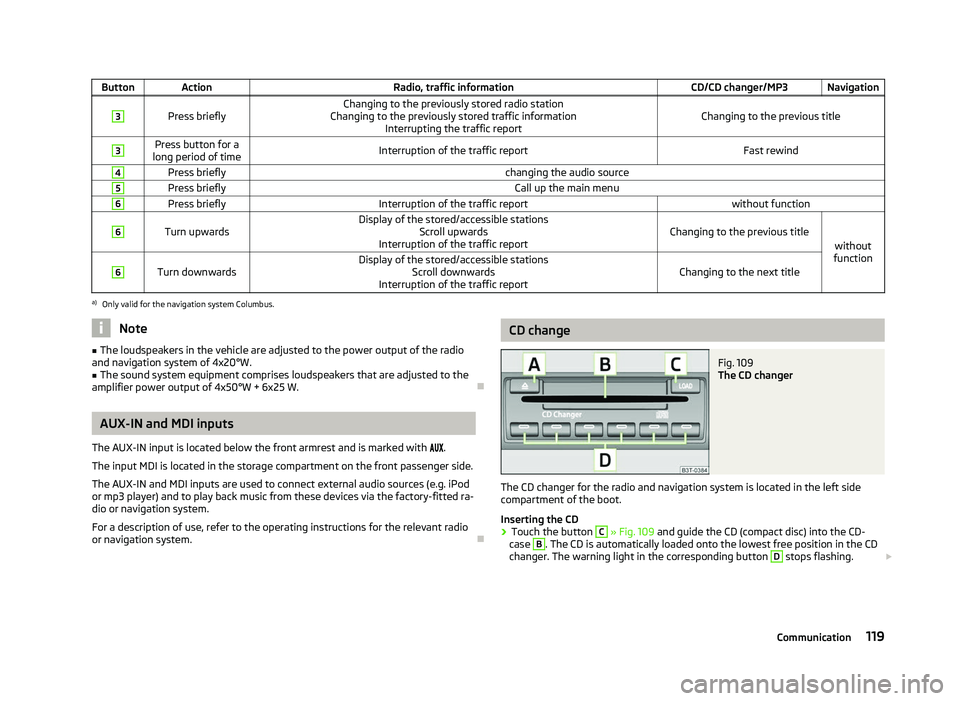
Fig. 109
The CD changer
The CD changer for the radio and navigation system is located in the left side
compartment of the boot.
Inserting the CD
› Touch the button C
» Fig. 109
and guide the CD (compact disc) into the CD-
case B
. The CD is automatically loaded onto the lowest free position in the CD
changer. The warning light in the corresponding button D
stops flashing.
£
119
Communication
Page 128 of 218
WARNING (Continued)
■ The seat belts for the rear seats can only fulfil their function reliably when
the seat backrests are correctly locked into position » page 59, Rear seats.
■ The belt webbing must always be kept clean. Soiled belt webbing may im-
pair proper operation of the inertia reel » page 154, Seat belts.
■ The seat belts must not be removed or changed in any way. Do not attempt
to repair the seat belts yourself.
■ Check the condition of all the seat belts on a regular basis. If any damage to
the seat belts, seat belt connections, inertia reel or the lock is detected, the
relevant seat belt must be replaced by a
ŠKODA specialist garage.
■ Damaged seat belts which have been subjected to stress in an accident and
were therefore stretched, must be replaced - this is best done by a
ŠKODA
specialist garage. The anchorage points for the belts should also be checked. Note
The national legal requirements must be observed when using seat belts. ÐThe physical principle of a frontal collision
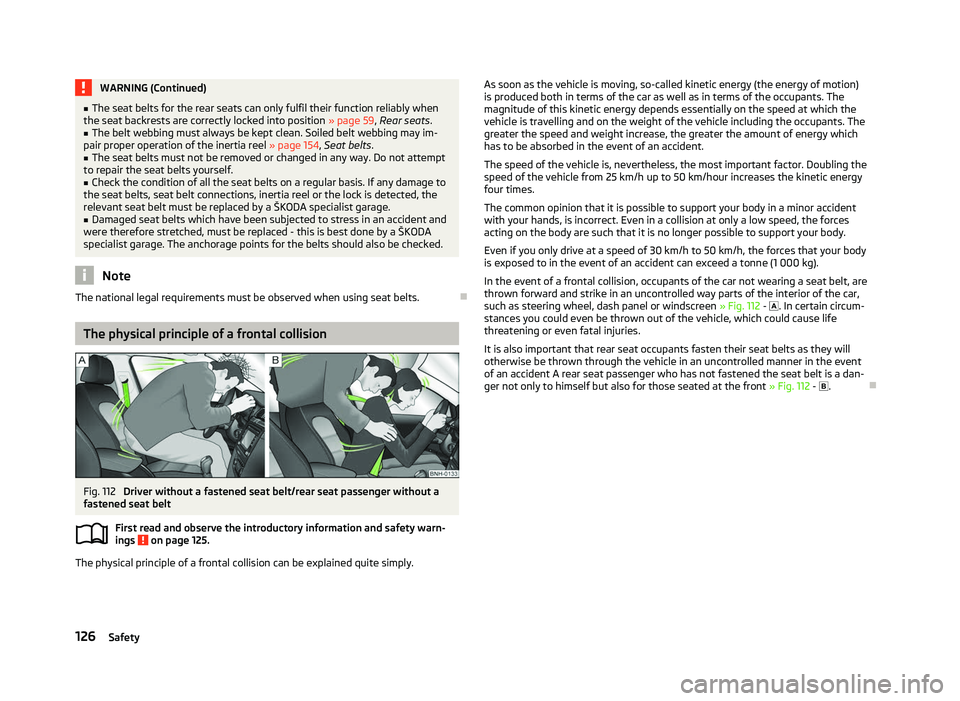
Fig. 112
Driver without a fastened seat belt/rear seat passenger without a
fastened seat belt
First read and observe the introductory information and safety warn-
ings on page 125.
The physical principle of a frontal collision can be explained quite simply.
ä As soon as the vehicle is moving, so-called kinetic energy (the energy of motion)
is produced both in terms of the car as well as in terms of the occupants. The
magnitude of this kinetic energy depends essentially on the speed at which the
vehicle is travelling and on the weight of the vehicle including the occupants. The
greater the speed and weight increase, the greater the amount of energy which
has to be absorbed in the event of an accident.
The speed of the vehicle is, nevertheless, the most important factor. Doubling the
speed of the vehicle from 25 km/h up to 50 km/hour increases the kinetic energy
four times.
The common opinion that it is possible to support your body in a minor accident
with your hands, is incorrect. Even in a collision at only a low speed, the forces
acting on the body are such that it is no longer possible to support your body.
Even if you only drive at a speed of 30
km/h to 50 km/h, the forces that your body
is exposed to in the event of an accident can exceed a tonne (1 000 kg).
In the event of a frontal collision, occupants of the car not wearing a seat belt, are
thrown forward and strike in an uncontrolled way parts of the interior of the car,
such as steering wheel, dash panel or windscreen » Fig. 112 - . In certain circum-
stances you could even be thrown out of the vehicle, which could cause life
threatening or even fatal injuries.
It is also important that rear seat occupants fasten their seat belts as they will
otherwise be thrown through the vehicle in an uncontrolled manner in the event
of an accident A rear seat passenger who has not fastened the seat belt is a dan-
ger not only to himself but also for those seated at the front » Fig. 112 - . Ð
126 Safety
Page 131 of 218
Airbag system
Description of the airbag system
Introductory information
The operational readiness of the airbag system is monitored electronically. The
airbag warning light comes on for a few seconds each time the ignition is
switched on »
page 24.
The airbags inflate in fractions of a second and at a high speed to offer additional
protection in the event of an accident.
The airbag system (according to vehicle equipment) consists of: › an electronic control unit;
› Front airbags for the driver and front seat passenger
» page 130;
› side airbags » page 131;
› head airbags » page 132;
› an airbag warning light in the instrument cluster
» page 24;
› a key switch for the front seat passenger airbag
» page 133;
› an warning light in the middle of the dash panel to indicate the front seat pas-
senger airbag is switched off » page 133.
A fault in the airbag system exists if:
› the warning light
does not illuminate when the ignition is switched on;
› the warning light
does not go out 4 seconds after the ignition is switched on;
› the warning light
goes out and comes on again after the ignition is switched
on;
› the warning light
comes on or flashes when driving;
› the warning light in the middle of the dash panel for the deactivated front seat
passenger airbag flashes. WARNING
■ The airbag is not a substitute for the seat belt, but instead forms part of the
complete passive vehicle safety concept. Please note that an airbag can only
offer you optimal protection in combination with a seat belt which is fas-
tened.
■ To ensure passengers are protected with the greatest possible effect when
the airbag is deployed, the front seats must be correctly adjusted to match
the body size »
page 122, Correct seated position .
■ If you do not fasten the seat belts when driving, lean too far forward or
adopt an incorrect seated position, you are exposing yourself to increased risk
of injury in the event of an accident. ■ If there is a fault, have the airbag system checked immediately by a ŠKODA
specialist garage. Otherwise, there is a risk of the airbag not being activated in
the event of an accident.
■ No modifications of any kind must be made to parts of the airbag system.
Any work on the airbag system including the installation and removal of sys-
tem components due to other repair work (e.g. removal of the steering wheel)
must only be carried out by a
ŠKODA specialist garage.
■ Never make any changes to the front bumper or bodywork.
■ It is prohibited to manipulate individual parts of the airbag system as this
might result in the airbag being deployed. ■ The protective function of the airbag system is sufficient for only one acci-
dent. The airbag system must then be replaced if the airbag has been de-
ployed.
■ The airbag system needs no maintenance during its working life.
■ If you sell your vehicle, provide the complete vehicle documentation to the
new owner. Please note that the information relating to the possibility of de-
activating the front passenger airbag must be included! ■ When disposing of vehicle or parts of the airbag system, it is important to
comply with the national legal requirements. Ð When are the airbags deployed?
The airbag system is only functional when the ignition is switched on.
In certain accident situations, the several airbags may be deployed simultaneous-
ly.
The airbags are not deployed in the case of minor frontal and side collisions, rear-
end collisions, tilting of the vehicle and vehicle rollover. £
129
Airbag system
Page 169 of 218

Battery cover
Fig. 138
Engine compartment: Polyester cover of the vehicle battery/plastic
cover of the vehicle battery
First read and observe the introductory information and safety warn-
ings on page 165.
The battery is located in the engine compartment in a polyester cover
1
» Fig. 138 or in a plastic cover 2
.
› Open the battery cover in the direction of the arrow 1
or press the interlock on
the side of the battery cover in the direction of the arrow 2
, fold the cover up
and remove.
› The battery cover is installed in reverse order.
When working on the battery, the edge of the polyester battery cover 1
is inser-
ted between the battery and the side wall of the battery cover. ÐChecking the battery electrolyte level
Fig. 139
Vehicle battery: Electrolyte level
indicator
ä First read and observe the introductory information and safety warn-
ings on page 165.
We recommend you have the electrolyte level checked by a ŠKODA specialist ga-
rage from time to time, especially in the following cases.
› High outside temperatures.
› Long daily drives
› After each charge
» page 168.
On vehicles with a vehicle battery fitted with a colour indicator, the so-called
magic eye » Fig. 139, the electrolyte level can be determined by looking at the
change in colour.
Air bubbles can influence the colour of the indicator. For this reason carefully
knock on the indicator before carrying out the check.
› Black colour - electrolyte level is correct.
› Colourless or light yellow colour - electrolyte level too low, the battery must be
replaced. Note
■ The battery electrolyte level is periodically checked by a ŠKODA Service Partner
as part of the Inspection Service. ■ For technical reasons, on vehicles with the description “AGM”, the electrolyte
level cannot be checked. ■ Vehicles with a START-STOP system are fitted with a battery control unit for
checking the energy level for the recurring engine start. Ð Operation in winter
First read and observe the introductory information and safety warn-
ings on page 165.
At low temperatures, the vehicle battery only has part of the initial power output
that it has at normal temperatures.
A discharged vehicle battery may already freeze at temperatures just below 0
°C.
We therefore recommend that you have the battery checked and, if necessary, re-
charged by a ŠKODA Service Partner before the start of the winter.
Ð
ä
ä
167
Inspecting and replenishing
Page 177 of 218
Tyre control display
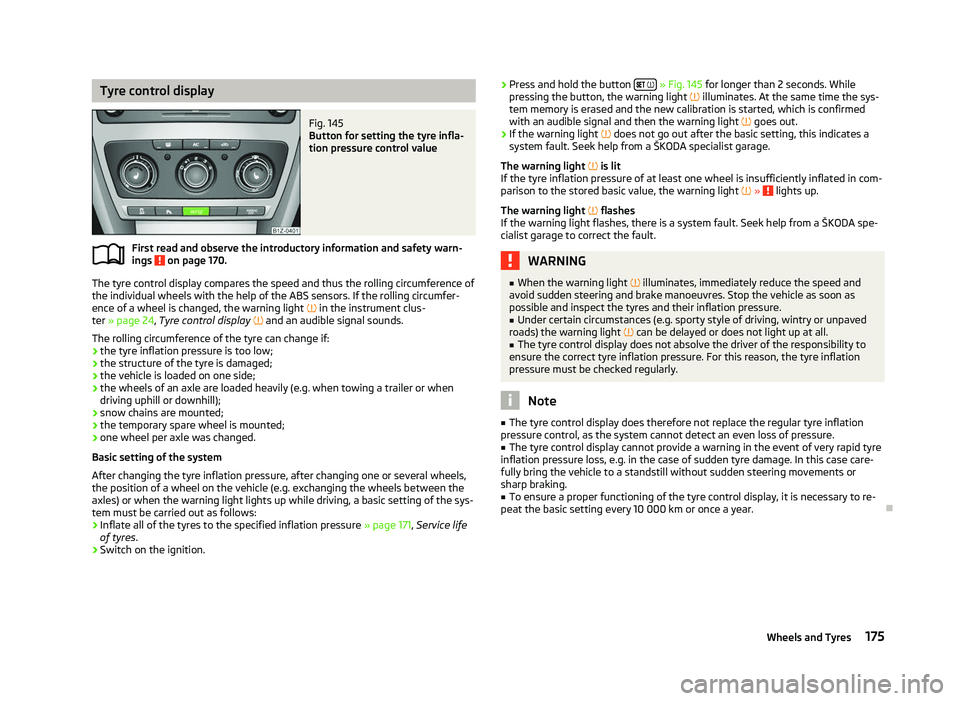
Fig. 145
Button for setting the tyre infla-
tion pressure control value
First read and observe the introductory information and safety warn-
ings on page 170.
The tyre control display compares the speed and thus the rolling circumference of
the individual wheels with the help of the ABS sensors. If the rolling circumfer-
ence of a wheel is changed, the warning light
in the instrument clus-
ter » page 24, Tyre control display and an audible signal sounds.
The rolling circumference of the tyre can change if: › the tyre inflation pressure is too low;
› the structure of the tyre is damaged;
› the vehicle is loaded on one side;
› the wheels of an axle are loaded heavily (e.g. when towing a trailer or when
driving uphill or downhill);
› snow chains are mounted;
› the temporary spare wheel is mounted;
› one wheel per axle was changed.
Basic setting of the system
After changing the tyre inflation pressure, after changing one or several wheels,
the position of a wheel on the vehicle (e.g. exchanging the wheels between the
axles) or when the warning light lights up while driving, a basic setting of the sys-
tem must be carried out as follows:
› Inflate all of the tyres to the specified inflation pressure
» page 171, Service life
of tyres .
› Switch on the ignition.
ä
›
Press and hold the button
» Fig. 145 for longer than 2
seconds. While
pressing the button, the warning light illuminates. At the same time the sys-
tem memory is erased and the new calibration is started, which is confirmed
with an audible signal and then the warning light goes out.
› If the warning light
does not go out after the basic setting, this indicates a
system fault. Seek help from a ŠKODA specialist garage.
The warning light is lit
If the tyre inflation pressure of at least one wheel is insufficiently inflated in com-
parison to the stored basic value, the warning light » lights up.
The warning light flashes
If the warning light flashes, there is a system fault. Seek help from a
ŠKODA spe-
cialist garage to correct the fault. WARNING
■ When the warning light illuminates, immediately reduce the speed and
avoid sudden steering and brake manoeuvres. Stop the vehicle as soon as
possible and inspect the tyres and their inflation pressure.
■ Under certain circumstances (e.g. sporty style of driving, wintry or unpaved
roads) the warning light can be delayed or does not light up at all.
■ The tyre control display does not absolve the driver of the responsibility to
ensure the correct tyre inflation pressure. For this reason, the tyre inflation
pressure must be checked regularly. Note
■ The tyre control display does therefore not replace the regular tyre inflation
pressure control, as the system cannot detect an even loss of pressure. ■ The tyre control display cannot provide a warning in the event of very rapid tyre
inflation pressure loss, e.g. in the case of sudden tyre damage. In this case care-
fully bring the vehicle to a standstill without sudden steering movements or
sharp braking.
■ To ensure a proper functioning of the tyre control display, it is necessary to re-
peat the basic setting every 10 000 km or once a year. Ð
175
Wheels and Tyres
Page 194 of 218

Fog lights and daytime running lights 194
Fog lights Octavia RS, Octavia Scout 195
Changing the bulb for the licence plate light 195
Tail lamp assembly 196
Tail light (Combi) 196
Some manual skills are required to change a bulb. For this reason, if uncertain, we
recommend that bulbs are replaced by a ŠKODA specialist garage or other expert
help is sought.
› Switch off the ignition and all of the lights before replacing a bulb.
› Faulty bulbs must only be replaced with the same type of bulbs. The designa-
tion is located on the light socket or the glass bulb.
› A stowage compartment for replacement bulbs is located in a plastic box in the
spare wheel or underneath the floor covering in the boot. WARNING
■ Accidents can be caused if the road in front of the vehicle is not sufficiently
illuminated and the vehicle cannot or can only be seen with difficulty by other
road users.
■ Always read and observe the warnings before completing any work in the
engine compartment »
page 158, Engine compartment .
■ Bulbs H7 and H1 are pressurised and may burst when changing the bulb -
risk of injury! We therefore recommended wearing gloves and safety glasses
when changing a bulb. ■ Gas discharge bulbs (xenon bulbs) operate with a high voltage, professional
knowledge is required - danger to life! CAUTION
■ Do not take hold of the glass bulb with naked fingers (even the smallest
amount of dirt reduces the working life of the light bulb). Use a clean cloth, nap-
kin, or similar. ■ When removing and installing the headlight make sure that the paintwork of
the vehicle and the headlight are not damaged. Note
■ This Owner's Manual only describes the replacement of bulbs where it is possi-
ble to replace the bulbs on your own without any complications arising. Other
light bulbs should be changed by a
ŠKODA specialist garage.
■ We recommend that a box of replacement bulbs be always carried in the vehi-
cle. Replacement bulbs can be purchased from
ŠKODAOriginal Accessories.
■ We recommend that the headlight settings are checked by a ŠKODA specialist
garage after replacing a bulb in the main or low beam.
■ Gas discharge bulbs and LED diodes are replaced by a ŠKODA specialist garage. Ð Headlights
Fig. 160
Headlights: Bulb arrangement/removal
First read and observe the introductory information and safety warn-
ings on page 191.
Overview of the location of the bulbs
» Fig. 160. 1
- front turn signal light
2
- parking lights and low beam
3
- main beam light
The headlight must be removed in order to change the light bulb of the parking
lights, low beam lights and main beam lights as well as the turn signal lights.
Removing the main beam lights
› Open the bonnet
» page 160, Opening and closing the bonnet .
› Unscrew the plastic nuts A
» Fig. 160
.
› Pull the locking button B
upwards.
£
ä
192 Do-it-yourself
Page 202 of 218
Specifications and engine oil capacity
The engine has been factory-filled with a high-grade oil that can be use through-
out the year - except in extreme climate zones.
Various oils can be mixed together when refilling. However, this does not apply to
vehicles with flexible service intervals.
Engine oils are, of course, undergoing continuous further development. Thus the
information stated in this Owner's Manual is only correct at the time of publica-
tion.
ŠKODA Service Partners are informed about the latest changes by
ŠKODA. We
therefore recommend that the oil change is completed by a ŠKODA Service Part-
ner.
The specifications (VW standards) stated in the following can be indicated sepa-
rately or together with other specifications on the bottle.
The oil capacities include oil filter change. Check the oil level when filling; do not
over fill. The oil level must be between the markings » page 161.
Specifications and capacity (in l) for vehicles with flexible service intervals Petrol engines SpecificationFilling level
1.2 ltr./77 kW TSI VW 504 003.9
1.4 l/59 kW VW 503 00, VW 504 00 3.2
1.4 ltr./90 kW TSI VW 504 003.6
1.6 l/75 kW VW 503 00, VW 504 00 4.5
1.6 ltr./75 kW MultiFuel VW 503 00, VW 504 00 4.5
1.8 ltr/118 kW TSI
1.8 ltr/112 kW TSI VW 504 00
4.6
2.0 ltr./147 kW TSI VW 504 004.6Diesel engines
SpecificationFilling level
1.6 ltr./77 kW TDI CR VW 507 004.3
1.9 l/77 kW TDI PD VW 506 01, VW 507 00 3.8
1.9 ltr./77 kW TD PD DPF VW 507 004.3
2.0 ltr./81 kW TDI CR VW 507 004.3
2.0 ltr/103 kW TDI CR
DPF VW 507 00
4.3
2.0 ltr./125 kW TDI CR VW 507 004.3 Specifications and capacity (in l) for vehicles with fixed service intervals
Petrol engines SpecificationFilling level
1.2 ltr./77 kW TSI VW 502 003.9
1.4 l/59 kW VW 501 01, VW 502 00 3.2
1.4 ltr./90 kW TSI VW 502 003.6
1.6 l/75 kW VW 501 01, VW 502 00 4.5
1.6 ltr./75 kW MultiFuel VW 502 004.5
1.8 ltr/118 kW TSI
1.8 ltr/112 kW TSI VW 502 00
4.6
2.0 ltr./147 kW TSI VW 502 004.6 If the oils specified above are not available, oils according to ACEA
A2 or ACEA A3
can be used once for refilling.
Diesel engines SpecificationFilling level
1.6 ltr./77 kW TDI CR VW 507 004.3
1.9 l/77 kW TDI PD VW 505 013.8
1.9 ltr./77 kW TD PD DPF VW 507 004.3
2.0 ltr./81 kW TDI CR VW 507 004.3
2.0 ltr/103 kW TDI CR
DPF VW 507 00
4.3
2.0 ltr./125 kW TDI CR VW 507 004.3 If the oils specified above are not available, oils according to ACEA
B3 or ACEA B4
can be used once for refilling. CAUTION
Only the above-mentioned oils can be used on vehicles with flexible service inter-
vals. We recommend always refilling with oil of the same specification since this
will maintain the properties of the oil. In exceptional cases, a maximum of 0.5
l of
specification VW 502 00 (only for petrol engines) or specification VW 505 01 (only
for diesel engines) engine oil can be used to refill once. Other engine oils must
not be used - risk of engine damage! Note
■ Before a long drive we recommend that you purchase and carry with you engine
oil which complies with the specification for your vehicle. ■ We recommend that you use oils from ŠKODA Original Accessories. Ð200
Technical data