radio SKODA OCTAVIA 2006 Owner´s Manual
[x] Cancel search | Manufacturer: SKODA, Model Year: 2006, Model line: OCTAVIA, Model: SKODA OCTAVIA 2006Pages: 218, PDF Size: 5.48 MB
Page 58 of 218
Storing setting
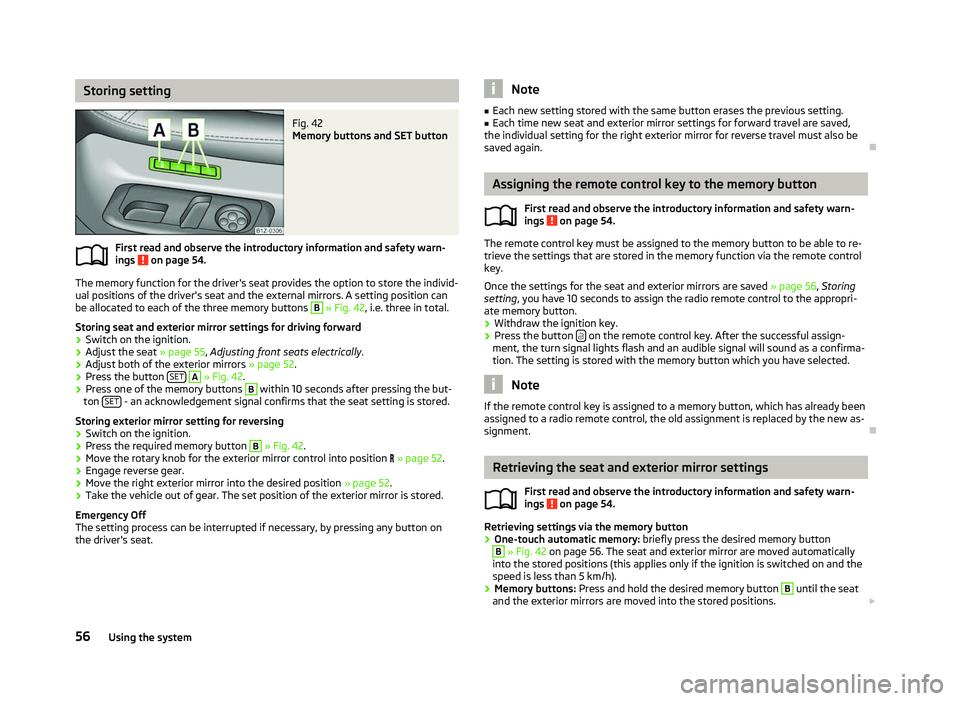
Fig. 42
Memory buttons and SET button
First read and observe the introductory information and safety warn-
ings on page 54.
The memory function for the driver's seat provides the option to store the individ-
ual positions of the driver's seat and the external mirrors. A setting position can
be allocated to each of the three memory buttons B
» Fig. 42, i.e. three in total.
Storing seat and exterior mirror settings for driving forward
› Switch on the ignition.
› Adjust the seat
» page 55, Adjusting front seats electrically .
› Adjust both of the exterior mirrors
» page 52.
› Press the button
SET A
» Fig. 42.
› Press one of the memory buttons B
within 10 seconds after pressing the but-
ton SET - an acknowledgement signal confirms that the seat setting is stored.
Storing exterior mirror setting for reversing › Switch on the ignition.
› Press the required memory button B
» Fig. 42.
› Move the rotary knob for the exterior mirror control into position
» page 52.
› Engage reverse gear.
› Move the right exterior mirror into the desired position
» page 52.
› Take the vehicle out of gear. The set position of the exterior mirror is stored.
Emergency Off
The setting process can be interrupted if necessary, by pressing any button on
the driver's seat.
ä Note
■ Each new setting stored with the same button erases the previous setting.
■ Each time new seat and exterior mirror settings for forward travel are saved,
the individual setting for the right exterior mirror for reverse travel must also be
saved again. Ð Assigning the remote control key to the memory button
First read and observe the introductory information and safety warn-
ings on page 54.
The remote control key must be assigned to the memory button to be able to re-
trieve the settings that are stored in the memory function via the remote control
key.
Once the settings for the seat and exterior mirrors are saved » page 56, Storing
setting, you have 10
seconds to assign the radio remote control to the appropri-
ate memory button.
› Withdraw the ignition key.
› Press the button
on the remote control key. After the successful assign-
ment, the turn signal lights flash and an audible signal will sound as a confirma-
tion. The setting is stored with the memory button which you have selected. Note
If the remote control key is assigned to a memory button, which has already been
assigned to a radio remote control, the old assignment is replaced by the new as-
signment. Ð Retrieving the seat and exterior mirror settings
First read and observe the introductory information and safety warn-
ings on page 54.
Retrieving settings via the memory button
›
One-touch automatic memory:
briefly press the desired memory button B
» Fig. 42 on page 56. The seat and exterior mirror are moved automatically
into the stored positions (this applies only if the ignition is switched on and the
speed is less than 5 km/h).
› Memory buttons:
Press and hold the desired memory button B
until the seat
and the exterior mirrors are moved into the stored positions. £
ä
ä
56 Using the system
Page 87 of 218
Climatronic (automatic air conditioning system)
Introductory information
The Climatronic maintains fully automatically a convenience temperature. This is
achieved by automatically varying the temperature of the air flow, the blower
stages and air distribution. The system also takes sunlight into account, which
eliminates the need to alter the settings manually. The automatic
mode » page 86
ensures maximum well-being of the occupants at all times of
the year.
Description of Climatronic system
The cooling system only operates if the following conditions are met:
› engine running;
› outside temperature above approx. +2 °C;
› AC 13
» Fig. 90 on page 85
switched on.
The AC compressor is switched off at a high coolant temperature in order to pro-
vide cooling at a high load of the engine.
Recommended setting for all periods of the year.
› Set the desired temperature, we recommend 22 °C.
› Press the button
AUTO 8
» Fig. 90
on page 85.
› Move the air outlet vents
3 » Fig. 86 on page 80 and 4 so that the air flow is
directed slightly upwards. Note
■ We recommend that you have the Climatronic system cleaned by a
ŠKODA spe-
cialist garage once every year. ■ On vehicles equipped with a factory-fitted radio or radio navigation system, the
Climatronic information is also shown on their displays. This function can be
switched off, see operating instructions for the radio or navigation system. Ð Overview of the control elements
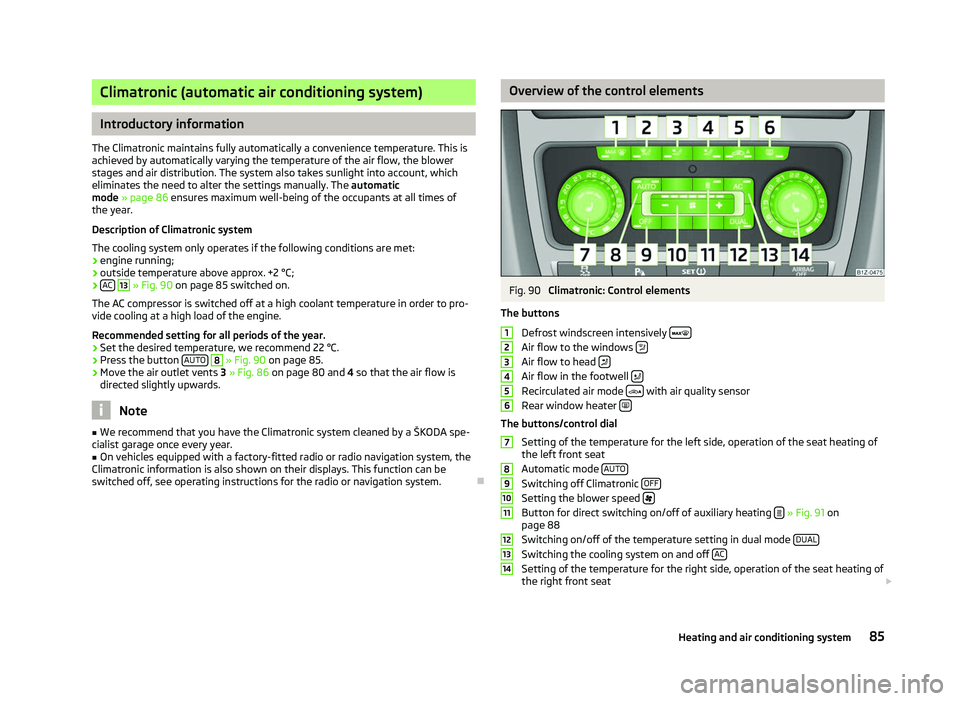
Fig. 90
Climatronic: Control elements
The buttons Defrost windscreen intensively Air flow to the windows
Air flow to head
Air flow in the footwell
Recirculated air mode
with air quality sensor
Rear window heater The buttons/control dial
Setting of the temperature for the left side, operation of the seat heating of
the left front seat
Automatic mode AUTO Switching off Climatronic
OFF Setting the blower speed
Button for direct switching on/off of auxiliary heating
» Fig. 91 on
page 88
Switching on/off of the temperature setting in dual mode DUAL Switching the cooling system on and off
AC Setting of the temperature for the right side, operation of the seat heating of
the right front seat £ 1
2
3
4
5
6
7
8
9
10
11
12
13
14
85
Heating and air conditioning system
Page 89 of 218

Switching recirculated air mode on
›
Repeatedly press the button
5
» Fig. 90
on page 85 until the warning
light on the left side of the button is illuminated.
Switch on automatic air distribution control
› Repeatedly press the button
5
» Fig. 90
on page 85 until the warning
light on the right side of the button is illuminated.
Switch off automatic air distribution control temporarily
› If the air quality sensor does not automatically switch on the air distribution
control in the event of an unpleasant odour, you can switch it on yourself by
pressing the button 5
» Fig. 90
on page 85. The warning light lights up in
the button on the left side.
Switching recirculated air mode off
› Press the button
AUTO 8
» Fig. 90
on page
85 or repeatedly press the button
5
» Fig. 90 on page 85
until the warning lights in the button go out.WARNING
Do not leave recirculated air mode on over a longer period of time, as “stale”
air can cause fatigue of the driver and passengers, reduce attention levels and
also cause the windows to mist up. The risk of having an accident increases.
Switch off recirculated air mode as soon as the windows start to mist up. Note
■ If the windscreen mists up, press the button 1
» Fig. 90 on page 85
. Press
the button AUTO 8
» Fig. 90
on page 85 when the windshield is demisted.
■ The automatic air distribution control operates only if the outside temperature
is higher than approx. 2 °C. ÐControlling blower
The Climatronic system controls the blower stages automatically in line with the
interior temperature. However, the blower stages can be manually adapted to
suit your particular needs.
› Repeatedly press the button
10
» Fig. 90
on page 85 on the left side (reduce
blower speed) or on the right side (increase blower speed).
If the blower is switched off, the Climatronic system is switched off.
The set blower speed is displayed above the button 10
» Fig. 90 on page 85
when the respective number of warning lights come on. WARNING
■ “
Stale air” may result in fatigue in the driver and occupants, reduce attention
levels and also cause the windows to mist up. The risk of having an accident
increases.
■ Do not switch off the Climatronic system for longer than necessary.
■ Switch on the Climatronic system as soon as the windows mist up. Ð Defrosting windscreen
Switching on › Press the button
1
» Fig. 90
on page 85.
Switching off
› Once again press the button
1
» Fig. 90 on page 85
or the button AUTO .
The temperature control is controlled automatically. More air flows out of the air
outlet vents 1 » Fig. 86 on page 80
. Ð Auxiliary heating (auxiliary heating and ventilation)
ä
Introduction
This chapter contains information on the following subjects:
Direct switching on/off 88
System settings 89
Radio remote control 89
Changing the battery of the radio remote control 90
Auxiliary heating (parking heating)
The auxiliary heater (parking heater) functions in connection with the air-condi-
tioning system or Climatronic.
It can be used when stationary, when the engine is switched off to preheat the
vehicle and while driving (e.g. during the heating phase of the engine).
The engine is also preheated, if the auxiliary heating is switched on when the ve-
hicle is stationary and the engine is switched off. £
87
Heating and air conditioning system
Page 91 of 218
System settings
First read and observe the introductory information and safety warn-
ings on page 87.
The following menu items can be selected in the menu
Aux. heating in the infor-
mation display (depending on the equipment fitted in the vehicle):
■ Day of the wk. - Set the current weekday.
■ Time- Set the desired running time in 5
minute increments. The running time
can be 10 to 60 minutes.
■ Mode - Set the desired heating/ventilation mode.
■ Starting time 1-3 - In each pre-set time, the day and the time (hour and minute)
can be set for switching on the auxiliary heating and/or ventilation. An empty
position can be found between Sunday and Monday when selecting the day. If
this empty position is selected, the activation is performed without taking into
account the day.
■ Activate - Enable pre-set mode.
■ Dectivate - Disable pre-set mode.
■ Factory setting - Restore factory setting.
■ Back - Return to main menu.
Only one programmed pre-set time can be active.
The last programmed pre-set time remains active.
After the auxiliary heating activates at the set time, it is necessary to pre-set a
time again.
If the pre-set menu is closed by selecting the menu item Back or if no changes
are made on the display for more than 10 seconds, the set values are stored, but
the pre-set time is not activated.
An warning light on the button »
Fig. 91
on page 88 is illuminated when the
system is running.
The running system deactivates after expiration of the operating period or can be
deactivated earlier by pressing the button to directly switch on/off the auxiliary
heating » Fig. 91 on page 88
or by using the radio remote control. Ð
ä Radio remote control
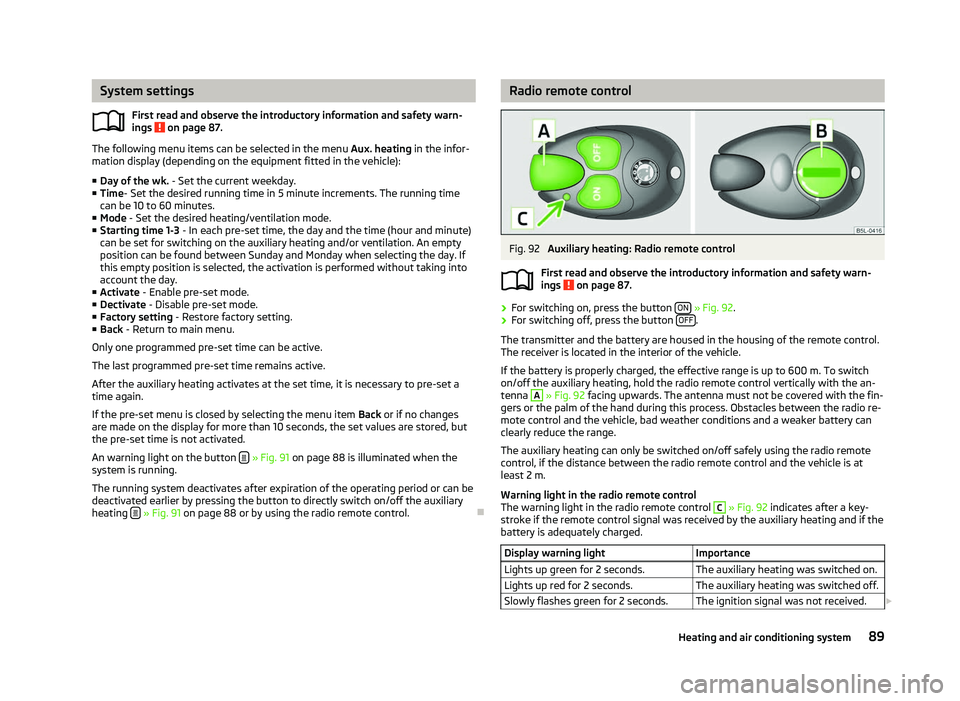
Fig. 92
Auxiliary heating: Radio remote control
First read and observe the introductory information and safety warn-
ings on page 87.
›
For switching on, press the button
ON » Fig. 92.
› For switching off, press the button
OFF .
The transmitter and the battery are housed in the housing of the remote control.
The receiver is located in the interior of the vehicle.
If the battery is properly charged, the effective range is up to 600
m. To switch
on/off the auxiliary heating, hold the radio remote control vertically with the an-
tenna A
» Fig. 92 facing upwards. The antenna must not be covered with the fin-
gers or the palm of the hand during this process. Obstacles between the radio re-
mote control and the vehicle, bad weather conditions and a weaker battery can
clearly reduce the range.
The auxiliary heating can only be switched on/off safely using the radio remote
control, if the distance between the radio remote control and the vehicle is at
least 2
m.
Warning light in the radio remote control
The warning light in the radio remote control C
» Fig. 92 indicates after a key-
stroke if the remote control signal was received by the auxiliary heating and if the
battery is adequately charged.
Display warning light Importance
Lights up green for 2 seconds. The auxiliary heating was switched on.
Lights up red for 2 seconds. The auxiliary heating was switched off.
Slowly flashes green for 2 seconds. The ignition signal was not received. £ ä
89
Heating and air conditioning system
Page 92 of 218
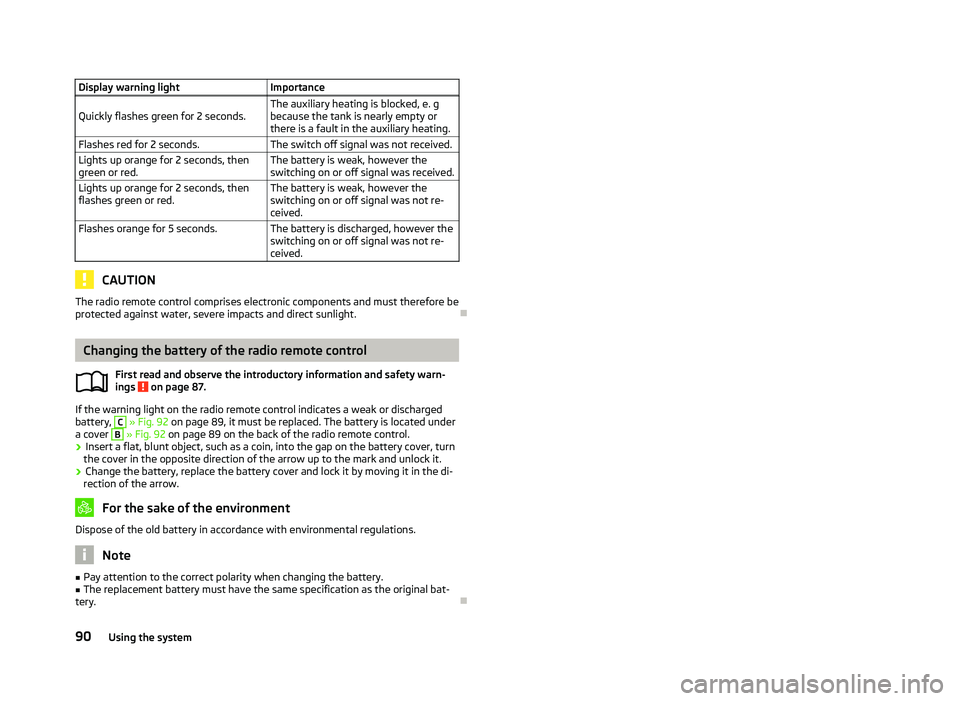
Display warning light
Importance
Quickly flashes green for 2 seconds. The auxiliary heating is blocked, e. g
because the tank is nearly empty or
there is a fault in the auxiliary heating.
Flashes red for 2 seconds. The switch off signal was not received.
Lights up orange for 2 seconds, then
green or red. The battery is weak, however the
switching on or off signal was received.
Lights up orange for 2 seconds, then
flashes green or red. The battery is weak, however the
switching on or off signal was not re-
ceived.
Flashes orange for 5 seconds. The battery is discharged, however the
switching on or off signal was not re-
ceived.CAUTION
The radio remote control comprises electronic components and must therefore be
protected against water, severe impacts and direct sunlight. ÐChanging the battery of the radio remote control
First read and observe the introductory information and safety warn-
ings on page 87.
If the warning light on the radio remote control indicates a weak or discharged
battery, C
» Fig. 92 on page 89
, it must be replaced. The battery is located under
a cover B
» Fig. 92
on page 89 on the back of the radio remote control.
› Insert a flat, blunt object, such as a coin, into the gap on the battery cover, turn
the cover in the opposite direction of the arrow up to the mark and unlock it.
› Change the battery, replace the battery cover and lock it by moving it in the di-
rection of the arrow. For the sake of the environment
Dispose of the old battery in accordance with environmental regulations. Note
■ Pay attention to the correct polarity when changing the battery.
■ The replacement battery must have the same specification as the original bat-
tery. Ð
ä
90
Using the system
Page 100 of 218

Parking aid
Fig. 99
Parking aid: Range of the sensors/activating the parking aid
The parking aid determines the distance between the front or rear bumper and
an obstacle with the aid of ultrasound sensors. The sensors are integrated in the
front/rear bumper.
The signal tones for the front parking aid sound higher than for the rear parking
aid. The tones of the parking aid can be adapted in the menu of the Information
display » page 16.
Range of sensors
The distance warning begins at a distance of about 160°cm from the obstacle at
the rear of the vehicle and about 120
cm from the obstacle in front of the vehicleA
» Fig. 99
. The interval between the warning signals becomes shorter as the
clearance is reduced.
A continuous tone sounds from a distance of approx. 30
cm B
» Fig. 99
- danger
area. From this moment on do not continue driving!
On vehicles with a factory-fitted radio or navigation system, the distance to the
obstacle is simultaneously graphically illustrated on the display, refer to the oper-
ating instructions for the radio or navigation system.
On vehicles with a factory-fitted towing device, the border of the danger area
starts (continuous tone) 5
cm further away from the vehicle. The length of the ve-
hicle can be increased with an installed detachable towing device.
On vehicles with a factory-fitted towing device, the rear sensors are deactivated
when towing a trailer. Activating/deactivating the rear parking aid
The parking aid is activated automatically when
reverse gear is engaged and the
ignition is turned on. This is confirmed by a brief audible signal.
The parking aid is deactivated by removing the reverse gear.
Activating/deactivating the front and rear parking aid
The parking aid is activated when the ignition is turned on and reverse gear is en-
gaged and or by pressing the button » Fig. 99
- the symbol lights up in the
button. This is confirmed by a brief audible signal.
The parking aid is deactivated by pressing the button or at a speed of more
than 10 km/h (the symbol in the button is no longer illuminated). WARNING
■ The parking aid is not a substitute for the driver paying proper attention and
it is always the driver's responsibility to take care when reversing the vehicle
or carrying out similar manoeuvres. Pay particular attention to small children
and animals as they are not recognised by the parking aid sensors.
■ Before reversing or parking, check that there is no small obstacle, such as a
rock, thin post, trailer drawbar etc., in front of or behind the vehicle. Such ob-
stacles may not be recognised by the parking aid sensors.
■ Under certain circumstances, surfaces of certain objects and types of cloth-
ing cannot reflect the signals from the parking aid. Thus, these objects or peo-
ple who wear such clothing are not recognised by the parking aid sensors.
■ External sound sources can have a detrimental effect on the parking aid.
Under unfavourable conditions, objects or people may not be recognised. Note
■ If a warning signal sounds for about 3
seconds after activating the system and
there is no obstacle close to your car, this indicates a system fault. The fault is
confirmed additionally when the symbol flashes in the button . Have the
fault rectified by a
ŠKODA specialist garage.
■ The sensors must be kept clean (free of ice, etc.) to enable the parking aid to
operate properly.
■ If the parking aid is activated and the selector lever of the automatic gearbox is
in the position P, the warning signal is interrupted (the vehicle cannot move). Ð
98 Using the system
Page 109 of 218
Communication
Mobile phones and two-way radio systems
ŠKODA permits the operation of mobile phones and two-way radio systems with
a professionally installed external aerial and a maximum transmission power of
up to 10 watts.
Please refer to a ŠKODA Service Partner for information about the possibilities of
installing and operating mobile phones and two-way radio systems that have a
transmission power of more than 10
W.
Operating mobile phones or two-way radio systems may interfere with the func-
tionality of the electronic systems in your vehicle.
The reasons for this are as follows:
› no external aerial;
› external aerial incorrectly installed;
› transmission power greater than 10 watts. WARNING
■ Concentrate fully at all times on your driving! As the driver you are fully re-
sponsible for the operation of your vehicle. Use the telephone system only to
such an extent that you are in full control of your vehicle at any time.
■ The national regulations for using a mobile phone in a vehicle must be ob-
served. WARNING (Continued)
■ If a mobile phone or a two-way radio system is operated in a vehicle without
an external aerial or an external aerial which has been installed incorrectly,
this can increase the strength of the electromagnetic field inside the vehicle.
■ Two-way radio systems, mobile phones or mounts must not be installed on
airbag covers or within the immediate deployment range of the airbags.
■ Never leave a mobile phone on a seat, on the dash panel or in another area,
from which it can be thrown during a sudden braking manoeuvre, an accident
or a collision - risk of injury.
■ In the event of air transport, the Bluetooth ®
function for the hands-free sys-
tem must be switched off by a specialist garage. Note
■ We recommend that the installation of mobile phones and two-way radio sys-
tems in a vehicle be carried out by a ŠKODA
Service Partner.
■ Not all mobile phones that enable Bluetooth ®
communication are compatible
with the universal telephone preinstallation GSM
II or GSM III. Ask a ŠKODA Serv-
ice Partner to find out if your phone is compatible with the universal telephone
preinstallation GSM II or GSM III. ■ The range of the Bluetooth ®
connection to the hands-free system is restricted
to the vehicle interior. The range is dependent on local factors, e.g. obstacles be-
tween the devices and mutual interferences with other devices. If your mobile
phone is in a jacket pocket, for example, this can lead to difficulties when estab-
lishing a connection with the hands-free-system or transferring data. Ð
107
Communication
Page 111 of 218

Symbols in the information display
Symbol Importance Valid for
Charge status of the phone battery a)
GSM II, GSM III
Signal strength a)
GSM II, GSM III
a phone is connected to the hands-free system. GSM II, GSM III when connected via the HFP profile
The hands-free system is visible to other devices. GSM II, GSM III when connected via the HFP profile
a phone is connected to the hands-free system. GSM III when connected via the rSAP profile
The hands-free system is visible to other devices. GSM III when connected via the rSAP profile
A multimedia unit is connected to the hands-free system. GSM II, GSM III
A UMTS network is available. GSM III
Internet connection via the hands-free system GSM III when connected via the rSAP profilea)
This function is only supported by some mobile phones. ÐPhone Phonebook
A phone phonebook is part of the hands-free system. This phone phonebook can
be used depending on the type of mobile phone.
After the first connection of the telephone, the system begins to load the phone
book from the phone and the SIM card into the memory of the control unit.
Each time the telephone has established a new connection with the hands-free
system, an update of the relevant phone book is performed. The updating can
take a few minutes. During this time the phone book, which was stored after the
last update was completed, is available. Newly stored telephone numbers are on-
ly shown after the updating has ended.
The update is interrupted if a telephone event (e.g. incoming or outgoing call,
voice control dialogue) occurs during the updating procedure. After the telephone
event has ended, the updating starts anew.
GSM II
The internal phonebook provides 2
500 free memory locations. Each contact can
contain up to 4 numbers.
On vehicles fitted with the Columbus navigation system, a maximum of 1 200 tel-
ephone contacts are shown on the display of this appliance.
If the number of contacts loaded exceeds 2 500, the phone book is not complete. GSM III
The internal phonebook provides 2
000 free memory locations. Each contact can
contain up to 5 numbers.
On vehicles fitted with the Columbus navigation system, a maximum of 1 000 tel-
ephone contacts are shown on the display of this appliance.
If the mobile phone's telephone book has more than 2 000 contacts, the follow-
ing message will appear in the information display:
Phone book not fully loaded Ð Universal telephone preinstallation GSM II
Introductory information
The universal telephone preinstallation GSM
II (“hands-free system”) includes a
convenience mode for the mobile phone via voice control, the multifunction
steering wheel, the adapter, radio or the navigation system.
The universal telephone preinstallation GSM II comprises the following functions.
› Phone Phonebook » page 109.
› Convenience operation of the telephone via the multifunction steering
wheel » page 108. £
109
Communication
Page 112 of 218
›
Managing telephone calls via the adapter
» page 111.
› Operation of the telephone via the information display
» page 112.
› Voice control of the telephone
» page 116.
› Music playback from the telephone or other multimedia units
» page 118.
All communication between a mobile phone and your vehicle's hands-free system
is established with the help of Bluetooth ®
technology. The adapter serves only
for charging the telephone and for transmitting the signal to the vehicle's exter-
nal aerial. Note
The following guidelines must be observed » page 107, Mobile phones and two-
way radio systems. ÐConnecting the mobile phone to the hands-free system
To connect a mobile phone with the hands-free system, the two devices must be
paired. Detailed information on this is provided in the operating instructions for
your mobile phone. The following steps must be carried out for the connection.
› Activate Bluetooth ®
and the visibility of your mobile phone on your telephone.
› Switch on the ignition.
› Select the menu
Phone - New user in the information display and wait until the
control unit has completed the search.
› Select your mobile phone from the menu of the units found.
› Confirm the PIN 1)
.
› If the hands-free system announces (as standard
SKODA_BT) on the display of
the mobile phone, enter the PIN 1)
within 30 seconds and wait, until the connec-
tion is established 2
).
› After terminating the connection, confirm the creation of a new user profile in
the information display.
If there is no free space available to create a new user profile, delete an existing
user profile.
During the connecting procedure, no other mobile phone may be connected with
the hands-free system. Up to four mobile phones can be paired with the hands-free system, whereby on-
ly one mobile phone can communicate with the hands-free system.
The visibility of the hands-free system is automatically switched off 3
minutes af-
ter the ignition is switched on and is also deactivated when the mobile phone has
connected to the hands-free system.
Restoring the visibility of the hands-free system
If you have not managed to connect your mobile phone with the hands-free sys-
tem within 3 minutes of switching on the ignition, the visibility of the hands-free
system can be reestablished for 3 minutes in the following ways.
› By turning the ignition off and on.
› By turning voice control off and on.
› Via the information display in the menu item Bluetooth
- Visibility.
Creating a connection with an already paired mobile phone
After switching on the ignition, the connection is automatically established for
the already paired mobile phone 2)
. Check on your mobile phone if the automatic
connection has been established.
Disconnecting the connection
› By withdrawing the ignition key.
› By disconnecting the hands-free system in the mobile phone.
› By disconnecting the user in the information display in the menu
Bluetooth -
User .
Solving connection problems
If the system announces No paired phone found, check the operating state of the
mobile phone.
› Is the mobile phone switched on?
› Is the PIN code entered?
› Is Bluetooth ®
active?
› Is the visibility of the mobile phone active?
› Has the mobile phone already been paired with the hands-free system?
£1)
Depending on the Bluetooth ®
version on the mobile phone, an automatically generated 6-digit PIN is
either displayed or the PIN 1234 has to be entered manually.
2) Some mobile phones have a menu, in which the authorisation for establishing a Bluetooth ®
connec-
tion is completed by inputting a code. If the authorisation input is required, it must always be per-
formed when re-establishing the Bluetooth connection.
110 Using the system
Page 114 of 218
Operate the telephone via the information display
The following menu points can be selected in the menu Phone.
■ Phone book
■ Dial number 1)
■ Call register
■ Voice mailbox
■ Bluetooth 1
)
■ Settings 2)
■ Back
Phone book
In the menu point Phone book is the list of the loaded contacts from the tele-
phone memory and the SIM card of the mobile phone.
Dial number
Any telephone number can be entered in the menu point Dial number. The re-
quired numbers must be selected one after the other using adjustment wheel
and confirmed by pressing the adjustment wheel. Numbers 0 - 9, symbols , , #
and the functions Cancel, Call, Delete can be selected.
Call register
The following menu items can be selected in the menu item Call register.
■ Missed calls
■ Dialled numbers
■ Received calls
Voice mailbox
In the menu Voice mailbox , it is possible to set the number of the voice mailbox 1 )
and then dial the number.
Bluetooth
The following menu items can be selected in the menu Bluetooth.
■ User - the overview of the stored users
■ New user - Search for new mobile phones that are in the reception range
■ Visibility - Switching on the visibility of the telephone unit for other devices ■
Media player
■ Active device
■ Paired devices
■ Search
■ Phone name - the possibility to change the name of the telephone unit (pre-set
SKODA UHV)
Settings
The following menu items can be selected in the menu Settings.
■ Phone book
■ Update 1
)
■ List
■ Surname
■ First name
■ Ring tone
Back
Return in the Start menu of the telephone. Ð Universal telephone preinstallation GSM IIl
Introductory information
The universal telephone preinstallation GSM
II (“hands-free system”) includes a
convenience mode for the mobile phone via voice control, the multifunction
steering wheel, the radio or navigation system.
The universal telephone preinstallation GSM III comprises the following functions.
› Phone Phonebook » page 109
.
› Convenience operation via the multifunction steering wheel
» page 108.
› Operation of the telephone via the information display
» page 114.
› Voice control of the telephone
» page 116.
› Music playback from the telephone or other multimedia units
» page 118.
› Internet connection
» page 115.
› Display of SMS messages » page 114.
£1)
On vehicles fitted with the Amundsen+ navigation system, this function can be accessed via the navi-
gation system menu; refer to the operating instructions for the Amundsen+ navigation system.
2) This function is not available in vehicles fitted with the Amundsen+ navigation system.
112 Using the system