radio SKODA OCTAVIA 2006 Owner´s Manual
[x] Cancel search | Manufacturer: SKODA, Model Year: 2006, Model line: OCTAVIA, Model: SKODA OCTAVIA 2006Pages: 218, PDF Size: 5.48 MB
Page 115 of 218

All communication between a telephone and the hands-free system of your vehi-
cle can only be established with the help of the following profiles of Bluetooth
®
technology.
rSAP - Remote SIM access profile
After connecting the telephone with the hands-free system via the rSAP profile,
the telephone deregisters from the GSM network, and communication with the
network is only enabled by the control unit via the vehicle's external aerial. In the
telephone only the interface for Bluetooth ®
remains active. In this case, you can
only use the mobile phone to disconnect from the hands-free system, deactivate
the Bluetooth ®
connection or dial the emergency number
112 (only valid in some
countries).
HFP - Hands Free Profile
After connecting the telephone with the hands-free system via the HFP profile,
the telephone continues to use its GMS module and the internal antenna to com-
municate with the GSM network. Note
The following guidelines must be observed » page 107, Mobile phones and two-
way radio systems. ÐConnecting the phone to the hands-free system
To connect a mobile phone with the hands-free system, it is necessary to inter-
connect the telephone and hands-free system. Detailed information on this is
provided in the operating instructions for your mobile phone. The following steps
must be carried out for the connection.
Connecting the telephone with the hands-free system via the rSAP profile
› Activate Bluetooth ®
and the visibility of your mobile phone on your telephone.
For certain mobile phones it is necessary to switch on first the rSAP function.
› Switch on the ignition.
› Select the menu
Phone - New user in the information display and wait until the
control unit has completed the search.
› Select your mobile phone from the menu of the units found.
› Within 30 seconds enter the 16-digit code that is shown on the information dis-
play and confirm it according to the instructions on the display of your mobile
phone. ›
If your SIM card is blocked by a PIN code, enter the PIN code for the SIM card in
your phone. The telephone connects to the hands-free system (during the first
connection you can only enter the PIN code in the information display when the
vehicle is stationary, as this is the only situation when you can choose whether
the PIN code should be stored).
› Follow the instructions in the information display, the first time a new user is
stored.
› Reconfirm the
rSAP command on your mobile phone to download the tele-
phone book and the identification data from the SIM card into the control unit.
Connecting the telephone with the hands-free system via the HPP profile
› Activate Bluetooth ®
and the visibility of your mobile phone on your telephone.
› Switch on the ignition.
› Select the menu
Phone - New user in the information display and wait until the
control unit has completed the search.
› Select your mobile phone from the menu of the units found.
› Within 30 seconds enter the 16-digit code that is shown on the information dis-
play and confirm it according to the instructions on the display of your mobile
phone.
› Follow the instructions on the information display and the mobile phone, to
store a new user or to download the telephone book and identification data
from the SIM card into the control unit.
The telephone primarily connects via the rSAP profile.
If the PIN code was stored, the telephone is automatically detected and connec-
ted with the hands-free system the next time the ignition is switched on. Check
your mobile phone to see whether this automatic connection has been establish-
ed.
Disconnecting the connection
› By removing the key from the ignition lock (the connection is disconnected dur-
ing a telephone call).
› By disconnecting the hands-free system in the mobile phone.
› By disconnecting the user in the information display in the menu
Bluetooth -
User - Select user - Disconnect.
On vehicles which are fitted with a radio or navigation system at the factory, it is
possible to terminate the telephone call after removing the key from the ignition
lock by pressing the button on the touchscreen of the radio 1)
or navigation sys-
tem; refer to the operating instructions for the radio or navigation system. £1)
Does not apply for Radio Swing.
113
Communication
Page 120 of 218
Multimedia
Music playback via Bluetooth
®
The universal telephone preinstallation makes it possible to play back music via
Bluetooth ®
from devices such as MP3 players, mobile phones or notebooks.
To ensure the music can be played back via Bluetooth ®
, it is necessary to connect
the terminal device with the hands-free system in the menu Phone - Bluetooth -
Media player. The music playback process is performed on the connected device.
The universal telephone preinstallation GSM II ensures that the music played back
via the hands-free system can be controlled with the remote control » page 117,
Voice commands - GSM II . Note
The device being connected must support the Bluetooth ®
A2DP profile; refer to
the operating instructions for the relevant device being connected. ÐOperating the radio and navigation system on the multifunction steering wheel
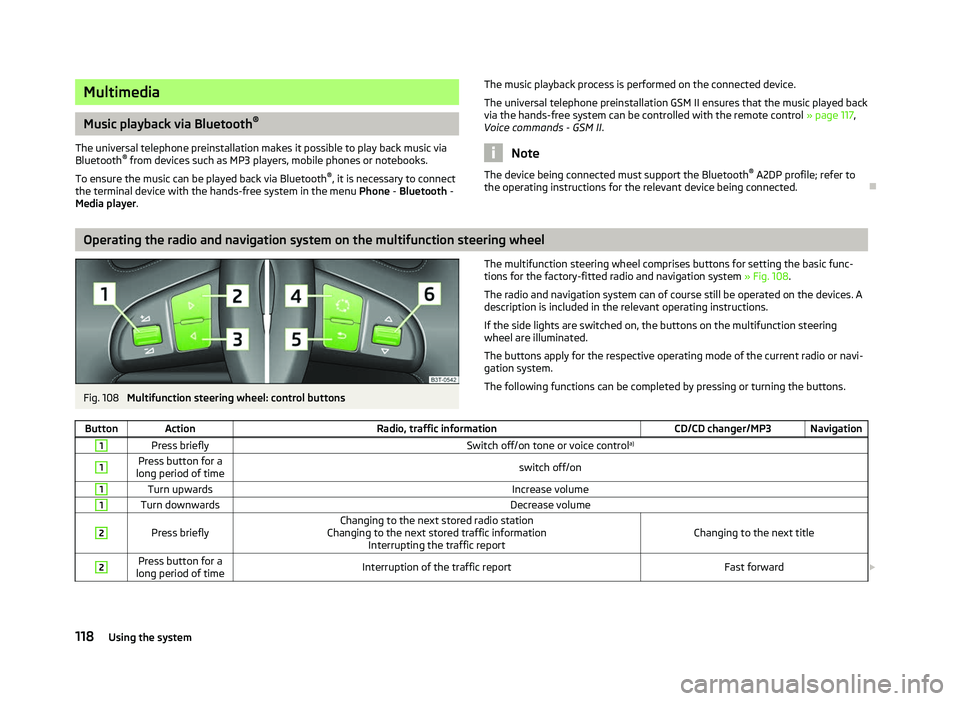
Fig. 108
Multifunction steering wheel: control buttons The multifunction steering wheel comprises buttons for setting the basic func-
tions for the factory-fitted radio and navigation system » Fig. 108.
The radio and navigation system can of course still be operated on the devices. A
description is included in the relevant operating instructions.
If the side lights are switched on, the buttons on the multifunction steering
wheel are illuminated.
The buttons apply for the respective operating mode of the current radio or navi-
gation system.
The following functions can be completed by pressing or turning the buttons.
Button Action Radio, traffic information CD/CD changer/MP3 Navigation1
Press briefly
Switch off/on tone or voice controla)1 Press button for a
long period of time switch off/on1
Turn upwards
Increase volume1
Turn downwards
Decrease volume2
Press briefly
Changing to the next stored radio station
Changing to the next stored traffic information Interrupting the traffic report Changing to the next title2 Press button for a
long period of time Interruption of the traffic report
Fast forward£118
Using the system
Page 121 of 218
Button Action
Radio, traffic information CD/CD changer/MP3 Navigation3
Press briefly
Changing to the previously stored radio station
Changing to the previously stored traffic information Interrupting the traffic report Changing to the previous title3 Press button for a
long period of time Interruption of the traffic report
Fast rewind4
Press briefly
changing the audio source5
Press briefly
Call up the main menu6
Press briefly
Interruption of the traffic report without function6
Turn upwards
Display of the stored/accessible stations
Scroll upwards
Interruption of the traffic report Changing to the previous title
without
function 6
Turn downwards
Display of the stored/accessible stations
Scroll downwards
Interruption of the traffic report Changing to the next titlea)
Only valid for the navigation system Columbus. Note
■ The loudspeakers in the vehicle are adjusted to the power output of the radio
and navigation system of 4x20°W. ■ The sound system equipment comprises loudspeakers that are adjusted to the
amplifier power output of 4x50°W + 6x25 W. ÐAUX-IN and MDI inputs
The AUX-IN input is located below the front armrest and is marked with .
The input MDI is located in the storage compartment on the front passenger side.
The AUX-IN and MDI inputs are used to connect external audio sources (e.g. iPod
or mp3 player) and to play back music from these devices via the factory-fitted ra-
dio or navigation system.
For a description of use, refer to the operating instructions for the relevant radio
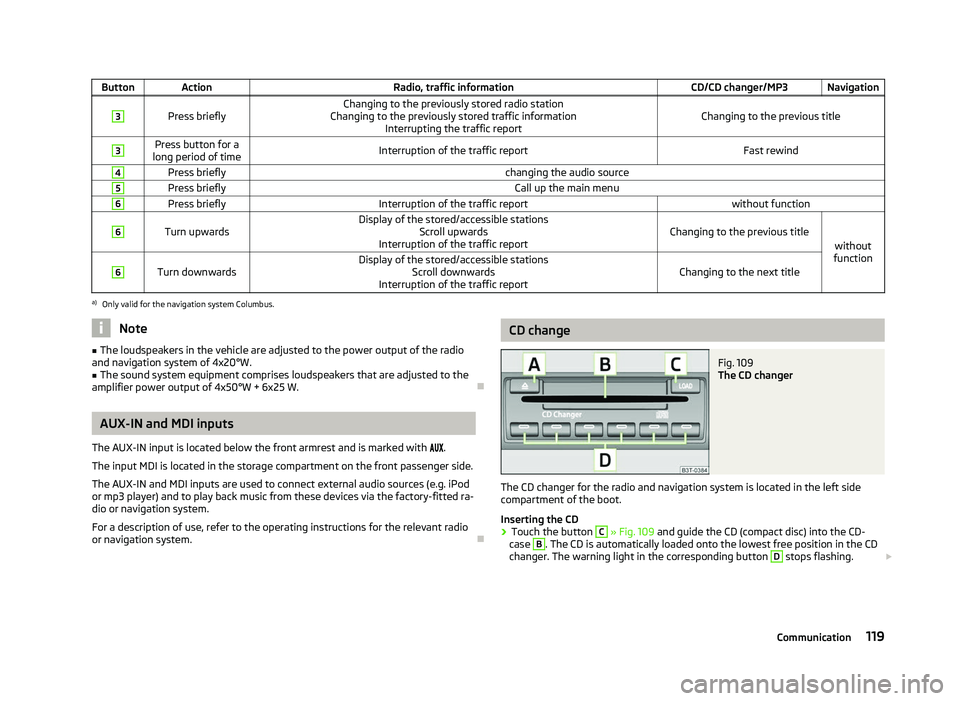
or navigation system. Ð CD change
Fig. 109
The CD changer
The CD changer for the radio and navigation system is located in the left side
compartment of the boot.
Inserting the CD
› Touch the button C
» Fig. 109
and guide the CD (compact disc) into the CD-
case B
. The CD is automatically loaded onto the lowest free position in the CD
changer. The warning light in the corresponding button D
stops flashing.
£
119
Communication
Page 150 of 218

General Maintenance
Taking care of and cleaning the vehicle
Taking care of your vehicle
ä
Introduction
This chapter contains information on the following subjects:
Washing the vehicle 149
Automatic car wash systems 149
Washing by hand 149
Washing with a high-pressure cleaner 149
Preserving and polishing the vehicle paintwork 150
Chrome parts 150
Paint damage 150
Plastic parts 150
De-icing windows and exterior mirrors 151
Radio reception and aerial 151
Headlight lenses 151
Rubber seals 151
Door lock cylinders 151
Wheels 152
Underbody protection 152
Protection of hollow spaces 152
Artificial leather and materials 153
Fabric covers on electrically heated seats 153
Natural leather 153
Seat belts 154
Regular and proper care help to retain the efficiency and value of your vehicle. It
may also be one of the requirements for the acceptance of warranty claims relat-
ing to corrosion damage and paint defects on the bodywork.
We recommend using care products from
ŠKODA Original Accessories that are
available from ŠKODA Service Partners. The instructions for use on the package
must be observed. WARNING
■ Care products may be harmful to your health if not used according to the in-
structions.
■ Always store care products in a safe place, out of the reach of children - risk
of poisoning! ■ When washing your vehicle in the winter: Water and ice in the brake system
can affect the braking efficiency - risk of accident! ■ Only wash the vehicle when the ignition is switched off - risk of accident!
■ Protect your hands and arms from sharp-edged metal parts when cleaning
the underfloor, the inside of the wheel housings or the wheel trims - risk of
cuts!
■ Air fresheners and scents can be hazardous to heath when the temperature
inside the vehicle is high. CAUTION
■ Be sure to check clothing for colourfastness to avoid any damage or visible
stains on the material (leather), panels and textiles.
■ Cleaners containing solvents can damage the material being cleaned.
■ Do not wash your vehicle in bright sunlight - risk of paint damage.
■ If washing the vehicle in the winter using a hose or high-pressure cleaner, en-
sure that the jet of water is not aimed directly at the locking cylinders or the
door/panel joints - risk of freezing!
■ Do not use any insect sponges, rough kitchen sponges or similar cleaning prod-
ucts - risk of damaging the surface of paintwork.
■ Do not stick any stickers on the inside of the rear windows, the rear side win-
dows and in the vicinity of the heating elements on the windscreen or near the
window aerial. These may get damaged. With regard to the antenna, they may in-
terfere with the radio or navigation system.
■ Do not clean the inside of the windows with sharp-edged objects or corrosive
and acidic cleaning agents - risk of damaging the heating elements or window
aerial.
■ Do not attach scents and air fresheners to the dashboard - risk of damage to
the dashboard.
■ To avoid damaging the parking aid sensors while cleaning with high-pressure
cleaners or steam jets, the sensors must only be directly sprayed for short periods
while a minimum distance of 10
cm must be observed.
■ Do not clean the roof trim with a brush - risk of damage to the trim surface. £
148 General Maintenance
Page 151 of 218
For the sake of the environment
■ Used cans of vehicle care products represent a special type of hazardous waste.
These must be disposed of in accordance with national legal regulations. ■ Only wash the vehicle at washing bays intended for this purpose. Note
■ Remove fresh stains such as those from ball-point pens, ink, lipstick, shoe pol-
ish, etc., from the material (leather), panels and textiles as quickly as possible. ■ Due to possible issues with the cleaning and care of the interior of your vehicle,
the special tools and knowledge required, we recommend that this is completed
by a
ŠKODA Service Partner. ÐWashing the vehicle
First read and observe the introductory information and safety warn-
ings on page 148.
The best protection for your vehicle against harmful environmental influences is
frequent washing and wax treatment. How often the vehicle should be washed
depends on a wide range of factors, such as:
›
Frequency of use;
› The parking situation (garage, below trees etc.);
› Season of the year;
› Weather conditions;
› Environmental influences.
The longer insect residues, bird droppings, tree sap, road and industrial dust, tar,
soot particles, road salt and other aggressive deposits remain adhering to the
paintwork of your vehicle, the more detrimental their destructive effect can be.
High temperatures, such as those caused by intensive sun's rays, accentuate this
caustic effect.
It is essential to also thoroughly clean the underside of the vehicle at the end of
the winter. ÐAutomatic car wash systems
First read and observe the introductory information and safety warn-
ings on page 148.ä
ä Your vehicle can be washed in automatic car wash systems.
The usual precautionary measures must be taken before washing the vehicle in
an automatic car wash system (closing the windows including the sliding/tilting
roof, etc.).
If your vehicle is fitted with any particular attached parts, such as a spoiler, roof
luggage rack, two-way radio aerial - it is best to consult the operator of the car
wash system beforehand.
It is important to degrease the lips of the windscreen wiper rubbers after passing
through the automatic vehicle wash system. Ð Washing by hand
First read and observe the introductory information and safety warn-
ings on page 148.
When washing by hand, first soften the dirt with plenty of water and rinse off as
much as possible.
Clean the vehicle with a soft
sponge, a washing glove or a washing brush. Work
from the top to the bottom - starting with the roof. Only apply slight pressure
when cleaning the vehicle's paintwork. Only use a car shampoo for stubborn dirt.
Wash out the sponge or washing glove thoroughly at short intervals.
Clean wheels, door sills and similar parts last. Use a second sponge for such
areas.
Give the vehicle a good rinse after washing it and dry it off using a chamois leath-
er. Ð Washing with a high-pressure cleaner
First read and observe the introductory information and safety warn-
ings on page 148.
When washing the vehicle with a high-pressure cleaner, the instructions for use
of the equipment must be observed. This applies in particular to the
pressure
used and to the spraying distance. Maintain a sufficiently large distance to the
parking aid sensors and soft materials such as rubber hoses or insulation materi-
al. £
ä
ä
149
Taking care of and cleaning the vehicle
Page 153 of 218
De-icing windows and exterior mirrors
First read and observe the introductory information and safety warn-
ings on page 148.
Use a plastic ice scraper for removing snow and ice from the windows and mir-
rors. The ice scraper should not be moved forward and backward but in one direc-
tion to avoid any damage to the surface of the glass.
Clean the windows from the inside on a regular basis.
Dry the glass surfaces with a clean chamois leather or a cloth intended for this
purpose.
When drying the windows after washing the vehicle, do not use window leathers
that have been used to polish the bodywork. Residues of preservatives in the
window leather can dirty the window and reduce visibility. CAUTION
■ Never remove snow or ice from glass parts using warm or hot water - risk of for-
mation of cracks in the glass!
■ When removing snow or ice from windows and mirror lenses ensure that the
paintwork of the vehicle is not to damage.
■ Snow or ice that is contaminated with coarse dirt such as fine gravel, sand, and
salt must not be removed from the window glass and mirrors - risk of damage to
the surface of the windows and mirrors. ÐRadio reception and aerial
First read and observe the introductory information and safety warn-
ings on page 148.
Car parks, tunnels, tall buildings or mountains can disrupt the radio signal even
causing it to fail completely.
With factory-fitted radios and navigation systems, the aerial for the radio recep-
tion can be installed at different locations in the vehicle:
› on the inside of the rear window along with the rear window heater;
› on the inside of the rear side windows;
› on the inside of the windscreen;
› on the roof. Ð
ä
ä Headlight lenses
First read and observe the introductory information and safety warn-
ings on page 148.
Use soap and clean water to clean the plastic headlight lenses.
CAUTION
■ Never wipe the headlights dry and do not use any sharp objects to clean the
plastic lenses, this may damage the protective paintwork and consequently cause
the formation of cracks on the headlight lenses.
■ Do not use any aggressive cleaning or chemical solvent products to clean the
headlights - risk of damaging the headlight lenses. Ð Rubber seals
First read and observe the introductory information and safety warn-
ings on page 148.
The rubber seals on doors, the sliding roof and other windows remain smoother
and last longer if the seals are treated regularly with a suitable rubber care prod-
uct. This helps to prevent leakages and premature wear of the seals. Rubber
seals which are well cared for also do not stick together in cold winter weather.
Ð Door lock cylinders
First read and observe the introductory information and safety warn-
ings on page 148.
Specific products must be used for de-icing door lock cylinders.
Note
■ When washing your vehicle, ensure as little water as possible gets into the lock-
ing cylinders. ■ We recommend that suitable materials from ŠKODA Original Accessories are
used for maintaining the door lock cylinders. Ð
ä
ä
ä
151
Taking care of and cleaning the vehicle
Page 170 of 218
Charging a vehicle battery
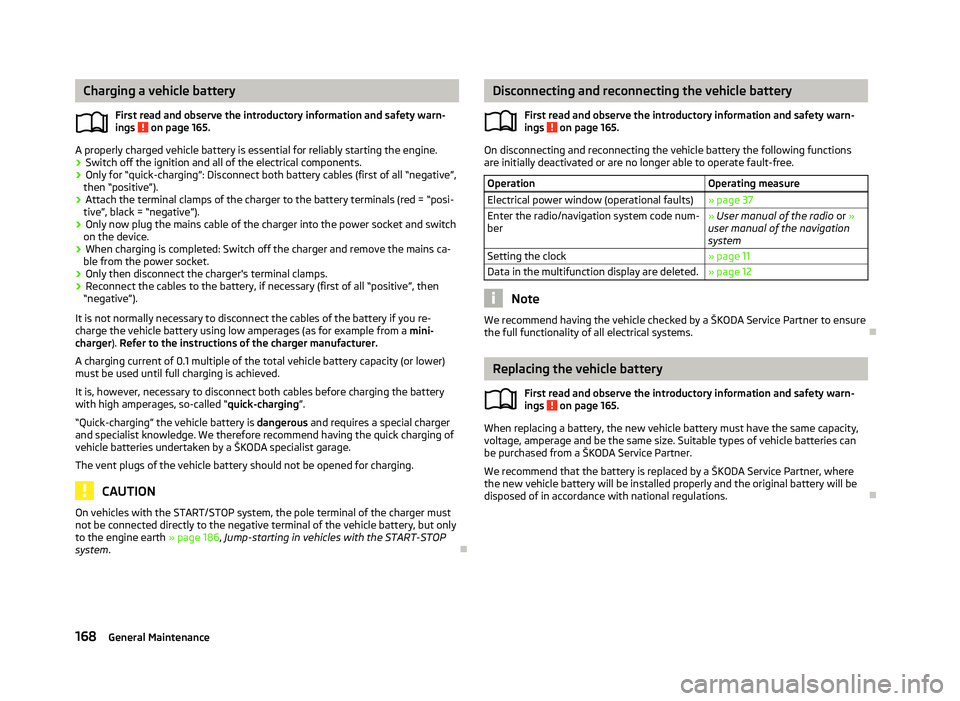
First read and observe the introductory information and safety warn-
ings on page 165.
A properly charged vehicle battery is essential for reliably starting the engine.
›
Switch off the ignition and all of the electrical components.
› Only for “quick-charging”: Disconnect both battery cables (first of all “negative”,
then “positive”).
› Attach the terminal clamps of the charger to the battery terminals (red =
“posi-
tive
”, black = “negative”).
› Only now plug the mains cable of the charger into the power socket and switch
on the device.
› When charging is completed: Switch off the charger and remove the mains ca-
ble from the power socket.
› Only then disconnect the charger's terminal clamps.
› Reconnect the cables to the battery, if necessary (first of all
“positive”, then
“negative
”).
It is not normally necessary to disconnect the cables of the battery if you re-
charge the vehicle battery using low amperages (as for example from a mini-
charger). Refer to the instructions of the charger manufacturer.
A charging current of 0.1 multiple of the total vehicle battery capacity (or lower)
must be used until full charging is achieved.
It is, however, necessary to disconnect both cables before charging the battery
with high amperages, so-called “ quick-charging”.
“Quick-charging” the vehicle battery is dangerous and requires a special charger
and specialist knowledge. We therefore recommend having the quick charging of
vehicle batteries undertaken by a ŠKODA specialist garage.
The vent plugs of the vehicle battery should not be opened for charging. CAUTION
On vehicles with the START/STOP system, the pole terminal of the charger must
not be connected directly to the negative terminal of the vehicle battery, but only
to the engine earth » page 186, Jump-starting in vehicles with the
START-STOP
system . Ð
ä Disconnecting and reconnecting the vehicle battery
First read and observe the introductory information and safety warn-
ings on page 165.
On disconnecting and reconnecting the vehicle battery the following functions
are initially deactivated or are no longer able to operate fault-free.
Operation Operating measure
Electrical power window (operational faults) » page 37
Enter the radio/navigation system code num-
ber » User manual of the radio
or »
user manual of the navigation
system
Setting the clock » page 11
Data in the multifunction display are deleted. » page 12 Note
We recommend having the vehicle checked by a ŠKODA Service Partner to ensure
the full functionality of all electrical systems. Ð Replacing the vehicle battery
First read and observe the introductory information and safety warn-
ings on page 165.
When replacing a battery, the new vehicle battery must have the same capacity,
voltage, amperage and be the same size. Suitable types of vehicle batteries can
be purchased from a
ŠKODA Service Partner.
We recommend that the battery is replaced by a ŠKODA Service Partner, where
the new vehicle battery will be installed properly and the original battery will be
disposed of in accordance with national regulations. Ð
ä
ä
168 General Maintenance
Page 192 of 218
Fuses in the dash panel
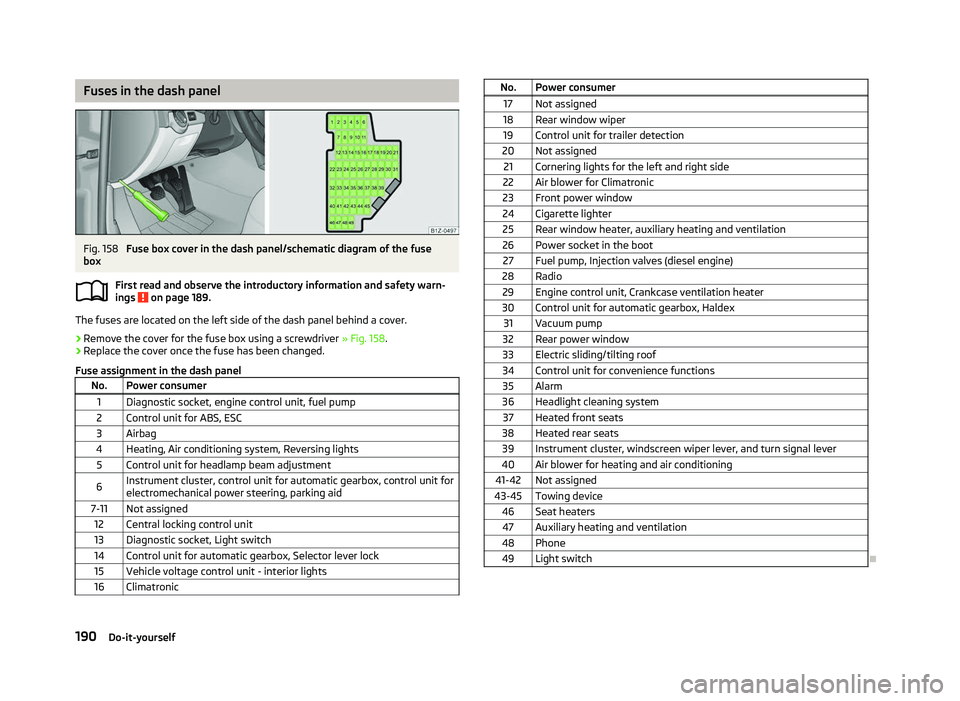
Fig. 158
Fuse box cover in the dash panel/schematic diagram of the fuse
box
First read and observe the introductory information and safety warn-
ings on page 189.
The fuses are located on the left side of the dash panel behind a cover.
›
Remove the cover for the fuse box using a screwdriver
» Fig. 158.
› Replace the cover once the fuse has been changed.
Fuse assignment in the dash panel No. Power consumer
1 Diagnostic socket, engine control unit, fuel pump
2 Control unit for ABS, ESC
3 Airbag
4 Heating, Air conditioning system, Reversing lights 5 Control unit for headlamp beam adjustment
6 Instrument cluster, control unit for automatic gearbox, control unit for
electromechanical power steering, parking aid
7-11 Not assigned 12 Central locking control unit
13 Diagnostic socket, Light switch
14 Control unit for automatic gearbox, Selector lever lock 15 Vehicle voltage control unit - interior lights
16 Climatronic ä
No. Power consumer
17 Not assigned
18 Rear window wiper 19 Control unit for trailer detection
20 Not assigned 21 Cornering lights for the left and right side
22 Air blower for Climatronic
23 Front power window
24 Cigarette lighter 25 Rear window heater, auxiliary heating and ventilation
26 Power socket in the boot 27 Fuel pump, Injection valves (diesel engine)
28 Radio 29 Engine control unit, Crankcase ventilation heater
30 Control unit for automatic gearbox, Haldex 31 Vacuum pump
32 Rear power window
33 Electric sliding/tilting roof
34 Control unit for convenience functions 35 Alarm
36 Headlight cleaning system 37 Heated front seats
38 Heated rear seats 39 Instrument cluster, windscreen wiper lever, and turn signal lever
40 Air blower for heating and air conditioning
41-42 Not assigned
43-45 Towing device 46 Seat heaters47 Auxiliary heating and ventilation
48 Phone 49 Light switch Ð
190 Do-it-yourself
Page 193 of 218
Fuses in the engine compartment
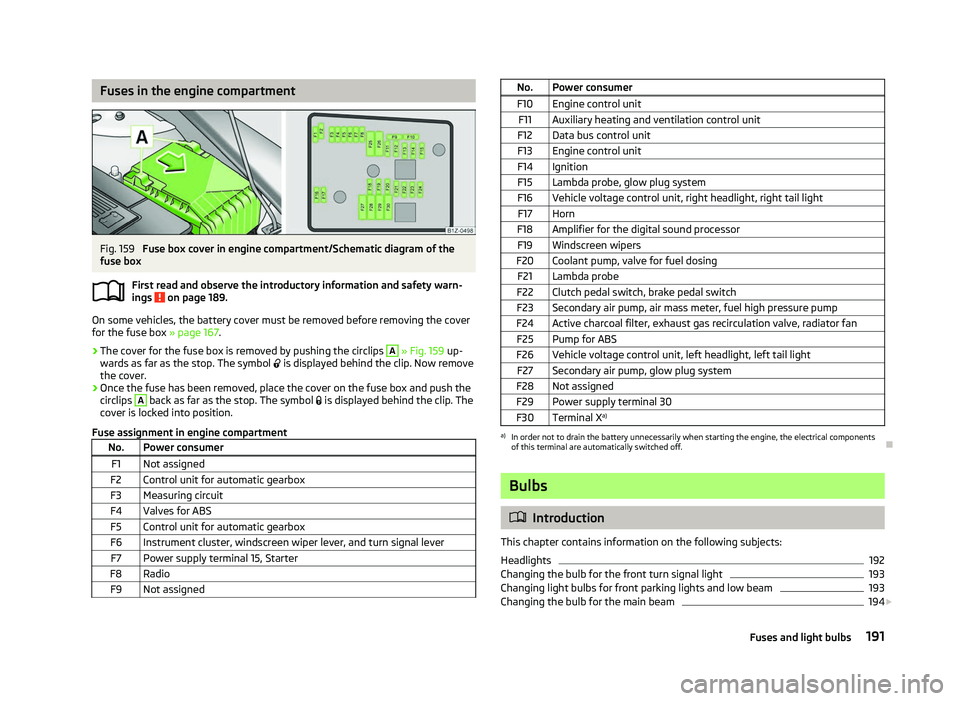
Fig. 159
Fuse box cover in engine compartment/Schematic diagram of the
fuse box
First read and observe the introductory information and safety warn-
ings on page 189.
On some vehicles, the battery cover must be removed before removing the cover
for the fuse box
» page 167.
› The cover for the fuse box is removed by pushing the circlips A
» Fig. 159
up-
wards as far as the stop. The symbol is displayed behind the clip. Now remove
the cover.
› Once the fuse has been removed, place the cover on the fuse box and push the
circlips A
back as far as the stop. The symbol
is displayed behind the clip. The
cover is locked into position.
Fuse assignment in engine compartment No. Power consumer
F1 Not assigned
F2 Control unit for automatic gearbox
F3 Measuring circuit
F4 Valves for ABS F5 Control unit for automatic gearbox
F6 Instrument cluster, windscreen wiper lever, and turn signal lever F7 Power supply terminal 15, Starter
F8 Radio F9 Not assigned ä
No. Power consumer
F10 Engine control unit F11 Auxiliary heating and ventilation control unit
F12 Data bus control unit
F13 Engine control unit
F14 Ignition F15 Lambda probe, glow plug system
F16 Vehicle voltage control unit, right headlight, right tail light F17 Horn
F18 Amplifier for the digital sound processor F19 Windscreen wipers
F20 Coolant pump, valve for fuel dosing F21 Lambda probe
F22 Clutch pedal switch, brake pedal switch
F23 Secondary air pump, air mass meter, fuel high pressure pump
F24 Active charcoal filter, exhaust gas recirculation valve, radiator fan F25 Pump for ABS
F26 Vehicle voltage control unit, left headlight, left tail light F27 Secondary air pump, glow plug system
F28 Not assigned F29 Power supply terminal 30
F30 Terminal X a) a)
In order not to drain the battery unnecessarily when starting the engine, the electrical components
of this terminal are automatically switched off. Ð Bulbs
ä
Introduction
This chapter contains information on the following subjects:
Headlights 192
Changing the bulb for the front turn signal light 193
Changing light bulbs for front parking lights and low beam 193
Changing the bulb for the main beam 194
£
191
Fuses and light bulbs
Page 210 of 218
Index
A
ABS 96
Warning light 22
Accessories 177
Active steering support 95
Adjusting Exterior mirror 52
Adjusting seats 122
Adjustment Seat 55
Aerial 149
see Radio reception 151
Airbag 129
Deployment 129
Front airbag 130
Head airbag 132
Side airbag 131
Airbag system 129
Air conditioning system Air outlet vents 80
Climatronic 85
Manual air conditioning system 82
Alarm 31
Anti-theft alarm system 31
Antilock brake system 96
Armrest Front 74
rear 60, 75
Ashtray 68
Assistance systems ESC 95
Assist systems ABS 22, 96
Cruise control systems (CCS) 99
EDS and XDS 97
ESC 22Parking aid 98
START/STOP 100
TCS 21, 96
Auto Check Control 17
Automatic driving lamp control 40
Automatic gearbox 102
Dynamic shift programme 105
Emergency programme 106
Information for driving 102
Kickdown 105
Manual shifting of gears on the multifunction steering wheel 104
Parking 103
Selector lever-emergency unlocking 106
Selector lever lock 105
Selector lever positions 103
Starting off 103
Stopping 103
Tiptronic 104
Automatic load deactivation 169
Auxiliary heating (auxiliary heating and ventila- tion) 87
Avoiding damage to your vehicle 143
B
Before setting off 121
Belt tensioners 128
Bonnet Closing 160
Opening 160
Warning light 20
Boot Class
N1 vehicles 61
Cover 63
Emergency unlocking 34
Fastening elements 61
Fixing nets 62
Fixing of the floor covering 63
foldable boot cover (Combi) 64
Light 47see Boot lid 33
Unlocking the boot lid 34
Variable loading floor 64
Boot lid 33
Automatic locking 33
Warning light 21
Brake booster 95
Brake fluid Checking 164
Brakes Brake assist systems 93
Handbrake 95
Running in 139
Warning light 19
Braking Brake fluid 164
Braking assistant 95
Breakdown kit 182
Bulbs Replacing 191
Button in the driver's door Electric power windows 34
C
Car computer see Multifunction display 12
Car jack 179
Carrier 66
Catalytic converter 139
CD changer 119
Central locking button 29
Central locking system 27
lock 29
unlock 28
Changes 177
Changing Engine oil 162
Wheel 179
Charging a vehicle battery 168
208 Index