ESP SKODA OCTAVIA 2006 Owner´s Manual
[x] Cancel search | Manufacturer: SKODA, Model Year: 2006, Model line: OCTAVIA, Model: SKODA OCTAVIA 2006Pages: 218, PDF Size: 5.48 MB
Page 108 of 218
Emergency programme
First read and observe the introductory information and safety warn-
ings on page 102.
An emergency programme exists in the event of a fault in the system.
The gearbox operates in a corresponding emergency programme if there are
functional faults in the gearbox electronics. All of the display elements illuminate
or go out.
A functional fault can have the following effect:
› The gearbox only shifts into certain gears;
› The reverse gear
R cannot be used,
› The manual shift programme is switched off in emergency mode. Note
If the gearbox has switched to emergency mode, drive to a ŠKODA specialist ga-
rage to have the fault rectified. ÐSelector lever-emergency unlocking
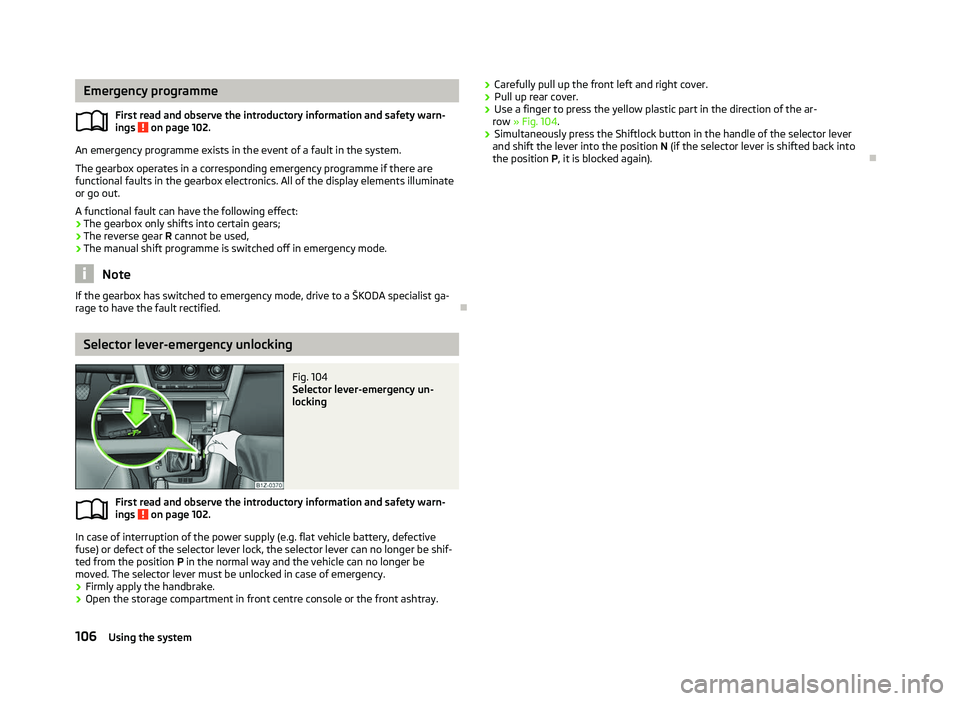
Fig. 104
Selector lever-emergency un-
locking
First read and observe the introductory information and safety warn-
ings on page 102.
In case of interruption of the power supply (e.g. flat vehicle battery, defective
fuse) or defect of the selector lever lock, the selector lever can no longer be shif-
ted from the position
P in the normal way and the vehicle can no longer be
moved. The selector lever must be unlocked in case of emergency.
› Firmly apply the handbrake.
› Open the storage compartment in front centre console or the front ashtray.
ä
ä
›
Carefully pull up the front left and right cover.
› Pull up rear cover.
› Use a finger to press the yellow plastic part in the direction of the ar-
row » Fig. 104.
› Simultaneously press the Shiftlock button in the handle of the selector lever
and shift the lever into the position N (if the selector lever is shifted back into
the position P , it is blocked again). Ð106
Using the system
Page 120 of 218
Multimedia
Music playback via Bluetooth
®
The universal telephone preinstallation makes it possible to play back music via
Bluetooth ®
from devices such as MP3 players, mobile phones or notebooks.
To ensure the music can be played back via Bluetooth ®
, it is necessary to connect
the terminal device with the hands-free system in the menu Phone - Bluetooth -
Media player. The music playback process is performed on the connected device.
The universal telephone preinstallation GSM II ensures that the music played back
via the hands-free system can be controlled with the remote control » page 117,
Voice commands - GSM II . Note
The device being connected must support the Bluetooth ®
A2DP profile; refer to
the operating instructions for the relevant device being connected. ÐOperating the radio and navigation system on the multifunction steering wheel
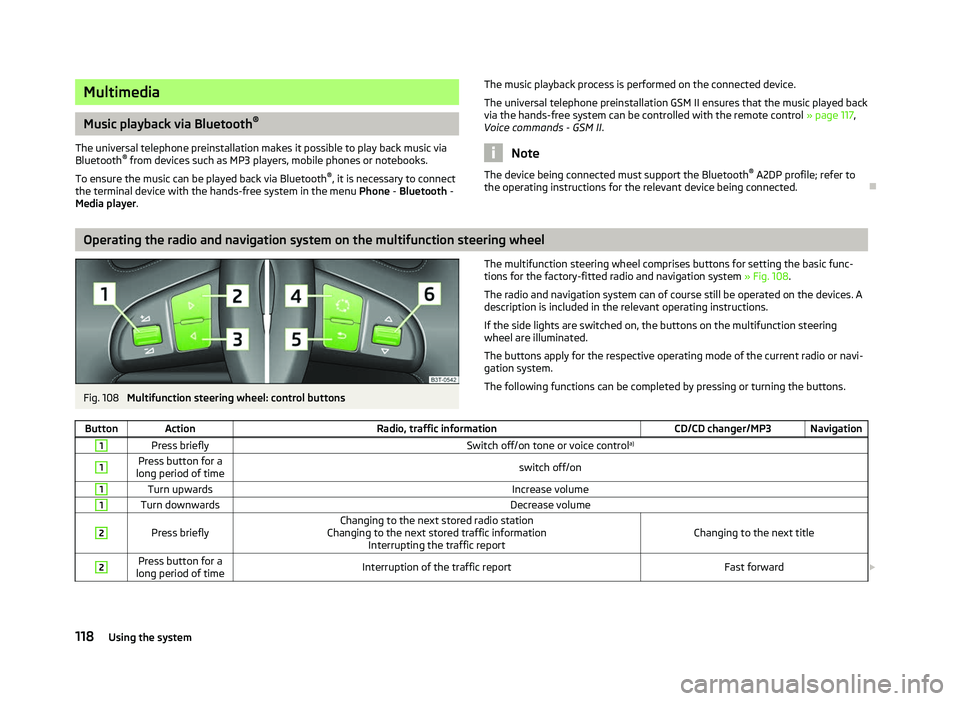
Fig. 108
Multifunction steering wheel: control buttons The multifunction steering wheel comprises buttons for setting the basic func-
tions for the factory-fitted radio and navigation system » Fig. 108.
The radio and navigation system can of course still be operated on the devices. A
description is included in the relevant operating instructions.
If the side lights are switched on, the buttons on the multifunction steering
wheel are illuminated.
The buttons apply for the respective operating mode of the current radio or navi-
gation system.
The following functions can be completed by pressing or turning the buttons.
Button Action Radio, traffic information CD/CD changer/MP3 Navigation1
Press briefly
Switch off/on tone or voice controla)1 Press button for a
long period of time switch off/on1
Turn upwards
Increase volume1
Turn downwards
Decrease volume2
Press briefly
Changing to the next stored radio station
Changing to the next stored traffic information Interrupting the traffic report Changing to the next title2 Press button for a
long period of time Interruption of the traffic report
Fast forward£118
Using the system
Page 121 of 218
Button Action
Radio, traffic information CD/CD changer/MP3 Navigation3
Press briefly
Changing to the previously stored radio station
Changing to the previously stored traffic information Interrupting the traffic report Changing to the previous title3 Press button for a
long period of time Interruption of the traffic report
Fast rewind4
Press briefly
changing the audio source5
Press briefly
Call up the main menu6
Press briefly
Interruption of the traffic report without function6
Turn upwards
Display of the stored/accessible stations
Scroll upwards
Interruption of the traffic report Changing to the previous title
without
function 6
Turn downwards
Display of the stored/accessible stations
Scroll downwards
Interruption of the traffic report Changing to the next titlea)
Only valid for the navigation system Columbus. Note
■ The loudspeakers in the vehicle are adjusted to the power output of the radio
and navigation system of 4x20°W. ■ The sound system equipment comprises loudspeakers that are adjusted to the
amplifier power output of 4x50°W + 6x25 W. ÐAUX-IN and MDI inputs
The AUX-IN input is located below the front armrest and is marked with .
The input MDI is located in the storage compartment on the front passenger side.
The AUX-IN and MDI inputs are used to connect external audio sources (e.g. iPod
or mp3 player) and to play back music from these devices via the factory-fitted ra-
dio or navigation system.
For a description of use, refer to the operating instructions for the relevant radio
or navigation system. Ð CD change
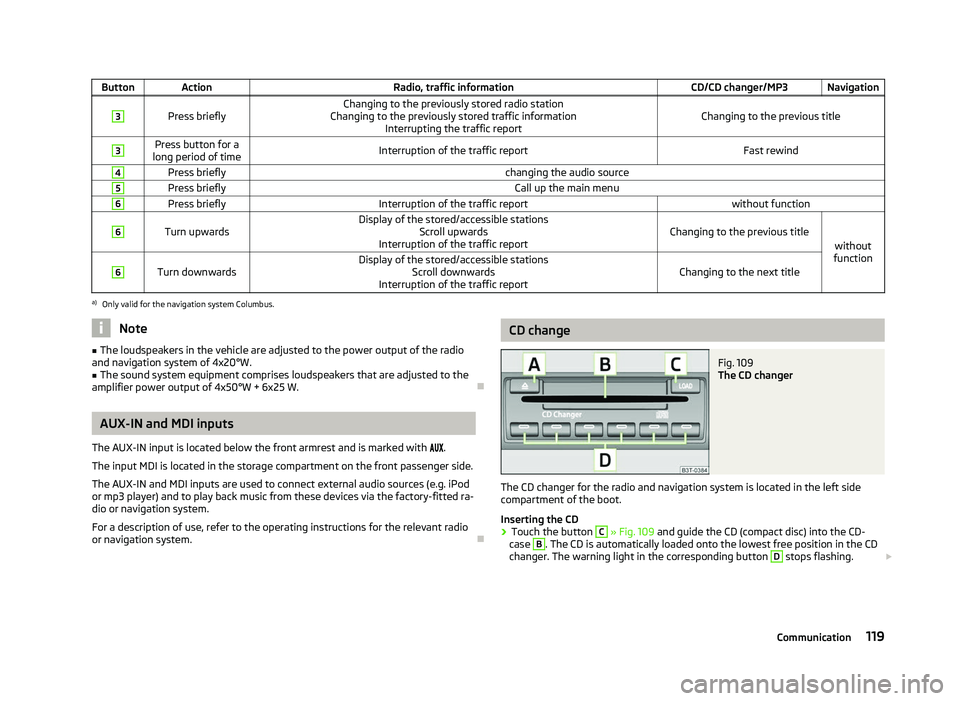
Fig. 109
The CD changer
The CD changer for the radio and navigation system is located in the left side
compartment of the boot.
Inserting the CD
› Touch the button C
» Fig. 109
and guide the CD (compact disc) into the CD-
case B
. The CD is automatically loaded onto the lowest free position in the CD
changer. The warning light in the corresponding button D
stops flashing.
£
119
Communication
Page 122 of 218
Filling the CD changer with CDs
›
Press and hold the button C
» Fig. 109 for longer than 2
seconds and guide the
CDs one after the other (maximum 6 CDs) into the CD case B
. The warning
lights in the buttons D
stop flashing.
Inserting a CD at a specific position
› Press the button C
» Fig. 109. The warning lights in the buttons D
illuminate
the memory spaces that are already assigned and flash in the case of free mem-
ory spaces.
› Touch the desired button D
and guide the CD into the CD-case B
.
Ejecting a CD
› Press the button A
» Fig. 109 to eject a CD. For assigned memory spaces, the
warning lights now illuminate in the buttons D
.
› Press the corresponding button D
. The CD is ejected.
Ejecting all CDs
› Press and hold the button A
» Fig. 109 for more than 2
seconds to eject the
CDs. All CDs in the CD-changer are ejected consecutively. Note
■ Always guide the CD into the CD case B
» Fig. 109 with the printed side facing
upwards.
■ Never force the CD into the CD case as it is drawn in automatically.
■ After loading a CD into the CD changer, wait until the warning light of the corre-
sponding button D
is illuminated. Then the CD case B
is free to load the next
CD.
■ If a position is selected, on which a CD is already located, this CD is ejected. Re-
move the ejected CD and load the desired CD. Ð
120 Using the system
Page 124 of 218
What influences the driving safety?
First read and observe the introductory information and safety warn-
ings on page 121.
The driver is fully responsible for himself and his occupants. If your driving safety
is effected, you place yourself and the oncoming traffic at risk.
The following guidelines must therefore be observed. › Do not get distracted from concentrating on the traffic situation, e.g. by your
passengers or mobile phone calls.
› Never drive when your driving ability is impaired, e.g. through medication, alco-
hol, drugs.
› Keep to the traffic regulations and the permissible speed limit.
› Always adjust the driving speed to the road, traffic and weather conditions.
› Take regular breaks on long journeys – at least every two hours. ÐCorrect seated position
ä
Introduction
This chapter contains information on the following subjects:
Correct seated position for the driver 123
Correct seated position for the front passenger 123
Correct seated position for the occupants on the rear seats 123
Examples of an incorrect seated position 124
WARNING
■ The front seats and the head restraints must always be adjusted to match
the body size of the seat occupant as well as the seat belts must always be
correctly fastened in order to provide an optimal protection for you and your
occupants.
■ Always assume the correct seated position before setting off and do not
change this position while driving. Also advise your passengers to adopt the
correct seated position and not to change this position while the car is mov-
ing.
ä WARNING (Continued)
■ If the occupant adopts an incorrect seated position, he is exposed to life-
threatening injuries, in case he is hit by a deployed airbag.
■ If the occupants on the rear seats are not sitting upright, the risk of injury is
increased due to incorrect routing of the seat belt.
■ The driver must maintain a distance of at least 25 cm to the steering wheel.
The front passenger must maintain a distance of at least 25 cm to the dash
panel. Not maintaining this minimum distance will mean that the airbag sys-
tem will not be able to properly protect you - hazard!
■ When driving, hold the steering wheel with both hands firmly on the outer
edge in the 9
o'clock and 3 o'clock position. Never hold the steering wheel in
the 12 o'clock position or in any other way (e.g. in the middle or inner edge of
the steering wheel). In such cases, you could severely injure the arms, hands
and head when the driver airbag is deployed.
■ The seat backrests must not be angled too far back when driving otherwise
this will affect proper operation of the seat belts and of the airbag system -
risk of injury!
■ Ensure that there are no objects in the driver's footwell as they may get
caught behind the pedals when driving or applying the braking. You would
then no longer be able to operate the clutch, brake or accelerate.
■ Always keep your feet in the footwell when the car is being driven - never
place your feet on the instrument panel, out of the window or on the surfaces
of the seats. You will be exposed to increased risk of injury if it becomes nec-
essary to apply the brake or in the event of an accident. If an airbag is de-
ployed, you may suffer fatal injuries when adopting an incorrect seated posi-
tion! Ð
122 Safety
Page 126 of 218
Examples of an incorrect seated position
First read and observe the introductory information and safety warn-
ings on page 122.
Seat belts offer their optimum protection only if the webbing of the seat belts is
properly routed. Incorrect seated positions considerably reduce the protective
functions of the seat belts and therefore increase the risk of injury due to an in-
correct routing of the seat belt. The driver is fully responsible for himself and pas-
sengers, especially children. Never allow a passenger to adopt an incorrect seated
position when the car is moving.
The following list contains examples of which seated positions can cause serious
injuries or death. This list is not complete, however we would like you to familiar-
ise yourself with this subject.
Therefore, while the car is moving never:
› stand up in the vehicle;
› stand up on the seats;
› kneel on the seats;
› tilt the seat backrest fully to the back;
› lean against the dash panel;
› lie on the rear seat bench;
› only sit on the front area of the seat;
› sit to the side;
› lean out of the window;
› put the feet out of the window;
› put the feet on the dash panel;
› put the feet on the seat upholstery;
› transport somebody in the footwell;
› have the seat belt not fastened when driving;
› be in the boot. Ðä
124 Safety
Page 135 of 218
WARNING (Continued)
■ The airbag control unit operates with sensors located in the front doors. For
this reason no adjustments must be carried out to the doors and door panels
(e.g. additional installation of loudspeakers). Resulting damages can have a
negative affect on the operation of the airbag system. All work on the front
doors and their panels must only be carried out by a
ŠKODA specialist garage.
■ There must no other persons (e.g. children) or animals between the passen-
ger and the deployment area of the head airbag. In addition, none of the occu-
pants should lean their head out of the window when driving, or extend their
arms and hands out of the window.
■ The sun visors must not be swivelled towards the side windows in the de-
ployment area of the head airbags if any objects, such as ball-point pens, etc.
are attached to them. This might result in injuries to the occupants if the head
airbag is deployed.
■ The installation of impermissible accessories in the vicinity of the head air-
bags can considerably impair the protection offered by the head airbag in the
event of it being deployed. When the deployed head airbag is inflated, parts of
the fitted accessories could be thrown into the interior of the car and injure
the occupants » page 177, Accessories, changes and replacement of parts .Ð Deactivating airbags
Deactivating airbags
Deactivation of airbags is envisaged only for particular instances, such as if:
› using a child seat on the front passenger seat, in which the child has its back to
the vehicle's direction of travel (in some countries this must be in the direction
of travel due to different legal regulations applying) » page 135, Transporting
children safely ;
› not being able to maintain a distance of at least 25 cm between the middle of
the steering wheel and chest, despite the driver's seat being correctly adjusted;
› special attachments are required in the area of the steering wheel because of a
physical disability;
› other seats have been installed (e.g. orthopaedic seats without side airbags).
The front passenger airbag can be switched off with the key-operated
switch » page 133 , Key switch for the front seat passenger airbag .
We recommend that you ask a
ŠKODA Service Partner to switch off any other air-
bags. Monitoring the airbag system
The functionality of the airbag system is monitored electronically even if one of
the airbags is switched off.
If the airbag was switched off using diagnostic equipment:
› The airbag warning light
illuminates for around 4
seconds after the ignition is
switched on and then flashes approximately another 12 seconds in 2 second in-
tervals.
The following applies if the airbag has been switched off using the key switch
in the storage compartment:
› The airbag warning light
comes on for around 4 seconds after the ignition is
switched on;
› The deactivated airbag is indicated by the illumination of the warning light
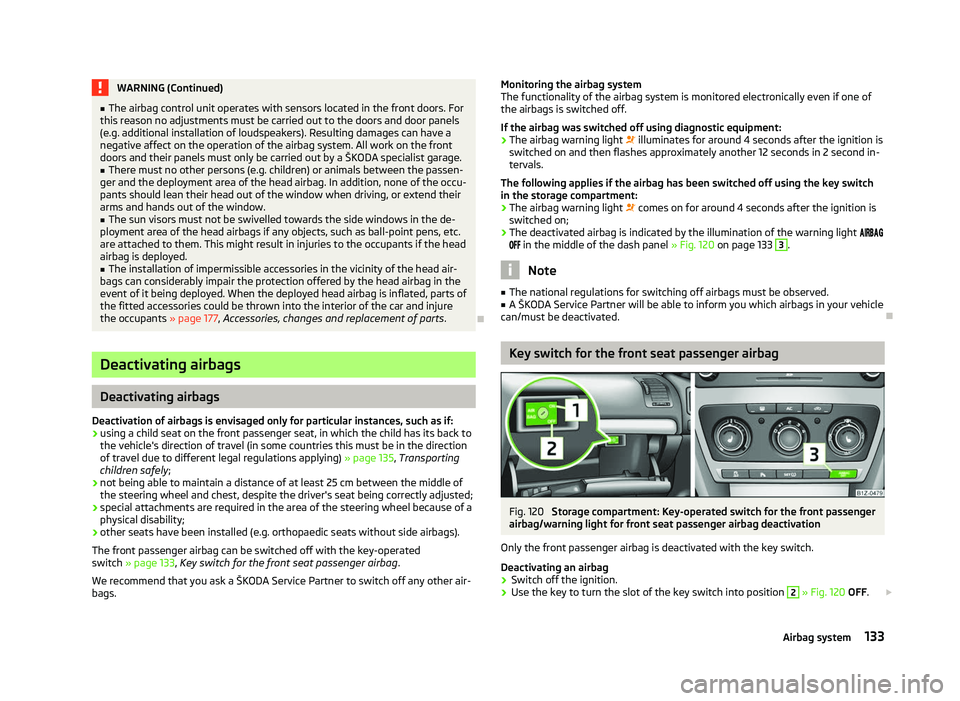
in the middle of the dash panel » Fig. 120 on page 133 3
.
Note
■ The national regulations for switching off airbags must be observed.
■ A ŠKODA Service Partner will be able to inform you which airbags in your vehicle
can/must be deactivated. Ð Key switch for the front seat passenger airbag
Fig. 120
Storage compartment: Key-operated switch for the front passenger
airbag/warning light for front seat passenger airbag deactivation
Only the front passenger airbag is deactivated with the key switch.
Deactivating an airbag › Switch off the ignition.
› Use the key to turn the slot of the key switch into position 2
» Fig. 120 OFF.
£
133
Airbag system
Page 136 of 218
›
Check whether the warning light
in the middle of the dash panel 3
lights up when the ignition is switched on.
Activating an airbag
› Switch off the ignition.
› Use the key to turn the slot of the key switch into position 1
» Fig. 120 ON.
› Ensure that the warning light
in the middle of the dash panel 3
does
not light up when the ignition is switched on.
Warning light
(airbag switched off)
If the front passenger airbag is switched off, the warning light comes on for
about 4 seconds after the ignition is switched on.
There is a system fault in the deactivated airbag » if the airbag warning light
flashes. Immediately visit a ŠKODA specialist garage. WARNING
■ The driver is responsible for whether the airbag is switched on or switched
off.
■ Only switch off the airbag when the ignition is switched off! Otherwise a
fault can occur in the system for deactivating the airbag. ■ If the airbag warning light
(airbag switched off) flashes, the front
passenger airbag will not be deployed in the event of an accident! Have the
airbag system checked by a ŠKODA specialist garage immediately. Ð134
Safety
Page 141 of 218
Driving Tips
Driving and the Environment
The first 1 500 km
New engine
The engine has to be run in during the first 1 500 kilometres.
Up to 1 000 kilometres › Do not drive faster than 3/4 of the maximum speed of the gear in use, i.e. 3/4 of
the maximum permissible engine speed.
› No full throttle.
› Avoid high engine speeds.
› Do not tow a trailer.
From 1 000 up to 1
500 kilometres
› Gradually
increase the power output of the engine up to the full speed of the
gear engaged, i.e. up to the maximum permissible engine speed.
During the first operating hours the engine has higher internal friction than later
until all of the moving parts have harmonized. The driving style which you adopt
during the first approx.1
500 kilometres plays a decisive part in the success of
running in your car.
Never drive at unnecessarily high engine speeds even after the running-in period
is complete. The maximum permissible engine speed is marked by the start of the
red scale area of the revolutions counter. On vehicles fitted with a manual gear-
box, at the very latest shift up into the next gear when the red area is reached.
During acceleration (depressing the accelerator) exceptionally high engine
speeds are automatically reduced, yet the engine is not protected against too
high engine speeds which are caused by incorrectly shifting down the gears re-
sulting in a sudden increase of the engine speeds above the permitted maximum
revolutions which can lead to engine damage.
For a vehicle fitted with a manual gearbox the converse situation also applies: Do
not drive at an engine speed that is too low. Shift down a gear when the engine
is no longer running smoothly. Observe the recommended gear » page 11, Recom-
mended gear . CAUTION
All the speed and engine revolution figures apply only when the engine is at its
normal operating temperature. Never rev up a cold engine when the vehicle is
stationary or when driving in individual gears. For the sake of the environment
Not driving at unnecessarily high engine revolutions and shifting to a higher gear
as early as possible are ways to minimise fuel consumption and operating noise
levels and protects the environment. Ð New tyres
New tyres have to be “
run in” since they do not offer optimal grip at first. Drive
especially carefully for the first 500 km or so. Ð New brake pads
New brake pads initially do not provide full braking efficiency. The brake pads
must initially be “run in
”. Drive especially carefully for the first 200 km or so. Ð Catalytic converter
Proper operation of the emission control system (catalytic converter) is of major
significance for driving your vehicle in an environmentally conscious way.
The following guidelines must be observed: › Vehicles fitted with a petrol engine must always be refueled with unleaded pet-
rol » page 156, Unleaded petrol ;
› Do not pour too much oil into the engine
» page 161, Checking the engine oil
level;
› Do not switch off the ignition while driving.
If you drive your vehicle in a country in which unleaded petrol is not available, you
must have the catalytic converter replaced later when driving the vehicle into a
country in which use of a catalytic converter is mandatory. £
139
Driving and the Environment
Page 158 of 218
Note
The fuel tank has a capacity of about 55 litres or 60 litres1)
, containing a reserve of
approx. 7 litres . ÐUnleaded petrol
First read and observe the introductory information and safety warn-
ings on page 155.
Your vehicle can only be operated with
unleaded fuel that complies with the
standard EN 228 (in Germany: standard DIN 51626-1 or E10 for unleaded fuel with
an octane rating of 95 RON and 91 RON or DIN 51626-2 or E5 for unleaded fuel
with the octane rating 95 RON and 98 RON).
Prescribed fuel - unleaded fuel 95/91 RON
Use unleaded fuel with the octane rating 95 RON. Unleaded petrol 91 RON can al-
so be used but results in a slight loss in performance.
If, in an emergency, the vehicle has to be refuelled with petrol of a lower octane
number than the one prescribed, the journey must only be continued at medium
engine speeds and a low engine load. Driving at high engine revs or a high engine
load can severely damage the engine! Refuel using petrol of the prescribed oc-
tane number as soon as possible.
Prescribed fuel - unleaded petrol min. 95 RON
Use unleaded fuel with the octane rating 95 RON.
In case of necessity, you can refuel with petrol with the octane rating 91 RON if
petrol with the octane rating 95 RON is not available. The journey must only be
continued at medium engine speeds and a minimum engine load. Driving at high
engine revs or a high engine load can severely damage the engine! Refuel using
petrol of the prescribed octane number as soon as possible.
Even in the event of an emergency, petrol of a lower octane number than 91 RON
must not be used, otherwise the engine can be severely damaged!
Unleaded petrol with higher octane number
Unleaded petrol that has a higher octane number than that required by the en-
gine can be used without limitations.
ä
On vehicles with prescribed unleaded petrol
95/91 RON, the use of petrol with a
higher octane number than 95 RON does not result in a noticeable power in-
crease or a lower fuel consumption.
On vehicles using prescribed unleaded petrol of min. 95
RON, the use of petrol
with a higher octane number than 95 RON can increase the power and reduce
fuel consumption.
Prescribed fuel - unleaded petrol 98/(95) RON
Use unleaded fuel with the octane rating 98 RON. Unleaded petrol 95 RON can
also be used but results in a slight loss in performance.
In case of necessity, you can refuel with petrol with the octane rating 91 RON of
unleaded fuel with octane rating 98 RON or 95 RON is not available. The journey
must only be continued at medium engine speeds and a minimum engine load.
Driving at high engine revs or a high engine load can severely damage the engine!
Refuel using petrol of the prescribed octane number as soon as possible.
Even in the event of an emergency, petrol of a lower octane number than 91 RON
must not be used, otherwise the engine can be severely damaged!
Fuel additives
Only use unleaded petrol, which complies with the standard EN 228 (in Germany:
standard DIN 51626-1 or E10 for unleaded fuel with an octane rating of 95 RON
and 91 RON or DIN 51626-2 or E5 for unleaded fuel with an octane rating of
95 RON and 98 RON), as these meet all of the requirements for fault-free engine
operation. We therefore recommend that no fuel additives are used. CAUTION
■ All
ŠKODA vehicles with petrol engines must only be operated with unleaded
petrol. Just filling the tank with leaded petrol once will damage the exhaust sys-
tem!
■ Engine parts can be damaged if petrol with a lower octane number than the one
prescribed is used.
■ In no case may fuel additives with metal components be used, especially not
with manganese and iron content.
LRP (lead replacement petrol) fuels with met-
allic components may not be used. There is a risk of causing considerable damage
to parts of the engine or exhaust system! £1)
Valid for Octavia Combi 4x4 and Octavia Scout.
156 General Maintenance