ESP SKODA OCTAVIA 2006 Owner´s Manual
[x] Cancel search | Manufacturer: SKODA, Model Year: 2006, Model line: OCTAVIA, Model: SKODA OCTAVIA 2006Pages: 218, PDF Size: 5.48 MB
Page 50 of 218
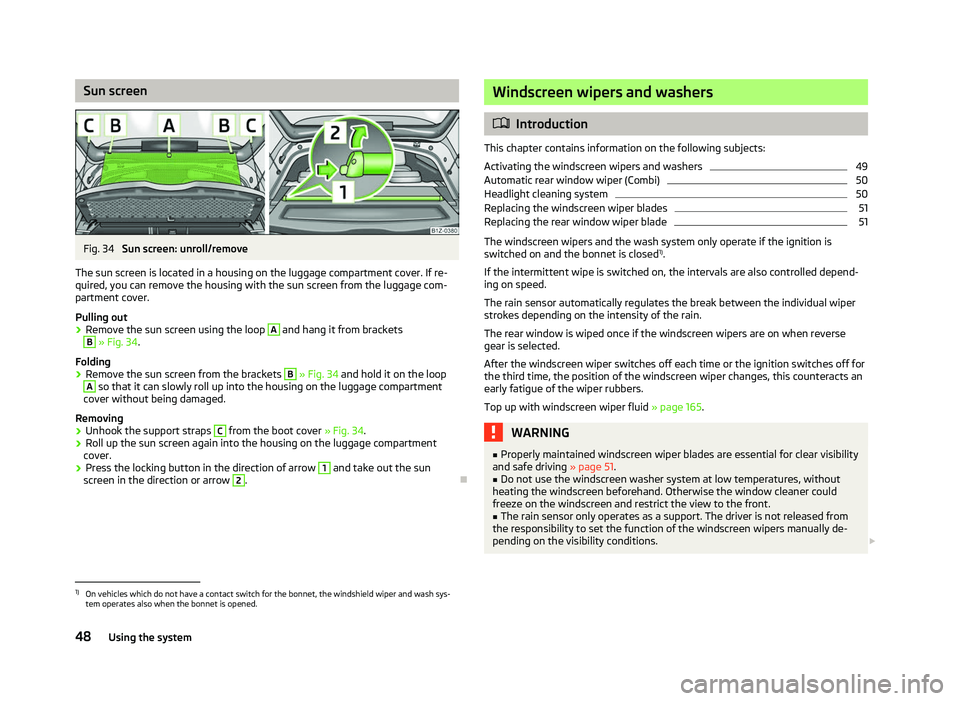
Sun screen
Fig. 34
Sun screen: unroll/remove
The sun screen is located in a housing on the luggage compartment cover. If re-
quired, you can remove the housing with the sun screen from the luggage com-
partment cover.
Pulling out
› Remove the sun screen using the loop A
and hang it from brackets
B
» Fig. 34.
Folding
› Remove the sun screen from the brackets B
» Fig. 34 and hold it on the loop
A
so that it can slowly roll up into the housing on the luggage compartment
cover without being damaged.
Removing
› Unhook the support straps C
from the boot cover » Fig. 34.
› Roll up the sun screen again into the housing on the luggage compartment
cover.
› Press the locking button in the direction of arrow 1
and take out the sun
screen in the direction or arrow 2
.
Ð Windscreen wipers and washers
ä
Introduction
This chapter contains information on the following subjects:
Activating the windscreen wipers and washers 49
Automatic rear window wiper (Combi) 50
Headlight cleaning system 50
Replacing the windscreen wiper blades 51
Replacing the rear window wiper blade 51
The windscreen wipers and the wash system only operate if the ignition is
switched on and the bonnet is closed 1)
.
If the intermittent wipe is switched on, the intervals are also controlled depend-
ing on speed.
The rain sensor automatically regulates the break between the individual wiper
strokes depending on the intensity of the rain.
The rear window is wiped once if the windscreen wipers are on when reverse
gear is selected.
After the windscreen wiper switches off each time or the ignition switches off for
the third time, the position of the windscreen wiper changes, this counteracts an
early fatigue of the wiper rubbers.
Top up with windscreen wiper fluid » page 165. WARNING
■ Properly maintained windscreen wiper blades are essential for clear visibility
and safe driving » page 51.
■ Do not use the windscreen washer system at low temperatures, without
heating the windscreen beforehand. Otherwise the window cleaner could
freeze on the windscreen and restrict the view to the front. ■ The rain sensor only operates as a support. The driver is not released from
the responsibility to set the function of the windscreen wipers manually de-
pending on the visibility conditions. £1)
On vehicles which do not have a contact switch for the bonnet, the windshield wiper and wash sys-
tem operates also when the bonnet is opened.
48 Using the system
Page 62 of 218
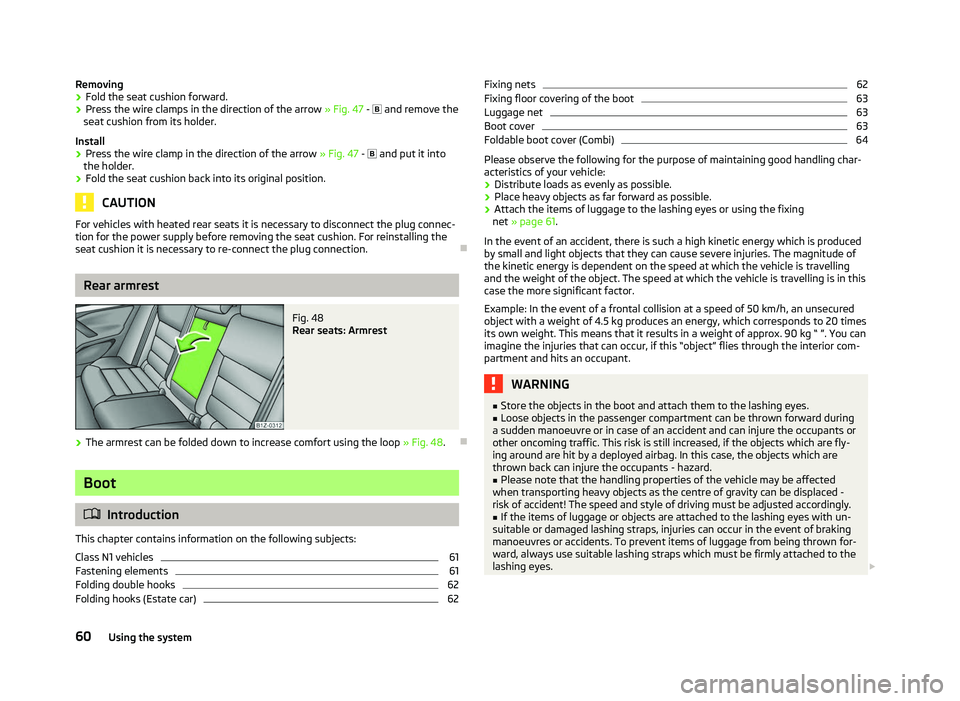
Removing
›
Fold the seat cushion forward.
› Press the wire clamps in the direction of the arrow
» Fig. 47 - and remove the
seat cushion from its holder.
Install
› Press the wire clamp in the direction of the arrow
» Fig. 47 - and put it into
the holder.
› Fold the seat cushion back into its original position. CAUTION
For vehicles with heated rear seats it is necessary to disconnect the plug connec-
tion for the power supply before removing the seat cushion. For reinstalling the
seat cushion it is necessary to re-connect the plug connection. ÐRear armrest
Fig. 48
Rear seats: Armrest
› The armrest can be folded down to increase comfort using the loop
» Fig. 48.Ð Boot
ä
Introduction
This chapter contains information on the following subjects:
Class
N1 vehicles 61
Fastening elements 61
Folding double hooks 62
Folding hooks (Estate car) 62Fixing nets 62
Fixing floor covering of the boot 63
Luggage net 63
Boot cover 63
Foldable boot cover (Combi) 64
Please observe the following for the purpose of maintaining good handling char-
acteristics of your vehicle:
› Distribute loads as evenly as possible.
› Place heavy objects as far forward as possible.
› Attach the items of luggage to the lashing eyes or using the fixing
net »
page 61 .
In the event of an accident, there is such a high kinetic energy which is produced
by small and light objects that they can cause severe injuries. The magnitude of
the kinetic energy is dependent on the speed at which the vehicle is travelling
and the weight of the object. The speed at which the vehicle is travelling is in this
case the more significant factor.
Example: In the event of a frontal collision at a speed of 50 km/h, an unsecured
object with a weight of 4.5 kg produces an energy, which corresponds to 20 times
its own weight. This means that it results in a weight of approx. 90 kg “ ”. You can
imagine the injuries that can occur, if this “object” flies through the interior com-
partment and hits an occupant. WARNING
■ Store the objects in the boot and attach them to the lashing eyes.
■ Loose objects in the passenger compartment can be thrown forward during
a sudden manoeuvre or in case of an accident and can injure the occupants or
other oncoming traffic. This risk is still increased, if the objects which are fly-
ing around are hit by a deployed airbag. In this case, the objects which are
thrown back can injure the occupants - hazard. ■ Please note that the handling properties of the vehicle may be affected
when transporting heavy objects as the centre of gravity can be displaced -
risk of accident! The speed and style of driving must be adjusted accordingly. ■ If the items of luggage or objects are attached to the lashing eyes with un-
suitable or damaged lashing straps, injuries can occur in the event of braking
manoeuvres or accidents. To prevent items of luggage from being thrown for-
ward, always use suitable lashing straps which must be firmly attached to the
lashing eyes. £
60 Using the system
Page 76 of 218
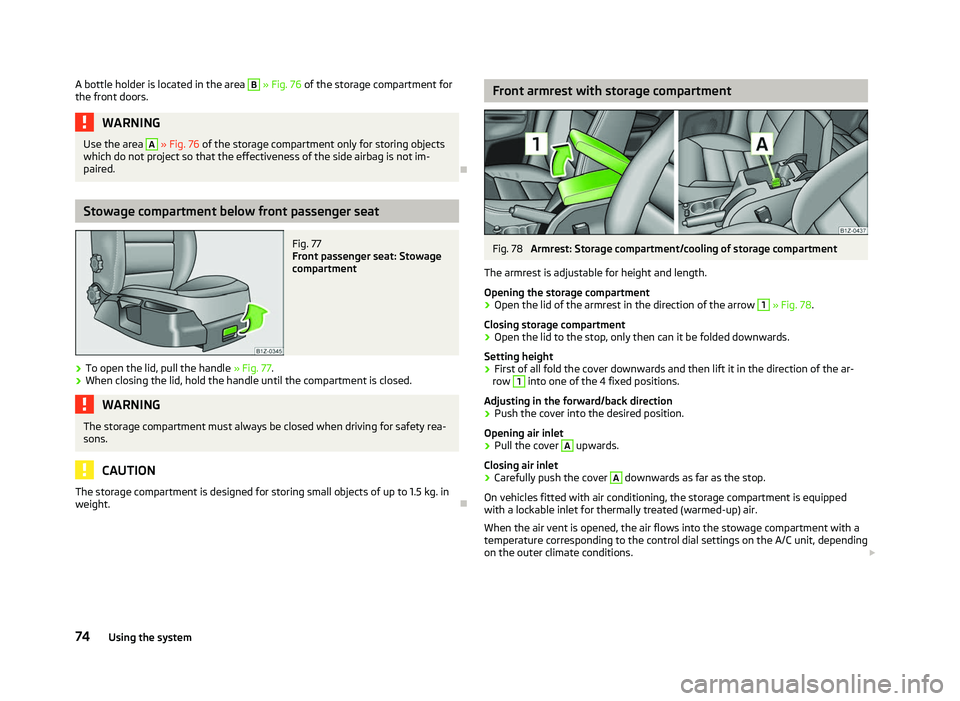
A bottle holder is located in the area B
» Fig. 76 of the storage compartment for
the front doors. WARNING
Use the area A
» Fig. 76 of the storage compartment only for storing objects
which do not project so that the effectiveness of the side airbag is not im-
paired. ÐStowage compartment below front passenger seat
Fig. 77
Front passenger seat: Stowage
compartment
› To open the lid, pull the handle
» Fig. 77.
› When closing the lid, hold the handle until the compartment is closed. WARNING
The storage compartment must always be closed when driving for safety rea-
sons. CAUTION
The storage compartment is designed for storing small objects of up to 1.5 kg. in
weight. Ð Front armrest with storage compartment
Fig. 78
Armrest: Storage compartment/cooling of storage compartment
The armrest is adjustable for height and length.
Opening the storage compartment
› Open the lid of the armrest in the direction of the arrow 1
» Fig. 78.
Closing storage compartment
› Open the lid to the stop, only then can it be folded downwards.
Setting height
› First of all fold the cover downwards and then lift it in the direction of the ar-
row 1
into one of the 4 fixed positions.
Adjusting in the forward/back direction
› Push the cover into the desired position.
Opening air inlet
› Pull the cover A
upwards.
Closing air inlet
› Carefully push the cover A
downwards as far as the stop.
On vehicles fitted with air conditioning, the storage compartment is equipped
with a lockable inlet for thermally treated (warmed-up) air.
When the air vent is opened, the air flows into the stowage compartment with a
temperature corresponding to the control dial settings on the A/C unit, depending
on the outer climate conditions. £
74 Using the system
Page 83 of 218
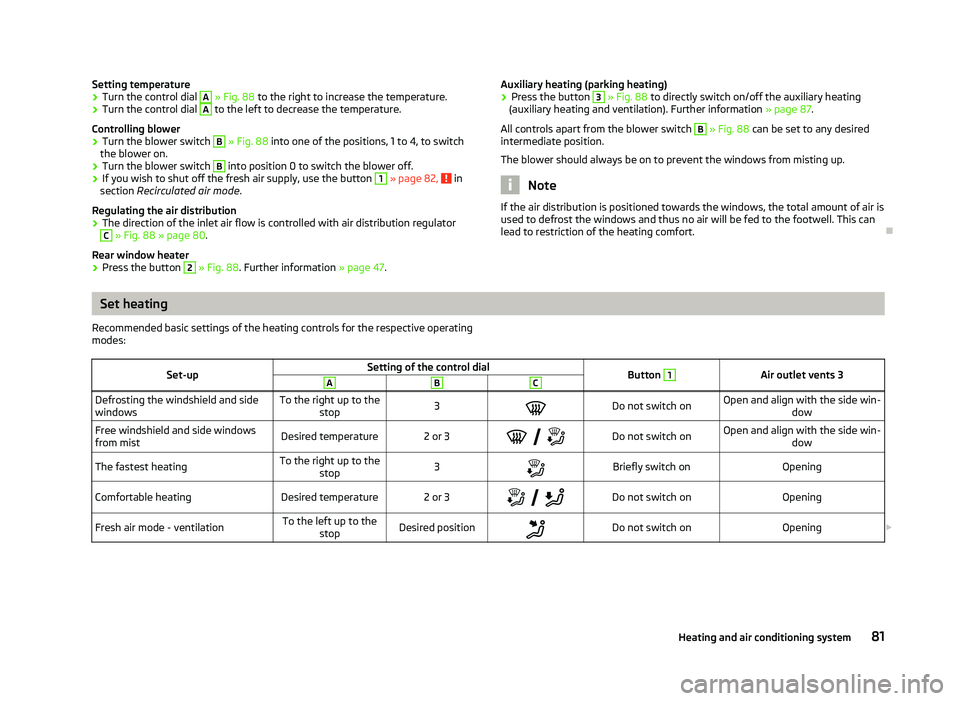
Setting temperature
›
Turn the control dial A
» Fig. 88 to the right to increase the temperature.
› Turn the control dial A
to the left to decrease the temperature.
Controlling blower
› Turn the blower switch B
» Fig. 88 into one of the positions, 1 to 4, to switch
the blower on.
› Turn the blower switch B
into position 0 to switch the blower off.
› If you wish to shut off the fresh air supply, use the button 1
» page 82,
in
section Recirculated air mode .
Regulating the air distribution
› The direction of the inlet air flow is controlled with air distribution regulator C
» Fig. 88
» page 80.
Rear window heater
› Press the button 2
» Fig. 88
. Further information » page 47. Auxiliary heating (parking heating)
›
Press the button 3
» Fig. 88
to directly switch on/off the auxiliary heating
(auxiliary heating and ventilation). Further information » page 87.
All controls apart from the blower switch B
» Fig. 88
can be set to any desired
intermediate position.
The blower should always be on to prevent the windows from misting up. Note
If the air distribution is positioned towards the windows, the total amount of air is
used to defrost the windows and thus no air will be fed to the footwell. This can
lead to restriction of the heating comfort. ÐSet heating
Recommended basic settings of the heating controls for the respective operating
modes:
Set-up Setting of the control dial
Button 1
Air outlet vents 3
A B C
Defrosting the windshield and side
windows
To the right up to the
stop 3
Do not switch on Open and align with the side win-
dow
Free windshield and side windows
from mist Desired temperature 2 or 3
Do not switch on Open and align with the side win-
dow
The fastest heating To the right up to the
stop 3
Briefly switch on
Opening
Comfortable heating Desired temperature 2 or 3
Do not switch on
Opening
Fresh air mode - ventilation To the left up to the
stop Desired position
Do not switch on
Opening£ 81
Heating and air conditioning system
Page 86 of 218
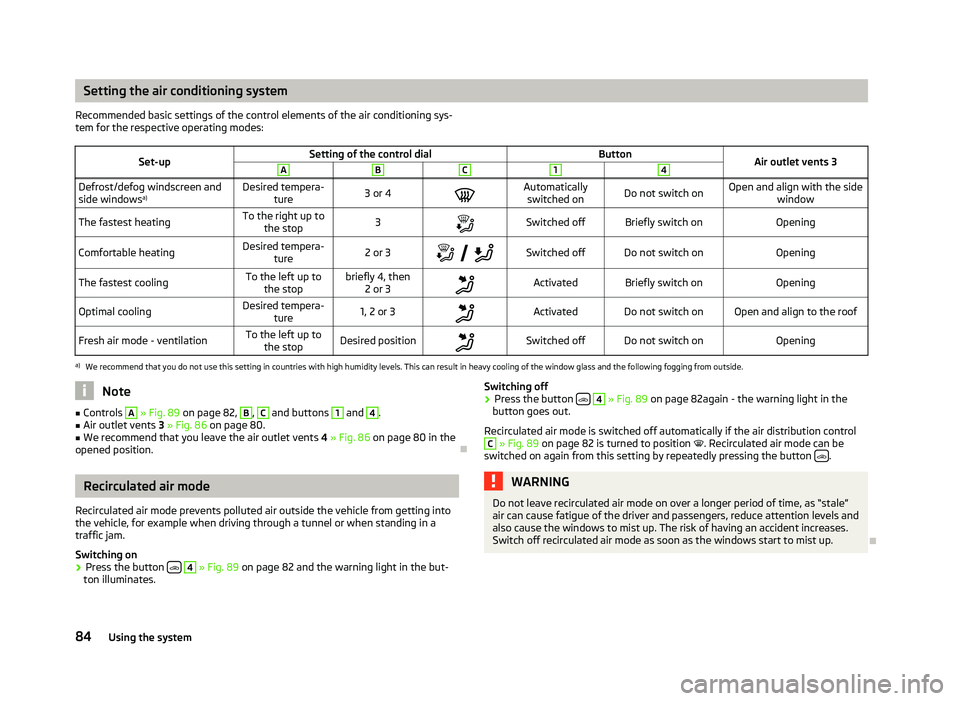
Setting the air conditioning system
Recommended basic settings of the control elements of the air conditioning sys-
tem for the respective operating modes:
Set-up Setting of the control dial
Button
Air outlet vents 3 A B C 1 4
Defrost/defog windscreen and
side windows
a) Desired tempera-
ture 3 or 4
Automatically
switched on Do not switch on Open and align with the side
window
The fastest heating To the right up to
the stop 3
Switched off Briefly switch on
Opening
Comfortable heating Desired tempera-
ture 2 or 3
Switched off Do not switch on
Opening
The fastest cooling To the left up to
the stop briefly 4, then
2 or 3 Activated Briefly switch on
Opening
Optimal cooling Desired tempera-
ture 1, 2 or 3
Activated Do not switch on Open and align to the roof
Fresh air mode - ventilation To the left up to
the stop Desired position
Switched off Do not switch on
Openinga)
We recommend that you do not use this setting in countries with high humidity levels. This can result in heavy cooling of the window glass and the following fogging from outside. Note
■ Controls A
» Fig. 89
on page 82, B
, C
and buttons 1
and 4
.
■ Air outlet vents 3 » Fig. 86 on page 80.
■ We recommend that you leave the air outlet vents 4 » Fig. 86 on page 80 in the
opened position. ÐRecirculated air mode
Recirculated air mode prevents polluted air outside the vehicle from getting into
the vehicle, for example when driving through a tunnel or when standing in a
traffic jam.
Switching on
› Press the button
4
» Fig. 89
on page 82 and the warning light in the but-
ton illuminates. Switching off
› Press the button
4
» Fig. 89
on page 82again - the warning light in the
button goes out.
Recirculated air mode is switched off automatically if the air distribution control C
» Fig. 89
on page 82 is turned to position . Recirculated air mode can be
switched on again from this setting by repeatedly pressing the button .
WARNING
Do not leave recirculated air mode on over a longer period of time, as “stale”
air can cause fatigue of the driver and passengers, reduce attention levels and
also cause the windows to mist up. The risk of having an accident increases.
Switch off recirculated air mode as soon as the windows start to mist up. Ð
84 Using the system
Page 88 of 218

Note
Below the top row of buttons is located the interior temperature sensor. Do not
stick anything on or cover the sensor, otherwise it could have an unfavourable ef-
fect on the Climatronic. ÐAutomatic mode
The automatic mode is used in order to maintain a constant temperature and to
demist the windows in the interior of the car.
Switching on
› Set a temperature between +18 °C and +26
℃.
› Move the air outlet vents
3 » Fig. 86 on page 80 and 4 so that the air flow is
directed slightly upwards.
› Press the button
AUTO 8
» Fig. 90
on page
85. The warning light in the top
right or left corner lights up, depending on which mode was last selected.
If the warning light in the top right corner of the button AUTO 8
» Fig. 90
on
page 85
lights up, the Climatronic operates in “HIGH” mode. The “HIGH” mode is
the standard setting of the Climatronic.
When pressing again the button AUTO , the Climatronic changes into the “LOW”
mode and the warning light in the top left corner lights up. The Climatronic uses
only in this mode the lower blower speed. However taking into account the noise
level, this is more comfortable, yet be aware that the effectiveness of the air con-
ditioning system is reduced particularly if the vehicle is fully occupied.
By pressing the button AUTO again, it is changed to “HIGH” mode.
Automatic mode is switched off by pressing one of the buttons for the air distri-
bution or by increasing/decreasing the blower speed. The temperature is never-
theless regulated. ÐSwitching the cooling system on and off
Switching the cooling system on and off › Press the button
AC 13
» Fig. 90 on page 85. The warning light in the button
lights up.
› When you again press the button
AC 13
, the air conditioning system is switch-
ed off. The warning light in the button goes out. Only the function of the venti-
lation remains active when no lower temperature than the outside temperature
can be reached. Ð Setting temperature
The interior temperature for the left and right side can be set separately.
› The temperature for both sides can be set with the control dial 7
» Fig. 90 on
page 85
after switching on the ignition.
› If you wish to set the temperature for the right side, turn the control dial 14
» Fig. 90
on page
85. The warning light in the button DUAL 12
» Fig. 90
on
page 85
lights up, this indicates that differing temperatures for the left and
right side can be set.
If the warning light in the button DUAL 12
»
Fig. 90
on page 85 is illuminated, the
temperature for both sides cannot be set with the control dial 7
» Fig. 90
on
page 85. You can reactivate this function by pressing the button DUAL 12
. The
warning light in the button goes out.
The interior temperature can be set between +18 °C and +26 ℃. The interior tem-
perature is regulated automatically within this range. If a temperature lower than
+18 °C is selected, a blue symbol lights up at the start of the numerical scale. If a
temperature higher than +26 °C is selected, a red symbol lights up at the start of
the numerical scale. In both limit positions the Climatronic operates at maximum
cooling or heating capacity, respectively. The temperature is not controlled in this
case.
Lengthy and uneven distribution of the air flow out of the vents (especially
around the feet) and large differences in temperature, for example, when getting
out of the vehicle, can cause susceptible individuals to catch a cold. Ð Recirculated air mode
Recirculated air mode largely prevents polluted air from outside the vehicle get-
ting into the vehicle, for example, when driving through a tunnel or when stand-
ing in a traffic jam. If a considerable increase in concentration of pollutants is rec-
ognized by the air quality sensor, when the automatic air distribution control is
switched on, the air distribution control will temporarily be switched off. If the
concentration of pollutants decreases to the normal level, the air distribution con-
trol is automatically switched off so that fresh air can be guided into the vehicle
interior. In recirculated air mode air is sucked out of the interior of the vehicle and
then fed back into the interior. When the automatic air distribution control is
switched on, an air quality sensor measures the concentration of pollutants in the
drawn in air. £
86 Using the system
Page 89 of 218

Switching recirculated air mode on
›
Repeatedly press the button
5
» Fig. 90
on page 85 until the warning
light on the left side of the button is illuminated.
Switch on automatic air distribution control
› Repeatedly press the button
5
» Fig. 90
on page 85 until the warning
light on the right side of the button is illuminated.
Switch off automatic air distribution control temporarily
› If the air quality sensor does not automatically switch on the air distribution
control in the event of an unpleasant odour, you can switch it on yourself by
pressing the button 5
» Fig. 90
on page 85. The warning light lights up in
the button on the left side.
Switching recirculated air mode off
› Press the button
AUTO 8
» Fig. 90
on page
85 or repeatedly press the button
5
» Fig. 90 on page 85
until the warning lights in the button go out.WARNING
Do not leave recirculated air mode on over a longer period of time, as “stale”
air can cause fatigue of the driver and passengers, reduce attention levels and
also cause the windows to mist up. The risk of having an accident increases.
Switch off recirculated air mode as soon as the windows start to mist up. Note
■ If the windscreen mists up, press the button 1
» Fig. 90 on page 85
. Press
the button AUTO 8
» Fig. 90
on page 85 when the windshield is demisted.
■ The automatic air distribution control operates only if the outside temperature
is higher than approx. 2 °C. ÐControlling blower
The Climatronic system controls the blower stages automatically in line with the
interior temperature. However, the blower stages can be manually adapted to
suit your particular needs.
› Repeatedly press the button
10
» Fig. 90
on page 85 on the left side (reduce
blower speed) or on the right side (increase blower speed).
If the blower is switched off, the Climatronic system is switched off.
The set blower speed is displayed above the button 10
» Fig. 90 on page 85
when the respective number of warning lights come on. WARNING
■ “
Stale air” may result in fatigue in the driver and occupants, reduce attention
levels and also cause the windows to mist up. The risk of having an accident
increases.
■ Do not switch off the Climatronic system for longer than necessary.
■ Switch on the Climatronic system as soon as the windows mist up. Ð Defrosting windscreen
Switching on › Press the button
1
» Fig. 90
on page 85.
Switching off
› Once again press the button
1
» Fig. 90 on page 85
or the button AUTO .
The temperature control is controlled automatically. More air flows out of the air
outlet vents 1 » Fig. 86 on page 80
. Ð Auxiliary heating (auxiliary heating and ventilation)
ä
Introduction
This chapter contains information on the following subjects:
Direct switching on/off 88
System settings 89
Radio remote control 89
Changing the battery of the radio remote control 90
Auxiliary heating (parking heating)
The auxiliary heater (parking heater) functions in connection with the air-condi-
tioning system or Climatronic.
It can be used when stationary, when the engine is switched off to preheat the
vehicle and while driving (e.g. during the heating phase of the engine).
The engine is also preheated, if the auxiliary heating is switched on when the ve-
hicle is stationary and the engine is switched off. £
87
Heating and air conditioning system
Page 99 of 218
If necessary, the TCS can be switched off and on again by pressing the button
» Fig. 97, or on vehicles with ESP, by pressing the button
» Fig. 96
on
page 95
. The TCS warning light lights up in the instrument cluster when the
TCS is switched off. ÐElectronic Differential Lock (EDS and XDS)
First read and observe the introductory information and safety warn-
ings on page 93.
If one of the wheels starts to spin, the EDL system brakes the spinning wheel and
transfers the driving force to the other wheels. This ensures the stability of the
vehicle and a quick journey.
The EDL switches off automatically if unusually severe stresses exist in order to
avoid excessive heat generation in the disc brake on the wheel which is being
braked. The vehicle can continue to be driven and has the same characteristics as
a vehicle not fitted with EDL. The EDL switches on again automatically as soon as
the brake has cooled down.
XDL (only for Octavia RS)
XDL is an extension to the electronic differential lock. XDL does not respond to
traction, but to the relief of the inner front wheel during fast cornering. The active
brake intervention on the brake of the inner wheel prevents it from spinning.
Thus, the traction is improved and the vehicle continues to follow the desired
track. ÐShifting (manual gearbox)
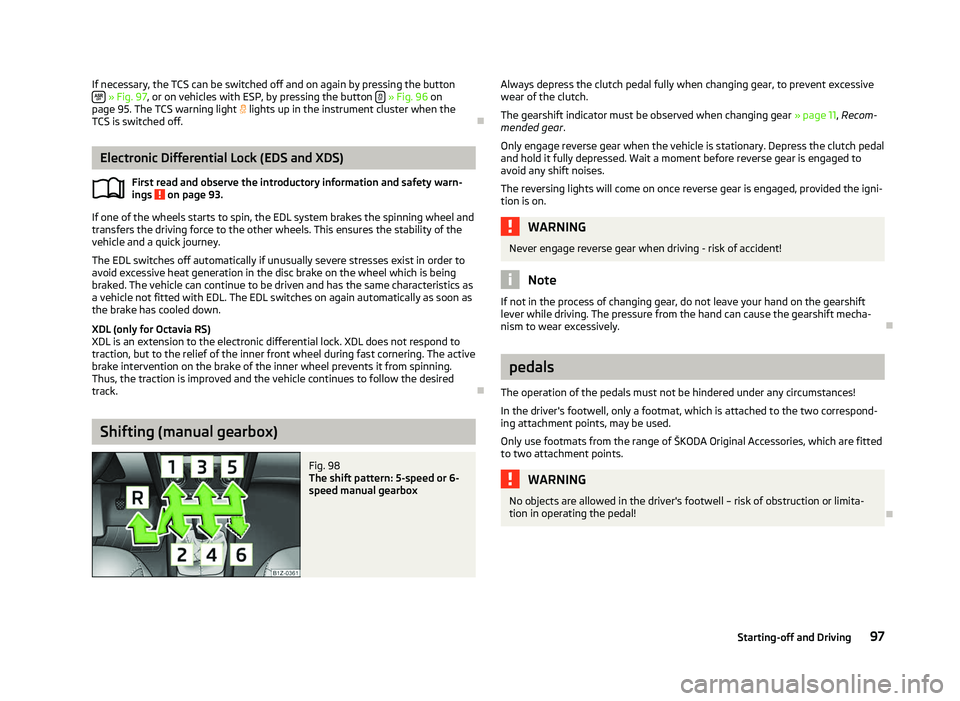
Fig. 98
The shift pattern: 5-speed or 6-
speed manual gearbox
ä
Always depress the clutch pedal fully when changing gear, to prevent excessive
wear of the clutch.
The gearshift indicator must be observed when changing gear
» page 11, Recom-
mended gear .
Only engage reverse gear when the vehicle is stationary. Depress the clutch pedal
and hold it fully depressed. Wait a moment before reverse gear is engaged to
avoid any shift noises.
The reversing lights will come on once reverse gear is engaged, provided the igni-
tion is on. WARNING
Never engage reverse gear when driving - risk of accident! Note
If not in the process of changing gear, do not leave your hand on the gearshift
lever while driving. The pressure from the hand can cause the gearshift mecha-
nism to wear excessively. Ð pedals
The operation of the pedals must not be hindered under any circumstances!
In the driver's footwell, only a footmat, which is attached to the two correspond-
ing attachment points, may be used.
Only use footmats from the range of
ŠKODA Original Accessories, which are fitted
to two attachment points. WARNING
No objects are allowed in the driver's footwell – risk of obstruction or limita-
tion in operating the pedal! Ð
97
Starting-off and Driving
Page 100 of 218

Parking aid
Fig. 99
Parking aid: Range of the sensors/activating the parking aid
The parking aid determines the distance between the front or rear bumper and
an obstacle with the aid of ultrasound sensors. The sensors are integrated in the
front/rear bumper.
The signal tones for the front parking aid sound higher than for the rear parking
aid. The tones of the parking aid can be adapted in the menu of the Information
display » page 16.
Range of sensors
The distance warning begins at a distance of about 160°cm from the obstacle at
the rear of the vehicle and about 120
cm from the obstacle in front of the vehicleA
» Fig. 99
. The interval between the warning signals becomes shorter as the
clearance is reduced.
A continuous tone sounds from a distance of approx. 30
cm B
» Fig. 99
- danger
area. From this moment on do not continue driving!
On vehicles with a factory-fitted radio or navigation system, the distance to the
obstacle is simultaneously graphically illustrated on the display, refer to the oper-
ating instructions for the radio or navigation system.
On vehicles with a factory-fitted towing device, the border of the danger area
starts (continuous tone) 5
cm further away from the vehicle. The length of the ve-
hicle can be increased with an installed detachable towing device.
On vehicles with a factory-fitted towing device, the rear sensors are deactivated
when towing a trailer. Activating/deactivating the rear parking aid
The parking aid is activated automatically when
reverse gear is engaged and the
ignition is turned on. This is confirmed by a brief audible signal.
The parking aid is deactivated by removing the reverse gear.
Activating/deactivating the front and rear parking aid
The parking aid is activated when the ignition is turned on and reverse gear is en-
gaged and or by pressing the button » Fig. 99
- the symbol lights up in the
button. This is confirmed by a brief audible signal.
The parking aid is deactivated by pressing the button or at a speed of more
than 10 km/h (the symbol in the button is no longer illuminated). WARNING
■ The parking aid is not a substitute for the driver paying proper attention and
it is always the driver's responsibility to take care when reversing the vehicle
or carrying out similar manoeuvres. Pay particular attention to small children
and animals as they are not recognised by the parking aid sensors.
■ Before reversing or parking, check that there is no small obstacle, such as a
rock, thin post, trailer drawbar etc., in front of or behind the vehicle. Such ob-
stacles may not be recognised by the parking aid sensors.
■ Under certain circumstances, surfaces of certain objects and types of cloth-
ing cannot reflect the signals from the parking aid. Thus, these objects or peo-
ple who wear such clothing are not recognised by the parking aid sensors.
■ External sound sources can have a detrimental effect on the parking aid.
Under unfavourable conditions, objects or people may not be recognised. Note
■ If a warning signal sounds for about 3
seconds after activating the system and
there is no obstacle close to your car, this indicates a system fault. The fault is
confirmed additionally when the symbol flashes in the button . Have the
fault rectified by a
ŠKODA specialist garage.
■ The sensors must be kept clean (free of ice, etc.) to enable the parking aid to
operate properly.
■ If the parking aid is activated and the selector lever of the automatic gearbox is
in the position P, the warning signal is interrupted (the vehicle cannot move). Ð
98 Using the system
Page 107 of 218
Selector lever lock
First read and observe the introductory information and safety warn-
ings on page 102.
Automatic selector lever lock
With the ignition on, the selector lever is locked when it is in the positions P and
N. The brake pedal must be depressed to move the selector lever out of this posi-
tion. The warning light » page 25, Selector lever lock illuminates in the in-
strument cluster as a reminder for the driver when the selector lever is in the po-
sitions P and N.
The selector lever is not locked when quickly moving across the position
N (e.g.
from R to D). This, for example, helps to rock out a vehicle that is stuck. The selec-
tor lever lock will click into place if the lever is in the N position for more than 2
seconds without the brake pedal being pressed.
The selector lever lock is only active if the vehicle is stationary or moving at speed
of less than 5 km/hour. The lock is switched off automatically into position N
when the car is travelling at a higher speed.
Shiftlock button
The Shiftlock button in the handle of selector lever prevents certain selector lever
positions being engaged inadvertently. The selector lever lock is cancelled when
the Shiftlock button is pressed.
Ignition key withdrawal lock
After the ignition is switched off, the ignition key can only be withdrawn if the se-
lector lever is in the position P. If the ignition key is withdrawn, the selector lever
is blocked in position P . ÐKickdown function
First read and observe the introductory information and safety warn-
ings on page 102.
The kickdown function provides you with maximum acceleration power.
When the accelerator pedal is fully depressed, the kickdown function is activated
in the desired driving program. This function has precedence over the driving pro-
gramme and serves for maximum acceleration of the vehicle when exploiting the
maximum power potential of the engine without taking into account the current
selector lever position ( D, S or Tiptronic ). The gearbox shifts down to one or sev-
ä
ä
eral gears in line with the driving state and the vehicle accelerates. The gearbox
does not shift up into the highest gear until the engine has reached its maximum
revolutions for this gear range. Ð Dynamic shift programme
First read and observe the introductory information and safety warn-
ings on page 102.
The automatic gearbox of your vehicle is controlled electronically. Shifting up and
down through the gears is performed automatically on the basis of pre-defined
driving programmes.
Adopting a moderate style of driving
will cause the gearbox to select the most
economical driving programme. Shifting up into a higher gear as soon as possible
and shifting down as late as possible will have a favourable effect on your fuel
consumption.
When adopting a sporty style of driving with rapid movements of the accelerator
pedal combined with sharp acceleration, frequent changes in speed and exploit-
ing the top speed of the car, the gearbox will adjust to this style of driving once
the accelerator pedal (kickdown function) is depressed and will shift down earlier,
frequently by several gears in comparison to a moderate style of driving.
Selecting the most appropriate driving programme for the particular style of driv-
ing is a continuous process. Irrespective of this it is, however, possible to switch
or shift down into a dynamic shift programme by depressing the accelerator rap-
idly. The gearbox shifts down into a lower gear in accordance with the speed,
therefore enabling rapid acceleration (e.g. when overtaking) without the accelera-
tor pedal having to be depressed into the kickdown range. The original pro-
gramme will be reactivated to match your particular style of driving once the
gearbox has shifted up again.
When driving in hilly regions, the gears are selected to match uphill and downhill
sections. This avoids the gearbox frequently shifting up and down when negoti-
ating an uphill stretch. When driving downhill, it is possible to shift down into the
Tiptronic position, in order to exploit the engine brake torque. Ð
ä
105
Automatic gearbox