light SKODA OCTAVIA 2006 Owner´s Manual
[x] Cancel search | Manufacturer: SKODA, Model Year: 2006, Model line: OCTAVIA, Model: SKODA OCTAVIA 2006Pages: 218, PDF Size: 5.48 MB
Page 65 of 218
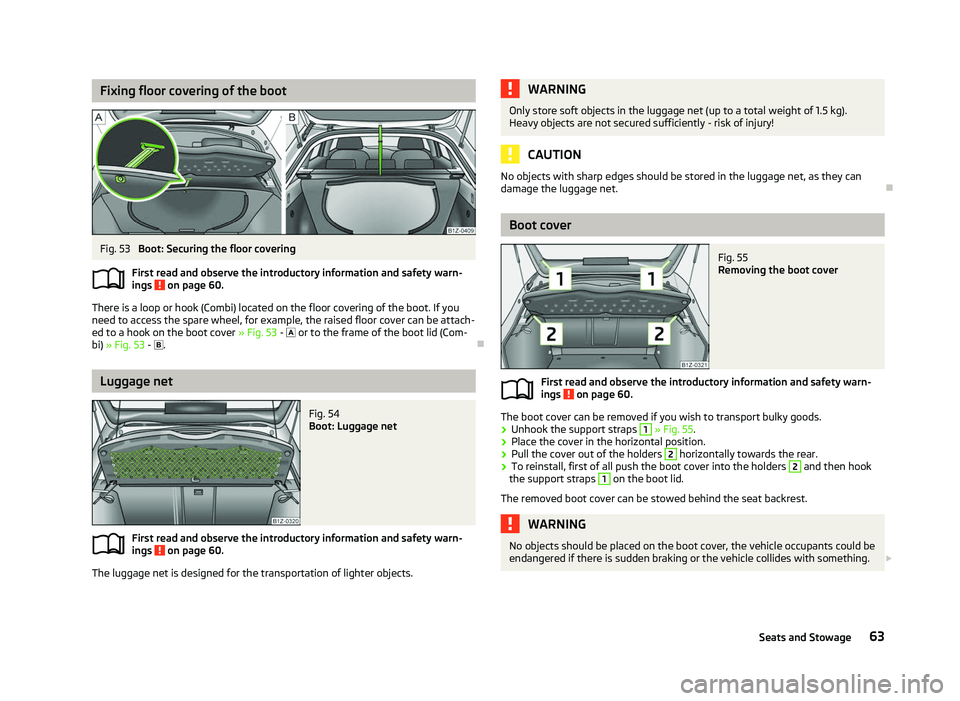
Fixing floor covering of the boot
Fig. 53
Boot: Securing the floor covering
First read and observe the introductory information and safety warn-
ings on page 60.
There is a loop or hook (Combi) located on the floor covering of the boot. If you
need to access the spare wheel, for example, the raised floor cover can be attach-
ed to a hook on the boot cover » Fig. 53 -
or to the frame of the boot lid (Com-
bi) » Fig. 53 - . ÐLuggage net
Fig. 54
Boot: Luggage net
First read and observe the introductory information and safety warn-
ings on page 60.
The luggage net is designed for the transportation of lighter objects.ä
ä WARNING
Only store soft objects in the luggage net (up to a total weight of 1.5 kg).
Heavy objects are not secured sufficiently - risk of injury! CAUTION
No objects with sharp edges should be stored in the luggage net, as they can
damage the luggage net. Ð Boot cover
Fig. 55
Removing the boot cover
First read and observe the introductory information and safety warn-
ings on page 60.
The boot cover can be removed if you wish to transport bulky goods.
›
Unhook the support straps 1
» Fig. 55.
› Place the cover in the horizontal position.
› Pull the cover out of the holders 2
horizontally towards the rear.
› To reinstall, first of all push the boot cover into the holders 2
and then hook
the support straps 1
on the boot lid.
The removed boot cover can be stowed behind the seat backrest. WARNING
No objects should be placed on the boot cover, the vehicle occupants could be
endangered if there is sudden braking or the vehicle collides with something. £
ä
63
Seats and Stowage
Page 68 of 218
›
First pull the cross rod back slightly on the one side and then on the other side
and remove it from the mounts C
.
› Hold the cross rod in such a way that the net partition can slowly roll up into
the housing B
without being damaged.
› Fold the storage compartment cover D
downwards.
If you wish to use the entire boot, the foldable boot cover can be re-
moved » Fig. 56 on page 64. ÐUsing the net partition behind the front seats
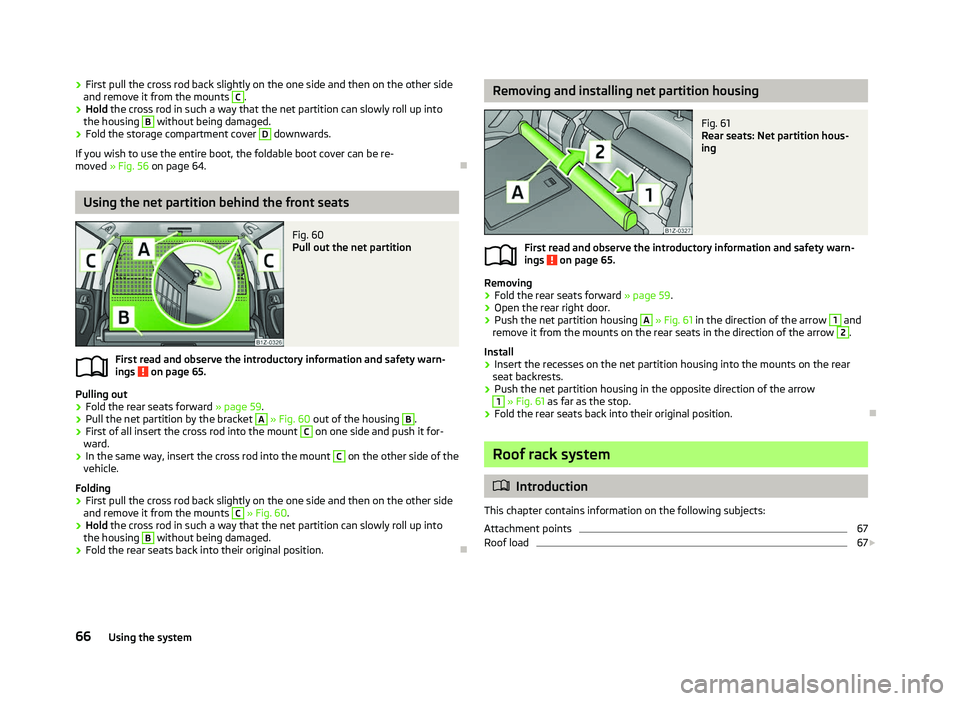
Fig. 60
Pull out the net partition
First read and observe the introductory information and safety warn-
ings on page 65.
Pulling out
› Fold the rear seats forward
» page 59.
› Pull the net partition by the bracket A
» Fig. 60
out of the housing B
.
› First of all insert the cross rod into the mount C
on one side and push it for-
ward.
› In the same way, insert the cross rod into the mount C
on the other side of the
vehicle.
Folding
› First pull the cross rod back slightly on the one side and then on the other side
and remove it from the mounts C
» Fig. 60
.
› Hold the cross rod in such a way that the net partition can slowly roll up into
the housing B
without being damaged.
› Fold the rear seats back into their original position. Ð
ä Removing and installing net partition housing
Fig. 61
Rear seats: Net partition hous-
ing
First read and observe the introductory information and safety warn-
ings on page 65.
Removing
› Fold the rear seats forward
»
page 59.
› Open the rear right door.
› Push the net partition housing A
» Fig. 61 in the direction of the arrow 1
and
remove it from the mounts on the rear seats in the direction of the arrow 2
.
Install
› Insert the recesses on the net partition housing into the mounts on the rear
seat backrests.
› Push the net partition housing in the opposite direction of the arrow 1
» Fig. 61 as far as the stop.
› Fold the rear seats back into their original position. Ð Roof rack system
ä
Introduction
This chapter contains information on the following subjects:
Attachment points 67
Roof load 67
£
ä
66 Using the system
Page 71 of 218
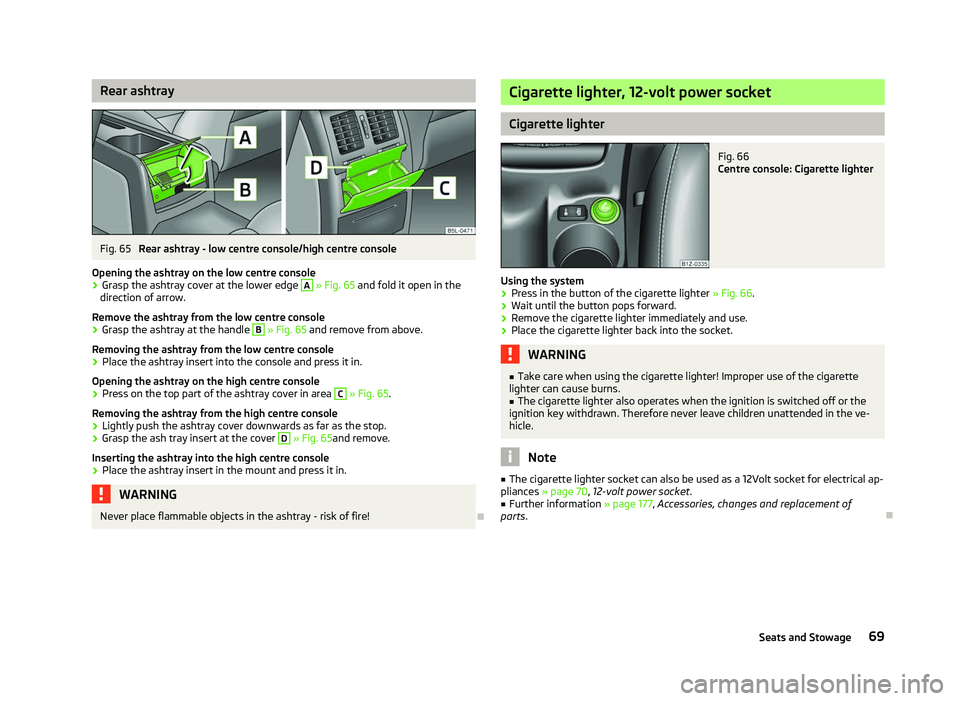
Rear ashtray
Fig. 65
Rear ashtray - low centre console/high centre console
Opening the ashtray on the low centre console
› Grasp the ashtray cover at the lower edge A
» Fig. 65 and fold it open in the
direction of arrow.
Remove the ashtray from the low centre console
› Grasp the ashtray at the handle B
» Fig. 65 and remove from above.
Removing the ashtray from the low centre console
› Place the ashtray insert into the console and press it in.
Opening the ashtray on the high centre console
› Press on the top part of the ashtray cover in area C
» Fig. 65.
Removing the ashtray from the high centre console
› Lightly push the ashtray cover downwards as far as the stop.
› Grasp the ash tray insert at the cover D
» Fig. 65and remove.
Inserting the ashtray into the high centre console
› Place the ashtray insert in the mount and press it in. WARNING
Never place flammable objects in the ashtray - risk of fire! Ð Cigarette lighter, 12-volt power socket
Cigarette lighter
Fig. 66
Centre console: Cigarette lighter
Using the system › Press in the button of the cigarette lighter
» Fig. 66.
› Wait until the button pops forward.
› Remove the cigarette lighter immediately and use.
› Place the cigarette lighter back into the socket. WARNING
■ Take care when using the cigarette lighter! Improper use of the cigarette
lighter can cause burns. ■ The cigarette lighter also operates when the ignition is switched off or the
ignition key withdrawn. Therefore never leave children unattended in the ve-
hicle. Note
■ The cigarette lighter socket can also be used as a 12Volt socket for electrical ap-
pliances » page 70 , 12-volt power socket.
■ Further information » page 177, Accessories, changes and replacement of
parts. Ð
69
Seats and Stowage
Page 72 of 218
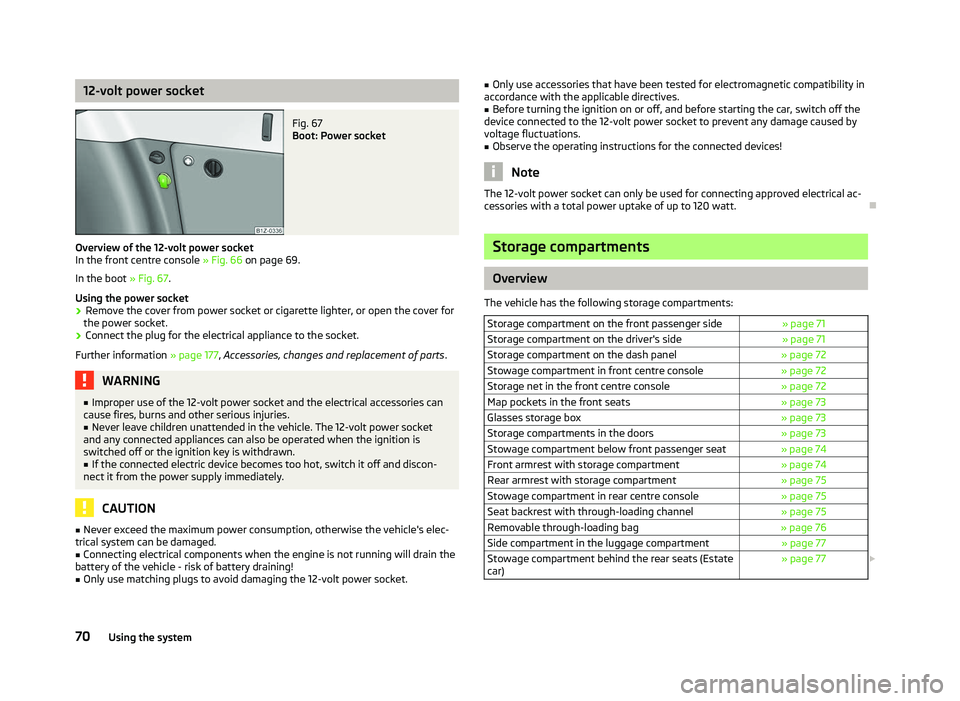
12-volt power socket
Fig. 67
Boot: Power socket
Overview of the 12-volt power socket
In the front centre console » Fig. 66 on page 69
.
In the boot » Fig. 67.
Using the power socket
› Remove the cover from power socket or cigarette lighter, or open the cover for
the power socket.
› Connect the plug for the electrical appliance to the socket.
Further information » page 177, Accessories, changes and replacement of parts .WARNING
■ Improper use of the 12-volt power socket and the electrical accessories can
cause fires, burns and other serious injuries. ■ Never leave children unattended in the vehicle. The 12-volt power socket
and any connected appliances can also be operated when the ignition is
switched off or the ignition key is withdrawn. ■ If the connected electric device becomes too hot, switch it off and discon-
nect it from the power supply immediately. CAUTION
■ Never exceed the maximum power consumption, otherwise the vehicle's elec-
trical system can be damaged.
■ Connecting electrical components when the engine is not running will drain the
battery of the vehicle - risk of battery draining!
■ Only use matching plugs to avoid damaging the 12-volt power socket. ■
Only use accessories that have been tested for electromagnetic compatibility in
accordance with the applicable directives.
■ Before turning the ignition on or off, and before starting the car, switch off the
device connected to the 12-volt power socket to prevent any damage caused by
voltage fluctuations.
■ Observe the operating instructions for the connected devices! Note
The 12-volt power socket can only be used for connecting approved electrical ac-
cessories with a total power uptake of up to 120
watt.Ð Storage compartments
Overview
The vehicle has the following storage compartments: Storage compartment on the front passenger side » page 71
Storage compartment on the driver's side » page 71
Storage compartment on the dash panel » page 72
Stowage compartment in front centre console » page 72
Storage net in the front centre console » page 72
Map pockets in the front seats » page 73
Glasses storage box » page 73
Storage compartments in the doors » page 73
Stowage compartment below front passenger seat » page 74
Front armrest with storage compartment » page 74
Rear armrest with storage compartment » page 75
Stowage compartment in rear centre console » page 75
Seat backrest with through-loading channel » page 75
Removable through-loading bag » page 76
Side compartment in the luggage compartment » page 77
Stowage compartment behind the rear seats (Estate
car) » page 77
£70
Using the system
Page 74 of 218
WARNING
The storage compartment must always be closed when driving for safety rea-
sons. ÐStorage compartment on the dash panel
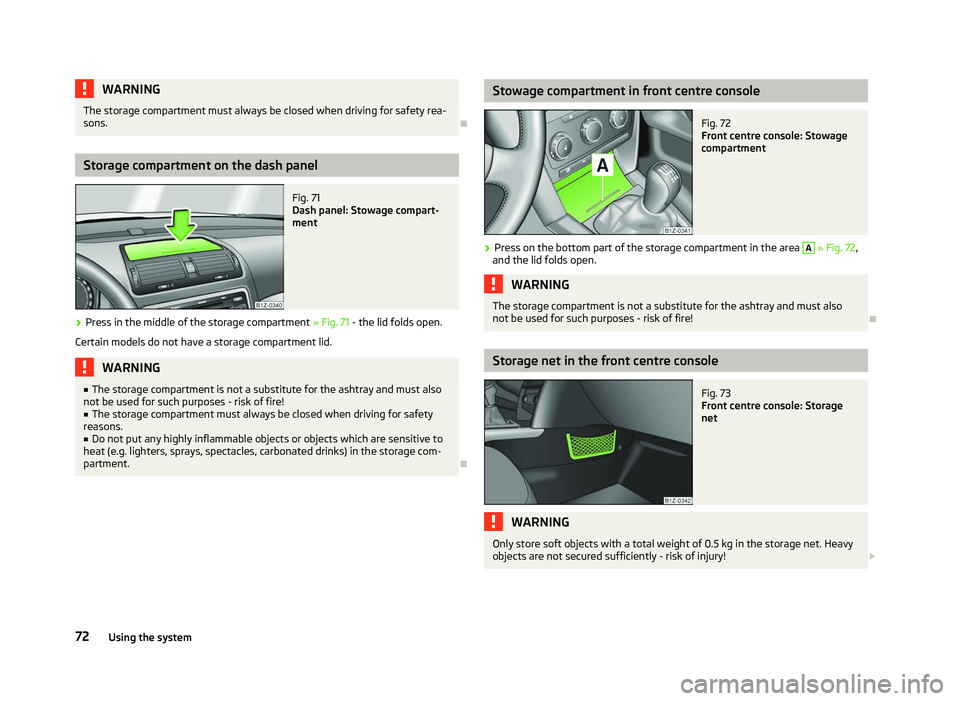
Fig. 71
Dash panel: Stowage compart-
ment
› Press in the middle of the storage compartment
» Fig. 71 - the lid folds open.
Certain models do not have a storage compartment lid. WARNING
■ The storage compartment is not a substitute for the ashtray and must also
not be used for such purposes - risk of fire!
■ The storage compartment must always be closed when driving for safety
reasons.
■ Do not put any highly inflammable objects or objects which are sensitive to
heat (e.g. lighters, sprays, spectacles, carbonated drinks) in the storage com-
partment. Ð Stowage compartment in front centre console
Fig. 72
Front centre console: Stowage
compartment
› Press on the bottom part of the storage compartment in the area A
» Fig. 72
,
and the lid folds open. WARNING
The storage compartment is not a substitute for the ashtray and must also
not be used for such purposes - risk of fire! Ð Storage net in the front centre console
Fig. 73
Front centre console: Storage
net WARNING
Only store soft objects with a total weight of 0.5 kg in the storage net. Heavy
objects are not secured sufficiently - risk of injury! £
72 Using the system
Page 79 of 218
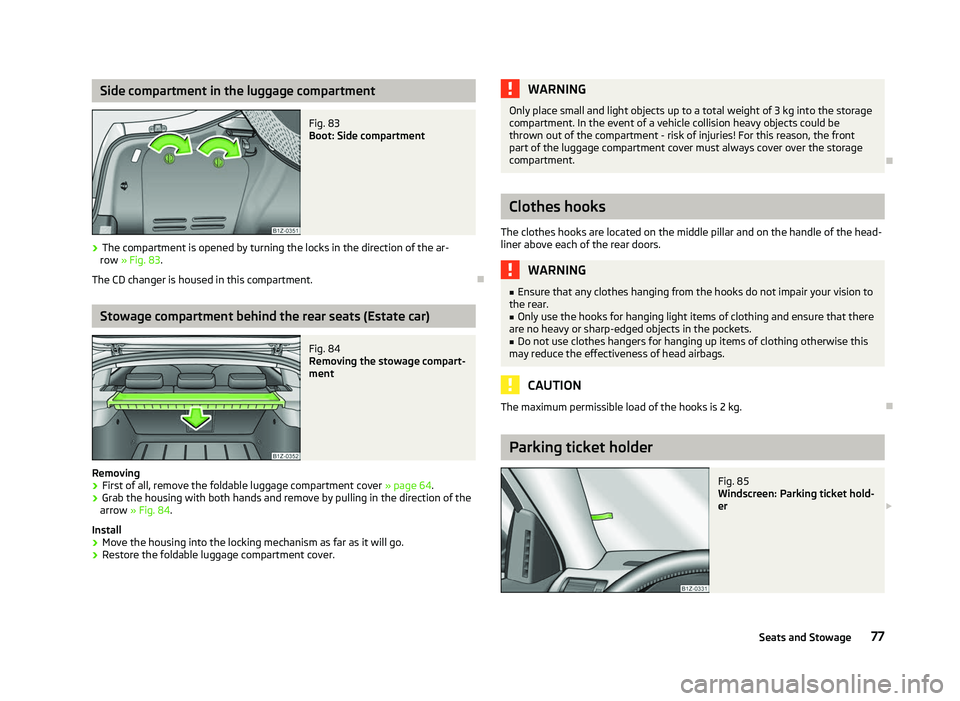
Side compartment in the luggage compartment
Fig. 83
Boot: Side compartment
› The compartment is opened by turning the locks in the direction of the ar-
row » Fig. 83.
The CD changer is housed in this compartment. ÐStowage compartment behind the rear seats (Estate car)
Fig. 84
Removing the stowage compart-
ment
Removing
› First of all, remove the foldable luggage compartment cover
» page 64.
› Grab the housing with both hands and remove by pulling in the direction of the
arrow » Fig. 84 .
Install
› Move the housing into the locking mechanism as far as it will go.
› Restore the foldable luggage compartment cover. WARNING
Only place small and light objects up to a total weight of 3 kg into the storage
compartment. In the event of a vehicle collision heavy objects could be
thrown out of the compartment - risk of injuries! For this reason, the front
part of the luggage compartment cover must always cover over the storage
compartment. Ð Clothes hooks
The clothes hooks are located on the middle pillar and on the handle of the head-
liner above each of the rear doors. WARNING
■ Ensure that any clothes hanging from the hooks do not impair your vision to
the rear.
■ Only use the hooks for hanging light items of clothing and ensure that there
are no heavy or sharp-edged objects in the pockets.
■ Do not use clothes hangers for hanging up items of clothing otherwise this
may reduce the effectiveness of head airbags. CAUTION
The maximum permissible load of the hooks is 2 kg. Ð Parking ticket holder
Fig. 85
Windscreen: Parking ticket hold-
er £
77
Seats and Stowage
Page 81 of 218
Heating and air conditioning system
Heating and air conditioning system
Introductory information
The heating effect is dependent upon the coolant temperature, thus full heat
output only occurs when the engine has reached its operating temperature.
If the cooling system is switched on, the temperature and air humidity drops in
the vehicle. The well-being of the occupants of the car is enhanced as a result of
this particularly at high outside temperatures and a high air humidity. The system
prevents the windows misting up during the cold season of the year.
It is possible to briefly activate recirculated air mode to enhance the cooling ef-
fect.
Please refer to the information regarding recirculated air mode for the air-condi-
tioning system » page 84 or for Climatronic »
page 86.
The air inlet in front of the windscreen must be free of ice, snow or leaves to en-
sure that the heating and cooling system operates properly.
After switching on the cooling Condensation from the evaporator of the air condi-
tioning may drip down and form a puddle below the vehicle. This is quite normal
and not an indication of a leak! WARNING
■ For your own safety and that of other road users, ensure that all the win-
dows are free of ice, snow and misting. Please familiarize yourself about how
to correctly operate the heating and ventilation systems, how to demist and
defrost the windows, as well as with the cooling mode.
■ Do not leave recirculated air mode on over a longer period of time, as “stale”
air can cause fatigue of the driver and passengers, reduce attention levels and
also cause the windows to mist up. The risk of having an accident increases.
Switch off recirculated air mode as soon as the windows start to mist up. Note
■ The used air streams out through the vents in the boot.
■ We recommend that you do not smoke in the vehicle when the recirculating air
mode is operating since the smoke which is drawn at the evaporator from the in-
terior of the vehicle forms deposits in the evaporator of the air conditioning sys-
tem. This produces a permanent odour when the air conditioning system is oper-
ating which can only be eliminated through considerable effort and expense (re-
placement of compressor). ■ To ensure that the heating and air conditioning systems work properly, do not
block up the air outlet vents with any objects. Ð Using the air conditioning system economically
The compressor on the air conditioning system uses power from the engine when
in cooling mode which will effect the fuel consumption.
It recommended to open the windows or the doors of a vehicle for which the inte-
rior has been strongly heated through the effect of direct sunlight in order to al-
low the heated air to escape.
The cooling system should not be switched on while travelling when the window
is open.
If the desired interior temperature can also be achieved without activating the
cooling system, fresh air mode should be selected. For the sake of the environment
Pollutant emissions are also reduced when fuel is saved. Ð Operational problems
If the cooling system does not operate at outside temperatures higher than +5 °C,
there is a problem in the system. The reasons for this may be.
› One of the fuses has blown. Check the fuse and replace if necessa-
ry »
page 190 .
› The cooling system has switched off automatically for a short time because the
coolant temperature of the engine is too hot » page 9.
If you cannot rectify the functional fault yourself, or the cooling capacity decrea-
ses, the cooling system must be switched off. Visit a ŠKODA specialist garage. Ð
79
Heating and air conditioning system
Page 84 of 218
Note
■ Controls A
» Fig. 88
on page 80, B
, C
and the button 1
.
■ Air outlet vents 3 » Fig. 86 on page 80.
■ We recommend that you leave the air outlet vents 4 » Fig. 86 on page 80 in the
opened position. ÐRecirculated air mode
Recirculated air mode prevents polluted air outside the vehicle from getting into
the vehicle, for example when driving through a tunnel or when standing in a
traffic jam.
Switching on
› Press the button
1
» Fig. 88
on page 80 and the warning light in the but-
ton illuminates.
Switching off
› Press the button
1
» Fig. 88
on page 80again - the warning light in the
button goes out.
Recirculated air mode is switched off automatically if the air distribution control C
» Fig. 88
on page 80 is in position . Recirculated air mode can be switched
on again from this setting by repeatedly pressing the button .
WARNING
Do not leave recirculated air mode on over a longer period of time, as “stale”
air can cause fatigue of the driver and passengers, reduce attention levels and
also cause the windows to mist up. The risk of having an accident increases.
Switch off recirculated air mode as soon as the windows start to mist up. Ð Air conditioning system (manual air conditioning
system) Introductory information
The cooling system only operates if the button AC 1
» Fig. 89 on page 82
is
pressed, and the following conditions are met:
› engine running;
› outside temperature above approx. +2 °C;
› blower switch switched on (positions 1 to 4).
Under certain circumstances, air at a temperature of about 5 °C can flow out of
the vents when the cooling system is switched on. Lengthy and uneven distribu-
tion of the air flow out of the vents and large differences in temperature, for ex-
ample when getting out of the vehicle, can result in chills in sensitive persons. Note
We recommend that you have the air conditioning system cleaned by a ŠKODA
specialist garage once every year. Ð Using the system
Fig. 89
The air conditioning system: Control elements £
82 Using the system
Page 85 of 218
Setting temperature
›
Turn the control dial A
» Fig. 89 to the right to increase the temperature.
› Turn the control dial A
to the left to decrease the temperature.
Controlling blower
› Turn the blower switch B
» Fig. 89 into one of the positions, 1 to 4, to switch
the blower on.
› Turn the blower switch B
into position 0 to switch the blower off.
› Press the button
4
to close the fresh air supply
» Fig. 89.
Regulating the air distribution
› The direction of the inlet air flow is controlled with air distribution regulator C
» Fig. 89
» page 80.
Switching the cooling system on and off
› Press the button
AC 1
» Fig. 89 and the warning light in the button illumi-
nates.
› When you again press the button
AC , the air conditioning system is switched
off. The warning light in the button goes out.
Rear window heater › Press the button
2
» Fig. 89
. Further information » page 47.
Auxiliary heating (parking heating)
› Press the button
3
»
Fig. 89
to directly switch on/off the auxiliary heating
(auxiliary heating and ventilation). Further information » page 87. Note
■ The whole heat output will be needed to defrost the windscreen and side win-
dows. No warm air will be fed to the footwell. This can lead to restriction of the
heating comfort. ■ The warning light AC lights after activation, even if not all of the conditions for
the function of the cooling system have been met » page 82, Introductory infor-
mation . By lighting up of the warning light in the button, the operational readi-
ness of the cooling system is signalled. Ð 83
Heating and air conditioning system
Page 86 of 218
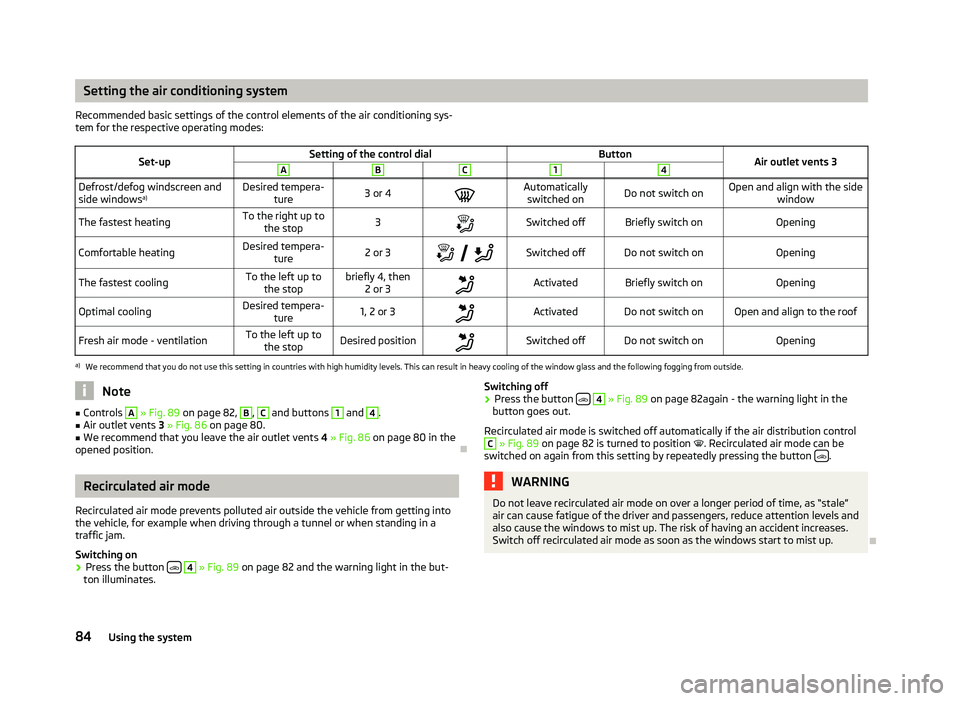
Setting the air conditioning system
Recommended basic settings of the control elements of the air conditioning sys-
tem for the respective operating modes:
Set-up Setting of the control dial
Button
Air outlet vents 3 A B C 1 4
Defrost/defog windscreen and
side windows
a) Desired tempera-
ture 3 or 4
Automatically
switched on Do not switch on Open and align with the side
window
The fastest heating To the right up to
the stop 3
Switched off Briefly switch on
Opening
Comfortable heating Desired tempera-
ture 2 or 3
Switched off Do not switch on
Opening
The fastest cooling To the left up to
the stop briefly 4, then
2 or 3 Activated Briefly switch on
Opening
Optimal cooling Desired tempera-
ture 1, 2 or 3
Activated Do not switch on Open and align to the roof
Fresh air mode - ventilation To the left up to
the stop Desired position
Switched off Do not switch on
Openinga)
We recommend that you do not use this setting in countries with high humidity levels. This can result in heavy cooling of the window glass and the following fogging from outside. Note
■ Controls A
» Fig. 89
on page 82, B
, C
and buttons 1
and 4
.
■ Air outlet vents 3 » Fig. 86 on page 80.
■ We recommend that you leave the air outlet vents 4 » Fig. 86 on page 80 in the
opened position. ÐRecirculated air mode
Recirculated air mode prevents polluted air outside the vehicle from getting into
the vehicle, for example when driving through a tunnel or when standing in a
traffic jam.
Switching on
› Press the button
4
» Fig. 89
on page 82 and the warning light in the but-
ton illuminates. Switching off
› Press the button
4
» Fig. 89
on page 82again - the warning light in the
button goes out.
Recirculated air mode is switched off automatically if the air distribution control C
» Fig. 89
on page 82 is turned to position . Recirculated air mode can be
switched on again from this setting by repeatedly pressing the button .
WARNING
Do not leave recirculated air mode on over a longer period of time, as “stale”
air can cause fatigue of the driver and passengers, reduce attention levels and
also cause the windows to mist up. The risk of having an accident increases.
Switch off recirculated air mode as soon as the windows start to mist up. Ð
84 Using the system