buttons SKODA OCTAVIA 2006 Owner´s Manual
[x] Cancel search | Manufacturer: SKODA, Model Year: 2006, Model line: OCTAVIA, Model: SKODA OCTAVIA 2006Pages: 218, PDF Size: 5.48 MB
Page 9 of 218
Using the system
Cockpit
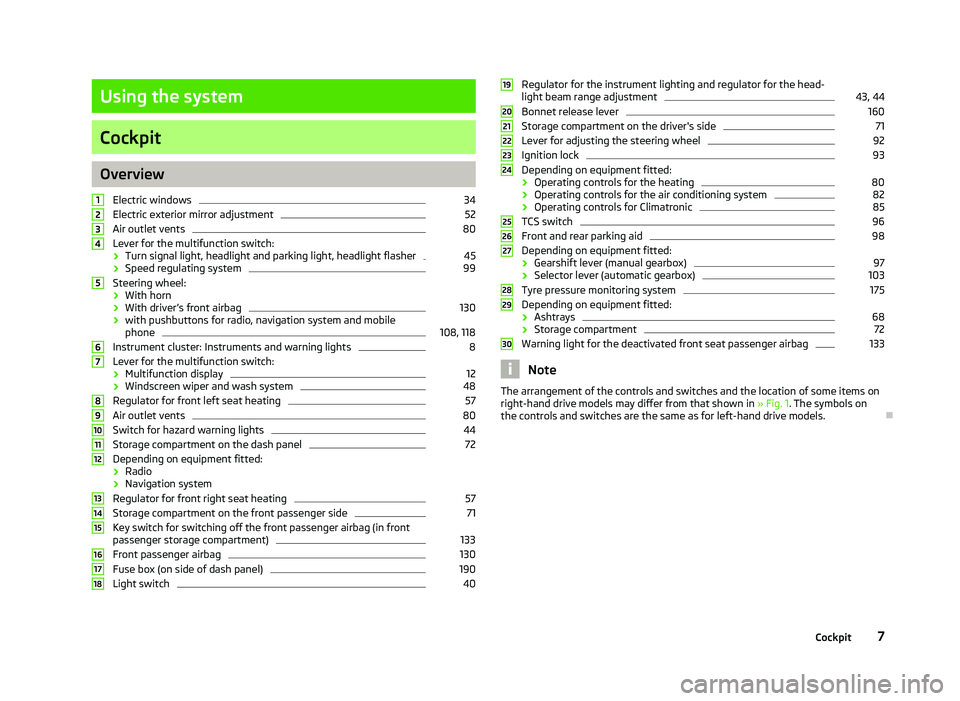
Overview
Electric windows 34
Electric exterior mirror adjustment 52
Air outlet vents 80
Lever for the multifunction switch:
› Turn signal light, headlight and parking light, headlight flasher 45
› Speed regulating system 99
Steering wheel:
› With horn
› With driver’s front airbag 130
› with pushbuttons for radio, navigation system and mobile
phone 108, 118
Instrument cluster: Instruments and warning lights 8
Lever for the multifunction switch:
› Multifunction display 12
› Windscreen wiper and wash system 48
Regulator for front left seat heating 57
Air outlet vents 80
Switch for hazard warning lights 44
Storage compartment on the dash panel 72
Depending on equipment fitted:
› Radio
› Navigation system
Regulator for front right seat heating 57
Storage compartment on the front passenger side 71
Key switch for switching off the front passenger airbag (in front
passenger storage compartment) 133
Front passenger airbag 130
Fuse box (on side of dash panel) 190
Light switch 401
2
3
4
5
6
7
8
9
10
11
12
13
14
15
16
17
18 Regulator for the instrument lighting and regulator for the head-
light beam range adjustment 43, 44
Bonnet release lever 160
Storage compartment on the driver's side 71
Lever for adjusting the steering wheel 92
Ignition lock 93
Depending on equipment fitted:
› Operating controls for the heating 80
› Operating controls for the air conditioning system 82
› Operating controls for Climatronic 85
TCS switch 96
Front and rear parking aid 98
Depending on equipment fitted:
› Gearshift lever (manual gearbox) 97
› Selector lever (automatic gearbox) 103
Tyre pressure monitoring system 175
Depending on equipment fitted:
› Ashtrays 68
› Storage compartment 72
Warning light for the deactivated front seat passenger airbag 133
Note
The arrangement of the controls and switches and the location of some items on
right-hand drive models may differ from that shown in »
Fig. 1. The symbols on
the controls and switches are the same as for left-hand drive models. Ð 19
20
21
22
23
24
25
26
27
28
29
30
7
Cockpit
Page 17 of 218
›
Press the button B
or D
to accept the current speed as the speed limit (the
value flashes).
If you wish to change the set speed limit, it is changed in 5
km/h intervals (e.g. the
accepted speed of 47 km/h increases to 50 km/h or decreases to 45 km/h).
› Press again the button B
or D
to confirm the speed limit, or wait approx. 5
seconds and the setting is saved automatically (the value stops flashing).
Change or delete speed limit
› With the button A
» Fig. 6
on page
13 or, if applicable, the adjustment wheelD
, select the menu item
Warning against excessive speeds .
› Pressing the button B
or D
deletes the speed limit.
› Pressing the button B
or D
again activates change mode for the speed limit.
If the set speed limit is exceeded, an audible signal will sound as a warning. At
the same time the message Warning against excessive speeds appears on the
display with the set limit value.
The set speed limit value remains stored even after switching off the ignition. ÐMAXI DOT (information display)
ä
Introduction
This chapter contains information on the following subjects:
Main menu 15
Settings 16
Door, boot lid and bonnet warning 17
Auto Check Control 17
The information display provides you with information on the current operating
state of your vehicle . The information system also provides you with data (de-
pending on the equipment installed in the vehicle) relating to the radio, mobile
phone, multi-functional indicator, navigation system, the unit connected to the
MDI input and the automatic gearbox » page 102.WARNING
Concentrate fully at all times on your driving! As the driver you are fully re-
sponsible for the operation of your vehicle. CAUTION
Pull out the ignition key if coming in contact with the display (e.g. when cleaning)
to prevent any possible damage. Ð Main menu
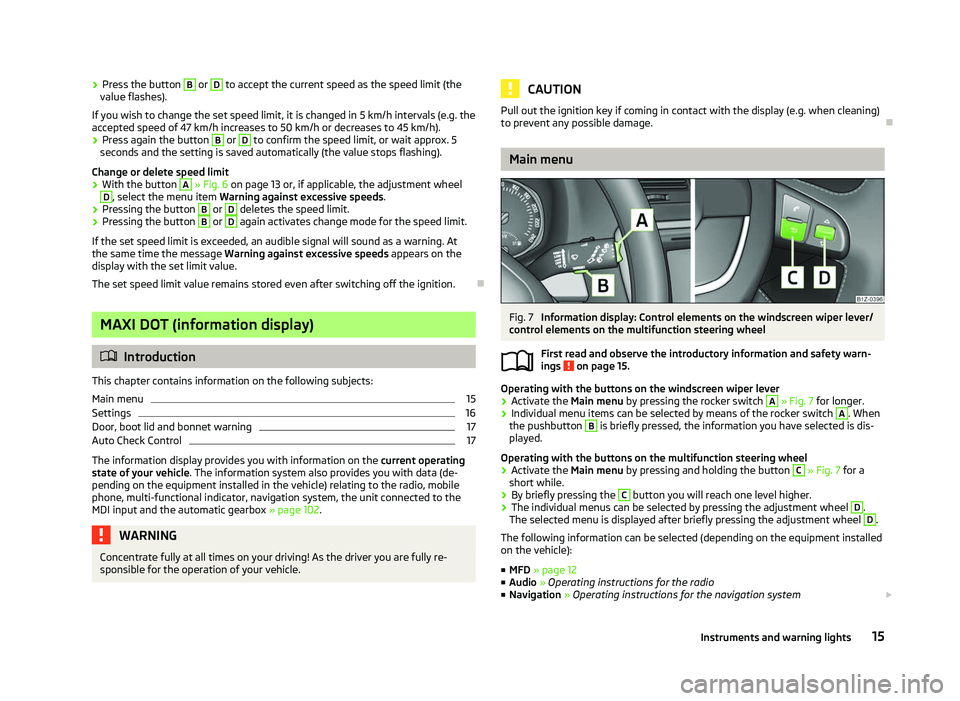
Fig. 7
Information display: Control elements on the windscreen wiper lever/
control elements on the multifunction steering wheel
First read and observe the introductory information and safety warn-
ings on page 15.
Operating with the buttons on the windscreen wiper lever
›
Activate the Main menu
by pressing the rocker switch A
» Fig. 7 for longer.
› Individual menu items can be selected by means of the rocker switch A
. When
the pushbutton B
is briefly pressed, the information you have selected is dis-
played.
Operating with the buttons on the multifunction steering wheel
› Activate the Main menu
by pressing and holding the button C
» Fig. 7
for a
short while.
› By briefly pressing the C
button you will reach one level higher.
› The individual menus can be selected by pressing the adjustment wheel D
.
The selected menu is displayed after briefly pressing the adjustment wheel D
.
The following information can be selected (depending on the equipment installed
on the vehicle):
■ MFD » page 12
■ Audio » Operating instructions for the radio
■ Navigation » Operating instructions for the navigation system £
ä
15
Instruments and warning lights
Page 31 of 218
›
The windows open while the key
is held in the unlock position.
› The warning light in the driver door stops flashing if the car is not fitted with an
anti-theft alarm system
» page 31.Note
If the vehicle is equipped with an anti-theft alarm system, you must insert the key
into the ignition lock and switch the ignition on within 15 seconds after unlocking
the door in order to deactivate the anti-theft alarm system. The alarm is trig-
gered if the ignition is not switched on within 15 seconds. ÐLocking the vehicle with the key
› Turn the key in the locking cylinder of the driver's door in the opposite direction
of travel (lock position) B
» Fig. 11
on page 28.
› The doors, the boot lid and the fuel filler flap are locked.
› The switched on interior lights will switch off over the door contact.
› The windows and the electric sliding/tilting roof close while the key
is held in
the lock position.
› The safe securing system is immediately activated.
› The warning light in the driver door begins flashing. Note
If the driver's door has been opened, the vehicle cannot be locked. ÐVehicle locking/unlocking from the inside
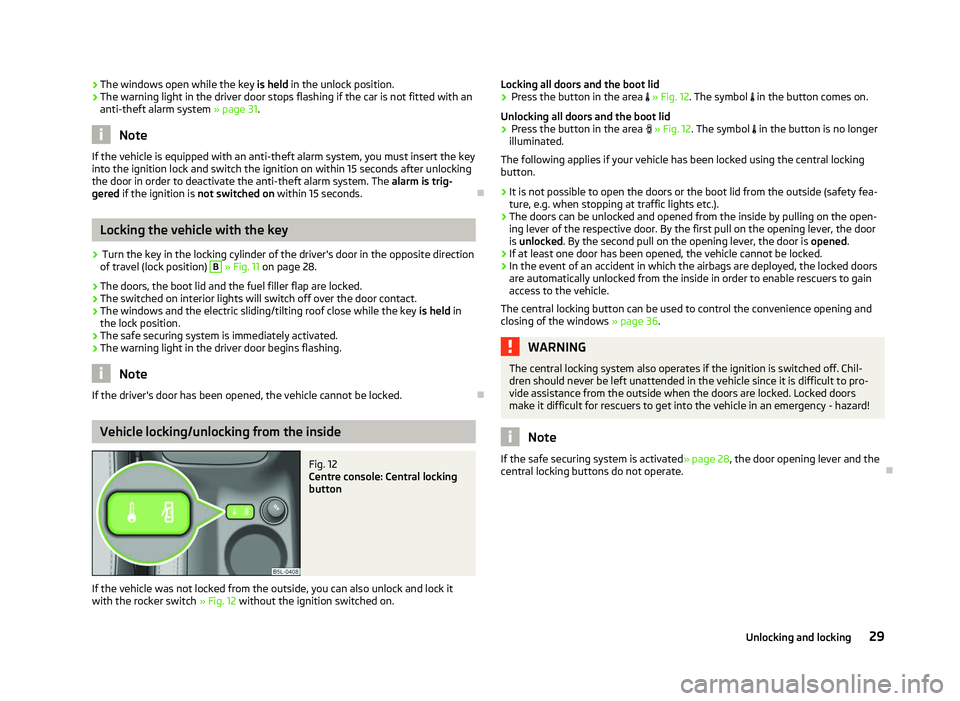
Fig. 12
Centre console: Central locking
button
If the vehicle was not locked from the outside, you can also unlock and lock it
with the rocker switch » Fig. 12 without the ignition switched on. Locking all doors and the boot lid
› Press the button in the area » Fig. 12. The symbol
in the button comes on.
Unlocking all doors and the boot lid
› Press the button in the area » Fig. 12. The symbol
in the button is no longer
illuminated.
The following applies if your vehicle has been locked using the central locking
button.
› It is not possible to open the doors or the boot lid from the outside (safety fea-
ture, e.g. when stopping at traffic lights etc.).
› The doors can be unlocked and opened from the inside by pulling on the open-
ing lever of the respective door. By the first pull on the opening lever, the door
is unlocked . By the second pull on the opening lever, the door is opened.
› If at least one door has been opened, the vehicle cannot be locked.
› In the event of an accident in which the airbags are deployed, the locked doors
are automatically unlocked from the inside in order to enable rescuers to gain
access to the vehicle.
The central locking button can be used to control the convenience opening and
closing of the windows »
page 36. WARNING
The central locking system also operates if the ignition is switched off. Chil-
dren should never be left unattended in the vehicle since it is difficult to pro-
vide assistance from the outside when the doors are locked. Locked doors
make it difficult for rescuers to get into the vehicle in an emergency - hazard! Note
If the safe securing system is activated » page 28, the door opening lever and the
central locking buttons do not operate. Ð
29
Unlocking and locking
Page 33 of 218
Locking
The turn signal lights flash once to confirm that the vehicle has been correctly
locked.
If the doors or the boot lid remain open after the vehicle has been locked, the
turn signal lights do not flash until they have been closed.
WARNING
If the car is locked from the outside and the safe securing system is activated,
there must not be any person in the car as it is then not possible to open ei-
ther a door or a window from the inside. The locked doors make it more diffi-
cult for rescuers to get into the vehicle in an emergency - hazard! Note
■ Only operate the remote control when the doors and boot lid are closed and the
vehicle is in your line of sight. ■ To avoid the car being locked inadvertently once in the car, the lock button of the remote control must not be pressed before the key is inserted into the ig-
nition lock. Should this happen, press the unlock button
of the remote control.
ÐSynchronisation
If the vehicle cannot be unlocked by actuating the remote control system then it
is possible that the code in the key and the control unit in the vehicle are no lon-
ger synchronised. This can occur when the buttons on the radio-operated key are
actuated a number of times outside of the operative range of the equipment or
the battery on the remote control was replaced.
This means it is necessary to synchronise the code as follows:
› press any button on the remote control key;
› pressing of the button means that the door will unlock with the key within 1 mi-
nute. Ð Anti-theft alarm system
Introductory information
The anti-theft alarm system increases the level of protection against people
seeking to break into the vehicle. The system triggers audible and visual warning
signals if an attempt is made to break into the vehicle.
How is the alarm system activated?
The anti-theft alarm system is activated when the vehicle is locked with the radio
remote control or the key in the driver's door . It is activated 30 seconds after
locking the door.
How is the alarm system deactivated?
The alarm system is deactivated by pressing the unlock button on the radio re-
mote control. The anti-theft alarm system is reactivated if the vehicle is not
opened within 30 seconds after transmitting the radio signal.
The alarm system is also deactivated if you unlock the driver door using the key
within 45 seconds of locking the vehicle.
If the vehicle is unlocked by inserting the key into the driver door, the key must
be inserted into the ignition lock and the ignition switched on within 15
seconds
of unlocking the door to deactivate the alarm system. The alarm is triggered if
the ignition is not switched on within 15 seconds.
When is the alarm triggered?
The following security areas of the locked vehicle are monitored: › bonnet;
› boot lid;
› doors;
› ignition lock;
› Vehicle inclination
» page 32;
› Interior of the vehicle
» page 32;
› A drop in voltage of the on-board power supply;
› Socket of the factory-fitted towing device.
An alarm is immediately triggered if either of the two battery terminals is discon-
nected while the anti-theft alarm system is activated.
How is the alarm switched off?
The alarm is switched off by unlocking the vehicle with the radio remote control
or switching on the ignition. £
31
Unlocking and locking
Page 37 of 218
Note
■ After switching the ignition off, it is still possible to open or close the windows
for approx. 10
minutes. The power windows are only switched off completely
once the driver or front passenger door are opened. ■ When driving always use the existing heating, air conditioning and ventilation
system for ventilating the interior of the vehicle. If the windows are opened, dust
as well as other dirt can get into the vehicle and in addition the wind noise is
more at certain speeds.
■ At high speeds, you should keep the windows closed to prevent unnecessarily
high fuel consumption.
■ The convenience opening of the windows by means of the key in the driver's
lock is only possible within 45
seconds of deactivating or activating the alarm sys-
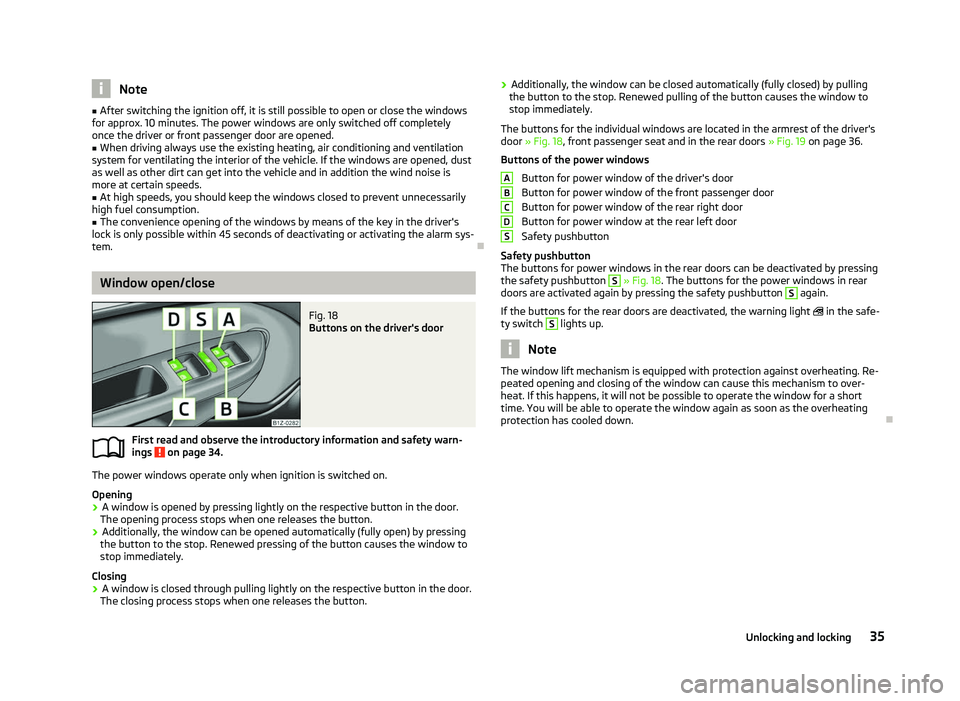
tem. ÐWindow open/close
Fig. 18
Buttons on the driver's door
First read and observe the introductory information and safety warn-
ings on page 34.
The power windows operate only when ignition is switched on.
Opening
›
A window is opened by pressing lightly on the respective button in the door.
The opening process stops when one releases the button.
› Additionally, the window can be opened automatically (fully open) by pressing
the button to the stop. Renewed pressing of the button causes the window to
stop immediately.
Closing
› A window is closed through pulling lightly on the respective button in the door.
The closing process stops when one releases the button.
ä ›
Additionally, the window can be closed automatically (fully closed) by pulling
the button to the stop. Renewed pulling of the button causes the window to
stop immediately.
The buttons for the individual windows are located in the armrest of the driver's
door » Fig. 18, front passenger seat and in the rear doors » Fig. 19 on page
36.
Buttons of the power windows Button for power window of the driver's door
Button for power window of the front passenger door
Button for power window of the rear right door
Button for power window at the rear left door
Safety pushbutton
Safety pushbutton
The buttons for power windows in the rear doors can be deactivated by pressing
the safety pushbutton S
» Fig. 18. The buttons for the power windows in rear
doors are activated again by pressing the safety pushbutton S
again.
If the buttons for the rear doors are deactivated, the warning light in the safe-
ty switch S
lights up.
Note
The window lift mechanism is equipped with protection against overheating. Re-
peated opening and closing of the window can cause this mechanism to over-
heat. If this happens, it will not be possible to operate the window for a short
time. You will be able to operate the window again as soon as the overheating
protection has cooled down. Ð A
B
C
D
S
35
Unlocking and locking
Page 58 of 218
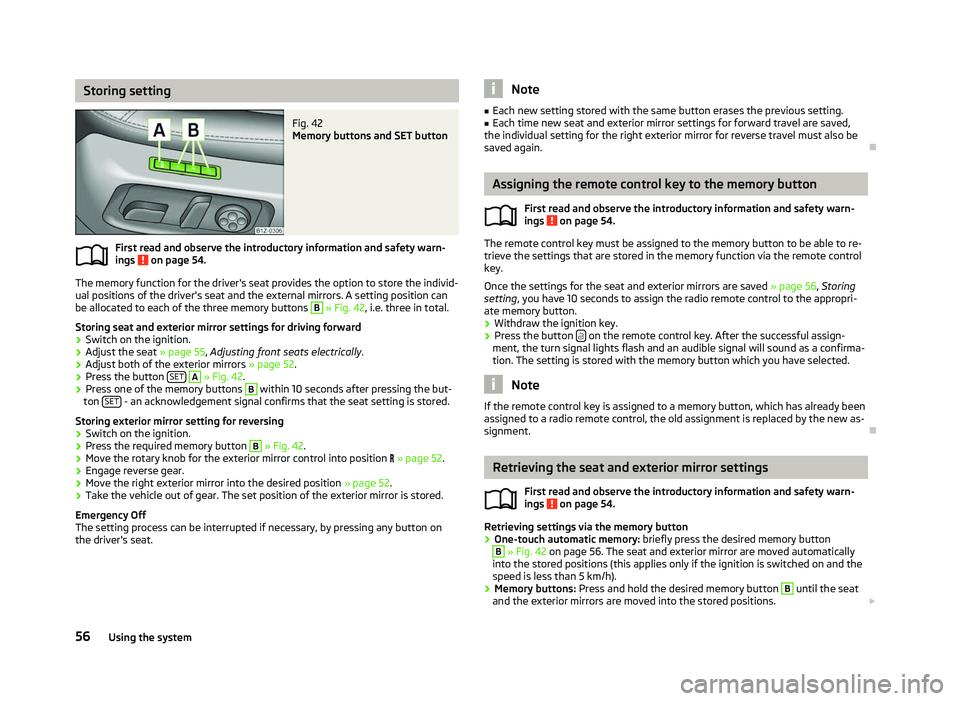
Storing setting
Fig. 42
Memory buttons and SET button
First read and observe the introductory information and safety warn-
ings on page 54.
The memory function for the driver's seat provides the option to store the individ-
ual positions of the driver's seat and the external mirrors. A setting position can
be allocated to each of the three memory buttons B
» Fig. 42, i.e. three in total.
Storing seat and exterior mirror settings for driving forward
› Switch on the ignition.
› Adjust the seat
» page 55, Adjusting front seats electrically .
› Adjust both of the exterior mirrors
» page 52.
› Press the button
SET A
» Fig. 42.
› Press one of the memory buttons B
within 10 seconds after pressing the but-
ton SET - an acknowledgement signal confirms that the seat setting is stored.
Storing exterior mirror setting for reversing › Switch on the ignition.
› Press the required memory button B
» Fig. 42.
› Move the rotary knob for the exterior mirror control into position
» page 52.
› Engage reverse gear.
› Move the right exterior mirror into the desired position
» page 52.
› Take the vehicle out of gear. The set position of the exterior mirror is stored.
Emergency Off
The setting process can be interrupted if necessary, by pressing any button on
the driver's seat.
ä Note
■ Each new setting stored with the same button erases the previous setting.
■ Each time new seat and exterior mirror settings for forward travel are saved,
the individual setting for the right exterior mirror for reverse travel must also be
saved again. Ð Assigning the remote control key to the memory button
First read and observe the introductory information and safety warn-
ings on page 54.
The remote control key must be assigned to the memory button to be able to re-
trieve the settings that are stored in the memory function via the remote control
key.
Once the settings for the seat and exterior mirrors are saved » page 56, Storing
setting, you have 10
seconds to assign the radio remote control to the appropri-
ate memory button.
› Withdraw the ignition key.
› Press the button
on the remote control key. After the successful assign-
ment, the turn signal lights flash and an audible signal will sound as a confirma-
tion. The setting is stored with the memory button which you have selected. Note
If the remote control key is assigned to a memory button, which has already been
assigned to a radio remote control, the old assignment is replaced by the new as-
signment. Ð Retrieving the seat and exterior mirror settings
First read and observe the introductory information and safety warn-
ings on page 54.
Retrieving settings via the memory button
›
One-touch automatic memory:
briefly press the desired memory button B
» Fig. 42 on page 56. The seat and exterior mirror are moved automatically
into the stored positions (this applies only if the ignition is switched on and the
speed is less than 5 km/h).
› Memory buttons:
Press and hold the desired memory button B
until the seat
and the exterior mirrors are moved into the stored positions. £
ä
ä
56 Using the system
Page 86 of 218
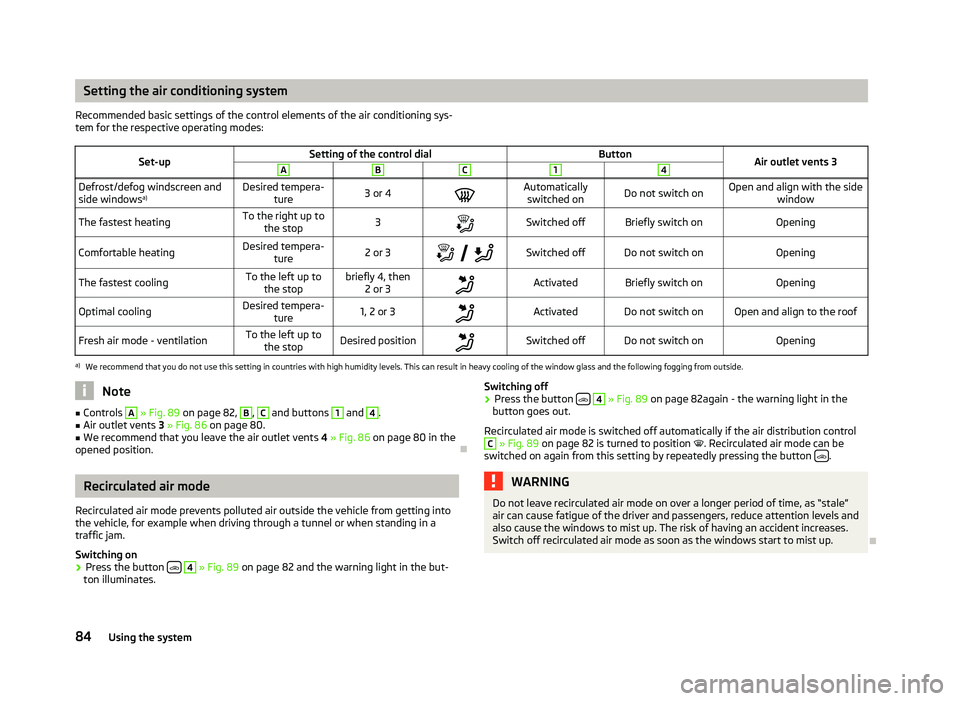
Setting the air conditioning system
Recommended basic settings of the control elements of the air conditioning sys-
tem for the respective operating modes:
Set-up Setting of the control dial
Button
Air outlet vents 3 A B C 1 4
Defrost/defog windscreen and
side windows
a) Desired tempera-
ture 3 or 4
Automatically
switched on Do not switch on Open and align with the side
window
The fastest heating To the right up to
the stop 3
Switched off Briefly switch on
Opening
Comfortable heating Desired tempera-
ture 2 or 3
Switched off Do not switch on
Opening
The fastest cooling To the left up to
the stop briefly 4, then
2 or 3 Activated Briefly switch on
Opening
Optimal cooling Desired tempera-
ture 1, 2 or 3
Activated Do not switch on Open and align to the roof
Fresh air mode - ventilation To the left up to
the stop Desired position
Switched off Do not switch on
Openinga)
We recommend that you do not use this setting in countries with high humidity levels. This can result in heavy cooling of the window glass and the following fogging from outside. Note
■ Controls A
» Fig. 89
on page 82, B
, C
and buttons 1
and 4
.
■ Air outlet vents 3 » Fig. 86 on page 80.
■ We recommend that you leave the air outlet vents 4 » Fig. 86 on page 80 in the
opened position. ÐRecirculated air mode
Recirculated air mode prevents polluted air outside the vehicle from getting into
the vehicle, for example when driving through a tunnel or when standing in a
traffic jam.
Switching on
› Press the button
4
» Fig. 89
on page 82 and the warning light in the but-
ton illuminates. Switching off
› Press the button
4
» Fig. 89
on page 82again - the warning light in the
button goes out.
Recirculated air mode is switched off automatically if the air distribution control C
» Fig. 89
on page 82 is turned to position . Recirculated air mode can be
switched on again from this setting by repeatedly pressing the button .
WARNING
Do not leave recirculated air mode on over a longer period of time, as “stale”
air can cause fatigue of the driver and passengers, reduce attention levels and
also cause the windows to mist up. The risk of having an accident increases.
Switch off recirculated air mode as soon as the windows start to mist up. Ð
84 Using the system
Page 87 of 218
Climatronic (automatic air conditioning system)
Introductory information
The Climatronic maintains fully automatically a convenience temperature. This is
achieved by automatically varying the temperature of the air flow, the blower
stages and air distribution. The system also takes sunlight into account, which
eliminates the need to alter the settings manually. The automatic
mode » page 86
ensures maximum well-being of the occupants at all times of
the year.
Description of Climatronic system
The cooling system only operates if the following conditions are met:
› engine running;
› outside temperature above approx. +2 °C;
› AC 13
» Fig. 90 on page 85
switched on.
The AC compressor is switched off at a high coolant temperature in order to pro-
vide cooling at a high load of the engine.
Recommended setting for all periods of the year.
› Set the desired temperature, we recommend 22 °C.
› Press the button
AUTO 8
» Fig. 90
on page 85.
› Move the air outlet vents
3 » Fig. 86 on page 80 and 4 so that the air flow is
directed slightly upwards. Note
■ We recommend that you have the Climatronic system cleaned by a
ŠKODA spe-
cialist garage once every year. ■ On vehicles equipped with a factory-fitted radio or radio navigation system, the
Climatronic information is also shown on their displays. This function can be
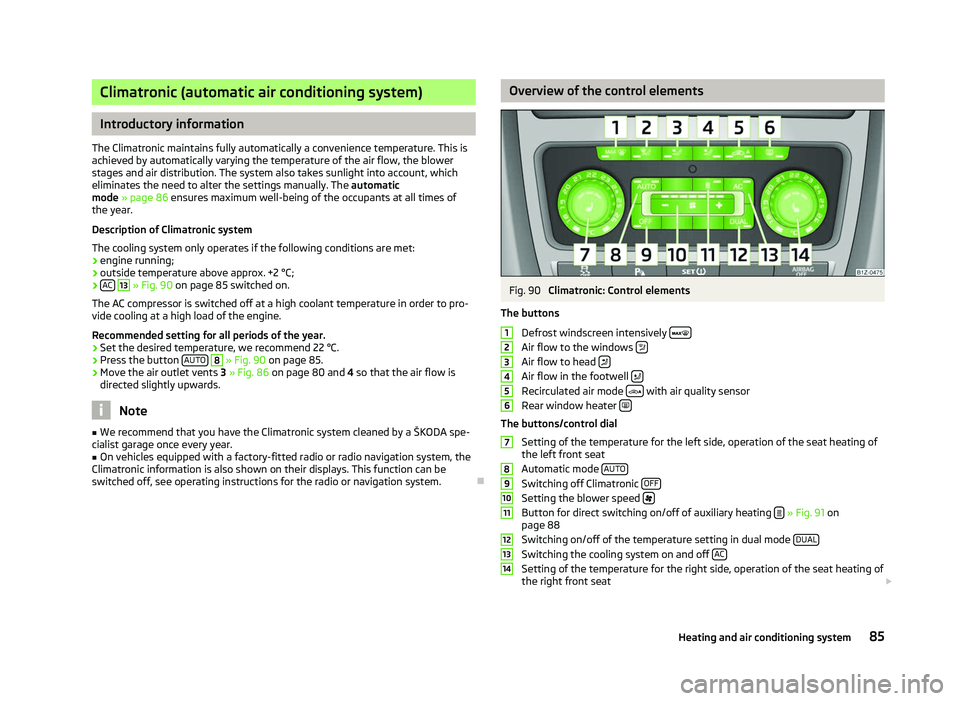
switched off, see operating instructions for the radio or navigation system. Ð Overview of the control elements
Fig. 90
Climatronic: Control elements
The buttons Defrost windscreen intensively Air flow to the windows
Air flow to head
Air flow in the footwell
Recirculated air mode
with air quality sensor
Rear window heater The buttons/control dial
Setting of the temperature for the left side, operation of the seat heating of
the left front seat
Automatic mode AUTO Switching off Climatronic
OFF Setting the blower speed
Button for direct switching on/off of auxiliary heating
» Fig. 91 on
page 88
Switching on/off of the temperature setting in dual mode DUAL Switching the cooling system on and off
AC Setting of the temperature for the right side, operation of the seat heating of
the right front seat £ 1
2
3
4
5
6
7
8
9
10
11
12
13
14
85
Heating and air conditioning system
Page 88 of 218

Note
Below the top row of buttons is located the interior temperature sensor. Do not
stick anything on or cover the sensor, otherwise it could have an unfavourable ef-
fect on the Climatronic. ÐAutomatic mode
The automatic mode is used in order to maintain a constant temperature and to
demist the windows in the interior of the car.
Switching on
› Set a temperature between +18 °C and +26
℃.
› Move the air outlet vents
3 » Fig. 86 on page 80 and 4 so that the air flow is
directed slightly upwards.
› Press the button
AUTO 8
» Fig. 90
on page
85. The warning light in the top
right or left corner lights up, depending on which mode was last selected.
If the warning light in the top right corner of the button AUTO 8
» Fig. 90
on
page 85
lights up, the Climatronic operates in “HIGH” mode. The “HIGH” mode is
the standard setting of the Climatronic.
When pressing again the button AUTO , the Climatronic changes into the “LOW”
mode and the warning light in the top left corner lights up. The Climatronic uses
only in this mode the lower blower speed. However taking into account the noise
level, this is more comfortable, yet be aware that the effectiveness of the air con-
ditioning system is reduced particularly if the vehicle is fully occupied.
By pressing the button AUTO again, it is changed to “HIGH” mode.
Automatic mode is switched off by pressing one of the buttons for the air distri-
bution or by increasing/decreasing the blower speed. The temperature is never-
theless regulated. ÐSwitching the cooling system on and off
Switching the cooling system on and off › Press the button
AC 13
» Fig. 90 on page 85. The warning light in the button
lights up.
› When you again press the button
AC 13
, the air conditioning system is switch-
ed off. The warning light in the button goes out. Only the function of the venti-
lation remains active when no lower temperature than the outside temperature
can be reached. Ð Setting temperature
The interior temperature for the left and right side can be set separately.
› The temperature for both sides can be set with the control dial 7
» Fig. 90 on
page 85
after switching on the ignition.
› If you wish to set the temperature for the right side, turn the control dial 14
» Fig. 90
on page
85. The warning light in the button DUAL 12
» Fig. 90
on
page 85
lights up, this indicates that differing temperatures for the left and
right side can be set.
If the warning light in the button DUAL 12
»
Fig. 90
on page 85 is illuminated, the
temperature for both sides cannot be set with the control dial 7
» Fig. 90
on
page 85. You can reactivate this function by pressing the button DUAL 12
. The
warning light in the button goes out.
The interior temperature can be set between +18 °C and +26 ℃. The interior tem-
perature is regulated automatically within this range. If a temperature lower than
+18 °C is selected, a blue symbol lights up at the start of the numerical scale. If a
temperature higher than +26 °C is selected, a red symbol lights up at the start of
the numerical scale. In both limit positions the Climatronic operates at maximum
cooling or heating capacity, respectively. The temperature is not controlled in this
case.
Lengthy and uneven distribution of the air flow out of the vents (especially
around the feet) and large differences in temperature, for example, when getting
out of the vehicle, can cause susceptible individuals to catch a cold. Ð Recirculated air mode
Recirculated air mode largely prevents polluted air from outside the vehicle get-
ting into the vehicle, for example, when driving through a tunnel or when stand-
ing in a traffic jam. If a considerable increase in concentration of pollutants is rec-
ognized by the air quality sensor, when the automatic air distribution control is
switched on, the air distribution control will temporarily be switched off. If the
concentration of pollutants decreases to the normal level, the air distribution con-
trol is automatically switched off so that fresh air can be guided into the vehicle
interior. In recirculated air mode air is sucked out of the interior of the vehicle and
then fed back into the interior. When the automatic air distribution control is
switched on, an air quality sensor measures the concentration of pollutants in the
drawn in air. £
86 Using the system
Page 110 of 218
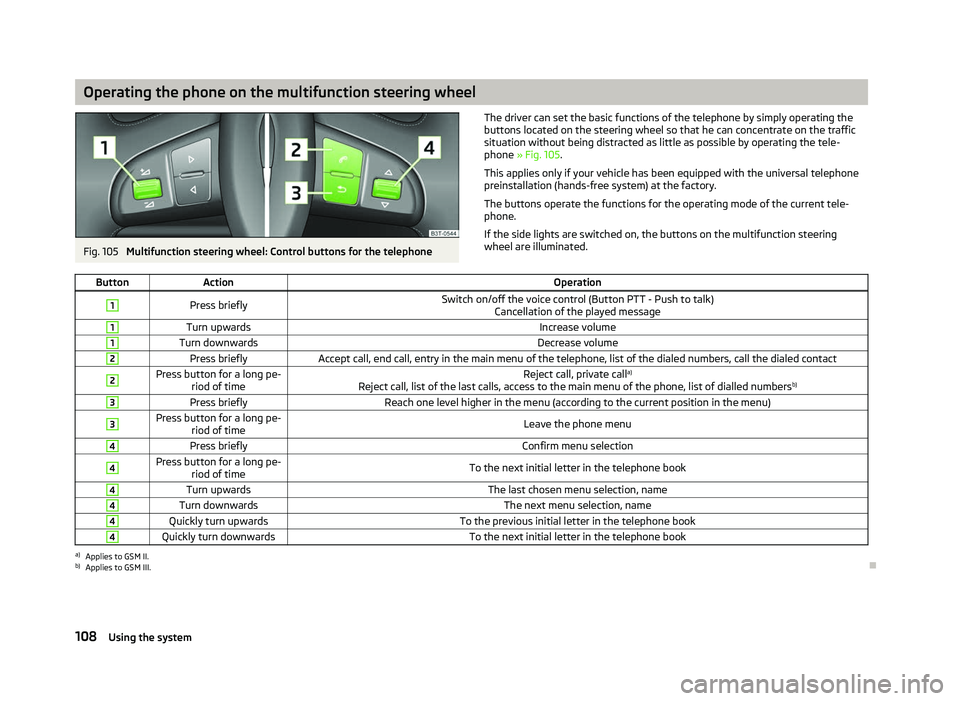
Operating the phone on the multifunction steering wheel
Fig. 105
Multifunction steering wheel: Control buttons for the telephone The driver can set the basic functions of the telephone by simply operating the
buttons located on the steering wheel so that he can concentrate on the traffic
situation without being distracted as little as possible by operating the tele-
phone
» Fig. 105 .
This applies only if your vehicle has been equipped with the universal telephone
preinstallation (hands-free system) at the factory.
The buttons operate the functions for the operating mode of the current tele-
phone.
If the side lights are switched on, the buttons on the multifunction steering
wheel are illuminated.
Button Action Operation1
Press briefly
Switch on/off the voice control (Button PTT - Push to talk)
Cancellation of the played message 1
Turn upwards
Increase volume1
Turn downwards
Decrease volume2
Press briefly
Accept call, end call, entry in the main menu of the telephone, list of the dialed numbers, call the dialed contact2 Press button for a long pe-
riod of time Reject call, private call
a)
Reject call, list of the last calls, access to the main menu of the phone, list of dialled numbers b)3
Press briefly
Reach one level higher in the menu (according to the current position in the menu)3 Press button for a long pe-
riod of time Leave the phone menu4
Press briefly
Confirm menu selection4 Press button for a long pe-
riod of time To the next initial letter in the telephone book4
Turn upwards
The last chosen menu selection, name4
Turn downwards
The next menu selection, name4
Quickly turn upwards
To the previous initial letter in the telephone book4
Quickly turn downwards
To the next initial letter in the telephone booka)
Applies to GSM II.
b) Applies to GSM III. Ð
108 Using the system