charging SKODA OCTAVIA 2006 Owner´s Manual
[x] Cancel search | Manufacturer: SKODA, Model Year: 2006, Model line: OCTAVIA, Model: SKODA OCTAVIA 2006Pages: 218, PDF Size: 5.48 MB
Page 7 of 218
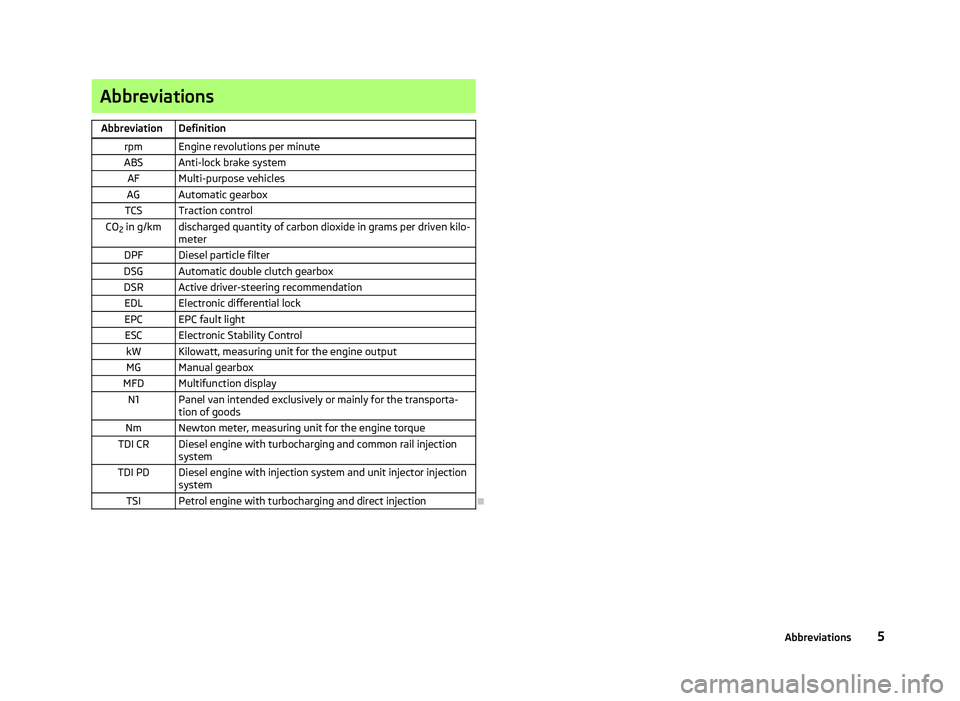
Abbreviations
Abbreviation Definition rpm Engine revolutions per minute
ABS Anti-lock brake system AF Multi-purpose vehicles
AG Automatic gearbox
TCS Traction control
CO 2 in g/km discharged quantity of carbon dioxide in grams per driven kilo-
meter
DPF Diesel particle filter
DSG Automatic double clutch gearbox
DSR Active driver-steering recommendation EDL Electronic differential lock
EPC EPC fault light ESC Electronic Stability Control kW Kilowatt, measuring unit for the engine outputMG Manual gearbox
MFD Multifunction display N1 Panel van intended exclusively or mainly for the transporta- tion of goods
Nm Newton meter, measuring unit for the engine torque
TDI CR Diesel engine with turbocharging and common rail injection system
TDI PD Diesel engine with injection system and unit injector injection system
TSI Petrol engine with turbocharging and direct injection Ð 5
Abbreviations
Page 48 of 218
If operating lights with the door contact switch is enabled (switch A
is in position
), the light will come on when:
› the vehicle is unlocked;
› one of the doors is opened;
› or the ignition key is removed.
If operating lights with the door contact switch is enabled (switch A
is in position
), the light will turn off when:
› the vehicle is locked;
› the ignition is switched on;
› about 30 seconds after all the doors have been closed.
If a door remains open, or if the switch A
is in the position
, the interior light
goes out after 10
minutes to prevent the battery from discharging. Note
We recommend having these bulbs replaced by a ŠKODA specialist garage. ÐInterior lighting - version 2
Fig. 30
Interior lighting - version 2
Switching on
› Press the switch into position
» Fig. 30.
Switching off
› Press the switch into position
O » Fig. 30.
Operating with the door contact switch
› Press the switch into position
» Fig. 30.
The same principles apply for interior lighting version 2 as for » page 45, Interior
lighting - version 1 . Ð Illuminated storage compartment on front passenger side
› When opening the flap of the storage compartment on the front passenger
side the lighting in the storage compartment comes on.
› The light switches on automatically when the parking light is switched on and
goes out when the flap is closed. Ð Front door warning light
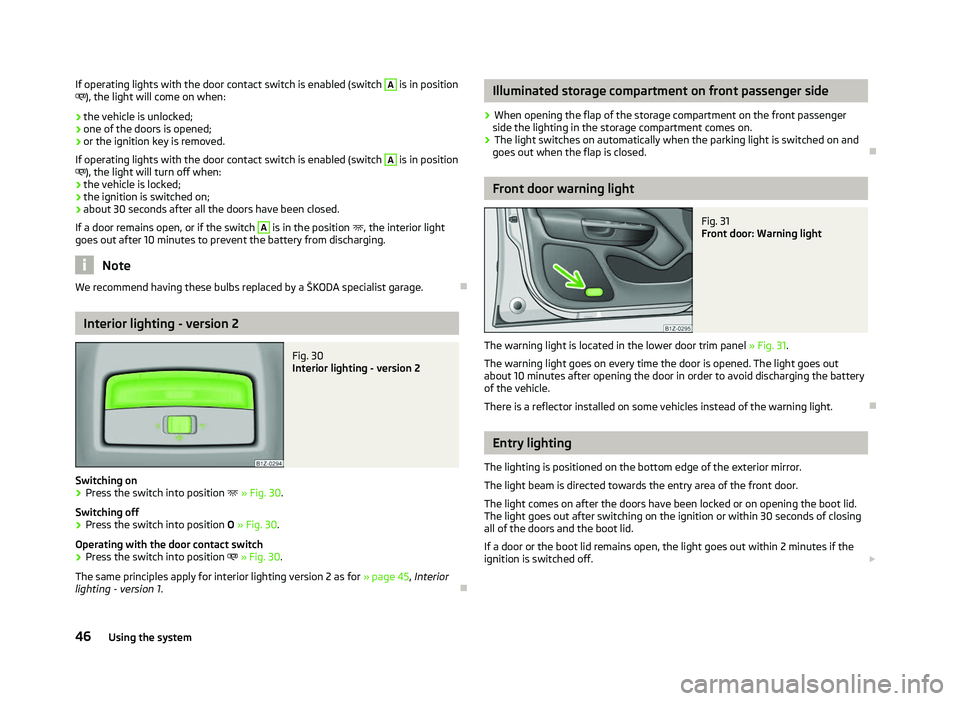
Fig. 31
Front door: Warning light
The warning light is located in the lower door trim panel » Fig. 31.
The warning light goes on every time the door is opened. The light goes out
about 10 minutes after opening the door in order to avoid discharging the battery
of the vehicle.
There is a reflector installed on some vehicles instead of the warning light. Ð Entry lighting
The lighting is positioned on the bottom edge of the exterior mirror.
The light beam is directed towards the entry area of the front door.
The light comes on after the doors have been locked or on opening the boot lid.
The light goes out after switching on the ignition or within 30
seconds of closing
all of the doors and the boot lid.
If a door or the boot lid remains open, the light goes out within 2 minutes if the
ignition is switched off. £
46 Using the system
Page 112 of 218
›
Managing telephone calls via the adapter
» page 111.
› Operation of the telephone via the information display
» page 112.
› Voice control of the telephone
» page 116.
› Music playback from the telephone or other multimedia units
» page 118.
All communication between a mobile phone and your vehicle's hands-free system
is established with the help of Bluetooth ®
technology. The adapter serves only
for charging the telephone and for transmitting the signal to the vehicle's exter-
nal aerial. Note
The following guidelines must be observed » page 107, Mobile phones and two-
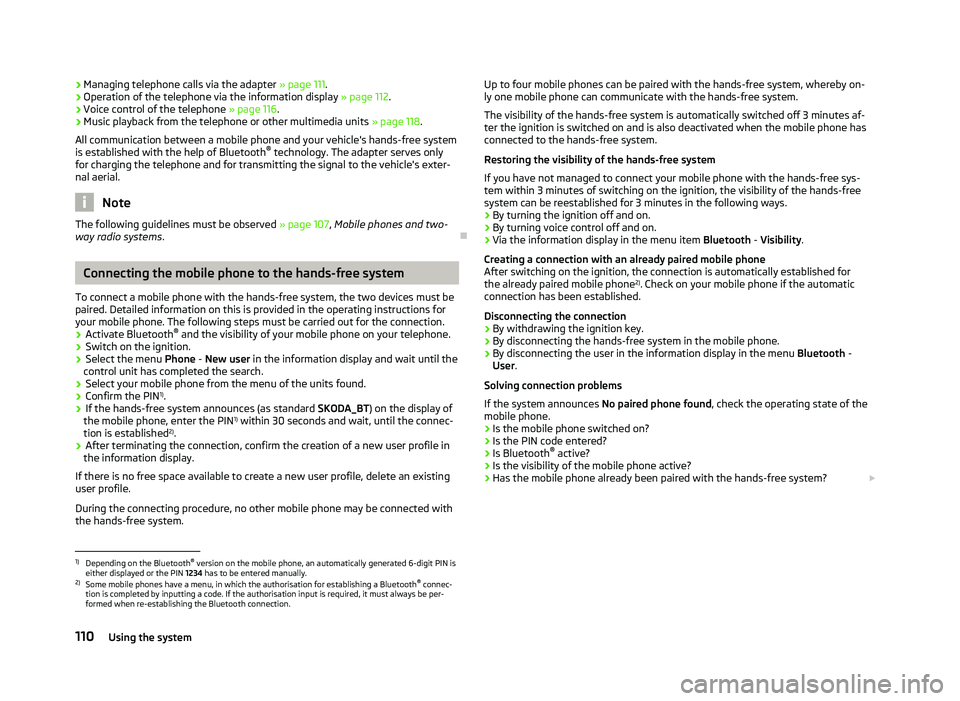
way radio systems. ÐConnecting the mobile phone to the hands-free system
To connect a mobile phone with the hands-free system, the two devices must be
paired. Detailed information on this is provided in the operating instructions for
your mobile phone. The following steps must be carried out for the connection.
› Activate Bluetooth ®
and the visibility of your mobile phone on your telephone.
› Switch on the ignition.
› Select the menu
Phone - New user in the information display and wait until the
control unit has completed the search.
› Select your mobile phone from the menu of the units found.
› Confirm the PIN 1)
.
› If the hands-free system announces (as standard
SKODA_BT) on the display of
the mobile phone, enter the PIN 1)
within 30 seconds and wait, until the connec-
tion is established 2
).
› After terminating the connection, confirm the creation of a new user profile in
the information display.
If there is no free space available to create a new user profile, delete an existing
user profile.
During the connecting procedure, no other mobile phone may be connected with
the hands-free system. Up to four mobile phones can be paired with the hands-free system, whereby on-
ly one mobile phone can communicate with the hands-free system.
The visibility of the hands-free system is automatically switched off 3
minutes af-
ter the ignition is switched on and is also deactivated when the mobile phone has
connected to the hands-free system.
Restoring the visibility of the hands-free system
If you have not managed to connect your mobile phone with the hands-free sys-
tem within 3 minutes of switching on the ignition, the visibility of the hands-free
system can be reestablished for 3 minutes in the following ways.
› By turning the ignition off and on.
› By turning voice control off and on.
› Via the information display in the menu item Bluetooth
- Visibility.
Creating a connection with an already paired mobile phone
After switching on the ignition, the connection is automatically established for
the already paired mobile phone 2)
. Check on your mobile phone if the automatic
connection has been established.
Disconnecting the connection
› By withdrawing the ignition key.
› By disconnecting the hands-free system in the mobile phone.
› By disconnecting the user in the information display in the menu
Bluetooth -
User .
Solving connection problems
If the system announces No paired phone found, check the operating state of the
mobile phone.
› Is the mobile phone switched on?
› Is the PIN code entered?
› Is Bluetooth ®
active?
› Is the visibility of the mobile phone active?
› Has the mobile phone already been paired with the hands-free system?
£1)
Depending on the Bluetooth ®
version on the mobile phone, an automatically generated 6-digit PIN is
either displayed or the PIN 1234 has to be entered manually.
2) Some mobile phones have a menu, in which the authorisation for establishing a Bluetooth ®
connec-
tion is completed by inputting a code. If the authorisation input is required, it must always be per-
formed when re-establishing the Bluetooth connection.
110 Using the system
Page 113 of 218

Note
■ If a suitable adapter is available for your mobile phone, only use your mobile
phone in the adapter inserted in the telephone mount so that the radiation in the
vehicle drops to a minimum. ■ Placing the mobile phone in the adapter inserted in the telephone mount en-
sures optimum sending and receiving power. ÐInserting the mobile phone and adapter
Fig. 106
Universal telephone preinstalla-
tion
Only one telephone mount is factory-fitted. An adapter for the mobile phone can
be purchased from ŠKODA Original Accessories.
Inserting the adapter and mobile phone › First of all push the adapter A
in the direction of the arrow
» Fig. 106 up to the
stop into the mount. Then press the adapter slightly downwards, until it locks
securely into position.
› Insert the mobile phone into the adapter A
(as specified in the instructions
from the manufacturer of the adapter).
Removing the adapter and mobile phone
› Simultaneously press the locks on the mount
» Fig. 106 and remove the adapter
with the mobile phone. CAUTION
Taking the mobile phone out of the adapter during the call can lead to interrup-
tion of the connection. When removing the mobile phone, the connection to the
factory-fitted antenna is interrupted, which reduces the quality of the transmit-
ting and receiving signal. The charging of the mobile phone battery is also inter-
rupted. Ð Managing telephone calls with the help of the adapter
Fig. 107
Principle sketch: single-button adapter/two-button adapter
Function overview of the »
Fig. 107 (PTT - “push to talk”) button on the adapt-
er:
› Switch on/off voice control;
› Accept/end a call.
On some adapters include the button SOS » Fig. 107
A
in addition to the button
. After pressing this button for 2 seconds, the number 112 (Emergency call) is
dialled. Note
On vehicles fitted with the Columbus navigation system , the buttons and
SOS do not work.
Ð
111
Communication
Page 167 of 218
Windscreen washer system
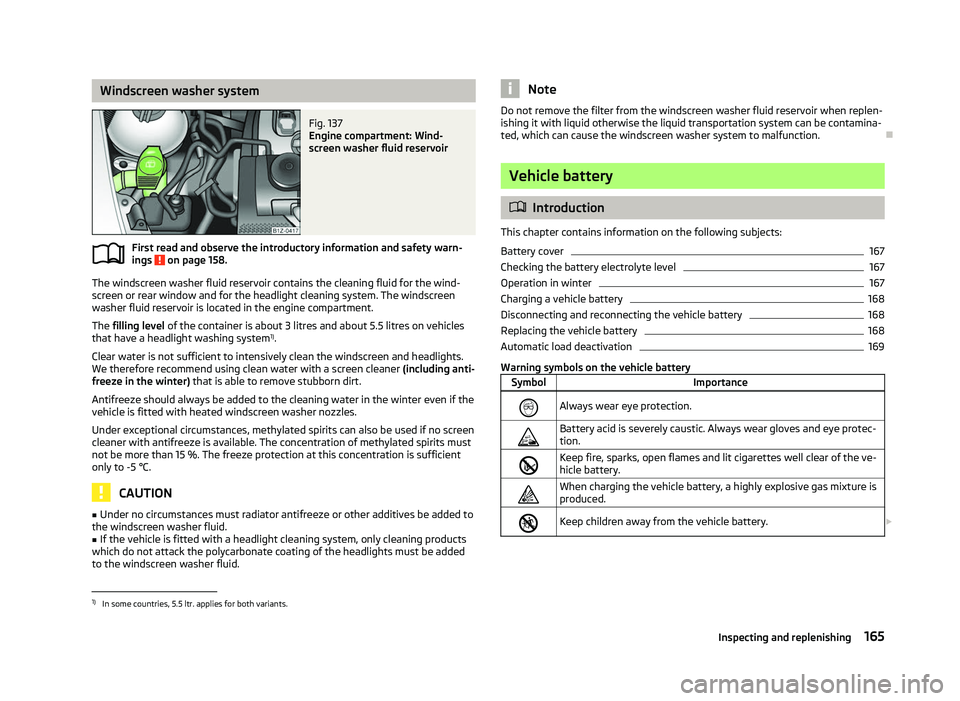
Fig. 137
Engine compartment: Wind-
screen washer fluid reservoir
First read and observe the introductory information and safety warn-
ings on page 158.
The windscreen washer fluid reservoir contains the cleaning fluid for the wind-
screen or rear window and for the headlight cleaning system. The windscreen
washer fluid reservoir is located in the engine compartment.
The filling level of the container is about 3
litres and about 5.5 litres on vehicles
that have a headlight washing system 1)
.
Clear water is not sufficient to intensively clean the windscreen and headlights.
We therefore recommend using clean water with a screen cleaner (including anti-
freeze in the winter) that is able to remove stubborn dirt.
Antifreeze should always be added to the cleaning water in the winter even if the
vehicle is fitted with heated windscreen washer nozzles.
Under exceptional circumstances, methylated spirits can also be used if no screen
cleaner with antifreeze is available. The concentration of methylated spirits must
not be more than 15 %. The freeze protection at this concentration is sufficient
only to -5 °C. CAUTION
■ Under no circumstances must radiator antifreeze or other additives be added to
the windscreen washer fluid.
■ If the vehicle is fitted with a headlight cleaning system, only cleaning products
which do not attack the polycarbonate coating of the headlights must be added
to the windscreen washer fluid.
ä Note
Do not remove the filter from the windscreen washer fluid reservoir when replen-
ishing it with liquid otherwise the liquid transportation system can be contamina-
ted, which can cause the windscreen washer system to malfunction. Ð Vehicle battery
ä
Introduction
This chapter contains information on the following subjects:
Battery cover 167
Checking the battery electrolyte level 167
Operation in winter 167
Charging a vehicle battery 168
Disconnecting and reconnecting the vehicle battery 168
Replacing the vehicle battery 168
Automatic load deactivation 169
Warning symbols on the vehicle battery Symbol Importance
Always wear eye protection.
Battery acid is severely caustic. Always wear gloves and eye protec-
tion.
Keep fire, sparks, open flames and lit cigarettes well clear of the ve-
hicle battery.
When charging the vehicle battery, a highly explosive gas mixture is
produced.
Keep children away from the vehicle battery.
£1)
In some countries, 5.5 ltr. applies for both variants.
165
Inspecting and replenishing
Page 168 of 218
Improper handling of the vehicle battery can cause damage. We therefore recom-
mend that any work on the vehicle battery is carried out by a
ŠKODA Service Part-
ner.
There is a risk of injuries, scalding, accidents and burns when carrying out any
work on the battery and on the electrical system. For this reason, it is essential to
comply with the warning instructions stated below and with the general applica-
ble rules of safety. WARNING
■ The battery acid is strongly corrosive and must, therefore, be handled with
the greatest of care. Always wear protective gloves, eye and skin protection
when handling the vehicle battery. Corrosive fumes in the air irritate the air
passages and lead to conjunctivitis and inflammation of the air passages in
the lungs. They corrode tooth enamel. After contact with the skin, the acid
creates deep wounds which take a long time to heal. Repeated contact with
diluted acids causes skin diseases (inflammations, ulcers, slin cracks). Acids
coming into contact with water are diluted accompanied by significant devel-
opment of heat.
■ Do not tilt the battery otherwise battery electrolyte may flow out of the bat-
tery vent openings. Protect the eyes with safety glasses or a shield! There is
the danger of suffering blindness! If any battery electrolyte comes into con-
tact with your eyes, rinse the relevant eye immediately with clear water for
several minutes. Then consult a doctor immediately. ■ Splashes of acid on your skin or clothes should be neutralised as soon as
possible using soap suds and then rinsed with plenty of water. If acid was
swallowed, seek immediate medical attention.
■ Keep children away from the vehicle battery.
■ When you charge a battery, hydrogen is released, and a highly explosive gas
mixture is also produced. An explosion can be caused through sparkling over
during unclamping or loosening of the cable plug while the ignition is on.
■ Bridging of the poles will create a short circuit (e.g. through metal objects,
cables). Possible consequences of a short circuit: Melting of lead struts, explo-
sion and burning of the battery, jets of acid spurting out.
■ It is prohibited to work with a naked flame and light, to smoke or to carry
out any activities which produce sparks. Avoid creating sparks when working
with cables and electrical devices. Strong sparking represents a risk of injury. WARNING (Continued)
■ Before carrying out any work on the electrical system, switch off the engine,
the ignition and all of the electrical components and disconnect the negative
terminal (-) on the battery. If you wish to replace a bulb it suffices to switch off
the relevant light.
■ Never charge a frozen or thawed vehicle battery - risk of explosion and
caustic burns! Replace a frozen vehicle battery.
■ Never jump-start vehicle batteries with an electrolyte level that is too low -
risk of explosion and caustic burns!
■ Never use a damaged vehicle battery - risk of explosion! Replace a damaged
vehicle battery immediately. CAUTION
■ The vehicle battery must only be disconnected if the ignition is switched off,
otherwise the vehicle's electrical system (electronic components) can be dam-
aged. When disconnecting the battery from the electrical system, first of all dis-
connect the negative terminal
(-) of the battery. Then disconnect the positive ter-
minal (+).
■ When connecting the battery to the electrical system, first connect the positive
terminal (+) of the battery. Then connect the negative terminal
(-). Under no cir-
cumstances must the battery cables be connected incorrectly - risk of a cable fire.
■ Ensure that battery acid does not come into contact with the bodywork - risk of
damage to the paintwork.
■ Do not place the battery in direct daylight in order to protect the vehicle battery
housing from the effects of ultra-violet light.
■ If the vehicle has not been driven for more than 3 to 4 weeks, the battery will
discharge. This is because certain electrical components consume electricity (e.
g.
control units) also in idle state. Prevent the battery from discharging by discon-
necting the battery's negative terminal or continuously charging the battery with
a very low charging current.
■ If the vehicle is frequently used for making short trips, the vehicle battery will
not have time to charge up sufficiently and may discharge. For the sake of the environment
A vehicle battery that has been removed is a special type of hazardous waste.
These must be disposed of in accordance with national legal regulations. Note
You should replace batteries older than 5 years. Ð
166 General Maintenance
Page 170 of 218
Charging a vehicle battery
First read and observe the introductory information and safety warn-
ings on page 165.
A properly charged vehicle battery is essential for reliably starting the engine.
›
Switch off the ignition and all of the electrical components.
› Only for “quick-charging”: Disconnect both battery cables (first of all “negative”,
then “positive”).
› Attach the terminal clamps of the charger to the battery terminals (red =
“posi-
tive
”, black = “negative”).
› Only now plug the mains cable of the charger into the power socket and switch
on the device.
› When charging is completed: Switch off the charger and remove the mains ca-
ble from the power socket.
› Only then disconnect the charger's terminal clamps.
› Reconnect the cables to the battery, if necessary (first of all
“positive”, then
“negative
”).
It is not normally necessary to disconnect the cables of the battery if you re-
charge the vehicle battery using low amperages (as for example from a mini-
charger). Refer to the instructions of the charger manufacturer.
A charging current of 0.1 multiple of the total vehicle battery capacity (or lower)
must be used until full charging is achieved.
It is, however, necessary to disconnect both cables before charging the battery
with high amperages, so-called “ quick-charging”.
“Quick-charging” the vehicle battery is dangerous and requires a special charger
and specialist knowledge. We therefore recommend having the quick charging of
vehicle batteries undertaken by a ŠKODA specialist garage.
The vent plugs of the vehicle battery should not be opened for charging. CAUTION
On vehicles with the START/STOP system, the pole terminal of the charger must
not be connected directly to the negative terminal of the vehicle battery, but only
to the engine earth » page 186, Jump-starting in vehicles with the
START-STOP
system . Ð
ä Disconnecting and reconnecting the vehicle battery
First read and observe the introductory information and safety warn-
ings on page 165.
On disconnecting and reconnecting the vehicle battery the following functions
are initially deactivated or are no longer able to operate fault-free.
Operation Operating measure
Electrical power window (operational faults) » page 37
Enter the radio/navigation system code num-
ber » User manual of the radio
or »
user manual of the navigation
system
Setting the clock » page 11
Data in the multifunction display are deleted. » page 12 Note
We recommend having the vehicle checked by a ŠKODA Service Partner to ensure
the full functionality of all electrical systems. Ð Replacing the vehicle battery
First read and observe the introductory information and safety warn-
ings on page 165.
When replacing a battery, the new vehicle battery must have the same capacity,
voltage, amperage and be the same size. Suitable types of vehicle batteries can
be purchased from a
ŠKODA Service Partner.
We recommend that the battery is replaced by a ŠKODA Service Partner, where
the new vehicle battery will be installed properly and the original battery will be
disposed of in accordance with national regulations. Ð
ä
ä
168 General Maintenance
Page 171 of 218
Automatic load deactivation
First read and observe the introductory information and safety warn-
ings on page 165.
An intelligent vehicle power management system automatically takes various
measures at high loads on the vehicle battery to prevent discharging of the bat-
tery: This manifests itself by the following:
› The idling speed is raised to allow the generator to deliver more electricity to
the electrical system.
› Where appropriate large consumers of power, e.g. seat heaters, rear window
heaters, voltage supply to the 12V power socket, have their power limited or in
case of emergency shut off completely. Note
Despite such intervention by the vehicle electric system management, the vehicle
battery may be drained. For example, when the ignition is switched on a long time
with the engine turned off or the side or parking lights are turned on during lon-
ger parking. Driving comfort is not put at risk by any shutting off of consumers.
Often the driver is not aware of it having taken place. Ðä
169
Inspecting and replenishing
Page 210 of 218
Index
A
ABS 96
Warning light 22
Accessories 177
Active steering support 95
Adjusting Exterior mirror 52
Adjusting seats 122
Adjustment Seat 55
Aerial 149
see Radio reception 151
Airbag 129
Deployment 129
Front airbag 130
Head airbag 132
Side airbag 131
Airbag system 129
Air conditioning system Air outlet vents 80
Climatronic 85
Manual air conditioning system 82
Alarm 31
Anti-theft alarm system 31
Antilock brake system 96
Armrest Front 74
rear 60, 75
Ashtray 68
Assistance systems ESC 95
Assist systems ABS 22, 96
Cruise control systems (CCS) 99
EDS and XDS 97
ESC 22Parking aid 98
START/STOP 100
TCS 21, 96
Auto Check Control 17
Automatic driving lamp control 40
Automatic gearbox 102
Dynamic shift programme 105
Emergency programme 106
Information for driving 102
Kickdown 105
Manual shifting of gears on the multifunction steering wheel 104
Parking 103
Selector lever-emergency unlocking 106
Selector lever lock 105
Selector lever positions 103
Starting off 103
Stopping 103
Tiptronic 104
Automatic load deactivation 169
Auxiliary heating (auxiliary heating and ventila- tion) 87
Avoiding damage to your vehicle 143
B
Before setting off 121
Belt tensioners 128
Bonnet Closing 160
Opening 160
Warning light 20
Boot Class
N1 vehicles 61
Cover 63
Emergency unlocking 34
Fastening elements 61
Fixing nets 62
Fixing of the floor covering 63
foldable boot cover (Combi) 64
Light 47see Boot lid 33
Unlocking the boot lid 34
Variable loading floor 64
Boot lid 33
Automatic locking 33
Warning light 21
Brake booster 95
Brake fluid Checking 164
Brakes Brake assist systems 93
Handbrake 95
Running in 139
Warning light 19
Braking Brake fluid 164
Braking assistant 95
Breakdown kit 182
Bulbs Replacing 191
Button in the driver's door Electric power windows 34
C
Car computer see Multifunction display 12
Car jack 179
Carrier 66
Catalytic converter 139
CD changer 119
Central locking button 29
Central locking system 27
lock 29
unlock 28
Changes 177
Changing Engine oil 162
Wheel 179
Charging a vehicle battery 168
208 Index
Page 214 of 218
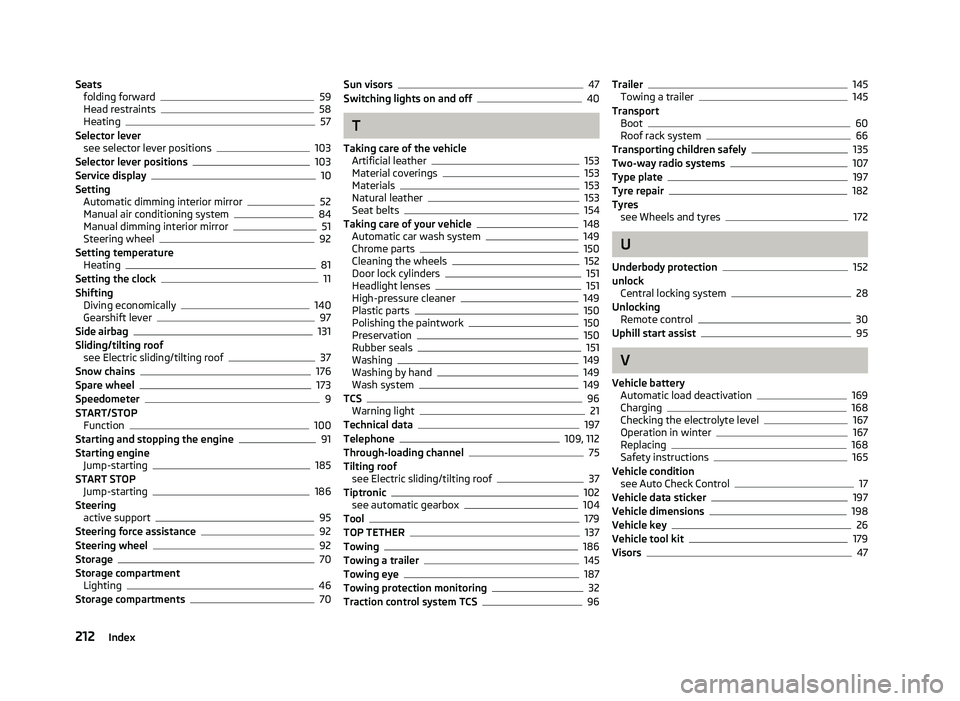
Seats
folding forward 59
Head restraints 58
Heating 57
Selector lever see selector lever positions 103
Selector lever positions 103
Service display 10
Setting Automatic dimming interior mirror 52
Manual air conditioning system 84
Manual dimming interior mirror 51
Steering wheel 92
Setting temperature Heating 81
Setting the clock 11
Shifting Diving economically 140
Gearshift lever 97
Side airbag 131
Sliding/tilting roof see Electric sliding/tilting roof 37
Snow chains 176
Spare wheel 173
Speedometer 9
START/STOP Function 100
Starting and stopping the engine 91
Starting engine Jump-starting 185
START STOP Jump-starting 186
Steering active support 95
Steering force assistance 92
Steering wheel 92
Storage 70
Storage compartment Lighting 46
Storage compartments 70Sun visors 47
Switching lights on and off 40
T
Taking care of the vehicle Artificial leather 153
Material coverings 153
Materials 153
Natural leather 153
Seat belts 154
Taking care of your vehicle 148
Automatic car wash system 149
Chrome parts 150
Cleaning the wheels 152
Door lock cylinders 151
Headlight lenses 151
High-pressure cleaner 149
Plastic parts 150
Polishing the paintwork 150
Preservation 150
Rubber seals 151
Washing 149
Washing by hand 149
Wash system 149
TCS 96
Warning light 21
Technical data 197
Telephone 109, 112
Through-loading channel 75
Tilting roof see Electric sliding/tilting roof 37
Tiptronic 102
see automatic gearbox 104
Tool 179
TOP TETHER 137
Towing 186
Towing a trailer 145
Towing eye 187
Towing protection monitoring 32
Traction control system TCS 96Trailer 145
Towing a trailer 145
Transport Boot 60
Roof rack system 66
Transporting children safely 135
Two-way radio systems 107
Type plate 197
Tyre repair 182
Tyres see Wheels and tyres 172
U
Underbody protection 152
unlock Central locking system 28
Unlocking Remote control 30
Uphill start assist 95
V
Vehicle battery Automatic load deactivation 169
Charging 168
Checking the electrolyte level 167
Operation in winter 167
Replacing 168
Safety instructions 165
Vehicle condition see Auto Check Control 17
Vehicle data sticker 197
Vehicle dimensions 198
Vehicle key 26
Vehicle tool kit 179
Visors 47
212 Index