steering wheel SKODA OCTAVIA 2006 Owner´s Manual
[x] Cancel search | Manufacturer: SKODA, Model Year: 2006, Model line: OCTAVIA, Model: SKODA OCTAVIA 2006Pages: 218, PDF Size: 5.48 MB
Page 5 of 218
Table of Contents
Abbreviations
Using the system
Cockpit 7
Overview 6
Instruments and warning lights 8
Instrument cluster 8
Multifunction display (onboard computer) 12
MAXI DOT (information display) 15
Warning lights 18
Unlocking and locking 26
Vehicle key 26
Child safety lock 27
Central locking system 27
Remote control 30
Anti-theft alarm system 31
Boot lid 33
Electric power windows 34
Electric sliding/tilting roof 37
Lights and visibility 39
Lights 39
Interior light 45
Visibility 47
Windscreen wipers and washers 48
Rear window 51
Seats and Stowage 54
Front seats 54
Seat heaters 57
Head restraints 58
Rear seats 59
Boot 60Variable loading floor in the boot 64
Net partition (Combi) 65
Roof rack system 66
Cup holder 68
Ashtray 68
Cigarette lighter, 12-volt power socket 69
Storage compartments 70
Clothes hooks 77
Parking ticket holder 77
Heating and air conditioning system 79
Heating and air conditioning system 79
Air outlet vents 80
Heating 80
Air conditioning system (manual air conditioning
system) 82
Climatronic (automatic air conditioning
system) 85
Auxiliary heating (auxiliary heating and
ventilation) 87
Starting-off and Driving 91
Starting and stopping the engine 91
Brakes and brake assist systems 93
Shifting (manual gearbox) 97
pedals 97
Parking aid 98
Cruise control system (CCS) 99
START/STOP 100
Automatic gearbox 102
Automatic gearbox 102
Communication 107
Mobile phones and two-way radio systems 107
Operating the phone on the multifunction
steering wheel 108
Symbols in the information display 109
Phone Phonebook 109
Universal telephone preinstallation GSM II 109
Universal telephone preinstallation GSM IIl 112Voice control 116
Multimedia 118
Safety
Passive Safety 121
General information 121
Correct seated position 122
Seat belts 125
Seat belts 125
Airbag system 129
Description of the airbag system 129
Front airbags 130
Side airbags 131
Head airbags 132
Deactivating airbags 133
Transporting children safely 135
Child seat 135
Driving Tips
Driving and the Environment 139
The first 1 500 km 139
Catalytic converter 139
Economical and environmentally friendly
driving 140
Environmental compatibility 142
Driving abroad 143
Avoiding damage to your vehicle 143
Driving through water on the street 144
Towing a trailer 145
Towing a trailer 145
General Maintenance
Taking care of and cleaning the vehicle 148
Taking care of your vehicle 148
3
Table of Contents
Page 9 of 218
Using the system
Cockpit
Overview
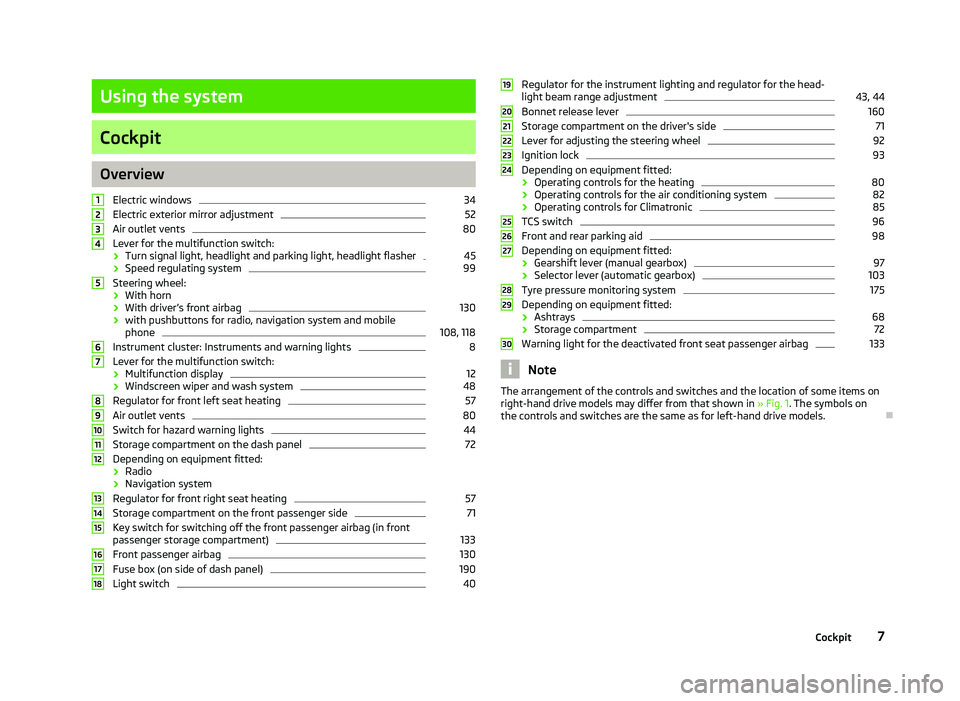
Electric windows 34
Electric exterior mirror adjustment 52
Air outlet vents 80
Lever for the multifunction switch:
› Turn signal light, headlight and parking light, headlight flasher 45
› Speed regulating system 99
Steering wheel:
› With horn
› With driver’s front airbag 130
› with pushbuttons for radio, navigation system and mobile
phone 108, 118
Instrument cluster: Instruments and warning lights 8
Lever for the multifunction switch:
› Multifunction display 12
› Windscreen wiper and wash system 48
Regulator for front left seat heating 57
Air outlet vents 80
Switch for hazard warning lights 44
Storage compartment on the dash panel 72
Depending on equipment fitted:
› Radio
› Navigation system
Regulator for front right seat heating 57
Storage compartment on the front passenger side 71
Key switch for switching off the front passenger airbag (in front
passenger storage compartment) 133
Front passenger airbag 130
Fuse box (on side of dash panel) 190
Light switch 401
2
3
4
5
6
7
8
9
10
11
12
13
14
15
16
17
18 Regulator for the instrument lighting and regulator for the head-
light beam range adjustment 43, 44
Bonnet release lever 160
Storage compartment on the driver's side 71
Lever for adjusting the steering wheel 92
Ignition lock 93
Depending on equipment fitted:
› Operating controls for the heating 80
› Operating controls for the air conditioning system 82
› Operating controls for Climatronic 85
TCS switch 96
Front and rear parking aid 98
Depending on equipment fitted:
› Gearshift lever (manual gearbox) 97
› Selector lever (automatic gearbox) 103
Tyre pressure monitoring system 175
Depending on equipment fitted:
› Ashtrays 68
› Storage compartment 72
Warning light for the deactivated front seat passenger airbag 133
Note
The arrangement of the controls and switches and the location of some items on
right-hand drive models may differ from that shown in »
Fig. 1. The symbols on
the controls and switches are the same as for left-hand drive models. Ð 19
20
21
22
23
24
25
26
27
28
29
30
7
Cockpit
Page 15 of 218
Note
All information in the memory 1 and 2 is erased if the battery of the vehicle is dis-
connected. ÐOperation
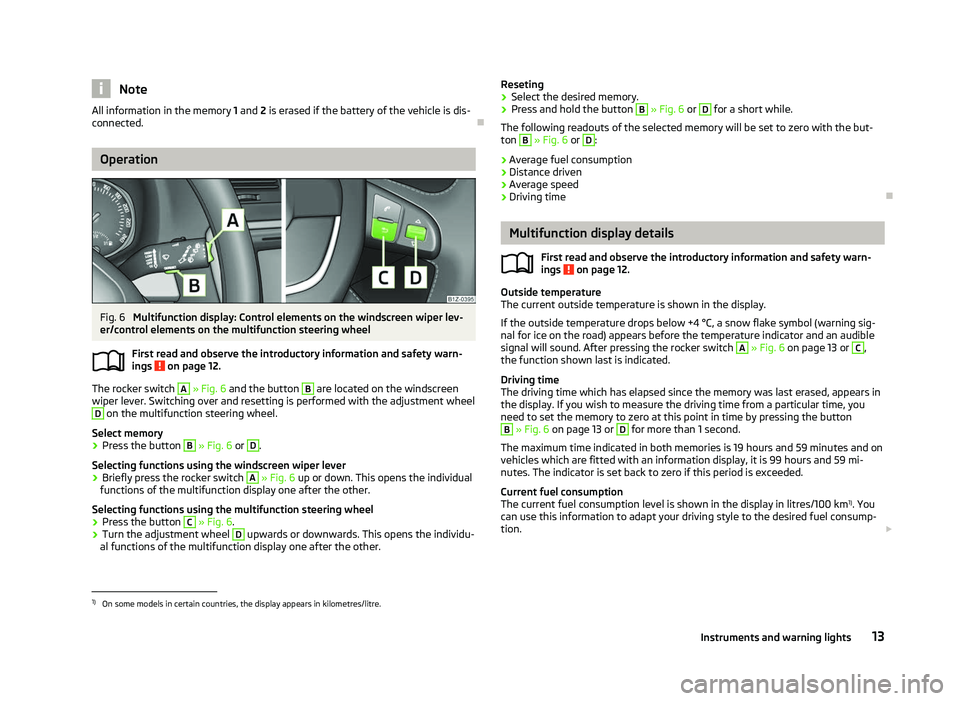
Fig. 6
Multifunction display: Control elements on the windscreen wiper lev-
er/control elements on the multifunction steering wheel
First read and observe the introductory information and safety warn-
ings on page 12.
The rocker switch A
» Fig. 6
and the button B
are located on the windscreen
wiper lever. Switching over and resetting is performed with the adjustment wheel D
on the multifunction steering wheel.
Select memory
› Press the button B
» Fig. 6 or D
.
Selecting functions using the windscreen wiper lever
› Briefly press the rocker switch A
» Fig. 6
up or down. This opens the individual
functions of the multifunction display one after the other.
Selecting functions using the multifunction steering wheel
› Press the button C
» Fig. 6.
› Turn the adjustment wheel D
upwards or downwards. This opens the individu-
al functions of the multifunction display one after the other.
ä Reseting
› Select the desired memory.
› Press and hold the button B
» Fig. 6 or D
for a short while.
The following readouts of the selected memory will be set to zero with the but-
ton B
» Fig. 6 or D
:
› Average fuel consumption
› Distance driven
› Average speed
› Driving time Ð Multifunction display details
First read and observe the introductory information and safety warn-
ings on page 12.
Outside temperature
The current outside temperature is shown in the display.
If the outside temperature drops below +4
°C, a snow flake symbol (warning sig-
nal for ice on the road) appears before the temperature indicator and an audible
signal will sound. After pressing the rocker switch A
» Fig. 6 on page 13 or C
,
the function shown last is indicated.
Driving time
The driving time which has elapsed since the memory was last erased, appears in
the display. If you wish to measure the driving time from a particular time, you
need to set the memory to zero at this point in time by pressing the button B
» Fig. 6 on page 13 or D
for more than 1 second.
The maximum time indicated in both memories is 19 hours and 59
minutes and on
vehicles which are fitted with an information display, it is 99 hours and 59 mi-
nutes. The indicator is set back to zero if this period is exceeded.
Current fuel consumption
The current fuel consumption level is shown in the display in litres/100 km 1)
. You
can use this information to adapt your driving style to the desired fuel consump-
tion. £
ä
1)
On some models in certain countries, the display appears in kilometres/litre.
13
Instruments and warning lights
Page 17 of 218
›
Press the button B
or D
to accept the current speed as the speed limit (the
value flashes).
If you wish to change the set speed limit, it is changed in 5
km/h intervals (e.g. the
accepted speed of 47 km/h increases to 50 km/h or decreases to 45 km/h).
› Press again the button B
or D
to confirm the speed limit, or wait approx. 5
seconds and the setting is saved automatically (the value stops flashing).
Change or delete speed limit
› With the button A
» Fig. 6
on page
13 or, if applicable, the adjustment wheelD
, select the menu item
Warning against excessive speeds .
› Pressing the button B
or D
deletes the speed limit.
› Pressing the button B
or D
again activates change mode for the speed limit.
If the set speed limit is exceeded, an audible signal will sound as a warning. At
the same time the message Warning against excessive speeds appears on the
display with the set limit value.
The set speed limit value remains stored even after switching off the ignition. ÐMAXI DOT (information display)
ä
Introduction
This chapter contains information on the following subjects:
Main menu 15
Settings 16
Door, boot lid and bonnet warning 17
Auto Check Control 17
The information display provides you with information on the current operating
state of your vehicle . The information system also provides you with data (de-
pending on the equipment installed in the vehicle) relating to the radio, mobile
phone, multi-functional indicator, navigation system, the unit connected to the
MDI input and the automatic gearbox » page 102.WARNING
Concentrate fully at all times on your driving! As the driver you are fully re-
sponsible for the operation of your vehicle. CAUTION
Pull out the ignition key if coming in contact with the display (e.g. when cleaning)
to prevent any possible damage. Ð Main menu
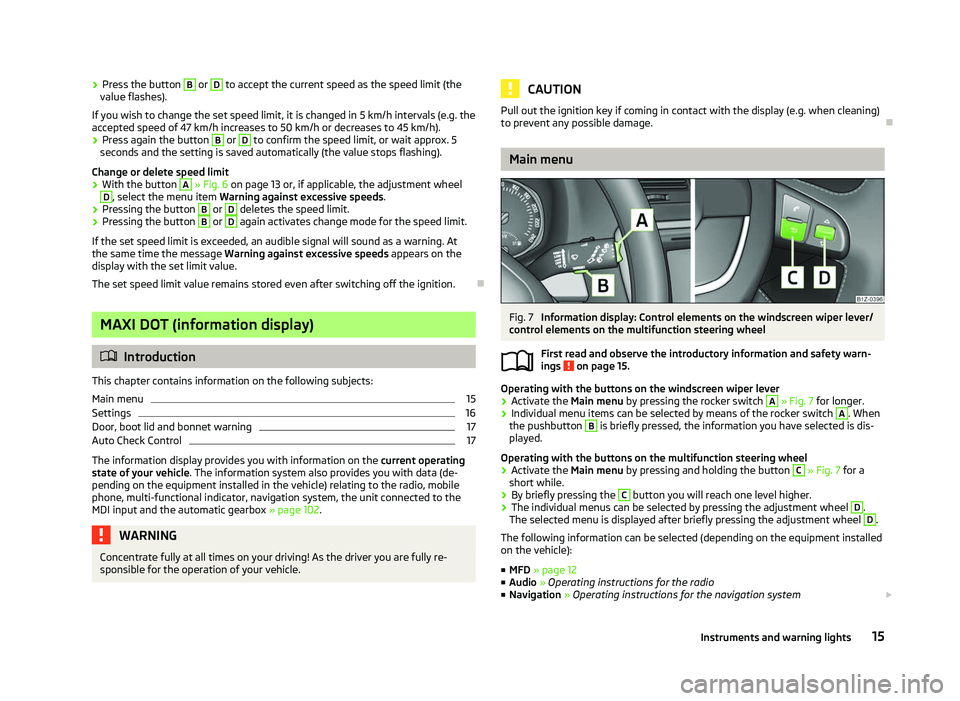
Fig. 7
Information display: Control elements on the windscreen wiper lever/
control elements on the multifunction steering wheel
First read and observe the introductory information and safety warn-
ings on page 15.
Operating with the buttons on the windscreen wiper lever
›
Activate the Main menu
by pressing the rocker switch A
» Fig. 7 for longer.
› Individual menu items can be selected by means of the rocker switch A
. When
the pushbutton B
is briefly pressed, the information you have selected is dis-
played.
Operating with the buttons on the multifunction steering wheel
› Activate the Main menu
by pressing and holding the button C
» Fig. 7
for a
short while.
› By briefly pressing the C
button you will reach one level higher.
› The individual menus can be selected by pressing the adjustment wheel D
.
The selected menu is displayed after briefly pressing the adjustment wheel D
.
The following information can be selected (depending on the equipment installed
on the vehicle):
■ MFD » page 12
■ Audio » Operating instructions for the radio
■ Navigation » Operating instructions for the navigation system £
ä
15
Instruments and warning lights
Page 18 of 218
■
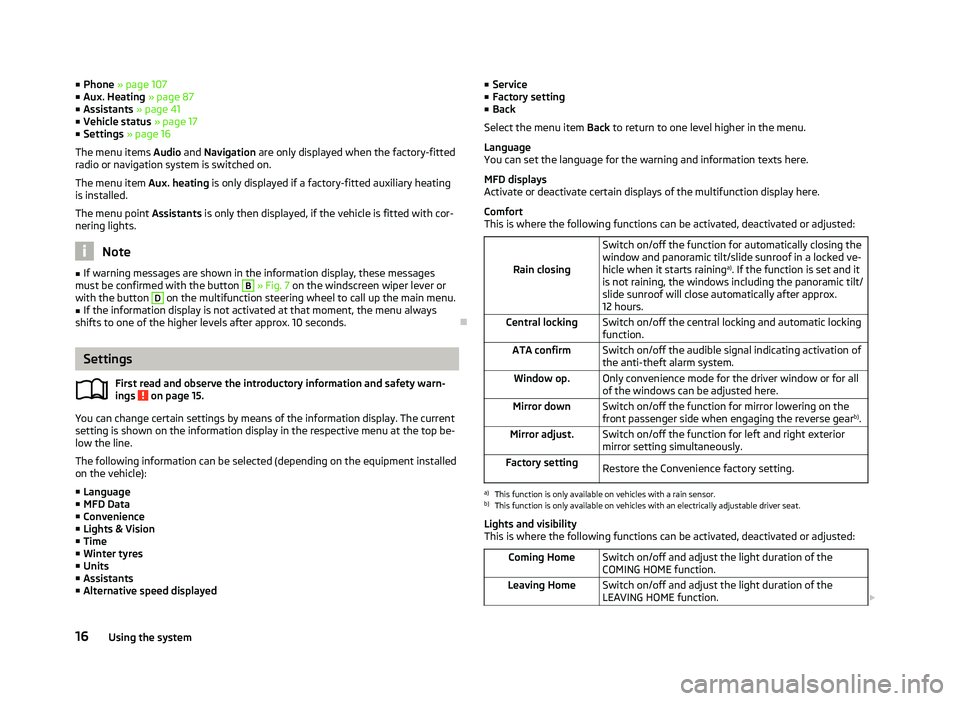
Phone » page 107
■ Aux.
Heating » page 87
■ Assistants » page 41
■ Vehicle status » page 17
■ Settings » page 16
The menu items Audio and Navigation are only displayed when the factory-fitted
radio or navigation system is switched on.
The menu item Aux. heating is only displayed if a factory-fitted auxiliary heating
is installed.
The menu point Assistants is only then displayed, if the vehicle is fitted with cor-
nering lights. Note
■ If warning messages are shown in the information display, these messages
must be confirmed with the button B
» Fig. 7 on the windscreen wiper lever or
with the button D
on the multifunction steering wheel to call up the main menu.
■ If the information display is not activated at that moment, the menu always
shifts to one of the higher levels after approx. 10
seconds.ÐSettings
First read and observe the introductory information and safety warn-
ings on page 15.
You can change certain settings by means of the information display. The current
setting is shown on the information display in the respective menu at the top be-
low the line.
The following information can be selected (depending on the equipment installed
on the vehicle):
■ Language
■ MFD Data
■ Convenience
■ Lights & Vision
■ Time
■ Winter tyres
■ Units
■ Assistants
■ Alternative speed displayed
ä ■
Service
■ Factory setting
■ Back
Select the menu item Back to return to one level higher in the menu.
Language
You can set the language for the warning and information texts here.
MFD displays
Activate or deactivate certain displays of the multifunction display here.
Comfort
This is where the following functions can be activated, deactivated or adjusted:
Rain closing Switch on/off the function for automatically closing the
window and panoramic tilt/slide sunroof in a locked ve-
hicle when it starts raining
a)
. If the function is set and it
is not raining, the windows including the panoramic tilt/
slide sunroof will close automatically after approx.
12 hours.
Central locking Switch on/off the central locking and automatic locking
function.
ATA confirm Switch on/off the audible signal indicating activation of
the anti-theft alarm system.
Window op. Only convenience mode for the driver window or for all
of the windows can be adjusted here.
Mirror down Switch on/off the function for mirror lowering on the
front passenger side when engaging the reverse gear b)
.
Mirror adjust. Switch on/off the function for left and right exterior
mirror setting simultaneously.
Factory setting Restore the Convenience factory setting. a)
This function is only available on vehicles with a rain sensor.
b) This function is only available on vehicles with an electrically adjustable driver seat.
Lights and visibility
This is where the following functions can be activated, deactivated or adjusted:
Coming Home Switch on/off and adjust the light duration of the
COMING HOME
function.
Leaving Home Switch on/off and adjust the light duration of the
LEAVING HOME function. £16
Using the system
Page 42 of 218
Switching lights on and off
Fig. 22
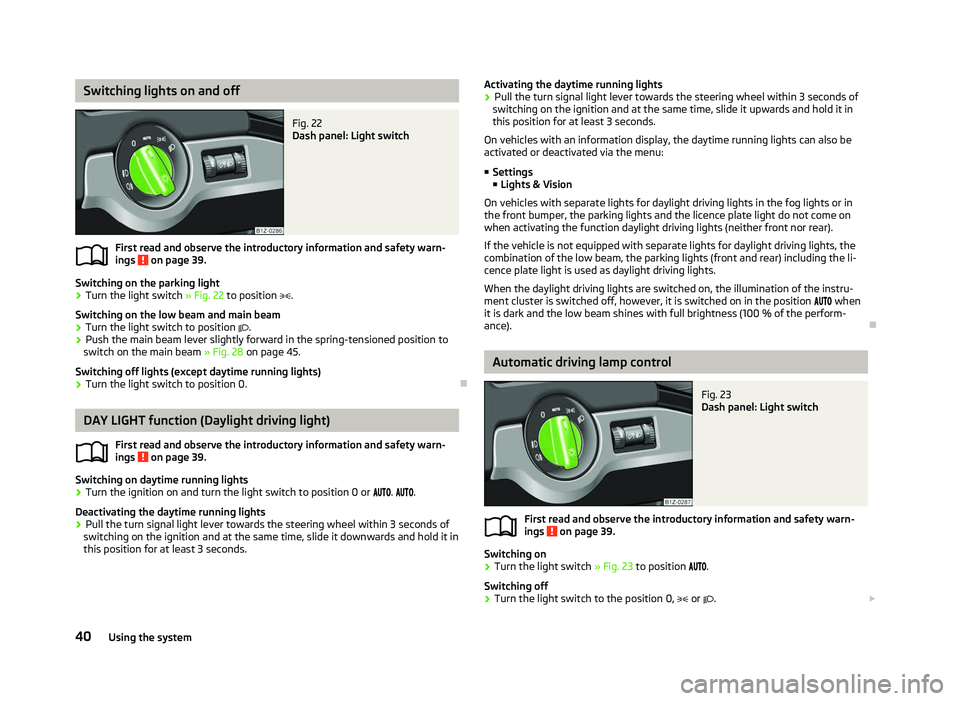
Dash panel: Light switch
First read and observe the introductory information and safety warn-
ings on page 39.
Switching on the parking light
› Turn the light switch
» Fig. 22 to position .
Switching on the low beam and main beam
› Turn the light switch to position
.
› Push the main beam lever slightly forward in the spring-tensioned position to
switch on the main beam » Fig. 28 on page 45.
Switching off lights (except daytime running lights)
› Turn the light switch to position 0. ÐDAY LIGHT function (Daylight driving light)
First read and observe the introductory information and safety warn-
ings on page 39.
Switching on daytime running lights
› Turn the ignition on and turn the light switch to position 0 or
. .
Deactivating the daytime running lights
› Pull the turn signal light lever towards the steering wheel within 3
seconds of
switching on the ignition and at the same time, slide it downwards and hold it in
this position for at least 3
seconds.
ä
ä Activating the daytime running lights
› Pull the turn signal light lever towards the steering wheel within 3
seconds of
switching on the ignition and at the same time, slide it upwards and hold it in
this position for at least 3
seconds.
On vehicles with an information display, the daytime running lights can also be
activated or deactivated via the menu:
■ Settings
■ Lights & Vision
On vehicles with separate lights for daylight driving lights in the fog lights or in
the front bumper, the parking lights and the licence plate light do not come on
when activating the function daylight driving lights (neither front nor rear).
If the vehicle is not equipped with separate lights for daylight driving lights, the
combination of the low beam, the parking lights (front and rear) including the li-
cence plate light is used as daylight driving lights.
When the daylight driving lights are switched on, the illumination of the instru-
ment cluster is switched off, however, it is switched on in the position when
it is dark and the low beam shines with full brightness (100 % of the perform-
ance). Ð Automatic driving lamp control
Fig. 23
Dash panel: Light switch
First read and observe the introductory information and safety warn-
ings on page 39.
Switching on
› Turn the light switch
» Fig. 23 to position .
Switching off
› Turn the light switch to the position 0,
or . £
ä
40 Using the system
Page 45 of 218
The fog lights with the function CORNER are adjusted according to the steering
angle or after switching on the turn signal light
1)
in the following circumstances:
› the vehicle is stationary and the engine is running or it moves with a speed of
maximum 40 km/h;
› the daytime running lights are not switched on;
› the low beam is switched on or the light switch is in the position
and the
intensity of the ambient light causes the low beam to be switched on;
› the fog lights are not switched on;
› no reverse gear is engaged. Note
If the reverse gear is engaged during the active function CORNER, both fog lights
illuminate. ÐRear fog light
First read and observe the introductory information and safety warn-
ings on page 39.
Switching on
› First of all, turn the light switch to position
or » Fig. 24 on page 42.
› Pull the light switch to position 2
.
If the vehicle is not fitted with fog lights » page 42, the rear fog light is switched
on by turning the light switch to the position or and is pulled out directly to
the position 2
. This switch does not have two positions, but only one position.
The warning light
lights up in the instrument cluster when the rear fog light is
switched on » page 18.
Only the rear fog light on the trailer lights up if the vehicle has a factory-fitted
towing device or a towing device from ŠKODA original accessories and it is driven
with a trailer and the rear fog light switched on.
The rear fog light is located in the rear light array on the driver's side. Ð
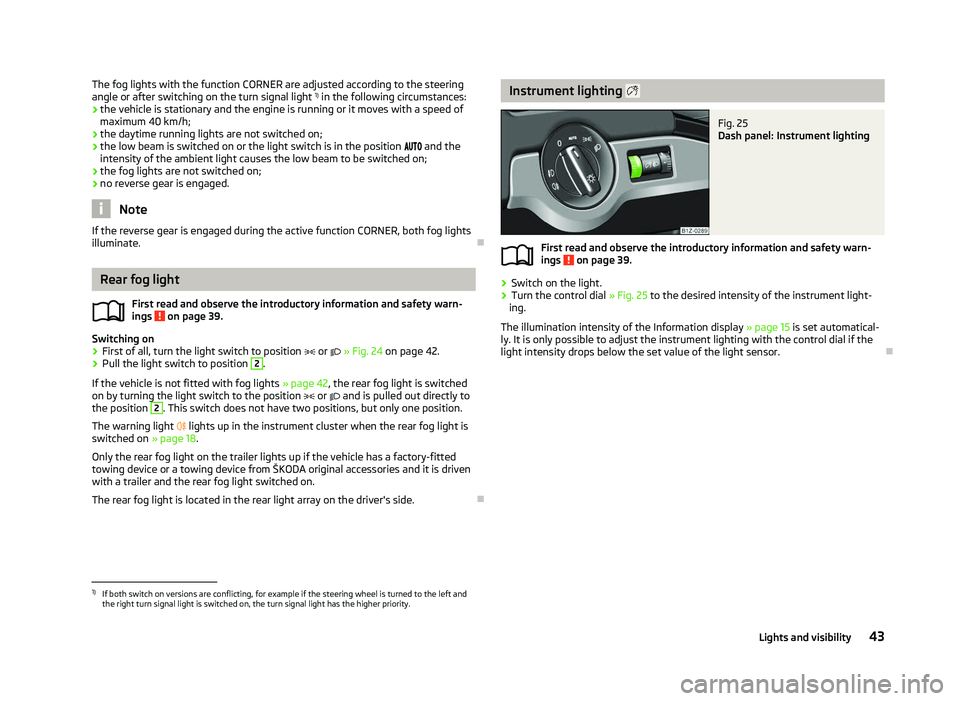
ä Instrument lighting
Fig. 25
Dash panel: Instrument lighting
First read and observe the introductory information and safety warn-
ings on page 39.
›
Switch on the light.
› Turn the control dial
» Fig. 25 to the desired intensity of the instrument light-
ing.
The illumination intensity of the Information display »
page 15 is set automatical-
ly. It is only possible to adjust the instrument lighting with the control dial if the
light intensity drops below the set value of the light sensor. Ð
ä
1)
If both switch on versions are conflicting, for example if the steering wheel is turned to the left and
the right turn signal light is switched on, the turn signal light has the higher priority.
43
Lights and visibility
Page 47 of 218
Turn signal and main beam lever
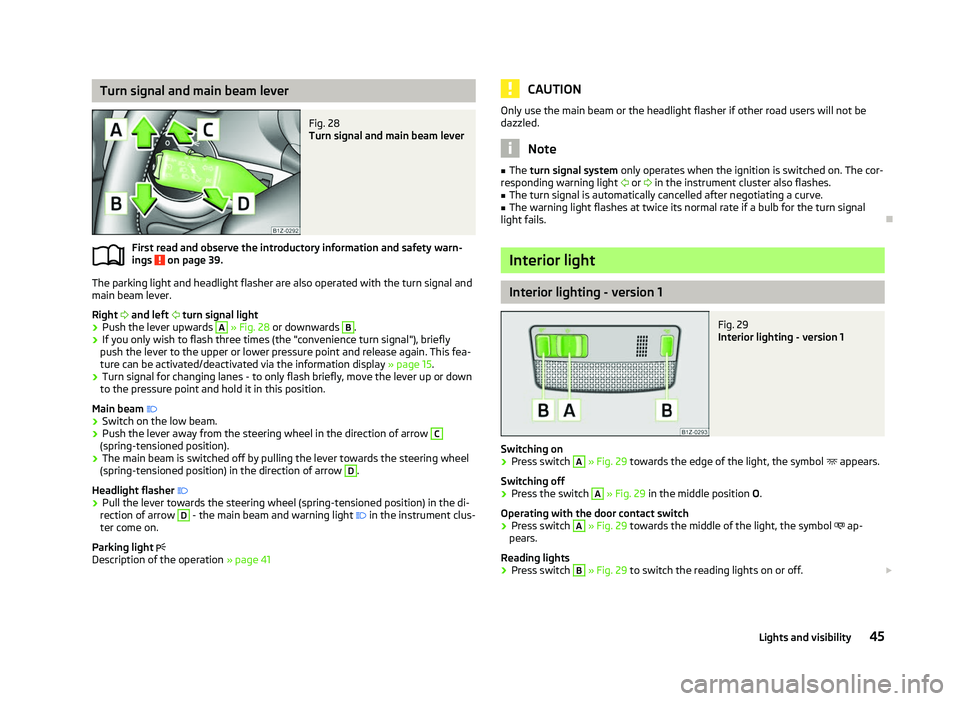
Fig. 28
Turn signal and main beam lever
First read and observe the introductory information and safety warn-
ings on page 39.
The parking light and headlight flasher are also operated with the turn signal and
main beam lever.
Right and left turn signal light
› Push the lever upwards A
» Fig. 28
or downwards B
.
› If you only wish to flash three times (the "convenience turn signal"), briefly
push the lever to the upper or lower pressure point and release again. This fea-
ture can be activated/deactivated via the information display » page 15.
› Turn signal for changing lanes - to only flash briefly, move the lever up or down
to the pressure point and hold it in this position.
Main beam
› Switch on the low beam.
› Push the lever away from the steering wheel in the direction of arrow C
(spring-tensioned position).
› The main beam is switched off by pulling the lever towards the steering wheel
(spring-tensioned position) in the direction of arrow D
.
Headlight flasher
› Pull the lever towards the steering wheel (spring-tensioned position) in the di-
rection of arrow D
- the main beam and warning light
in the instrument clus-
ter come on.
Parking light
Description of the operation » page 41
ä CAUTION
Only use the main beam or the headlight flasher if other road users will not be
dazzled. Note
■ The turn signal system only operates when the ignition is switched on. The cor-
responding warning light or in the instrument cluster also flashes.
■ The turn signal is automatically cancelled after negotiating a curve.
■ The warning light flashes at twice its normal rate if a bulb for the turn signal
light fails. Ð Interior light
Interior lighting - version 1
Fig. 29
Interior lighting - version 1
Switching on › Press switch A
» Fig. 29 towards the edge of the light, the symbol
appears.
Switching off
› Press the switch A
»
Fig. 29
in the middle position O.
Operating with the door contact switch
› Press switch A
» Fig. 29 towards the middle of the light, the symbol
ap-
pears.
Reading lights
› Press switch B
» Fig. 29 to switch the reading lights on or off.
£
45
Lights and visibility
Page 51 of 218
CAUTION
■ In cold temperatures and during the winter, check before the journey or before
switching on the ignition that the wiper blades are not frozen to the windscreen.
If the windscreen wipers are switched on when the blades are frozen to the
windscreen, this may damage both the blades and windscreen wiper motor!
■ If the ignition is switched off while the windscreen wipers are switched on, the
windscreen wipers will continue wiping in the same mode after the ignition is
turned back on. The windscreen wipers could freeze up in cold temperatures be-
tween the time the ignition was turned off and when it was turned back on again.
■ Carefully detach frozen wiper blades from the front or rear window.
■ Remove snow and ice from the windscreen wipers before driving.
■ If the windscreen wipers are handled carelessly, there is a risk of damage to the
windscreen.
■ Replace the windscreen wiper blades once or twice a year for safety reasons.
These can be purchased from a ŠKODA Service Partner.
■ The ignition must not be switched on if the front windscreen wiper arms are fol-
ded out. The wiper blades would move back into their rest position and while do-
ing so damage the paintwork of the bonnet. Note
■ If the slower 2
» Fig. 35 on page 49 or the faster 3
wiper setting is switched
on and the vehicle speed decreases to below 4 km/h, the lower wiper step is
switched on automatically. At a speed increase of more than 8 km/h the previous
wiper setting is established again.
■ If there is an obstacle on the windscreen, the wiper will try to push away the
obstacle. If the obstacle continues to block the wiper, the wiper stops automati-
cally after 5 attempts to eliminate the obstacle, in order to avoid a damage to the
wiper. Remove the the obstacle and switch the wiper on again. ■ The windscreen washer nozzles for the windscreen are heated when the en-
gine is running and the outside temperature is less than approx. +10
°C.
■ The content of the windscreen washer fluid reservoir is 3 litres. On vehicles fit-
ted with the headlight cleaning system, the volume is 5.5
litres. On vehicles fitted
with auxiliary heating, the content of the windscreen wiper reservoir is 4.5 litres.
■ The wiper blades should be cleaned on a regular basis with a windscreen clean-
er to avoid any smears. The wiper blades should be cleaned with a sponge or
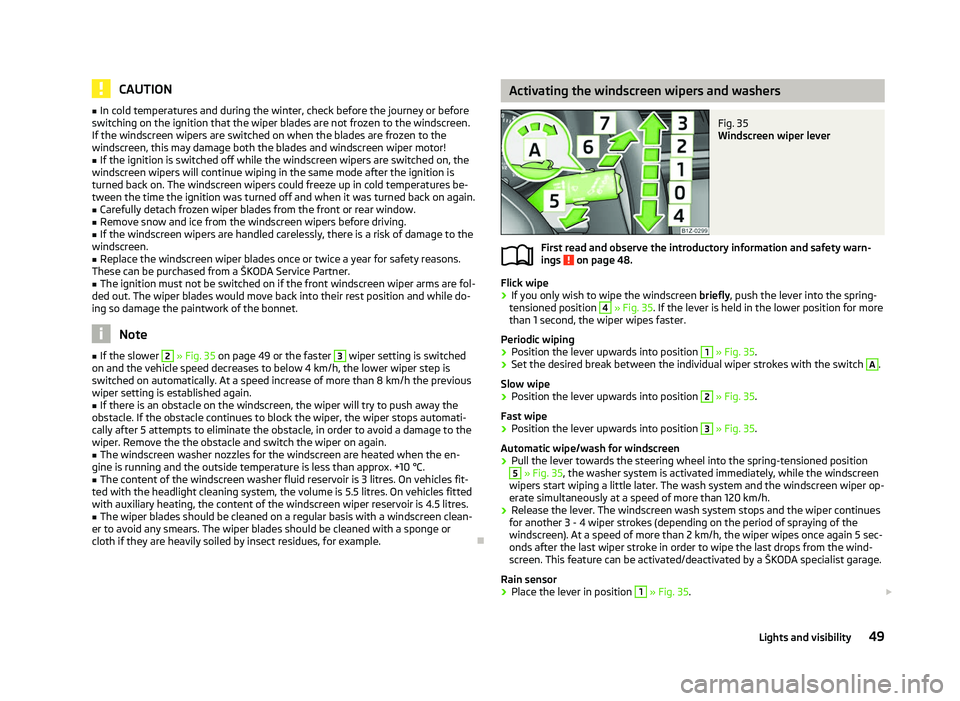
cloth if they are heavily soiled by insect residues, for example. Ð Activating the windscreen wipers and washers
Fig. 35
Windscreen wiper lever
First read and observe the introductory information and safety warn-
ings on page 48.
Flick wipe
›
If you only wish to wipe the windscreen
briefly, push the lever into the spring-
tensioned position 4
» Fig. 35. If the lever is held in the lower position for more
than 1 second, the wiper wipes faster.
Periodic wiping
› Position the lever upwards into position 1
» Fig. 35.
› Set the desired break between the individual wiper strokes with the switch A
.
Slow wipe
› Position the lever upwards into position 2
» Fig. 35.
Fast wipe
› Position the lever upwards into position 3
» Fig. 35.
Automatic wipe/wash for windscreen
› Pull the lever towards the steering wheel into the spring-tensioned position 5
» Fig. 35, the washer system is activated immediately, while the windscreen
wipers start wiping a little later. The wash system and the windscreen wiper op-
erate simultaneously at a speed of more than 120
km/h.
› Release the lever. The windscreen wash system stops and the wiper continues
for another 3 - 4 wiper strokes (depending on the period of spraying of the
windscreen). At a speed of more than 2 km/h, the wiper wipes once again 5 sec-
onds after the last wiper stroke in order to wipe the last drops from the wind-
screen. This feature can be activated/deactivated by a
ŠKODA specialist garage.
Rain sensor
› Place the lever in position 1
» Fig. 35.
£
ä
49
Lights and visibility
Page 52 of 218
›
The sensitivity of the sensor can be set individually with the switch A
.
Wiping the rear window pane
› Push the lever away from the steering wheel into position 6
» Fig. 35 and the
windscreen wiper will operate every 6
seconds.
Automatic wipe/wash for the rear window
› Press the lever completely away from the steering wheel into the spring-ten-
sioned position 7
» Fig. 35, the washer system is activated immediately, while
the windscreen wiper starts wiping a little later. The wiper and washer system
will operate as long as the lever is held in this position.
› Release the lever. The washer system stops and the wiper continues for anoth-
er 2 to 3
wiper strokes (depending on the duration of the spraying process). The
lever will stay in position after releasing it 6
.
Switching windscreen wipers off
› Move the lever back into the home position 0
» Fig. 35.
Winter position
If the windscreen wipers are in rest position, they cannot be folded out from the
windscreen. For this reason we recommend adjusting the windscreen wipers in
winter so that they can be folded out from the windscreen easily.
This rest position is set as follows:
› Switch on the windscreen wipers.
› Switch off the ignition. The windscreen wipers remain in the position in which
they were when switching off the ignition.
The service position can also be used as a winter position » page 51.ÐAutomatic rear window wiper (Combi)
First read and observe the introductory information and safety warn-
ings on page 48.
If the windscreen wiper is in position 2
» Fig. 35 on page 49 or 3
the rear win-
dow is wiped every 30 or 10 seconds if the vehicle's speed exceeds 5
km/h.
When the rain sensor is active (the lever is in the position 1
) the function is only
active if the windscreen wipers operate in continuous mode (no break between
each wiping process). ä Activation/deactivation
The function of the automatic rear window wiper is activated/deactivated in the
information display in the menu:
■ Settings
■ Lights & Vision
■ Rear wiper Ð Headlight cleaning system
First read and observe the introductory information and safety warn-
ings on page 48.
The headlights are being cleaned after the windscreen has been sprayed for the
first time and fifth time, the low beam or main beam are switched on and the
windscreen wiper lever was held in the position 5
» Fig. 35 on page 49 for about
1 second.
The headlight washer nozzles are moved forward out of the bumper by the water
pressure for cleaning the headlights.
You should remove stubborn dirt (such as insect residues) from the headlight len-
ses at regular intervals, for example when refuelling. The following guidelines
must be observed » page 151, Headlight lenses.
To ensure the proper operation of the cleaning system during the winter, any
snow should be removed from the washer nozzle fixtures and ice should be
cleared with a de-icing spray. CAUTION
Never remove the nozzles from the headlight cleaning system by hand - risk of
damage! Ð
ä
50 Using the system