turn signal SKODA OCTAVIA 2007 1.G / (1U) User Guide
[x] Cancel search | Manufacturer: SKODA, Model Year: 2007, Model line: OCTAVIA, Model: SKODA OCTAVIA 2007 1.G / (1U)Pages: 288, PDF Size: 15.19 MB
Page 57 of 288
Lights and Visibility
56
Note
Switch on the hazard warning light system if, for example:
•you encounter traffic congestion,
•your vehicle breaks down or an emergency situation occurs.
The turn signal and main beam lever
The parking lights and headlight flasher are also switched on and off
using the turn signal and main beam lever.
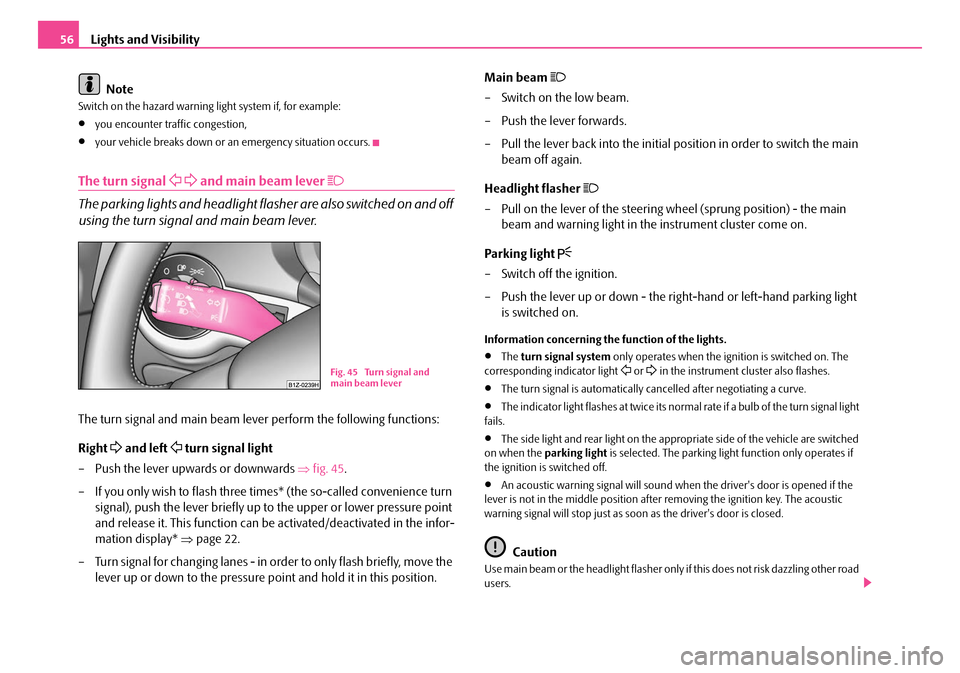
The turn signal and main beam lever perform the following functions:
Right
and left turn signal light
– Push the lever upwards or downwards ⇒fig. 45 .
– If you only wish to flash three times* (the so-called convenience turn signal), push the lever briefly up to the upper or lower pressure point
and release it. This function can be activated/deactivated in the infor-
mation display* ⇒page 22.
– Turn signal for changing lanes - in or der to only flash briefly, move the
lever up or down to the pressure point and hold it in this position. Main beam
– Switch on the low beam.
– Push the lever forwards.
– Pull the lever back into the initial po
sition in order to switch the main
beam off again.
Headlight flasher
– Pull on the lever of the steering wheel (sprung position) - the main beam and warning light in the instrument cluster come on.
Parking light
– Switch off the ignition.
– Push the lever up or down - the ri ght-hand or left-hand parking light
is switched on.
Information concerning the function of the lights.
•The turn signal system only operates when the ignition is switched on. The
corresponding indicator light or in the instrument cluster also flashes.
•The turn signal is automatically cancelled after negotiating a curve.
•The indicator light flashes at twice its normal rate if a bulb of the turn signal light
fails.
•The side light and rear light on the appr opriate side of the vehicle are switched
on when the parking light is selected. The parking light function only operates if
the ignition is switched off.
•An acoustic warning signal will sound when the driver's door is opened if the
lever is not in the middle position after removing the ignition key. The acoustic
warning signal will stop just as s oon as the driver's door is closed.
Caution
Use main beam or the headlight flasher only if this does not risk dazzling other road
users.
Fig. 45 Turn signal and
main beam lever
NKO A5 20 MR08.book Page 56 Wednesday, April 11, 2007 2:54 PM
Page 70 of 288
Seats and Stowage69
Using the systemSafetyDriving TipsGeneral MaintenanceBreakdown assistanceTechnical Data
WARNING
•Only adjust the driver seat when the ve hicle is stationary - risk of injury!
•Caution when adjusting the seat! You ma y suffer injuries or bruises as a
result of adjusting the seat without paying proper attention.
•In view of the fact that the seats can also be adjusted when the ignition is
switched off (even when ignition key withdrawn), you should never leave
children unattended in the car.
•The backrests must not be angled too far back when driving otherwise
this will affect proper operation of the seat belts and of the airbag system -
risk of injury!
Note
If the movement of the seat is inadvertentl y interrupted during an adjustment, once
again press the switch in the appropriate direction and continue with the adjust-
ment of the seat to the end.
Storing setting
Storing seat and exterior mirror settings for driving forward
– Switch on the ignition. – Adjust the seat
⇒page 68.
– Adjust both exterior mirrors ⇒page 65.
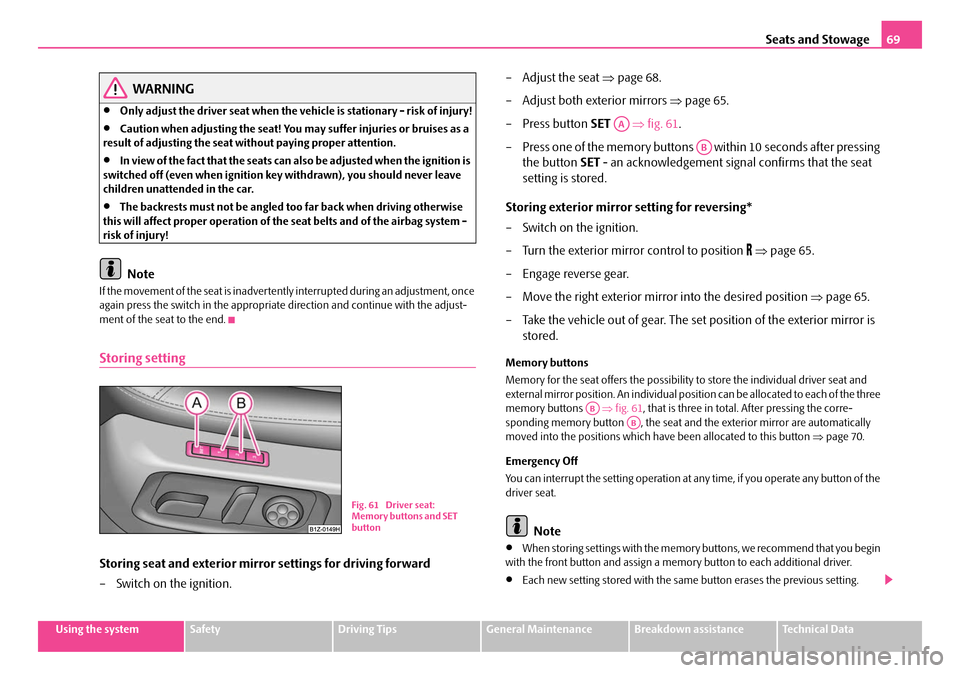
–Press button SET ⇒fig. 61 .
– Press one of the memory buttons within 10 seconds after pressing the button SET - an acknowledgement signal confirms that the seat
setting is stored.
Storing exterior mirror setting for reversing*
– Switch on the ignition.
– Turn the exterior mirror control to position
⇒ page 65.
– Engage reverse gear.
– Move the right exterior mirror into the desired position ⇒page 65.
– Take the vehicle out of gear. The set position of the exterior mirror is stored.
Memory buttons
Memory for the seat offers the possibility to store the individual driver seat and
external mirror position. An individual posi tion can be allocated to each of the three
memory buttons ⇒fig. 61 , that is three in total. After pressing the corre-
sponding memory button , the seat and the exterior mirror are automatically
moved into the positions which have been allocated to this button ⇒page 70.
Emergency Off
You can interrupt the setting operation at an y time, if you operate any button of the
driver seat.
Note
•When storing settings with the memory buttons, we recommend that you begin
with the front button and assign a memo ry button to each additional driver.
•Each new setting stored with the same button erases the previous setting.
Fig. 61 Driver seat:
Memory buttons and SET
button
AA
AB
ABAB
NKO A5 20 MR08.book Page 69 Wednesday, April 11, 2007 2:54 PM
Page 122 of 288
Starting-off and Driving121
Using the systemSafetyDriving TipsGeneral MaintenanceBreakdown assistanceTechnical Data
Rear parking aid*
The parking aid provides a warning of obstacles behind the vehicle.
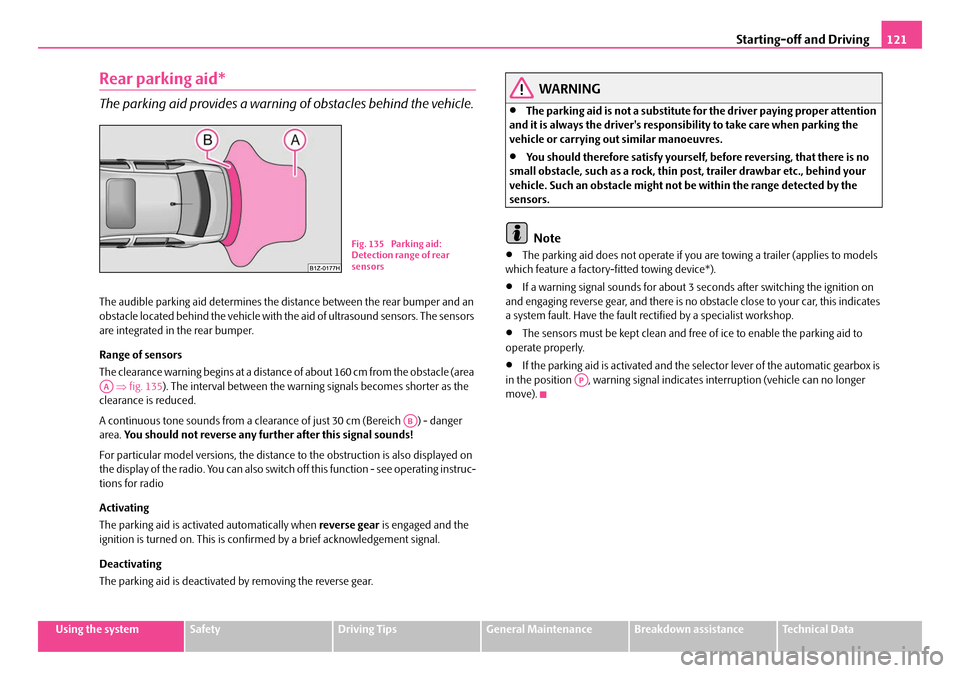
The audible parking aid determines the distance between the rear bumper and an
obstacle located behind the vehicle with the aid of ultrasound sensors. The sensors
are integrated in the rear bumper.
Range of sensors
The clearance warning begins at a distance of about 160 cm from the obstacle (area
⇒ fig. 135 ). The interval between the warning signals becomes shorter as the
clearance is reduced.
A continuous tone sounds from a clearanc e of just 30 cm (Bereich ) - danger
area. You should not reverse any further after this signal sounds!
For particular model versions, the distance to the obstruction is also displayed on
the display of the radio. You can also switch off this function - see operating instruc-
tions for radio
Activating
The parking aid is activated automatically when reverse gear is engaged and the
ignition is turned on. This is confirmed by a brief acknowledgement signal.
Deactivating
The parking aid is deactivated by removing the reverse gear.
WARNING
•The parking aid is not a substitute for the driver paying proper attention
and it is always the driver's responsibility to take care when parking the
vehicle or carrying ou t similar manoeuvres.
•You should therefore satisfy yourself, before reversing, that there is no
small obstacle, such as a rock, thin po st, trailer drawbar etc., behind your
vehicle. Such an obstacle might not be within the range detected by the
sensors.
Note
•The parking aid does not operate if you are towing a trailer (applies to models
which feature a factory-fi tted towing device*).
•If a warning signal sounds for about 3 seconds after switching the ignition on
and engaging reverse gear, and there is no obstacle close to your car, this indicates
a system fault. Have the fault rectified by a specialist workshop.
•The sensors must be kept clean and free of ice to enable the parking aid to
operate properly.
•If the parking aid is activated and the selector lever of the automatic gearbox is
in the position , warning signal indicates interruption (vehicle can no longer
move).
Fig. 135 Parking aid:
Detection range of rear
sensors
AA
AB
AP
NKO A5 20 MR08.book Page 121 Wednesday, April 11, 2007 2:54 PM
Page 123 of 288

Starting-off and Driving
122
Front and rear parking aid*
The parking aid provides a warning of obstacles in front and behind
the vehicle.
The audible parking aid determines the distance between the front or rear bumper
and an obstacle with the aid of ultrasound sensors. The sensors are integrated in the
front and rear bumper. The signal tones for the front parking aid sound higher than
for the rear parking aid.
Range of sensors
The distance warning begins at a distance of about 120 cm from the obstacle in
front of the vehicle (area ⇒fig. 137 ) and about 160 cm from the obstacle behind the vehicle (area
⇒page 121, fig. 135). The interval between the
warning signals becomes shorter as the clearance is reduced.
A continuous tone sounds from a clearanc e of just 30 cm (area ) - danger area.
You should not reverse any further after this signal sounds!
Your vehicle can be equipped with a radio which shows on its display the distance
of the vehicle to the obstacle. You can also switch off this function - see operating
instructions for radio
Activating
The parking aid is activated when the reverse gear is engaged and the ignition is
turned on or by pressing the button ⇒fig. 136 - the symbol
lights up in the
button. The activation is confirmed by a brief acknowledgement signal.
Deactivating
The parking aid is deactivated after pressing the button
⇒ fig. 136 or at a speed
of more than 15 km/h - the symbol in the button is no longer illuminated.
WARNING
•The parking aid is not a substitute fo r the driver paying proper attention
and it is always the driver's responsibility to take care when reversing the
vehicle or carrying out similar manoeuvres.
•You should therefore satisfy yourself, before reversing, that there is no
small obstacle, such as a rock, thin po st, trailer drawbar etc., in front or
behind your vehicle. Such an obstacle might not be within the range
detected by the sensors.
Caution
In order to ensure the correct functioning of the parking aid, only a licence plate
frame approved by the manufacturer Škod a for your vehicle type should be
installed at the front bumper. Non-proved licence plate frames can project into the
detection range ⇒fig. 137 . A non-proved licence plate frame could be recog-
nized as an obstacle by the system and this would lead to an incorrect warning. If
you have any questions, please contact a specialist garage.
Fig. 136 Activating the
parking aid
Fig. 137 Parking aid:
Detection range of the
front sensors
AA
AA
AB
AB
NKO A5 20 MR08.book Page 122 Wednesday, April 11, 2007 2:54 PM
Page 155 of 288
Passive Safety
154
Before setting off
The driver is always fully respon sible for his occupants and for the
operating safety of the vehicle.
For your own safety and the safety of the people travelling with you, please pay
attention to the following points before setting off:
•Ensure that the lighting and the turn signal system are functioning properly.
•Inspect the tyre inflation pressure.
•Ensure that all the windows offer a good visibility to the outside.
•Safely attach the items of luggage ⇒page 76, “Loading the luggage compart-
ment”.
•Ensure that no objects can obstruct the pedal.
•Adjust the mirror, the front seat and the head restraint to match your body size.
•Point out to your occupants that the head restraints must be adjusted to match
their body size.
•Protect the children in suitable child se ats with correctly fastened seat belts
⇒ page 173, “Transporting children safely”.
•Adopt the correct seated position ⇒page 155, “Correct seated position”. Also
inform your occupants to adopt the correct seated position.
•Fasten the seat belt correctly. Also inform your occupants to properly fasten the
seat belts ⇒page 160, “How are seat belts correctly fastened?”.
What influences the driving safety?
The driving safety is primarily dete rmined by the style of driving and
the personal behaviour of all the occupants.
The driver is fully responsible for himself and his occupants. If your driving safety is
effected, you place yourself and the oncomi ng traffic at risk. Please refer to the
following guidelines.
•Do not get distracted from concentrating on the traffic situation, e.g. by your
occupants or mobile phone calls.
•Never drive when your driving ability is impaired, e.g. through medication,
alcohol, drugs.
•Keep to the traffic regulations and the permissible speed limit.
•Adjust the driving speed at all times to the road condition as well as to the traffic
and weather conditions.
•Take regular breaks on long journe ys - at the latest every two hours.
NKO A5 20 MR08.book Page 154 Wednesday, April 11, 2007 2:54 PM
Page 241 of 288

Breakdown assistance
240
– Release the clutch particularly gent ly when starting off or depress the
accelerator particularly gently if yo ur vehicle is fitted with an auto-
matic gearbox.
Driver of the towed vehicle
– Switch the ignition on so that the steering wheel is not blocked and you can also operate the turn signal lights, the headlight flasher, the
windscreen wipers and wi ndscreen washer system.
– Take the vehicle out of gear or move the selector lever into position N
if your vehicle is fitted with an automatic gearbox.
– Note that the brake servo unit and power steering only operate if the engine is running. You will require si gnificantly greater physical force
to depress the brake pedal and to steer the vehicle if the engine is not
running.
– Ensure that the tow rope is always kept taught.
Tow rope or tow bar
A tow bar is safest way of towing a vehicle and also minimizes any shocks. You can
use a tow rope only if a suitable tow bar is not available.
The tow rope must be elastic to protect the vehicle. Thus one should only use
plastic fibre rope or a rope made out of a similarly elastic material.
Only attach the tow rope to the towing eyes provided for this purpose ⇒page 241,
“Front towing eye” and ⇒page 241, “Rear towing eye”.
Driving style
Towing another vehicle requires a certain amount of practice. Both drivers should
be familiar with the particular points about towing a vehicle. Unskilled drivers
should not attempt to tow in another vehicle or to be towed in.
One should be constantly vigilant not to allow impermissibly high towing forces or
jerky loadings. There is always a risk of excessive stresses and damage resulting at
the points to which you attach the tow ro pe or tow bar when you attempt to tow a
vehicle which is not standing on a paved road.
Caution
If the gearbox of your vehicle no longer contains any oil because of a defect, your
vehicle must only be towed in with the driven wheels raised clear of the ground, or
on a special vehicle transporter or trailer.
Note
•Please comply with any legal requirements particularly regarding the switched
on signal systems, when towing in or tow-starting another vehicle.
•The tow rope must not be twisted as it may in certain circumstances result in the
front towing eye being unscrewed out of your vehicle.
NKO A5 20 MR08.book Page 240 Wednesday, April 11, 2007 2:54 PM
Page 246 of 288
Fuses and light bulbs245
Using the systemSafetyDriving TipsGeneral MaintenanceBreakdown assistanceTechnical Data
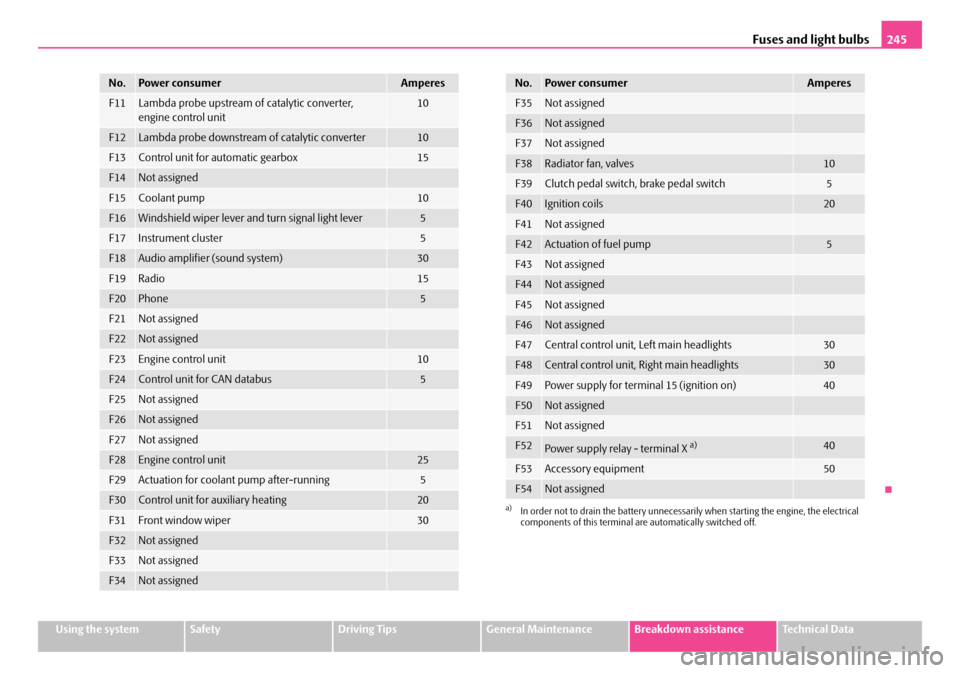
F11Lambda probe upstream of catalytic converter,
engine control unit10
F12Lambda probe downstream of catalytic converter10
F13Control unit for automatic gearbox15
F14Not assigned
F15Coolant pump10
F16Windshield wiper lever and turn signal light lever5
F17Instrument cluster5
F18Audio amplifier (sound system)30
F19Radio15
F20Phone5
F21Not assigned
F22Not assigned
F23Engine control unit10
F24Control unit for CAN databus5
F25Not assigned
F26Not assigned
F27Not assigned
F28Engine control unit25
F29Actuation for coolant pump after-running5
F30Control unit for auxiliary heating20
F31Front window wiper30
F32Not assigned
F33Not assigned
F34Not assigned
No.Power consumerAmperes
F35Not assigned
F36Not assigned
F37Not assigned
F38Radiator fan, valves10
F39Clutch pedal switch, brake pedal switch5
F40Ignition coils20
F41Not assigned
F42Actuation of fuel pump5
F43Not assigned
F44Not assigned
F45Not assigned
F46Not assigned
F47Central control unit, Left main headlights30
F48Central control unit, Right main headlights30
F49Power supply for terminal 15 (ignition on)40
F50Not assigned
F51Not assigned
F52Power supply relay - terminal X a)40
F53Accessory equipment50
F54Not assigned
a)In order not to drain the battery unnecessarily when starting the engine, the electrical
components of this terminal are automatically switched off.
No.Power consumerAmperes
NKO A5 20 MR08.book Page 245 Wednesday, April 11, 2007 2:54 PM
Page 247 of 288
Fuses and light bulbs
246
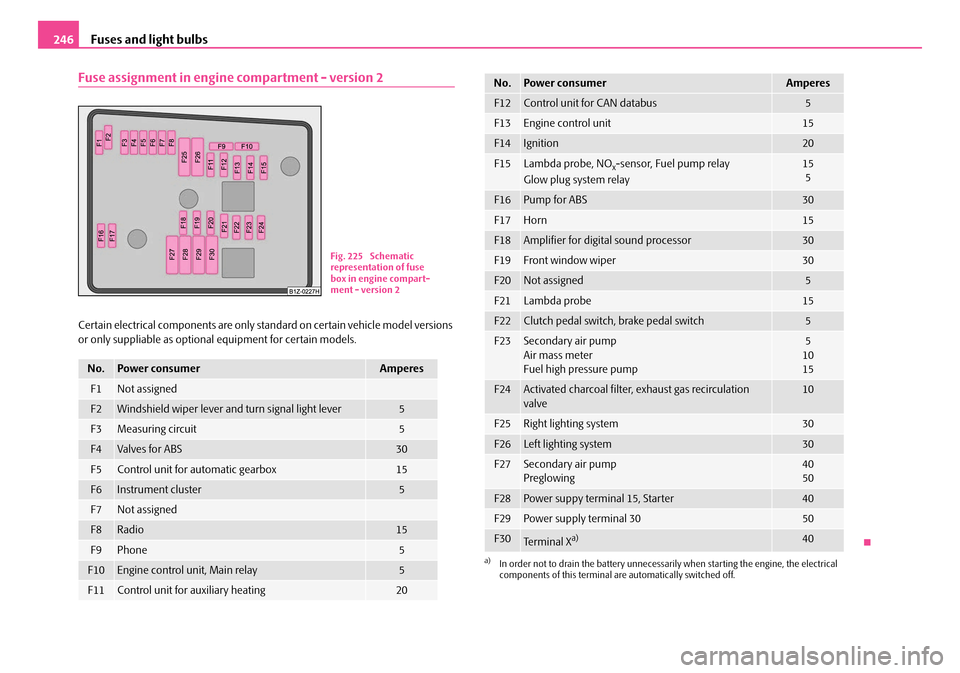
Fuse assignment in engine compartment - version 2
Certain electrical components are only st andard on certain vehicle model versions
or only suppliable as optional equipment for certain models.
No.Power consumerAmperes
F1Not assigned
F2Windshield wiper lever and turn signal light lever5
F3Measuring circuit5
F4Valves for ABS30
F5Control unit for automatic gearbox15
F6Instrument cluster5
F7Not assigned
F8Radio15
F9Phone5
F10Engine control unit, Main relay5
F11Control unit for auxiliary heating20
Fig. 225 Schematic
representation of fuse
box in engine compart-
ment - version 2
F12Control unit for CAN databus5
F13Engine control unit15
F14Ignition20
F15Lambda probe, NOx-sensor, Fuel pump relay
Glow plug system relay15 5
F16Pump for ABS30
F17Horn15
F18Amplifier for digital sound processor30
F19Front window wiper30
F20Not assigned5
F21Lambda probe15
F22Clutch pedal switch, brake pedal switch5
F23Secondary air pump
Air mass meter
Fuel high pressure pump5
10
15
F24Activated charcoal filter, exhaust gas recirculation
valve10
F25Right lighting system30
F26Left lighting system30
F27Secondary air pump
Preglowing40
50
F28Power suppy terminal 15, Starter40
F29Power supply terminal 3050
F30Te r m i n a l Xa)40
a)In order not to drain the battery unnecessarily when starting the engine, the electrical
components of this terminal are automatically switched off.
No.Power consumerAmperes
NKO A5 20 MR08.book Page 246 Wednesday, April 11, 2007 2:54 PM
Page 250 of 288
Fuses and light bulbs249
Using the systemSafetyDriving TipsGeneral MaintenanceBreakdown assistanceTechnical Data
WARNING
•Bulbs H7 and H1 are pressurised and may burst when changing the bulb
- risk of injury!
•It is recommended to wear gloves and eye protection when changing a
light bulb.
•Gas discharge bulbs* (xenon bulbs) op erate with a high voltage, profes-
sional knowledge is required - danger to life!
Caution
Do not take hold of the glass bulb with naked fingers (even the smallest amount of
dirt reduces the working life of the light bu lb). Use a clean cloth, serviette or some-
thing similar.
Note
This Owner's Manual only describes the replacement of bulbs where it is assumed
that no major complications wi ll arise. Other light bulbs should be changed by your
specialist garage.
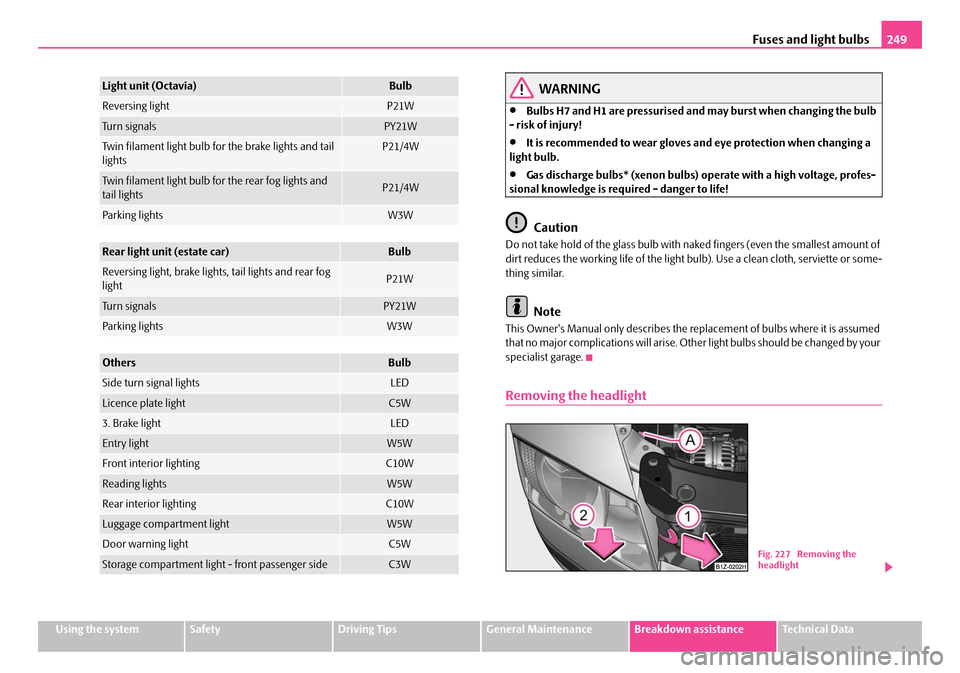
Removing the headlight
Light unit (Octavia)Bulb
Reversing lightP21W
Tu r n s i g n a l sPY21W
Twin filament light bulb for the brake lights and tail
lightsP21/4W
Twin filament light bulb for the rear fog lights and
tail lightsP21/4W
Parking lightsW3W
Rear light unit (estate car)Bulb
Reversing light, brake lights, tail lights and rear fog
lightP21W
Tu r n s i g n a l sPY21W
Parking lightsW3W
OthersBulb
Side turn signal lightsLED
Licence plate lightC5W
3. Brake lightLED
Entry lightW5W
Front interior lightingC10W
Reading lightsW5W
Rear interior lightingC10W
Luggage compartment lightW5W
Door warning lightC5W
Storage compartment light - front passenger sideC3WFig. 227 Removing the
headlight
NKO A5 20 MR08.book Page 249 Wednesday, April 11, 2007 2:54 PM
Page 251 of 288
Fuses and light bulbs
250
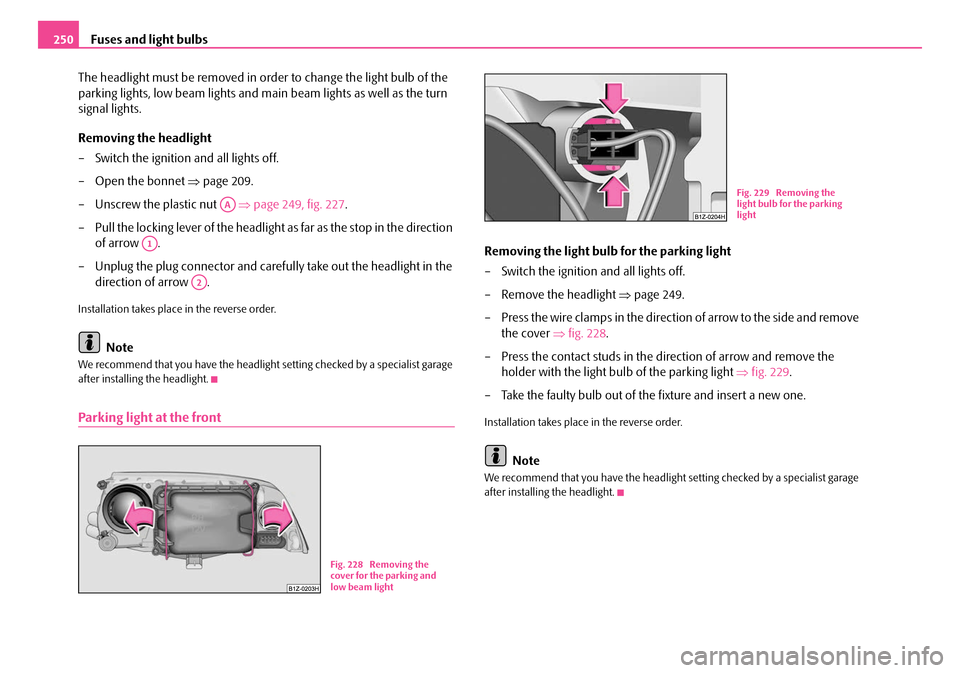
The headlight must be removed in order to change the light bulb of the
parking lights, low beam lights and main beam lights as well as the turn
signal lights.
Removing the headlight
– Switch the ignition and all lights off.
– Open the bonnet ⇒page 209.
– Unscrew the plastic nut ⇒page 249, fig. 227 .
– Pull the locking lever of the headlight as far as the stop in the direction
of arrow .
– Unplug the plug connector and carefully take out the headlight in the direction of arrow .
Installation takes place in the reverse order.
Note
We recommend that you have the headlight setting checked by a specialist garage
after installing the headlight.
Parking light at the front
Removing the light bulb for the parking light
– Switch the ignition and all lights off.
– Remove the headlight ⇒ page 249.
– Press the wire clamps in the direction of arrow to the side and remove the cover ⇒fig. 228 .
– Press the contact studs in the direction of arrow and remove the holder with the light bulb of the parking light ⇒ fig. 229.
– Take the faulty bulb out of the fixture and insert a new one.
Installation takes place in the reverse order.
Note
We recommend that you have the headlight setting checked by a specialist garage
after installing the headlight.
AA
A1
A2
Fig. 228 Removing the
cover for the parking and
low beam light
Fig. 229 Removing the
light bulb for the parking
light
NKO A5 20 MR08.book Page 250 Wednesday, April 11, 2007 2:54 PM