AUX SKODA OCTAVIA 2008 2.G / (1Z) User Guide
[x] Cancel search | Manufacturer: SKODA, Model Year: 2008, Model line: OCTAVIA, Model: SKODA OCTAVIA 2008 2.G / (1Z)Pages: 304, PDF Size: 17.69 MB
Page 123 of 304

Heating and air conditioning system
122
The transmitter and the battery are housed in the housing of the remote control.
The receiver is located in the interior of the car.
If the battery is properly charged, the ef fective range is up to 600 m. For switching
on or off the auxiliary heating, hold the remote control vertically with the antenna
⇒ page 121, fig. 142 towards the top. You must not cover over the antenna with
the fingers or the palm of the hand. Obstacles between the remote control and the
vehicle, bad weather conditio ns and a weaker battery can clearly reduce the range.
The auxiliary heating can only be switched on or off with the remote control, if the
distance between the remote control and the vehicle is at least 2 m.
Warning light in the remote control
The warning light in the remote control ⇒page 121, fig. 142 indicates after a
keystroke if the remote control signal was received by the auxiliary heating and if
the battery is adequately charged.Caution
There are electronic components in the remote control, protect the remote control
against water, severe shoc ks and direct sun rays.
Changing the battery of the radio remote control
If the warning light of the remote control indicates a weak or discharged
battery, ⇒page 121, fig. 142 , it must be replaced. The battery is located
under a cover on the back of the remote control.
– Place a coin into the gap of the battry cover and by turning to the left, unlock the cover.
– Change the battery, insert the cover and lock it by turning to the right.
For the sake of the environment
Dispose of an old battery in accord ance with environmental regulations.
Note
•Pay attention to the correct polarity when changing the battery.
•The replacement battery must have the same specification as the original
battery.
Display warning lightImportance
Lights up green for 2 seconds.The auxiliary heating was switched on.
Lights up red for 2 seconds.The auxiliary heating was switched off.
Slowly flashes green for 2 seconds.The ignition signal was not received.
Quickly flashes green for 2 seconds.The auxiliary heating is blocked, e. g
because the tank is nearly empty or
there is a fault in the auxiliary heating.
Flashes red for 2 seconds.The switch off signal was not received.
Lights up orange for 2 seconds, then
green or red.The battery is weak, however the
switching on or off signal was received.
Lights up orange for 2 seconds, then
flashes green or red.The battery is weak, however the
switching on or off signal was not
received.
Flashes orange for 5 seconds.The battery is discharged, however the
switching on or off signal was not
received.
AA
20A5Facelift.book Page 122 Saturday, September 6, 2008 2:13 PM
Page 124 of 304

Heating and air conditioning system123
Using the systemSafetyDriving TipsGeneral MaintenanceBreakdown assistanceTechnical Data
Direct switching on/off
The auxiliary heating (auxiliary heating and ve ntilation) can be switched on or off at
any time directly using the button on the operating part of the Climatic
⇒ fig. 143 or on the operating part of the Climatronic.
If the auxiliary heating and ventilation is not switched off earlier, it switches off
automatically after the expiration of the set operating period, in the menu Running
time .
Fig. 143 Button for direct
switching on/off of the auxil-
iary heating (auxiliary
heating and ventilation) on
the operating part of the
Climatic
20A5Facelift.book Page 123 Saturday, September 6, 2008 2:13 PM
Page 162 of 304
Communication161
Using the systemSafetyDriving TipsGeneral MaintenanceBreakdown assistanceTechnical Data
Operation of mobile phones or two-way radio systems may interfere with func-
tioning of the electronic systems of your
vehicle. The reasons for this may be:
•no external aerial
•external aerial incorrectly installed
•transmission power greater than 10 watts.
You should also be aware of the fact that only an external aerial makes it possible
to achieve the optimal range of such equipment.
WARNING
•If a mobile phone or two-way radio sy stem is operated inside the vehicle
without using an external aerial, or wi th an external aerial which has been
incorrectly installed, the result can be excessive electromagnetic fields
which may cause harm to your health.
•Please concentrate fully at all times on your driving!
•You must not install two-way radio systems, mobile phones or mounts
on the covers of the airbags or within the immediate deployment range of
airbags. This might result in injuries to the occupants in the event of an acci-
dent.
Note
Please also refer to the operating instru ctions of the mobile phones and two-way
radio systems.
Input AUX-IN*
The input AUX-IN is located below the armrest* of the front seats and is marked
with . The equipment AUX-IN can only be us ed in combination with a radio or
navigation system installed in the factory.
The input AUX-IN connects the external audio sources (e. g. iPod or mp3 player)
and records music from these devices via your radio* or your navigation*. The description of the operation can be
found in the relevant Owner's Manual of
your radio* or your navigation*.
Note
•If an external audio source is conne cted via AUX-IN, which has a separate
power supply, this can lead to an interfer ence of the audio signals. It depends on
the properties of the adapter.
•The loudspeakers in the vehicle are matched to a power output of 30 W.
MDI input*
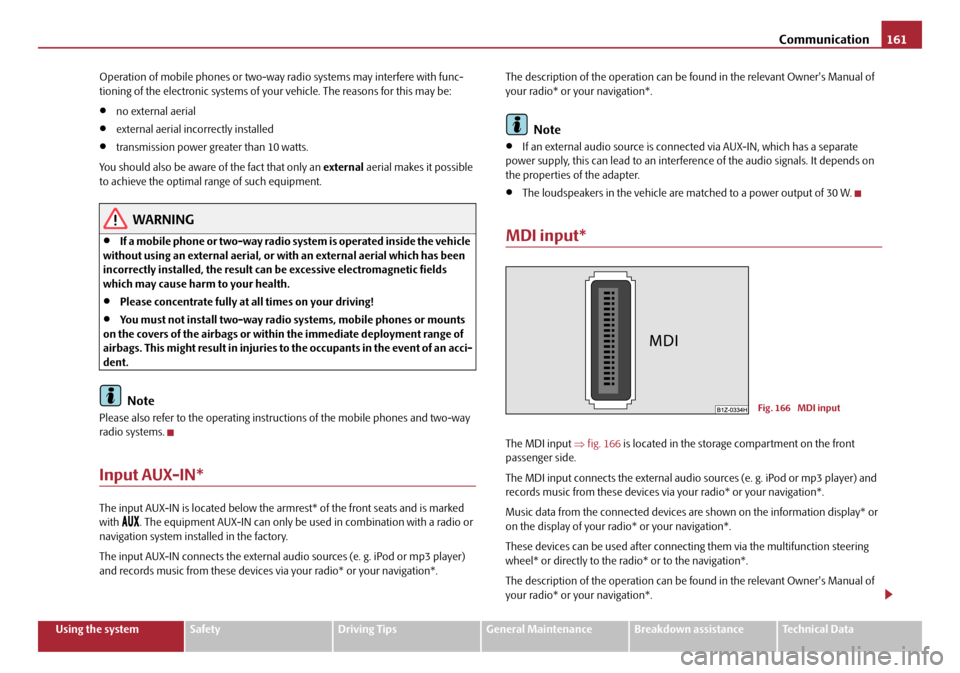
The MDI input ⇒fig. 166 is located in the storage compartment on the front
passenger side.
The MDI input connects the external audio sources (e. g. iPod or mp3 player) and
records music from these devices via your radio* or your navigation*.
Music data from the connected devices ar e shown on the information display* or
on the display of your radio* or your navigation*.
These devices can be used after connectin g them via the multifunction steering
wheel* or directly to the ra dio* or to the navigation*.
The description of the operation can be found in the relevant Owner's Manual of
your radio* or your navigation*.
Fig. 166 MDI input
20A5Facelift.book Page 161 Saturday, September 6, 2008 2:13 PM
Page 223 of 304
Fuel
222
Refuelling
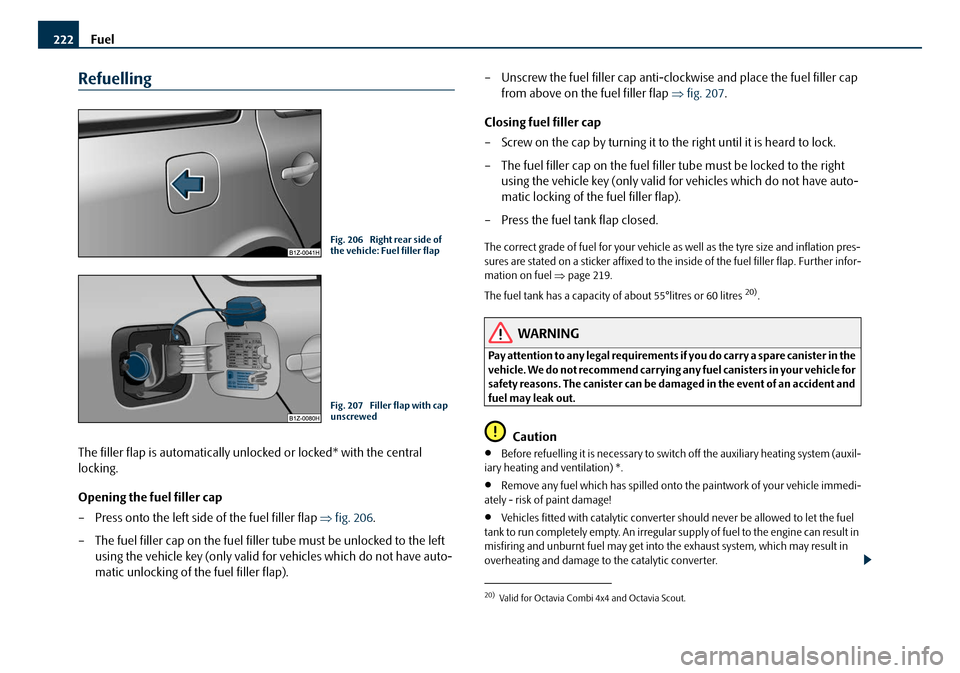
The filler flap is automatically unlocked or locked* with the central
locking.
Opening the fuel filler cap
– Press onto the left side of the fuel filler flap ⇒fig. 206 .
– The fuel filler cap on the fuel filler tube must be unlocked to the left using the vehicle key (only valid for vehicles which do not have auto-
matic unlocking of the fuel filler flap). – Unscrew the fuel filler cap anti-clo
ckwise and place the fuel filler cap
from above on the fuel filler flap ⇒fig. 207.
Closing fuel filler cap
– Screw on the cap by turning it to the right until it is heard to lock.
– The fuel filler cap on the fuel filler tube must be locked to the right using the vehicle key (only valid for vehicles which do not have auto-
matic locking of the fuel filler flap).
– Press the fuel tank flap closed.
The correct grade of fuel for your vehicle as well as the tyre size and inflation pres-
sures are stated on a sticker affixed to the inside of the fuel filler flap. Further infor-
mation on fuel ⇒page 219.
The fuel tank has a capacity of about 55°litres or 60 litres
20).
WARNING
Pay attention to any legal requirements if you do carry a spare canister in the
vehicle. We do not recommend carrying any fuel canisters in your vehicle for
safety reasons. The canister can be damaged in the event of an accident and
fuel may leak out.
Caution
•Before refuelling it is necessary to switch off the auxiliary heating system (auxil-
iary heating and ventilation) *.
•Remove any fuel which has spilled onto the paintwork of your vehicle immedi-
ately - risk of paint damage!
•Vehicles fitted with cataly tic converter should never be allowed to let the fuel
tank to run completely empty. An irregular supply of fuel to the engine can result in
misfiring and unburnt fuel may get into the exhaust system, which may result in
overheating and damage to the catalytic converter.
Fig. 206 Right rear side of
the vehicle: Fuel filler flap
Fig. 207 Filler flap with cap
unscrewed
20)Valid for Octavia Combi 4x4 and Octavia Scout.
20A5Facelift.book Page 222 Saturday, September 6, 2008 2:13 PM
Page 260 of 304
Fuses and light bulbs259
Using the systemSafetyDriving TipsGeneral MaintenanceBreakdown assistanceTechnical Data
F13Control unit for automatic gearbox15
F14Not assigned
F15Coolant pump10
F16Not assigned
F17Instrument cluster, windshield wiper lever and turn sig-
nal light lever5
F18Audio amplifier (sound system)30
F19Radio15
F20Phone5
F21Not assigned
F22Not assigned
F23Engine control unit10
F24Control unit for CAN databus5
F25Not assigned
F26Not assigned
F27Not assigned
F28Engine control unit15
F29Actuation for coolant pump after-running5
F30Control unit for auxiliary heating20
F31Front window wiper30
F32Not assigned
F33Not assigned
F34Not assigned
F35Not assigned
F36Not assigned
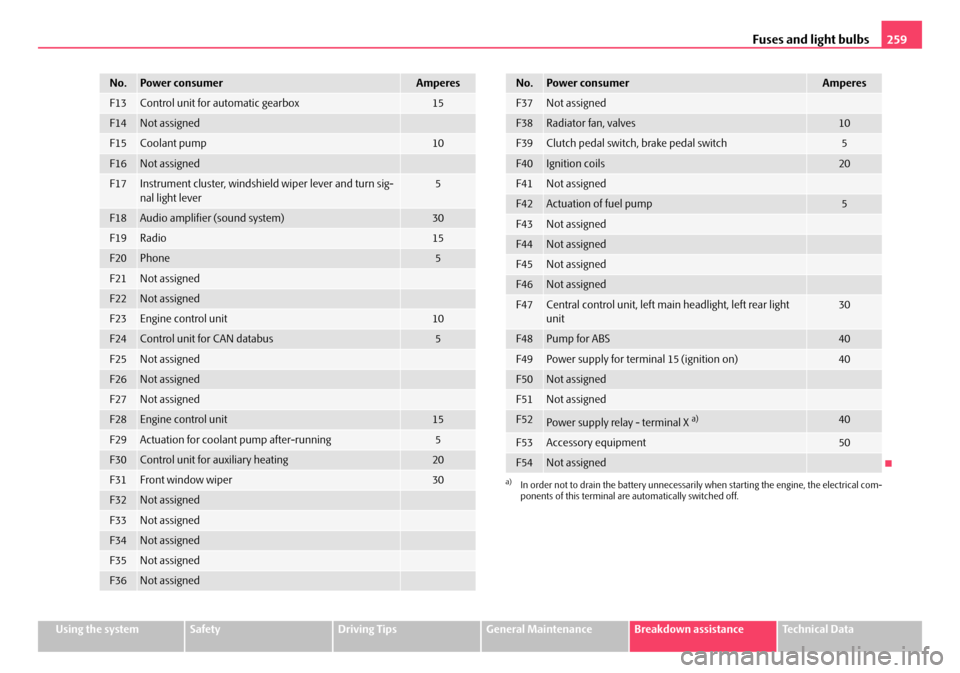
No.Power consumerAmperes
F37Not assigned
F38Radiator fan, valves10
F39Clutch pedal switch, brake pedal switch5
F40Ignition coils20
F41Not assigned
F42Actuation of fuel pump5
F43Not assigned
F44Not assigned
F45Not assigned
F46Not assigned
F47Central control unit, left main headlight, left rear light
unit30
F48Pump for ABS40
F49Power supply for terminal 15 (ignition on)40
F50Not assigned
F51Not assigned
F52Power supply relay - terminal X a)40
F53Accessory equipment50
F54Not assigned
a)In order not to drain the battery unnecessarily when starting the engine, the electrical com-
ponents of this terminal are automatically switched off.
No.Power consumerAmperes
20A5Facelift.book Page 259 Saturday, September 6, 2008 2:13 PM
Page 261 of 304
Fuses and light bulbs
260
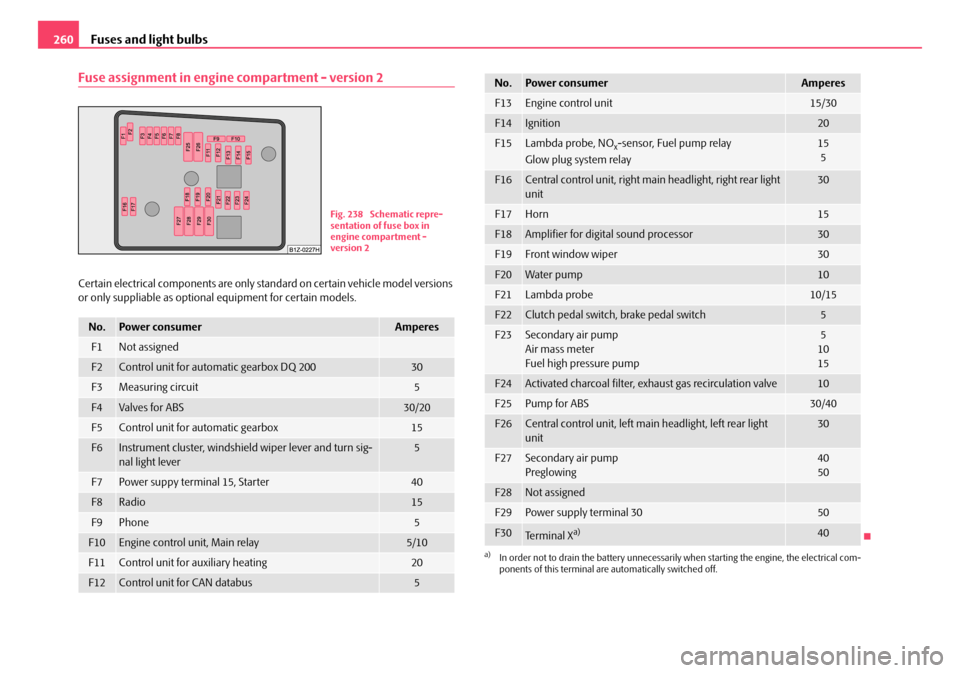
Fuse assignment in engine compartment - version 2
Certain electrical components are only st andard on certain vehicle model versions
or only suppliable as optional equipment for certain models.
No.Power consumerAmperes
F1Not assigned
F2Control unit for automatic gearbox DQ 20030
F3Measuring circuit5
F4Valves for ABS30/20
F5Control unit for automatic gearbox15
F6Instrument cluster, windshield wiper lever and turn sig-
nal light lever5
F7Power suppy terminal 15, Starter40
F8Radio15
F9Phone5
F10Engine control unit, Main relay5/10
F11Control unit for auxiliary heating20
F12Control unit for CAN databus5
Fig. 238 Schematic repre-
sentation of fuse box in
engine compartment -
version 2
F13Engine control unit15/30
F14Ignition20
F15Lambda probe, NOx-sensor, Fuel pump relay
Glow plug system relay15 5
F16Central control unit, right main headlight, right rear light
unit30
F17Horn15
F18Amplifier for digital sound processor30
F19Front window wiper30
F20Water pump10
F21Lambda probe10/15
F22Clutch pedal switch, brake pedal switch5
F23Secondary air pump
Air mass meter
Fuel high pressure pump5
10
15
F24Activated charcoal filter, exhaust gas recirculation valve10
F25Pump for ABS30/40
F26Central control unit, left main headlight, left rear light
unit30
F27Secondary air pump
Preglowing40
50
F28Not assigned
F29Power supply terminal 3050
F30Te r m i n a l Xa)40
a)In order not to drain the battery unnecessarily when starting the engine, the electrical com-
ponents of this terminal are automatically switched off.
No.Power consumerAmperes
20A5Facelift.book Page 260 Saturday, September 6, 2008 2:13 PM
Page 262 of 304
Fuses and light bulbs261
Using the systemSafetyDriving TipsGeneral MaintenanceBreakdown assistanceTechnical Data
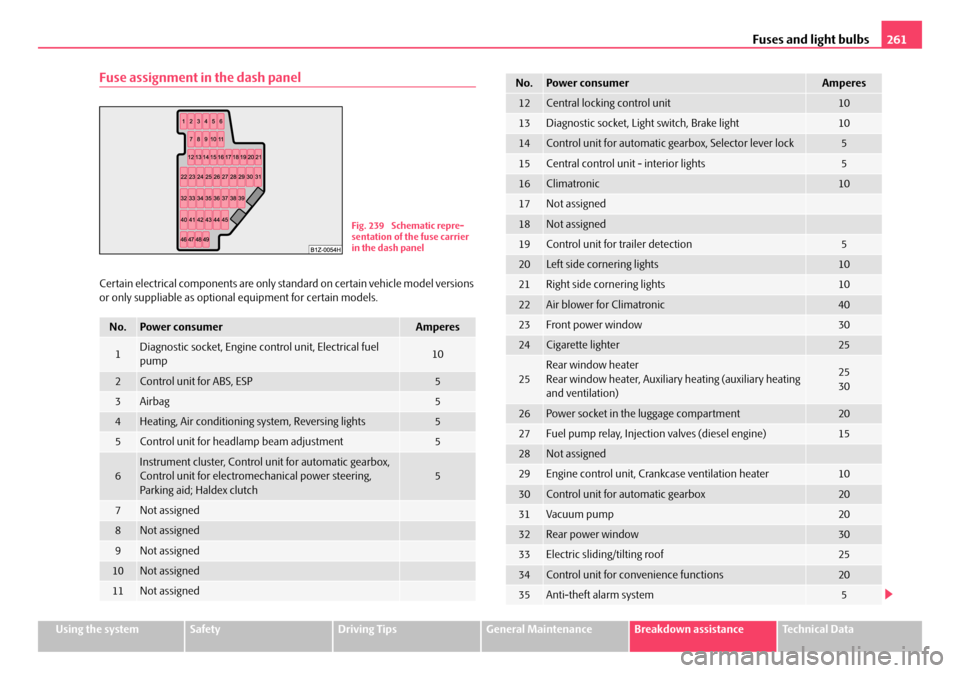
Fuse assignment in the dash panel
Certain electrical components are only standard on certain vehicle model versions
or only suppliable as optional equipment for certain models.
No.Power consumerAmperes
1Diagnostic socket, Engine control unit, Electrical fuel
pump10
2Control unit for ABS, ESP5
3Airbag5
4Heating, Air conditioning system, Reversing lights5
5Control unit for headlamp beam adjustment5
6Instrument cluster, Control unit for automatic gearbox,
Control unit for electromec hanical power steering,
Parking aid; Haldex clutch5
7Not assigned
8Not assigned
9Not assigned
10Not assigned
11Not assigned
Fig. 239 Schematic repre-
sentation of the fuse carrier
in the dash panel
12Central locking control unit10
13Diagnostic socket, Light switch, Brake light10
14Control unit for automatic gearbox, Selector lever lock5
15Central control unit - interior lights5
16Climatronic10
17Not assigned
18Not assigned
19Control unit for trailer detection5
20Left side cornering lights10
21Right side cornering lights10
22Air blower for Climatronic40
23Front power window30
24Cigarette lighter25
25Rear window heater
Rear window heater, Auxiliar y heating (auxiliary heating
and ventilation)25
30
26Power socket in the luggage compartment20
27Fuel pump relay, Injection valves (diesel engine)15
28Not assigned
29Engine control unit, Cran kcase ventilation heater10
30Control unit for automatic gearbox20
31Vacuum pump20
32Rear power window30
33Electric sliding/tilting roof25
34Control unit for convenience functions20
35Anti-theft alarm system5
No.Power consumerAmperes
20A5Facelift.book Page 261 Saturday, September 6, 2008 2:13 PM
Page 263 of 304
Fuses and light bulbs
262
Electrically adjustable seats are protected by automatic circuit breakers, which
switch on again automatically after a few seconds after the overload has been
eliminated.
Bulbs
Changing bulbs
The relevant lamp must always be switch ed off before a light bulb is replaced.
Defect light bulbs should only be replaced with light bulbs of the same type. The
designation is located on the light socket or the glass bulb.
Changing certain bulbs is not something wh ich you can do yourself, but requires to
be done by a specialist. Other parts of the vehicle must be removed in order to change the light bulbs. This applies, in particular, to bulbs which can only be
reached from the engine compartment.
We therefore recommend that you have any bulbs changed by a Škoda Service
Partner or, in exceptional cases, by ca
lling on other professional assistance.
Please note that the engine compartment is a hazardous area ⇒page 225,
“Working in the engine compartment”.
We recommend that you carry the set of light bulbs with you which was delivered
in your vehicle. Replacement light bulbs
23) are available at specialist garages.
The set of light bulbs can be stowed in the locable box in the spare wheel.
Fitted with a xenon headlight
Change of light bulbs on Xenon lights (low beam lights, parking lights and main
beam lights) should be undertaken by a specialist garage.
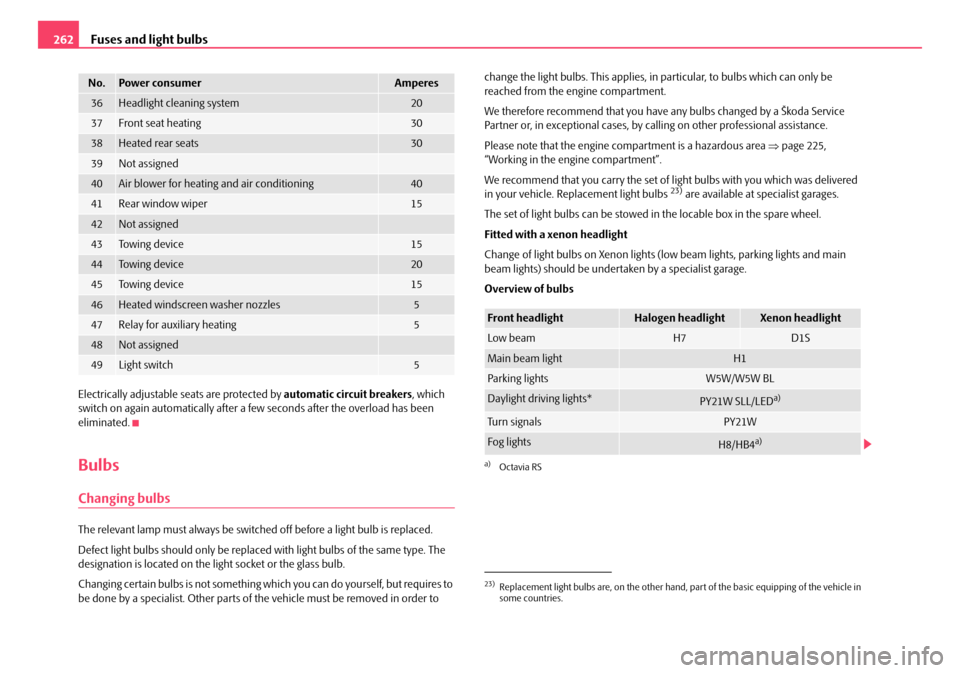
Overview of bulbs
36Headlight cleaning system20
37Front seat heating30
38Heated rear seats30
39Not assigned
40Air blower for heating and air conditioning40
41Rear window wiper15
42Not assigned
43To w i n g d e v i c e15
44To w i n g d e v i c e20
45To w i n g d e v i c e15
46Heated windscreen washer nozzles5
47Relay for auxiliary heating5
48Not assigned
49Light switch5
No.Power consumerAmperes
23)Replacement light bulbs are, on the other hand, part of the basic equipping of the vehicle in
some countries.
Front headlightHalogen headlightXenon headlight
Low beam H7D1S
Main beam lightH1
Parking lightsW5W/W5W BL
Daylight driving lights*PY21W SLL/LEDa)
a)Octavia RS
Tu r n s i g n a l sPY21W
Fog lightsH8/HB4a)
20A5Facelift.book Page 262 Saturday, September 6, 2008 2:13 PM
Page 276 of 304
Technical Data275
Using the systemSafetyDriving TipsGeneral MaintenanceBreakdown assistanceTechnical Data
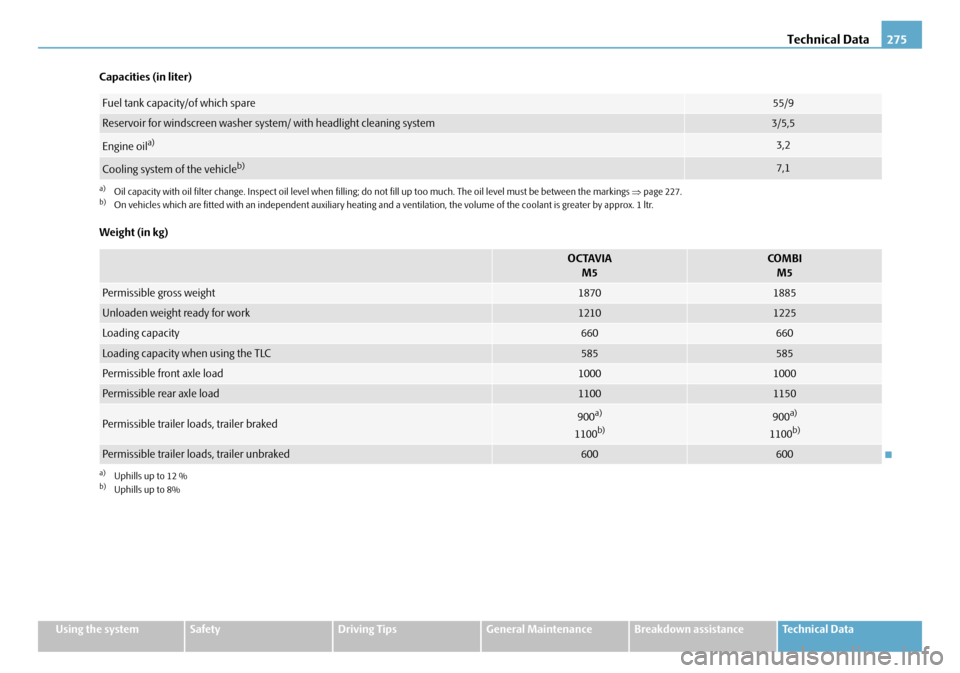
Capacities (in liter)
Weight (in kg)
Fuel tank capacity/of which spare55/9
Reservoir for windscreen washer system/ with headlight cleaning system3/5,5
Engine oila)
a)Oil capacity with oil filter change. Inspec
t oil level when filling; do not fill up too much. The oil level must be between the markings ⇒page 227.
3,2
Cooling system of the vehicleb)
b)On vehicles which are fitted with an independent auxiliary heating and a ventilation, the volume of the coolant is greater by a pprox. 1 ltr.
7,1
OCTAVIA
M5COMBIM5
Permissible gross weight 18701885
Unloaden weight ready for work12101225
Loading capacity660660
Loading capacity when using the TLC585585
Permissible front axle load10001000
Permissible rear axle load11001150
Permissible trailer loads, trailer braked900a)
1100b)
a)Uphills up to 12 %b)Uphills up to 8%
900a)
1100b)
Permissible trailer loads, trailer unbraked600600
20A5Facelift.book Page 275 Saturday, September 6, 2008 2:13 PM
Page 278 of 304
Technical Data277
Using the systemSafetyDriving TipsGeneral MaintenanceBreakdown assistanceTechnical Data
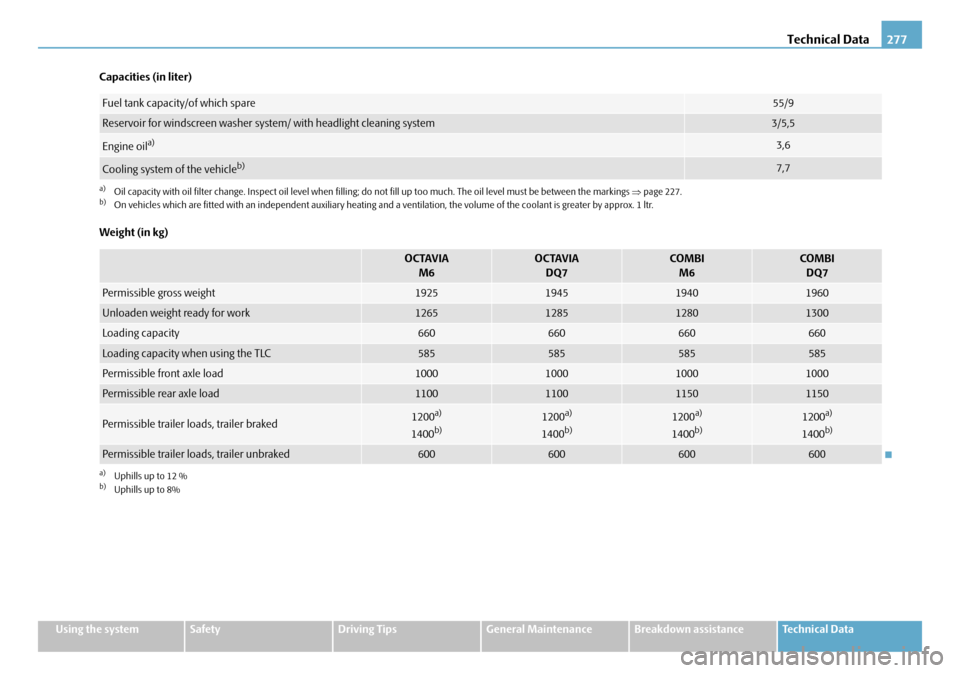
Capacities (in liter)
Weight (in kg)
Fuel tank capacity/of which spare55/9
Reservoir for windscreen washer system/ with headlight cleaning system3/5,5
Engine oila)
a)Oil capacity with oil filter change. Inspec
t oil level when filling; do not fill up too much. The oil level must be between the markings ⇒page 227.
3,6
Cooling system of the vehicleb)
b)On vehicles which are fitted with an independent auxiliary heating and a ventilation, the volume of the coolant is greater by a pprox. 1 ltr.
7,7
OCTAVIA
M6OCTAVIADQ7COM B I M6COMBIDQ7
Permissible gross weight 1925194519401960
Unloaden weight ready for work1265128512801300
Loading capacity660660660660
Loading capacity when using the TLC585585585585
Permissible front axle load1000100010001000
Permissible rear axle load1100110011501150
Permissible trailer loads, trailer braked1200a)
1400b)
a)Uphills up to 12 %b)Uphills up to 8%
1200a)
1400b)1200a)
1400b)1200a)
1400b)
Permissible trailer loads, trailer unbraked600600600600
20A5Facelift.book Page 277 Saturday, September 6, 2008 2:13 PM