fuel SKODA OCTAVIA 2009 2.G / (1Z) User Guide
[x] Cancel search | Manufacturer: SKODA, Model Year: 2009, Model line: OCTAVIA, Model: SKODA OCTAVIA 2009 2.G / (1Z)Pages: 304, PDF Size: 19.56 MB
Page 24 of 304

Instruments and Indicator/Warning Lights
23
Using the system
Safety
Driving Tips
General Maintenance
Breakdown assistance
Technical Data
Operating with the buttons on the multifunction steering wheel*Switching over and resetting is performed with the handwheel ⇒
fig. 23
.
Selecting the memory – Short-term pressing of the button
allows to select the desired
memory.
Selecting the functions – By pressing the button , you can call up the menu of the multi-func-
tional indicator.
– Turn the handwheel upwards or downwards. In this way, call up in
sequence the individual functions of the multi-functional indicator.
– Short-term pressing of the button
allows to select the highlighted
function.
Setting function to zero – Select the memory you want. – Press the button for more than 1 second.
The following readouts of the selected memo
ry will be set to zero with the button
:•
average fuel consumption,
•
distance driven,
•
average speed,
•
Driving time.
You can only operate the multi-functional
indicator when the ignition is switched
on. After the ignition is switched on, the f
unction displayed is the one which you last
selected before switching off the ignition.Outside temperatureThe outside temperature appears in the disp
lay when the ignition is switched on.
If the outside temperature drops below +4 °C
, a snow flake symbol (warning signal
for ice on the road) appears before the temperature indicator
⇒fig. 24
and a
warning signal sounds. After pressing the rocker switch at the windshield wiper lever
⇒page 22, fig. 22
or the button at the multifunction steering wheel
⇒ fig. 23
, the function shown last is indicated.
Fig. 23 Multi-functional indicator: Operating with the buttons on the multifunction steering wheel
AD
AD
AC
AD
AD
AD
AD
Fig. 24 The outside tempera-tureAA
AC
se0.1.book Page 23 Friday, April 10, 2009 3:19 PM
Page 25 of 304
Instruments and Indicator/Warning Lights
24
WARNING
Do not only rely upon the information given on the outside temperature display that there is no ice on the road.
Please note that black ice may also be
present on the road surface even at
temperatures around +4°C - warning,
drive with care!Driving timeThe driving time which has elapsed since the memory was last erased, appears in the display. If you wish to
measure the driving time as of a particular time, you must
set the memory to zero at this moment in
time by pressing the button on the
windshield wiper lever
⇒page 22, fig. 22
or the handwheel on the multifunc-
tion steering wheel*
⇒page 23, fig. 23
for longer than 1 second.
The maximum distance indicated in both memories is 99 hours and 59 minutes. The indicator is set back to nu
ll if this period is exceeded.
Current consumptionThe current fuel consumption level is shown in the display in litres/100 km. This information can help you to
adapt your style of driving to the fuel consumption you
wish to achieve. The display appears in litres/hour if the vehicle is stationary or driving at a low speed. The indicated value will be updated every 0.5 seconds while you are driving.Average fuel consumptionThe average fuel consumption since the memory was last erased is shown in the display in litres/100 km
⇒page 21. This information can help you to adapt your
style of driving to the fuel co
nsumption you wish to achieve.
If you wish to determine the average fuel
consumption over a cert
ain period of time
you must set the memory to zero at the start of the measurement using the button
on the windshield wiper lever
⇒page 22, fig. 22
or with the handwheel on
the multifunction steering wheel*
⇒page 23, fig. 23
. A zero appears in the display
for the first 100 m you drive after erasing the memory. The indicated value will be updated every 5 seconds while you are driving.
Note
The amount of fuel consum
ed will not be indicated.
RangeThe estimated range in kilometres is shown on the display. It indicates the distance you can still drive with your vehicle based on the present level of fuel in the tank for the same style of driving. The readout is shown in steps of 10 km. After lighting up of the indicator light for the fuel reserve the display is shown in steps of 5 km. The fuel consumption for the last 50 km is
taken as a basis for calculating the range.
If you drive in a more economical manner
from this moment on, the range will be
increased accordingly. If the memory is set to zero (after disc
onnecting the battery), the fuel consumption
of 10 ltr./100 km is calculated for the rang
e; afterwards the value is adapted accord-
ingly to the style of driving.Distance drivenThe distance driven since the memory was last erased appears in the display ⇒ page 21. If you wish to measure the dist
ance driven of a particular time, you
must set the memory to zero at this mome
nt in time by pressing the button on
the windshield wiper lever
⇒page 22, fig. 22
or the handwheel on the multi-
function steering wheel*
⇒page 23, fig. 23
.
The maximum distance indicated in both sw
itch positions is 9 999 km. The indicator
is set back to null if th
is period is exceeded.
AB
AD
AB
ADAB
AD
se0.1.book Page 24 Friday, April 10, 2009 3:19 PM
Page 33 of 304
Instruments and Indicator/Warning Lights
32
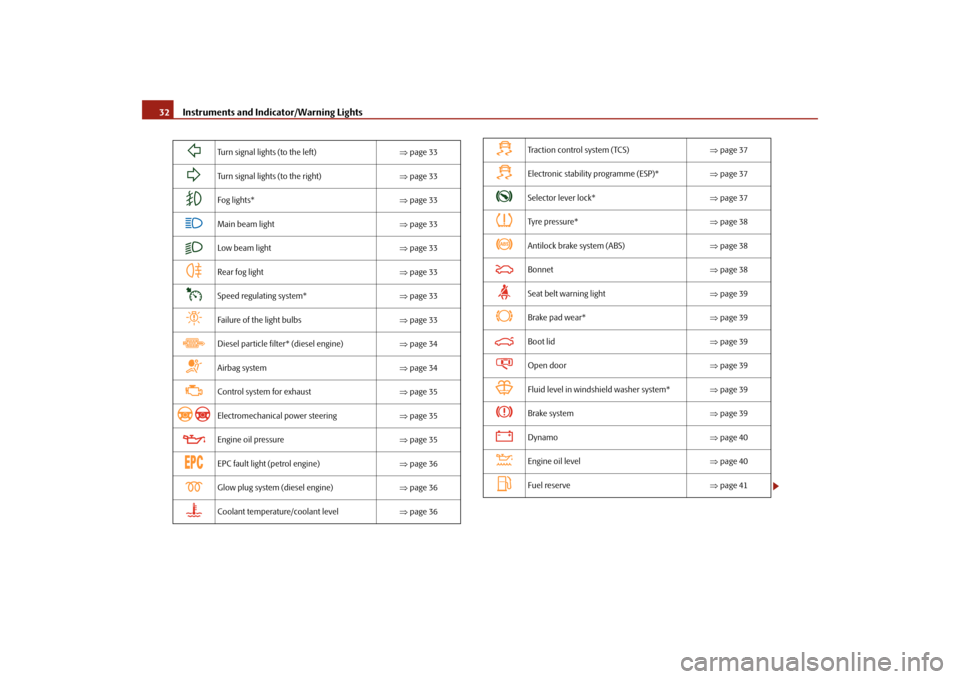
Turn signal lights (to the left)
⇒page 33
Turn signal lights (to the right)
⇒page 33
Fog lights*
⇒page 33
Main beam light
⇒page 33
Low beam light
⇒page 33
Rear fog light
⇒page 33
Speed regulating system*
⇒page 33
Failure of the light bulbs
⇒page 33
Diesel particle filter* (diesel engine)
⇒page 34
Airbag system
⇒page 34
Control system for exhaust
⇒page 35
Electromechanical power steering
⇒page 35
Engine oil pressure
⇒page 35
EPC fault light (petrol engine)
⇒page 36
Glow plug system (diesel engine)
⇒page 36
Coolant temperature/coolant level
⇒page 36
Traction control system (TCS)
⇒page 37
Electronic stability programme (ESP)*
⇒page 37
Selector lever lock*
⇒page 37
Tyre pressure*
⇒page 38
Antilock brake system (ABS)
⇒page 38
Bonnet
⇒page 38
Seat belt warning light
⇒page 39
Brake pad wear*
⇒page 39
Boot lid
⇒page 39
Open door
⇒page 39
Fluid level in windshield washer system*
⇒page 39
Brake system
⇒page 39
Dynamo
⇒page 40
Engine oil level
⇒page 40
Fuel reserve
⇒page 41
se0.1.book Page 32 Friday, April 10, 2009 3:19 PM
Page 35 of 304
Instruments and Indicator/Warning Lights
34
Diesel particle filter*
(diesel engine)
If the warning light
comes on, this means that soot has accumulated in the
diesel particle filter because of the frequent short distances. In order to clean the diesel particle filter,
the vehicle should be
driven at an even
speed of at least 60 km/h at engine speeds of 1 800 - 2 500 rpm for at least 15 minutes or until the warning light goes ou
t with the 4th or 5th gear engaged (auto-
matic gearbox: position S) when the traffi
c situation permits it. This increases the
exhaust temperature and the soot deposited in the diesel particle filter is burnt. Always pay attention to the valid speed limits
⇒
.
The warning light
goes out after the successful cleaning of the diesel particle
filter. If the filter is not properly
cleaned, the warning light
does not go out and the
warning light
begins to flash. In the information display* appears
Diesel-
particle Owner's manual
. Afterwards the engine control unit shifts the engine into
the emergency mode, which only has a reduced power output. After switching the ignition off and on again the warning light
comes on.
Have the vehicle inspected without delay by your specialist garage.
WARNING
•
If you do not pay attention to the warning light coming on and the corre-
sponding descriptions and warning notes, this may result in injuries or major vehicle damage.•
Always adjust your speed to suit weather, road, region and traffic condi-
tions. The route indicated by the warning light must not tempt you to disre- gard the national regulations for road traffic.
Caution
As long as the warning light
lights up, one must take into account an increased
fuel consumption and in certain circumst
ances a power reduction of the engine.
Note
Further information about diesel particle filter
⇒page 200.
Airbag system
Monitoring the airbag system The warning light
comes on for a few seconds when the ignition is switched on.
There is a fault in the system if the warning light does not go out or flashes while driving
⇒
. This also applies if the warning light does not come on when the igni-
tion is switched on. The following text will be displayed in the information display*:
Airbag fault!
The functionality of the airbag system is
also monitored electronically, when one
airbag has been switched off Front, side and head airbags or belt
tensioner which have been switched off
using the vehicle system tester:•
The warning light
lights up for 4 seconds after switching on the ignition and
then flashes again for 12 seconds in intervals of 2 seconds. The following text will be displayed in the information display*:
Airbag/belt tensio
ner deactivated!
Front passenger airbags switched off
using the switch for front passenger
airbags* in storage compartment on the front passenger side:•
the warning light
comes on for 4 seconds after the ignition has been
switched on,•
switching off the airbag is indicated in
the middle of the dash panel by the
lighting up of the indicator light
(airbag switched off)
⇒page 182.
se0.1.book Page 34 Friday, April 10, 2009 3:19 PM
Page 42 of 304
Instruments and Indicator/Warning Lights
41
Using the system
Safety
Driving Tips
General Maintenance
Breakdown assistance
Technical Data
Warning light
flashes
A fault on the engine oil level sensor is indicated additionally by an audible signal and the warning light coming on several times after the ignition has been switched on. In this case have the engine inspected without delay by a specialist garage.The following text will be displayed in the information display*:
Oil sensor Workshop!
Fuel reserve
The warning light
comes on, if the fuel level is still below 9 litres.
An audible signal sounds as an additional warning signal.The following text will be displayed in the information display*:
Please refuel! Range...kmNote
The Text in the information display* goes out only after refuelling and driving a short distance.
se0.1.book Page 41 Friday, April 10, 2009 3:19 PM
Page 45 of 304
Unlocking and locking
44
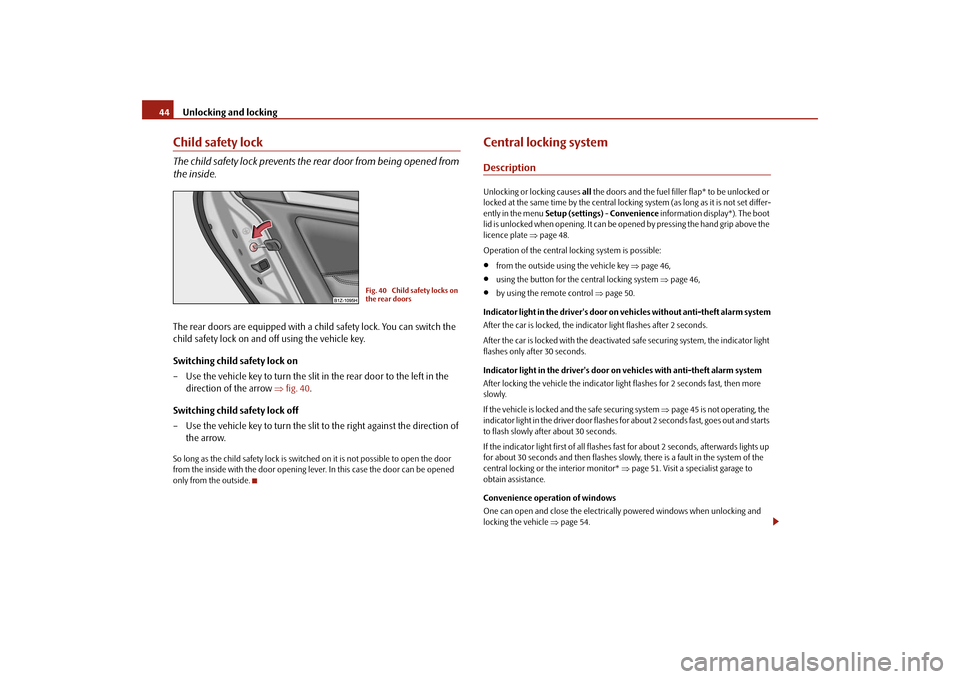
Child safety lockThe child safety lock prevents the
rear door from being opened from
the inside.The rear doors are equipped with a child safety lock. You can switch the child safety lock on and off using the vehicle key. Switching child safety lock on – Use the vehicle key to turn the slit in the rear door to the left in the
direction of the arrow
⇒
fig. 40
.
Switching child safety lock off – Use the vehicle key to turn the slit to the right against the direction of
the arrow.
So long as the child safety lo
ck is switched on it is no
t possible to open the door
from the inside with the door opening lever. In this case the door can be opened only from the outside.
Central locking systemDescriptionUnlocking or locking causes
all the doors and the fuel filler flap* to be unlocked or
locked at the same time by the central lockin
g system (as long as it is not set differ-
ently in the menu
Setup (settings)
- Convenience
information display*). The boot
lid is unlocked when opening. It can be op
ened by pressing the hand grip above the
licence plate
⇒page 48.
Operation of the central locking system is possible:•
from the outside using the vehicle key
⇒page 46,
•
using the button for the central locking system
⇒page 46,
•
by using the remote control
⇒page 50.
Indicator light in the driver's door on vehicles without anti-theft alarm system After the car is locked, the indicator light flashes after 2 seconds. After the car is locked with the deactivate
d safe securing system, the indicator light
flashes only after 30 seconds. Indicator light in the driver's door on vehicles with anti-theft alarm system After locking the vehicle the indicator light flashes for 2 seconds fast, then more slowly. If the vehicle is locked and the safe securing system
⇒page 45 is not operating, the
indicator light in the driver door flashes fo
r about 2 seconds fast, goes out and starts
to flash slowly after about 30 seconds. If the indicator light first of all flashes fast for about 2 seconds, afterwards lights up for about 30 seconds and then flashes slowly
, there is a fault in the system of the
central locking or the interior monitor*
⇒page 51. Visit a specialist garage to
obtain assistance. Convenience operation of windows One can open and close the electrically
powered windows when unlocking and
locking the vehicle
⇒page 54.
Fig. 40 Child safety locks on the rear doors
se0.1.book Page 44 Friday, April 10, 2009 3:19 PM
Page 46 of 304

Unlocking and locking
45
Using the system
Safety
Driving Tips
General Maintenance
Breakdown assistance
Technical Data
Opening a single door* This function allows one to just unlock the driver's door. The other doors and the fuel filler flap* remain locked and are
only unlocked after repetitive unlocking.
If you wish, you can have yo
ur authorised Škoda Service Partner activate the func-
tion of the single door opening mode. Automatic locking* All the doors and the boot lid are locked
automatically once the car reaches a speed
of about 15 km/h. If the ignition key is withdrawn, the ca
r is then automatically unlocked again. In
addition, it is possible for the driver to unl
ock the car by pressing the central locking
button
or by pulling the door opening lever.
If you wish, your Škoda Deal
er can activate the function of the automatic locking
mode.
WARNING
Locking the doors prevents involuntary
opening in an exceptional situation
(an accident). Locked doors prevent unwanted entry into the vehicle from outside, for example at road crossings. Locked doors do, however, make it more difficult for rescuers to get into
the vehicle in an emergency - danger to
life!
Note
•
In the event of an accident in which the airbags are deployed, the locked doors
are automatically unlocked in order to enable
rescuers to gain access to the vehicle.
•
Only the front doors can be unlocked an
d locked using the key if the central
locking system fails. You can lock or unlock manually the other doors and the boot lid.
− Emergency locking of the door
⇒page 47.
− Emergency unlocking of the boot lid
⇒page 48.
Safe securingThe central locking system is equipped with a
safe securing
7) system. Locking the
vehicle from the outside causes the door lock
s to be automatically blocked. It is not
possible to open the doors with the door
handle either from the inside or from the
outside. This acts as an effective deterren
t for attempts to break into your vehicle.
You can deactivate the safe securing sy
stem by locking twice within 2°seconds.
If the safe securing system is not operating, the warning light in the driver door flashes for about 2 seconds fast, goes out and starts to flash slowly again after about 30°seconds. The safe securing system is again activate
d the next time the vehicle is unlocked and
locked again. The doors can be opened from the inside
if the vehicle is locked and the safe
securing system is deactivated:•
The door is unlocked by actuating the door-opening lever.
•
The door opens upon actuating the door-opening lever again.
WARNING
If the vehicle is locked from the outside and the safe securing system is acti-vated, there must not be any person and animals in the vehicle as it is then not possible to open either a door or a window from the inside. The locked doors make it more difficult for rescuers to get into the vehicle in an emer- gency - hazard!
Note
The anti-theft alarm system* is also acti
vated with the deactivated safe securing
system when locking the vehicle. The inte
rior monitor* is however not activated.
7)Only valid for some countries.
se0.1.book Page 45 Friday, April 10, 2009 3:19 PM
Page 47 of 304

Unlocking and locking
46
Unlocking the vehicle using the key– Turn the key in the lock of the driver
's door in the direction of travel
(opening position)
⇒
fig. 41
.
– Pull on the door handle and open the door.•
All the doors (only the driver's door on vehicles with anti-theft alarm system)
and the fuel filler flap* are unlocked.•
The boot lid is then unlocked.
•
The switched on interior lights come on over the door contact.
•
The safe securing system is deactivated.
•
The windows are opened provided the key
is held
in the opening position*. On
vehicles fitted with anti-theft alarm system
the window operation is only possible
45 seconds after deactivation of the warning system.•
The indicator light in the driver's door stops flashing if the vehicle is not fitted
with an anti-theft alarm system*
⇒page 51.
Note
If the vehicle is equipped with an anti-t
heft alarm system*, you must unlock the
vehicle by inserting the key into the driver door you then have to insert the key into the ignition lock and switch the ignition
on within 15 seconds after opening the
door. The
alarm will be triggered
if you do
not switch on
the ignition within 15
seconds.Closing the vehicle with the key– Turn the key in the lock of the driver's door in the opposite direction of
travel (closing position)
⇒
fig. 41
.
•
The doors, the boot lid and the fuel filler flap* are locked.
•
The switched on interior lights wi
ll switch off over the door contact.
•
The windows and the electric sliding/tilting roof* are closed provided the key is
held
in the locking position.
•
The safe securing system is activated immediately.
•
The indicator light in the driver door begins flashing.Note
The opened driver door cannot be locked. It
must be locked separately after closing
it.Button for the central locking system
Fig. 41 Turning the key for unlocking and locking the vehicle
AA
AB
Fig. 42 Centre console: Buttons for central locking
se0.1.book Page 46 Friday, April 10, 2009 3:19 PM
Page 68 of 304

Lights and Visibility
67
Using the system
Safety
Driving Tips
General Maintenance
Breakdown assistance
Technical Data
If a door, the bonnet or the boot lid re
mains open, the light goes out within 2
minutes if the ignition is switched off.
WARNING
If the entry light comes on, do not touch its cover - risk of burns!VisibilityRear window heater– You can switch the rear window heater on or off by pressing the switch
⇒
fig. 63
- the indicator light in the
switch comes on or goes out.
The rear window heater only oper
ates when the engine is running.
The rear window heater
switches
off automatically after 10 minutes.
For the sake of the environment
As soon as the window is de-iced or free from mist, the heating should be switched off. The reduced current consumption will have a favourable effect on fuel economy
⇒page 205, “Saving electricity”.
Note
•
The position and the shape of the switch can differ depending on equipment
installed in the vehicle.•
If the on-board voltage drops, the rear
window heater
is switched off automat-
ically, in order to provide sufficient electrical energy for the engine control.Sun visorsYou can pull the sun visor for the driver or
front passenger out of the fixture and
swivel it toward the door in the direction of the arrow
⇒fig. 64
.
Fig. 63 Switch for rear window heater
Fig. 64 Sun visor: swivelling outFig. 65 Double sun visorA1
se0.1.book Page 67 Friday, April 10, 2009 3:19 PM
Page 72 of 304
Lights and Visibility
71
Using the system
Safety
Driving Tips
General Maintenance
Breakdown assistance
Technical Data
The headlight washer nozzles are moved forward out of the bumper by the water pressure for cleaning the headlights. You should remove stubborn dirt (such
as insect residues) from the headlight
lenses at regular intervals, for example when refuelling. Please refer to the following guidelines
⇒page 214, “The headlight lenses”.
You should remove any snow from the fixt
ures of the washer nozzles and clear ice
in winter with a de-icing spray in order to
ensure proper operation of the cleaning
system.Replacing wiper blades fo
r the windscreen wipers
One cannot fold out the wiper arms in the rest position from the wind- screen. Before replacing the wiper
arms you must put them into the
service position. Service position for changing wiper blades – Close the bonnet. – Switch the ignition on and then again off. – Then press the windscreen wiper lever in the position
⇒
page 69,
fig. 68
within 20 seconds - the wiper ar
ms move into the service posi-
tion.
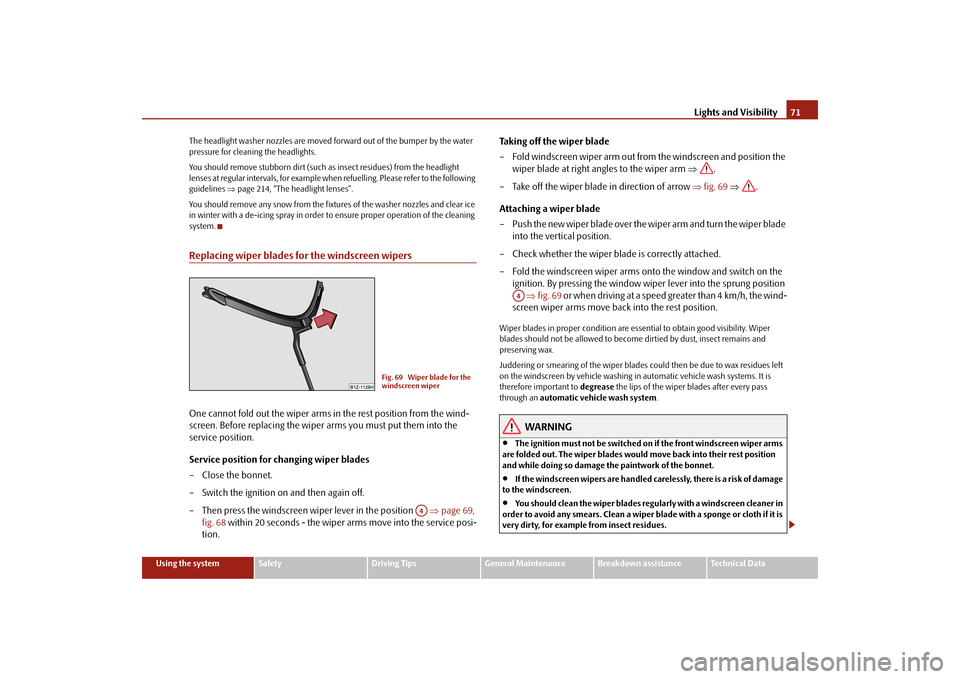
Taking off the wiper blade – Fold windscreen wiper arm out from
the windscreen and position the
wiper blade at right angles to the wiper arm
⇒
.
– Take off the wiper blade in direction of arrow
⇒
fig. 69
⇒
.
Attaching a wiper blade – Push the new wiper blade over the wiper arm and turn the wiper blade
into the vertical position.
– Check whether the wiper blade is correctly attached.– Fold the windscreen wiper arms onto the window and switch on the
ignition. By pressing the window wi
per lever into the sprung position
⇒
fig. 69
or when driving at a speed greater than 4 km/h, the wind-
screen wiper arms move back into the rest position.
Wiper blades in proper condition are esse
ntial to obtain good visibility. Wiper
blades should not be allowed to become
dirtied by dust, insect remains and
preserving wax. Juddering or smearing of the wiper blades
could then be due to wax residues left
on the windscreen by vehicle washing in
automatic vehicle wash systems. It is
therefore important to
degrease
the lips of the wiper blades after every pass
through an
automatic vehicle wash system
.
WARNING
•
The ignition must not be switched on if the front windscreen wiper arms
are folded out. The wiper blades would move back into their rest position and while doing so damage th
e paintwork of the bonnet.
•
If the windscreen wipers are handled carelessly, there is a risk of damage
to the windscreen.•
You should clean the wiper blades regularly with a windscreen cleaner in
order to avoid any smears. Clean a wiper blade with a sponge or cloth if it is very dirty, for example from insect residues.
Fig. 69 Wiper blade for the windscreen wiper
A4
A4
se0.1.book Page 71 Friday, April 10, 2009 3:19 PM