turn signal SKODA OCTAVIA 2009 2.G / (1Z) Owner's Manual
[x] Cancel search | Manufacturer: SKODA, Model Year: 2009, Model line: OCTAVIA, Model: SKODA OCTAVIA 2009 2.G / (1Z)Pages: 304, PDF Size: 19.56 MB
Page 10 of 304
Cockpit
9
Using the system
Safety
Driving Tips
General Maintenance
Breakdown assistance
Technical Data
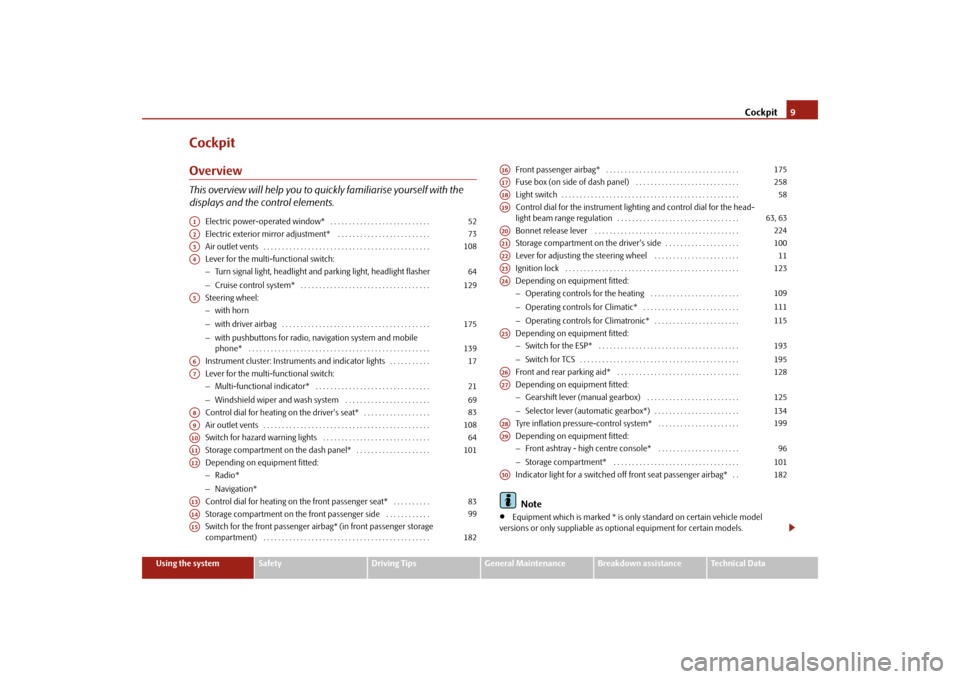
CockpitOverviewThis overview will help you to quickly familiarise yourself with the displays and the control elements.
Electric power-operated window* . . . . . . . . . . . . . . . . . . . . . . . . . . . Electric exterior mirror adjustment* . . . . . . . . . . . . . . . . . . . . . . . . . Air outlet vents . . . . . . . . . . . . . . . . . . . . . . . . . . . . . . . . . . . . . . . . . . . . . Lever for the multi-functional switch:− Turn signal light, headlight and parking light, headlight flasher − Cruise control system* . . . . . . . . . . . . . . . . . . . . . . . . . . . . . . . . . . . Steering wheel: − with horn − with driver airbag . . . . . . . . . . . . . . . . . . . . . . . . . . . . . . . . . . . . . . . . − with pushbuttons for radio, na
vigation system and mobile
phone* . . . . . . . . . . . . . . . . . . . . . . . . . . . . . . . . . . . . . . . . . . . . . . . . . Instrument cluster: Instrum
ents and indicator lights . . . . . . . . . . .
Lever for the multi-functional switch:− Multi-functional indicator* . . . . . . . . . . . . . . . . . . . . . . . . . . . . . . . − Windshield wiper and wash system . . . . . . . . . . . . . . . . . . . . . . . Control dial for heating on the driver's seat* . . . . . . . . . . . . . . . . . . Air outlet vents . . . . . . . . . . . . . . . . . . . . . . . . . . . . . . . . . . . . . . . . . . . . . Switch for hazard warning lights . . . . . . . . . . . . . . . . . . . . . . . . . . . . . Storage compartment on the dash panel* . . . . . . . . . . . . . . . . . . . . Depending on equipment fitted:− Radio* − Navigation* Control dial for heating on the front passenger seat* . . . . . . . . . . Storage compartment on the front passenger side . . . . . . . . . . . . Switch for the front passenger airbag* (in front passenger storage compartment) . . . . . . . . . . . . . . . . . . . . . . . . . . . . . . . . . . . . . . . . . . . . .
Front passenger airbag* . . . . . . . . . . . . . . . . . . . . . . . . . . . . . . . . . . . . Fuse box (on side of dash panel) . . . . . . . . . . . . . . . . . . . . . . . . . . . . Light switch . . . . . . . . . . . . . . . . . . . . . . . . . . . . . . . . . . . . . . . . . . . . . . . . Control dial for the instrument lighting and control dial for the head- light beam range regulation . . . . . . . . . . . . . . . . . . . . . . . . . . . . . . . . . Bonnet release lever . . . . . . . . . . . . . . . . . . . . . . . . . . . . . . . . . . . . . . . Storage compartment on the driver's side . . . . . . . . . . . . . . . . . . . . Lever for adjusting the steering wheel . . . . . . . . . . . . . . . . . . . . . . . Ignition lock . . . . . . . . . . . . . . . . . . . . . . . . . . . . . . . . . . . . . . . . . . . . . . . Depending on equipment fitted:− Operating controls for the heating . . . . . . . . . . . . . . . . . . . . . . . . − Operating controls for Climatic* . . . . . . . . . . . . . . . . . . . . . . . . . . − Operating controls for Climatronic* . . . . . . . . . . . . . . . . . . . . . . . Depending on equipment fitted: − Switch for the ESP* . . . . . . . . . . . . . . . . . . . . . . . . . . . . . . . . . . . . . . − Switch for TCS . . . . . . . . . . . . . . . . . . . . . . . . . . . . . . . . . . . . . . . . . . . Front and rear parking aid* . . . . . . . . . . . . . . . . . . . . . . . . . . . . . . . . . Depending on equipment fitted: − Gearshift lever (manual gearbox) . . . . . . . . . . . . . . . . . . . . . . . . . − Selector lever (automatic gearbox*) . . . . . . . . . . . . . . . . . . . . . . . Tyre inflation pressure-control system* . . . . . . . . . . . . . . . . . . . . . . Depending on equipment fitted: − Front ashtray - high centre console* . . . . . . . . . . . . . . . . . . . . . . − Storage compartment* . . . . . . . . . . . . . . . . . . . . . . . . . . . . . . . . . . Indicator light for a switched off front seat passenger airbag* . . Note
•
Equipment which is marked * is only standard on certain vehicle model
versions or only suppliable as op
tional equipment for certain models.
A1
52
A2
73
A3
108
A4
64 129
A5
175 139
A6
17
A7
21 69
A8
83
A9
108
A10
64
A11
101
A12A13
83
A14
99
A15
182
A16
175
A17
258
A18
58
A19
63, 63
A20
224
A21
100
A22
11
A23
123
A24
109111115
A25
193195
A26
128
A27
125134
A28
199
A29
96101
A30
182
se0.1.book Page 9 Friday, April 10, 2009 3:19 PM
Page 15 of 304
The brief instruction
14
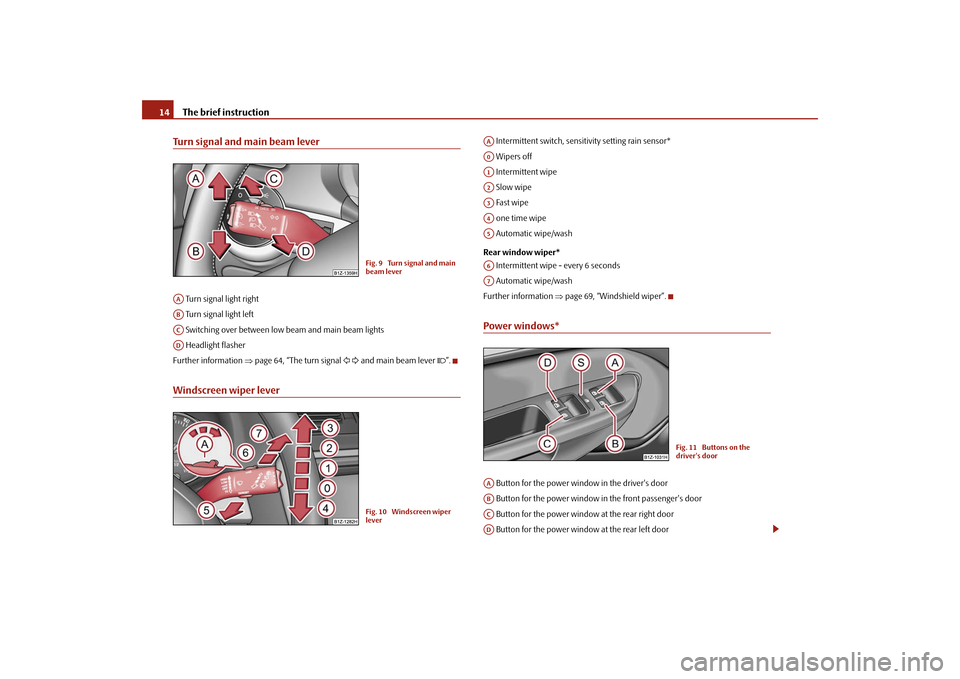
Turn signal and main beam lever Turn signal light right Turn signal light left Switching over between low beam and main beam lights Headlight flasherFurther information
⇒page 64, “The turn signal
and main beam lever
”.
Windscreen wiper lever
Intermittent switch, sensitivity setting rain sensor* Wipers off Intermittent wipe Slow wipe Fast wipe one time wipe Automatic wipe/wash Rear window wiper* Intermittent wipe - every 6 seconds Automatic wipe/washFurther information
⇒page 69, “Windshield wiper”.
Power windows* Button for the power window in the driver's door Button for the power window in the front passenger's door Button for the power window at the rear right door Button for the power window at the rear left door
Fig. 9 Turn signal and main beam lever
AAABACAD
Fig. 10 Windscreen wiper lever
AAA0A1A2A3A4A5A6A7
Fig. 11 Buttons on the driver's door
AAABACAD
se0.1.book Page 14 Friday, April 10, 2009 3:19 PM
Page 24 of 304

Instruments and Indicator/Warning Lights
23
Using the system
Safety
Driving Tips
General Maintenance
Breakdown assistance
Technical Data
Operating with the buttons on the multifunction steering wheel*Switching over and resetting is performed with the handwheel ⇒
fig. 23
.
Selecting the memory – Short-term pressing of the button
allows to select the desired
memory.
Selecting the functions – By pressing the button , you can call up the menu of the multi-func-
tional indicator.
– Turn the handwheel upwards or downwards. In this way, call up in
sequence the individual functions of the multi-functional indicator.
– Short-term pressing of the button
allows to select the highlighted
function.
Setting function to zero – Select the memory you want. – Press the button for more than 1 second.
The following readouts of the selected memo
ry will be set to zero with the button
:•
average fuel consumption,
•
distance driven,
•
average speed,
•
Driving time.
You can only operate the multi-functional
indicator when the ignition is switched
on. After the ignition is switched on, the f
unction displayed is the one which you last
selected before switching off the ignition.Outside temperatureThe outside temperature appears in the disp
lay when the ignition is switched on.
If the outside temperature drops below +4 °C
, a snow flake symbol (warning signal
for ice on the road) appears before the temperature indicator
⇒fig. 24
and a
warning signal sounds. After pressing the rocker switch at the windshield wiper lever
⇒page 22, fig. 22
or the button at the multifunction steering wheel
⇒ fig. 23
, the function shown last is indicated.
Fig. 23 Multi-functional indicator: Operating with the buttons on the multifunction steering wheel
AD
AD
AC
AD
AD
AD
AD
Fig. 24 The outside tempera-tureAA
AC
se0.1.book Page 23 Friday, April 10, 2009 3:19 PM
Page 26 of 304
Instruments and Indicator/Warning Lights
25
Using the system
Safety
Driving Tips
General Maintenance
Breakdown assistance
Technical Data
Average speedThe average speed since the memory was last erased is shown in the display in km/hour
⇒page 21. If you wish to determine the average vehicle speed over a
certain period of time you must set the me
mory to zero at the start of the measure-
ment using the button on
the windshield wiper lever
⇒page 22, fig. 22
or with
the handwheel on the mult
ifunction stee
ring wheel*
⇒page 23, fig. 23
.
A zero appears in the display for the first 100 m you drive after erasing the memory.The indicated value will be updated every 5 seconds while you are driving.Current speed*The current speed which is identical to the display of the speedometer, is indicated on the display
⇒page 17, fig. 18
.
Warning against excessive speeds*
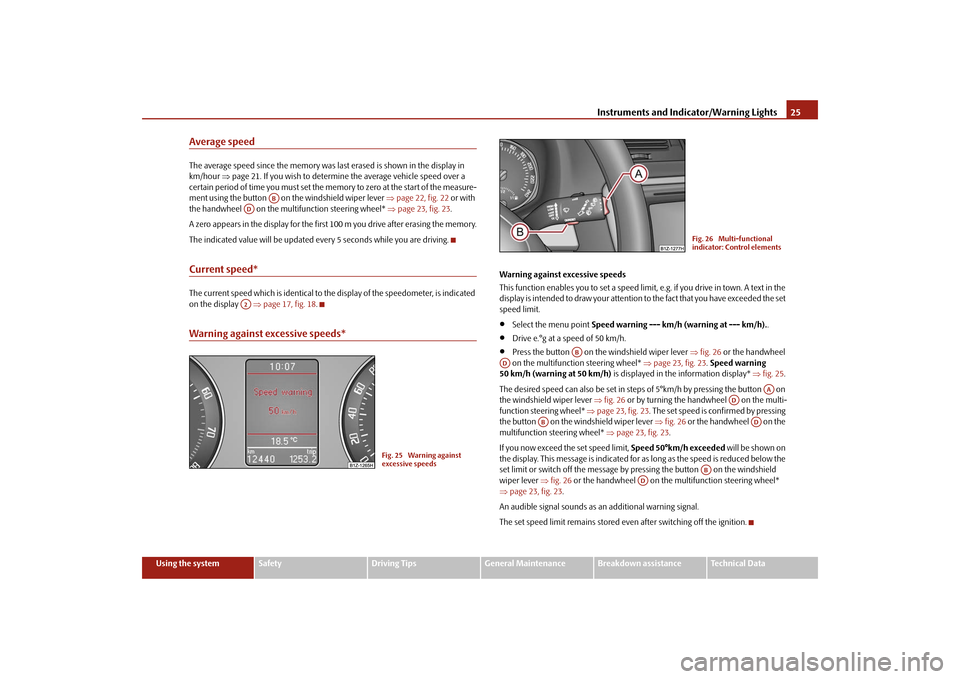
Warning against excessive speeds This function enables you to set a speed limit, e.g. if you drive in town. A text in the display is intended to draw yo
ur attention to the fact that
you have exceeded the set
speed limit.•
Select the menu point
Speed warning --- km/h (warning at --- km/h).
.
•
Drive e.°g at a speed of 50 km/h.
•
Press the button on the windshield wiper lever
⇒fig. 26
or the handwheel
on the multifunction steering wheel*
⇒page 23, fig. 23
. Speed warning
50 km/h (warning at 50 km/h)
is displayed in the information display*
⇒fig. 25
.
The desired speed can also be set in steps of 5°km/h by pressing the button on the windshield wiper lever
⇒fig. 26
or by turning the handwheel on the multi-
function stee
ring wheel*
⇒page 23, fig. 23
. The set speed is confirmed by pressing
the button on the windshield wiper lever
⇒fig. 26
or the handwheel on the
multifunction steering wheel*
⇒page 23, fig. 23
.
If you now exceed th
e set speed limit,
Speed 50°km/h exceeded
will be shown on
the display. This message is indicated for as long as the speed is reduced below the set limit or switch off the message by pr
essing the button on the windshield
wiper lever
⇒fig. 26
or the handwheel on the multifunction steering wheel*
⇒ page 23, fig. 23
.
An audible signal sounds as an additional warning signal.The set speed limit remains stored even after switching off the ignition.
AB
ADA2
Fig. 25 Warning against excessive speeds
Fig. 26 Multi-functional indicator: Control elements
AB
AD
AA
AD
AB
AD
AB
AD
se0.1.book Page 25 Friday, April 10, 2009 3:19 PM
Page 31 of 304
Instruments and Indicator/Warning Lights
30
After selecting the menu point
Back
you will reach one level higher in the menu.
Displays of the MFA Here you can switch off or on certain displays of the multi-functional indicator. Comfort* You can set the following functions (depen
ding on the equipment installed on the
vehicle):
Lights and Visibility Here you can set how long the light should
stay on for the function Coming/Leaving
Home and the intensity of the footwell li
ghting. Furthermore you can here switch
on or off the function daylight driving lights and convenience turn signal. After selecting the menu point
Fa ct or y se t tin g
the factory setting is established
again. Time Here you can set the time, the time format (12 or 24 hour indicator) and the time change summer/winter time. Winter tyres Here you can set at which speed a warning signal should sound. This function is used for e.g winter tyres with the permissible maximum speed less than the maximum speed of the vehicle. When exceeding the speed, the following is
displayed on the information display*:
Snow tyres max. speed ... km/h (Winter tyres maximum ... km/h)
Language Here you can set in which language the warning and information texts should be displayed. Measures Here you can set the units for temperat
ure, consumption and distance driven.
Assistant Here you can adjust the tones of the acoustic signals of the parking aid*. Second speed Here you can switch on the display of
the second speed in mph or in km/h
3).
Tra v e l m o d e Here you can activate / deactivate the mode “tourist light”. This mode makes it possible to drive in countries with opposing
traffic system, driving on the left/right,
Rain closing
On vehicles with ra
in sensor you can switch on or off the
function for automatic closing of the windows and the sliding/tilting roof in case of
rain and locked vehicle. If it
is not raining and the function is set, the windows including the sliding/tilting roof are closed automatically after approx. 12 hours.
Door open
Here you can switch on or off the functions for opening a single door and automatic closing.
ATA c onfir m
Here you can set if a signal tone should sound addition-ally when activating or deactivating the anti-theft alarm system .
Window op.
Here you can set the convenience mode only for the driver window or for all the windows.
Mirror down
Here you can switch on or off the function for mirror lowering on the front passenger side when engaging the reverse gear
a).
a)This function is only available on vehicles wi
th an electrically adjustable driver seat.
Mirror adjust.
Here you can switch on or off the function for left and right exterior mirror adjustment simultaneously.
Factory setting
After selecting this menu the convenience setting is reset to factory setting. The following is displayed in the information display: Factory setting for convenience is set
3)Valid for countries where the values ar
e indicated in British measuring units.
se0.1.book Page 30 Friday, April 10, 2009 3:19 PM
Page 33 of 304
Instruments and Indicator/Warning Lights
32
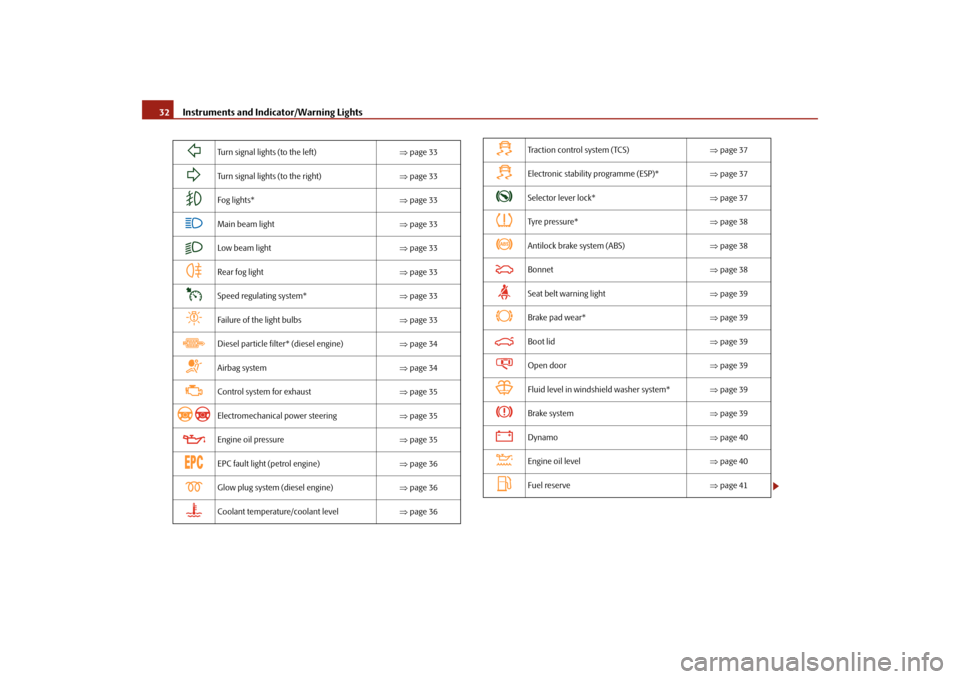
Turn signal lights (to the left)
⇒page 33
Turn signal lights (to the right)
⇒page 33
Fog lights*
⇒page 33
Main beam light
⇒page 33
Low beam light
⇒page 33
Rear fog light
⇒page 33
Speed regulating system*
⇒page 33
Failure of the light bulbs
⇒page 33
Diesel particle filter* (diesel engine)
⇒page 34
Airbag system
⇒page 34
Control system for exhaust
⇒page 35
Electromechanical power steering
⇒page 35
Engine oil pressure
⇒page 35
EPC fault light (petrol engine)
⇒page 36
Glow plug system (diesel engine)
⇒page 36
Coolant temperature/coolant level
⇒page 36
Traction control system (TCS)
⇒page 37
Electronic stability programme (ESP)*
⇒page 37
Selector lever lock*
⇒page 37
Tyre pressure*
⇒page 38
Antilock brake system (ABS)
⇒page 38
Bonnet
⇒page 38
Seat belt warning light
⇒page 39
Brake pad wear*
⇒page 39
Boot lid
⇒page 39
Open door
⇒page 39
Fluid level in windshield washer system*
⇒page 39
Brake system
⇒page 39
Dynamo
⇒page 40
Engine oil level
⇒page 40
Fuel reserve
⇒page 41
se0.1.book Page 32 Friday, April 10, 2009 3:19 PM
Page 34 of 304
Instruments and Indicator/Warning Lights
33
Using the system
Safety
Driving Tips
General Maintenance
Breakdown assistance
Technical Data
WARNING
•
If you do not pay attention to the warning lights coming on and the corre-
sponding descriptions and warning notes, this may result in severe body injuries or major vehicle damage.•
The engine compartment of your car is
a hazardous area. There is a risk
of injuries, scalding, accidents and
fire when working in the engine
compartment, e.g. inspecting and replenis
hing oil and other fluids. It is also
essential to observe all warnings
⇒page 225, “Working in the engine
compartment”.
Note
•
The arrangement of the indicator lights depends on the model version. The
symbols shown in the following functional description are to be found as indicator lights in the instrument cluster.•
Operational faults are shown in the instrument cluster as red symbols (priority
1 - danger) or yellow symb
ols (priority 2 - warning).
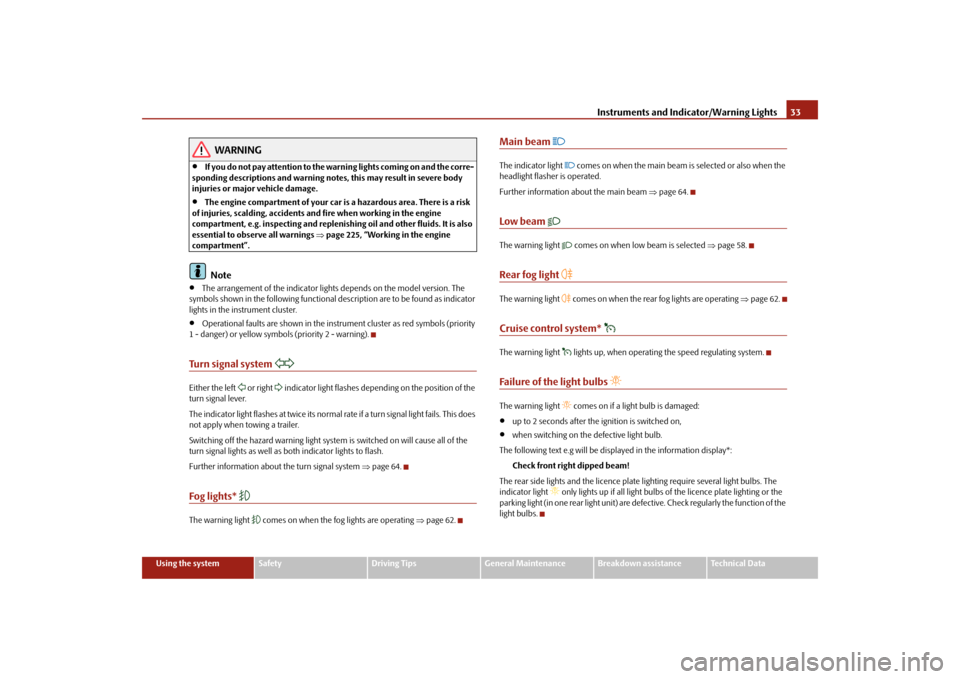
Turn signal system
Either the left
or right
indicator light flashes depending on the position of the
turn signal lever. The indicator light flashes at twice its normal ra
te if a turn signal light fails. This does
not apply when towing a trailer. Switching off the hazard warning light system is switched on will cause all of the turn signal lights as well as
both indicator lights to flash.
Further information about
the turn signal system
⇒page 64.
Fog lights*
The warning light
comes on when the fog lights are operating
⇒page 62.
Main beam
The indicator light
comes on when the main beam is selected or also when the
headlight flasher is operated. Further information about the main beam
⇒page 64.
Low beam
The warning light
comes on when low beam is selected
⇒page 58.
Rear fog light
The warning light
comes on when the rear fog lights are operating
⇒page 62.
Cruise control system*
The warning light
lights up, when operating the speed regulating system.
Failure of the light bulbs
The warning light
comes on if a light bulb is damaged:
•
up to 2 seconds after the ignition is switched on,
•
when switching on the defective light bulb.
The following text e.g will be displayed in the information display*:
Check front right dipped beam!
The rear side lights and the licence plate
lighting require several light bulbs. The
indicator light
only lights up if all light bulbs
of the licence plate lighting or the
parking light (in one rear light unit) are defe
ctive. Check regularly the function of the
light bulbs.
se0.1.book Page 33 Friday, April 10, 2009 3:19 PM
Page 51 of 304
Unlocking and locking
50
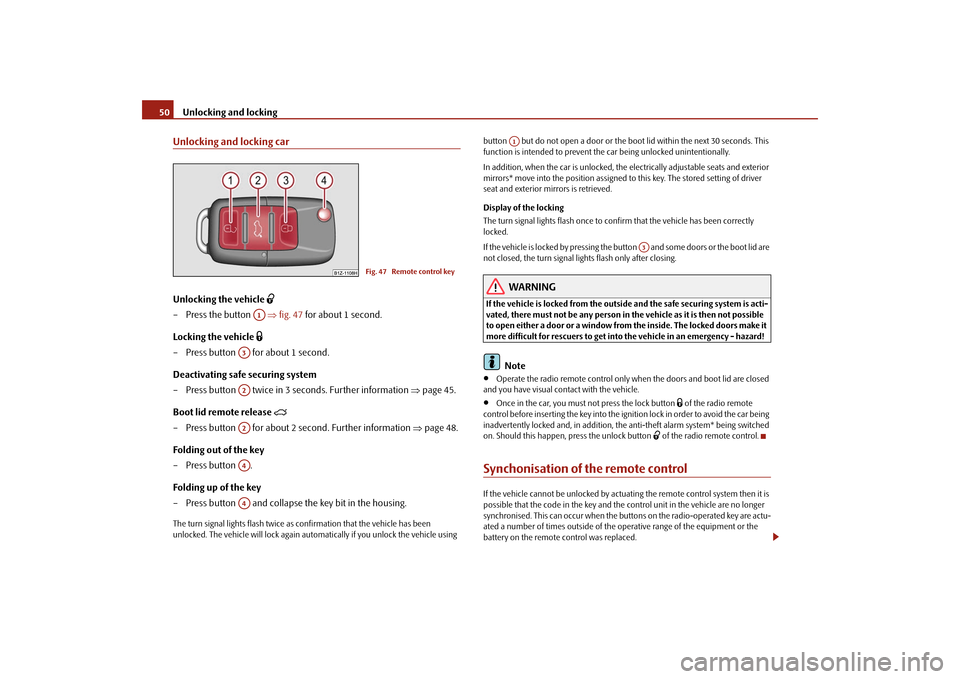
Unlocking and locking carUnlocking the vehicle
– Press the button
⇒
fig. 47
for about 1 second.
Locking the vehicle
– Press button for about 1 second.Deactivating safe securing system – Press button twice in 3 seconds. Further information
⇒
page 45.
Boot lid remote release
– Press button for about 2 second. Further information
⇒
page 48.
Folding out of the key – Press button . Folding up of the key – Press button and collapse the key bit in the housing.The turn signal lights flash twice as
confirmation that the vehicle has been
unlocked. The vehicle will lock again auto
matically if you unlock the vehicle using
button but do not open a door or the b
oot lid within the next 30 seconds. This
function is intended to prevent the car being unlocked unintentionally. In addition, when the car is unlocked, the el
ectrically adjustable seats and exterior
mirrors* move into the position assigned to this key. The stored setting of driver seat and exterior mirrors is retrieved. Display of the locking The turn signal lights flash once to co
nfirm that the vehicle has been correctly
locked. If the vehicle is locked by
pressing the button and some doors or the boot lid are
not closed, the turn signal lights flash only after closing.
WARNING
If the vehicle is locked from the outsid
e and the safe securing system is acti-
vated, there must not be any person in the vehicle as it is then not possible to open either a door or a window from the inside. The locked doors make it more difficult for rescuers to get into
the vehicle in an emergency - hazard!
Note
•
Operate the radio remote control only when the doors and boot lid are closed
and you have visual co
ntact with the vehicle.
•
Once in the car, you must
not press the lock button
of the radio remote
control before inserting the key into the ignition lock in order to avoid the car being inadvertently locked and, in addition, the anti-theft alarm system* being switched on. Should this happen, press the unlock button
of the radio remote control.
Synchonisation of the remote controlIf the vehicle cannot be unlocked by actuatin
g the remote control system then it is
possible that the code in the key and the
control unit in the vehicle are no longer
synchronised. This can occur when the buttons on the radio-operated key are actu- ated a number of times outside of the operative range of the equipment or the battery on the remote control was replaced.
Fig. 47 Remote control key
A1
A3A2A2A4A4
A1
A3
se0.1.book Page 50 Friday, April 10, 2009 3:19 PM
Page 59 of 304
Lights and Visibility
58
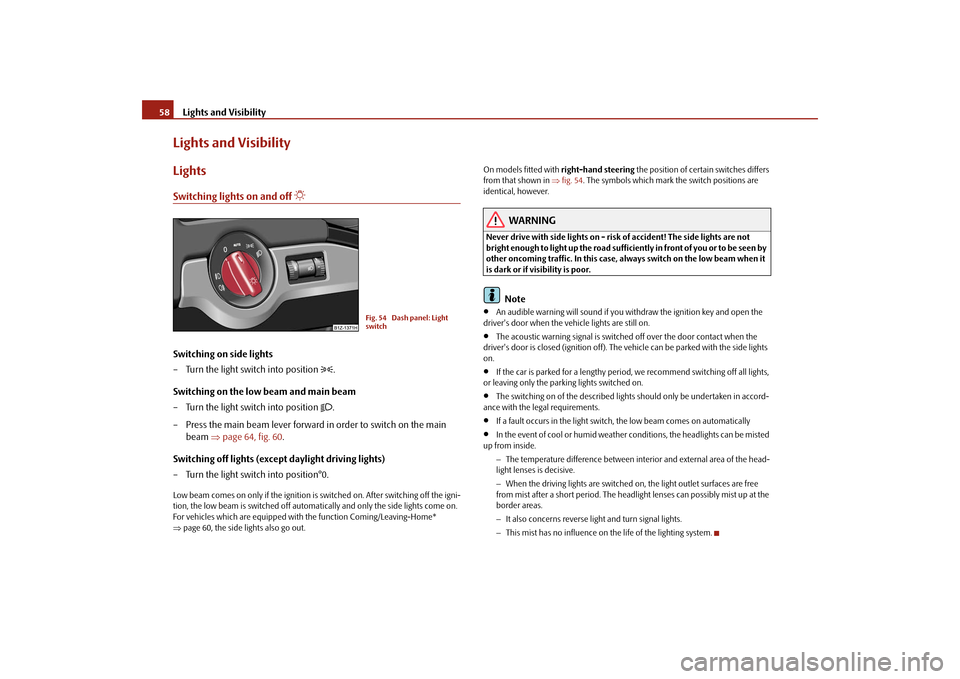
Lights and VisibilityLightsSwitching lights on and off
Switching on side lights – Turn the light switch into position
.
Switching on the low beam and main beam – Turn the light switch into position
.
– Press the main beam lever forward in order to switch on the main
beam
⇒
page 64, fig. 60
.
Switching off lights (except daylight driving lights) – Turn the light switch into position°0.Low beam comes on only if the ignition is switched on. After switching off the igni- tion, the low beam is switched off automati
cally and only the side lights come on.
For vehicles which are equipped with
the function Comi
ng/Leaving-Home*
⇒ page 60, the side lights also go out.
On models fitted with
right-hand steering
the position of certain switches differs
from that shown in
⇒fig. 54
. The symbols which mark the switch positions are
identical, however.
WARNING
Never drive with side lights on - risk of accident! The side lights are not bright enough to light up the road sufficiently in front of you or to be seen by other oncoming traffic. In this case, always switch on the low beam when it is dark or if visibility is poor.
Note
•
An audible warning will sound if you withdraw the ignition key and open the
driver's door when the vehicle lights are still on.•
The acoustic warning signal is switched off over the door contact when the
driver's door is closed (ignition off). The
vehicle can be parked with the side lights
on.•
If the car is parked for a lengthy period
, we recommend switching off all lights,
or leaving only the parking lights switched on.•
The switching on of the described lights
should only be undertaken in accord-
ance with the legal requirements.•
If a fault occurs in the light switch, the low beam comes on automatically
•
In the event of cool or humid weather co
nditions, the headligh
ts can be misted
up from inside.
− The temperature difference between interior and external area of the head- light lenses is decisive. − When the driving lights are switched on, the light outlet surfaces are free from mist after a short period. The headli
ght lenses can possib
ly mist up at the
border areas. − It also concerns reverse light and turn signal lights. − This mist has no influence on th
e life of the lighting system.
Fig. 54 Dash panel: Light switch
se0.1.book Page 58 Friday, April 10, 2009 3:19 PM
Page 60 of 304
Lights and Visibility
59
Using the system
Safety
Driving Tips
General Maintenance
Breakdown assistance
Technical Data
Daylight driving lights*In some countries, the national legisl
ation requires that the vehicles are
equipped with the function
daylight driving lights.
Switching on daylight driving lights – Switch on the ignition without turnin
g the light switch out of the posi-
tion 0.
Deactivate function daylight driving lights – Pull the turn signal light lever towards the steering wheel up to 3
seconds after switching on the ignition
and at the same time, slide it to
the bottom and hold it in this position for at least 3 seconds.
Activate function daylight driving lights – Pull the turn signal light lever towards the steering wheel up to 3
seconds after switching on the ignition
and at the same time, slide it to
the top and hold it in this position for at least 3 seconds.
When the daylight driving lights are switched on, the side lights and the low beam come on together. On vehicles which are fitted with bulbs for
daylight driving lights* in the fog lights,
the parking lights do not co
me on when activating the function daylight driving
lights
9).
When the daylight driving lights are switched on, the illumination of the instrument cluster is switched off, however, it is switched on in the position
when it is dark
and the low beam shines with full brightness (100 % of the performance). On vehicles fitted with an information displa
y*, you can activate or
deactivate in the
menu the function daylight driving lights:„
SETUP (Settings)
„
Lights & Vision (Lights & Vision)
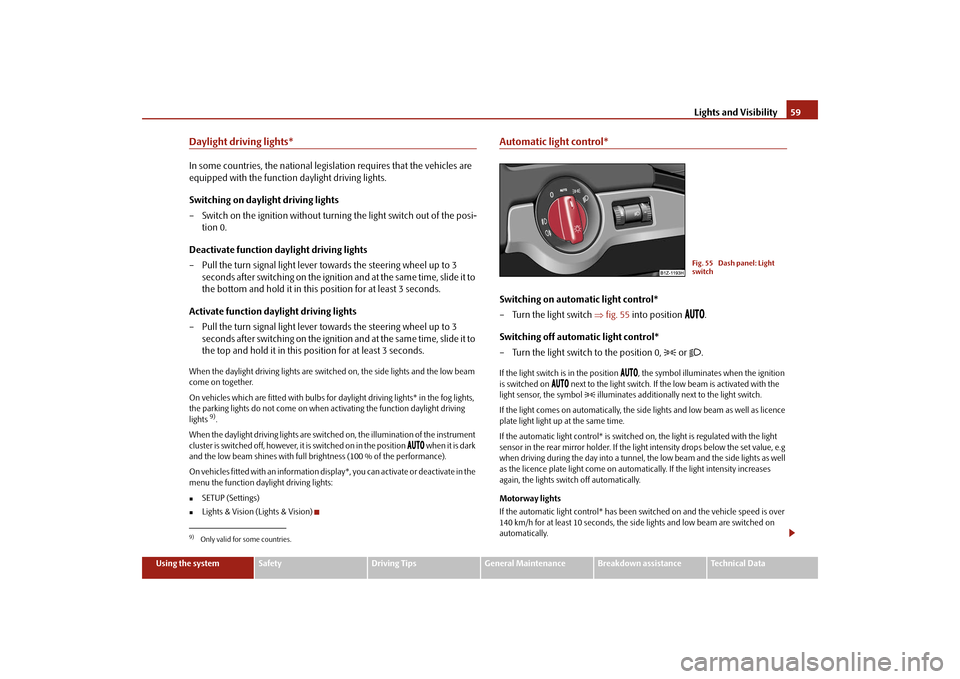
Automatic light control*Switching on automatic light control* – Turn the light switch
⇒
fig. 55
into position
.
Switching off automatic light control* – Turn the light switch to the position 0,
or
.
If the light switch is in the position
, the symbol illuminates when the ignition
is switched on
next to the light switch. If th
e low beam is activated with the
light sensor, the symbol
illuminates additionally next to the light switch.
If the light comes on automatically, the side lights and low beam as well as licence plate light light up at the same time. If the automatic light control* is switched on, the light is regulated with the light sensor in the rear mirror holder. If the light intensity drops below the set value, e.g when driving during the day into a tunnel, the low beam and the side lights as well as the licence plate light come on automa
tically. If the light intensity increases
again, the lights switch off automatically. Motorway lights If the automatic light control* has been sw
itched on and the vehicle speed is over
140 km/h for at least 10 seconds, the side
lights and low beam are switched on
automatically.
9)Only valid for some countries.
Fig. 55 Dash panel: Light switch
se0.1.book Page 59 Friday, April 10, 2009 3:19 PM