air conditioning SKODA OCTAVIA 2011 2.G / (1Z) Owner's Manual
[x] Cancel search | Manufacturer: SKODA, Model Year: 2011, Model line: OCTAVIA, Model: SKODA OCTAVIA 2011 2.G / (1Z)Pages: 248, PDF Size: 3.79 MB
Page 5 of 248
Table of Contents
Layout of this Owner's Manual
(explanations)
. . . . . . . . . . . . . . . . . . . . . . . . . . . . . . . 6
Using the system . . . . . . . . . . . . . . . . . . . . . . . . . . 9
Cockpit . . . . . . . . . . . . . . . . . . . . . . . . . . . . . . . . . . . . . . . . . . . . . 9
Overview . . . . . . . . . . . . . . . . . . . . . . . . . . . . . . . . . . . . . . . . . . 8
Instruments and warning lights . . . . . . . . . . . . . . . . . . 10
General information . . . . . . . . . . . . . . . . . . . . . . . . . . . . . . . 10
Overview of the instrument cluster . . . . . . . . . . . . . . . . . 10
Engine revolutions counter . . . . . . . . . . . . . . . . . . . . . . . . . 11
Speedometer . . . . . . . . . . . . . . . . . . . . . . . . . . . . . . . . . . . . . . 11
Coolant temperature gauge . . . . . . . . . . . . . . . . . . . . . . . . 11
Fuel gauge . . . . . . . . . . . . . . . . . . . . . . . . . . . . . . . . . . . . . . . . 11
Counter for distance driven . . . . . . . . . . . . . . . . . . . . . . . . 12
Service reminder indicator . . . . . . . . . . . . . . . . . . . . . . . . . 12
Digital clock . . . . . . . . . . . . . . . . . . . . . . . . . . . . . . . . . . . . . . . 13
Shift recommendation for changing gears . . . . . . . . . . . 13
Multi-functional indicator (onboard computer) . . . . . . . 14
MAXI DOT display (information display) . . . . . . . . . . . . . . 17
Auto Check Control . . . . . . . . . . . . . . . . . . . . . . . . . . . . . . . . 19
Warning lights . . . . . . . . . . . . . . . . . . . . . . . . . . . . . . . . . . . . . 21
Unlocking and locking . . . . . . . . . . . . . . . . . . . . . . . . . . . . . 30
Vehicle key . . . . . . . . . . . . . . . . . . . . . . . . . . . . . . . . . . . . . . . . 30
Child safety lock . . . . . . . . . . . . . . . . . . . . . . . . . . . . . . . . . . . 31
Central locking system . . . . . . . . . . . . . . . . . . . . . . . . . . . . . 32
Remote control . . . . . . . . . . . . . . . . . . . . . . . . . . . . . . . . . . . . 36
Anti-theft alarm system . . . . . . . . . . . . . . . . . . . . . . . . . . . . 37
Power windows . . . . . . . . . . . . . . . . . . . . . . . . . . . . . . . . . . . 38
Electric sliding/tilting roof . . . . . . . . . . . . . . . . . . . . . . . . . . 41
Lights and Visibility . . . . . . . . . . . . . . . . . . . . . . . . . . . . . . . . 44
Lights . . . . . . . . . . . . . . . . . . . . . . . . . . . . . . . . . . . . . . . . . . . . . 44
Interior lighting . . . . . . . . . . . . . . . . . . . . . . . . . . . . . . . . . . . . 50
Visibility . . . . . . . . . . . . . . . . . . . . . . . . . . . . . . . . . . . . . . . . . . 52
Windshield wiper and wash system . . . . . . . . . . . . . . . . . 53
Rear-view mirror . . . . . . . . . . . . . . . . . . . . . . . . . . . . . . . . . . 57 Seats and Stowage
. . . . . . . . . . . . . . . . . . . . . . . . . . . . . . . . 60
Front seats . . . . . . . . . . . . . . . . . . . . . . . . . . . . . . . . . . . . . . . . 60
Adjusting front seats electrically . . . . . . . . . . . . . . . . . . . . 61
Head restraints . . . . . . . . . . . . . . . . . . . . . . . . . . . . . . . . . . . . 63
Middle rear head restraint . . . . . . . . . . . . . . . . . . . . . . . . . . 64
Rear seats . . . . . . . . . . . . . . . . . . . . . . . . . . . . . . . . . . . . . . . . 64
Seat heaters . . . . . . . . . . . . . . . . . . . . . . . . . . . . . . . . . . . . . . 66
luggage compartment . . . . . . . . . . . . . . . . . . . . . . . . . . . . . 66
Net partition (Estate car) . . . . . . . . . . . . . . . . . . . . . . . . . . . 71
The roof rack . . . . . . . . . . . . . . . . . . . . . . . . . . . . . . . . . . . . . . 73
Cup holder . . . . . . . . . . . . . . . . . . . . . . . . . . . . . . . . . . . . . . . . 74
Note holder . . . . . . . . . . . . . . . . . . . . . . . . . . . . . . . . . . . . . . . 75
Ashtray . . . . . . . . . . . . . . . . . . . . . . . . . . . . . . . . . . . . . . . . . . . 75
Cigarette lighter, power sockets . . . . . . . . . . . . . . . . . . . . 76
Storage compartments . . . . . . . . . . . . . . . . . . . . . . . . . . . . 77
Heating and air conditioning system . . . . . . . . . . . . . 85
Introduction . . . . . . . . . . . . . . . . . . . . . . . . . . . . . . . . . . . . . . . 85
Description and information . . . . . . . . . . . . . . . . . . . . . . . . 85
Using the air conditioning system economically . . . . . 85
Operational problems . . . . . . . . . . . . . . . . . . . . . . . . . . . . . . 85
Air outlet vents . . . . . . . . . . . . . . . . . . . . . . . . . . . . . . . . . . . . 86
Heating . . . . . . . . . . . . . . . . . . . . . . . . . . . . . . . . . . . . . . . . . . . 87
Air conditioning system (manual air conditioning
system) . . . . . . . . . . . . . . . . . . . . . . . . . . . . . . . . . . . . . . . . . . . 88
Climatronic (automatic air conditioning) . . . . . . . . . . . . . 91
Auxiliary heating (auxiliary heating and ventilation) . . 94
Starting-off and Driving . . . . . . . . . . . . . . . . . . . . . . . . . . . 98
Setting steering wheel position . . . . . . . . . . . . . . . . . . . . 98
Ignition lock . . . . . . . . . . . . . . . . . . . . . . . . . . . . . . . . . . . . . . . 98
Starting the engine . . . . . . . . . . . . . . . . . . . . . . . . . . . . . . . . 99
Switching off the engine . . . . . . . . . . . . . . . . . . . . . . . . . . . 100
Shifting (manual gearbox) . . . . . . . . . . . . . . . . . . . . . . . . . . 101
Pedals . . . . . . . . . . . . . . . . . . . . . . . . . . . . . . . . . . . . . . . . . . . . 101
Handbrake . . . . . . . . . . . . . . . . . . . . . . . . . . . . . . . . . . . . . . . . 101
Rear parking aid . . . . . . . . . . . . . . . . . . . . . . . . . . . . . . . . . . . 102
Front and rear parking aid . . . . . . . . . . . . . . . . . . . . . . . . . . 103
Cruise control system (CCS) . . . . . . . . . . . . . . . . . . . . . . . . 104
“(START-STOP)” . . . . . . . . . . . . . . . . . . . . . . . . . . . . . . . . . . . 105 Automatic gearbox
. . . . . . . . . . . . . . . . . . . . . . . . . . . . . . . . 108
Information for driving with the 6-speed automatic
gearbox
. . . . . . . . . . . . . . . . . . . . . . . . . . . . . . . . . . . . . . . . . . . 108
Information for driving with the automatic gearbox
DSG
. . . . . . . . . . . . . . . . . . . . . . . . . . . . . . . . . . . . . . . . . . . . . . . 108
Selector lever positions . . . . . . . . . . . . . . . . . . . . . . . . . . . . 110
Selector lever lock . . . . . . . . . . . . . . . . . . . . . . . . . . . . . . . . . 111
Kickdown function . . . . . . . . . . . . . . . . . . . . . . . . . . . . . . . . . 111
Dynamic shift programme . . . . . . . . . . . . . . . . . . . . . . . . . . 111
Tiptronic . . . . . . . . . . . . . . . . . . . . . . . . . . . . . . . . . . . . . . . . . . 112
Manual shifting on the multifunction steering wheel . 112
Emergency programme . . . . . . . . . . . . . . . . . . . . . . . . . . . . 113
Selector lever-emergency unlocking . . . . . . . . . . . . . . . . 113
Communication . . . . . . . . . . . . . . . . . . . . . . . . . . . . . . . . . . . . 114
Multifunction steering wheel . . . . . . . . . . . . . . . . . . . . . . . 114
Mobile phones and two-way radio systems . . . . . . . . . . 115
Universal telephone preinstallation GSM II . . . . . . . . . . 116
Voice control . . . . . . . . . . . . . . . . . . . . . . . . . . . . . . . . . . . . . . 121
Universal telephone preinstallation GSM IIl . . . . . . . . . . 122
Voice control . . . . . . . . . . . . . . . . . . . . . . . . . . . . . . . . . . . . . . 128
Internet connection . . . . . . . . . . . . . . . . . . . . . . . . . . . . . . . 129
Music playback via Bluetooth ®
. . . . . . . . . . . . . . . . . . . . . . 129
Multimedia . . . . . . . . . . . . . . . . . . . . . . . . . . . . . . . . . . . . . . . . 129
Safety . . . . . . . . . . . . . . . . . . . . . . . . . . . . . . . . . . . . . . . . . . . 131
Passive Safety . . . . . . . . . . . . . . . . . . . . . . . . . . . . . . . . . . . . . 131
Basic information . . . . . . . . . . . . . . . . . . . . . . . . . . . . . . . . . . 131
Correct seated position . . . . . . . . . . . . . . . . . . . . . . . . . . . . 132
Seat belts . . . . . . . . . . . . . . . . . . . . . . . . . . . . . . . . . . . . . . . . . . 135
Why seat belts? . . . . . . . . . . . . . . . . . . . . . . . . . . . . . . . . . . . 135
The physical principle of a frontal collision . . . . . . . . . . 135
Important safety information regarding the use of
seat belts
. . . . . . . . . . . . . . . . . . . . . . . . . . . . . . . . . . . . . . . . . 136
How are seat belts correctly fastened? . . . . . . . . . . . . . . 137
Airbag system . . . . . . . . . . . . . . . . . . . . . . . . . . . . . . . . . . . . . . 139
Description of the airbag system . . . . . . . . . . . . . . . . . . . 139
Front airbags . . . . . . . . . . . . . . . . . . . . . . . . . . . . . . . . . . . . . . 140
Side airbags . . . . . . . . . . . . . . . . . . . . . . . . . . . . . . . . . . . . . . . 142 3
Table of Contents Using the system Safety Driving Tips General Maintenance Breakdown assistance Technical data
Page 11 of 248
Using the system
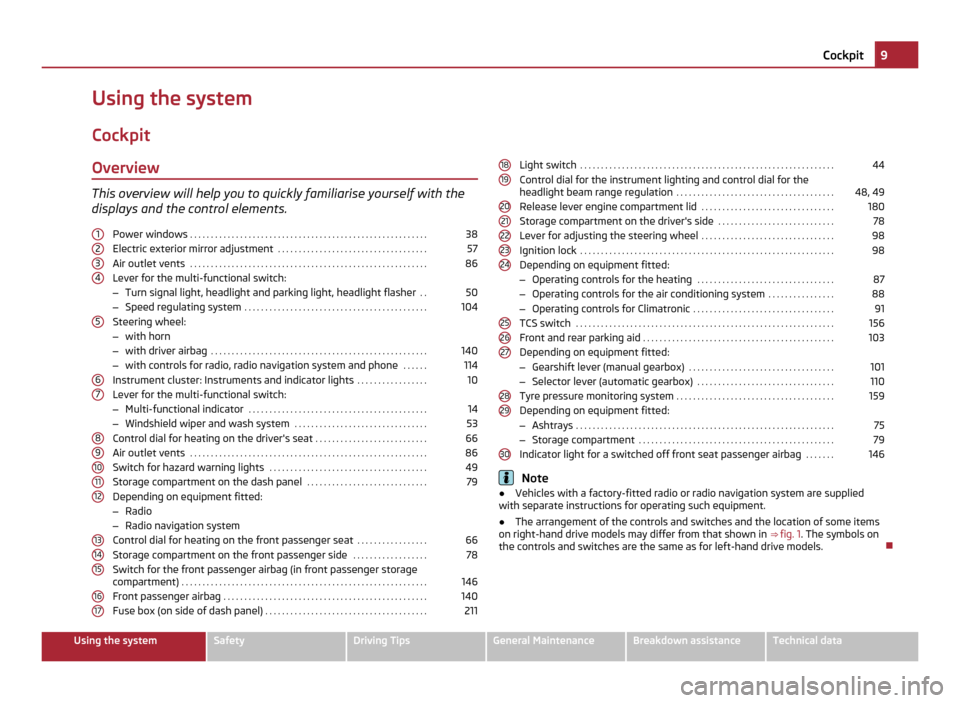
Cockpit Overview This overview will help you to quickly familiarise yourself with the
displays and the control elements.
Power windows . . . . . . . . . . . . . . . . . . . . . . . . . . . . . . . . . . . . . . . . . . . . . . . . . . . . . . . . . 38
Electric exterior mirror adjustment . . . . . . . . . . . . . . . . . . . . . . . . . . . . . . . . . . . . 57
Air outlet vents . . . . . . . . . . . . . . . . . . . . . . . . . . . . . . . . . . . . . . . . . . . . . . . . . . . . . . . . . 86
Lever for the multi-functional switch:
– Turn signal light, headlight and parking light, headlight flasher . .50
– Speed regulating system . . . . . . . . . . . . . . . . . . . . . . . . . . . . . . . . . . . . . . . . . . . . 104
Steering wheel:
– with horn
– with driver airbag . . . . . . . . . . . . . . . . . . . . . . . . . . . . . . . . . . . . . . . . . . . . . . . . . . . . 140
– with controls for radio, radio navigation system and phone . . . . . .114
Instrument cluster: Instruments and indicator lights . . . . . . . . . . . . . . . . .10
Lever for the multi-functional switch:
– Multi-functional indicator . . . . . . . . . . . . . . . . . . . . . . . . . . . . . . . . . . . . . . . . . . . 14
– Windshield wiper and wash system . . . . . . . . . . . . . . . . . . . . . . . . . . . . . . . . 53
Control dial for heating on the driver's seat . . . . . . . . . . . . . . . . . . . . . . . . . . .66
Air outlet vents . . . . . . . . . . . . . . . . . . . . . . . . . . . . . . . . . . . . . . . . . . . . . . . . . . . . . . . . . 86
Switch for hazard warning lights . . . . . . . . . . . . . . . . . . . . . . . . . . . . . . . . . . . . . . 49
Storage compartment on the dash panel . . . . . . . . . . . . . . . . . . . . . . . . . . . . .79
Depending on equipment fitted:
– Radio
– Radio navigation system
Control dial for heating on the front passenger seat . . . . . . . . . . . . . . . . .
66
Storage compartment on the front passenger side . . . . . . . . . . . . . . . . . .78
Switch for the front passenger airbag (in front passenger storage
compartment) . . . . . . . . . . . . . . . . . . . . . . . . . . . . . . . . . . . . . . . . . . . . . . . . . . . . . . . . . . . 146
Front passenger airbag . . . . . . . . . . . . . . . . . . . . . . . . . . . . . . . . . . . . . . . . . . . . . . . . . 140
Fuse box (on side of dash panel) . . . . . . . . . . . . . . . . . . . . . . . . . . . . . . . . . . . . . . . 211
1 2
3
4
5
6
7
8
9
10
11
12
13
14
15
16
17 Light switch
. . . . . . . . . . . . . . . . . . . . . . . . . . . . . . . . . . . . . . . . . . . . . . . . . . . . . . . . . . . . . 44
Control dial for the instrument lighting and control dial for the
headlight beam range regulation . . . . . . . . . . . . . . . . . . . . . . . . . . . . . . . . . . . . . . 48, 49
Release lever engine compartment lid . . . . . . . . . . . . . . . . . . . . . . . . . . . . . . . .180
Storage compartment on the driver's side . . . . . . . . . . . . . . . . . . . . . . . . . . . .78
Lever for adjusting the steering wheel . . . . . . . . . . . . . . . . . . . . . . . . . . . . . . . .98
Ignition lock . . . . . . . . . . . . . . . . . . . . . . . . . . . . . . . . . . . . . . . . . . . . . . . . . . . . . . . . . . . . . 98
Depending on equipment fitted:
– Operating controls for the heating . . . . . . . . . . . . . . . . . . . . . . . . . . . . . . . . . 87
– Operating controls for the air conditioning system . . . . . . . . . . . . . . . .88
– Operating controls for Climatronic . . . . . . . . . . . . . . . . . . . . . . . . . . . . . . . . . . 91
TCS switch . . . . . . . . . . . . . . . . . . . . . . . . . . . . . . . . . . . . . . . . . . . . . . . . . . . . . . . . . . . . . . 156
Front and rear parking aid . . . . . . . . . . . . . . . . . . . . . . . . . . . . . . . . . . . . . . . . . . . . . . 103
Depending on equipment fitted:
– Gearshift lever (manual gearbox) . . . . . . . . . . . . . . . . . . . . . . . . . . . . . . . . . . . 101
– Selector lever (automatic gearbox) . . . . . . . . . . . . . . . . . . . . . . . . . . . . . . . . . 110
Tyre pressure monitoring system . . . . . . . . . . . . . . . . . . . . . . . . . . . . . . . . . . . . . . 159
Depending on equipment fitted:
– Ashtrays . . . . . . . . . . . . . . . . . . . . . . . . . . . . . . . . . . . . . . . . . . . . . . . . . . . . . . . . . . . . . . 75
– Storage compartment . . . . . . . . . . . . . . . . . . . . . . . . . . . . . . . . . . . . . . . . . . . . . . . 79
Indicator light for a switched off front seat passenger airbag . . . . . . .146 Note
● Vehicles with a factory-fitted radio or radio navigation system are supplied
with separate instructions for operating such equipment.
● The arrangement of the controls and switches and the location of some items
on right-hand drive models may differ from that shown in ⇒
fig. 1. The symbols on
the controls and switches are the same as for left-hand drive models. 18
19
20
21
22
23
24
25
26
27
28
29
30 9
Cockpit Using the system Safety Driving Tips General Maintenance Breakdown assistance Technical data
Page 41 of 248
–
Additionally you can open the window automatically (fully opened) by pressing
the button up to the stop. Renewed pressing of the button causes the window
to stop immediately.
Closing a window
– A window is closed through pulling lightly on the respective button in the
door. The closing process stops when one releases the button.
– Additionally you can close the window automatically (fully closed) by pulling
the button up to the stop. Renewed pulling of the button causes the window
to stop immediately.
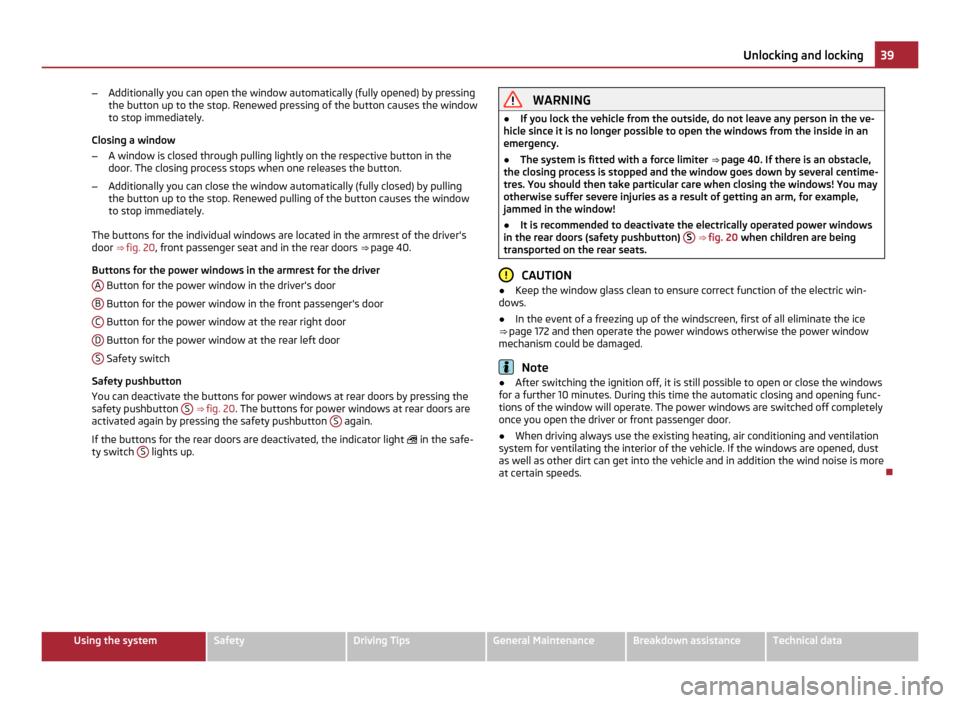
The buttons for the individual windows are located in the armrest of the driver's
door ⇒
fig. 20, front passenger seat and in the rear doors ⇒ page 40.
Buttons for the power windows in the armrest for the driver A Button for the power window in the driver's door
B Button for the power window in the front passenger's door
C Button for the power window at the rear right door
D Button for the power window at the rear left door
S Safety switch
Safety pushbutton
You can deactivate the buttons for power windows at rear doors by pressing the
safety pushbutton S
⇒ fig. 20 . The buttons for power windows at rear doors are
activated again by pressing the safety pushbutton S again.
If the buttons for the rear doors are deactivated, the indicator light in the safe-
ty switch S lights up. WARNING
● If you lock the vehicle from the outside, do not leave any person in the ve-
hicle since it is no longer possible to open the windows from the inside in an
emergency.
● The system is fitted with a force limiter ⇒ page 40
. If there is an obstacle,
the closing process is stopped and the window goes down by several centime-
tres. You should then take particular care when closing the windows! You may
otherwise suffer severe injuries as a result of getting an arm, for example,
jammed in the window!
● It is recommended to deactivate the electrically operated power windows
in the rear doors (safety pushbutton) S ⇒
fig. 20 when children are being
transported on the rear seats. CAUTION
● Keep the window glass clean to ensure correct function of the electric win-
dows.
● In the event of a freezing up of the windscreen, first of all eliminate the ice
⇒
page 172 and then operate the power windows otherwise the power window
mechanism could be damaged. Note
● After switching the ignition off, it is still possible to open or close the windows
for a further 10 minutes. During this time the automatic closing and opening func-
tions of the window will operate. The power windows are switched off completely
once you open the driver or front passenger door.
● When driving always use the existing heating, air conditioning and ventilation
system for ventilating the interior of the vehicle. If the windows are opened, dust
as well as other dirt can get into the vehicle and in addition the wind noise is more
at certain speeds. 39
Unlocking and locking Using the system Safety Driving Tips General Maintenance Breakdown assistance Technical data
Page 80 of 248
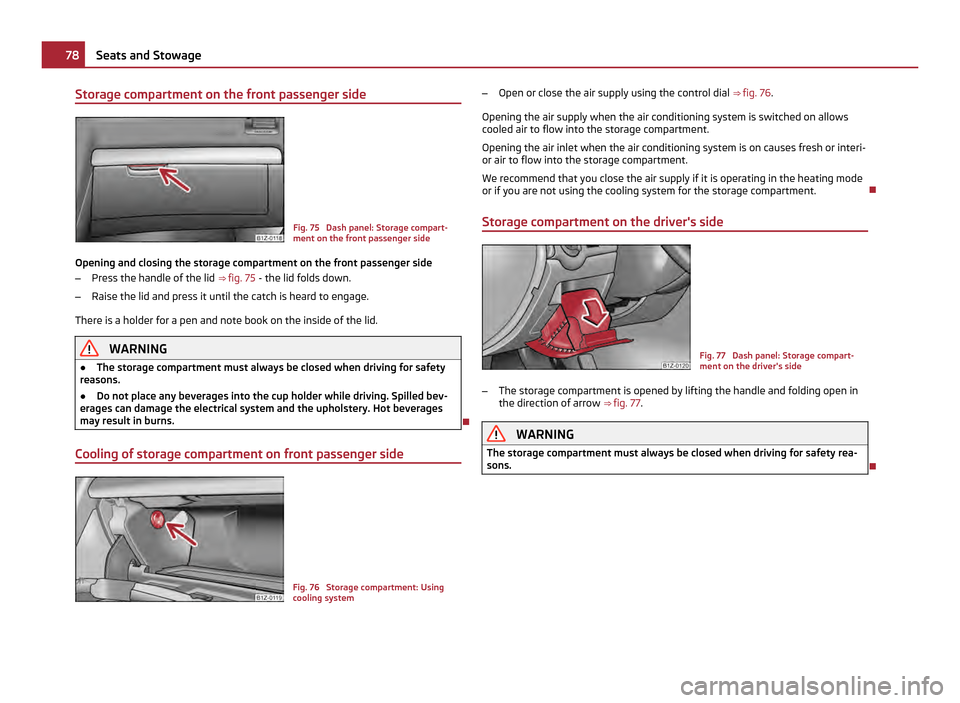
Storage compartment on the front passenger side
Fig. 75 Dash panel: Storage compart-
ment on the front passenger side
Opening and closing the storage compartment on the front passenger side
– Press the handle of the lid ⇒ fig. 75 - the lid folds down.
– Raise the lid and press it until the catch is heard to engage.
There is a holder for a pen and note book on the inside of the lid. WARNING
● The storage compartment must always be closed when driving for safety
reasons.
● Do not place any beverages into the cup holder while driving. Spilled bev-
erages can damage the electrical system and the upholstery. Hot beverages
may result in burns.
Cooling of storage compartment on front passenger side Fig. 76 Storage compartment: Using
cooling system–
Open or close the air supply using the control dial ⇒ fig. 76.
Opening the air supply when the air conditioning system is switched on allows
cooled air to flow into the storage compartment.
Opening the air inlet when the air conditioning system is on causes fresh or interi-
or air to flow into the storage compartment.
We recommend that you close the air supply if it is operating in the heating mode
or if you are not using the cooling system for the storage compartment.
Storage compartment on the driver's side Fig. 77 Dash panel: Storage compart-
ment on the driver's side
– The storage compartment is opened by lifting the handle and folding open in
the direction of arrow ⇒
fig. 77. WARNING
The storage compartment must always be closed when driving for safety rea-
sons. 78
Seats and Stowage
Page 83 of 248
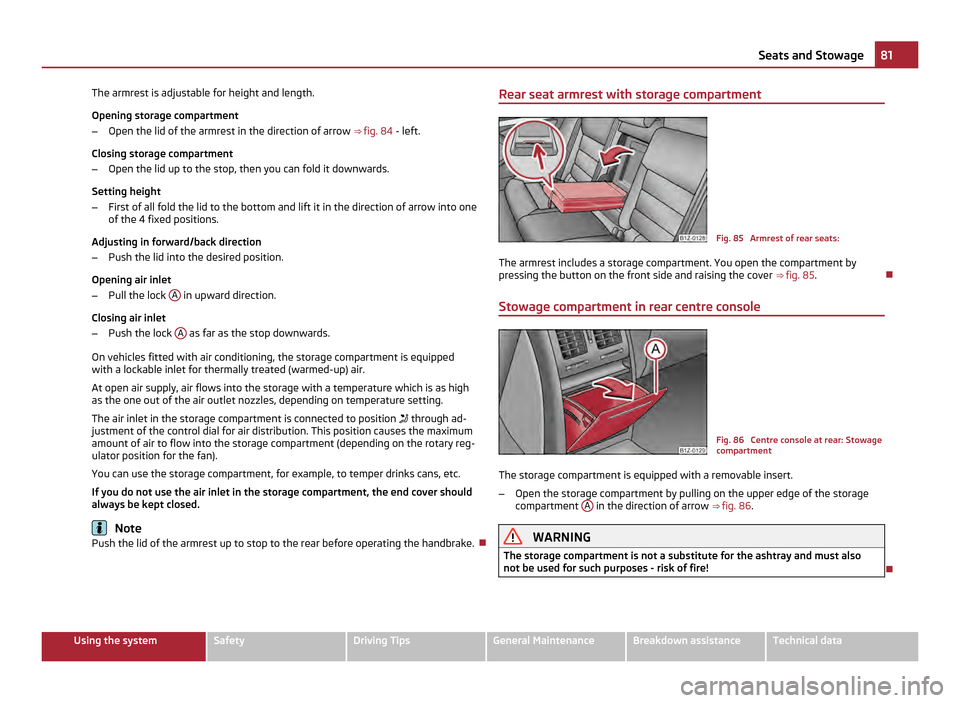
The armrest is adjustable for height and length.
Opening storage compartment
–
Open the lid of the armrest in the direction of arrow ⇒ fig. 84 - left.
Closing storage compartment
– Open the lid up to the stop, then you can fold it downwards.
Setting height
– First of all fold the lid to the bottom and lift it in the direction of arrow into one
of the 4 fixed positions.
Adjusting in forward/back direction
– Push the lid into the desired position.
Opening air inlet
– Pull the lock A in upward direction.
Closing air inlet
– Push the lock A as far as the stop downwards.
On vehicles fitted with air conditioning, the storage compartment is equipped
with a lockable inlet for thermally treated (warmed-up) air.
At open air supply, air flows into the storage with a temperature which is as high
as the one out of the air outlet nozzles, depending on temperature setting.
The air inlet in the storage compartment is connected to position through ad-
justment of the control dial for air distribution. This position causes the maximum
amount of air to flow into the storage compartment (depending on the rotary reg-
ulator position for the fan).
You can use the storage compartment, for example, to temper drinks cans, etc.
If you do not use the air inlet in the storage compartment, the end cover should
always be kept closed. Note
Push the lid of the armrest up to stop to the rear before operating the handbrake. Rear seat armrest with storage compartment
Fig. 85 Armrest of rear seats:
The armrest includes a storage compartment. You open the compartment by
pressing the button on the front side and raising the cover ⇒
fig. 85 .
Stowage compartment in rear centre console Fig. 86 Centre console at rear: Stowage
compartment
The storage compartment is equipped with a removable insert.
– Open the storage compartment by pulling on the upper edge of the storage
compartment A in the direction of arrow
⇒ fig. 86 . WARNING
The storage compartment is not a substitute for the ashtray and must also
not be used for such purposes - risk of fire! 81
Seats and Stowage Using the system Safety Driving Tips General Maintenance Breakdown assistance Technical data
Page 87 of 248
Heating and air conditioning system
Introduction
Description and information The heating effect is dependent upon the coolant temperature, thus full heat out-
put only occurs when the engine has reached its operating temperature.
If the cooling system is switched on, the temperature and air humidity drops in
the vehicle. The well-being of the occupants of the car is enhanced as a result of
this particularly at high outside temperatures and a high air humidity. The system
prevents the windows misting up during the cold season of the year.
It is possible to briefly activate recirculated air mode in order to enhance the cool-
ing effect - air-conditioning system ⇒ page 90
, Climatronic ⇒ page 93.
The air inlet in front of the windscreen must be free of ice, snow or leaves in order
to ensure that the heating and cooling systems operate properly.
After switching on the cooling Condensation from the evaporator of the air condi-
tioning may drip down and form a puddle below the vehicle. This is quite normal
and not an indication of a leak! WARNING
● For your own safety and that of other road users, ensure that all the win-
dows are free of ice, snow and misting. Please familiarize yourself about how
to correctly operate the heating and ventilation systems, how to demist and
defrost the windows, as well as with the cooling mode.
● You should not leave recirculated air mode on over a longer period of time,
as
“stale” air may result in fatigue in the driver and occupants, divert your at-
tention and also cause the windows to mist up. The risk of having an accident
increases. Switch recirculated air mode off as soon as the windows begin
misting up. Note
● The used air streams out through the air removal openings in the luggage
compartment.
● We recommend that you do not smoke in the vehicle when the recirculating air
mode is operating since the smoke which is drawn at the evaporator from the in-
terior of the vehicle forms deposits in the evaporator of the air conditioning sys- tem. This produces a permanent odour when the air conditioning system is oper-
ating which can only be eliminated through considerable effort and expense (re-
placement of compressor).
● Please refer to the information regarding the recirculated air mode for heating
⇒
page 88 and/or for air-conditioning system ⇒ page 90 or Climatronic
⇒ page 93.
● To ensure the heating system, air conditioning system or Climatronic work per-
fectly, the air outlet vents must not be covered by any objects.
Using the air conditioning system economically The compressor on the air conditioning system uses power from the engine when
in cooling mode which will effect the fuel consumption.
It recommended to open the windows or the doors of a vehicle for which the inte-
rior has been strongly heated through the effect of direct sunlight in order to al-
low the heated air to escape.
The cooling system should not be switched on while travelling when the window
is open.
The desired interior temperature can also be achieved without switching in the
cooling system just by switching to fresh air mode. For the sake of the environment
When you economize on fuel, you also reduce pollutant emissions.
Operational problems If the cooling system does not operate at outside temperatures higher than +5 °C,
there is a problem in the system. The reasons for this may be:
●
The fuse on the air conditioning system has blown. Check the fuse, replace it if
necessary ⇒ page 211.
● The cooling system has switched off automatically for a short time because
the coolant temperature of the engine is too hot ⇒ page 11.
If you are not able to rectify the operational problem yourself, or if the cooling ca-
pacity decreases, switch the cooling system off. Contact a specialist garage. 85
Heating and air conditioning system Using the system Safety Driving Tips General Maintenance Breakdown assistance Technical data
Page 88 of 248
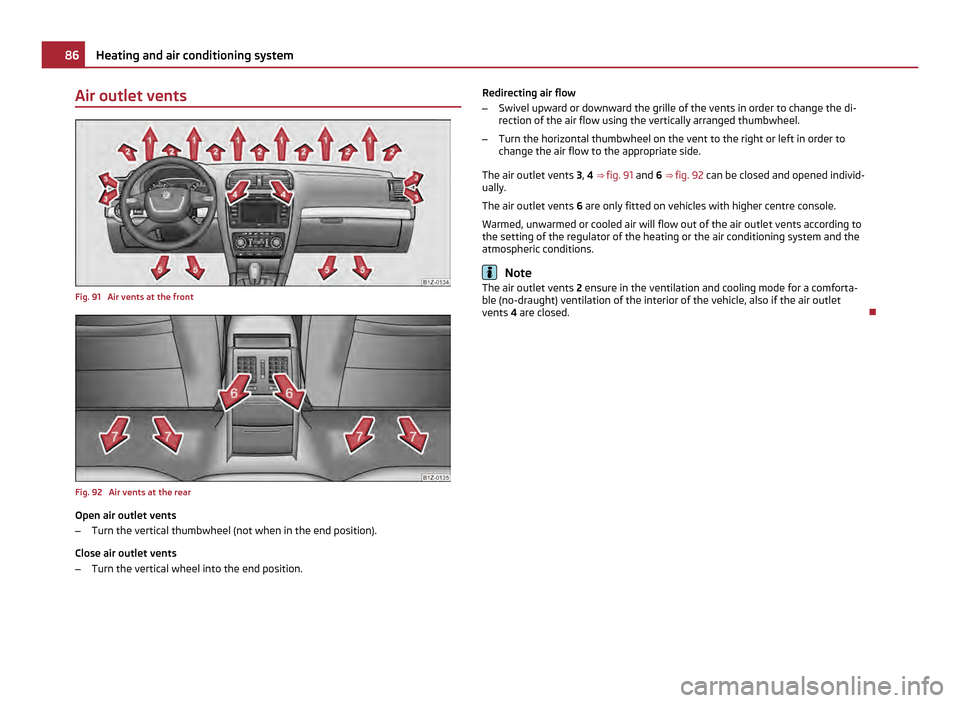
Air outlet vents
Fig. 91 Air vents at the front
Fig. 92 Air vents at the rear
Open air outlet vents
–
Turn the vertical thumbwheel (not when in the end position).
Close air outlet vents
– Turn the vertical wheel into the end position. Redirecting air flow
–
Swivel upward or downward the grille of the vents in order to change the di-
rection of the air flow using the vertically arranged thumbwheel.
– Turn the horizontal thumbwheel on the vent to the right or left in order to
change the air flow to the appropriate side.
The air outlet vents 3, 4 ⇒
fig. 91 and 6 ⇒ fig. 92 can be closed and opened individ-
ually.
The air outlet vents 6 are only fitted on vehicles with higher centre console.
Warmed, unwarmed or cooled air will flow out of the air outlet vents according to
the setting of the regulator of the heating or the air conditioning system and the
atmospheric conditions. Note
The air outlet vents 2 ensure in the ventilation and cooling mode for a comforta-
ble (no-draught) ventilation of the interior of the vehicle, also if the air outlet
vents 4 are closed. 86
Heating and air conditioning system
Page 89 of 248
Heating
Using the system The heating system delivers air into the interior of the vehicle and
warms it as required.
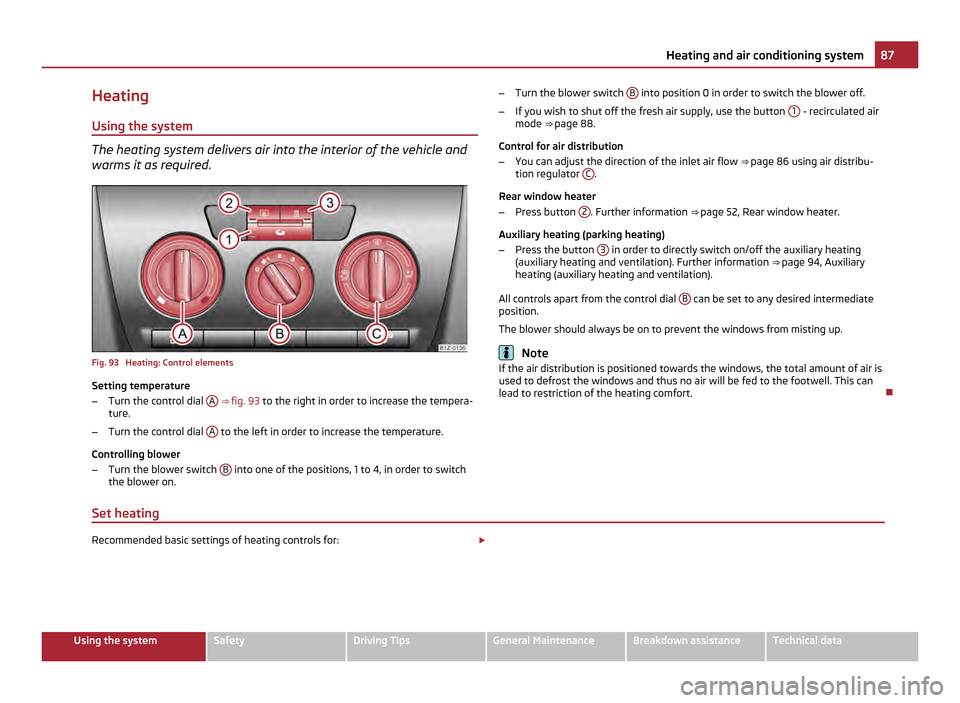
Fig. 93 Heating: Control elements
Setting temperature
–
Turn the control dial A
⇒ fig. 93 to the right in order to increase the tempera-
ture.
– Turn the control dial A to the left in order to increase the temperature.
Controlling blower
– Turn the blower switch B into one of the positions, 1 to 4, in order to switch
the blower on. –
Turn the blower switch B into position 0 in order to switch the blower off.
– If you wish to shut off the fresh air supply, use the button 1 - recirculated air
mode ⇒ page 88
.
Control for air distribution
– You can adjust the direction of the inlet air flow ⇒
page 86 using air distribu-
tion regulator C .
Rear window heater
– Press button 2 . Further information
⇒ page 52, Rear window heater
.
Auxiliary heating (parking heating)
– Press the button 3 in order to directly switch on/off the auxiliary heating
(auxiliary heating and ventilation). Further information ⇒
page 94, Auxiliary
heating (auxiliary heating and ventilation).
All controls apart from the control dial B can be set to any desired intermediate
position.
The blower should always be on to prevent the windows from misting up. Note
If the air distribution is positioned towards the windows, the total amount of air is
used to defrost the windows and thus no air will be fed to the footwell. This can
lead to restriction of the heating comfort.
Set heating Recommended basic settings of heating controls for:
£ 87
Heating and air conditioning system Using the system Safety Driving Tips General Maintenance Breakdown assistance Technical data
Page 90 of 248
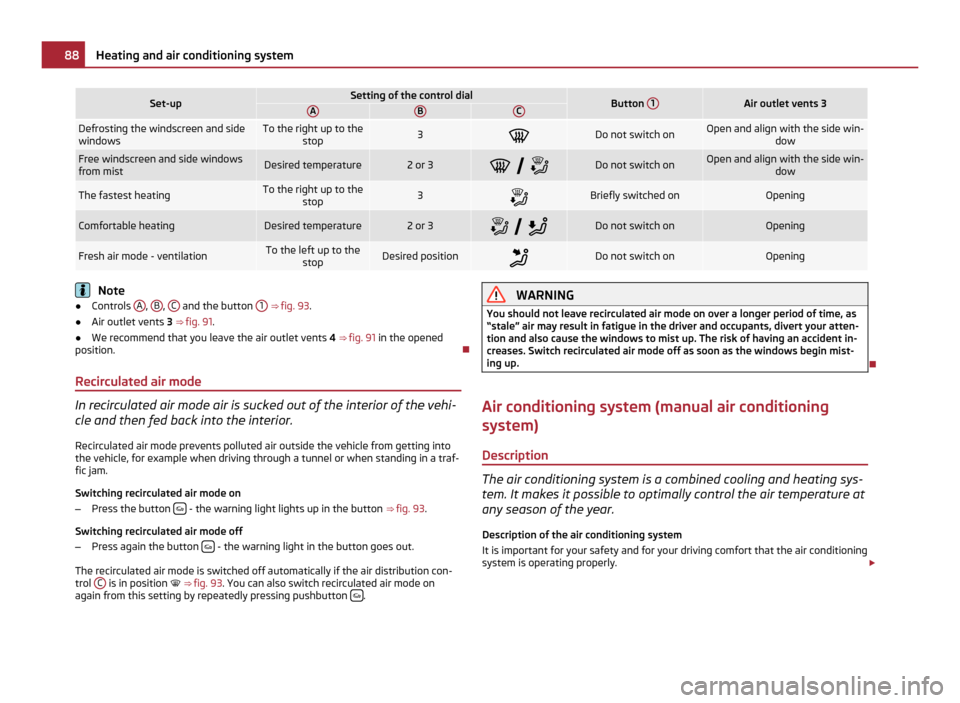
Set-up Setting of the control dial
Button
1 Air outlet vents 3
A B C
Defrosting the windscreen and side
windows To the right up to the
stop 3
Do not switch on Open and align with the side win-
dowFree windscreen and side windows
from mist
Desired temperature 2 or 3
Do not switch on Open and align with the side win-
dowThe fastest heating To the right up to the
stop 3
Briefly switched on Opening
Comfortable heating Desired temperature 2 or 3
Do not switch on Opening
Fresh air mode - ventilation To the left up to the
stop Desired position
Do not switch on Opening
Note
● Controls A ,
B ,
C and the button
1 ⇒ fig. 93
.
● Air outlet vents 3 ⇒ fig. 91.
● We recommend that you leave the air outlet vents 4 ⇒ fig. 91 in the opened
position.
Recirculated air mode In recirculated air mode air is sucked out of the interior of the vehi-
cle and then fed back into the interior.
Recirculated air mode prevents polluted air outside the vehicle from getting into
the vehicle, for example when driving through a tunnel or when standing in a traf-
fic jam.
Switching recirculated air mode on
– Press the button - the warning light lights up in the button
⇒ fig. 93 .
Switching recirculated air mode off
– Press again the button - the warning light in the button goes out.
The recirculated air mode is switched off automatically if the air distribution con-
trol C is in position
⇒ fig. 93. You can also switch recirculated air mode on
again from this setting by repeatedly pressing pushbutton . WARNING
You should not leave recirculated air mode on over a longer period of time, as
“stale
” air may result in fatigue in the driver and occupants, divert your atten-
tion and also cause the windows to mist up. The risk of having an accident in-
creases. Switch recirculated air mode off as soon as the windows begin mist-
ing up.
Air conditioning system (manual air conditioning
system) Description The air conditioning system is a combined cooling and heating sys-
tem. It makes it possible to optimally control the air temperature at
any season of the year.
Description of the air conditioning system
It is important for your safety and for your driving comfort that the air conditioning
system is operating properly. £88
Heating and air conditioning system
Page 91 of 248
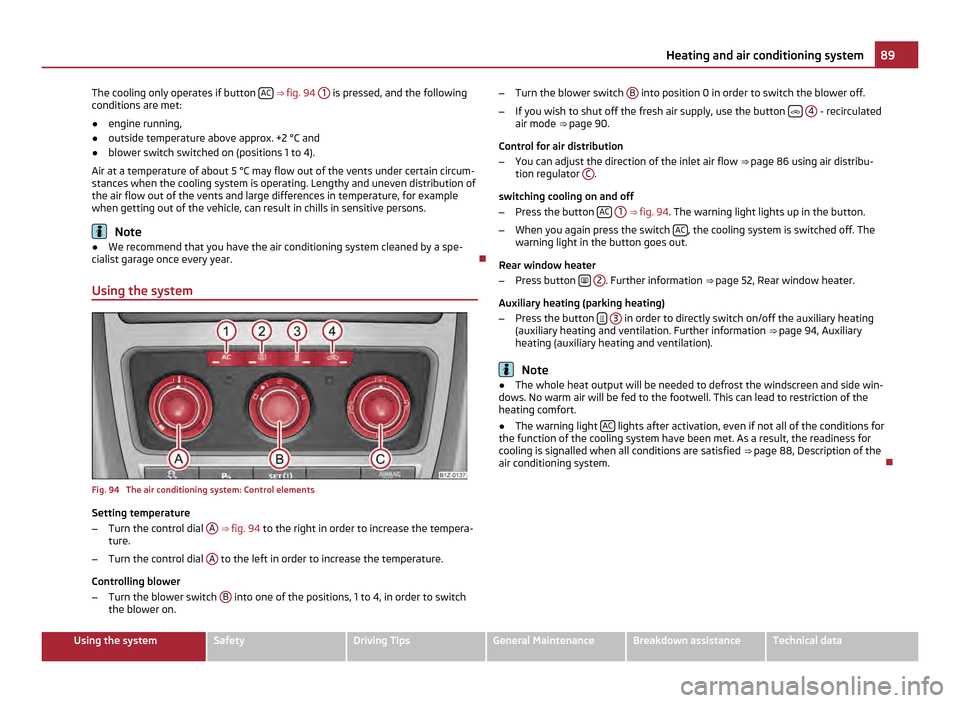
The cooling only operates if button
AC ⇒
fig. 94 1 is pressed, and the following
conditions are met:
● engine running,
● outside temperature above approx. +2 °C and
● blower switch switched on (positions 1 to 4).
Air at a temperature of about 5 °C may flow out of the vents under certain circum-
stances when the cooling system is operating. Lengthy and uneven distribution of
the air flow out of the vents and large differences in temperature, for example
when getting out of the vehicle, can result in chills in sensitive persons. Note
● We recommend that you have the air conditioning system cleaned by a spe-
cialist garage once every year.
Using the system Fig. 94 The air conditioning system: Control elements
Setting temperature
–
Turn the control dial A
⇒
fig. 94 to the right in order to increase the tempera-
ture.
– Turn the control dial A to the left in order to increase the temperature.
Controlling blower
– Turn the blower switch B into one of the positions, 1 to 4, in order to switch
the blower on. –
Turn the blower switch B into position 0 in order to switch the blower off.
– If you wish to shut off the fresh air supply, use the button
4 - recirculated
air mode ⇒
page 90.
Control for air distribution
– You can adjust the direction of the inlet air flow ⇒
page 86 using air distribu-
tion regulator C .
switching cooling on and off
– Press the button AC
1 ⇒
fig. 94 . The warning light lights up in the button.
– When you again press the switch AC , the cooling system is switched off. The
warning light in the button goes out.
Rear window heater
– Press button
2 . Further information
⇒
page 52, Rear window heater.
Auxiliary heating (parking heating)
– Press the button
3 in order to directly switch on/off the auxiliary heating
(auxiliary heating and ventilation. Further information ⇒ page 94
, Auxiliary
heating (auxiliary heating and ventilation). Note
● The whole heat output will be needed to defrost the windscreen and side win-
dows. No warm air will be fed to the footwell. This can lead to restriction of the
heating comfort.
● The warning light AC lights after activation, even if not all of the conditions for
the function of the cooling system have been met. As a result, the readiness for
cooling is signalled when all conditions are satisfied ⇒
page 88, Description of the
air conditioning system. 89
Heating and air conditioning system Using the system Safety Driving Tips General Maintenance Breakdown assistance Technical data