battery SKODA OCTAVIA 2012 3.G / (5E) User Guide
[x] Cancel search | Manufacturer: SKODA, Model Year: 2012, Model line: OCTAVIA, Model: SKODA OCTAVIA 2012 3.G / (5E)Pages: 222, PDF Size: 13.52 MB
Page 34 of 222
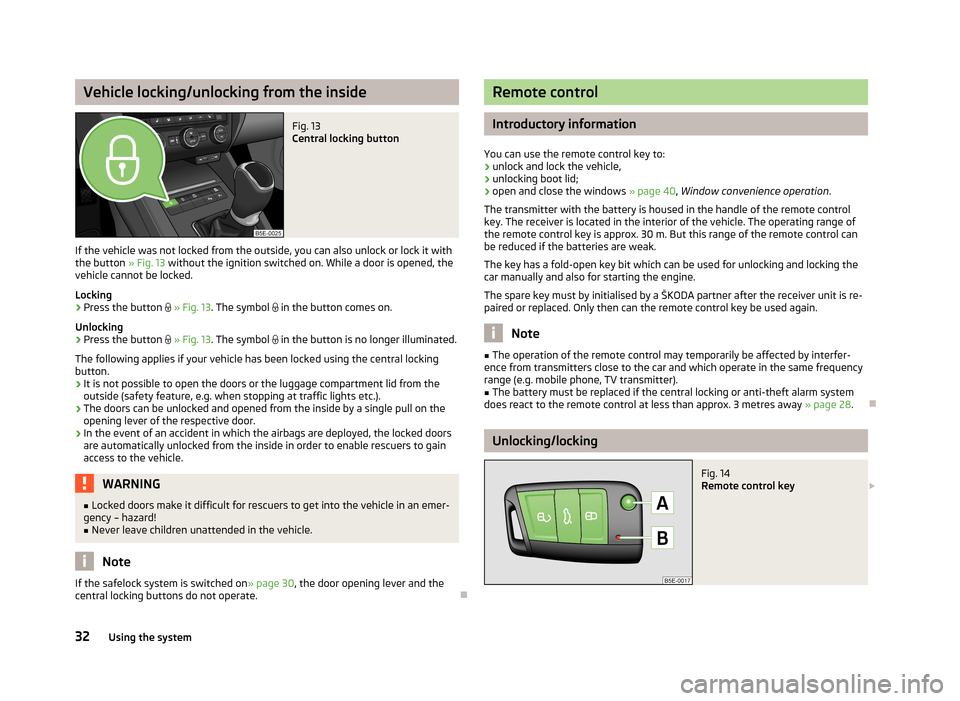
Vehicle locking/unlocking from the insideFig. 13
Central locking button
If the vehicle was not locked from the outside, you can also unlock or lock it with
the button » Fig. 13 without the ignition switched on. While a door is opened, the
vehicle cannot be locked.
Locking
›
Press the button
» Fig. 13 . The symbol
in the button comes on.
Unlocking
›
Press the button
» Fig. 13 . The symbol
in the button is no longer illuminated.
The following applies if your vehicle has been locked using the central locking button.
› It is not possible to open the doors or the luggage compartment lid from the
outside (safety feature, e.g. when stopping at traffic lights etc.).
› The doors can be unlocked and opened from the inside by a single pull on the
opening lever of the respective door.
› In the event of an accident in which the airbags are deployed, the locked doors
are automatically unlocked from the inside in order to enable rescuers to gain access to the vehicle.
WARNING■ Locked doors make it difficult for rescuers to get into the vehicle in an emer-
gency – hazard!■
Never leave children unattended in the vehicle.
Note
If the safelock system is switched on » page 30
, the door opening lever and the
central locking buttons do not operate.
Remote control
Introductory information
You can use the remote control key to:
› unlock and lock the vehicle,
› unlocking boot lid;
› open and close the windows
» page 40, Window convenience operation .
The transmitter with the battery is housed in the handle of the remote control
key. The receiver is located in the interior of the vehicle. The operating range of
the remote control key is approx. 30 m. But this range of the remote control can
be reduced if the batteries are weak.
The key has a fold-open key bit which can be used for unlocking and locking the
car manually and also for starting the engine.
The spare key must by initialised by a ŠKODA partner after the receiver unit is re-
paired or replaced. Only then can the remote control key be used again.
Note
■ The operation of the remote control may temporarily be affected by interfer-
ence from transmitters close to the car and which operate in the same frequency
range (e.g. mobile phone, TV transmitter).■
The battery must be replaced if the central locking or anti-theft alarm system
does react to the remote control at less than approx. 3 metres away » page 28.
Unlocking/locking
Fig. 14
Remote control key
32Using the system
Page 35 of 222
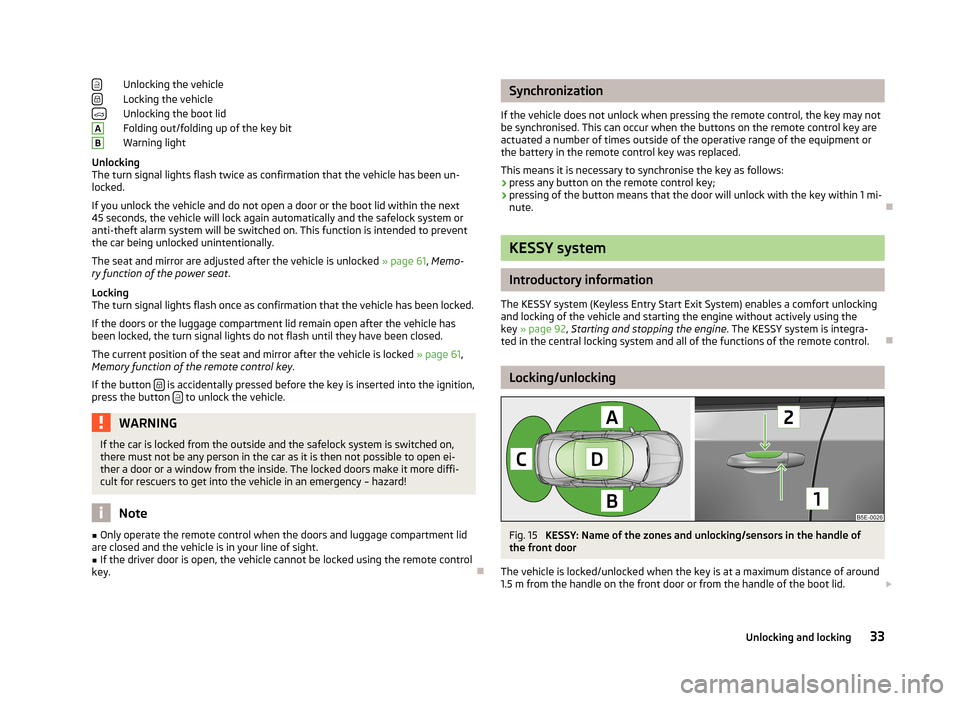
Unlocking the vehicle
Locking the vehicle
Unlocking the boot lid
Folding out/folding up of the key bit
Warning light
Unlocking
The turn signal lights flash twice as confirmation that the vehicle has been un-
locked.
If you unlock the vehicle and do not open a door or the boot lid within the next
45 seconds, the vehicle will lock again automatically and the safelock system or
anti-theft alarm system will be switched on. This function is intended to prevent
the car being unlocked unintentionally.
The seat and mirror are adjusted after the vehicle is unlocked » page 61, Memo-
ry function of the power seat .
Locking
The turn signal lights flash once as confirmation that the vehicle has been locked.
If the doors or the luggage compartment lid remain open after the vehicle has
been locked, the turn signal lights do not flash until they have been closed.
The current position of the seat and mirror after the vehicle is locked » page 61,
Memory function of the remote control key .
If the button
is accidentally pressed before the key is inserted into the ignition,
press the button to unlock the vehicle.
WARNINGIf the car is locked from the outside and the safelock system is switched on,
there must not be any person in the car as it is then not possible to open ei-
ther a door or a window from the inside. The locked doors make it more diffi-
cult for rescuers to get into the vehicle in an emergency – hazard!
Note
■ Only operate the remote control when the doors and luggage compartment lid
are closed and the vehicle is in your line of sight.■
If the driver door is open, the vehicle cannot be locked using the remote control
key.
ABSynchronization
If the vehicle does not unlock when pressing the remote control, the key may not be synchronised. This can occur when the buttons on the remote control key areactuated a number of times outside of the operative range of the equipment or
the battery in the remote control key was replaced.
This means it is necessary to synchronise the key as follows:
› press any button on the remote control key;
› pressing of the button means that the door will unlock with the key within 1 mi-
nute.
KESSY system
Introductory information
The KESSY system (Keyless Entry Start Exit System) enables a comfort unlocking
and locking of the vehicle and starting the engine without actively using the
key » page 92 , Starting and stopping the engine . The KESSY system is integra-
ted in the central locking system and all of the functions of the remote control.
Locking/unlocking
Fig. 15
KESSY: Name of the zones and unlocking/sensors in the handle of
the front door
The vehicle is locked/unlocked when the key is at a maximum distance of around
1.5 m from the handle on the front door or from the handle of the boot lid.
33Unlocking and locking
Page 36 of 222
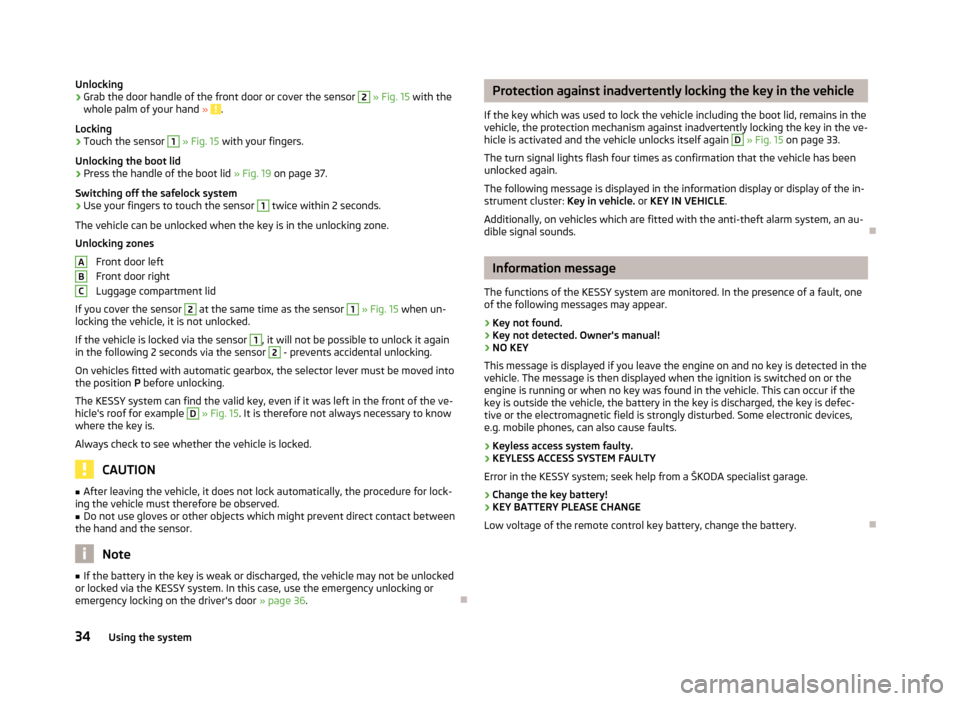
Unlocking›Grab the door handle of the front door or cover the sensor 2 » Fig. 15 with the
whole palm of your hand » .
Locking
›
Touch the sensor
1
» Fig. 15 with your fingers.
Unlocking the boot lid
›
Press the handle of the boot lid » Fig. 19 on page 37.
Switching off the safelock system
›
Use your fingers to touch the sensor
1
twice within 2 seconds.
The vehicle can be unlocked when the key is in the unlocking zone.
Unlocking zones
Front door left
Front door right
Luggage compartment lid
If you cover the sensor
2
at the same time as the sensor
1
» Fig. 15 when un-
locking the vehicle, it is not unlocked.
If the vehicle is locked via the sensor
1
, it will not be possible to unlock it again
in the following 2 seconds via the sensor
2
- prevents accidental unlocking.
On vehicles fitted with automatic gearbox, the selector lever must be moved into the position P before unlocking.
The KESSY system can find the valid key, even if it was left in the front of the ve-
hicle's roof for example
D
» Fig. 15 . It is therefore not always necessary to know
where the key is.
Always check to see whether the vehicle is locked.
CAUTION
■ After leaving the vehicle, it does not lock automatically, the procedure for lock-
ing the vehicle must therefore be observed.■
Do not use gloves or other objects which might prevent direct contact between
the hand and the sensor.
Note
■ If the battery in the key is weak or discharged, the vehicle may not be unlocked
or locked via the KESSY system. In this case, use the emergency unlocking or emergency locking on the driver's door » page 36.ABCProtection against inadvertently locking the key in the vehicle
If the key which was used to lock the vehicle including the boot lid, remains in the
vehicle, the protection mechanism against inadvertently locking the key in the ve-
hicle is activated and the vehicle unlocks itself again D
» Fig. 15 on page 33.
The turn signal lights flash four times as confirmation that the vehicle has been
unlocked again.
The following message is displayed in the information display or display of the in-
strument cluster: Key in vehicle. or KEY IN VEHICLE .
Additionally, on vehicles which are fitted with the anti-theft alarm system, an au- dible signal sounds.
Information message
The functions of the KESSY system are monitored. In the presence of a fault, one of the following messages may appear.
› Key not found.
› Key not detected. Owner's manual!
› NO KEY
This message is displayed if you leave the engine on and no key is detected in the vehicle. The message is then displayed when the ignition is switched on or the
engine is running or when no key was found in the vehicle. This can occur if the
key is outside the vehicle, the battery in the key is discharged, the key is defec-
tive or the electromagnetic field is strongly disturbed. Some electronic devices,
e.g. mobile phones, can also cause faults.
› Keyless access system faulty.
› KEYLESS ACCESS SYSTEM FAULTY
Error in the KESSY system; seek help from a ŠKODA specialist garage.
› Change the key battery!
› KEY BATTERY PLEASE CHANGE
Low voltage of the remote control key battery, change the battery.
34Using the system
Page 37 of 222
Parking the vehicle
If the vehicle is not unlocked within 60 or 90 seconds, the sensors in the handle of the driver /front passenger's door is deactivated automatically » Fig. 15 on
page 33.
Activation after 60 hours›
Unlock the driver's door using the sensor
2
» Fig. 15 on page 33.
›
Press the handle of the boot lid.
›
Unlock the vehicle using the button on the remote control key.
›
Unlocking the driver's door in an emergency
» page 36.
Activation after 90 hours
›
Unlock the vehicle using the button on the remote control key.
›
Unlocking the driver's door in an emergency
» page 36.
Anti-theft alarm system
Introductory information
The anti-theft alarm system increases the level of protection against people
seeking to break into the vehicle. The system triggers audible and visual warning
signals if an attempt is made to break into the vehicle.
Activating
The anti-theft alarm system is activated by locking the vehicle or inserting the key in the driver's door. It is activated 30 seconds after locking the door.
If you unlock the vehicle and do not open a door or the boot lid within the next45 seconds, the vehicle will lock again automatically and the safelock system or
anti-theft alarm system will be switched on. This function is intended to prevent
the car being unlocked unintentionally.
Deactivating
The anti-theft alarm system is deactivated by unlocking the vehicle. If the vehicle
is not opened within 45 seconds, the anti-theft alarm system is automatically ac-
tivated again.
The alarm system is also deactivated if you unlock the driver door using the key
within 45 seconds of locking the vehicle.
If the vehicle is unlocked by inserting the key into the driver door, the key must
be inserted into the ignition lock and the ignition switched on within 15 seconds
of unlocking the door to deactivate the alarm system. The alarm is triggered if
the ignition is not switched on within 15 seconds.
Triggering the alarm
An alarm is triggered when the following monitored areas of the vehicle have a fault:
› bonnet;
› boot lid;
› doors;
› ignition lock;
› Vehicle inclination
» page 36;
› Interior of the vehicle
» page 36;
› A drop in voltage of the on-board power supply;
› Socket of the factory-fitted towing device
» page 110, Driving with a trailer .
An alarm is immediately triggered if either of the two battery terminals is discon-
nected while the anti-theft alarm system is activated.
Switching off the alarm
The alarm is switched off by unlocking the vehicle or switching on the ignition.
CAUTION
Before leaving the car, it must be checked that all of the windows, doors and the
sliding/tilting roof are properly closed to ensure the full functionality of the anti-
theft alarm system.
Note
The working life of the alarm siren is 5 years.
35Unlocking and locking
Page 43 of 222
The convenience opening of the windows by means of the key in the driver's/
front passenger's lock is only possible within 45 seconds of deactivating or acti-
vating the alarm system.
Setting options
Information on the setting » operating instructions for Infotainment , chapter Set-
ting vehicle systems (CAR button) .
Operational faults in the automatic power windows
First read and observe the introductory information and safety warn-
ings
on page 38.
The automatic power windows do not work if the vehicle battery was disconnec-
ted and connected while a window is open. The system must be activated.
Proceed as follows in order to re-establish the function:
›
Switch on the ignition.
›
Pull the top edge of the button and close the window.
›
Release the button.
›
Pull the relevant button upwards again for approx. 3 seconds, and keep it press-ed down.
In the winter, ice accumulating on the surface of the window may cause there to be more resistance when closing the window. The window will stop and move
back several centimetres.
It is necessary to deactivate the force limiter to close the window » page 40.
Power panoramic sliding/sliding tilting roof
Introductory information
The power panoramic sliding/tilting roof (abbreviated in the following as 'sliding/
tilting roof'), can only be when the ignition is turned on and when the outdoor temperature is higher than -20 °C.
The sliding/tilting roof can still be operated for approx. 10 minutes after switching the ignition off. However, as soon as the driver or front passenger's door is
opened it is no longer possible to operate the sliding/tilting roof.
CAUTION■ Always close the sliding/tilting roof before disconnecting the battery.■If the battery has been disconnected and reconnected, it is possible that the
sliding/tilting roof does not operate correctly. Next, move the rotary switch into
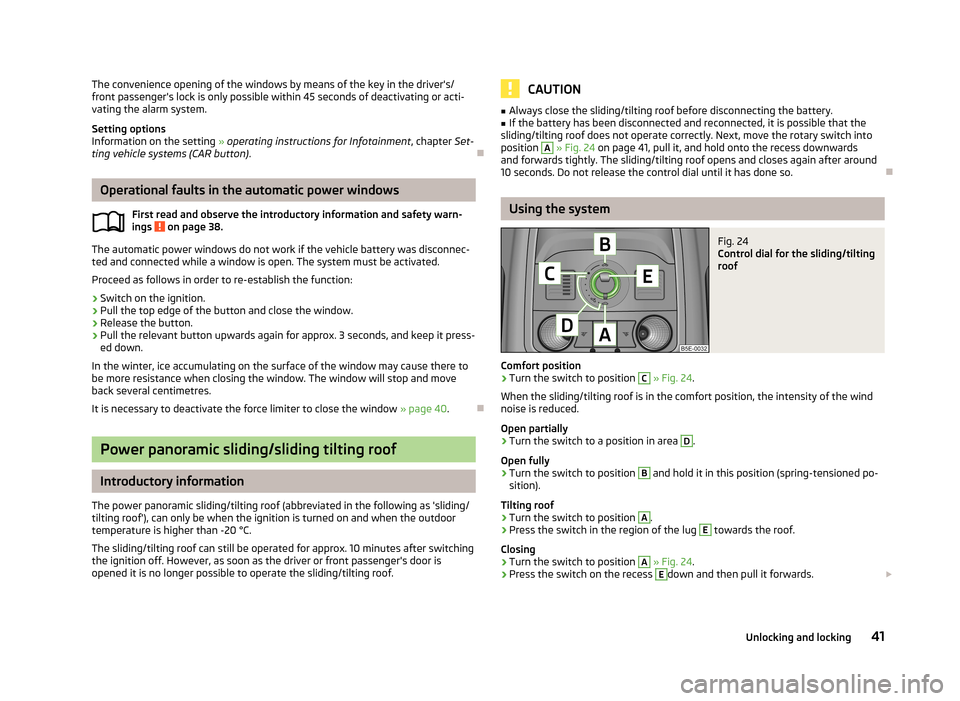
position A
» Fig. 24 on page 41, pull it, and hold onto the recess downwards
and forwards tightly. The sliding/tilting roof opens and closes again after around 10 seconds. Do not release the control dial until it has done so.
Using the system
Fig. 24
Control dial for the sliding/tilting
roof
Comfort position
›
Turn the switch to position
C
» Fig. 24 .
When the sliding/tilting roof is in the comfort position, the intensity of the wind noise is reduced.
Open partially
›
Turn the switch to a position in area
D
.
Open fully
›
Turn the switch to position
B
and hold it in this position (spring-tensioned po-
sition).
Tilting roof
›
Turn the switch to position
A
.
›
Press the switch in the region of the lug
E
towards the roof.
Closing
›
Turn the switch to position
A
» Fig. 24 .
›
Press the switch on the recess
E
down and then pull it forwards.
41Unlocking and locking
Page 51 of 222
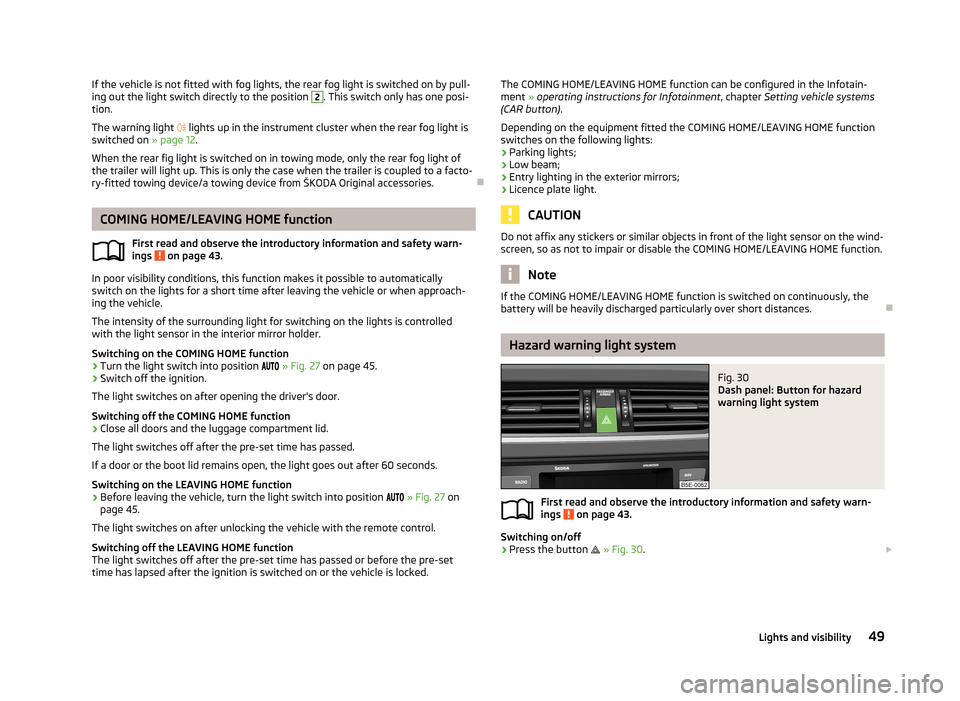
If the vehicle is not fitted with fog lights, the rear fog light is switched on by pull-
ing out the light switch directly to the position 2. This switch only has one posi-
tion.
The warning light lights up in the instrument cluster when the rear fog light is
switched on » page 12.
When the rear fig light is switched on in towing mode, only the rear fog light of the trailer will light up. This is only the case when the trailer is coupled to a facto-
ry-fitted towing device/a towing device from ŠKODA Original accessories.
COMING HOME/LEAVING HOME function
First read and observe the introductory information and safety warn-ings
on page 43.
In poor visibility conditions, this function makes it possible to automatically
switch on the lights for a short time after leaving the vehicle or when approach-
ing the vehicle.
The intensity of the surrounding light for switching on the lights is controlled
with the light sensor in the interior mirror holder.
Switching on the COMING HOME function
›
Turn the light switch into position
» Fig. 27 on page 45.
›
Switch off the ignition.
The light switches on after opening the driver's door.
Switching off the COMING HOME function
›
Close all doors and the luggage compartment lid.
The light switches off after the pre-set time has passed.
If a door or the boot lid remains open, the light goes out after 60 seconds.
Switching on the LEAVING HOME function
›
Before leaving the vehicle, turn the light switch into position
» Fig. 27 on
page 45.
The light switches on after unlocking the vehicle with the remote control.
Switching off the LEAVING HOME function
The light switches off after the pre-set time has passed or before the pre-set
time has lapsed after the ignition is switched on or the vehicle is locked.
The COMING HOME/LEAVING HOME function can be configured in the Infotain-
ment » operating instructions for Infotainment , chapter Setting vehicle systems
(CAR button) .
Depending on the equipment fitted the COMING HOME/LEAVING HOME function switches on the following lights:
› Parking lights;
› Low beam;
› Entry lighting in the exterior mirrors;
› Licence plate light.
CAUTION
Do not affix any stickers or similar objects in front of the light sensor on the wind-
screen, so as not to impair or disable the COMING HOME/LEAVING HOME function.
Note
If the COMING HOME/LEAVING HOME function is switched on continuously, the
battery will be heavily discharged particularly over short distances.
Hazard warning light system
Fig. 30
Dash panel: Button for hazard
warning light system
First read and observe the introductory information and safety warn-
ings on page 43.
Switching on/off
›
Press the button
» Fig. 30 .
49Lights and visibility
Page 73 of 222
Sockets
12-Volt power socket
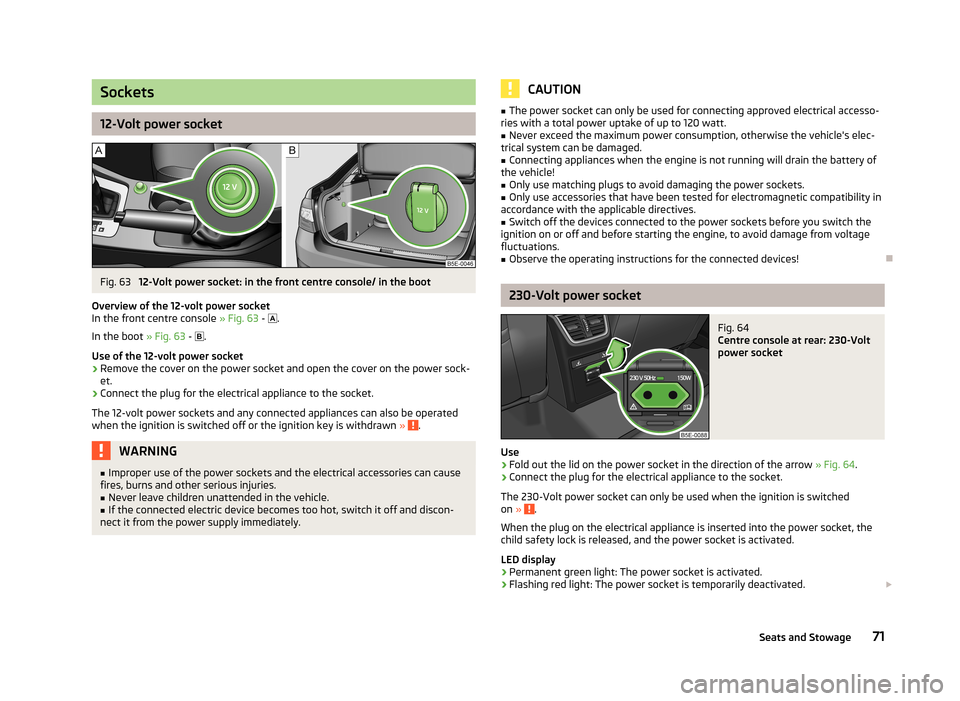
Fig. 63
12-Volt power socket: in the front centre console/ in the boot
Overview of the 12-volt power socket
In the front centre console » Fig. 63 -
.
In the boot » Fig. 63 -
.
Use of the 12-volt power socket
›
Remove the cover on the power socket and open the cover on the power sock-
et.
›
Connect the plug for the electrical appliance to the socket.
The 12-volt power sockets and any connected appliances can also be operated when the ignition is switched off or the ignition key is withdrawn »
.
WARNING■
Improper use of the power sockets and the electrical accessories can cause
fires, burns and other serious injuries.■
Never leave children unattended in the vehicle.
■
If the connected electric device becomes too hot, switch it off and discon-
nect it from the power supply immediately.
CAUTION■ The power socket can only be used for connecting approved electrical accesso-
ries with a total power uptake of up to 120 watt.■
Never exceed the maximum power consumption, otherwise the vehicle's elec-
trical system can be damaged.
■
Connecting appliances when the engine is not running will drain the battery of
the vehicle!
■
Only use matching plugs to avoid damaging the power sockets.
■
Only use accessories that have been tested for electromagnetic compatibility in
accordance with the applicable directives.
■
Switch off the devices connected to the power sockets before you switch the
ignition on or off and before starting the engine, to avoid damage from voltage
fluctuations.
■
Observe the operating instructions for the connected devices!
230-Volt power socket
Fig. 64
Centre console at rear: 230-Volt
power socket
Use
›
Fold out the lid on the power socket in the direction of the arrow » Fig. 64
.
›
Connect the plug for the electrical appliance to the socket.
The 230-Volt power socket can only be used when the ignition is switched on »
.
When the plug on the electrical appliance is inserted into the power socket, the
child safety lock is released, and the power socket is activated.
LED display › Permanent green light: The power socket is activated.
› Flashing red light: The power socket is temporarily deactivated.
71Seats and Stowage
Page 74 of 222
The power socket is deactivated automatically when the amperage is too high,
the temperature is too high or the battery charge state is too low.
When the reasons for the deactivation no longer apply, the power socket will be
re-activated automatically. Then re-activate connected devices which are switch- ed on »
.
WARNING■
The power socket can only be used for connecting approved electrical ac-
cessories with a two-pin 230V plug, with a total power uptake of up to
150 watt.■
The power sockets- and thus the connected electrical devices -only oper-
ates if the ignition is switched on!
■
Improper use can lead to serious injury or fire. Therefore never leave chil-
dren unattended in the vehicle - risk of injury!
■
Safely stow away all connected devices during the journey to prevent them
from being thrown around the interior in the event of a sudden braking ma- noeuvre or an accident - risk of death!
■
Do not pour liquids into the power socket - risk of death! If fluid does man-
age to get into the power socket, completely dry out the socket before reuse.
■
The connected appliances may behave differently to when connected to the
mains.
■
The connected devices may warm up during operation - risk of injury or fire!
■
The child lock on the 230 Volt power socket is unlocked when using ener-
gised adapters and extension cables - risk of injury!
■
Do no insert any conductive objects into the contacts of the power socket,
e.g knitting needs - risk of death!
CAUTION
■ Place the connector on the electrical device into the power socket as far as it
can go to create a connection between the contacts.■
If the connector of the electrical device is not inserted fully into the power sock-
et, the child safety lock might release, and the power socket be activated. The
electrical device is nevertheless not connected.
■
On vehicles with the START STOP system, when starting up the engine, the 230
Volt power socket is temporarily deactivated and the LED display flashes red. Af-
ter starting the engine, the power socket is re-activated automatically.
■
Do not connect any lamps with neon filaments to the 230 V power socket - risk
of damaging the lamp.
■ A larger current surge may arise in some power supplies (e.g. for notebooks)
when connecting them to a 230 V power socket- this will automatically deacti-
vate the power socket. In this case, disconnect the power supply from the con-
sumer and connect the power supply to the power socket first, followed by the
consumer.■
Observe the operating instructions for the connected devices!
Storage compartments
Overview
The vehicle has the following storage compartments:
Storage compartment on the front passenger side» page 73Storage compartment on the driver's side» page 73Holder for reflex vest» page 74Stowage compartment in front centre console» page 74Multimedia holder» page 74Map pockets in the front seats» page 75Glasses storage box» page 75Storage compartments in the doors» page 75Stowage compartment below front passenger seat» page 76Front armrest with storage compartment» page 76Stowage compartment in rear centre console» page 77Seat backrest with through-loading channel» page 77Removable through-loading bag» page 77Storage compartment in the boot» page 78Storage box underneath the luggage compartment cov-
er» page 79 72Using the system
Page 90 of 222
If a considerable increase in concentration of pollutants is recognised by the air
quality sensor, recirculated air mode will temporarily be switched off.
If the concentration of pollutants decreases to the normal level, the air distribu-
tion control is automatically switched off so that fresh air can be guided into the
vehicle interior.
In recirculated air mode air is sucked out of the interior of the vehicle and then
fed back into the interior. When the automatic air distribution control is switched on, an air quality sensor measures the concentration of pollutants in the drawn inair.
If the air quality sensor does not switch on automatic recirculated air mode when there is an unpleasant smell, you can switch in on manually.
Switching on/off›
Press the button and the warning light underneath the button illuminates.
›
Press the button again, the warning light underneath the button goes out,
where necessary press the button AUTO.
You can also switch the system on/off in he Infotainment » Bedienungsanleitung
Infotainment, chapter Setting vehicle systems (CAR button) .
WARNINGDo not leave recirculated air mode on over a longer period of time, as “stale”
air can cause fatigue of the driver and passengers, reduce attention levels and
also cause the windows to mist up. The risk of having an accident increases.
Switch off recirculated air mode as soon as the windows start to mist up.
Note
■ If the windscreen mists up, press the button . Press the button AUTO when
the windscreen is demisted.■
The automatic air distribution control operates only if the outside temperature
is higher than approx. 2 °C.
Controlling blower
The blower stage can be manually adapted to suit your particular needs.
›
Turn the control dial
B
» Fig. 86 on page 86 to the left or right to increase or
decrease the blower speed.
If the blower speed is reduced to a minimum, Climatronic is switched off.
The set blower speed is displayed in the control dial B when the respective num-
ber of warning lights come on.WARNING■ “Stale air” may result in fatigue in the driver and occupants, reduce attention
levels and also cause the windows to mist up. The risk of having an accident
increases.■
Do not switch off the Climatronic system for longer than necessary.
■
Switch on the Climatronic system as soon as the windows mist up.
Defrosting windscreen
Switching on/off
›
Press the button
» Fig. 86 on page 86.
›
Press the button or the button
AUTO again.
More air flows out of the air outlet vents 1 » Fig. 82 on page 82. The temperature
control is controlled automatically.
Auxiliary heating (auxiliary heating and ventilation)
Introduction
This chapter contains information on the following subjects:
Switching on/off
89
setting
90
Remote control
90
Replacing the battery in the remote control
91
Function prerequisites when switching on:
› Comfort temperature has been set;
› The blower is switched on;
› the air outlet vents are opened;
› The air outlet is set to position
or
.
Auxiliary heating (parking heating) › It can be used when stationary, when the engine is switched off to preheat the
vehicle and while driving (e.g. during the heating phase of the engine);
› It works in tandem with the hearer, air-conditioning system or Climatronic;
88Using the system
Page 91 of 222
›The engine is also preheated when the vehicle is stationary and the engine is
not running;
› It warms up the coolant by burning fuel from the vehicle tank. The coolant
warms up the air, which (if the blower speed is not set to zero) flows into the passenger compartment.
Auxiliary ventilation
The auxiliary ventilation enables fresh air to flow into the vehicle interior by
switching off the engine, whereby the interior temperature is effectively de-
creased (e.g. with the vehicle parked in the sun).WARNING■ The auxiliary heating must never be operated in closed rooms - risk of poi-
soning!■
The auxiliary heating must not be running during refuelling - risk of fire.
■
The exhaust pipe of the auxiliary heating is located on the underside of the
vehicle. Therefore, if you wish to operate the auxiliary heating, do not park the vehicle in such a way that the exhaust gases can come into contact with high-
ly flammable materials (e.g. dry grass) or easily inflammable substances (e.g.
spilt fuel).
CAUTION
■ The running auxiliary heater consumes fuel from the vehicle tank and automati-
cally controls the filling level. If only a low quantity of fuel is present in the fuel
tank, the function of the auxiliary heating is blocked.■
The exhaust pipe of the auxiliary heating, which is located on the underside of
the vehicle, must not be clogged and the exhaust flow must not be blocked.
■
If the auxiliary heating and ventilation is running, the vehicle battery discharges.
If the auxiliary heating and ventilation has been operated several times over a
longer period, the vehicle must be driven a few kilometres in order to recharge
the vehicle battery.
Note
■ The auxiliary heating only switches the blower on, if it has achieved a coolant
temperature of approx. 50 °C.■
At low outside temperatures, this can result in a formation of water vapour in
the area of the engine compartment. This is quite normal and is not an operating problem.
■
The air inlet in front of the windscreen must be free of e.g. ice, snow or leaves
to ensure that the auxiliary heating and cooling system operates properly.
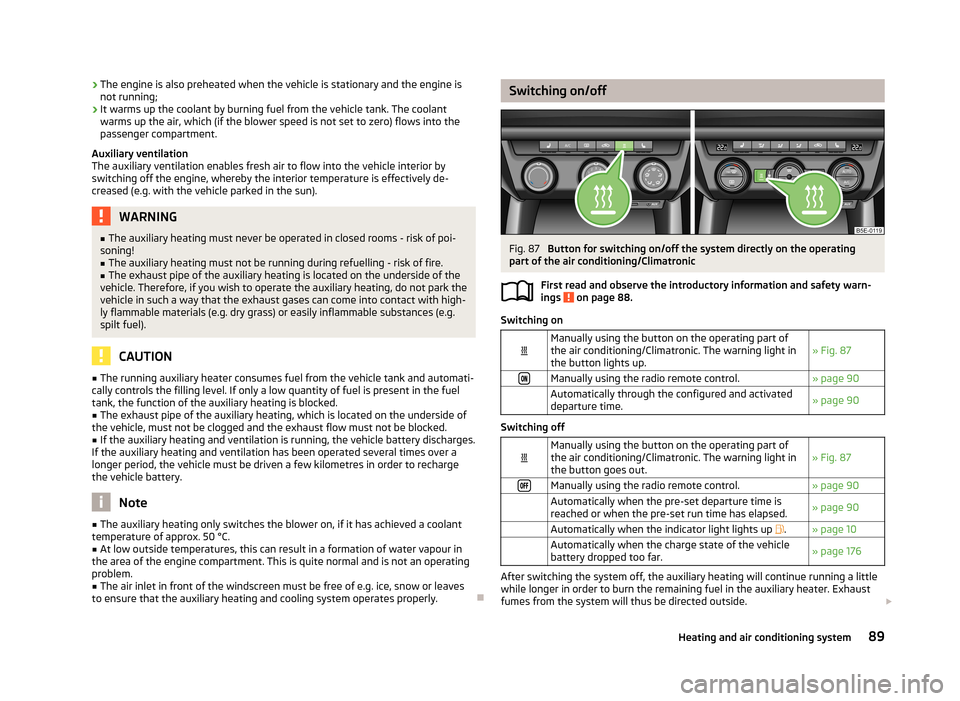
Switching on/offFig. 87
Button for switching on/off the system directly on the operating
part of the air conditioning/Climatronic
First read and observe the introductory information and safety warn-ings
on page 88.
Switching on
Manually using the button on the operating part of
the air conditioning/Climatronic. The warning light in the button lights up.» Fig. 87Manually using the radio remote control.» page 90 Automatically through the configured and activated
departure time.» page 90
Switching off
Manually using the button on the operating part of
the air conditioning/Climatronic. The warning light in the button goes out.» Fig. 87Manually using the radio remote control.» page 90 Automatically when the pre-set departure time is
reached or when the pre-set run time has elapsed.» page 90 Automatically when the indicator light lights up .» page 10 Automatically when the charge state of the vehicle
battery dropped too far.» page 176
After switching the system off, the auxiliary heating will continue running a little
while longer in order to burn the remaining fuel in the auxiliary heater. Exhaust
fumes from the system will thus be directed outside.
89Heating and air conditioning system