towing SKODA OCTAVIA 2013 3.G / (5E) User Guide
[x] Cancel search | Manufacturer: SKODA, Model Year: 2013, Model line: OCTAVIA, Model: SKODA OCTAVIA 2013 3.G / (5E)Pages: 287, PDF Size: 18.55 MB
Page 102 of 287
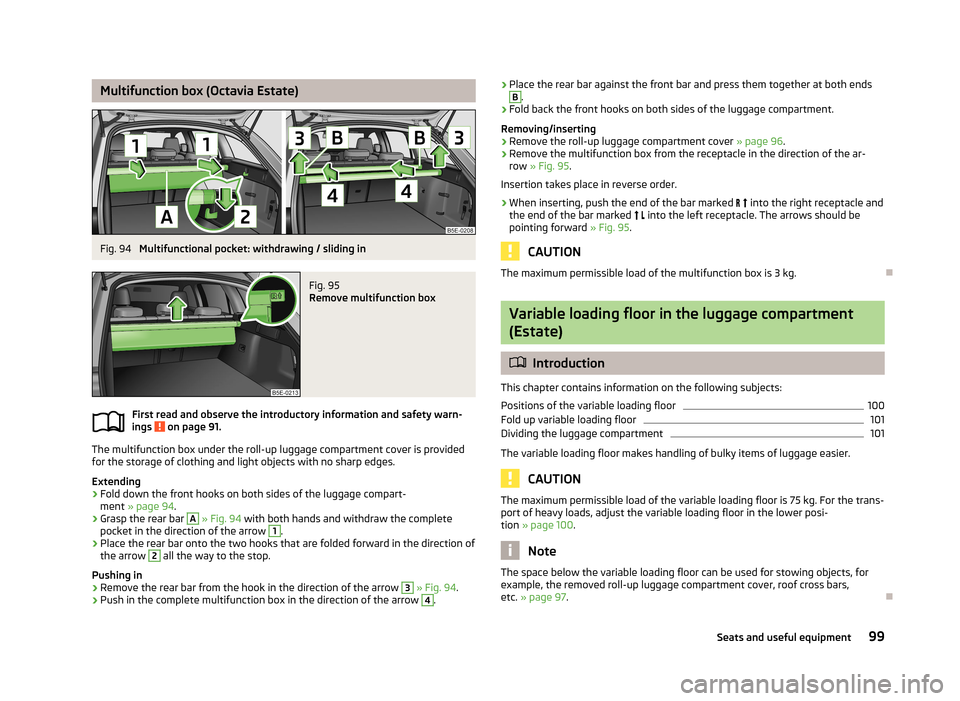
Multifunction box (Octavia Estate)Fig. 94
Multifunctional pocket: withdrawing / sliding in
Fig. 95
Remove multifunction box
First read and observe the introductory information and safety warn-
ings on page 91.
The multifunction box under the roll-up luggage compartment cover is provided
for the storage of clothing and light objects with no sharp edges.
Extending
›
Fold down the front hooks on both sides of the luggage compart- ment » page 94 .
›
Grasp the rear bar
A
» Fig. 94 with both hands and withdraw the complete
pocket in the direction of the arrow
1
.
›
Place the rear bar onto the two hooks that are folded forward in the direction of
the arrow
2
all the way to the stop.
Pushing in
›
Remove the rear bar from the hook in the direction of the arrow
3
» Fig. 94 .
›
Push in the complete multifunction box in the direction of the arrow
4
.
›Place the rear bar against the front bar and press them together at both endsB.›
Fold back the front hooks on both sides of the luggage compartment.
Removing/inserting
›
Remove the roll-up luggage compartment cover » page 96.
›
Remove the multifunction box from the receptacle in the direction of the ar-
row » Fig. 95 .
Insertion takes place in reverse order.
›
When inserting, push the end of the bar marked into the right receptacle and
the end of the bar marked into the left receptacle. The arrows should be
pointing forward » Fig. 95.
CAUTION
The maximum permissible load of the multifunction box is 3 kg.
Variable loading floor in the luggage compartment
(Estate)
Introduction
This chapter contains information on the following subjects:
Positions of the variable loading floor
100
Fold up variable loading floor
101
Dividing the luggage compartment
101
The variable loading floor makes handling of bulky items of luggage easier.
CAUTION
The maximum permissible load of the variable loading floor is 75 kg. For the trans- port of heavy loads, adjust the variable loading floor in the lower posi-
tion » page 100 .
Note
The space below the variable loading floor can be used for stowing objects, for
example, the removed roll-up luggage compartment cover, roof cross bars,
etc. » page 97 .
99Seats and useful equipment
Page 107 of 287
WARNING■The items which you transport on the roof rack must be reliably attached –
risk of accident!■
Always secure the load with appropriate and undamaged lashing straps or
tensioning straps.
■
Distribute the load evenly over the roof rack system.
■
When transporting heavy objects or objects which take up a large area on
the roof rack system, the handling of the car may change as a result of the displacement of the centre of gravity. The style of driving and speed musttherefore be adapted to the current circumstances.
■
Avoid abrupt and sudden driving/braking manoeuvres.
■
Adjust the speed and driving style to the visibility, weather, road and traffic
conditions.
■
The permissible roof load, permissible axle loads and gross permissible
weight of the vehicle must not be exceeded under any circumstances – risk of
accident!
CAUTION
■ Only use roof rack systems approved by ŠKODA AUTO a.s.■When dealing with roof rack systems, the installation instructions supplied with
the roof luggage rack system must be observed.■
On models fitted with a sliding/tilting roof, ensure that the sliding/tilting roof
does not strike any items of luggage transported on the roof.
■
Ensure that the luggage compartment lid does not hit the roof load when
opened.
■
The height of the vehicle changes after mounting a roof luggage rack system
and the load that is secured to it. Compare the vehicle height with available clear-
ances, such as underpasses and garage doors.
■
Always remove the roof luggage rack system before entering an automated car
wash.
■
Ensure the roof aerial is not impaired by the secured load.
For the sake of the environment
The increased aerodynamic drag results in a higher fuel consumption.NoteThe removed roof rack for the Octavia Estate can be stowed in the stowage com-
partment under the variable loading floor » page 97, Stowing roll-up luggage
compartment cover and roof racks .
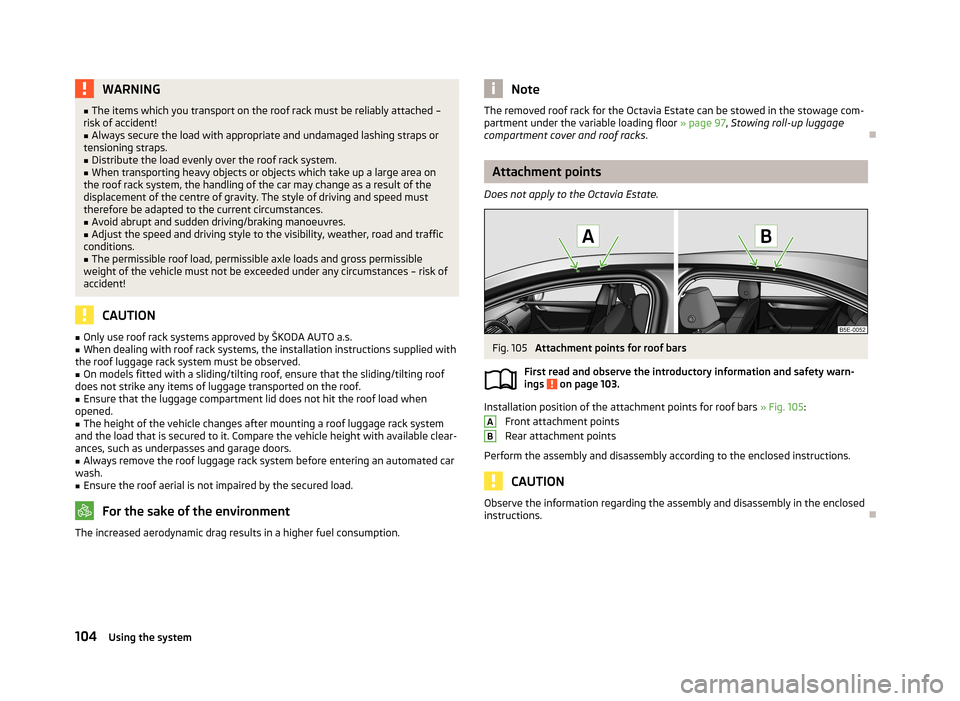
Attachment points
Does not apply to the Octavia Estate.
Fig. 105
Attachment points for roof bars
First read and observe the introductory information and safety warn- ings
on page 103.
Installation position of the attachment points for roof bars » Fig. 105:
Front attachment points
Rear attachment points
Perform the assembly and disassembly according to the enclosed instructions.
CAUTION
Observe the information regarding the assembly and disassembly in the enclosed
instructions.
AB104Using the system
Page 144 of 287
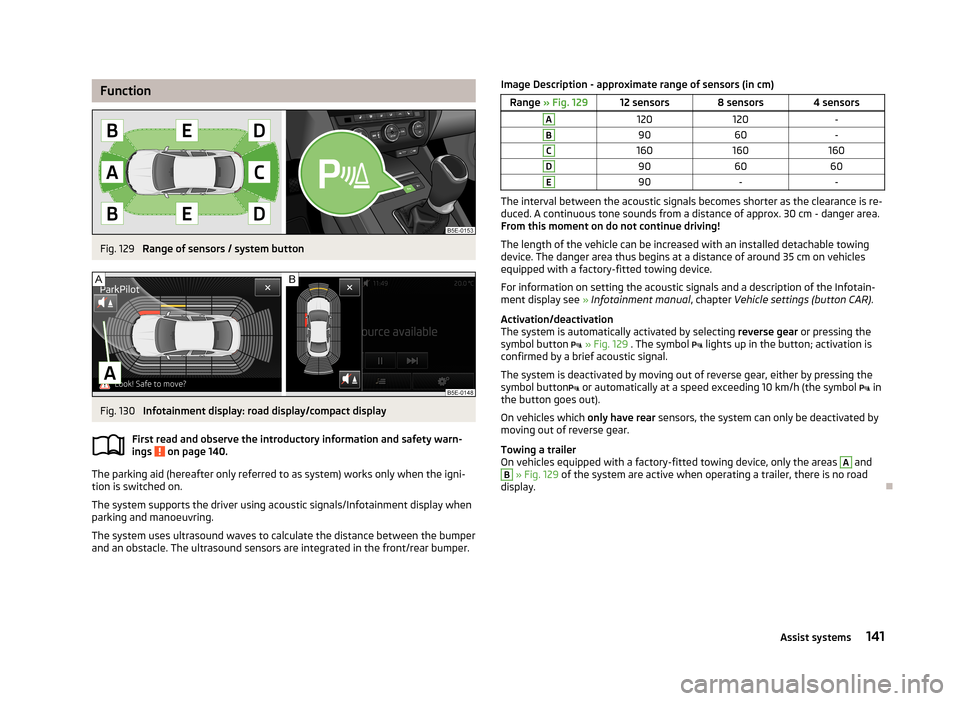
FunctionFig. 129
Range of sensors / system button
Fig. 130
Infotainment display: road display/compact display
First read and observe the introductory information and safety warn-
ings
on page 140.
The parking aid (hereafter only referred to as system) works only when the igni- tion is switched on.
The system supports the driver using acoustic signals/Infotainment display when
parking and manoeuvring.
The system uses ultrasound waves to calculate the distance between the bumper
and an obstacle. The ultrasound sensors are integrated in the front/rear bumper.
Image Description - approximate range of sensors (in cm)Range » Fig. 12912 sensors8 sensors4 sensorsA120120-B9060-C160160160D906060E90--
The interval between the acoustic signals becomes shorter as the clearance is re-
duced. A continuous tone sounds from a distance of approx. 30 cm - danger area.
From this moment on do not continue driving!
The length of the vehicle can be increased with an installed detachable towing
device. The danger area thus begins at a distance of around 35 cm on vehicles
equipped with a factory-fitted towing device.
For information on setting the acoustic signals and a description of the Infotain-
ment display see » Infotainment manual , chapter Vehicle settings (button CAR) .
Activation/deactivation
The system is automatically activated by selecting reverse gear or pressing the
symbol button
» Fig. 129 . The symbol
lights up in the button; activation is
confirmed by a brief acoustic signal.
The system is deactivated by moving out of reverse gear, either by pressing the
symbol button
or automatically at a speed exceeding 10 km/h (the symbol
in
the button goes out).
On vehicles which only have rear sensors, the system can only be deactivated by
moving out of reverse gear.
Towing a trailer
On vehicles equipped with a factory-fitted towing device, only the areas
A
and
B
» Fig. 129 of the system are active when operating a trailer, there is no road
display.
141Assist systems
Page 157 of 287
Narrow vehicles or vehicles travelling side by side
Narrow vehicles or vehicles travelling side by side are not detected by the radar
sensor until they are within the sensor's range » Fig. 139 - . This is especially
true for narrow vehicles, such as motorcycles.
If necessary, slow down the car by applying the brake.
Other vehicles changing lanes
Vehicles that change onto the lane with a small proximity » Fig. 140 - do not
have to be detected by the radar sensor in time. The result may be a delayed ACC
response.
If necessary, slow down the car by applying the brake.
Stationary vehicles
The ACC does not detect stationary objects! When a vehicle detected by the ACC turns or sheers off and there is a stationary vehicle in front of this vehi-cle, » Fig. 140 -
the ACC does not respond to the stationary vehicle.
In such cases, take over the steering and apply the brake.
When overtaking
When your vehicle is being controlled (the speed is lower than that which is stor-
ed) and the indicator is activated, the ACC interprets that the driver intends to
overtake. The ACC automatically accelerates the vehicle, thereby reducing the
proximity to a vehicle ahead.
If the vehicle changes to the fast lane and no vehicle is detected ahead, the ACC
accelerates until the set speed is reached and then keeps it constant.
Acceleration can be cancelled at any time by touch on the brake pedal or pressing
the button
on the control lever » Fig. 138 on page 151 .
Vehicles with special load or special body parts
Other vehicles with a load or with body parts protruding from the sides, back or
top of the vehicle contour may not be detected by the ACC.
Control should therefore be disabled whenever you are driving behind or overtak-ing such a vehicle.
Towing a trailer
When towing a trailer, the ACC control will be less powerful. The manner of driv- ing should therefore be adapted to this limitation.
Information messages
First read and observe the introductory information and safety warn-
ings
on page 148.
If the symbol
appears in the instrument cluster display when ACC is enabled, it
means that the ACC is not working.
The messages and information are indicated in the instrument cluster display. ACC: no sensor view!
The sensor is dirty or has no “visibility”. Stop the car, switch off the engine and
clean the sensor or remove the obstacle causing the lack of “visibility” » Fig. 135
on page 149 . Should the ACC still be unavailable after the engine is restarted,
push the lever into position
» Fig. 138 on page 151 . Seek help from a specialist
garage.
ACC not available.
Stop the vehicle, switch off the engine and then start it again. If the ACC is still not available, push the lever into position
. Seek help from a specialist garage.
Error: ACC
There is an ACC system error. Push the lever into position .
. Seek help from a
specialist garage.
Speed limit
Increase the speed accordingly and start control » page 152.
Area monitoring system (Front Assist)
Introduction
This chapter contains information on the following subjects:
Instructions and Information
155
Radar sensor
155
Operation
156
Activating/deactivating
157
“City”Emergency braking
157
Information messages
158
154Driving
Page 166 of 287
Note■The Eco driving mode is not available when towing a trailer. When the vehicle is
connected electrically to a trailer and is in the Eco driving mode, the Normal driv-
ing mode is configured automatically.■
The maximum vehicle acceleration (kickdown function) is possible also in driving
mode Eco.
Individualmode
First read and observe the introductory information and safety warn-
ings
on page 161.
In mode Individual you can select between Normal, Sport and Eco for each system
separately » Operating instructions for Infotainment , chapter Vehicle settings .
ProActive passenger protection
Introduction
This chapter contains information on the following subjects:
Function
163WARNINGAdjust the speed and driving style to the current visibility, weather, road and
traffic conditions. The increased safety by ProActive passenger protection must not tempt you to take greater risks than otherwise – risk of accident!
Note
■ If the front passenger front airbag is deactivated » page 191 the belt tension-
ing function for the front passenger seat is switched off.■
The system component service life is monitored electronically. Further informa-
tion » page 19 , Security Systems .
Function
First read and observe the introductory information and safety warn-ings
on page 163.
ProActive passenger protection (From here on referred to only as system) increa-
ses passenger protection in the front seats in situations that could lead to vehicle
impact or overturning.
The system is ready to intervene automatically in the following conditions. The ignition is switched on.
The vehicle moves at a speed of more than 30 km/h.
In critical driving situations (e.g. during emergency braking or a sudden change in
direction), the following steps can be taken separately or combined in order to re-
duce the risk of serious injury.
› The front passenger's and driver's seatbelts, if worn, are automatically
ten-
sioned closely over the body.
› The windows in the side doors (if open) are automatically closed up to a gap of
about 5 cm from the edge.
› The sliding/tilting roof is closed.
Once the critical driving situation has passed, the tension on the seatbelts will be
released again.
The system operates at two levels of protection.
The first level of protection
The system already intervenes in situations that may occur during dynamic driv-
ing. As a result, this primarily helps to keep the driver and the passenger in the
correct seated position.
The first level of protection can be deactivated by one of the following measures. › Deactivation of the system in Infotainment
» Operating instructions for Info-
tainment , chapter Vehicle settings (CAR button) .
› Deactivation of TCS
» page 138.
› Selecting the driving mode Sport
» page 161.
The second level of protection
The system intervenes only if the situation is evaluated as critical, such as in pan-
ic braking at high speeds.
This level of protection cannot be deactivated.
163Assist systems
Page 170 of 287
The system works on the basis of the data captured by the camera and is only
able to show traffic signs which are in the camera's “viewing range” » Fig. 150.
Data from the camera can be supplemented by information from the Infotainment
Navigation. This is the reason why traffic signs with maximum speeds can also be shown on sections of roads which do not have any traffic signs.
The system may not be available or may only be available to a limited extent in the following situations.
› Poor visibility conditions, e.g. fog, heavy rain, thick snowfall.
› The camera is blinded by the sun.
› The camera is blinded by the oncoming traffic.
› The camera “viewing range” is obstructed by an obstacle.
› Travelling at high speed.
› The traffic signs are fully or partially obscured (e.g. by trees, snow, dirt or other
vehicles).
› The traffic signs are not standard (round with a red border).
› The traffic signs are damaged or bent.
› The traffic signs are attached to flashing neon signs.
› The traffic signs were changed (the navigation data are out of date).
Notifications and settings
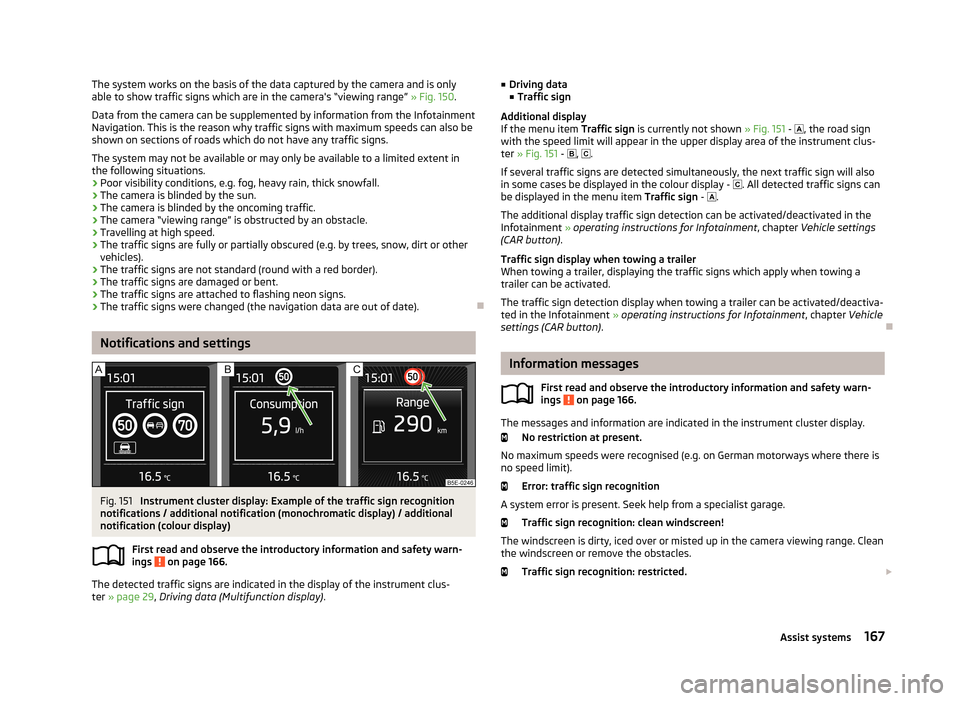
Fig. 151
Instrument cluster display: Example of the traffic sign recognition
notifications / additional notification (monochromatic display) / additional
notification (colour display)
First read and observe the introductory information and safety warn-ings
on page 166.
The detected traffic signs are indicated in the display of the instrument clus- ter » page 29 , Driving data (Multifunction display) .
■
Driving data
■ Traffic sign
Additional display
If the menu item Traffic sign is currently not shown » Fig. 151 - , the road sign
with the speed limit will appear in the upper display area of the instrument clus-
ter » Fig. 151 - , .
If several traffic signs are detected simultaneously, the next traffic sign will also
in some cases be displayed in the colour display - . All detected traffic signs can
be displayed in the menu item Traffic sign - .
The additional display traffic sign detection can be activated/deactivated in the
Infotainment » operating instructions for Infotainment , chapter Vehicle settings
(CAR button) .
Traffic sign display when towing a trailer
When towing a trailer, displaying the traffic signs which apply when towing a
trailer can be activated.
The traffic sign detection display when towing a trailer can be activated/deactiva-
ted in the Infotainment » operating instructions for Infotainment , chapter Vehicle
settings (CAR button) .
Information messages
First read and observe the introductory information and safety warn-
ings
on page 166.
The messages and information are indicated in the instrument cluster display.
No restriction at present.
No maximum speeds were recognised (e.g. on German motorways where there is
no speed limit).
Error: traffic sign recognition
A system error is present. Seek help from a specialist garage. Traffic sign recognition: clean windscreen!
The windscreen is dirty, iced over or misted up in the camera viewing range. Clean the windscreen or remove the obstacles.
Traffic sign recognition: restricted.
167Assist systems
Page 172 of 287
Towing a trailer
Towing device
Introduction
This chapter contains information on the following subjects:
Description
169
Setting the ready position
170
Installing the ball rod
170
Check proper fitting
171
Removing the ball rod
171
Use and care
172
If your vehicle has already been factory-fitted with a towing device or is fitted
with a towing device from ŠKODA Original Accessories, then it meets all of the
technical requirements and national legal provisions for towing a trailer.
Your vehicle is fitted with a 13-pin power socket for the electrical connection be-tween the vehicle and trailer. If the trailer that is to be towed has a 7-pin connec-
tor , you can use a suitable adapter from ŠKODA Original Accessories.
Maximum Trailer drawbar load weight is 75 kg, or 80 kg for the Octavia Estate
4x4 vehicles.
WARNING■ Before each time you make a journey when using the ball rod, check that it
is seated correctly and is secured in the mounting recess.■
Do not operate the ball rod if it is not correctly inserted in the mounting re-
cess.
■
Do not operate the towing device if it is damaged or incomplete.
■
Do not perform any modifications or changes to the towing device.
■
Never release the ball rod while the trailer is still coupled.
CAUTION
Handle the ball rod carefully to avoid damaging the paintwork on the bumper.
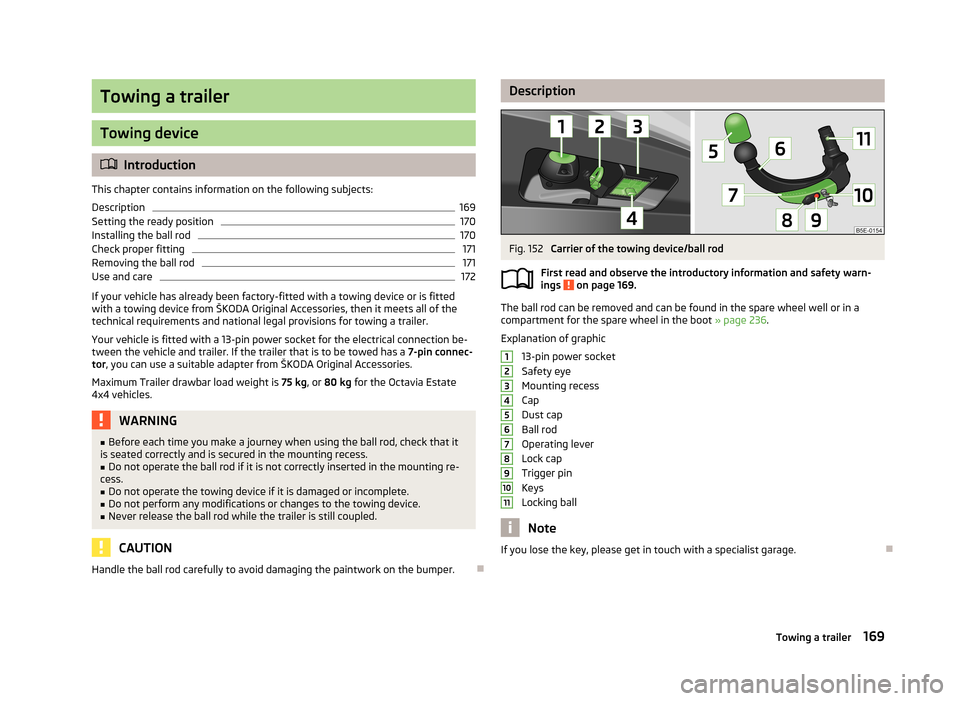
DescriptionFig. 152
Carrier of the towing device/ball rod
First read and observe the introductory information and safety warn-
ings
on page 169.
The ball rod can be removed and can be found in the spare wheel well or in a
compartment for the spare wheel in the boot » page 236.
Explanation of graphic 13-pin power socket
Safety eye
Mounting recess
Cap
Dust cap
Ball rod
Operating lever
Lock cap
Trigger pin
Keys
Locking ball
Note
If you lose the key, please get in touch with a specialist garage.
1234567891011169Towing a trailer
Page 174 of 287
CAUTION■After removing the key, always replace the cap on the lock of the operating lev-
er – there is a risk of dirt getting into the lock.■
Keep the mounting recess of the towing device clean at all times. Such dirt pre-
vents the ball rod from being attached securely!
■
After removing the ball rod, always place the cap on the mounting recess.
Check proper fitting
Fig. 155
Check the proper attachment of
the ball rod
First read and observe the introductory information and safety warn-
ings on page 169.
Before each use of the ball rod, check that it is attached properly.
Check the following points.
Lever
1
is up as far as it goes » Fig. 155.
The trigger pin
2
is completely exposed (both its red and green part is visi-
ble).
The key is removed.
the cap
3
is on top of the lock of the operating lever.
The ball rod does not come off the mounting recess even after strong “shak- ing”.
WARNINGDo not use the towing device unless the ball rod was properly locked!
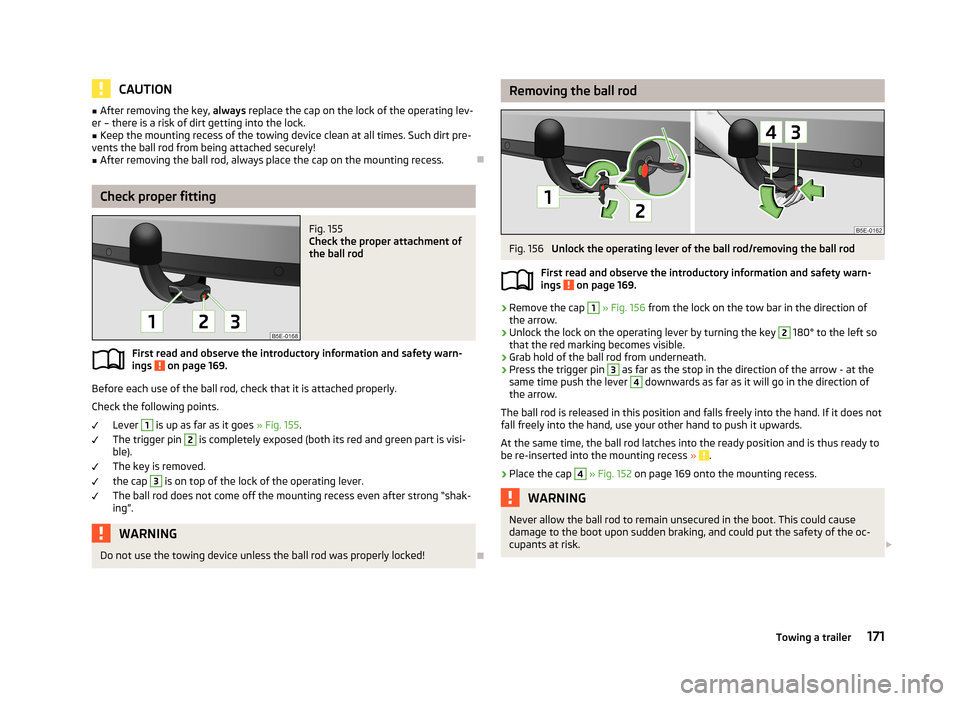
Removing the ball rodFig. 156
Unlock the operating lever of the ball rod/removing the ball rod
First read and observe the introductory information and safety warn-
ings
on page 169.
›
Remove the cap
1
» Fig. 156 from the lock on the tow bar in the direction of
the arrow.
›
Unlock the lock on the operating lever by turning the key
2
180° to the left so
that the red marking becomes visible.
›
Grab hold of the ball rod from underneath.
›
Press the trigger pin
3
as far as the stop in the direction of the arrow - at the
same time push the lever
4
downwards as far as it will go in the direction of
the arrow.
The ball rod is released in this position and falls freely into the hand. If it does not
fall freely into the hand, use your other hand to push it upwards.
At the same time, the ball rod latches into the ready position and is thus ready to
be re-inserted into the mounting recess »
.
›
Place the cap
4
» Fig. 152 on page 169 onto the mounting recess.
WARNINGNever allow the ball rod to remain unsecured in the boot. This could cause
damage to the boot upon sudden braking, and could put the safety of the oc-
cupants at risk. 171Towing a trailer
Page 175 of 287
CAUTION■If the lever is held firm and not pushed downwards as far as it can go, it will go
back up after the ball rod is removed and will not latch into the ready position.
The ball rod then needs to be brought into this position before the next time it is installed.■
Stow the ball head in the ready position with the key inserted in the box. When
doing so, make the side opposite to the inserted key face downwards – there is a
risk of damaging the key.
■
Do not use excessive force when handling the operating lever (e.g. do not climb
on it)!
Note
■ We recommend putting the protective cover onto the ball head before removing
the tow bar.■
Remove any dirt from the ball rod before stowing it away in the box with the
vehicle tool kit.
Use and care
First read and observe the introductory information and safety warn-
ings
on page 169.
Seal the mounting recess with the cap to prevent any ingress of dirt.
Always check the ball head before hitching a trailer. Use a suitable lubricating grease where necessary.
Include the protective cap when stowing away the ball rod to protect the boot
from getting contaminated.
In the event of dirt, clean the surfaces of the mounting recess and treat with a
suitable preservative.
CAUTION
Apply lubricating grease to the upper part of the mounting recess. Make sure you
do not remove any grease.
Trailer
Introduction
This chapter contains information on the following subjects:
Loading a trailer
172
Driving with a trailer
173
Trailer stabilisation
174
Anti-theft alarm system
174WARNINGAlways drive particularly carefully with the trailer.
Loading a trailer
First read and observe the introductory information and safety warn-
ings
on page 172.
The vehicle/trailer combination must be balanced. whereby the maximum permis-
sible drawbar load must be utilised. If the drawbar load is too low, it jeopardises the performance of the vehicle/trailer combination.
Distribution of the load
Distribute the load in the trailer in such a way that heavy items are located as close to the axle as possible. Secure the items from slipping.
The distribution of the weight is very poor if your vehicle is unladen and the trail-
er is laden. Drive at a particularly low speed if you cannot avoid driving with this
combination.
Tyre pressure
Correct the tyre inflation pressure on your vehicle for a “full load” » page 229,
Service life of tyres .
Trailer load
The permissible trailer load must not be exceeded under any circumstan-
ces » page 263 , Technical data .
The trailer loads specified apply only to altitudes up to 1000 metres above mean
sea level.
172Driving
Page 176 of 287
The engine output falls as the height increases, as does the ability to climb.
Therefore, for every additional 1000 m in height (or part), the maximum permissi- ble towed weight must be reduced by 10%.
The towed weight is made up of the actual weights of the loaded towing vehicleand the loaded trailer.
The trailer and drawbar load information on the type plate of the towing device are merely test data for the towing device. The vehicle-specific values are de-
tailed in the vehicle documents.WARNING■ Do not exceed the maximum permissible axle and drawbar load and the
maximum permissible total or towed weight of the vehicle and the trailer –
risk of accident and serious injury.■
Slipping loads can significantly impair the stability and safety of the vehicle/
trailer combination – risk of accident and serious injury.
Driving with a trailer
Fig. 157
Swivel out the 13-pin power
socket
First read and observe the introductory information and safety warn- ings on page 172.
Before the journey
›
Grip the 13-pin socket at point
A
and swing out in the direction of ar-
row » Fig. 157 .
›
Lift off protective cap
5
» Fig. 152 on page 169 .
After the journey
›
Grip the 13-pin socket at point
A
and swing in the opposite direction to the ar-
row » Fig. 157 .
›Place the protective cover 5
» Fig. 152 on page 169 onto the tow bar.
Safety eye
The purpose of the safety eyelet B
» Fig. 157 is to attach the breakaway cable of
the trailer.
When attaching the breakaway cable to the safety eye, it must sag freely in all
trailer positions (sharp bends, in reverse, etc.).
Exterior mirrors
You have to have additional exterior mirrors fitted if you are not able to see the
traffic behind the trailer with the standard rear-view mirrors. The national legal requirements must be observed.
Headlights
The front of the vehicle may lift up when a trailer is being towed and the head-
lights may dazzle other road users.
Adjust the headlights using the headlight beam control » page 55, Side lights and
low beam .
Driving speed
For safety reasons, do not drive faster than 80 km/h when hitching a trailer.
Immediately reduce your speed as soon as even the slightest swaying of the trail- er is detected. Never attempt to stop the trailer from “swaying” by accelerating.
Brakes
Apply the brakes in good time! If the trailer is fitted with a trailer brake, apply the
brakes gently at first, then brake firmly. This will avoid brake jolts resulting from
the trailer wheels locking.
On downhill sections shift down a gear in good time to also use the engine as a
brake.
Engine overheating
If the needle for the coolant temperature gauge moves into the right-hand area
or the red area of the scale, the speed must be reduced immediately.
Stop and switch off the engine if the warning light
in the display » page 22 is
lit. Wait a few minutes and check the level of coolant » page 222.
The following guidelines must be observed » page 22,
Coolant .
The coolant temperature can be reduced by switching on the heating.
173Towing a trailer