brake sensor SKODA OCTAVIA 2013 3.G / (5E) Owner's Manual
[x] Cancel search | Manufacturer: SKODA, Model Year: 2013, Model line: OCTAVIA, Model: SKODA OCTAVIA 2013 3.G / (5E)Pages: 287, PDF Size: 18.55 MB
Page 143 of 287
Multicollision brakeFirst read and observe the introductory information and safety warn-
ings
on page 137.
The multifunction brake deploys automatic braking after a collision in order to re- duce the risk of further collisions. Automatic braking can only be deployed at
speeds of over 10 km/h in the event of a frontal or side impact.
The vehicle is slowed down automatically by the ESC system as long as the brakes, the ESC and the relevant electrical system remain operational after the impact.
Automatic braking is not applied if the driver presses the accelerator during the
accident.
Parking aid
Introduction
This chapter contains information on the following subjects:
Function
141
Automatic system activation when moving forward
142
Road display
142WARNING■ The parking aid is not a substitute for the driver paying proper attention and
it is always the driver's responsibility to take care when reversing the vehicle
or carrying out similar manoeuvres. Pay particular attention to small children
and animals as they may not be recognised by the system sensors.■
You should satisfy yourself before reversing that there is no small obstacle,
such as a rock, thin post, trailer drawbar etc., in front or behind your vehicle.
Such obstacles may not be recognised by the system sensors.
■
Under certain circumstances, surfaces of certain objects and types of cloth-
ing cannot reflect the system signals. Thus, these objects or people who wear such clothing are not recognised by the System sensors.
■
External sound sources can have a detrimental effect on the system. Under
adverse conditions, this can cause objects or people to not be recognized by
the system.
CAUTION■ If a warning signal sounds for about 3 seconds after activating the system and
there is no obstacle close to your car, this indicates a system fault. The fault is
also indicated by the symbol flashing » Fig. 129 on page 141 in the button. ! or
appears in the Infotainment display. Seek help from a specialist garage.■
The sensors must be kept clean (free of ice, etc.) to enable the system to oper-
ate properly.
■
The system function may be limited under adverse weather conditions (heavy
rain, water vapour, very low or high temperatures etc.).
■
Additional mounted modules, such as a bicycle carrier, can impair the function of
the parking aid.
Note
■ The signal tones for front obstacle recognition are factory-set to be higher than
for rear obstacle recognition.■
If not all fields around the vehicle are shown after the system is activated, the
vehicle will need to be moved a few metres forwards or in reverse.
■
If the system is activated and the selector lever of the automatic gearbox is in
position P (the vehicle cannot move), the warning tone is interrupted and no ob-
stacles are displayed.
140Driving
Page 151 of 287
Briefly push the rocker button B into the RES/+ position in order to resume the
stored speed after the clutch or brake pedal is released.
Information on the display
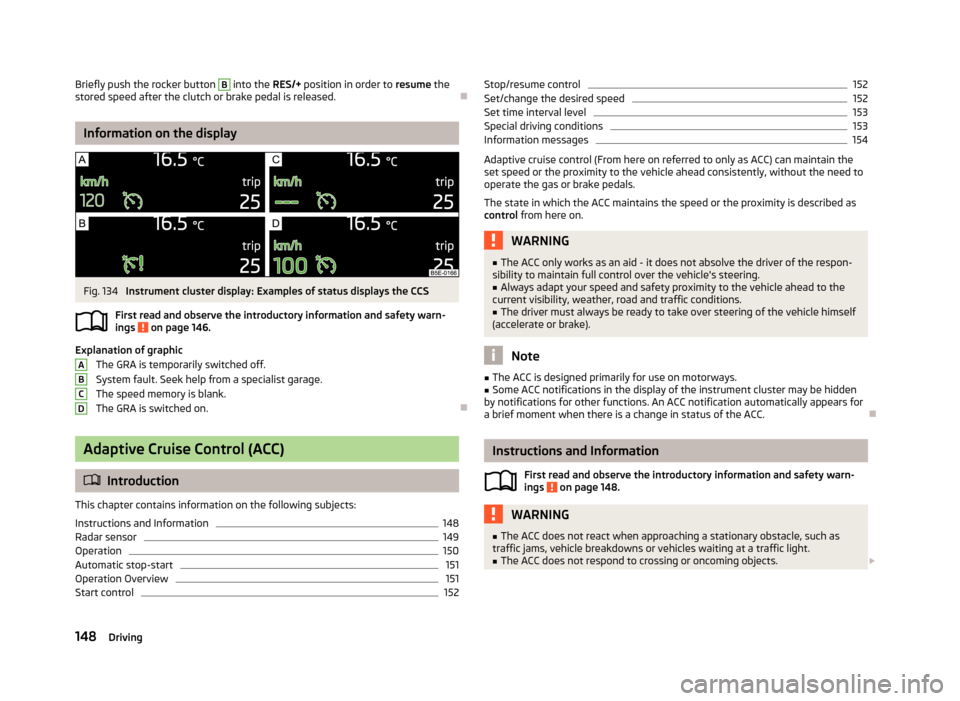
Fig. 134
Instrument cluster display: Examples of status displays the CCS
First read and observe the introductory information and safety warn- ings
on page 146.
Explanation of graphic
The GRA is temporarily switched off.
System fault. Seek help from a specialist garage.
The speed memory is blank. The GRA is switched on.
Adaptive Cruise Control (ACC)
Introduction
This chapter contains information on the following subjects:
Instructions and Information
148
Radar sensor
149
Operation
150
Automatic stop-start
151
Operation Overview
151
Start control
152ABCDStop/resume control152Set/change the desired speed152
Set time interval level
153
Special driving conditions
153
Information messages
154
Adaptive cruise control (From here on referred to only as ACC) can maintain the
set speed or the proximity to the vehicle ahead consistently, without the need to
operate the gas or brake pedals.
The state in which the ACC maintains the speed or the proximity is described as
control from here on.
WARNING■
The ACC only works as an aid - it does not absolve the driver of the respon-
sibility to maintain full control over the vehicle's steering.■
Always adapt your speed and safety proximity to the vehicle ahead to the
current visibility, weather, road and traffic conditions.
■
The driver must always be ready to take over steering of the vehicle himself
(accelerate or brake).
Note
■ The ACC is designed primarily for use on motorways.■Some ACC notifications in the display of the instrument cluster may be hidden
by notifications for other functions. An ACC notification automatically appears for
a brief moment when there is a change in status of the ACC.
Instructions and Information
First read and observe the introductory information and safety warn-ings
on page 148.
WARNING■ The ACC does not react when approaching a stationary obstacle, such as
traffic jams, vehicle breakdowns or vehicles waiting at a traffic light.■
The ACC does not respond to crossing or oncoming objects. 148Driving
Page 152 of 287
WARNING (Continued)■If the ACC does not decelerate fast enough, immediately apply the vehicle's
footbrake.■
Control may only be resumed if the stored speed is not too high for the cur-
rent traffic conditions.
WARNINGFor safety reasons, do not use the ACC under the following conditions.■When driving in turning lanes, motorway exits or construction sites, to avoid
an unwanted acceleration to the stored speed.■
When visibility is poor, (e.g. fog, heavy rain, thick snowfall).
■
When road conditions are poor (e.g. ice, slippery road, gravel, dirt road).
■
When driving around “sharp” bends.
■
When riding on a steep gradient / high slope.
CAUTION
■ It is not possible to switch on the control on vehicles fitted with a manual
transmission if the first gear or reverse gear is engaged.■
It is not possible to switch on the control on vehicles fitted with an automatic
transmission , if the selector lever is in the position P, N or R .
■
The control may automatically switch off when some brake assist systems (e.g.
ESC) intervene, when the maximum permissible engine speed is exceeded, etc.
Note
■ The speed can only be set and stored when ACC is activated. The stored speed
may differ from the actual speed if a proximity control procedure is in progress at the time.■
Vehicles with an automatic transmission can decelerate to a standstill and start
again using the ACC.
■
The ACC reduces the speed by automatically releasing the accelerator or by
means of a braking procedure as appropriate. If the brakes are used for an auto-
matic speed reduction at any moments, then the brake light illuminates.
■
In case of failure of more than one brake light on the vehicle or on the electri-
cally connected trailer, the ACC becomes unavailable.
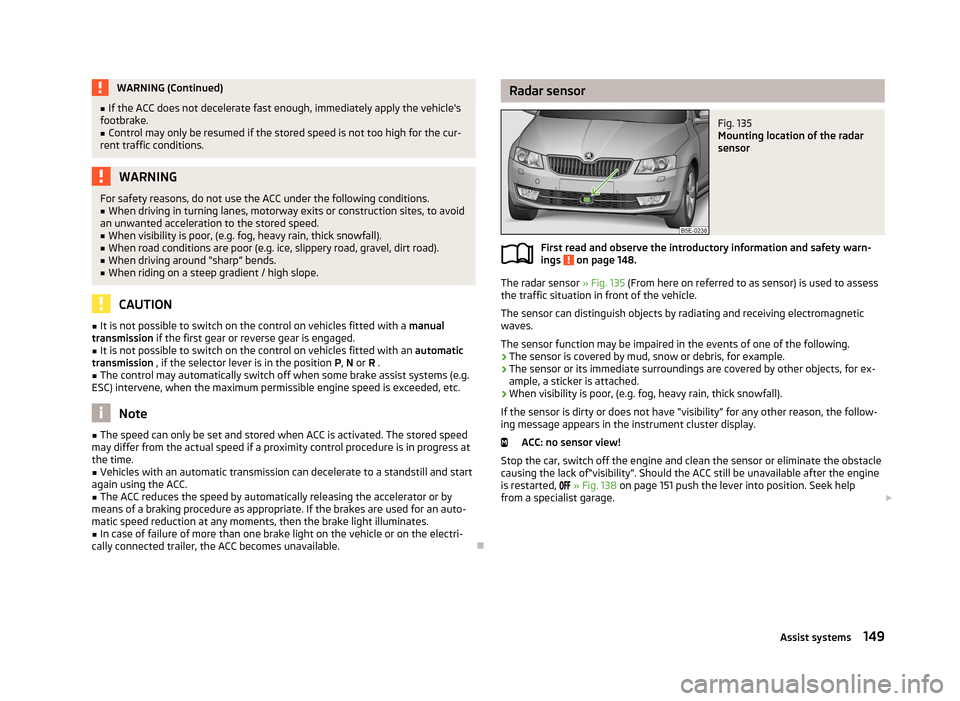
Radar sensorFig. 135
Mounting location of the radar
sensor
First read and observe the introductory information and safety warn-
ings on page 148.
The radar sensor » Fig. 135 (From here on referred to as sensor) is used to assess
the traffic situation in front of the vehicle.
The sensor can distinguish objects by radiating and receiving electromagneticwaves.
The sensor function may be impaired in the events of one of the following.
› The sensor is covered by mud, snow or debris, for example.
› The sensor or its immediate surroundings are covered by other objects, for ex-
ample, a sticker is attached.
› When visibility is poor, (e.g. fog, heavy rain, thick snowfall).
If the sensor is dirty or does not have “visibility” for any other reason, the follow- ing message appears in the instrument cluster display.
ACC: no sensor view!
Stop the car, switch off the engine and clean the sensor or eliminate the obstacle
causing the lack of“visibility”. Should the ACC still be unavailable after the engine is restarted,
» Fig. 138 on page 151 push the lever into position. Seek help
from a specialist garage.
149Assist systems
Page 154 of 287
Explanation of graphic » Fig. 137
Control deactivated (vehicle detected).
Control activated (no vehicle detected).
Control deactivated (no speed stored).
Control activated (vehicle detected).
The ACC can consistently maintain the set speed of 30-160 km/h, as well as the
proximity to the vehicle ahead ranging from a very small to a very large time inter-
val.
The ACC adjusts the set speed with respect to the detected vehicle ahead, thus
maintaining the selected proximity.
If the ACC does not decelerate fast enough with respect to the vehicle ahead, the symbol
and the following message both appear in the instrument cluster dis-
play.
Apply the brake!
Take over the steering and apply the brake! The ACC can detect a vehicle that is up to approx.120m ahead using the radar
sensor .
Automatic stop-start
First read and observe the introductory information and safety warn-
ings
on page 148.
Vehicles with an automatic transmission can decelerate to a standstill and start
moving again using the ACC.
Decelerate to a standstill
If a vehicle ahead decelerates to a standstill, the ACC will also decelerate your ve-
hicle to a standstill.
Starting to drive again after a holding period As soon as the vehicle ahead starts moving again after a holding period, your ve-hicle will also move and the speed will continue to be regulated. Control is auto-
matically disconnected in case of longer holding periods.
Take over the steering and apply the brake.
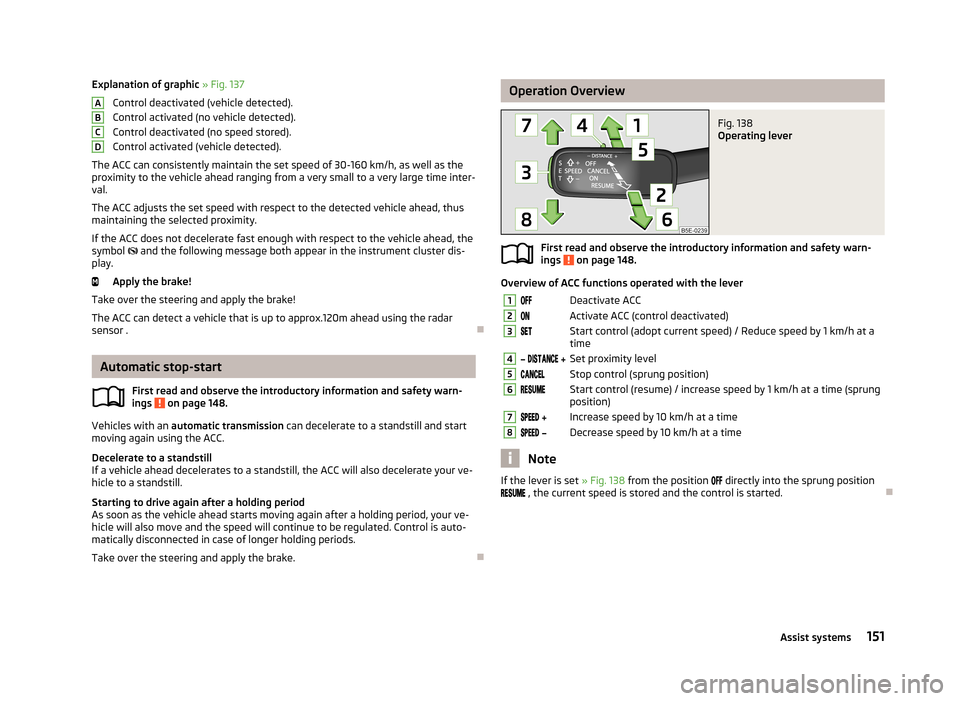
ABCDOperation OverviewFig. 138
Operating lever
First read and observe the introductory information and safety warn-
ings on page 148.
Overview of ACC functions operated with the lever
1Deactivate ACC2Activate ACC (control deactivated)3Start control (adopt current speed) / Reduce speed by 1 km/h at a
time4 Set proximity level5Stop control (sprung position)6Start control (resume) / increase speed by 1 km/h at a time (sprung
position)7 Increase speed by 10 km/h at a time8 Decrease speed by 10 km/h at a time
Note
If the lever is set » Fig. 138 from the position directly into the sprung position
, the current speed is stored and the control is started.
151Assist systems
Page 157 of 287
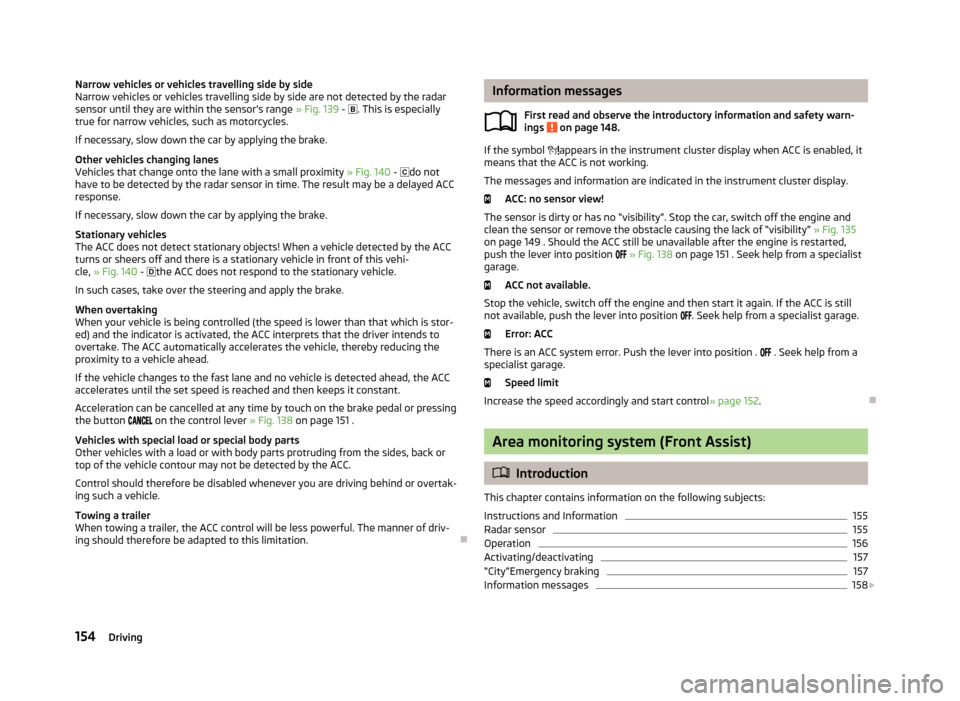
Narrow vehicles or vehicles travelling side by side
Narrow vehicles or vehicles travelling side by side are not detected by the radar
sensor until they are within the sensor's range » Fig. 139 - . This is especially
true for narrow vehicles, such as motorcycles.
If necessary, slow down the car by applying the brake.
Other vehicles changing lanes
Vehicles that change onto the lane with a small proximity » Fig. 140 - do not
have to be detected by the radar sensor in time. The result may be a delayed ACC
response.
If necessary, slow down the car by applying the brake.
Stationary vehicles
The ACC does not detect stationary objects! When a vehicle detected by the ACC turns or sheers off and there is a stationary vehicle in front of this vehi-cle, » Fig. 140 -
the ACC does not respond to the stationary vehicle.
In such cases, take over the steering and apply the brake.
When overtaking
When your vehicle is being controlled (the speed is lower than that which is stor-
ed) and the indicator is activated, the ACC interprets that the driver intends to
overtake. The ACC automatically accelerates the vehicle, thereby reducing the
proximity to a vehicle ahead.
If the vehicle changes to the fast lane and no vehicle is detected ahead, the ACC
accelerates until the set speed is reached and then keeps it constant.
Acceleration can be cancelled at any time by touch on the brake pedal or pressing
the button
on the control lever » Fig. 138 on page 151 .
Vehicles with special load or special body parts
Other vehicles with a load or with body parts protruding from the sides, back or
top of the vehicle contour may not be detected by the ACC.
Control should therefore be disabled whenever you are driving behind or overtak-ing such a vehicle.
Towing a trailer
When towing a trailer, the ACC control will be less powerful. The manner of driv- ing should therefore be adapted to this limitation.
Information messages
First read and observe the introductory information and safety warn-
ings
on page 148.
If the symbol
appears in the instrument cluster display when ACC is enabled, it
means that the ACC is not working.
The messages and information are indicated in the instrument cluster display. ACC: no sensor view!
The sensor is dirty or has no “visibility”. Stop the car, switch off the engine and
clean the sensor or remove the obstacle causing the lack of “visibility” » Fig. 135
on page 149 . Should the ACC still be unavailable after the engine is restarted,
push the lever into position
» Fig. 138 on page 151 . Seek help from a specialist
garage.
ACC not available.
Stop the vehicle, switch off the engine and then start it again. If the ACC is still not available, push the lever into position
. Seek help from a specialist garage.
Error: ACC
There is an ACC system error. Push the lever into position .
. Seek help from a
specialist garage.
Speed limit
Increase the speed accordingly and start control » page 152.
Area monitoring system (Front Assist)
Introduction
This chapter contains information on the following subjects:
Instructions and Information
155
Radar sensor
155
Operation
156
Activating/deactivating
157
“City”Emergency braking
157
Information messages
158
154Driving
Page 158 of 287
The area monitoring system (From here on only referred to as Front Assist) warns
you of the danger of a collision with an obstacle in front of the vehicle and tries to
avoid a collision or mitigate its consequences by automatically applying the
brakes as appropriate.WARNING■ Front Assist only works as an aid, it does absolve the driver of the responsi-
bility to maintain full control over the vehicle's steering.■
Front Assist has physical and system related limitations. For this reason, the
driver may experience some undesired or delayed system responses in certain
situations. You should therefore always be alert and ready to intervene!
■
Always adapt your speed and safety proximity to the vehicle ahead to the
current visibility, weather, road and traffic conditions.
■
If Front Assist gives a warning, then, depending on the traffic situation, im-
mediately slow down the car by applying the brakes or avoid the obstacle.
■
The increased safety through the Front Assist system must not tempt you
to take greater risks than otherwise – risk of accident!
■
The driver must always be ready to take over steering of the vehicle himself
(brake or accelerate).
■
Front Assist does not respond to crossing or oncoming objects.
Instructions and Information
First read and observe the introductory information and safety warn-ings
on page 154.
Front Assist may become impaired in the following situations, for example.
› When visibility is poor, (e.g. fog, heavy rain, thick snowfall).
› Driving around “sharp” bends.
› When fully pressing down the accelerator pedal.
› If there is a fault with the Front Assist system.
› When one of the brake assist systems (e.g. ESC) intervenes.
WARNINGIn the following situations, Front Assist should be switched off for safety rea-
sons.■
When the vehicle is being towed away.WARNING (Continued)■ When the vehicle is on a rolling test bench.■When an undesired activation has repeatedly occurred.■
When on a truck, train or a car ferry service or the like.
CAUTION
Narrow vehicles or vehicles travelling side by side are not detected by Front As-
sist via the radar sensor until they are within the sensor's range. This is especially
true for narrow vehicles, such as motorcycles.
Note
In case of failure of more than one brake light on the vehicle or on the electrically
connected trailer, Front Assist not available.
Radar sensor
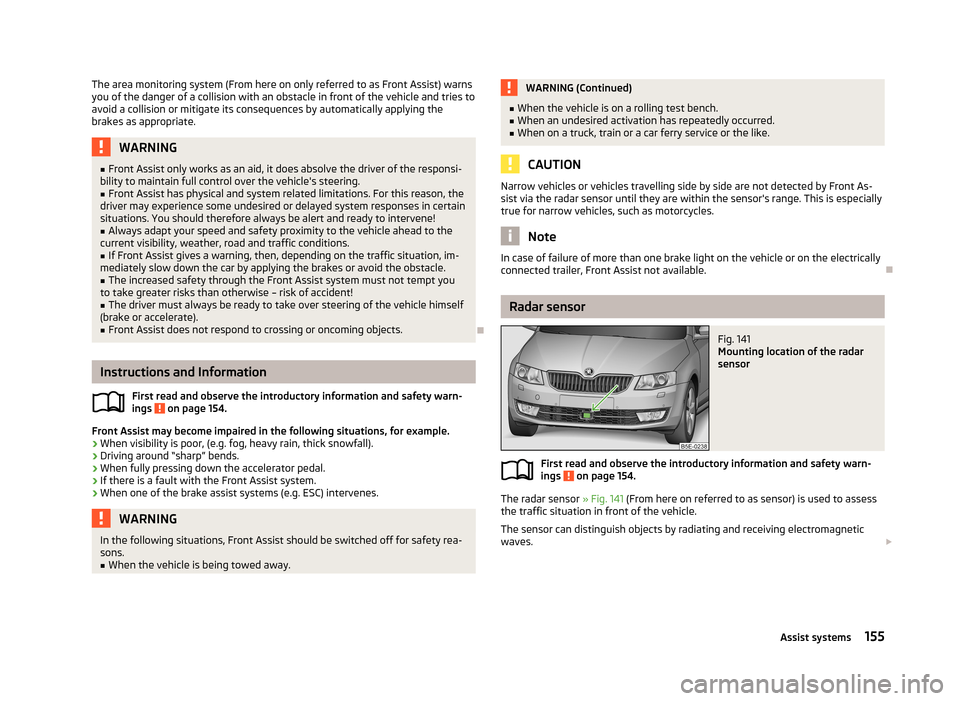
Fig. 141
Mounting location of the radar
sensor
First read and observe the introductory information and safety warn- ings on page 154.
The radar sensor » Fig. 141 (From here on referred to as sensor) is used to assess
the traffic situation in front of the vehicle.
The sensor can distinguish objects by radiating and receiving electromagneticwaves.
155Assist systems
Page 159 of 287
The sensor function may be impaired in the events of one of the following.
› The sensor is covered by mud, snow or debris, for example.
› The sensor or its immediate surroundings are covered by other objects, for ex-
ample, a sticker is attached.
› When visibility is poor, (e.g. fog, heavy rain, thick snowfall).
If the sensor is dirty or does not have “visibility” for any other reason, the follow-
ing message appears in the instrument cluster display.
Front Assist: no sensor view.
Stop the car, switch off the engine and clean the sensor or eliminate the obstacle
causing the lack of“visibility”. Should Front Assist still be unavailable after the en-
gine is restarted, consult a specialist garage for help.WARNING■ If you suspect that the sensor is damaged, deactivate Front Assist. Have the
sensor checked by a specialist garage.■
The sensor can become misaligned by collisions or by damage to the front of
the vehicle, the wheel arch or the underside of the vehicle. This can lead to
impaired function of the Front Assist function - risk of accidents! If this is the
case, have the sensor checked by a specialist garage.
■
Any improperly carried out work to the front of the vehicle may cause the
sensor to become misaligned. We therefore recommend only having these
modifications and technical alterations carried out by a specialist garage. Please also observed the instructions in » page 200, Service work, adjust-
ments and technical alterations .
■
The area in front of and around the sensor must not be covered with stick-
ers, additional lights or similar items. This can lead to impaired function of the
sensor - risk of accidents!
WARNINGThe sensor may not be able to distinguish all objects correctly under certain
circumstances. You should therefore not use Front Assist in the following ca-
ses - risk of accidents!■
When driving through places where metal objects (such as metal buildings,
railroad tracks, etc.) can be found.
■
When driving through very divided and enclosed spaces (such as large-ca-
pacity garages, car ferries and the like.)
CAUTIONRemove the snow with a brush and the ice with a solvent-free de-icer.
Operation
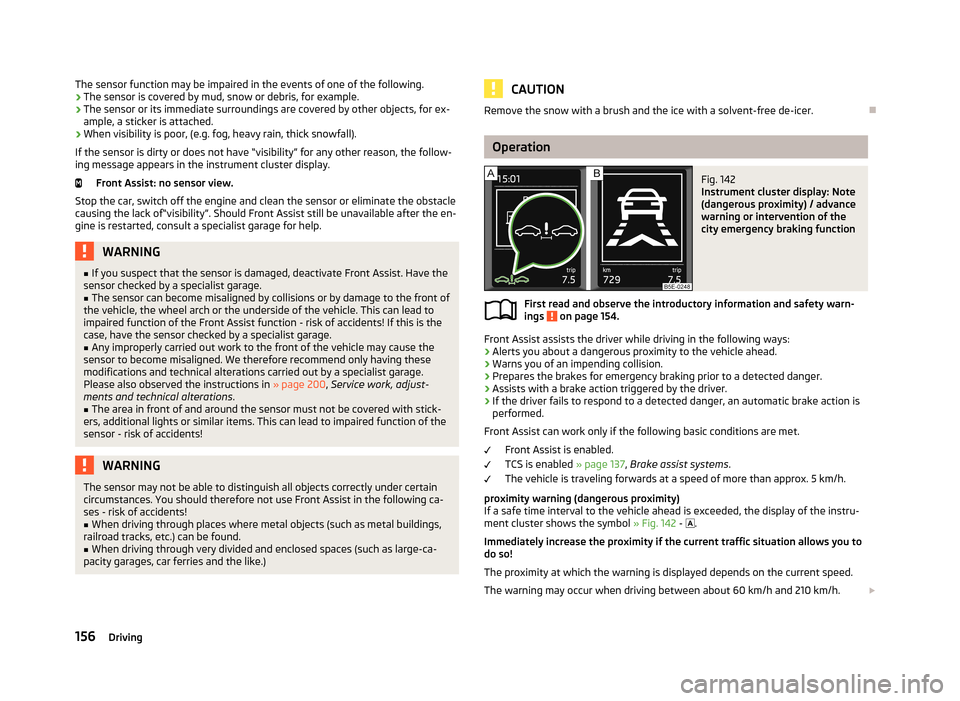
Fig. 142
Instrument cluster display: Note
(dangerous proximity) / advance
warning or intervention of the
city emergency braking function
First read and observe the introductory information and safety warn-
ings on page 154.
Front Assist assists the driver while driving in the following ways:
› Alerts you about a dangerous proximity to the vehicle ahead.
› Warns you of an impending collision.
› Prepares the brakes for emergency braking prior to a detected danger.
› Assists with a brake action triggered by the driver.
› If the driver fails to respond to a detected danger, an automatic brake action is
performed.
Front Assist can work only if the following basic conditions are met. Front Assist is enabled.
TCS is enabled » page 137, Brake assist systems .
The vehicle is traveling forwards at a speed of more than approx. 5 km/h.
proximity warning (dangerous proximity)
If a safe time interval to the vehicle ahead is exceeded, the display of the instru- ment cluster shows the symbol » Fig. 142 -
.
Immediately increase the proximity if the current traffic situation allows you to do so!
The proximity at which the warning is displayed depends on the current speed.
The warning may occur when driving between about 60 km/h and 210 km/h.
156Driving
Page 161 of 287
The emergency brake function is automatically activated or deactivated togetherwith the Front Assist system.
If the emergency brake function triggers an automatic brake action, the display of
the instrument cluster shows the symbol » Fig. 142 on page 156 - .WARNINGThe emergency brake function can slow down the vehicle to a complete
standstill. If the vehicle continues to roll forward after stopping, then it should
be stopped with the footbrake.
CAUTION
Automatic braking interventions by the emergency brake function can be termi-
nated by pressing the clutch or the accelerator, or by moving the steering wheel.
Note
If an automatic brake intervention is triggered by the emergency brake function,
the pressure in the brake system increases and the brake pedal cannot be oper-
ated with the normal pedal stroke.
Information messages
First read and observe the introductory information and safety warn-
ings
on page 154.
The messages and information are indicated in the instrument cluster display.
Front Assist: no sensor view.
The sensor is dirty or has no “visibility”. Stop the car, switch off the engine and clean the sensor or remove the obstacle causing the lack of “visibility” » Fig. 135
on page 149 . If the message appears again after starting the engine, the system
should be disabled » page 157. Seek help from a specialist garage.
Front Assist not available.
Stop the vehicle, switch off the engine and then start it again. If the message ap-
pears again after starting the engine, the system should be disabled » page 157.
Seek help from a specialist garage.
START-STOP
Introduction
This chapter contains information on the following subjects:
Starting/shutting down the engine
159
Operating conditions of the system
160
Manually activating/deactivating the system
160
Information messages
161
The START-STOP system helps you to save fuel while at the same time reducing
harmful exhaust emissions and CO 2 emissions.
The function is automatically activated each time the ignition is switched on.
In the start-stop mode, the engine automatically switches to the vehicle's idle phase, e.g. when stopped at traffic lights. The engine restarts automatically
where necessary.
Information about the current status of the system can be displayed in the Info-
tainment display » operating instructions for Infotainment , chapter Vehicle set-
tings (CAR button) .
The system can work only if the following basic conditions are met. The driver's door is closed.
The driver has fastened the seat belt. The bonnet is closed.
The driving speed was higher than 4 km.h after the last stop.
No trailer is coupled.
WARNING■ The brake servo unit and power steering only operate if the engine is run-
ning.■
Never let the vehicle roll with the engine switched off.
CAUTION
Always deactivate the START-STOPsystem before driving through wa-
ter » page 135 . 158Driving
Page 257 of 287
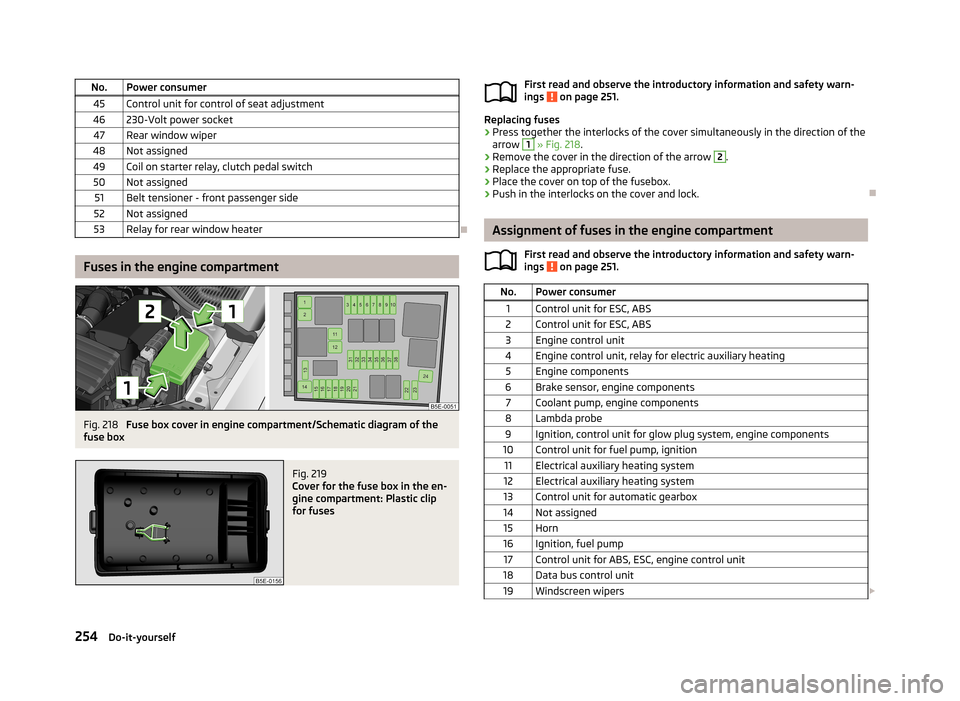
No.Power consumer45Control unit for control of seat adjustment46230-Volt power socket47Rear window wiper48Not assigned49Coil on starter relay, clutch pedal switch50Not assigned51Belt tensioner - front passenger side52Not assigned53Relay for rear window heater
Fuses in the engine compartment
Fig. 218
Fuse box cover in engine compartment/Schematic diagram of the
fuse box
Fig. 219
Cover for the fuse box in the en-
gine compartment: Plastic clip
for fuses
First read and observe the introductory information and safety warn-
ings on page 251.
Replacing fuses
›
Press together the interlocks of the cover simultaneously in the direction of the
arrow
1
» Fig. 218 .
›
Remove the cover in the direction of the arrow
2
.
›
Replace the appropriate fuse.
›
Place the cover on top of the fusebox.
›
Push in the interlocks on the cover and lock.
Assignment of fuses in the engine compartment
First read and observe the introductory information and safety warn-ings
on page 251.
No.Power consumer1Control unit for ESC, ABS2Control unit for ESC, ABS3Engine control unit4Engine control unit, relay for electric auxiliary heating5Engine components6Brake sensor, engine components7Coolant pump, engine components8Lambda probe9Ignition, control unit for glow plug system, engine components10Control unit for fuel pump, ignition11Electrical auxiliary heating system12Electrical auxiliary heating system13Control unit for automatic gearbox14Not assigned15Horn16Ignition, fuel pump17Control unit for ABS, ESC, engine control unit18Data bus control unit19Windscreen wipers 254Do-it-yourself
Page 278 of 287
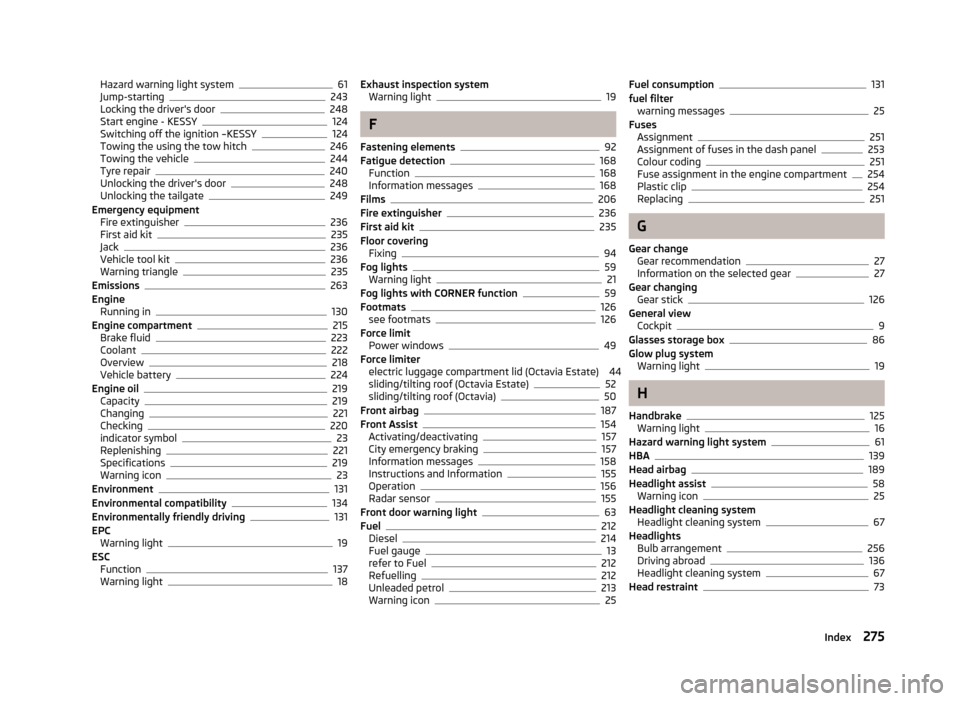
Hazard warning light system61
Jump-starting243
Locking the driver's door248
Start engine - KESSY124
Switching off the ignition –KESSY124
Towing the using the tow hitch246
Towing the vehicle244
Tyre repair240
Unlocking the driver's door248
Unlocking the tailgate249
Emergency equipment Fire extinguisher
236
First aid kit235
Jack236
Vehicle tool kit236
Warning triangle235
Emissions263
Engine Running in
130
Engine compartment215
Brake fluid223
Coolant222
Overview218
Vehicle battery224
Engine oil219
Capacity219
Changing221
Checking220
indicator symbol23
Replenishing221
Specifications219
Warning icon23
Environment131
Environmental compatibility134
Environmentally friendly driving131
EPC Warning light
19
ESC Function
137
Warning light18
Exhaust inspection system Warning light19
F
Fastening elements
92
Fatigue detection168
Function168
Information messages168
Films206
Fire extinguisher236
First aid kit235
Floor covering Fixing
94
Fog lights59
Warning light21
Fog lights with CORNER function59
Footmats126
see footmats126
Force limit Power windows
49
Force limiter electric luggage compartment lid (Octavia Estate) 44sliding/tilting roof (Octavia Estate)
52
sliding/tilting roof (Octavia)50
Front airbag187
Front Assist154
Activating/deactivating157
City emergency braking157
Information messages158
Instructions and Information155
Operation156
Radar sensor155
Front door warning light63
Fuel212
Diesel214
Fuel gauge13
refer to Fuel212
Refuelling212
Unleaded petrol213
Warning icon25
Fuel consumption131
fuel filter warning messages
25
Fuses Assignment
251
Assignment of fuses in the dash panel253
Colour coding251
Fuse assignment in the engine compartment254
Plastic clip254
Replacing251
G
Gear change Gear recommendation
27
Information on the selected gear27
Gear changing Gear stick
126
General view Cockpit
9
Glasses storage box86
Glow plug system Warning light
19
H
Handbrake
125
Warning light16
Hazard warning light system61
HBA139
Head airbag189
Headlight assist58
Warning icon25
Headlight cleaning system Headlight cleaning system
67
Headlights Bulb arrangement
256
Driving abroad136
Headlight cleaning system67
Head restraint73
275Index