fuses SKODA OCTAVIA 2013 3.G / (5E) Owner's Manual
[x] Cancel search | Manufacturer: SKODA, Model Year: 2013, Model line: OCTAVIA, Model: SKODA OCTAVIA 2013 3.G / (5E)Pages: 287, PDF Size: 18.55 MB
Page 7 of 287
General Maintenance
Vehicle care198
Service intervals
198
Service work, adjustments and technical alterations
200
Washing your car
203
Taking care of your vehicle exterior
205
Taking care of the interior
208
Inspecting and replenishing
212
Fuel
212
Engine compartment
215
Engine oil
219
Coolant
221
Brake fluid
223
Vehicle battery
224
Wheels
228
Tyres and wheel rims
228
Winter operation
234
Do-it-yourself
Emergency equipment, and self-help
235
Emergency equipment
235
Changing a wheel
237
Tyre repair
240
Jump-starting
243
Towing the vehicle
244
Remote control
246
Emergency unlocking/locking
248
Replacing windscreen wiper blades
249
Fuses and light bulbs
251
Fuses
251
Bulbs
255Technical data
Technical data263
Vehicle data
263
Index
4Table of Contents
Page 25 of 287
While the operational faults remain unrectified, the messages are always indica-
ted again. After they are displayed for the first time, the symbols or continue
to be indicated without any extra messages for the driver.
On vehicles with a colour MAXI DOT display some warning icons in the display are
in colour.WARNING■ Ignoring illuminated warning icons and related messages or instructions in
the display of the instrument cluster may lead to serious personal injury or
damage to the vehicle.■
If you have to stop for technical reasons, then park the vehicle at a safe dis-
tance from the traffic, switch off the engine and activate the hazard warning
light system » page 61. The warning triangle must be set up at the prescri-
bed distance - observe the national legal provisions when doing so.
■
The engine compartment of your car is a hazardous area. While working in
the engine compartment, be sure to observe the following warn-
ings » page 215 , Engine compartment .
Rear seat belt warning
First read and observe the introductory information and safety warn-
ings
on page 21.
A rear seat belt is not fastened
A rear seat belt is fastened
The warning icons
or
come on after the ignition has been switched on.
When the seat belt is fastened/unfastened, the particular icon lights up briefly and indicates the current belt status!
Further information » page 180, Seat belts .
Alternator
First read and observe the introductory information and safety warn-
ings
on page 21.
The warning icon
lights up if the vehicle battery is not charged when the en-
gine is running.
Seek assistance from a specialist garage immediately.
CAUTION
If the icon (cooling system fault) comes on in addition to the icon when driv-
ing, stop the vehicle immediately and switch off the engine – risk of engine dam- age!
Coolant
First read and observe the introductory information and safety warn-ings
on page 21.
Coolant level too low
If the coolant level is too low, the warning icon
lights up and the following
message appears in the instrument cluster display.
Check coolant! Owner's manual!
ENGINE COOLANT PLEASE CHECK
› Stop the vehicle, switch off the engine, and check the coolant level
» page 222.
› If the coolant level is too low, add coolant to the reservoir
» page 222.
› If, after adding coolant and switching on the ignition, the warning icon
disap-
pears, you can continue your journey.
› If the coolant level is within the specified range, but the warning icon
is still
lit, check the fuse for the radiator fan and replace it if necessary » page 254,
Fuses in the engine compartment .
› If the coolant level and fan fuse are in order, but the warning icon
is still lid,
do not continue your journey!
› Seek help from a specialist garage.
Coolant temperature too high
If the coolant temperature is too high, the warning icon
lights up and the fol-
lowing message appears in the instrument cluster display.
Engine overheat. Stop! Owner's manual!
ENGINE OVERHEAT STOP
› Stop the vehicle and turn off the engine.
› Wait until the coolant temperature gauge pointer returns to the operating
range » page 13 .
› Continue your journey only after the warning icon
has disappeared.
22Using the system
Page 111 of 287
It recommended to open the windows or the doors of a vehicle for which the inte-rior has been strongly heated through the effect of direct sunlight in order to al-low the heated air to escape.
The cooling system should not be on if the windows are open.
For the sake of the environment
Pollutant emissions are also reduced when fuel is saved » page 131, Economical
driving and environmental sustainability .
Operational problems
First read and observe the introductory information and safety warn-
ings
on page 106.
If the cooling system does not operate at outside temperatures higher than +5 °C,
there is a problem in the system. The reasons for this may be.
› One of the fuses has blown. Check the fuse and replace if necessa-
ry » page 253 .
› The cooling system has switched off automatically for a short time because the
coolant temperature of the engine is too hot » page 13.
If you are not able to resolve the operational problem yourself, or if the cooler output has reduced, switch off the cooling system and seek assistance from a
specialist garage.
Heating
Introduction
This chapter contains information on the following subjects:
Control elements
108
Adjusting
109
Recirculated air mode
109
Control elementsFig. 108
Heating: Control elements
First read and observe the introductory information given on page 108.
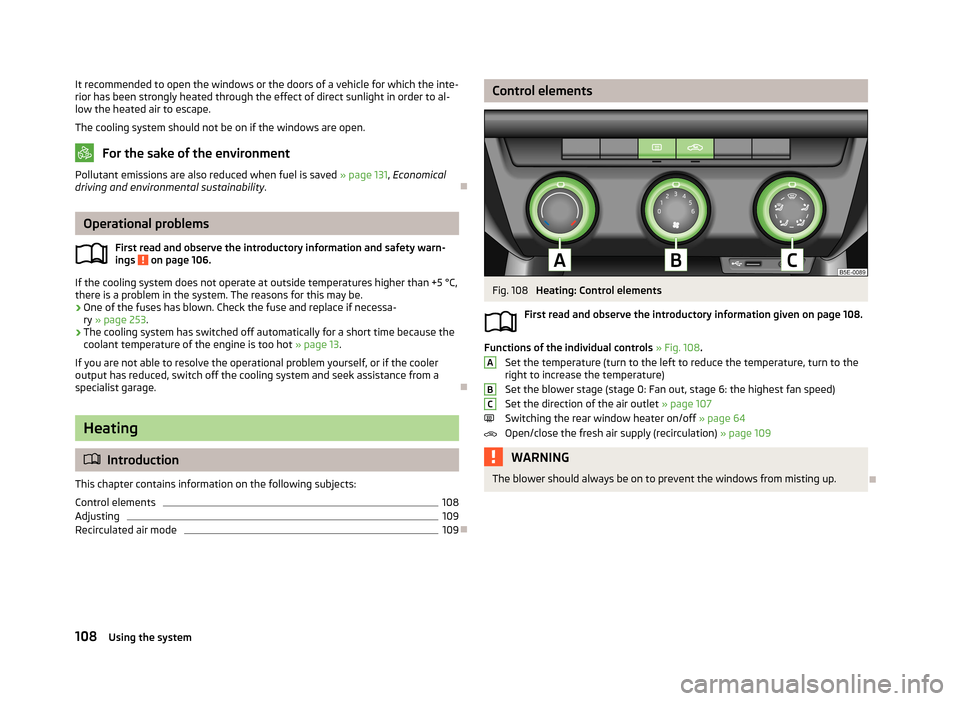
Functions of the individual controls » Fig. 108 .
Set the temperature (turn to the left to reduce the temperature, turn to the
right to increase the temperature)
Set the blower stage (stage 0: Fan out, stage 6: the highest fan speed)
Set the direction of the air outlet » page 107
Switching the rear window heater on/off » page 64
Open/close the fresh air supply (recirculation) » page 109
WARNINGThe blower should always be on to prevent the windows from misting up.
ABC108Using the system
Page 124 of 287
›Depress and hold the clutch pedal (vehicles with a manual gearbox) or brake
pedal (vehicles with an automatic gearbox) until the engine starts.›
Turn the key into position
3
as far as it will go - the engine's starting proce-
dure will commence (do not touch the accelerator).
›
Release the key, the engine will start automatically.
After letting go, the vehicle key will return to position
2
.
›
Release the handbrake.
If the engine does not start within 10 seconds, turn the key to position
1
. Repeat
the start-up process after approx. half a minute.
Vehicles with manual transmission
The engine will not start if the clutch pedal is not depressed.
The following message is shown in the information cluster display. Press the clutch to start.
PRESS CLUTCH
Vehicles with automatic transmission
The engine will not start if the brake pedal is not depressed.
The following message is shown in the information cluster display. Apply the brake to start.
APPLY BRAKE
CAUTION
■ If the engine does not start up after a second attempt, one of the following
fuses may be defective. ■Petrol engine - fuse for the fuel pump.
■ Diesel engine - fuse for the glow plug control unit or fuel pump.■
Check the fuse and replace if necessary » page 251, or seek assistance from a
specialist garage.
Stopping the engine
First read and observe the introductory information and safety warn-ings
on page 119.
Switch off the engine by turning the ignition key into position
1
» Fig. 115 on
page 120.
NoteFor vehicles with automatic transmission, the ignition key can only be removed if
the selector lever is in position P .
Starting and stopping the engine - KESSY
Introduction
This chapter contains information on the following subjects:
Steering lock / unlock
122
Switching on the ignition
123
Starting the engine
123
Switching off the ignition
123
Switching off the engine
123
Emergency start-up of the engine
124
Emergency ignition shutoff system
124
The KESSY system (Keyless Entry Exit System, hereinafter referred to only as sys- tem) allows the switching on or switching off of the ignition and starting or stop-
ping of the engine without the active use of the key.
A key must be in the vehicle to unlock the steering, switch on the ignition and
start the vehicle. When travelling the key must be in the vehicle.
The engine running noises may louder at first be louder for a short time afterstarting the cold engine. This is quite normal and is not an operating problem.
WARNING■ Never leave the key in the vehicle when you exit the vehicle. This is particu-
larly important if children are left in the vehicle. Otherwise the children could,
for example, start the engine – risk of accident or injury!■
Never leave the vehicle unattended with the engine running.
■
Never switch off the engine before the vehicle is stationary – risk of acci-
dent!
121Starting-off and Driving
Page 126 of 287
If the steering is still not unlocked, then the following message is displayed on
the display of the instrument cluster.
Move the steering wheel!
MOVE STEERING WHEEL
Slightly move the steering wheel and the system will make up to 3 more attempts
to unlock after 2 seconds. At the same time, the indicator light flashes.
If the steering is still not unlocked, to try to eliminate the possible cause and then
repeat the unlocking attempt.
Switching on the ignition
First read and observe the introductory information and safety warn-
ings
on page 121.
›
Press the starter button » Fig. 116 on page 122 briefly.
The ignition is switched on.
Note
The ignition is switched on when indicated by the lighting up of certain indicator
lamps in the instrument cluster.
Starting the engine
First read and observe the introductory information and safety warn-
ings
on page 121.
Vehicles with a diesel engine are equipped with a glow plug system. The glow
plug warning light
illuminates after the ignition has been switched on. Start
the engine after the warning light
has gone out.
You should not switch on any major electrical components during the heating pe- riod otherwise the vehicle battery will be drained unnecessarily.
Procedure for starting the engine
›
Firmly apply the handbrake.
›
Move the gearshift lever into neutral or move the selector lever into position P
or N.
›
Depress and hold the clutch pedal (vehicles with a manual gearbox) or brake
pedal (vehicles with an automatic gearbox) until the engine starts.
› Press the starter button
» Fig. 116 on page 122 briefly – the engine starts auto-
matically.›
Release the handbrake.
CAUTION
■ If the engine does not start up after a second attempt, one of the following
fuses may be defective. ■Petrol engine - fuse for the fuel pump.
■ Diesel engine - fuse for the glow plug control unit or fuel pump.■
Check the fuse and replace if necessary » page 251, or seek assistance from a
specialist garage.
Switching off the ignition
First read and observe the introductory information and safety warn-ings
on page 121.
›
Press the starter button » Fig. 116 on page 122 briefly.
The ignition is switched off.
The ignition can be switched off up to a speed of 2 km/h.
On vehicles fitted with a manual gearbox, the clutch pedal must not be de-
pressed after switching off the ignition, otherwise the system would try to start.
For automatic transmission vehicles, the brake pedal must not be depressed,
otherwise the system will try to start.
If the driver's door is opened while the igition is on, an audible signal sounds andthe following message appears in the instrument cluster display.
Ignition on!
IGNITION STILL ON
When leaving the vehicle always switch off the ignition.
Switching off the engine
First read and observe the introductory information and safety warn-ings
on page 121.
›
Stop the vehicle.
›
Press the starter button » Fig. 116 on page 122 .
123Starting-off and Driving
Page 177 of 287
WARNING■Never use the safety eye to tow a vehicle!■Adapt your speed to the conditions of the road surface and to the traffic sit-
uation.■
Improper or incorrectly connected electric cables can energise the trailer and
cause functional faults to the vehicle's entire electrical system as well as acci-
dents and severe injuries.
■
Work on the electrical system must only be carried out by specialist garages.
■
Never directly connect the trailer's electrical system with the electrical con-
nections for the tail lights or other current sources.
Note
■ After coupling the trailer and connecting up the power socket, check the rear
lights on the trailer to ensure they work.■
If there is an error in the trailer lighting system, check the fuses in the fuse box
in the dashboard » page 253.
■
Contact between the breakaway cable and the safety eye can result in mechan-
ical wear on the protective surface of the eye. Such wear does not impair the
functioning of the safety eye and is not a fault. It is excluded from the warranty
coverage.
■
If you tow a trailer frequently, have your car inspected between service inter-
vals too.
■
The handbrake on the towing vehicle must be put on when coupling and decou-
pling the trailer.
Trailer stabilisation
First read and observe the introductory information and safety warn-
ings
on page 172.
The trailer stabilisation is an extension of the stabilisation control that works in
conjunction with the counter-steering assistance to reduce the amount the trail-
er "sways".
After turning on the ignition, the ESC warning light
in the instrument cluster
lights up for about 2 seconds longer than the ABS warning light.
Function requirements for trailer stabilisation.
The trailer was shipped from the factory or purchased from the ŠKODA genu-
ine accessories.
The ESC system is active. (The warning light is lit up in the instrument clus-
ter or not ).
The trailer is electrically connected to the towing vehicle by means of the
trailer socket.
The speed is higher than approx. 60 km/h.
The trailer has a rigid drawbar.WARNINGThe increased safety offered by the trailer stabilisation must not tempt you to take greater risks than otherwise.
CAUTION
■ The trailer stabilisation need not be able to correctly detect all of driving situa-
tions.■
Trailers that sway slightly may not always be detected by the trailer stabilisa-
tion and are thus not stabilised accordingly.
■
Release the pressure on the accelerator pedal if the system is being regulated.
■
Avoid abrupt and sudden driving/braking manoeuvres.
Note
The trailer stabilisation works for both braked and unbraked trailers.
Anti-theft alarm system
First read and observe the introductory information and safety warn-
ings
on page 172.
If the vehicle is locked, the alarm is activated when the electrical connection to
the trailer is interrupted.
Always switch off the anti-theft alarm system before a trailer is coupled or uncou- pled » page 42 .
174Driving
Page 254 of 287
Fuses and light bulbs
Fuses
Introduction
This chapter contains information on the following subjects:
Fuses in the dash panel – LHD
252
Fuses in the dash panel – RHD
252
Assignment of the fuses in the dash panel
253
Fuses in the engine compartment
254
Assignment of fuses in the engine compartment
254
Individual electrical circuits are protected by fuses.
Switch off the ignition and the corresponding power consuming device before re-
placing a fuse.
Find out which fuse belongs to the component that is not operating » page 253,
Assignment of the fuses in the dash panel or » page 254 , Assignment of fuses in
the engine compartment .
Electrically adjustable seats are protected by automatic circuit breakers, which
switch on again automatically after a few seconds after the overload has been
eliminated.
Fuse colourMaximum amperagelight brown5dark brown7.5red10blue15yellow/blue20white25green/pink30orange/green40red50WARNINGAlways read and observe the warnings before completing any work in the en-
gine compartment » page 215.
CAUTION
■
“Never repair” fuses, and do not replace them with fuses of a higher amperage –
risk of fire! This may also cause damage at other points in the electrical system.■
If a newly inserted fuse blows again after a short time, have the electrical sys-
tem checked as quickly as possible by a specialist garage.
■
A blown fuses is recognisable by the molten metal strip. Replace the faulty fuse
with a new one of the same amperage.
■
The cover for the fuse box in the engine compartment must always be applied
correctly. Water may get into the fuse box if the cover is not replaced properly -
there is a risk of damage to the vehicle.
Note
■ We recommend always carrying replacement fuses in the vehicle. A box of re-
placement fuses can be purchased from ŠKODA Original Accessories.■
There can be several power consuming devices for one fuse.
■
There can be several consumer devices for one fuse, depending on the vehicle's
equipment.
■
Multiple fuses may exist for a single power consuming device.
■
Multiple power consuming devices can share a single fuse.
251Fuses and light bulbs
Page 255 of 287
Fuses in the dash panel – LHDFig. 215
Storage compartment on the
driver's side: LHD
First read and observe the introductory information and safety warn-
ings on page 251.
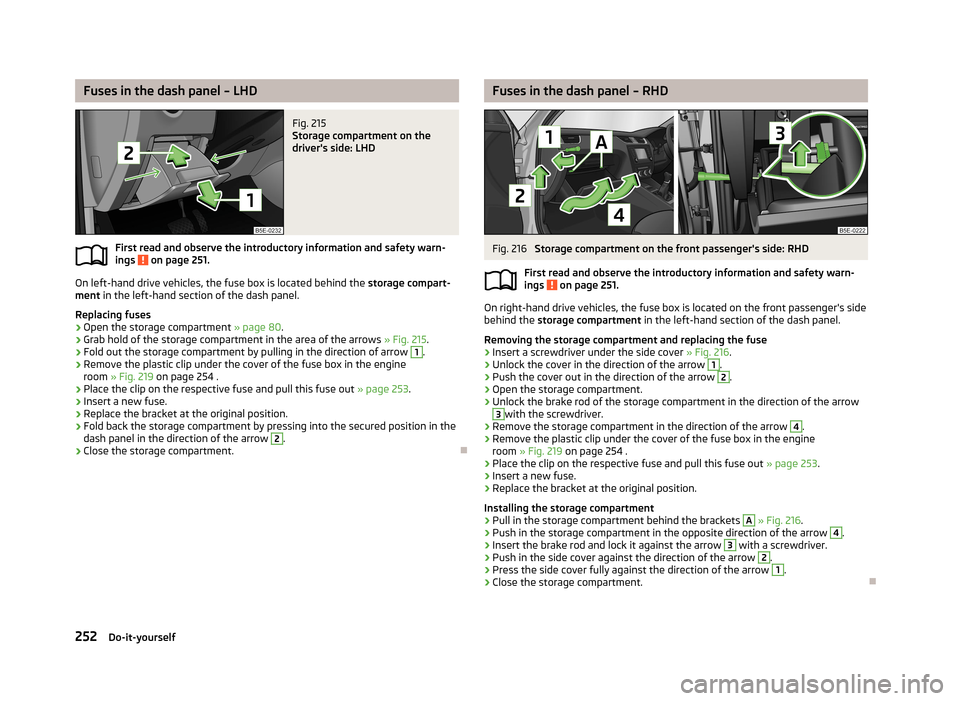
On left-hand drive vehicles, the fuse box is located behind the storage compart-
ment in the left-hand section of the dash panel.
Replacing fuses
›
Open the storage compartment » page 80.
›
Grab hold of the storage compartment in the area of the arrows » Fig. 215.
›
Fold out the storage compartment by pulling in the direction of arrow
1
.
›
Remove the plastic clip under the cover of the fuse box in the engine
room » Fig. 219 on page 254 .
›
Place the clip on the respective fuse and pull this fuse out » page 253.
›
Insert a new fuse.
›
Replace the bracket at the original position.
›
Fold back the storage compartment by pressing into the secured position in the
dash panel in the direction of the arrow
2
.
›
Close the storage compartment.
Fuses in the dash panel – RHDFig. 216
Storage compartment on the front passenger's side: RHD
First read and observe the introductory information and safety warn- ings
on page 251.
On right-hand drive vehicles, the fuse box is located on the front passenger's side behind the storage compartment in the left-hand section of the dash panel.
Removing the storage compartment and replacing the fuse
›
Insert a screwdriver under the side cover » Fig. 216.
›
Unlock the cover in the direction of the arrow
1
.
›
Push the cover out in the direction of the arrow
2
.
›
Open the storage compartment.
›
Unlock the brake rod of the storage compartment in the direction of the arrow
3
with the screwdriver.
›
Remove the storage compartment in the direction of the arrow
4
.
›
Remove the plastic clip under the cover of the fuse box in the engine
room » Fig. 219 on page 254 .
›
Place the clip on the respective fuse and pull this fuse out » page 253
.
›
Insert a new fuse.
›
Replace the bracket at the original position.
Installing the storage compartment
›
Pull in the storage compartment behind the brackets
A
» Fig. 216 .
›
Push in the storage compartment in the opposite direction of the arrow
4
.
›
Insert the brake rod and lock it against the arrow
3
with a screwdriver.
›
Push in the side cover against the direction of the arrow
2
.
›
Press the side cover fully against the direction of the arrow
1
.
›
Close the storage compartment.
252Do-it-yourself
Page 256 of 287
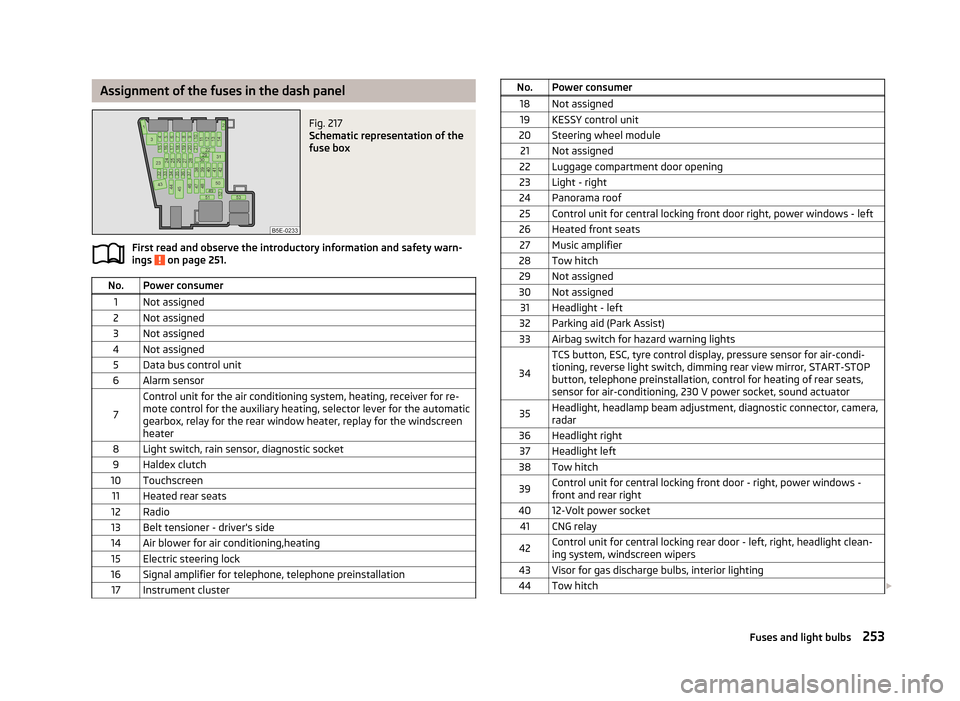
Assignment of the fuses in the dash panelFig. 217
Schematic representation of the
fuse box
First read and observe the introductory information and safety warn-
ings on page 251.
No.Power consumer1Not assigned2Not assigned3Not assigned4Not assigned5Data bus control unit6Alarm sensor
7
Control unit for the air conditioning system, heating, receiver for re-
mote control for the auxiliary heating, selector lever for the automatic gearbox, relay for the rear window heater, replay for the windscreenheater8Light switch, rain sensor, diagnostic socket9Haldex clutch10Touchscreen11Heated rear seats12Radio13Belt tensioner - driver's side14Air blower for air conditioning,heating15Electric steering lock16Signal amplifier for telephone, telephone preinstallation17Instrument clusterNo.Power consumer18Not assigned19KESSY control unit20Steering wheel module21Not assigned22Luggage compartment door opening23Light - right24Panorama roof25Control unit for central locking front door right, power windows - left26Heated front seats27Music amplifier28Tow hitch29Not assigned30Not assigned31Headlight - left32Parking aid (Park Assist)33Airbag switch for hazard warning lights
34
TCS button, ESC, tyre control display, pressure sensor for air-condi-tioning, reverse light switch, dimming rear view mirror, START-STOP
button, telephone preinstallation, control for heating of rear seats,
sensor for air-conditioning, 230 V power socket, sound actuator35Headlight, headlamp beam adjustment, diagnostic connector, camera,
radar36Headlight right37Headlight left38Tow hitch39Control unit for central locking front door - right, power windows - front and rear right4012-Volt power socket41CNG relay42Control unit for central locking rear door - left, right, headlight clean-ing system, windscreen wipers43Visor for gas discharge bulbs, interior lighting44Tow hitch 253Fuses and light bulbs
Page 257 of 287
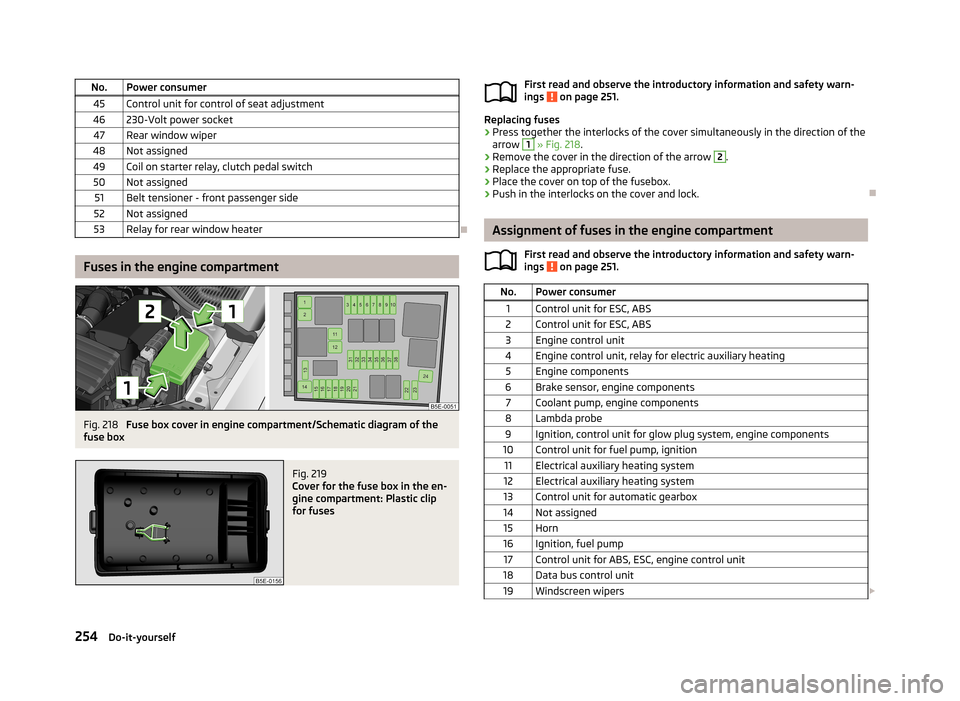
No.Power consumer45Control unit for control of seat adjustment46230-Volt power socket47Rear window wiper48Not assigned49Coil on starter relay, clutch pedal switch50Not assigned51Belt tensioner - front passenger side52Not assigned53Relay for rear window heater
Fuses in the engine compartment
Fig. 218
Fuse box cover in engine compartment/Schematic diagram of the
fuse box
Fig. 219
Cover for the fuse box in the en-
gine compartment: Plastic clip
for fuses
First read and observe the introductory information and safety warn-
ings on page 251.
Replacing fuses
›
Press together the interlocks of the cover simultaneously in the direction of the
arrow
1
» Fig. 218 .
›
Remove the cover in the direction of the arrow
2
.
›
Replace the appropriate fuse.
›
Place the cover on top of the fusebox.
›
Push in the interlocks on the cover and lock.
Assignment of fuses in the engine compartment
First read and observe the introductory information and safety warn-ings
on page 251.
No.Power consumer1Control unit for ESC, ABS2Control unit for ESC, ABS3Engine control unit4Engine control unit, relay for electric auxiliary heating5Engine components6Brake sensor, engine components7Coolant pump, engine components8Lambda probe9Ignition, control unit for glow plug system, engine components10Control unit for fuel pump, ignition11Electrical auxiliary heating system12Electrical auxiliary heating system13Control unit for automatic gearbox14Not assigned15Horn16Ignition, fuel pump17Control unit for ABS, ESC, engine control unit18Data bus control unit19Windscreen wipers 254Do-it-yourself