gearbox SKODA OCTAVIA 2013 3.G / (5E) Owner's Manual
[x] Cancel search | Manufacturer: SKODA, Model Year: 2013, Model line: OCTAVIA, Model: SKODA OCTAVIA 2013 3.G / (5E)Pages: 287, PDF Size: 18.55 MB
Page 2 of 287
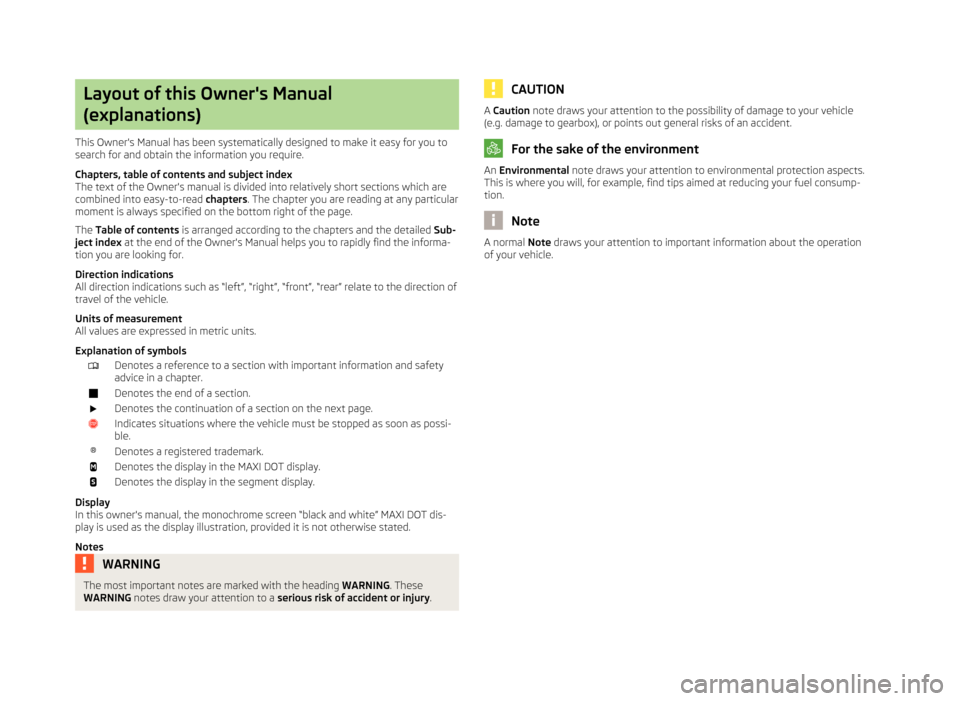
Layout of this Owner's Manual
(explanations)
This Owner's Manual has been systematically designed to make it easy for you to
search for and obtain the information you require.
Chapters, table of contents and subject index
The text of the Owner's manual is divided into relatively short sections which are
combined into easy-to-read chapters. The chapter you are reading at any particular
moment is always specified on the bottom right of the page.
The Table of contents is arranged according to the chapters and the detailed Sub-
ject index at the end of the Owner's Manual helps you to rapidly find the informa-
tion you are looking for.
Direction indications
All direction indications such as “left”, “right”, “front”, “rear” relate to the direction of
travel of the vehicle.
Units of measurement
All values are expressed in metric units.
Explanation of symbolsDenotes a reference to a section with important information and safety
advice in a chapter.Denotes the end of a section.Denotes the continuation of a section on the next page.Indicates situations where the vehicle must be stopped as soon as possi-
ble.®Denotes a registered trademark.Denotes the display in the MAXI DOT display.Denotes the display in the segment display.
Display
In this owner's manual, the monochrome screen “black and white” MAXI DOT dis-
play is used as the display illustration, provided it is not otherwise stated.
Notes
WARNINGThe most important notes are marked with the heading WARNING. These
WARNING notes draw your attention to a serious risk of accident or injury .CAUTIONA Caution note draws your attention to the possibility of damage to your vehicle
(e.g. damage to gearbox), or points out general risks of an accident.
For the sake of the environment
An Environmental note draws your attention to environmental protection aspects.
This is where you will, for example, find tips aimed at reducing your fuel consump-
tion.
Note
A normal Note draws your attention to important information about the operation
of your vehicle.
Page 10 of 287
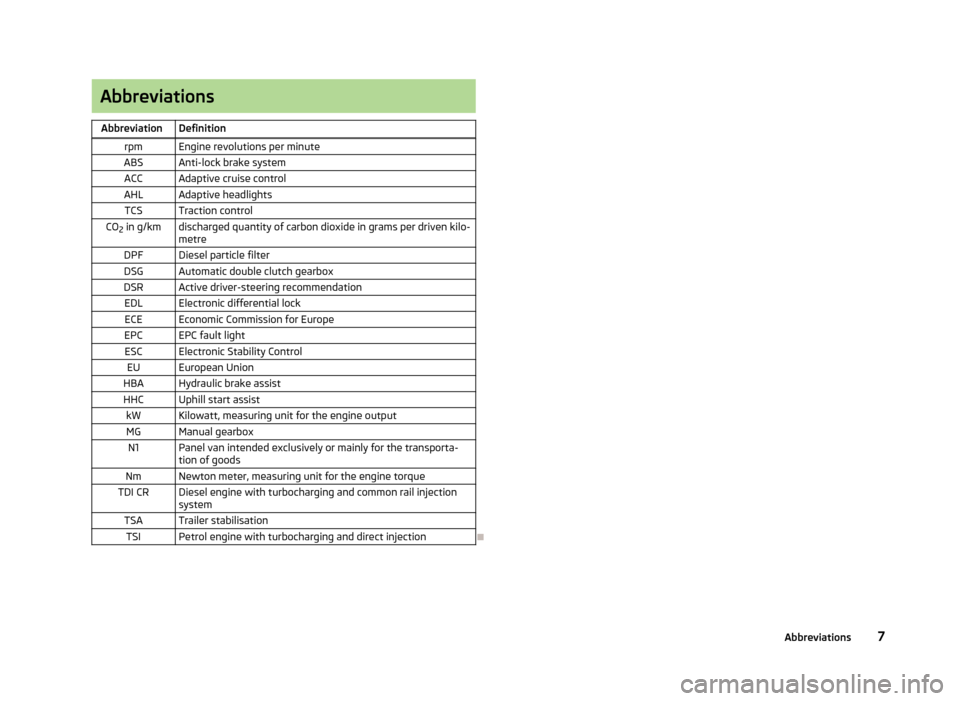
AbbreviationsAbbreviationDefinitionrpmEngine revolutions per minuteABSAnti-lock brake systemACCAdaptive cruise controlAHLAdaptive headlightsTCSTraction controlCO2 in g/kmdischarged quantity of carbon dioxide in grams per driven kilo-
metreDPFDiesel particle filterDSGAutomatic double clutch gearboxDSRActive driver-steering recommendationEDLElectronic differential lockECEEconomic Commission for EuropeEPCEPC fault lightESCElectronic Stability ControlEUEuropean UnionHBAHydraulic brake assistHHCUphill start assistkWKilowatt, measuring unit for the engine outputMGManual gearboxN1Panel van intended exclusively or mainly for the transporta-
tion of goodsNmNewton meter, measuring unit for the engine torqueTDI CRDiesel engine with turbocharging and common rail injection systemTSATrailer stabilisationTSIPetrol engine with turbocharging and direct injection
7Abbreviations
Page 12 of 287
Using the system
Cockpit
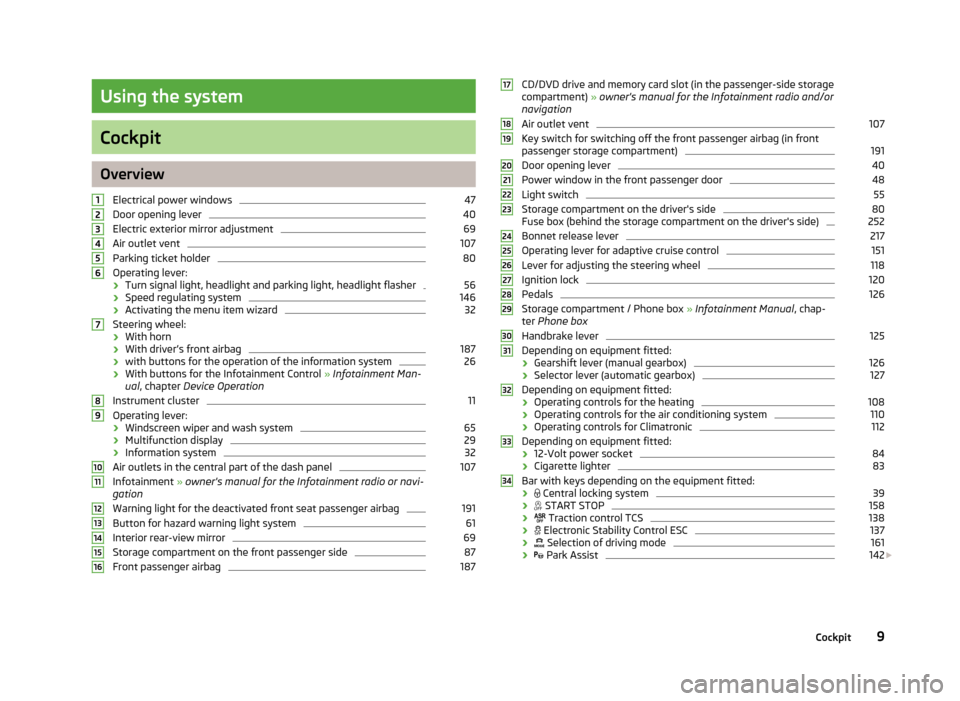
OverviewElectrical power windows
47
Door opening lever
40
Electric exterior mirror adjustment
69
Air outlet vent
107
Parking ticket holder
80
Operating lever:
› Turn signal light, headlight and parking light, headlight flasher
56
›
Speed regulating system
146
›Activating the menu item wizard
32
Steering wheel:
› With horn
› With driver’s front airbag
187
›
with buttons for the operation of the information system
26
›With buttons for the Infotainment Control
» Infotainment Man-
ual , chapter Device Operation
Instrument cluster
11
Operating lever:
› Windscreen wiper and wash system
65
›Multifunction display
29
›
Information system
32
Air outlets in the central part of the dash panel
107
Infotainment
» owner's manual for the Infotainment radio or navi-
gation
Warning light for the deactivated front seat passenger airbag
191
Button for hazard warning light system
61
Interior rear-view mirror
69
Storage compartment on the front passenger side
87
Front passenger airbag
18712345678910111213141516CD/DVD drive and memory card slot (in the passenger-side storage compartment) » owner's manual for the Infotainment radio and/or
navigation
Air outlet vent107
Key switch for switching off the front passenger airbag (in front passenger storage compartment)
191
Door opening lever
40
Power window in the front passenger door
48
Light switch
55
Storage compartment on the driver's side
80
Fuse box (behind the storage compartment on the driver's side)
252
Bonnet release lever
217
Operating lever for adaptive cruise control
151
Lever for adjusting the steering wheel
118
Ignition lock
120
Pedals
126
Storage compartment / Phone box » Infotainment Manual , chap-
ter Phone box
Handbrake lever
125
Depending on equipment fitted:
› Gearshift lever (manual gearbox)
126
›
Selector lever (automatic gearbox)
127
Depending on equipment fitted:
› Operating controls for the heating
108
›
Operating controls for the air conditioning system
110
›Operating controls for Climatronic
112
Depending on equipment fitted:
› 12-Volt power socket
84
›
Cigarette lighter
83
Bar with keys depending on the equipment fitted:
›
Central locking system
39
›
START STOP
158
›
Traction control TCS
138
›
Electronic Stability Control ESC
137
›
Selection of driving mode
161
›
Park Assist
142
1718192021222324252627282930313233349Cockpit
Page 15 of 287
Bar with warning lights » page 15
Button for:
› Set hours/minutes
» page 14
› Displaying the distance and days until the next service interval
» page 33
› Resetting Service Interval Display
» page 33
› Reset daily trip counter
» page 14
› Charge level indicator
» page 14
Fuel gauge » page 13
Revolutions counter
First read and observe the introductory information and safety warn-ings
on page 11.
The red scale of the revolution counter
1
» Fig. 2 on page 11 indicates the range
in which the system begins to limit the engine speed. The system automatically
restricts the engine speed to a steady limit.
You should shift into the next highest gear before the red scale of the revolution
counter is reached, or select mode D on the automatic gearbox.
Follow the recommended gear to prevent engine speeds that are too high or too
low » page 27 .
Display
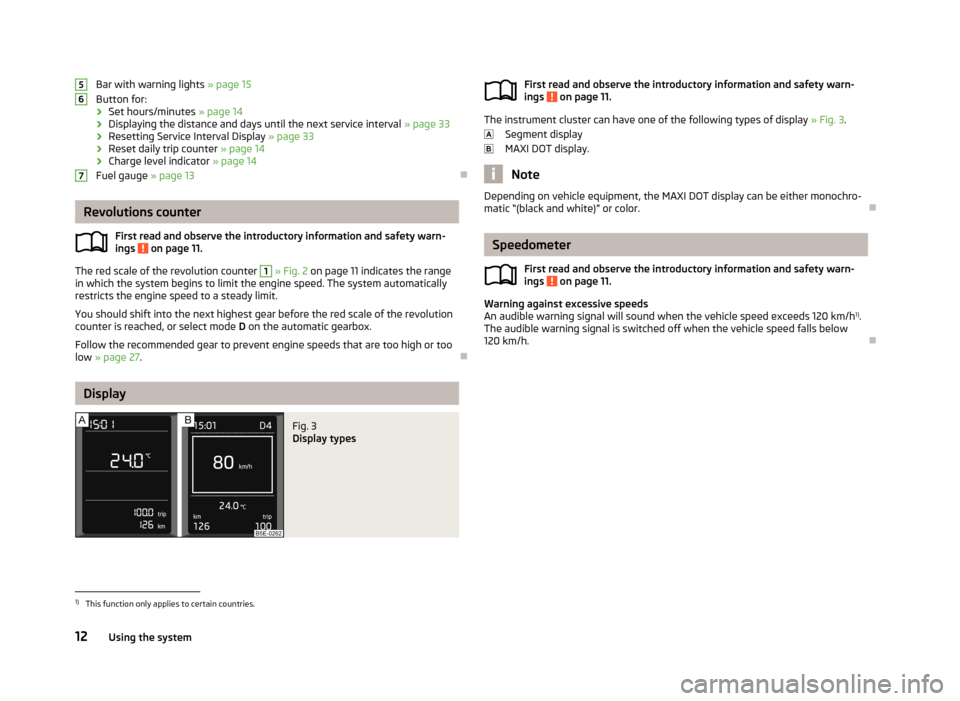
Fig. 3
Display types
567First read and observe the introductory information and safety warn-
ings on page 11.
The instrument cluster can have one of the following types of display » Fig. 3.
Segment display
MAXI DOT display.
Note
Depending on vehicle equipment, the MAXI DOT display can be either monochro- matic “(black and white)” or color.
Speedometer
First read and observe the introductory information and safety warn-
ings
on page 11.
Warning against excessive speeds
An audible warning signal will sound when the vehicle speed exceeds 120 km/h 1)
.
The audible warning signal is switched off when the vehicle speed falls below
120 km/h.
1)
This function only applies to certain countries.
12Using the system
Page 19 of 287
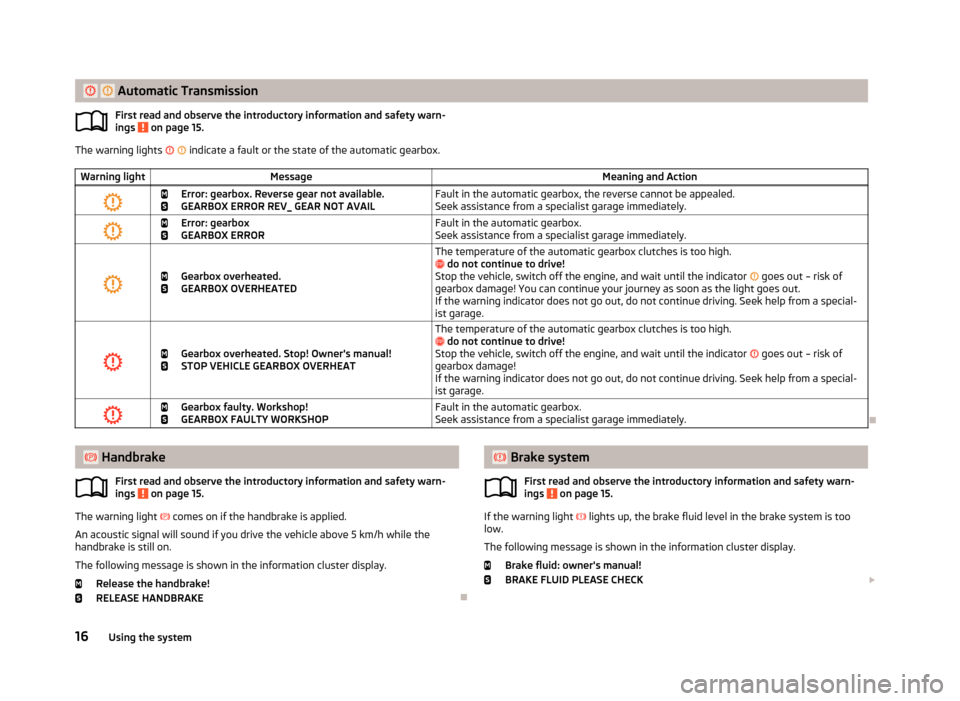
Automatic TransmissionFirst read and observe the introductory information and safety warn-
ings on page 15.
The warning lights indicate a fault or the state of the automatic gearbox.
Warning lightMessageMeaning and Action
Error: gearbox. Reverse gear not available.
GEARBOX ERROR REV_ GEAR NOT AVAILFault in the automatic gearbox, the reverse cannot be appealed. Seek assistance from a specialist garage immediately.
Error: gearbox
GEARBOX ERRORFault in the automatic gearbox.
Seek assistance from a specialist garage immediately.
Gearbox overheated.
GEARBOX OVERHEATED
The temperature of the automatic gearbox clutches is too high.
do not continue to drive!
Stop the vehicle, switch off the engine, and wait until the indicator goes out – risk of
gearbox damage! You can continue your journey as soon as the light goes out.
If the warning indicator does not go out, do not continue driving. Seek help from a special- ist garage.
Gearbox overheated. Stop! Owner's manual!
STOP VEHICLE GEARBOX OVERHEAT
The temperature of the automatic gearbox clutches is too high.
do not continue to drive!
Stop the vehicle, switch off the engine, and wait until the indicator goes out – risk of
gearbox damage!
If the warning indicator does not go out, do not continue driving. Seek help from a special- ist garage.
Gearbox faulty. Workshop!
GEARBOX FAULTY WORKSHOPFault in the automatic gearbox.
Seek assistance from a specialist garage immediately.
Handbrake
First read and observe the introductory information and safety warn-
ings
on page 15.
The warning light comes on if the handbrake is applied.
An acoustic signal will sound if you drive the vehicle above 5 km/h while the
handbrake is still on.
The following message is shown in the information cluster display. Release the handbrake!
RELEASE HANDBRAKE
Brake system
First read and observe the introductory information and safety warn-
ings
on page 15.
If the warning light lights up, the brake fluid level in the brake system is too
low.
The following message is shown in the information cluster display. Brake fluid: owner's manual!
BRAKE FLUID PLEASE CHECK
16Using the system
Page 27 of 287
WARNING■Do not continue your journey if for some reason it is not possible to top up
the engine oil ! Switch off the engine and seek assistance from a specialist
garage.■
If you have to stop for technical reasons, then park the vehicle at a safe dis-
tance from the traffic, switch off the engine and switch on the hazard warning
lights » page 61 . The warning triangle must be set up at the prescribed dis-
tance - observe the national legal provisions when doing so.
Lamp failure
First read and observe the introductory information and safety warn-
ings
on page 21.
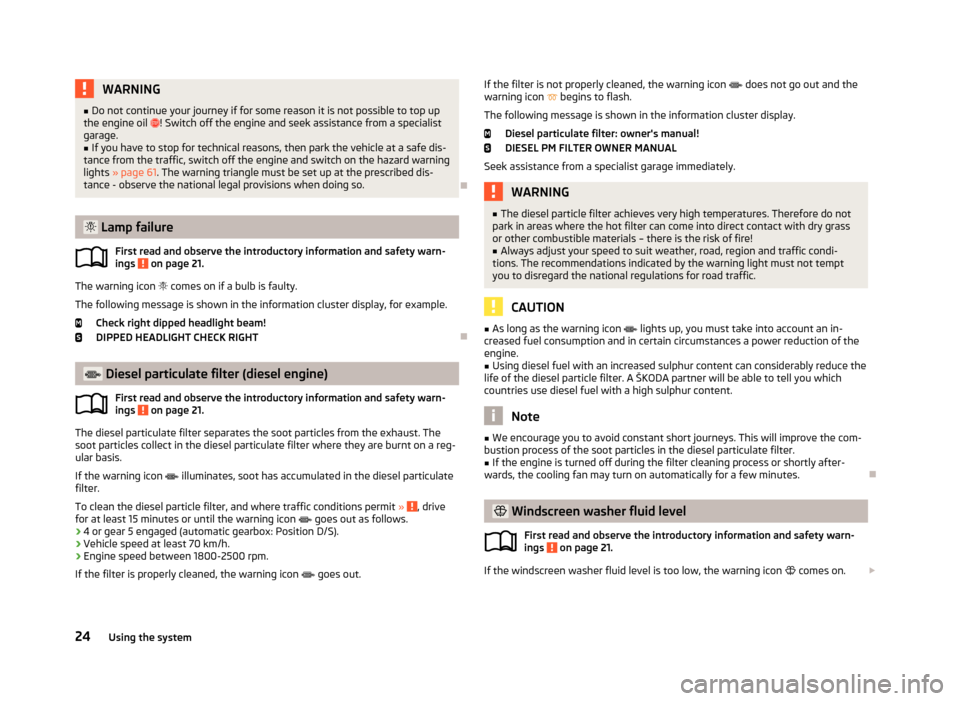
The warning icon
comes on if a bulb is faulty.
The following message is shown in the information cluster display, for example. Check right dipped headlight beam!
DIPPED HEADLIGHT CHECK RIGHT
Diesel particulate filter (diesel engine)
First read and observe the introductory information and safety warn-ings
on page 21.
The diesel particulate filter separates the soot particles from the exhaust. The
soot particles collect in the diesel particulate filter where they are burnt on a reg-
ular basis.
If the warning icon
illuminates, soot has accumulated in the diesel particulate
filter.
To clean the diesel particle filter, and where traffic conditions permit »
, drive
for at least 15 minutes or until the warning icon
goes out as follows.
› 4 or gear 5 engaged (automatic gearbox: Position D/S).
› Vehicle speed at least 70 km/h.
› Engine speed between 1800-2500 rpm.
If the filter is properly cleaned, the warning icon
goes out.
If the filter is not properly cleaned, the warning icon does not go out and the
warning icon begins to flash.
The following message is shown in the information cluster display. Diesel particulate filter: owner's manual!DIESEL PM FILTER OWNER MANUAL
Seek assistance from a specialist garage immediately.WARNING■ The diesel particle filter achieves very high temperatures. Therefore do not
park in areas where the hot filter can come into direct contact with dry grass
or other combustible materials – there is the risk of fire!■
Always adjust your speed to suit weather, road, region and traffic condi-
tions. The recommendations indicated by the warning light must not tempt
you to disregard the national regulations for road traffic.
CAUTION
■ As long as the warning icon lights up, you must take into account an in-
creased fuel consumption and in certain circumstances a power reduction of the
engine.■
Using diesel fuel with an increased sulphur content can considerably reduce the
life of the diesel particle filter. A ŠKODA partner will be able to tell you which
countries use diesel fuel with a high sulphur content.
Note
■ We encourage you to avoid constant short journeys. This will improve the com-
bustion process of the soot particles in the diesel particulate filter.■
If the engine is turned off during the filter cleaning process or shortly after-
wards, the cooling fan may turn on automatically for a few minutes.
Windscreen washer fluid level
First read and observe the introductory information and safety warn-ings
on page 21.
If the windscreen washer fluid level is too low, the warning icon comes on.
24Using the system
Page 29 of 287
Information system
Driver information system
Introduction
This chapter contains information on the following subjects:
Using the information system
26
Outside temperature
27
Gear recommendation
27
Door, luggage compartment or bonnet warning
28
Eco tips
28
Compass point display
28
The information system provides the driver with alerts and messages about in-
dividual vehicle systems. These alerts and messages appear in the instrument
cluster display
2
» Fig. 2 on page 11 (hereafter only in the display).
The information system provides the following information. › Outside temperature
» page 27.
› Recommended gear
» page 27.
›Door, boot lid and bonnet warning
» page 28.
› Eco tips
» page 28 .
› Compass display
» page 28.
› Driving data (multifunction display)
» page 29.
› Warning against excessive speeds
» page 31.
› Data relating to the Maxi DOT display
» page 32.
› To the lap timer function (stopwatch)
» page 32 .
› Service interval display
» page 33.
› Auto Check Control
» page 14.
› Warning icons
» page 21.
› Traffic sign recognition
» page 166.
› Fatigue detection
» page 168.
› Selector lever positions for an automatic gearbox
» page 127.
› Information and alerts in the Assist systems
» page 137.WARNINGConcentrate fully at all times on your driving! As the driver, you are fully re-
sponsible for the operation of your vehicle.
Using the information system
Fig. 7
Buttons / dial: on the operating lever / on the multifunction steering
wheel
First read and observe the introductory information and safety warn-
ings on page 26.
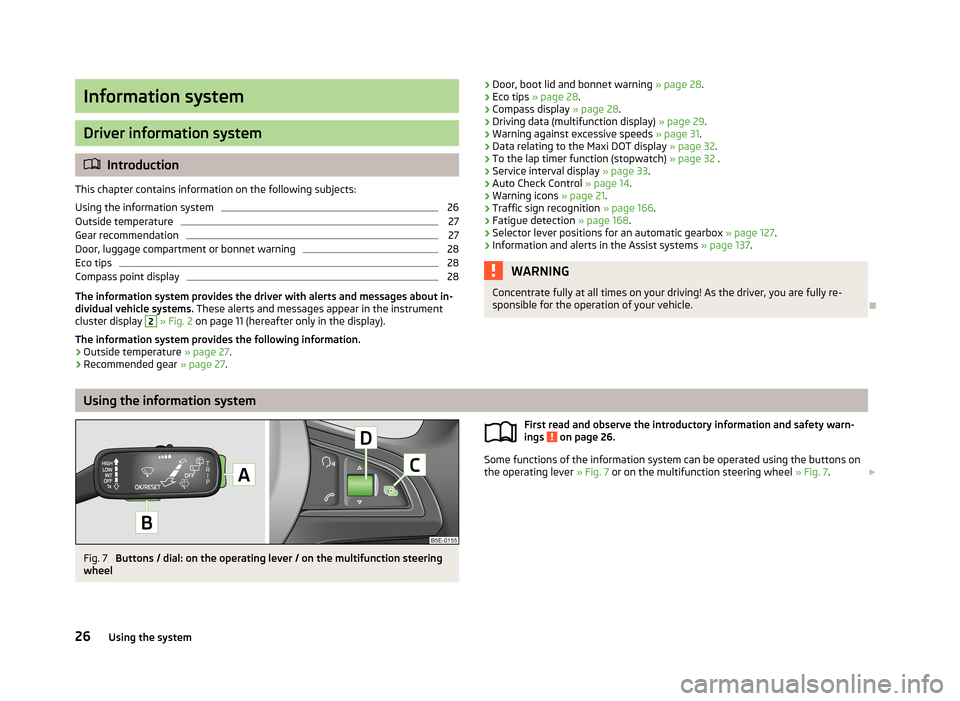
Some functions of the information system can be operated using the buttons on
the operating lever » Fig. 7 or on the multifunction steering wheel » Fig. 7.
26Using the system
Page 41 of 287
Unlocking/locking – KESSYFig. 14
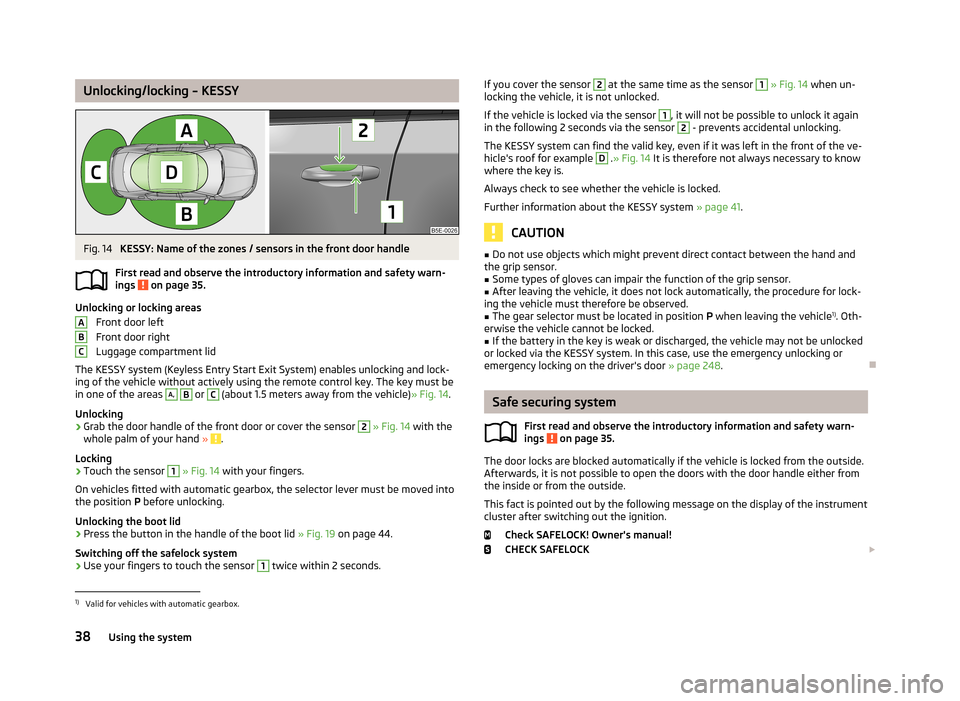
KESSY: Name of the zones / sensors in the front door handle
First read and observe the introductory information and safety warn- ings
on page 35.
Unlocking or locking areas
Front door left
Front door right
Luggage compartment lid
The KESSY system (Keyless Entry Start Exit System) enables unlocking and lock-
ing of the vehicle without actively using the remote control key. The key must be
in one of the areas
A,
B
or
C
(about 1.5 meters away from the vehicle) » Fig. 14.
Unlocking
›
Grab the door handle of the front door or cover the sensor
2
» Fig. 14 with the
whole palm of your hand » .
Locking
›
Touch the sensor
1
» Fig. 14 with your fingers.
On vehicles fitted with automatic gearbox, the selector lever must be moved into the position P before unlocking.
Unlocking the boot lid
›
Press the button in the handle of the boot lid » Fig. 19 on page 44.
Switching off the safelock system
›
Use your fingers to touch the sensor
1
twice within 2 seconds.
ABCIf you cover the sensor 2 at the same time as the sensor 1 » Fig. 14 when un-
locking the vehicle, it is not unlocked.
If the vehicle is locked via the sensor 1
, it will not be possible to unlock it again
in the following 2 seconds via the sensor
2
- prevents accidental unlocking.
The KESSY system can find the valid key, even if it was left in the front of the ve-
hicle's roof for example
D
. » Fig. 14 It is therefore not always necessary to know
where the key is.
Always check to see whether the vehicle is locked. Further information about the KESSY system » page 41.
CAUTION
■
Do not use objects which might prevent direct contact between the hand and
the grip sensor.■
Some types of gloves can impair the function of the grip sensor.
■
After leaving the vehicle, it does not lock automatically, the procedure for lock-
ing the vehicle must therefore be observed.
■
The gear selector must be located in position P when leaving the vehicle 1)
. Oth-
erwise the vehicle cannot be locked.
■
If the battery in the key is weak or discharged, the vehicle may not be unlocked
or locked via the KESSY system. In this case, use the emergency unlocking or emergency locking on the driver's door » page 248.
Safe securing system
First read and observe the introductory information and safety warn-
ings
on page 35.
The door locks are blocked automatically if the vehicle is locked from the outside.
Afterwards, it is not possible to open the doors with the door handle either from
the inside or from the outside.
This fact is pointed out by the following message on the display of the instrument
cluster after switching out the ignition.
Check SAFELOCK! Owner's manual!
CHECK SAFELOCK
1)
Valid for vehicles with automatic gearbox.
38Using the system
Page 124 of 287
›Depress and hold the clutch pedal (vehicles with a manual gearbox) or brake
pedal (vehicles with an automatic gearbox) until the engine starts.›
Turn the key into position
3
as far as it will go - the engine's starting proce-
dure will commence (do not touch the accelerator).
›
Release the key, the engine will start automatically.
After letting go, the vehicle key will return to position
2
.
›
Release the handbrake.
If the engine does not start within 10 seconds, turn the key to position
1
. Repeat
the start-up process after approx. half a minute.
Vehicles with manual transmission
The engine will not start if the clutch pedal is not depressed.
The following message is shown in the information cluster display. Press the clutch to start.
PRESS CLUTCH
Vehicles with automatic transmission
The engine will not start if the brake pedal is not depressed.
The following message is shown in the information cluster display. Apply the brake to start.
APPLY BRAKE
CAUTION
■ If the engine does not start up after a second attempt, one of the following
fuses may be defective. ■Petrol engine - fuse for the fuel pump.
■ Diesel engine - fuse for the glow plug control unit or fuel pump.■
Check the fuse and replace if necessary » page 251, or seek assistance from a
specialist garage.
Stopping the engine
First read and observe the introductory information and safety warn-ings
on page 119.
Switch off the engine by turning the ignition key into position
1
» Fig. 115 on
page 120.
NoteFor vehicles with automatic transmission, the ignition key can only be removed if
the selector lever is in position P .
Starting and stopping the engine - KESSY
Introduction
This chapter contains information on the following subjects:
Steering lock / unlock
122
Switching on the ignition
123
Starting the engine
123
Switching off the ignition
123
Switching off the engine
123
Emergency start-up of the engine
124
Emergency ignition shutoff system
124
The KESSY system (Keyless Entry Exit System, hereinafter referred to only as sys- tem) allows the switching on or switching off of the ignition and starting or stop-
ping of the engine without the active use of the key.
A key must be in the vehicle to unlock the steering, switch on the ignition and
start the vehicle. When travelling the key must be in the vehicle.
The engine running noises may louder at first be louder for a short time afterstarting the cold engine. This is quite normal and is not an operating problem.
WARNING■ Never leave the key in the vehicle when you exit the vehicle. This is particu-
larly important if children are left in the vehicle. Otherwise the children could,
for example, start the engine – risk of accident or injury!■
Never leave the vehicle unattended with the engine running.
■
Never switch off the engine before the vehicle is stationary – risk of acci-
dent!
121Starting-off and Driving
Page 126 of 287
If the steering is still not unlocked, then the following message is displayed on
the display of the instrument cluster.
Move the steering wheel!
MOVE STEERING WHEEL
Slightly move the steering wheel and the system will make up to 3 more attempts
to unlock after 2 seconds. At the same time, the indicator light flashes.
If the steering is still not unlocked, to try to eliminate the possible cause and then
repeat the unlocking attempt.
Switching on the ignition
First read and observe the introductory information and safety warn-
ings
on page 121.
›
Press the starter button » Fig. 116 on page 122 briefly.
The ignition is switched on.
Note
The ignition is switched on when indicated by the lighting up of certain indicator
lamps in the instrument cluster.
Starting the engine
First read and observe the introductory information and safety warn-
ings
on page 121.
Vehicles with a diesel engine are equipped with a glow plug system. The glow
plug warning light
illuminates after the ignition has been switched on. Start
the engine after the warning light
has gone out.
You should not switch on any major electrical components during the heating pe- riod otherwise the vehicle battery will be drained unnecessarily.
Procedure for starting the engine
›
Firmly apply the handbrake.
›
Move the gearshift lever into neutral or move the selector lever into position P
or N.
›
Depress and hold the clutch pedal (vehicles with a manual gearbox) or brake
pedal (vehicles with an automatic gearbox) until the engine starts.
› Press the starter button
» Fig. 116 on page 122 briefly – the engine starts auto-
matically.›
Release the handbrake.
CAUTION
■ If the engine does not start up after a second attempt, one of the following
fuses may be defective. ■Petrol engine - fuse for the fuel pump.
■ Diesel engine - fuse for the glow plug control unit or fuel pump.■
Check the fuse and replace if necessary » page 251, or seek assistance from a
specialist garage.
Switching off the ignition
First read and observe the introductory information and safety warn-ings
on page 121.
›
Press the starter button » Fig. 116 on page 122 briefly.
The ignition is switched off.
The ignition can be switched off up to a speed of 2 km/h.
On vehicles fitted with a manual gearbox, the clutch pedal must not be de-
pressed after switching off the ignition, otherwise the system would try to start.
For automatic transmission vehicles, the brake pedal must not be depressed,
otherwise the system will try to start.
If the driver's door is opened while the igition is on, an audible signal sounds andthe following message appears in the instrument cluster display.
Ignition on!
IGNITION STILL ON
When leaving the vehicle always switch off the ignition.
Switching off the engine
First read and observe the introductory information and safety warn-ings
on page 121.
›
Stop the vehicle.
›
Press the starter button » Fig. 116 on page 122 .
123Starting-off and Driving