traction control SKODA OCTAVIA 2013 3.G / (5E) Owner's Manual
[x] Cancel search | Manufacturer: SKODA, Model Year: 2013, Model line: OCTAVIA, Model: SKODA OCTAVIA 2013 3.G / (5E)Pages: 287, PDF Size: 18.55 MB
Page 10 of 287
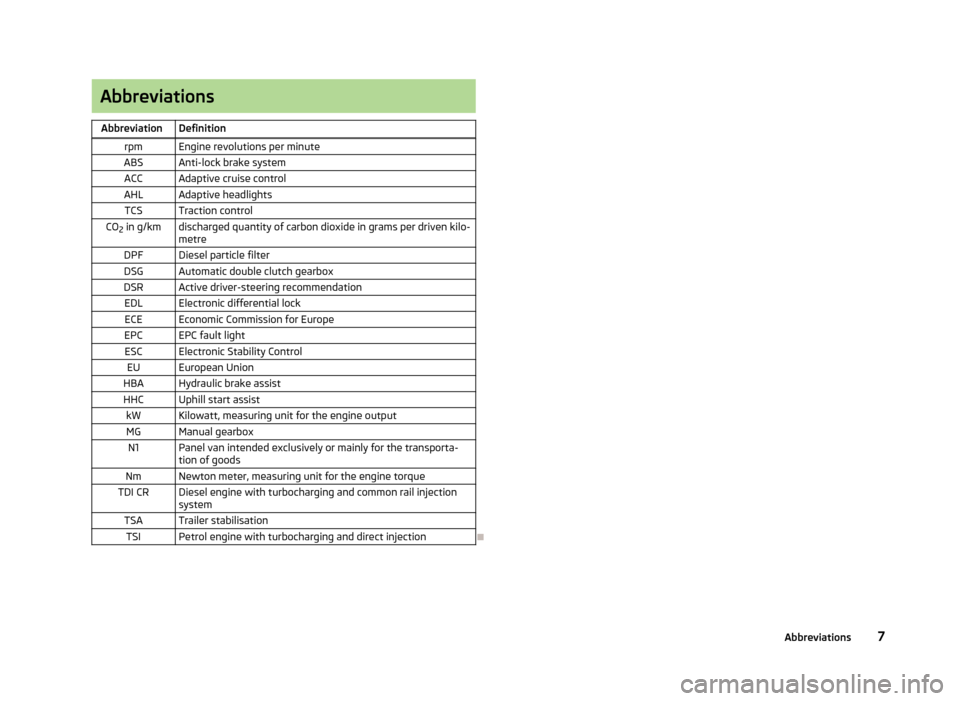
AbbreviationsAbbreviationDefinitionrpmEngine revolutions per minuteABSAnti-lock brake systemACCAdaptive cruise controlAHLAdaptive headlightsTCSTraction controlCO2 in g/kmdischarged quantity of carbon dioxide in grams per driven kilo-
metreDPFDiesel particle filterDSGAutomatic double clutch gearboxDSRActive driver-steering recommendationEDLElectronic differential lockECEEconomic Commission for EuropeEPCEPC fault lightESCElectronic Stability ControlEUEuropean UnionHBAHydraulic brake assistHHCUphill start assistkWKilowatt, measuring unit for the engine outputMGManual gearboxN1Panel van intended exclusively or mainly for the transporta-
tion of goodsNmNewton meter, measuring unit for the engine torqueTDI CRDiesel engine with turbocharging and common rail injection systemTSATrailer stabilisationTSIPetrol engine with turbocharging and direct injection
7Abbreviations
Page 12 of 287
Using the system
Cockpit
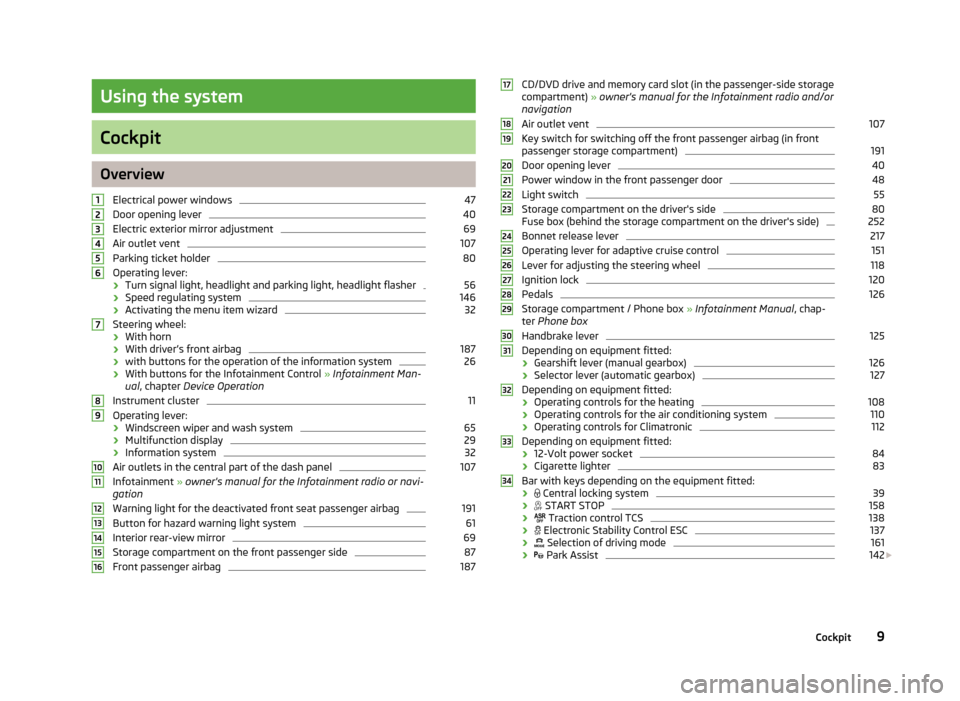
OverviewElectrical power windows
47
Door opening lever
40
Electric exterior mirror adjustment
69
Air outlet vent
107
Parking ticket holder
80
Operating lever:
› Turn signal light, headlight and parking light, headlight flasher
56
›
Speed regulating system
146
›Activating the menu item wizard
32
Steering wheel:
› With horn
› With driver’s front airbag
187
›
with buttons for the operation of the information system
26
›With buttons for the Infotainment Control
» Infotainment Man-
ual , chapter Device Operation
Instrument cluster
11
Operating lever:
› Windscreen wiper and wash system
65
›Multifunction display
29
›
Information system
32
Air outlets in the central part of the dash panel
107
Infotainment
» owner's manual for the Infotainment radio or navi-
gation
Warning light for the deactivated front seat passenger airbag
191
Button for hazard warning light system
61
Interior rear-view mirror
69
Storage compartment on the front passenger side
87
Front passenger airbag
18712345678910111213141516CD/DVD drive and memory card slot (in the passenger-side storage compartment) » owner's manual for the Infotainment radio and/or
navigation
Air outlet vent107
Key switch for switching off the front passenger airbag (in front passenger storage compartment)
191
Door opening lever
40
Power window in the front passenger door
48
Light switch
55
Storage compartment on the driver's side
80
Fuse box (behind the storage compartment on the driver's side)
252
Bonnet release lever
217
Operating lever for adaptive cruise control
151
Lever for adjusting the steering wheel
118
Ignition lock
120
Pedals
126
Storage compartment / Phone box » Infotainment Manual , chap-
ter Phone box
Handbrake lever
125
Depending on equipment fitted:
› Gearshift lever (manual gearbox)
126
›
Selector lever (automatic gearbox)
127
Depending on equipment fitted:
› Operating controls for the heating
108
›
Operating controls for the air conditioning system
110
›Operating controls for Climatronic
112
Depending on equipment fitted:
› 12-Volt power socket
84
›
Cigarette lighter
83
Bar with keys depending on the equipment fitted:
›
Central locking system
39
›
START STOP
158
›
Traction control TCS
138
›
Electronic Stability Control ESC
137
›
Selection of driving mode
161
›
Park Assist
142
1718192021222324252627282930313233349Cockpit
Page 18 of 287
Warning lights
Introduction
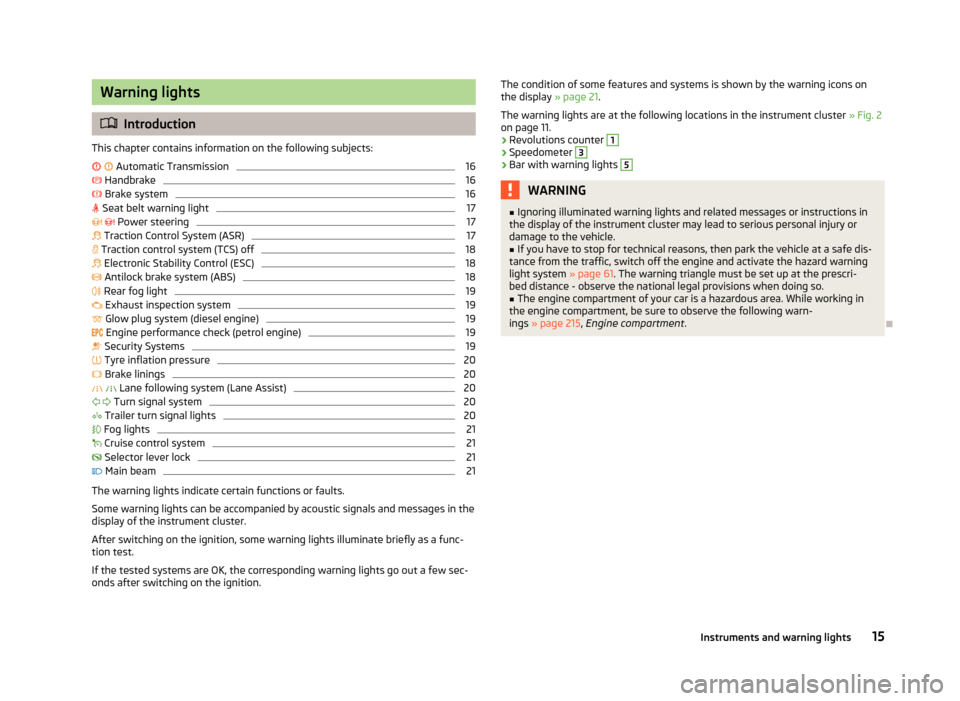
This chapter contains information on the following subjects:
Automatic Transmission
16
Handbrake
16
Brake system
16
Seat belt warning light
17
Power steering
17
Traction Control System (ASR)
17
Traction control system (TCS) off
18
Electronic Stability Control (ESC)
18
Antilock brake system (ABS)
18
Rear fog light
19
Exhaust inspection system
19
Glow plug system (diesel engine)
19
Engine performance check (petrol engine)
19
Security Systems
19
Tyre inflation pressure
20
Brake linings
20
Lane following system (Lane Assist)
20
Turn signal system
20
Trailer turn signal lights
20
Fog lights
21
Cruise control system
21
Selector lever lock
21
Main beam
21
The warning lights indicate certain functions or faults.
Some warning lights can be accompanied by acoustic signals and messages in the
display of the instrument cluster.
After switching on the ignition, some warning lights illuminate briefly as a func-
tion test.
If the tested systems are OK, the corresponding warning lights go out a few sec-
onds after switching on the ignition.
The condition of some features and systems is shown by the warning icons on
the display » page 21.
The warning lights are at the following locations in the instrument cluster » Fig. 2
on page 11.
› Revolutions counter 1
›Speedometer
3
›Bar with warning lights
5WARNING■
Ignoring illuminated warning lights and related messages or instructions in
the display of the instrument cluster may lead to serious personal injury or
damage to the vehicle.■
If you have to stop for technical reasons, then park the vehicle at a safe dis-
tance from the traffic, switch off the engine and activate the hazard warning
light system » page 61. The warning triangle must be set up at the prescri-
bed distance - observe the national legal provisions when doing so.
■
The engine compartment of your car is a hazardous area. While working in
the engine compartment, be sure to observe the following warn- ings » page 215 , Engine compartment .
15Instruments and warning lights
Page 20 of 287
Stop the vehicle, switch off the engine, and check the level of the brake flu-
id » page 223 » .
If the warning light lights up together with the warning light , there is a
problem with the ABS.WARNING■ If you have to stop for technical reasons, then park the vehicle at a safe dis-
tance from the traffic, switch off the engine and switch on the hazard warning lights » page 61 . The warning triangle must be set up at the prescribed dis-
tance - observe the national legal provisions when doing so.■
If the warning light is displayed simultaneously with warning light
» page 18 , Antilock brake system (ABS) , do not continue your jour-
ney! Seek help from a specialist garage.
■
A fault to the braking system can increase the vehicle's braking distance -
risk of accident!
Seat belt warning light
First read and observe the introductory information and safety warn-ings
on page 15.
The warning light
comes on after the ignition is switched on as a reminder for
the driver and front passenger to fasten the seat belt.
The warning light
goes out if the driver or front passenger has fastened their
seat belt.
If the driver or front passenger has not fastened their seat belt and the vehicle
speed is more than 30 km/h, the warning light
flashes and you will hear an
acoustic signal.
If the seat belt is not fastened by the driver or front passenger during the next
approx. 2 seconds, the warning signal is deactivated and the warning light
lights up permanently.
Further information » page 180, Seat belts .
Power steering
First read and observe the introductory information and safety warn-
ings
on page 15.
If the warning light lights up, this indicates a partial failure of the power steer-
ing and the steering forces can be greater. Seek assistance from a specialist ga-
rage immediately.
If the warning light lights up, this indicates a complete failure of the power
steering and the steering assist has failed (significantly higher steering forces).
Seek assistance from a specialist garage immediately.
Further information » page 119, Power steering .
Note
If the vehicle's battery has been disconnected and reconnected, the warning light
comes on after switching on the ignition. The warning light should go out after
driving a short distance. If, after starting the engine again and a short drive, the
yellow warning light does not go out, there is a fault in the system. Seek assis-
tance from a specialist garage immediately.
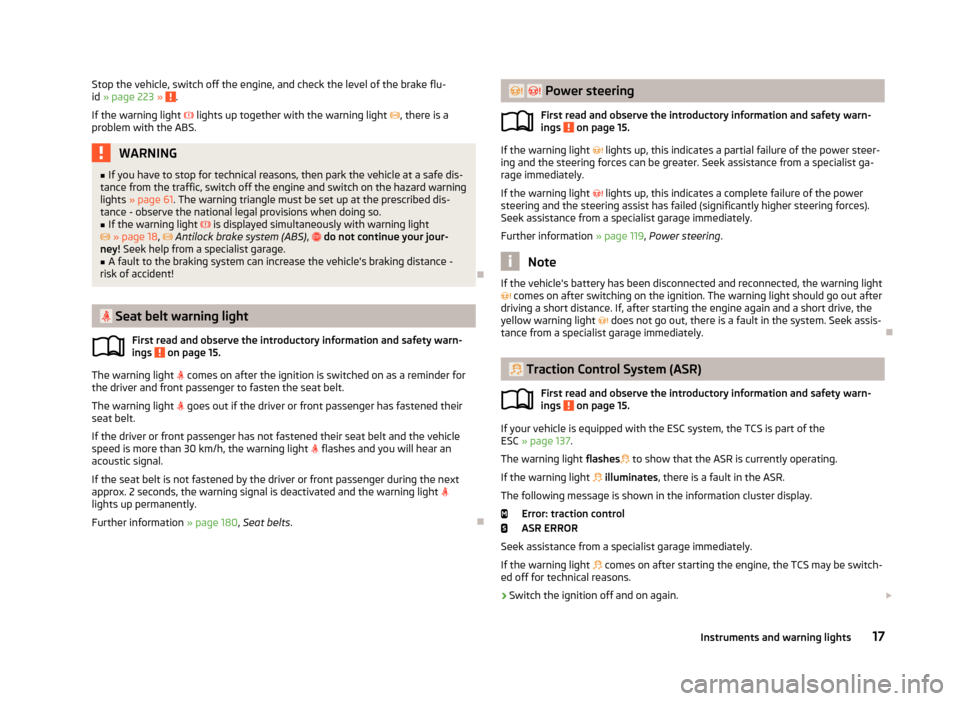
Traction Control System (ASR)
First read and observe the introductory information and safety warn-
ings
on page 15.
If your vehicle is equipped with the ESC system, the TCS is part of the
ESC » page 137 .
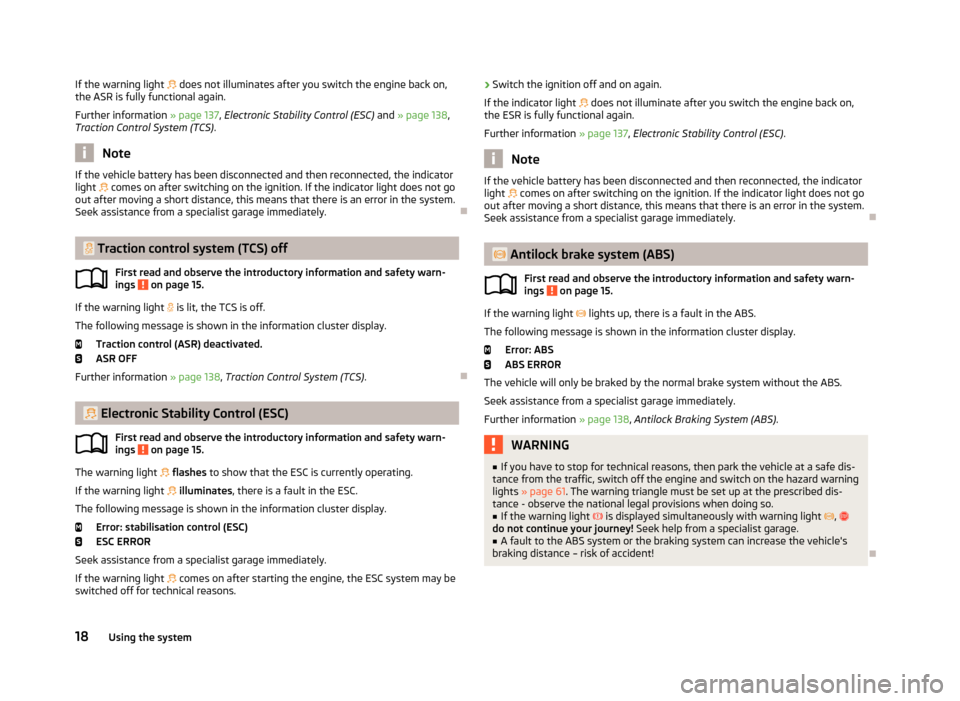
The warning light flashes
to show that the ASR is currently operating.
If the warning light
illuminates , there is a fault in the ASR.
The following message is shown in the information cluster display. Error: traction control
ASR ERROR
Seek assistance from a specialist garage immediately. If the warning light
comes on after starting the engine, the TCS may be switch-
ed off for technical reasons.
› Switch the ignition off and on again.
17Instruments and warning lights
Page 21 of 287
If the warning light does not illuminates after you switch the engine back on,
the ASR is fully functional again.
Further information » page 137, Electronic Stability Control (ESC) and » page 138 ,
Traction Control System (TCS) .
Note
If the vehicle battery has been disconnected and then reconnected, the indicator
light comes on after switching on the ignition. If the indicator light does not go
out after moving a short distance, this means that there is an error in the system. Seek assistance from a specialist garage immediately.
Traction control system (TCS) off
First read and observe the introductory information and safety warn-ings
on page 15.
If the warning light
is lit, the TCS is off.
The following message is shown in the information cluster display.
Traction control (ASR) deactivated.
ASR OFF
Further information » page 138, Traction Control System (TCS) .
Electronic Stability Control (ESC)
First read and observe the introductory information and safety warn-
ings
on page 15.
The warning light
flashes to show that the ESC is currently operating.
If the warning light
illuminates , there is a fault in the ESC.
The following message is shown in the information cluster display. Error: stabilisation control (ESC)
ESC ERROR
Seek assistance from a specialist garage immediately. If the warning light
comes on after starting the engine, the ESC system may be
switched off for technical reasons.
› Switch the ignition off and on again.
If the indicator light does not illuminate after you switch the engine back on,
the ESR is fully functional again.
Further information » page 137, Electronic Stability Control (ESC) .
Note
If the vehicle battery has been disconnected and then reconnected, the indicator
light comes on after switching on the ignition. If the indicator light does not go
out after moving a short distance, this means that there is an error in the system. Seek assistance from a specialist garage immediately.
Antilock brake system (ABS)
First read and observe the introductory information and safety warn-
ings
on page 15.
If the warning light
lights up, there is a fault in the ABS.
The following message is shown in the information cluster display.
Error: ABS
ABS ERROR
The vehicle will only be braked by the normal brake system without the ABS.
Seek assistance from a specialist garage immediately. Further information » page 138, Antilock Braking System (ABS) .
WARNING■
If you have to stop for technical reasons, then park the vehicle at a safe dis-
tance from the traffic, switch off the engine and switch on the hazard warning lights » page 61 . The warning triangle must be set up at the prescribed dis-
tance - observe the national legal provisions when doing so.■
If the warning light is displayed simultaneously with warning light ,
do not continue your journey! Seek help from a specialist garage.
■
A fault to the ABS system or the braking system can increase the vehicle's
braking distance – risk of accident!
18Using the system
Page 140 of 287
Assist systems
Brake assist systems
Introduction
This chapter contains information on the following subjects:
Electronic Stability Control (ESC)
137
Antilock Braking System (ABS)
138
Traction Control System (TCS)
138
Electronic Differential Lock (EDL and XDS)
139
Driver Steering Recommendation (DSR)
139
Hydraulic Brake Assist (HBA)
139
Hill Hold Control (HHC)
139
Multicollision brake
140WARNING■ A lack of fuel can cause irregular engine running or cause the engine to shut
down. The brake assist systems would then fail to function – risk of accident!■
Adjust the speed and driving style to the current visibility, weather, road and
traffic conditions. The increased safety offered by the brake assist systems must not tempt you to take greater risks than otherwise – risk of accident!
■
In the event of an ABS fault, visit a specialist garage immediately. Adjust
your style of driving according to the damage to the ABS as you will not know
how great the damage is and the limitation it is placing on the braking effi-
ciency.
CAUTION
■ All four wheels must be fitted with the same tyres approved by the manufactur-
er to ensure the brake assist systems operate correctly.■
Changes to the vehicle (e.g. to the engine, brakes, chassis) can influence the
functionality of the brake assist systems » page 200.
■
If a fault occurs in the ABS system, the ESC, ASR and EDL also do not work. An
ABS fault is indicated with the warning light » page 18 .
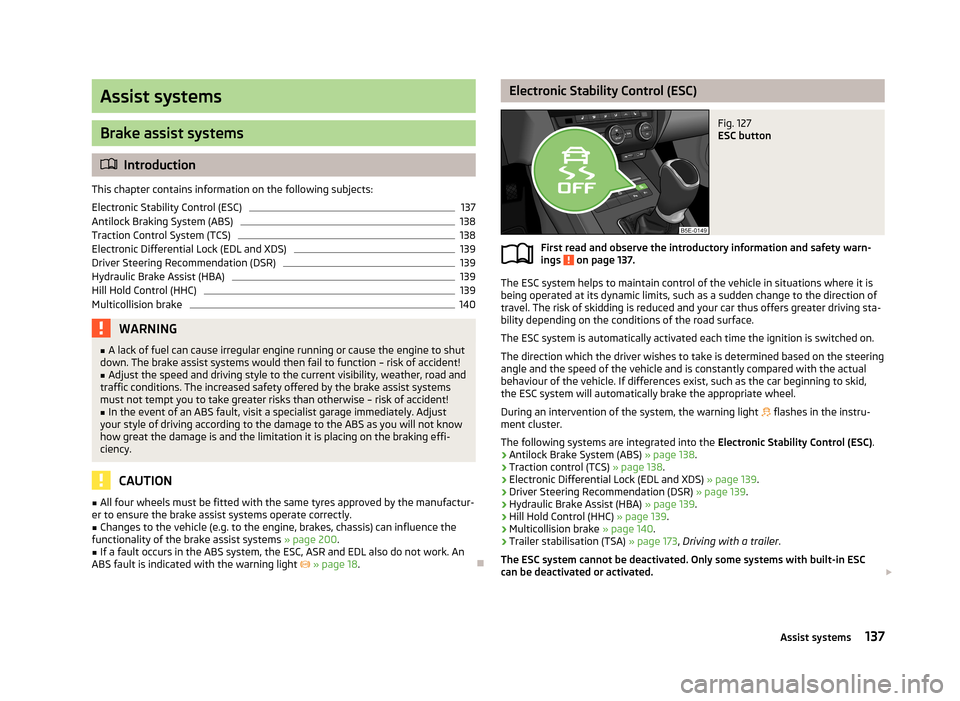
Electronic Stability Control (ESC)Fig. 127
ESC button
First read and observe the introductory information and safety warn-
ings on page 137.
The ESC system helps to maintain control of the vehicle in situations where it is
being operated at its dynamic limits, such as a sudden change to the direction of
travel. The risk of skidding is reduced and your car thus offers greater driving sta-
bility depending on the conditions of the road surface.
The ESC system is automatically activated each time the ignition is switched on.The direction which the driver wishes to take is determined based on the steering angle and the speed of the vehicle and is constantly compared with the actualbehaviour of the vehicle. If differences exist, such as the car beginning to skid,
the ESC system will automatically brake the appropriate wheel.
During an intervention of the system, the warning light
flashes in the instru-
ment cluster.
The following systems are integrated into the Electronic Stability Control (ESC).
› Antilock Brake System (ABS)
» page 138.
› Traction control (TCS)
» page 138.
› Electronic Differential Lock (EDL and XDS)
» page 139.
› Driver Steering Recommendation (DSR)
» page 139.
› Hydraulic Brake Assist (HBA)
» page 139.
› Hill Hold Control (HHC)
» page 139.
› Multicollision brake
» page 140.
› Trailer stabilisation (TSA)
» page 173, Driving with a trailer .
The ESC system cannot be deactivated. Only some systems with built-in ESC
can be deactivated or activated.
137Assist systems
Page 141 of 287
Activate/deactivate TCS
Within the ESC system, the TCS can be activated or deactivated in the Infotain-
ment » Infotainment manual , chapter Vehicle settings (key CAR) or with the sym-
bol key » Fig. 127 .
› Briefly press the symbol button
.
The warning light lights up in the instrument cluster and the following message
is shown on the display.
Traction control (ASR) deactivated.
ASR OFF
› Press the symbol button
again.
The warning light
lights up in the instrument cluster and the following message
is shown on the display.
Traction control (ASR) activated.ASR ON
Enable/disable ESC Sport Within the ESC system, the ESC SPORT can be deactivated or activated in the In-
fotainment » Infotainment manual , chapter Vehicle settings (key CAR) or with the
symbol key
» Fig. 127 .
ESC Sport is a setting intended for a sporty way of driving. By activating ESC
Sport, the TCS is disabled and the activation of the ESC procedure is delayed so
that the sporty drive will not be compromised if applicable.
› Press and hold the symbol button
.
The warning light
lights up in the instrument cluster and the following message
is shown on the display.
ESC sport: directional stabil. restricted.
ESC SPORT
› Press the symbol button
again.
The warning light
lights up in the instrument cluster and the following message
is shown on the display.
Stabilisation control (ESC) activated.
ESC ONCAUTIONBy activating ESC Sport, TCS is automatically deactivated. As a result of this, some
of the other vehicle system functions may be limited.
Antilock Braking System (ABS)
First read and observe the introductory information and safety warn-
ings
on page 137.
ABS prevents the wheels locking when braking. Thus helping the driver to main-
tain control of the vehicle.
The intervention of the ABS is noticeable from the pulsating movements of the
brake pedal which is accompanied by noises.
When the ABS system is active, do not brake periodically or reduce the pressure
on the brake pedal.
Traction Control System (TCS)
Fig. 128
TCS button
First read and observe the introductory information and safety warn- ings on page 137.
If the wheels are slipping, the TCS system adapts the engine speed to the condi-
tions of the road surface. The TCS makes it much easier to start off, accelerate
and climb steep hills even if the conditions of the road surface are unfavourable.
The TCS function is automatically activated each time the ignition is switched on.
If your vehicle is fitted with the ESC system, the ASR is integrated into the ESC
system » page 137 .
138Driving
Page 142 of 287
During an intervention of the system, the TCS warning light flashes in the in-
strument cluster.
The TCS should normally always be enabled. The system should be deactivated
only in the following situations, for example.
› When driving with snow chains.
› When driving in deep snow or on a very loose surface.
› When it is necessary to “rock” a car free when it has become stuck.
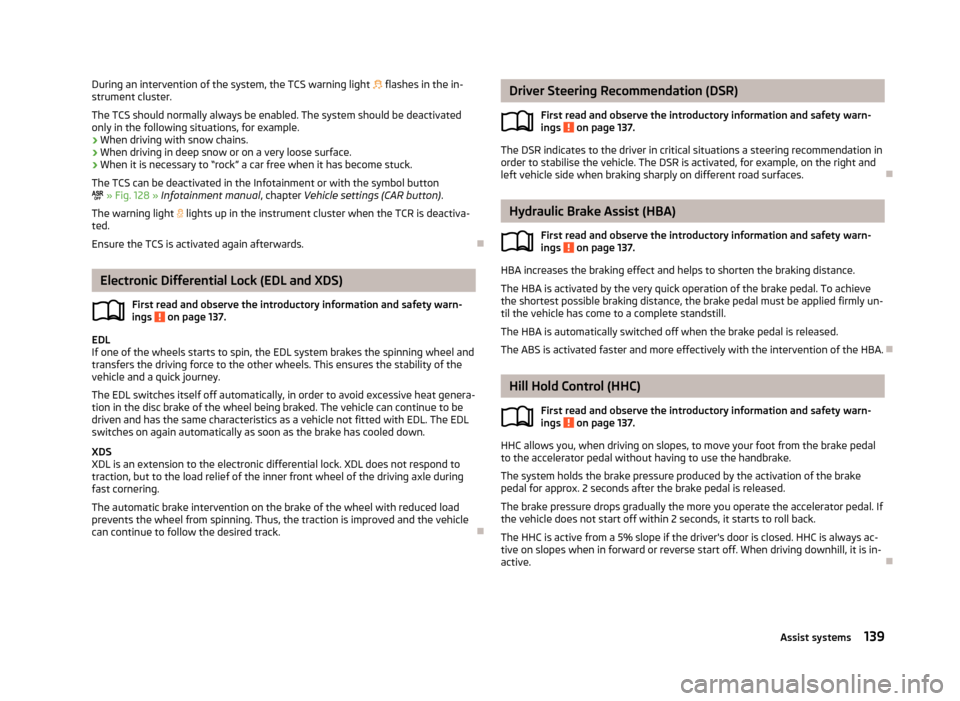
The TCS can be deactivated in the Infotainment or with the symbol button
» Fig. 128 » Infotainment manual , chapter Vehicle settings (CAR button) .
The warning light lights up in the instrument cluster when the TCR is deactiva-
ted.
Ensure the TCS is activated again afterwards.
Electronic Differential Lock (EDL and XDS)
First read and observe the introductory information and safety warn-
ings
on page 137.
EDL
If one of the wheels starts to spin, the EDL system brakes the spinning wheel and
transfers the driving force to the other wheels. This ensures the stability of the
vehicle and a quick journey.
The EDL switches itself off automatically, in order to avoid excessive heat genera-
tion in the disc brake of the wheel being braked. The vehicle can continue to be
driven and has the same characteristics as a vehicle not fitted with EDL. The EDL
switches on again automatically as soon as the brake has cooled down.
XDS
XDL is an extension to the electronic differential lock. XDL does not respond to traction, but to the load relief of the inner front wheel of the driving axle during
fast cornering.
The automatic brake intervention on the brake of the wheel with reduced load prevents the wheel from spinning. Thus, the traction is improved and the vehicle can continue to follow the desired track.
Driver Steering Recommendation (DSR)
First read and observe the introductory information and safety warn-ings
on page 137.
The DSR indicates to the driver in critical situations a steering recommendation in
order to stabilise the vehicle. The DSR is activated, for example, on the right and
left vehicle side when braking sharply on different road surfaces.
Hydraulic Brake Assist (HBA)
First read and observe the introductory information and safety warn-ings
on page 137.
HBA increases the braking effect and helps to shorten the braking distance.
The HBA is activated by the very quick operation of the brake pedal. To achieve
the shortest possible braking distance, the brake pedal must be applied firmly un-
til the vehicle has come to a complete standstill.
The HBA is automatically switched off when the brake pedal is released.The ABS is activated faster and more effectively with the intervention of the HBA.
Hill Hold Control (HHC)
First read and observe the introductory information and safety warn-ings
on page 137.
HHC allows you, when driving on slopes, to move your foot from the brake pedal
to the accelerator pedal without having to use the handbrake.
The system holds the brake pressure produced by the activation of the brakepedal for approx. 2 seconds after the brake pedal is released.
The brake pressure drops gradually the more you operate the accelerator pedal. Ifthe vehicle does not start off within 2 seconds, it starts to roll back.
The HHC is active from a 5% slope if the driver's door is closed. HHC is always ac-tive on slopes when in forward or reverse start off. When driving downhill, it is in- active.
139Assist systems
Page 145 of 287
Automatic system activation when moving forwardFirst read and observe the introductory information and safety warn-ings
on page 140.
Automatic activation takes place at a speed below around 10 km/h under the fol-
lowing conditions.
› The distance to the obstacle at the front is less than around 90 cm.
› The distance to the obstacle at the front is less than around 30 cm.
› The distance to the obstacle to the side of the vehicle is less than around
30 cm.
After activation, the following is shown in the left pane of the Infotainment dis-
play » Fig. 130 on page 141 -
.
Acoustic signals are sounded as of a distance from the obstacle of around 50 cm.
Automatic display can be activated/deactivated in the Infotainment » Infotain-
ment manual , chapter Vehicle settings (CAR button) .
Road display
First read and observe the introductory information and safety warn-ings
on page 140.
The display of the upcoming road changes depending on the steering angle
A
» Fig. 130 on page 141 -
.
Obstacles that are located on the road are represented by the following colours.
› Red – the distance to the obstacle is less than about 30 cm.
› Yellow – the distance to the obstacle is more than about 30 cm.
Obstacles that are not located on the road are represented by the following col-
ours.
› Red – the distance to the obstacle is less than about 30 cm.
› White – the distance to the obstacle is more than about 30 cm.
The road ahead is displayed when a forward gear or Neutral is engaged or the se-
lector lever is in position N.
The road behind the vehicle is displayed when reverse gear is engaged or the se-
lector lever is in position R.
Park assist
Introduction
This chapter contains information on the following subjects:
Finding a parking space
143
Parking
144
Manoeuvring out of a parallel parking space
145
Automatic brake assist
145
Information messages
145
The parking aid is part of the park assist system, therefore the information and
safety guidelines » page 140 , Parking aid must also be read and observed.
Park Assist (in the following referred to as the system) helps drivers park in suita- ble parallel and perpendicular parking places and also to manoeuvre out of paral-lel parking spaces.
The system only operates if the ignition is switched on. The displays, messages and system instructions are displayed in the MAXI DOTdisplay (in the display only below).
During the parking procedure the system only takes over the steering move- ments, the pedals continue to be operated by the driver.
When the system is activated, the warning light lights up
» Fig. 131 on
page 143 -
.
The traction control system (TCS) must always be switched on when parking.
Basis of the system function› The measurement and evaluation of the size of parking spaces when driving.
› The determination of the correct position of the vehicle for parking.
› The calculation of the line on which the vehicle drives backwards into the park-
ing space or forwards from the parking space.
› the automatic turning of the front wheels when parking in, or manoeuvring out
of the parking space.
142Driving
Page 283 of 287
Cleaning the wheels208
Decorative films206
Door lock cylinders207
Headlight lenses207
High-pressure cleaner204
Plastic parts206
Polishing the paintwork205
Rubber seals206
Taking care of the interior208
Taking care of your vehicle exterior205
Washing203
Washing by hand204
Wash system204
Wax treatment205
Taking care of your vehicles Fabric covers
210
TCS Operation
138
Warning light18
Technical data263
Temporary spare wheel232
Tiptronic128
Tools236
TOP TETHER197
Towing244
Towing a trailer169
Towing device Description
169
Drawbar load169
Use and care172
Towing eye front
245
Rear245
Towing protection43
Traction Control System (TCS)138
Traffic sign recognition166
Function166
Information messages167
Traffic Sign Recognition Notifications and settings
167
Traffic signssee Traffic sign recognition166
Trailer169, 172
13-pin power socket173
driving with a trailer173
loading172
Safety eye173
Trailer stabilisation174
Transmission warning messages
16
Transport Luggage compartment
91
Roof rack system103
Transporting children safely193
Turn signal56
Turn signal system Warning light
20
Type plate263
Tyre control display Calibration
231
Tyre inflation pressure Warning light
20
Tyre load-bearing capacity see Wheels
230
Tyre repair Check pressure
242
Preparations241
Sealing and inflating the tyre242
Tyres228
Inflation pressure229
New230
See Wheels230
Sizes229
Tyre wear indicator229
U
Underbody protection
208
Unleaded petrol136
Unlocking Individual settings39
KESSY38
Key36
Remote control37
Vehicle key36
Unlocking and locking35
Useful equipment 12-volt power outlet
84
230-volt power socket89
Ashtray83
Car park ticket holder80
Cigarette lighter83
Clothes hook88
Cup holders82
Glasses storage box86
Holder for reflective vest81
Multimedia holder85
Removable ski bag90
Seat backrest with long-cargo channel90
Storage compartment in the front centre console 82
Storage compartment on the driver's side
80
Storage compartments in the doors81
Storage compartment under the front armrest86
Using the information system26
Using the selector lever127
V
Variable loading floor
99
Dividing the luggage compartment101
Folding up101
Position change100
Vehicle battery Automatic load deactivation
227
Charge level indicator14
charging226
Checking the battery electrolyte level226
Cover225
Operation in winter226
Replacing227
280Index