buttons SKODA OCTAVIA 2014 3.G / (5E) Bolero Car Radio Manual
[x] Cancel search | Manufacturer: SKODA, Model Year: 2014, Model line: OCTAVIA, Model: SKODA OCTAVIA 2014 3.G / (5E)Pages: 54, PDF Size: 3.15 MB
Page 10 of 54
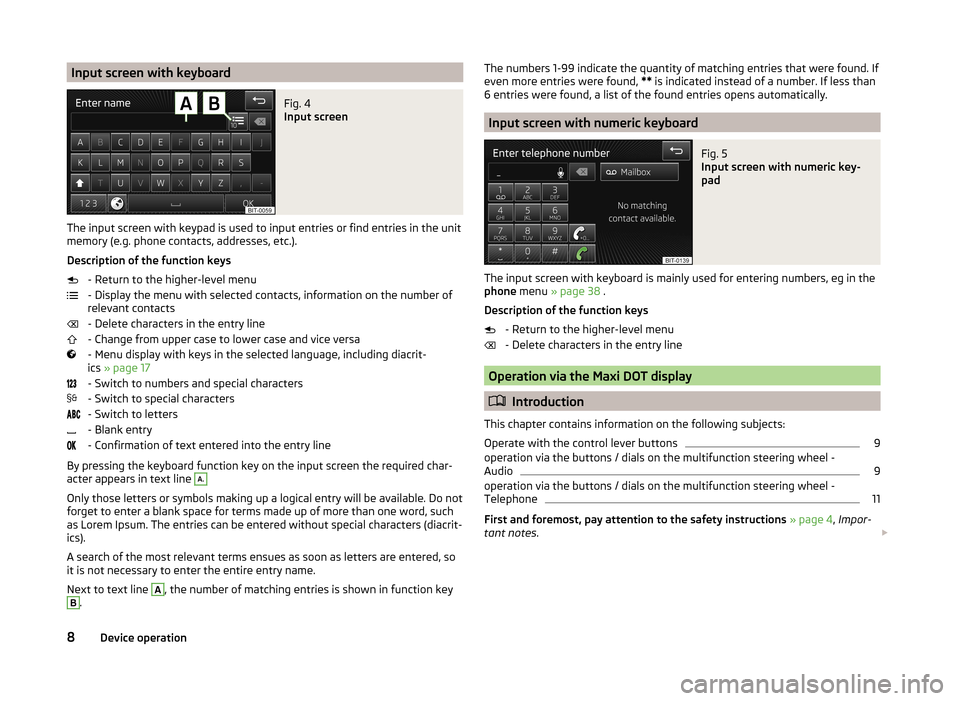
Input screen with keyboardFig. 4
Input screen
The input screen with keypad is used to input entries or find entries in the unit
memory (e.g. phone contacts, addresses, etc.).
Description of the function keys - Return to the higher-level menu
- Display the menu with selected contacts, information on the number of
relevant contacts
- Delete characters in the entry line
- Change from upper case to lower case and vice versa
- Menu display with keys in the selected language, including diacrit-
ics » page 17
- Switch to numbers and special characters
- Switch to special characters
- Switch to letters
- Blank entry
- Confirmation of text entered into the entry line
By pressing the keyboard function key on the input screen the required char-
acter appears in text line
A.
Only those letters or symbols making up a logical entry will be available. Do not
forget to enter a blank space for terms made up of more than one word, such
as Lorem Ipsum. The entries can be entered without special characters (diacrit-
ics).
A search of the most relevant terms ensues as soon as letters are entered, so
it is not necessary to enter the entire entry name.
Next to text line
A
, the number of matching entries is shown in function key
B
.
The numbers 1-99 indicate the quantity of matching entries that were found. If
even more entries were found, ** is indicated instead of a number. If less than
6 entries were found, a list of the found entries opens automatically.
Input screen with numeric keyboard
Fig. 5
Input screen with numeric key-
pad
The input screen with keyboard is mainly used for entering numbers, eg in the
phone menu » page 38 .
Description of the function keys - Return to the higher-level menu
- Delete characters in the entry line
Operation via the Maxi DOT display
Introduction
This chapter contains information on the following subjects:
Operate with the control lever buttons
9
operation via the buttons / dials on the multifunction steering wheel -
Audio
9
operation via the buttons / dials on the multifunction steering wheel -
Telephone
11
First and foremost, pay attention to the safety instructions » page 4 , Impor-
tant notes .
8Device operation
Page 11 of 54
Some of the device's features are also displayed in the MAXI DOT display1)
. De-
pending on the equipment, these features can be operated as follows.
■ With the buttons on the operating lever » page 9
■ With the buttons and wheels on the multifunction steering
wheel » page 9
Note
If the ignition and the side light are switched on, the buttons and dials on the
multifunction steering wheel will also be illuminated.
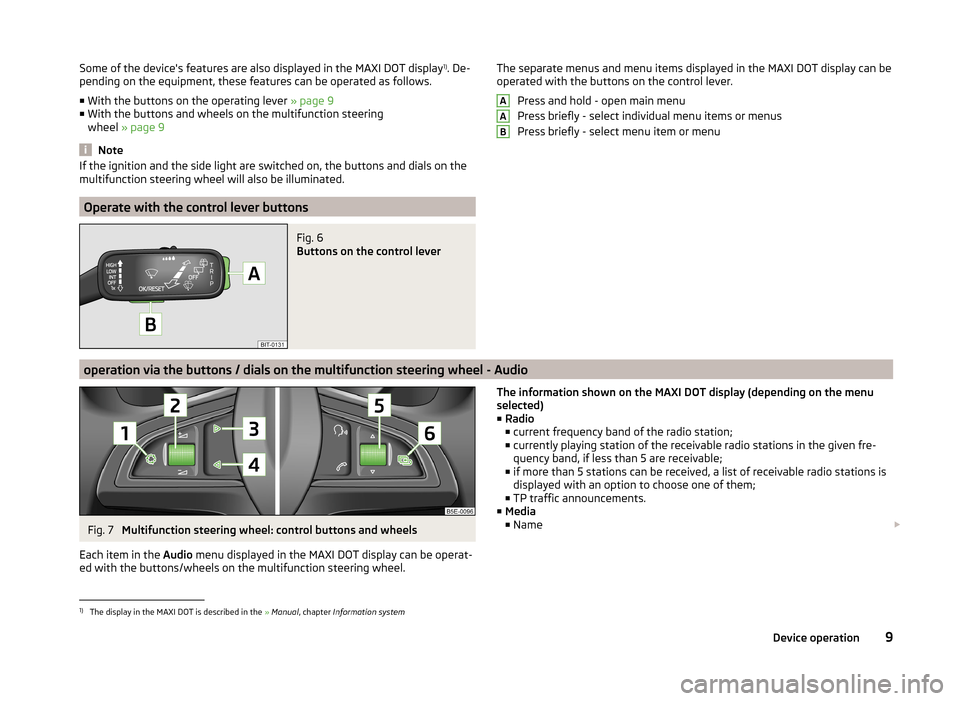
Operate with the control lever buttons
Fig. 6
Buttons on the control lever
The separate menus and menu items displayed in the MAXI DOT display can be operated with the buttons on the control lever.
Press and hold - open main menu
Press briefly - select individual menu items or menus
Press briefly - select menu item or menuAAB
operation via the buttons / dials on the multifunction steering wheel - Audio
Fig. 7
Multifunction steering wheel: control buttons and wheels
Each item in the Audio menu displayed in the MAXI DOT display can be operat-
ed with the buttons/wheels on the multifunction steering wheel.
The information shown on the MAXI DOT display (depending on the menu
selected) ■ Radio
■ current frequency band of the radio station;
■ currently playing station of the receivable radio stations in the given fre-
quency band, if less than 5 are receivable;
■ if more than 5 stations can be received, a list of receivable radio stations is
displayed with an option to choose one of them;
■ TP traffic announcements.
■ Media
■ Name 1)
The display in the MAXI DOT is described in the
» Manual , chapter Information system
9Device operation
Page 12 of 54
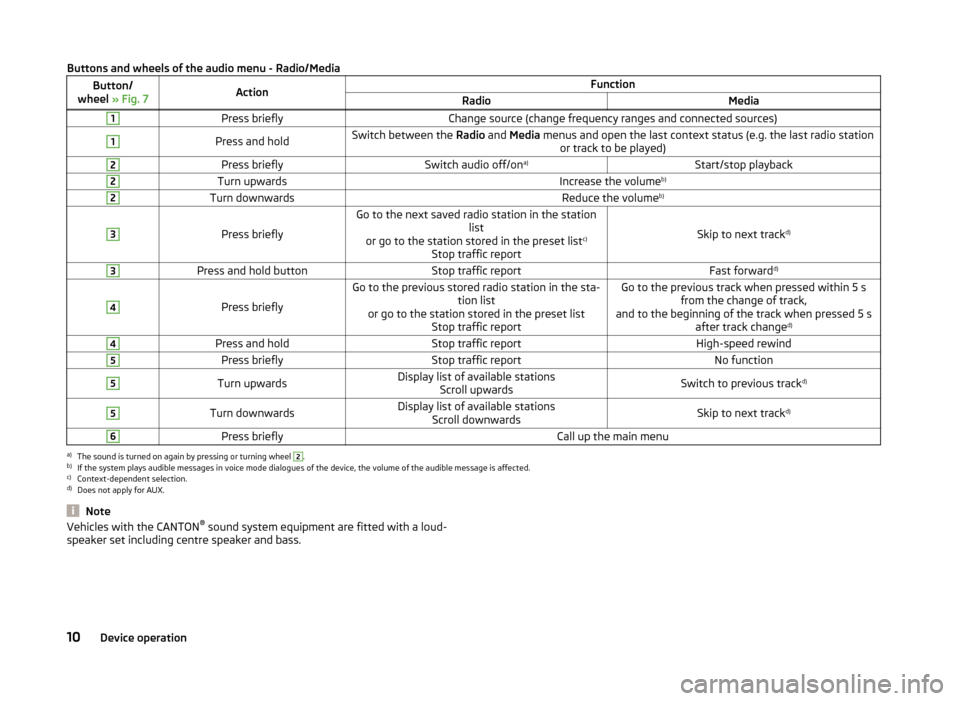
Buttons and wheels of the audio menu - Radio/MediaButton/
wheel » Fig. 7ActionFunctionRadioMedia1Press brieflyChange source (change frequency ranges and connected sources)1Press and holdSwitch between the Radio and Media menus and open the last context status (e.g. the last radio station
or track to be played)2Press brieflySwitch audio off/on a)Start/stop playback2Turn upwardsIncrease the volume b)2Turn downwardsReduce the volumeb)3
Press briefly
Go to the next saved radio station in the station
list
or go to the station stored in the preset list c)
Stop traffic report
Skip to next track d)
3Press and hold buttonStop traffic reportFast forward
d)4
Press briefly
Go to the previous stored radio station in the sta-
tion list
or go to the station stored in the preset list Stop traffic reportGo to the previous track when pressed within 5 sfrom the change of track,
and to the beginning of the track when pressed 5 s after track change d)4Press and holdStop traffic reportHigh-speed rewind5Press brieflyStop traffic reportNo function5Turn upwardsDisplay list of available stations
Scroll upwardsSwitch to previous track d)5Turn downwardsDisplay list of available stations
Scroll downwardsSkip to next track d)6Press brieflyCall up the main menua)
The sound is turned on again by pressing or turning wheel
2
.
b)
If the system plays audible messages in voice mode dialogues of the device, the volume of the audible message is affected.
c)
Context-dependent selection.
d)
Does not apply for AUX.
NoteVehicles with the CANTON ®
sound system equipment are fitted with a loud-
speaker set including centre speaker and bass.10Device operation
Page 13 of 54
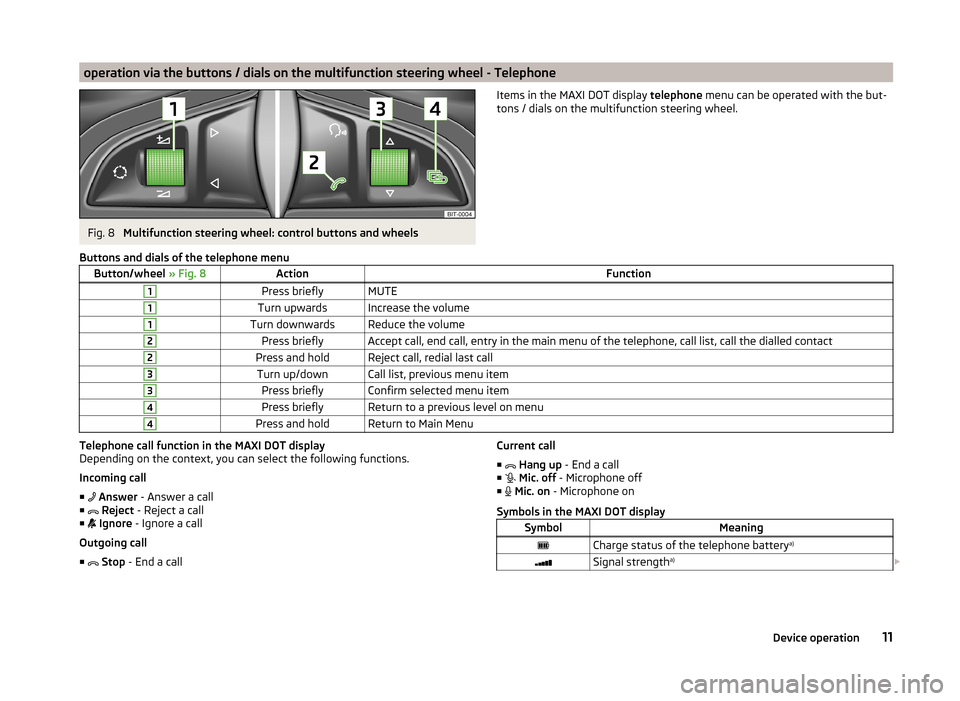
operation via the buttons / dials on the multifunction steering wheel - TelephoneFig. 8
Multifunction steering wheel: control buttons and wheels
Items in the MAXI DOT display telephone menu can be operated with the but-
tons / dials on the multifunction steering wheel.Buttons and dials of the telephone menuButton/wheel » Fig. 8ActionFunction1Press brieflyMUTE1Turn upwardsIncrease the volume1Turn downwardsReduce the volume2Press brieflyAccept call, end call, entry in the main menu of the telephone, call list, call the dialled contact2Press and holdReject call, redial last call3Turn up/downCall list, previous menu item3Press brieflyConfirm selected menu item4Press brieflyReturn to a previous level on menu4Press and holdReturn to Main MenuTelephone call function in the MAXI DOT display
Depending on the context, you can select the following functions.
Incoming call ■ Answer - Answer a call
■ Reject - Reject a call
■ Ignore - Ignore a call
Outgoing call ■ Stop - End a callCurrent call
■ Hang up - End a call
■ Mic. off - Microphone off
■ Mic. on - Microphone on
Symbols in the MAXI DOT displaySymbolMeaningCharge status of the telephone battery a)Signal strengtha)
11Device operation
Page 21 of 54
Radio
Operation
Introduction
This chapter contains information on the following subjects:
Main menu
19
List of available stations
20
Search and store radio station
20
Search the available stations (Scan)
21
Station logos
21
Traffic programme
21
Station information (DAB)
22
First and foremost, pay attention to the safety instructions » page 4 , Impor-
tant notes .
The device allows analogue radio reception of FM and AM frequency ranges as
well as DAB digital radio reception.
The radio reception DAB allows multiple stations to be transmitted in a single
frequency in the form of a so-called ensemble. It also allows for the transmis-
sion of additional data and information (e.g. messages, sport, weather, warn-
ings, etc.).
CAUTION
■ Car parks, tunnels, tall buildings or mountains can disrupt the radio signal
even causing it to fail completely.■
For vehicles with window antennas; if the windows are covered in foil or with
metallic film stickers, reception interference may be experienced.
■
In countries where the RDS function is not supported sufficiently, we recom-
mend turning off the RDS and AF functions. Otherwise, these settings can af-
fect the functionality of the radio.
Main menuFig. 12
Radio: Main menu
Read and observe on page 19 first.
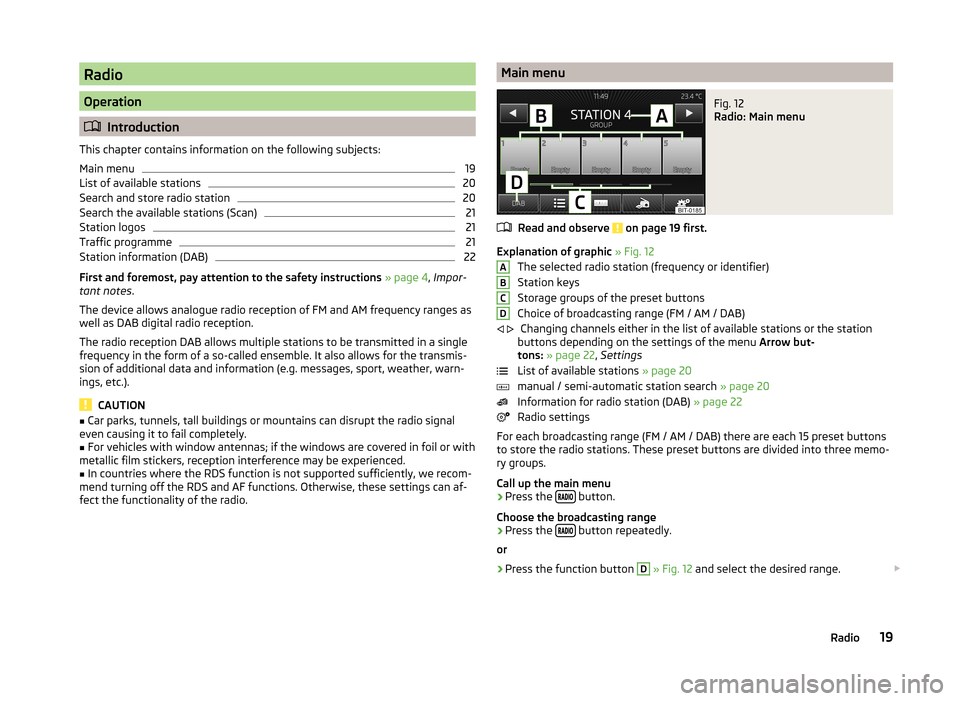
Explanation of graphic » Fig. 12
The selected radio station (frequency or identifier)
Station keys
Storage groups of the preset buttons
Choice of broadcasting range (FM / AM / DAB) Changing channels either in the list of available stations or the station
buttons depending on the settings of the menu Arrow but-
tons: » page 22 , Settings
List of available stations » page 20
manual / semi-automatic station search » page 20
Information for radio station (DAB) » page 22
Radio settings
For each broadcasting range (FM / AM / DAB) there are each 15 preset buttons to store the radio stations. These preset buttons are divided into three memo-
ry groups.
Call up the main menu
›
Press the button.
Choose the broadcasting range
›
Press the button repeatedly.
or
›
Press the function button
D
» Fig. 12 and select the desired range.
ABCD
19Radio
Page 22 of 54
Information symbols in the displaySymbolMeaningTraffic information station Traffic signals are not available or the selected station is not atraffic information station RDS function is switched off (FM) AF Alternative frequency is off (FM)
List of available stations
Fig. 13
Example, of the list of available stations: FM / DAB
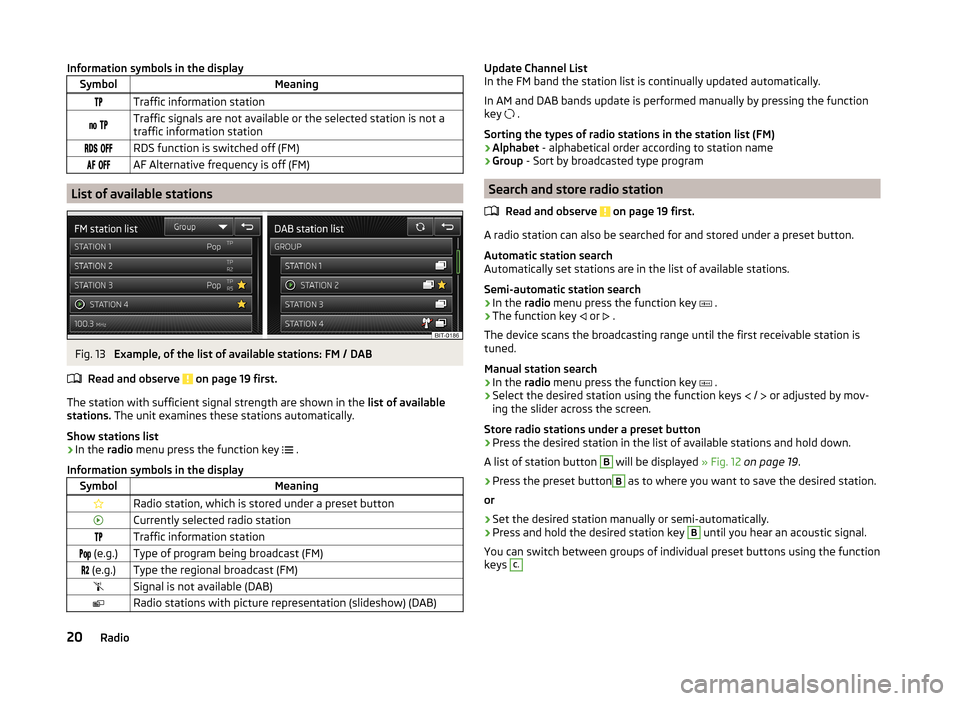
Read and observe on page 19 first.
The station with sufficient signal strength are shown in the list of availablestations. The unit examines these stations automatically.
Show stations list
›
In the radio menu press the function key .
Information symbols in the display
SymbolMeaningRadio station, which is stored under a preset buttonCurrently selected radio stationTraffic information station (e.g.)Type of program being broadcast (FM) (e.g.)Type the regional broadcast (FM)Signal is not available (DAB)Radio stations with picture representation (slideshow) (DAB)Update Channel ListIn the FM band the station list is continually updated automatically.
In AM and DAB bands update is performed manually by pressing the functionkey .
Sorting the types of radio stations in the station list (FM)›Alphabet - alphabetical order according to station name›Group - Sort by broadcasted type program
Search and store radio station
Read and observe on page 19 first.
A radio station can also be searched for and stored under a preset button.
Automatic station searchAutomatically set stations are in the list of available stations.
Semi-automatic station search
›
In the radio menu press the function key .
›
The function key or .
The device scans the broadcasting range until the first receivable station istuned.
Manual station search
›
In the radio menu press the function key .
›
Select the desired station using the function keys / or adjusted by mov-ing the slider across the screen.
Store radio stations under a preset button
›
Press the desired station in the list of available stations and hold down.
A list of station button
B
will be displayed » Fig. 12 on page 19.
›
Press the preset button
B
as to where you want to save the desired station.
or
›
Set the desired station manually or semi-automatically.
›
Press and hold the desired station key
B
until you hear an acoustic signal.
You can switch between groups of individual preset buttons using the functionkeys
C.20Radio
Page 23 of 54
Search the available stations (Scan)Read and observe
on page 19 first.
This function shows all the receivable stations in succession, each for a fewseconds.
Switching on
›
Press the menu knob
2
» Fig. 1 on page 5 .
or
›
In the radio menu press the function key
→ Press Scan.
Switching off
›
Press the menu knob
2
.
or
›
press any function key in the device screen.
After switching off the function, the device plays the station at which the
function was cancelled.
Station logos
Read and observe
on page 19 first.
The present buttons
B
» Fig. 12 on page 19 can be linked to logos (images) of
the radio stations.
Store the station logo automatically (FM / DAB)
›
Before you store the radio station to a station button function key press in
the Radio menu the function key
Press
→ Advanced settings .
›
Activate the menu item
Auto-save station logos » page 22 , Advanced set-
tings and » page 23 , Advanced settings (DAB) .
when you save the station to a station button, the station is also assigned a
logo from the device memory if the logo is available in the memory.
Storing station logos manually
For the previously stored stations a logo can be assigned manually.
›
Press the function key
Press
→ Station logos .
A menu with preset buttons for radio stations is displayed.
›
Press the station button for the station which is to be assigned a logo.
A menu for data media (CD, SD card, USB) is displayed.›
The desired image is to be selected in the corresponding data media.
Selecting the image causes this to be assigned to the corresponding station.
Note
■ The following image formats are supported: jpg, gif, png, bmp.■We recommend a resolution of up to 500 x 500 pixels.
Traffic programme
Read and observe
on page 19 first.
Switching on/off
›
In the radio menu, press the function key
.
›
Enable or disable the menu item
Traffic programme (TP).
Traffic reports
During a traffic announcement, the following menu is displayed.
›
Cancel - interruption of the current traffic report. The TP function remains
activated.
›
Deactivate - Exit the current traffic report and turn off the TP function.
Note
■
Some radio stations misleadingly identify themselves as traffic programs. It is
therefore not a device error that with such radio stations, no traffic news exist.■
During playback in the media menu the traffic information from the last se-
lected radio station is received.
■
Should this radio station not transmit traffic reports or the signal is not avail-
able, then the device automatically searches for a TP station.
21Radio
Page 24 of 54
Station information (DAB)Fig. 14
Station information
Read and observe on page 19 first.
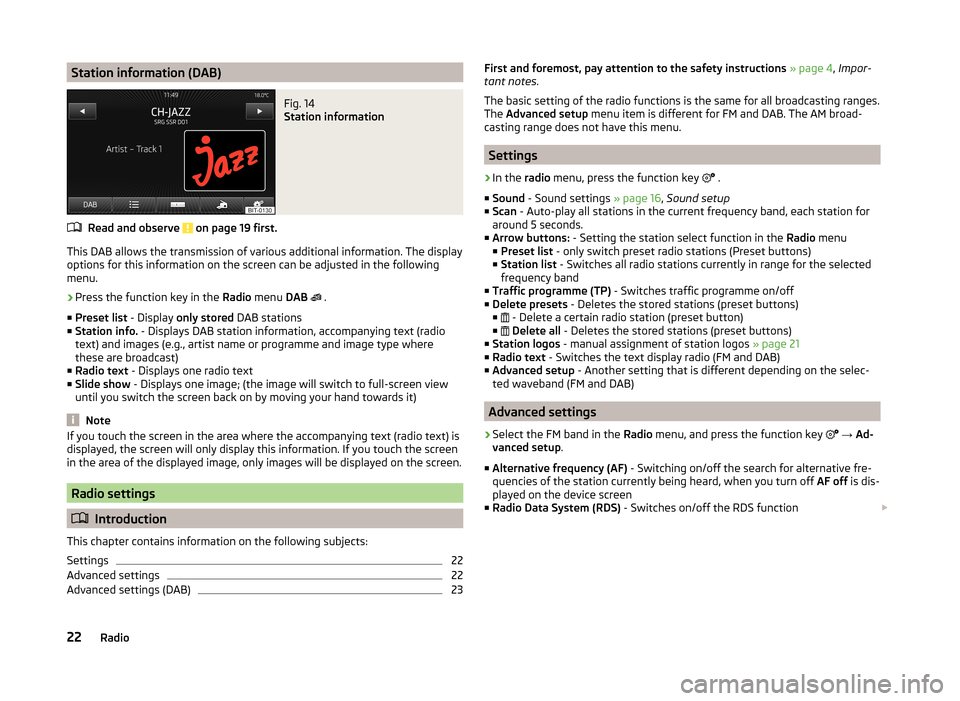
This DAB allows the transmission of various additional information. The displayoptions for this information on the screen can be adjusted in the following
menu.
›
Press the function key in the Radio menu DAB
.
■ Preset list - Display only stored DAB stations
■ Station info. - Displays DAB station information, accompanying text (radio
text) and images (e.g., artist name or programme and image type where
these are broadcast)
■ Radio text - Displays one radio text
■ Slide show - Displays one image; (the image will switch to full-screen view
until you switch the screen back on by moving your hand towards it)
Note
If you touch the screen in the area where the accompanying text (radio text) is
displayed, the screen will only display this information. If you touch the screen
in the area of the displayed image, only images will be displayed on the screen.
Radio settings
Introduction
This chapter contains information on the following subjects:
Settings
22
Advanced settings
22
Advanced settings (DAB)
23First and foremost, pay attention to the safety instructions » page 4 , Impor-
tant notes .
The basic setting of the radio functions is the same for all broadcasting ranges.
The Advanced setup menu item is different for FM and DAB. The AM broad-
casting range does not have this menu.
Settings
›
In the radio menu, press the function key
.
■ Sound - Sound settings » page 16, Sound setup
■ Scan - Auto-play all stations in the current frequency band, each station for
around 5 seconds.
■ Arrow buttons: - Setting the station select function in the Radio menu
■ Preset list - only switch preset radio stations (Preset buttons)
■ Station list - Switches all radio stations currently in range for the selected
frequency band
■ Traffic programme (TP) - Switches traffic programme on/off
■ Delete presets - Deletes the stored stations (preset buttons)
■ - Delete a certain radio station (preset button)
■
Delete all - Deletes the stored stations (preset buttons)
■ Station logos - manual assignment of station logos » page 21
■ Radio text - Switches the text display radio (FM and DAB)
■ Advanced setup - Another setting that is different depending on the selec-
ted waveband (FM and DAB)
Advanced settings
›
Select the FM band in the Radio menu, and press the function key
→ Ad-
vanced setup .
■ Alternative frequency (AF) - Switching on/off the search for alternative fre-
quencies of the station currently being heard, when you turn off AF off is dis-
played on the device screen
■ Radio Data System (RDS) - Switches on/off the RDS function
22Radio
Page 35 of 54
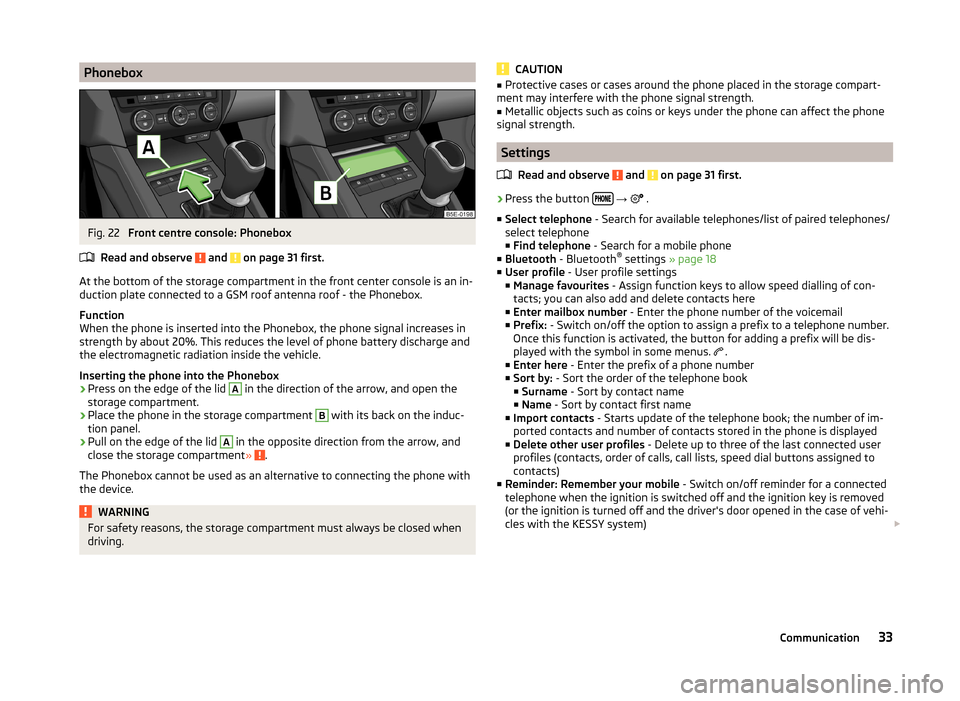
PhoneboxFig. 22
Front centre console: Phonebox
Read and observe
and on page 31 first.
At the bottom of the storage compartment in the front center console is an in-
duction plate connected to a GSM roof antenna roof - the Phonebox.
Function
When the phone is inserted into the Phonebox, the phone signal increases in
strength by about 20%. This reduces the level of phone battery discharge and
the electromagnetic radiation inside the vehicle.
Inserting the phone into the Phonebox
›
Press on the edge of the lid
A
in the direction of the arrow, and open the
storage compartment.
›
Place the phone in the storage compartment
B
with its back on the induc-
tion panel.
›
Pull on the edge of the lid
A
in the opposite direction from the arrow, and
close the storage compartment » .
The Phonebox cannot be used as an alternative to connecting the phone with
the device.
WARNINGFor safety reasons, the storage compartment must always be closed when
driving.CAUTION■ Protective cases or cases around the phone placed in the storage compart-
ment may interfere with the phone signal strength.■
Metallic objects such as coins or keys under the phone can affect the phone
signal strength.
Settings
Read and observe
and on page 31 first.
›
Press the button
→
.
■ Select telephone - Search for available telephones/list of paired telephones/
select telephone ■ Find telephone - Search for a mobile phone
■ Bluetooth - Bluetooth ®
settings » page 18
■ User profile - User profile settings
■ Manage favourites - Assign function keys to allow speed dialling of con-
tacts; you can also add and delete contacts here
■ Enter mailbox number - Enter the phone number of the voicemail
■ Prefix: - Switch on/off the option to assign a prefix to a telephone number.
Once this function is activated, the button for adding a prefix will be dis-
played with the symbol in some menus. .
■ Enter here - Enter the prefix of a phone number
■ Sort by: - Sort the order of the telephone book
■ Surname - Sort by contact name
■ Name - Sort by contact first name
■ Import contacts - Starts update of the telephone book; the number of im-
ported contacts and number of contacts stored in the phone is displayed
■ Delete other user profiles - Delete up to three of the last connected user
profiles (contacts, order of calls, call lists, speed dial buttons assigned to
contacts)
■ Reminder: Remember your mobile - Switch on/off reminder for a connected
telephone when the ignition is switched off and the ignition key is removed
(or the ignition is turned off and the driver's door opened in the case of vehi-
cles with the KESSY system)
33Communication
Page 39 of 54
›Cancel
- Cancels the deletion
› Delete
- delete confirmation
Disconnection
Read and observe
on page 34 first.
The connection of a phone to the device can be disconnected in one of the fol-
lowing ways.
› By removing the ignition key (or switching off the ignition and opening the
driver's door in vehicles with the KESSY system).
› By disconnecting the hands-free system or switching off the Bluetooth ®
function on the phone.
› By switching off the Bluetooth ®
function on the device » page 18, Blue-
tooth ®
-settings .
› By removing the phone from the list of paired devices
» page 36, Clear mo-
bile phone from the list of paired devices .
› By turning off the Bluetooth ®
HFP profile » page 36, Switching on / off Blue-
tooth ®
profile .
Telephone functions
Introduction
This chapter contains information on the following subjects:
Speed dialling a phone number of a contact
37
Direct entry of a phone number
38
Phone book
38
Call-lists
39
Telephone conversation
39
Conference
39
First and foremost, pay attention to the safety instructions » page 4 .
Speed dialling a phone number of a contact
You can use the speed dial function keys
C
» Fig. 21 on page 32 to dial previ-
ously assigned telephone numbers of a contact instantly.
There are five speed dial buttons available.
Assign a telephone number to a contact›Press a function key for the speed dial C » Fig. 21 on page 32 that is not as-
signed.
The unit displays the phone book.›
If necessary, enter one of the contact numbers for the desired telephone
contact.
The assignment of the contact telephone number to a function key for the
speed dialling is also possible in the telephone menu settings » page 33.
Select an assigned telephone number of a contact
›
Press the desired function key to speed dial the phone number of a contact
C
» Fig. 21 on page 32 .
Change the assigned telephone number of a contact
›
Press the desired function key for the speed dial
C
» Fig. 21 on page 32 for
longer.
The unit displays the phone book.
›
If necessary, enter one of the contact numbers for the desired telephone
contact.
The telephone number of a contact is assigned to the selected function key for
speed dialling.
You can also make the change in the Telephone menu » page 33 .
Remove phone number of a contact
›
Press the symbol button
→ User profile → Press manage favourites.
›
Press the function key for the speed dial. By confirming the menu item De-
lete the telephone number of a contact on the selected function key is re-
moved for quick dialling.
37Communication