light SKODA OCTAVIA 2014 3.G / (5E) Owners Manual
[x] Cancel search | Manufacturer: SKODA, Model Year: 2014, Model line: OCTAVIA, Model: SKODA OCTAVIA 2014 3.G / (5E)Pages: 280, PDF Size: 35.53 MB
Page 164 of 280

Engine (drive)
The vehicle acceleration is more dynamic than in Normal mode.
The engine noise is noticeable in the interior more intensely than in
normalmode 1)
.
Steering
The power steering is reduced slightly, i.e., the driver needs to exert more
force for steering .
Adaptive Cruise Control (ACC)
The acceleration is quicker than in normal mode with distance con-
trol » page 149 .
Adaptive headlights (AHL)
The headlights adapt to the driving style more dynamically than in mode
Normal » page 74 .
ProActive passenger protection
The first level of protection is deactivated » page 161.
Ecomode
Read and observe
on page 160 first.
This mode is suitable for a relaxed style of driving and helps to save fuel.
Selecting this mode primarily affects the function of the following systems.
Engine (drive)
Vehicle acceleration is more relaxed than in Normal mode.
The recommended gear is controlled such to achieve the lowest possible fuel
consumption » page 46.
When the START-STOP system was deactivated manually » page 158, it is au-
tomatically activated.
The automatic gearbox is set automatically to mode E » page 133 .
The engine noise is felt less intensely in the interior less than in normalmode 1)
.
Adaptive Cruise Control (ACC)
Acceleration occurs more relaxed than in Normal » page 149mode with dis-
tance control.
Adaptive headlights (AHL)
The system is automatically deactivated » page 74.
Air conditioning (Climatronic)
The air conditioning is controlled so as to save energy. For this reason, for ex-
ample, it may take longer to reach the desired interior temperature in mode
Normal.
Note
■ The Eco driving mode is not available when towing a trailer. When the vehicle
is connected electrically to a trailer and is in the Eco driving mode, the Normal
driving mode is configured automatically.■
The maximum vehicle acceleration (kickdown function) is possible also in
driving mode Eco.
Individualmode
Read and observe
on page 160 first.
In mode Individual you can select between Normal, Sport and Eco for each sys-tem separately » Operating instructions for Infotainment , chapter Vehicle set-
tings .
ProActive passenger protection
Introduction
This chapter contains information on the following subjects:
Function
162
ProActive passenger protection (From here on referred to only as system) in-
creases passenger protection in the front seats in situations that could lead to
vehicle impact or overturning.
WARNING■ The increased safety by ProActive passenger protection must not tempt
you to take greater risks than otherwise – risk of accident!■
Adjust the speed and driving style to the current visibility, weather, road
and traffic conditions.
1)
Applies to Octavia RS, Octavia RS.
161Assist systems
Page 165 of 280
NoteThe system component service life is monitored electronically. Further infor-
mation » page 38 , Security systems .
Function
Read and observe
on page 161 first.
The system is activated whenever the ignition is switched on, and is ready tointervene automatically under the following conditions.
The engine is running.
The vehicle moves at a speed of more than 30 km/h.
In critical driving situations (e.g. during emergency braking or a sudden change
in direction), the following steps can be taken separately or combined in order
to reduce the risk of serious injury.
› The front passenger's and driver's seatbelts, if worn, are automatically
ten-
sioned closely over the body.
› The windows in the side doors (if open) are automatically closed up to a gap
of about 5 cm from the edge.
› The sliding/tilting roof is closed.
Once the critical driving situation has passed, the tension on the seatbelts will
be released again.
The system operates at two levels of protection.
The first level of protection
The system already intervenes in situations that may occur during dynamic
driving. As a result, this primarily helps to keep the driver and the passenger in
the correct seated position.
The first level of protection can be deactivated by one of the following meas-
ures.
› Deactivation of the system in Infotainment
» Operating instructions for Info-
tainment , chapter Vehicle settings (CAR button) .
› Deactivation of TCS
» page 139.
› Selecting the driving mode Sport
» page 160.
Provided that the driving mode Sports is not selected, the system is activated over the two levels of protection after switching the ignition off and on again.
The second level of protection
The system intervenes only if the situation is evaluated as critical, such as in
panic braking at high speeds.
This level of protection cannot be deactivated.
Note
If the front passenger front airbag is deactivated » page 21 the belt tensioning
function for the front passenger seat is switched off.
Lane Assist
Introduction
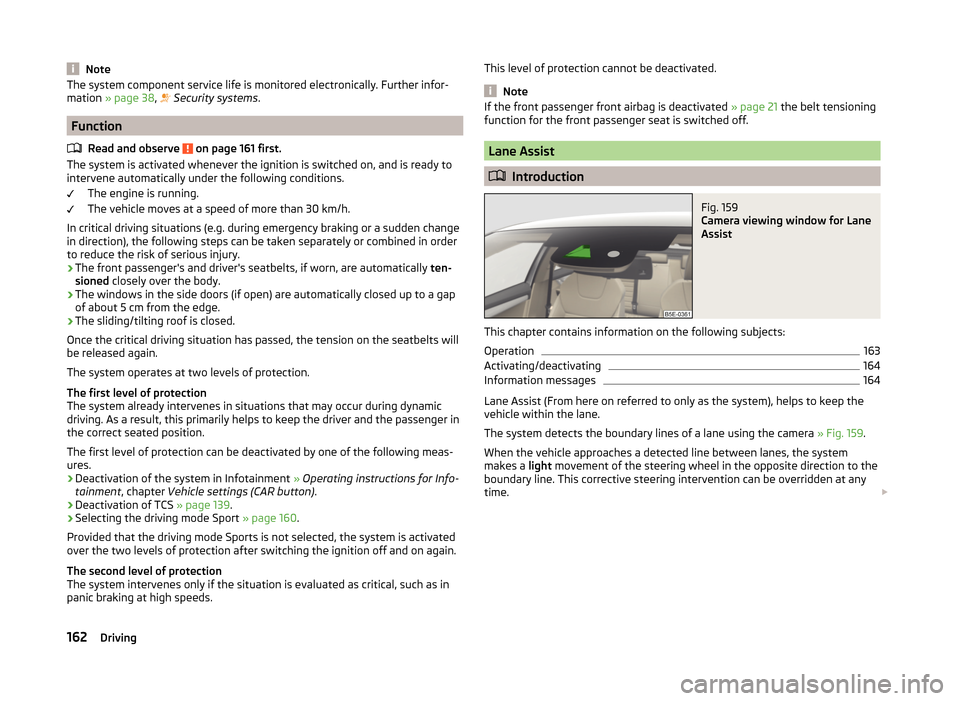
Fig. 159
Camera viewing window for Lane
Assist
This chapter contains information on the following subjects:
Operation
163
Activating/deactivating
164
Information messages
164
Lane Assist (From here on referred to only as the system), helps to keep the
vehicle within the lane.
The system detects the boundary lines of a lane using the camera » Fig. 159.
When the vehicle approaches a detected line between lanes, the system
makes a light movement of the steering wheel in the opposite direction to the
boundary line. This corrective steering intervention can be overridden at any
time.
162Driving
Page 167 of 280

The boundary lines are clearly visible (appropriate longitudinal markings).
The boundary line of at least one side of the lane is detected.
The driver's hands are on the steering wheel.
The lane is more than 2.5 m in width.
If the turn signal is switched on prior to driving over the boundary line (e.g.
when making a turn), no steering intervention takes place when the vehicle
approaches the boundary line. The system regards the situation as an inten-
ded lane change.
Warning lights in the instrument clusterWarning lightMeaningThe system is active, but not ready to intervene.The system is active and ready to intervene or is currently
intervening.
Adaptive lane assist
Adaptive lane assist helps to keep the vehicle in the position between the
boundary lines selected by the driver, by means of steering intervention.
If the system detects only one boundary line, it will help to maintain the selec-
ted proximity from said boundary line.
If the proximity to the detected boundary line is changed, the system quickly
adapts and maintains the newly-selected position.
WARNINGThe function of adaptive lane guidance Assist system may be restricted
when driving e.g. over rutted roads, on a slope, or if there are lateral winds.
Activating/deactivating
Read and observe
and on page 163 first.
The activation or deactivation of the system can be carried out in one of two
ways.
› In the
Assist systems menu item in the instrument cluster display » page 51,
Menu item wizard .
› In Infotainment
» Infotainment operating instructions , chapter Vehicle set-
tings (CAR button) .
Adaptive tracking can also be enabled or disabled In Infotainment.
Information messages
Read and observe
and on page 163 first.
The information messages are shown in the instrument cluster display. Lane Assist not available. No sensor view.
The windscreen is dirty, iced over or misted up in the camera viewing range.
Clean the windscreen or remove the obstacles.
Lane Assist currently not available.
The system has limited functionality due to a temporary error. Try to re-acti-
vate the machine.
Error: Lane Assist
There is a system error. Seek help from a specialist garage. Lane Assist: Take over steering!
The system has detected that there are no hands on the steering wheel. In
this case, the Assist system is not ready to intervene. Place your hands on the
steering wheel.
Traffic sign recognition
Introduction
This chapter contains information on the following subjects:
Function
165
Additional display
166
Traffic sign display when towing a trailer
166
Information messages
166
The traffic sign recognition system (hereinafter referred to only as system)
shows certain traffic signs on the display of the instrument cluster.
WARNING■ The system only serves to support and does not relieve the driver of the
responsibility for the vehicle operation.■
Vertical traffic signs must always take precedence over the traffic signs
shown in the display. The driver is always responsible for correctly assess-
ing the traffic situation.
164Driving
Page 170 of 280
The system detects a break from driving when one of the following condi-
tions is met.
› The vehicle is stopped and the ignition is turned off.
› The vehicle is stopped, the seat belt is taken off and the driver's door is
opened.
› The vehicle is stopped for more than 15 minutes.
If none of these conditions are met or if the driving style is not changed, the
system recommends a driving break again after 15 minutes.
The system can be activated/deactivated in the Infotainment » operating in-
structions for Infotainment , chapter Vehicle settings (CAR button) .
Information messages
Read and observe
on page 166 first.
The icon appears and the following message for a few seconds in the display
of the instrument cluster
Driver alert. Take a break!
DRIVER ALERT TAKE A BREAK
An audible signal is also emitted.
Tyre pressure monitoring
Introduction
This chapter contains information on the following subjects:
Saving tyre pressure values
167
Saving tyre pressure values and infotainment display
168
Saving tyre pressure values by pressing a button
168
The tyre pressure monitoring function (hereinafter referred to simply as the
system) monitors the tyre pressure while driving.
If the tyre inflation pressure changes, the warning light lights up in the in-
strument cluster and an audible signal is heard.
Information on the procedure for the notification of a change in tyre inflation
pressure » page 39 .
The system can only function properly if the tyres have the prescribed inflation
pressure and these pressure values are stored in the system.
WARNING■ Having the correct tyre inflation pressure is always the driver's responsi-
bility. Tyre inflation pressure must be checked regularly » page 204.■
The system cannot warn in case of very rapid tyre inflation pressure loss,
e.g. in case of sudden tyre damage.
Saving tyre pressure values
Read and observe
on page 167 first.
The tyre pressure values are always stored in the system if one of the follow-ing events occurs.
› Change of tyre inflation pressure.
› Change one or more wheels.
› Change in position of a wheel on the vehicle.
› The warning light
lights up in the instrument cluster.
Depending on the vehicle equipment, the tyre pressure values are stored ei-
ther in Infotainment or by pressing a button.
WARNINGBefore storing the pressure values, the tyres must be inflated to the speci-
fied inflation pressure » page 204. If incorrect pressure values are saved,
the system may also not issue a warning even if the tyre inflation pressure
is too low.l
CAUTION
The tyre pressure values must be saved every 10,000 km or once annually in
order to ensure correct system functioning.167Assist systems
Page 171 of 280
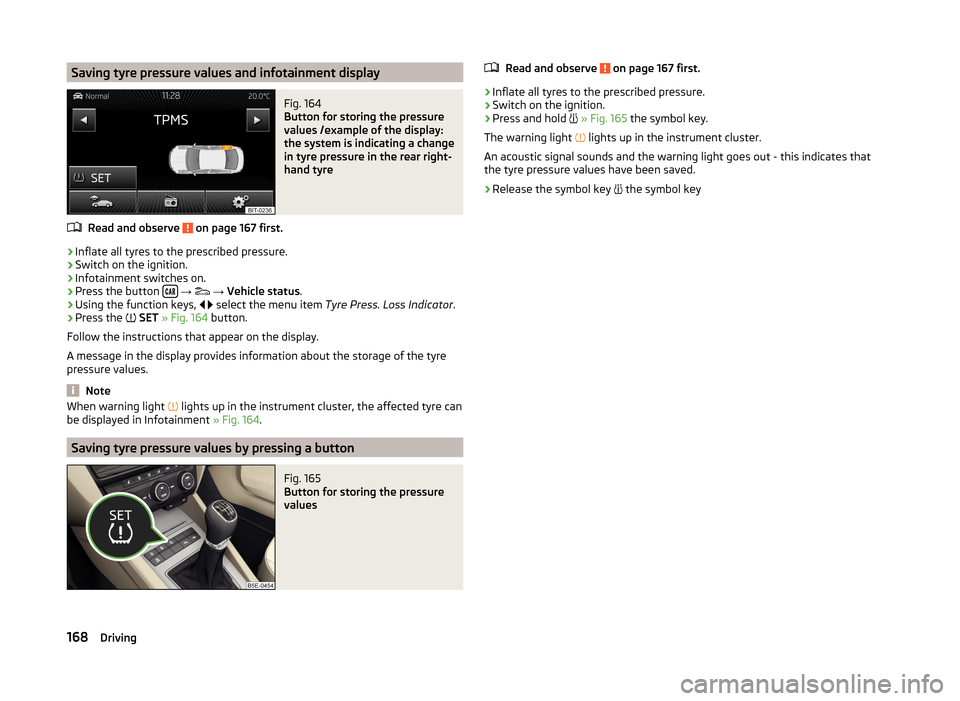
Saving tyre pressure values and infotainment displayFig. 164
Button for storing the pressure
values /example of the display:
the system is indicating a change
in tyre pressure in the rear right-
hand tyre
Read and observe on page 167 first.
›
Inflate all tyres to the prescribed pressure.
›
Switch on the ignition.
›
Infotainment switches on.
›
Press the button
→
→ Vehicle status .
›
Using the function keys,
select the menu item
Tyre Press. Loss Indicator .
›
Press the
SET » Fig. 164 button.
Follow the instructions that appear on the display.
A message in the display provides information about the storage of the tyre
pressure values.
Note
When warning light lights up in the instrument cluster, the affected tyre can
be displayed in Infotainment » Fig. 164.
Saving tyre pressure values by pressing a button
Fig. 165
Button for storing the pressure
values
Read and observe on page 167 first.›
Inflate all tyres to the prescribed pressure.
›
Switch on the ignition.
›
Press and hold
» Fig. 165 the symbol key.
The warning light
lights up in the instrument cluster.
An acoustic signal sounds and the warning light goes out - this indicates that the tyre pressure values have been saved.
›
Release the symbol key
the symbol key
168Driving
Page 177 of 280
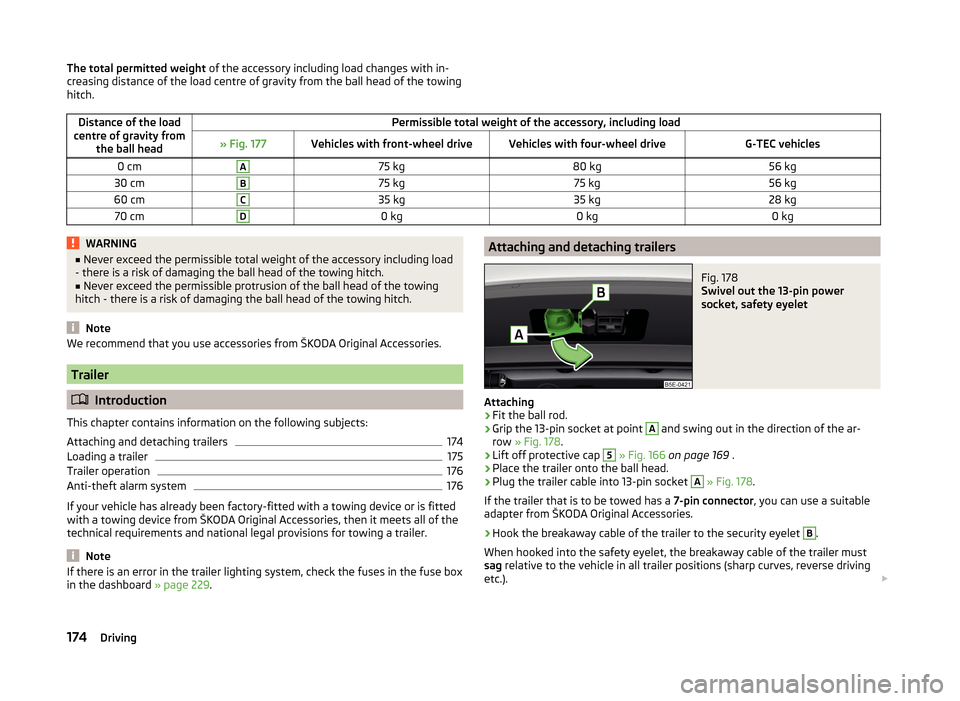
The total permitted weight of the accessory including load changes with in-
creasing distance of the load centre of gravity from the ball head of the towing
hitch.Distance of the load
centre of gravity from the ball headPermissible total weight of the accessory, including load» Fig. 177Vehicles with front-wheel driveVehicles with four-wheel driveG-TEC vehicles0 cmA75 kg80 kg56 kg30 cmB75 kg75 kg56 kg60 cmC35 kg35 kg28 kg70 cmD0 kg0 kg0 kgWARNING■Never exceed the permissible total weight of the accessory including load
- there is a risk of damaging the ball head of the towing hitch.■
Never exceed the permissible protrusion of the ball head of the towing
hitch - there is a risk of damaging the ball head of the towing hitch.
Note
We recommend that you use accessories from ŠKODA Original Accessories.
Trailer
Introduction
This chapter contains information on the following subjects:
Attaching and detaching trailers
174
Loading a trailer
175
Trailer operation
176
Anti-theft alarm system
176
If your vehicle has already been factory-fitted with a towing device or is fitted
with a towing device from ŠKODA Original Accessories, then it meets all of the
technical requirements and national legal provisions for towing a trailer.
Note
If there is an error in the trailer lighting system, check the fuses in the fuse box
in the dashboard » page 229.Attaching and detaching trailersFig. 178
Swivel out the 13-pin power
socket, safety eyelet
Attaching
›
Fit the ball rod.
›
Grip the 13-pin socket at point
A
and swing out in the direction of the ar-
row » Fig. 178 .
›
Lift off protective cap
5
» Fig. 166 on page 169 .
›
Place the trailer onto the ball head.
›
Plug the trailer cable into 13-pin socket
A
» Fig. 178 .
If the trailer that is to be towed has a 7-pin connector, you can use a suitable
adapter from ŠKODA Original Accessories.
›
Hook the breakaway cable of the trailer to the security eyelet
B
.
When hooked into the safety eyelet, the breakaway cable of the trailer must
sag relative to the vehicle in all trailer positions (sharp curves, reverse driving
etc.).
174Driving
Page 178 of 280
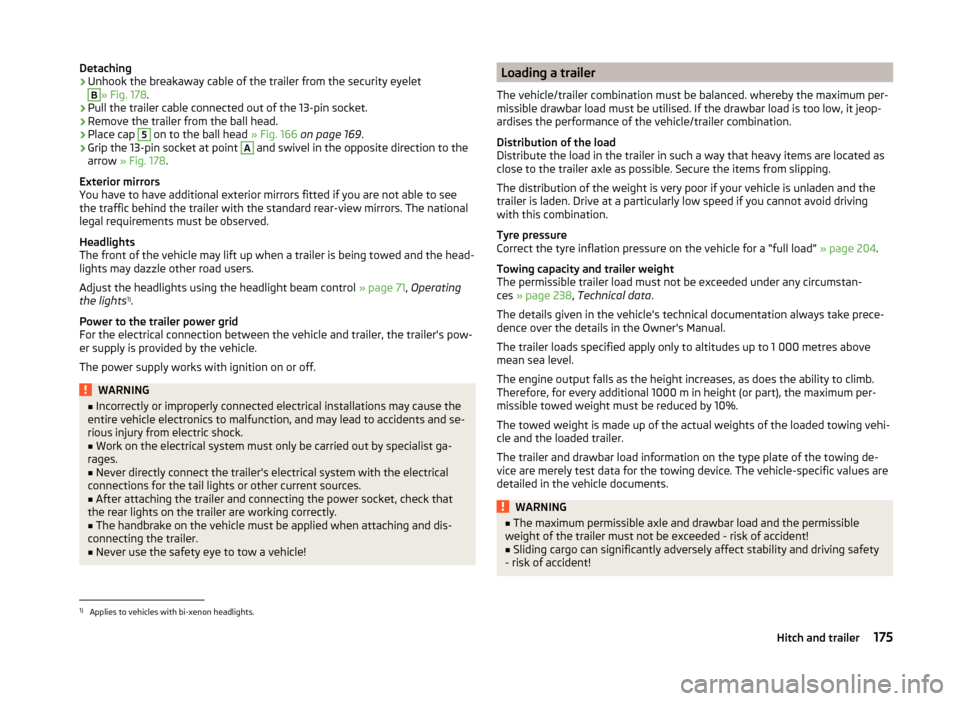
Detaching›Unhook the breakaway cable of the trailer from the security eyeletB
» Fig. 178.
›
Pull the trailer cable connected out of the 13-pin socket.
›
Remove the trailer from the ball head.
›
Place cap
5
on to the ball head » Fig. 166 on page 169 .
›
Grip the 13-pin socket at point
A
and swivel in the opposite direction to the
arrow » Fig. 178 .
Exterior mirrors
You have to have additional exterior mirrors fitted if you are not able to see
the traffic behind the trailer with the standard rear-view mirrors. The national
legal requirements must be observed.
Headlights
The front of the vehicle may lift up when a trailer is being towed and the head-
lights may dazzle other road users.
Adjust the headlights using the headlight beam control » page 71, Operating
the lights 1)
.
Power to the trailer power grid
For the electrical connection between the vehicle and trailer, the trailer's pow-
er supply is provided by the vehicle.
The power supply works with ignition on or off.
WARNING■ Incorrectly or improperly connected electrical installations may cause the
entire vehicle electronics to malfunction, and may lead to accidents and se-
rious injury from electric shock.■
Work on the electrical system must only be carried out by specialist ga-
rages.
■
Never directly connect the trailer's electrical system with the electrical
connections for the tail lights or other current sources.
■
After attaching the trailer and connecting the power socket, check that
the rear lights on the trailer are working correctly.
■
The handbrake on the vehicle must be applied when attaching and dis-
connecting the trailer.
■
Never use the safety eye to tow a vehicle!
Loading a trailer
The vehicle/trailer combination must be balanced. whereby the maximum per-
missible drawbar load must be utilised. If the drawbar load is too low, it jeop-
ardises the performance of the vehicle/trailer combination.
Distribution of the load
Distribute the load in the trailer in such a way that heavy items are located as
close to the trailer axle as possible. Secure the items from slipping.
The distribution of the weight is very poor if your vehicle is unladen and the
trailer is laden. Drive at a particularly low speed if you cannot avoid driving
with this combination.
Tyre pressure
Correct the tyre inflation pressure on the vehicle for a “full load” » page 204.
Towing capacity and trailer weight
The permissible trailer load must not be exceeded under any circumstan-
ces » page 238 , Technical data .
The details given in the vehicle's technical documentation always take prece-
dence over the details in the Owner's Manual.
The trailer loads specified apply only to altitudes up to 1 000 metres above
mean sea level.
The engine output falls as the height increases, as does the ability to climb.
Therefore, for every additional 1000 m in height (or part), the maximum per-
missible towed weight must be reduced by 10%.
The towed weight is made up of the actual weights of the loaded towing vehi-
cle and the loaded trailer.
The trailer and drawbar load information on the type plate of the towing de-
vice are merely test data for the towing device. The vehicle-specific values are
detailed in the vehicle documents.WARNING■ The maximum permissible axle and drawbar load and the permissible
weight of the trailer must not be exceeded - risk of accident!■
Sliding cargo can significantly adversely affect stability and driving safety
- risk of accident!
1)
Applies to vehicles with bi-xenon headlights.
175Hitch and trailer
Page 179 of 280
Trailer operation
Driving speed
For safety reasons, do not drive faster than 80 km/h when hitching a trailer.
Immediately reduce your speed as soon as even the slightest swaying of the
trailer is detected. Never attempt to stop the trailer from “swaying” by acceler-
ating.
Brakes
Apply the brakes in good time! If the trailer is fitted with a trailer brake, apply
the brakes gently at first, then brake firmly. This will avoid brake jolts resulting
from the trailer wheels locking.
On downhill sections shift down a gear in good time to also use the engine as
a brake.
Engine overheating
If the needle for the coolant temperature gauge moves into the right-hand
area or the red area of the scale, the speed must be reduced immediately.
Stop and switch off the engine if the warning symbol in the instrument clus-
ter » page 41 lights up.
The following information must be observed » page 41,
Coolant
.
The coolant temperature can be reduced by switching on the heating.WARNING■ Always drive particularly carefully with the trailer.■Adapt your speed to the conditions of the road surface and to the traffic
situation.
CAUTION
If you tow a trailer frequently, you should also have your vehicle inspected be-
tween service intervals.
Anti-theft alarm system
If the vehicle is locked, the alarm is activated when the electrical connection to
the trailer is interrupted.
Always switch off the anti-theft alarm system before a trailer is coupled or un-
coupled » page 59 .
Conditions for including a trailer in the anti-theft alarm system.
The vehicle is factory-fitted with an anti-theft alarm system and a towing
device.
The trailer is electrically connected to the towing vehicle by means of the
trailer socket.
The electrical system of the vehicle and trailer is functional.
the vehicle is locked with the vehicle key and the anti-theft alarm system
is activated.
CAUTION
For technical reasons, trailers with rear LED lights cannot be connected to the
anti-theft alarm system.176Driving
Page 184 of 280
Washing by handRead and observe
and on page 180 first.
Soak the dirt with plenty of water and rinse as well as possible.
Clean the vehicle with a soft sponge, a washing glove or a washing brush.
Work from the top to the bottom – starting with the roof.
For stubborn dirt, agents specifically intended for this purpose are to be used. Wash out the sponge or washing glove thoroughly at short intervals.
Clean wheels, door sills and similar parts last. Use a second sponge for such areas.
Give the vehicle a good rinse after washing it and dry it off using a chamois
leather.
WARNINGProtect your hands and arms from sharp-edged metal parts when cleaning
the underfloor or the inside of the wheel housings or the wheel trims – risk
of cuts!
CAUTION
■ Only apply slight pressure when cleaning the vehicle's paintwork.■Do not wash your vehicle in bright sunlight – risk of paint damage.
Automatic car wash systems
Read and observe
and on page 180 first.
The usual precautionary measures must be taken before washing the vehicle
in an automatic car wash system (e.g. closing the windows and the sliding/tilt-
ing roof etc.).
If your vehicle is fitted with any particular attached parts, such as a spoiler,
roof rack system, two-way radio aerial etc., it is best to consult the operator of
the car wash system beforehand.
After an automatic wash with wax treatment, the lips of the wipers should be
cleaned with cleaning agents specially designed for the purpose, and then de-
greased.
CAUTIONFold in the exterior mirrors to prevent damage before washing the vehicle in
an automatic car wash system. Never manually fold in electric exterior mirrors -
always use the electric controls.
Washing with a high-pressure cleaner
Read and observe
and on page 180 first.
When washing the vehicle with a high-pressure cleaner, the instructions for
use of the equipment must be observed. This applies in particular to the pres-
sure used and to the spraying distance .
Maintain a sufficiently large distance to the parking aid sensors and soft mate-
rials such as rubber hoses or insulation material.
CAUTION
■ If washing the vehicle in the winter using a hose or high-pressure cleaner,
ensure that the jet of water is not aimed directly at the locking cylinders or the
door/panel joints – risk of freezing!■
To avoid damaging the parking aid sensors while cleaning with high-pressure
cleaners or steam jets, the sensors must only be directly sprayed for short pe-
riods while a minimum distance of 10 cm must be observed.
Note
See also Washing cars with decorative films using a high-pressure clean-
er » page 183 .
Cleaning vehicle exterior
Introduction
This chapter contains information on the following subjects:
Vehicle paint work
182
Plastic parts
182
Rubber seals
183
Chrome parts
183
Decorative films
183
Windows and external mirrors
183
Headlight glasses
184
Camera lens
184
181Care and maintenance
Page 187 of 280
■Do not remove snow or ice from glass parts using warm or hot water – risk of
cracks forming in the glass.■
Make sure that when removing snow and ice from the windows, the labels
attached to the vehicle by the factory are not damaged.
CAUTION
Information for cleaning windows■Do not clean the inside of the windows with sharp-edged objects or corro-
sive and acidic cleaning agents – there is a risk of damaging the heating ele-
ments or window aerial.■
When drying the windows after washing the vehicle, do not use window
leathers that have been used to polish the bodywork. Residues of preserva-
tives in the window leather can dirty the window and reduce visibility.
Headlight glasses
Read and observe
and on page 182 first.
Clean plastic front headlight lenses using clean, warm water and soap.
CAUTION
■The headlights are never to be wiped dry - there is a risk of damaging the
protective lacquer and the headlight glass subsequently developing cracks.■
Do not use sharp objects to clean the glasses - there is a risk of damaging
the protective lacquer and the headlight glasses subsequently developing
cracks.
■
Do not use any aggressive cleaning or chemical solvent products to clean the
headlights – risk of damaging the headlight lenses.
Camera lens
Read and observe
and on page 182 first.
Moisten the lens of the rear view camera first with clean water and then dry
with a dry cloth.
Remove the snow from the lens with a brush and the ice from the lens with
de-icing agents specifically developed for these purposes.
CAUTION■ Remove snow or ice on the lens with warm or hot water - there is a risk of
damaging the lens.■
Never use cleaners containing abrasive effect to clean the lens.
■
Never use pressurized water or steam jet to clean the lens.
Door closing cylinder
Read and observe
and on page 182 first.
Specific products must be used for de-icing door lock cylinders.
CAUTION
Make sure that as little water as possible gets into the locking cylinder when
washing the vehicle - there is a risk of freezing the lock cylinder!
Cavity protection
Read and observe
and on page 182 first.
All the cavities of your vehicle which are at risk from corrosion are protected
for life by a layer of protective wax applied in the factory.
Wax protection does not require to be inspected or re-treated.
If any small amount of wax flow out of the cavities at high temperatures, these
must be removed with a plastic scraper and the stains cleaned using a petrole-
um cleaner.
WARNINGSafety regulations should be observed when using petroleum cleaner to re-
move wax – risk of fire!
Jack
Read and observe
and on page 182 first.
The jack is maintenance-free.
If necessary, the moving parts of the jack should be lubricated with a suitable
lubricant.
184General Maintenance