fog light SKODA OCTAVIA 2014 3.G / (5E) User Guide
[x] Cancel search | Manufacturer: SKODA, Model Year: 2014, Model line: OCTAVIA, Model: SKODA OCTAVIA 2014 3.G / (5E)Pages: 280, PDF Size: 35.53 MB
Page 153 of 280
WARNING■The system only serves to support and does not relieve the driver of the
responsibility for the vehicle operation.■
The driver must always be ready to take over steering of the vehicle him-
self (accelerate or brake).
■
Always adapt your speed and safety proximity to the vehicle ahead to the
current visibility, weather, road and traffic conditions.
WARNING■ The ACC does not react when approaching a stationary obstacle, such as
traffic jams, vehicle breakdowns or vehicles waiting at a traffic light.■
The ACC does not respond to crossing or oncoming objects.
■
If the ACC does not decelerate fast enough, immediately apply the vehi-
cle's foot brake.
WARNINGFor safety reasons, do not use the ACC under the following conditions.■When driving in turning lanes, motorway exits or construction sites, to
avoid an unwanted acceleration to the stored speed.■
When visibility is poor, (e.g. fog, heavy rain, thick snowfall).
■
When road conditions are poor (e.g. ice, slippery road, gravel, dirt road).
■
When driving around “sharp” bends.
■
When riding on a steep gradient / high slope.
CAUTION
The control may automatically switch off when some brake assist systems (e.g.
ESC) intervene, when the maximum permissible engine speed is exceeded, etc.
Note
■ The ACC is designed primarily for use on motorways.■The ACC reduces the speed by automatically releasing the accelerator or by
means of a braking procedure as appropriate. If the brakes are used for an au-
tomatic speed reduction at any moments, then the brake light illuminates.■
In case of failure of more than one brake light on the vehicle or on the elec-
trically connected trailer, the ACC becomes unavailable.
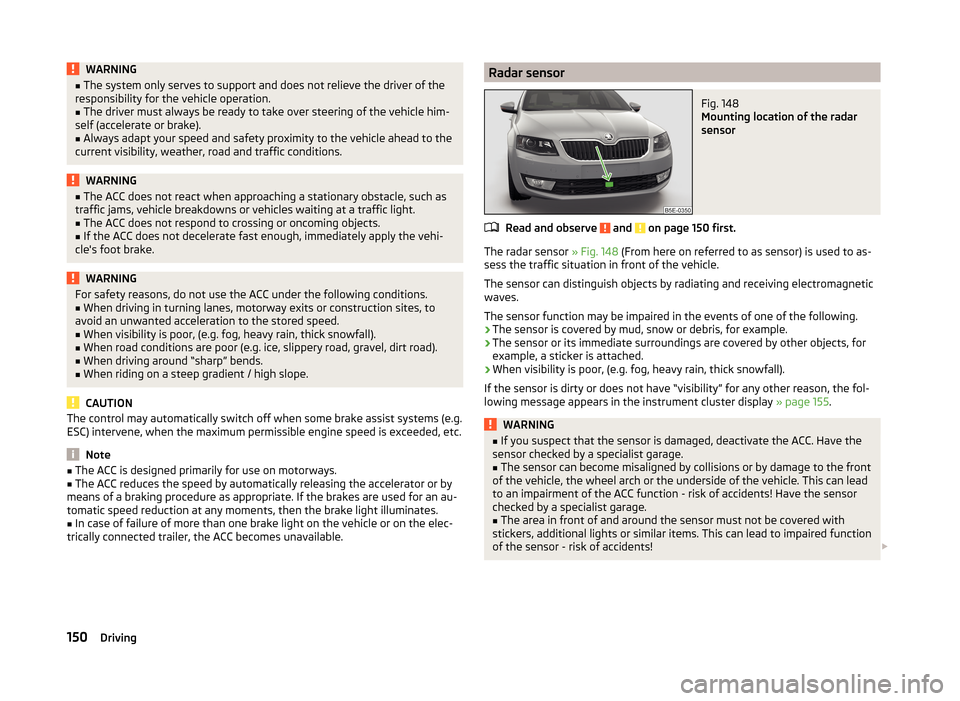
Radar sensorFig. 148
Mounting location of the radar
sensor
Read and observe and on page 150 first.
The radar sensor » Fig. 148 (From here on referred to as sensor) is used to as-
sess the traffic situation in front of the vehicle.
The sensor can distinguish objects by radiating and receiving electromagnetic waves.
The sensor function may be impaired in the events of one of the following.
› The sensor is covered by mud, snow or debris, for example.
› The sensor or its immediate surroundings are covered by other objects, for
example, a sticker is attached.
› When visibility is poor, (e.g. fog, heavy rain, thick snowfall).
If the sensor is dirty or does not have “visibility” for any other reason, the fol- lowing message appears in the instrument cluster display » page 155.
WARNING■
If you suspect that the sensor is damaged, deactivate the ACC. Have the
sensor checked by a specialist garage.■
The sensor can become misaligned by collisions or by damage to the front
of the vehicle, the wheel arch or the underside of the vehicle. This can lead
to an impairment of the ACC function - risk of accidents! Have the sensor
checked by a specialist garage.
■
The area in front of and around the sensor must not be covered with
stickers, additional lights or similar items. This can lead to impaired function
of the sensor - risk of accidents!
150Driving
Page 159 of 280
The sensor function may be impaired in the events of one of the following.
› The sensor is soiled by mud, snow etc.
› The area in front and around the sensor is obscured by labels, auxiliary lights
or similar items.
› Visibility is poor, (e.g. fog, heavy rain, thick snowfall).
If the sensor is dirty or covered, the corresponding message appears on the
display of the instrument cluster » page 157, Information messages .WARNING■
If you suspect that the sensor is damaged, deactivate the system. Have
the sensor checked by a specialist garage.■
The sensor can become misaligned by collisions or by damage to the front
of the vehicle, the wheel arch or the underside of the vehicle. This can lead
to impaired function of the sensor - risk of accidents! Have the sensor
checked by a specialist garage.
■
The area in front and around the sensor should not be obscured by labels,
auxiliary lights or similar items. This can lead to impaired function of the
sensor - risk of accidents!
CAUTION
Remove the snow with a brush and the ice with a solvent-free de-icer.
Operation
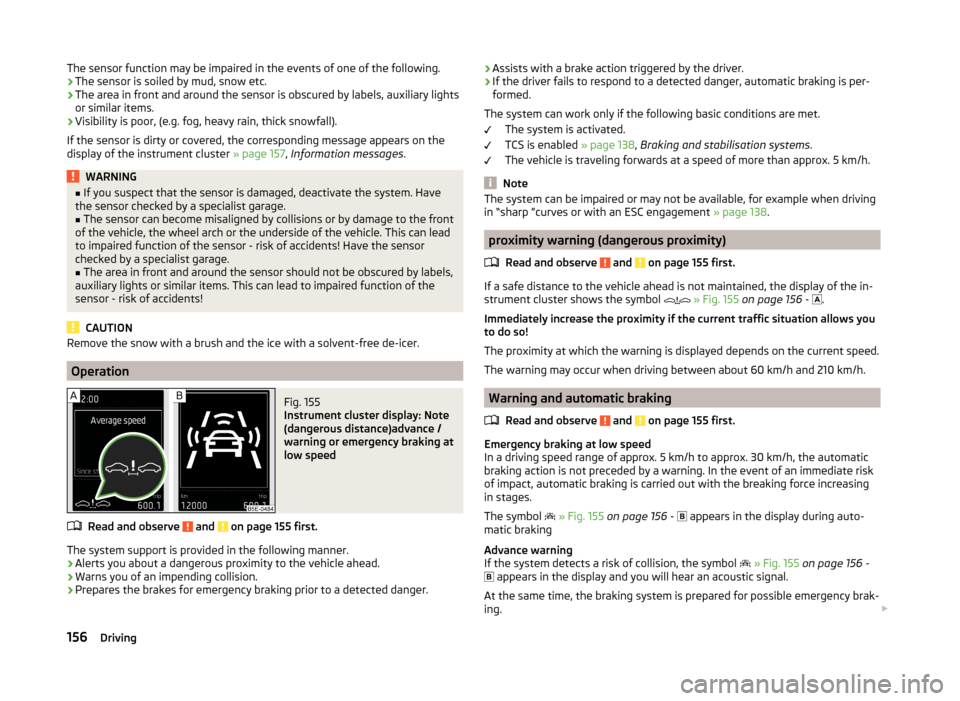
Fig. 155
Instrument cluster display: Note
(dangerous distance)advance /
warning or emergency braking at
low speed
Read and observe and on page 155 first.
The system support is provided in the following manner.
› Alerts you about a dangerous proximity to the vehicle ahead.
› Warns you of an impending collision.
› Prepares the brakes for emergency braking prior to a detected danger.
›Assists with a brake action triggered by the driver.
› If the driver fails to respond to a detected danger, automatic braking is per-
formed.
The system can work only if the following basic conditions are met. The system is activated.
TCS is enabled » page 138, Braking and stabilisation systems .
The vehicle is traveling forwards at a speed of more than approx. 5 km/h.
Note
The system can be impaired or may not be available, for example when driving
in “sharp ”curves or with an ESC engagement » page 138.
proximity warning (dangerous proximity)
Read and observe
and on page 155 first.
If a safe distance to the vehicle ahead is not maintained, the display of the in-strument cluster shows the symbol
» Fig. 155 on page 156 -
.
Immediately increase the proximity if the current traffic situation allows you
to do so!
The proximity at which the warning is displayed depends on the current speed.
The warning may occur when driving between about 60 km/h and 210 km/h.
Warning and automatic braking
Read and observe
and on page 155 first.
Emergency braking at low speed
In a driving speed range of approx. 5 km/h to approx. 30 km/h, the automatic
braking action is not preceded by a warning. In the event of an immediate risk
of impact, automatic braking is carried out with the breaking force increasing
in stages.
The symbol
» Fig. 155 on page 156 -
appears in the display during auto-
matic braking
Advance warning
If the system detects a risk of collision, the symbol
» Fig. 155 on page 156 -
appears in the display and you will hear an acoustic signal.
At the same time, the braking system is prepared for possible emergency brak-
ing.
156Driving
Page 235 of 280
Change bulb for long-distance, daytime running lights and parking light
switch233
Change bulb for additional parking light
233
Change bulb for fog light switch - Variant 1
234
Change bulb for fog light switch - Variant 2
234
Replacing the bulb for the licence plate light
235
Rear Light
235
Replacing bulbs in the rear light - Variant 1
236
Replacing bulbs in the rear light - Variant 2
237
Some manual skills are required to change a bulb. For this reason, we recom-
mend having bulbs replaced by a specialist garage or seeking other expert help
in the event of any uncertainties.
› Switch off the ignition and all of the lights before replacing a bulb.
› Faulty bulbs must only be replaced with the same type of bulbs. The designa-
tion is located on the light socket or the glass bulb.
› A stowage compartment for replacement bulbs is located in a plastic box in
the spare wheel or underneath the floor covering in the luggage compart-
ment.
WARNING■ Always read and observe the warnings before completing any work in the
engine compartment » page 192.■
Accidents can be caused if the road in front of the vehicle is not suffi-
ciently illuminated and the vehicle cannot or can only be seen with difficul-
ty by other road users.
■
Bulbs H7 H8 and H15 are pressurised and may burst when changing the
bulb - risk of injury! We therefore recommended wearing gloves and safety
glasses when changing a bulb.
■
Gas discharge bulbs (xenon bulbs) operate with a high voltage, professio-
nal knowledge is required – risk of death!
■
Switch off the respective vehicle light when changing the bulb.
CAUTION
Do not take hold of the glass bulb with naked fingers (even the smallest
amount of dirt reduces the working life of the light bulb). Use a clean cloth,
napkin, or similar.Note■ This Owner's Manual only describes the replacement of bulbs where it is pos-
sible to replace the bulbs on your own without any complications arising. Other
bulbs must be replaced by a specialist garage.■
We recommend that a box of replacement bulbs always be carried in the ve-
hicle. Replacement bulbs can be purchased from ŠKODAOriginal Accessories.
■
We recommend having the headlight settings checked by a specialist garage
after replacing a bulb in the main beam, low beam or fog lights.
■
In case of failure of a xenon gas discharge lamp or an LED diode, visit a spe-
cialist garage.
Bulb arrangement in the headlights
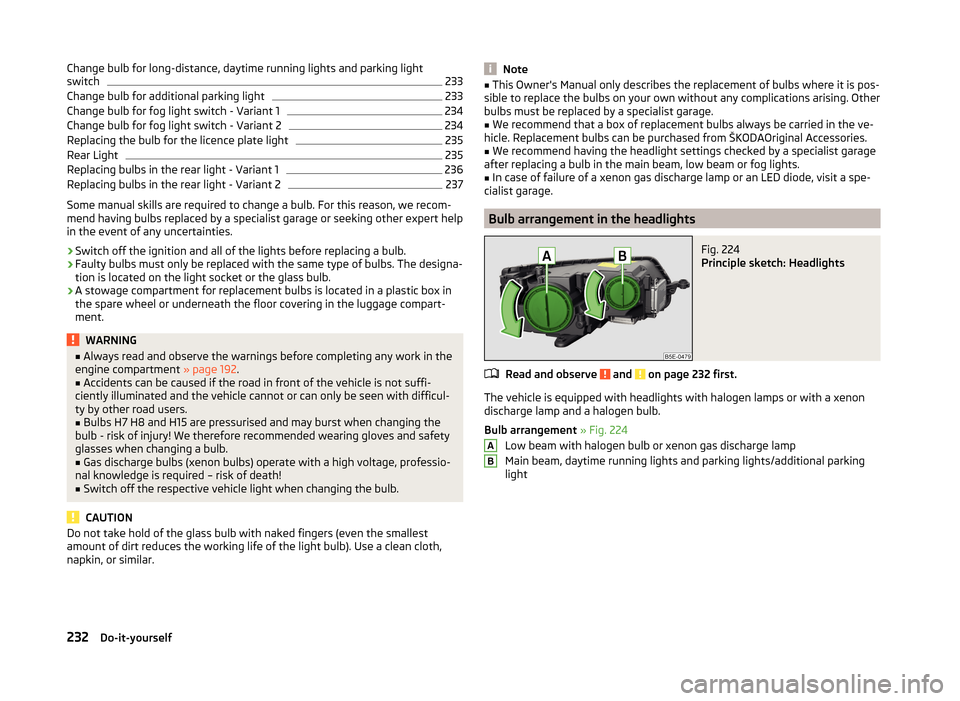
Fig. 224
Principle sketch: Headlights
Read and observe and on page 232 first.
The vehicle is equipped with headlights with halogen lamps or with a xenon
discharge lamp and a halogen bulb.
Bulb arrangement » Fig. 224
Low beam with halogen bulb or xenon gas discharge lamp
Main beam, daytime running lights and parking lights/additional parking
light
AB232Do-it-yourself
Page 237 of 280
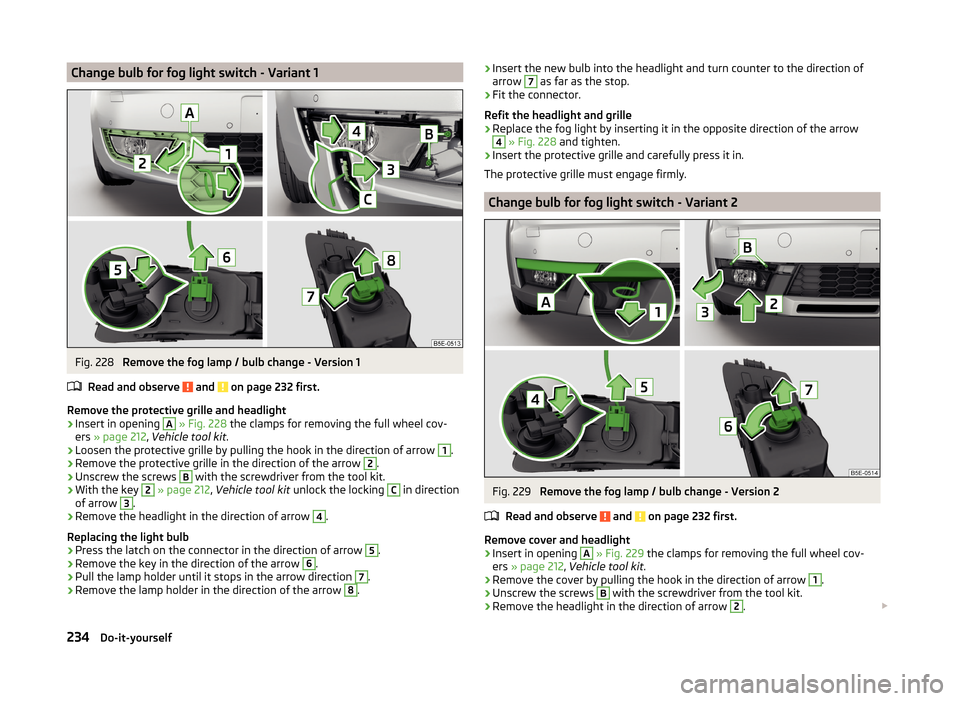
Change bulb for fog light switch - Variant 1Fig. 228
Remove the fog lamp / bulb change - Version 1
Read and observe
and on page 232 first.
Remove the protective grille and headlight
›
Insert in opening
A
» Fig. 228 the clamps for removing the full wheel cov-
ers » page 212 , Vehicle tool kit .
›
Loosen the protective grille by pulling the hook in the direction of arrow
1
.
›
Remove the protective grille in the direction of the arrow
2
.
›
Unscrew the screws
B
with the screwdriver from the tool kit.
›
With the key
2
» page 212 , Vehicle tool kit unlock the locking
C
in direction
of arrow
3
.
›
Remove the headlight in the direction of arrow
4
.
Replacing the light bulb
›
Press the latch on the connector in the direction of arrow
5
.
›
Remove the key in the direction of the arrow
6
.
›
Pull the lamp holder until it stops in the arrow direction
7
.
›
Remove the lamp holder in the direction of the arrow
8
.
› Insert the new bulb into the headlight and turn counter to the direction of
arrow 7 as far as the stop.›
Fit the connector.
Refit the headlight and grille
›
Replace the fog light by inserting it in the opposite direction of the arrow
4
» Fig. 228 and tighten.
›
Insert the protective grille and carefully press it in.
The protective grille must engage firmly.
Change bulb for fog light switch - Variant 2
Fig. 229
Remove the fog lamp / bulb change - Version 2
Read and observe
and on page 232 first.
Remove cover and headlight
›
Insert in opening
A
» Fig. 229 the clamps for removing the full wheel cov-
ers » page 212 , Vehicle tool kit .
›
Remove the cover by pulling the hook in the direction of arrow
1
.
›
Unscrew the screws
B
with the screwdriver from the tool kit.
›
Remove the headlight in the direction of arrow
2
.
234Do-it-yourself
Page 238 of 280
›Remove the headlight in the direction of arrow 3.
Replacing the light bulb›
Press the latch on the connector in the direction of arrow
4
.
›
Remove the key in the direction of the arrow
5
.
›
Pull the lamp holder until it stops in the arrow direction
6
.
›
Remove the lamp holder in the direction of the arrow
7
.
›
Insert the new bulb into the headlight and turn counter to the direction of
arrow
6
as far as the stop.
›
Fit the connector.
Refitting the headlight and grille
›
Replace the fog light by inserting it in the opposite direction of the arrow
3
» Fig. 229 and tighten.
›
Replace the cover and press in gently.
The cover must engage securely.
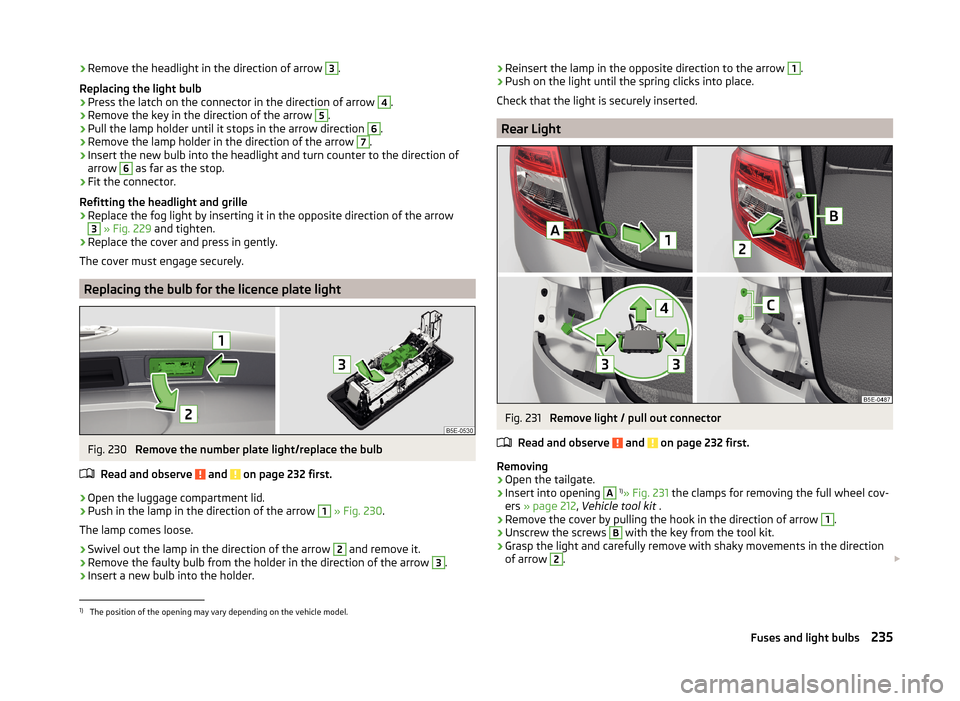
Replacing the bulb for the licence plate light
Fig. 230
Remove the number plate light/replace the bulb
Read and observe
and on page 232 first.
›
Open the luggage compartment lid.
›
Push in the lamp in the direction of the arrow
1
» Fig. 230 .
The lamp comes loose.
›
Swivel out the lamp in the direction of the arrow
2
and remove it.
›
Remove the faulty bulb from the holder in the direction of the arrow
3
.
›
Insert a new bulb into the holder.
› Reinsert the lamp in the opposite direction to the arrow 1.›Push on the light until the spring clicks into place.
Check that the light is securely inserted.
Rear Light
Fig. 231
Remove light / pull out connector
Read and observe
and on page 232 first.
Removing
›
Open the tailgate.
›
Insert into opening
A
1)
» Fig. 231 the clamps for removing the full wheel cov-
ers » page 212 , Vehicle tool kit .
›
Remove the cover by pulling the hook in the direction of arrow
1
.
›
Unscrew the screws
B
with the key from the tool kit.
›
Grasp the light and carefully remove with shaky movements in the direction
of arrow
2
.
1)
The position of the opening may vary depending on the vehicle model.
235Fuses and light bulbs
Page 264 of 280
Automatic gearbox modes133
Automatic load deactivation203
automatic transmission selector lever lock defect
134
Automatic transmission Kickdown
135
Launch control135
Selector lever lock134
Automatic Transmission Malfunction
35
Warning light35
warning messages35
Auxiliary heating (auxiliary heating and ventila- tion)
121
Adjust122
Radio remote control123
Switching on/off122
B
Ball head Check fitting
172
Ready position170
Ball rod assembling, step 1
171
assembling, step 2171
Ready position170
removing, step 1172
removing, step 2173
Battery In the remote control key
224
Belts12
Belt tensioners15
Bonnet Closing
194
Opening194
Boot Class N1 vehicles
110
See Boot lid61
Boot lid automatic locking61
Closing61
Opening61
Brake information messages
35
warning light35
Brake booster131
brake fluid specification
199
Brake fluid199
Checking199
information messages35
Brake linings warning light
39
Brake pedal (automatic transmission) Indicator light
40
brakes Driving in
136
Brakes Brake booster
131
Brake fluid199
Braking and stabilisation systems138
Handbrake131
Brakes and parking130
Braking Information on braking
130
Break recommendation See Fatigue detection
166
Bulbs Replacing
231
Buttons in the door Power windows
64
C
Camera Lens care
184
Camera lens care
184
Car computersee multifunction display47
Care and maintenance177
cargo cover roll-up cargo cover
108
Cargo element108
Caring for the vehicle exterior Towing hitch
185
Car park132
Car park ticket holder95
Carrier Roof rack
113
Cavity protection184
Central locking54
Problems58
Central locking button58
Central warning light Indicator light
36
Change bulb for additional parking light
233
bulb for fog lights - Version 1234
bulb for fog lights - Version 2234
bulb for high beam233
bulb for the parking light233
bulb in the rear light - Version 1236
bulb in the rear light - Version 2237
daytime running light bulb233
light bulb in tail light235
Changing Engine oil
195
Wheels214
Changing a wheel Follow-up tasks
215
Preparation214
Removing and refitting a wheel215
Charging a vehicle battery202
Check Fit ball head properly
172
261Index
Page 265 of 280
CheckingBattery electrolyte level201
Brake fluid199
Coolant198
Engine oil196
Oil level196
Windscreen washer fluid195
Checks Statutory checks
177
Children and safety22
Child safety Side airbag
24
Child safety lock58
Child safety seat Use of child safety seats
25
Child seat Classification
25
ISOFIX25
on the front passenger seat23
TOP TETHER27
Use of ISOFIX child seats26
Chrome parts see vehicle care
183
Cigarette lighter97
cleaning chrome parts
183
Cleaning Alcantara
187
and maintaining belts187
artificial leather187
headlight glasses184
materials187
natural leather186
plastic parts182
seats covers of the electrically heated seats187
wheels185
Cleaning safety belt
187
Cleaning seat covers
187
Cleaning the interiorartificial leather187
Seat covers187
Cleaning the outside of the vehicle Decorative films
183
Cleaning the vehicle exterior Camera lens
184
Cavity protection184
Door locking cylinder184
Headlight glasses184
Under-body protection185
wheels185
Windows and external mirrors183
Cleaning vehicle180
Cleaning vehicle exterior181
Plastic parts182
Rubber seals183
Vehicle paint work182
Wiper blades185
Clean interior Safety belt
187
clean outside of vehicle chrome parts
183
Climatronic air distribution control
117
Operating elements119
Closing sun roof - Version 1
67
- Version 269
Clothes hook101
CNG192
Indicator light40
Natural gas reserve display32
refuelling191
Refuelling191
Sticker192
Cockpit 12-Volt power outlet
98
Ashtray97
Cigarette lighter97
General view29
Lighting78
storage compartments94
useful equipment94
Comfort control window
66
comfort controls sun roof - Version 1
68
sun roof - Version 270
COMING HOME77
compartments94
Component protection179
Components of the puncture repair kit218
Compressed natural gas see CNG
192
Computer see multifunction display
47
convenience turn signal73
Coolant197
Checking198
Indicator symbol41
Information messages41
Replenishing198
Temperature gauge32
Cooling system cost-effective use
121
malfunctions121
CORNER See Fog lights with CORNER function
76
Correct seated position9
Driver9
Front passenger10
Instructions11
Rear seats11
Counter for distance driven33
cruise control operation
148
operation Description149
Cruise control system Warning light
40
262Index
Page 267 of 280
Engine number238
engine oil specification
196
Engine oil195
Changing195
Checking196
Indicator symbol42
Replenishing197
Warning icon42
EPC Warning light
38
ESC Functioning
138
Warning light37
ESC Sport138
Estate instrument Natural gas reserve display
32
Estate Instrument panel Petrol / Diesel reserve display
33
Exhaust inspection system Warning light
38
F
Fastening elements
104
Fatigue detection166
Function166
Information messages167
Films183
Fire extinguisher211
First-aid kit 211
Floor covering Fixing
106
in the luggage compartment106
Fog lights76
Warning light40
Fog lights with CORNER function76
Fold in passenger's mirror85
Footmats132
see footmats132
Force limit Electric boot lid61
Power windows65
Front airbag17
Front Assistant155
Activating/deactivating157
Information messages157
Operation156
Radar sensor155
Warning symbol44, 45
Front door warning light79
fuel lead-free petrol
189
Fuel188
CNG192
Diesel190
Natural gas reserve display32
Petrol / Diesel reserve display33
refer to Fuel188
Refuelling188
Refuelling - natural gas191
Warning icon43
Fuel consumption239
Fuel filter Information messages
44
Fuses Assignment
228
Assignment of fuses in the dash panel229
Colour coding228
Fuse assignment in the engine compartment231
Plastic clip230
Replacing228
G
Gear change Gear recommendation
46
Information on the selected gear46
Gear changing Gear stick
132
General viewCockpit29
Genuine parts178
Glasses compartment100
Glow plug system Warning light
38
H
Handbrake
131
Warning light35
Hazard warning light system77
HBA140
Head airbag20
Headlight assist Warning symbol
44
Headlight cleaning system Headlight cleaning system
83
Headlights Bulb arrangement
232
Driving abroad78
Headlight cleaning system83
Headrest Removing and installing
88
Head restraints88
Adjust height88
Heater Windscreen and rear window
80
Heating116
Air distribution control117
Control elements118
Exterior mirrors85
Seats90
HHC140
High beam assistant75
Hill Hold Control (HHC)140
Hitch169
Drawback load169
Hook106
Horn29
264Index
Page 268 of 280

Hydraulic Brake Assist (HBA)140
I
Ice scrapers
183
Ignition lock127
Immobilizer126
Individual settings Locking
57
Unlocking57
Inertia reel15
Information system45
Compass point display52
Door warning47
Eco-tips52
Gear recommendation46
Lap timer51
MAXI DOT display50
Multifunction display47
Operation46
Outside temperature46
Service interval display53
Stop watch51
Instrument cluster30
Auto-check control47
Counter for distance driven33
Display31
Overview31
Revolutions counter31
Speedometer32
Temperature gauge32
Viewing the charge level of the vehicle battery 34
Warning icons
40
Warning lights34
Interior care185
Natural leather186
Interior light Front
78
Interior lights Rear
79
Interior monitor60
ISOFIX25
J
Jack
212
Maintenance184
Jump-starting220
K
KESSY Locking
56
Unlocking56
Key Locking
55
Starting the engine127
Stopping the engine127
Switching off the ignition127
Switching on the ignition127
Unlocking55
Knee airbag18
L
Lamp failure Warning symbol
43
Lamps Warning symbol
43
Lane Assist162
Activating/deactivating164
Information messages164
Operation163
Warning light39
Lap timer51
Leather Natural leather care
186
LEAVING HOME77
Lever Main beam
73
Turn signal73
Levers Windscreen wipers
82
LichtCOMING HOME / LEAVING HOME77
light travel mode
74
Light Cockpit
78
Fog lights with CORNER function76
High beam assistant75
Replacing bulbs231
tourist light74
lighting entry space
80
Lighting Luggage compartment
103
Lights71
Adaptive headlights (AFS)74
Automatic driving lamp control73
Daylight running72
Fog lights76
Hazard warning light system77
Headlight beam range regulation71
Headlight flasher73
Low beam71
Main beam73
Parking lights71, 78
Rear fog light76
Switching on and off71
Turn signal73
Warning lights34
Locking Individual settings
57
KESSY56
Key55
Remote control55
Locking/unlocking the steering lock Starter button
128
Locking and unlocking the vehicle from the in- side
58
Locking the door without a locking cylinder Emergency
226
265Index
Page 270 of 280
Original accessories178
Outside temperature46
Overview Engine compartment
194
Warning icons40
Warning lights34
P
Park assist
144
Departing from a parallel parking space147
Finding a parking space145
Information messages147
Parking146
Park Assist automatic emergency braking
147
Operation145
Parking132
Park assist144
Parking aid140
Parking aid140
Automatic system activation when moving for- ward
143
Function141
Road display142
Parking lights71
Park the vehicle see Parking
132
Part replacement177
Passive safety Before setting off
8
Driving safety8
Safety equipment8
Passive Safety8
Payload239
Pedals132
Footmats132
Petrol see fuel
189
Phonebox96
Plastic parts182
Polishing vehicle paint work see vehicle care
182
Positioning the jack
216
Power limit Sun roof - Version 1
67
Sun roof - Version 269
Power outlet 12 V
98
Power steering Warning light
36
Power windows64
Button in the front passenger door65
Button in the rear doors65
Buttons in the driver's door64
Practical equipment Reflective vest
211
Practical features 12-Volt power outlet
98
Storage pockets on the front seats101
Waste container98
Proactive passenger protection Indicator light
38
ProActive passenger protection161
Function162
Puncture repair kit218
R
Radiator fan
195
Radio4
Radio remote control Auxiliary heating
123
Raising the vehicle216
Rear-view mirror Exterior mirrors
85
Fold in passenger mirror85
Synchronous adjustment of the rear-view mir- ror
85
Rear fog light76
Warning light38
Rear mirror83
Interior mirror84
Rear view camera143
Rear window - heater80
Refuelling188
Fuel188
Fuel - natural gas191
Remote control Locking
55
Replacing the battery224
Synchronisation process224
Unlocking55
Remote control key Replacing the battery
224
Removable through-loading bag102
Repairs and technical alterations177
Replace the battery in the auxiliary heating (auxiliary heating) in the remote control
225
Replacing Bulb for the licence plate light
235
Bulbs231
Fuses228
Fuses – engine compartment230
Fuses – LHD228
Fuses – RHD229
Low beam bulb233
Rear window wiper blade227
Vehicle battery202
windscreen wiper blades227
Replenishing Coolant
198
Engine oil197
Windscreen washer fluid195
Retraction and economical driving136
Reversing camera143
Lens care184
Revolutions counter31
267Index