ignition SKODA OCTAVIA 2014 3.G / (5E) User Guide
[x] Cancel search | Manufacturer: SKODA, Model Year: 2014, Model line: OCTAVIA, Model: SKODA OCTAVIA 2014 3.G / (5E)Pages: 280, PDF Size: 35.53 MB
Page 41 of 280
Seek assistance from a specialist garage immediately.
In the event of an ABS fault, the other braking and stabilization systems are
turned off » page 138 , Braking and stabilisation systems .WARNING■
A fault to the ABS system or the braking system can increase the vehi-
cle's braking distance – risk of accident!■
If warning light
illuminates simultaneously with warning light
» page 35 ,
Brake system
, do not continue your journey! Seek help
from a specialist garage.
Rear fog light
Read and observe
on page 34 first.
The warning light
illuminates when the rear fog light is switched on.
Exhaust inspection system
Read and observe
on page 34 first.
If the warning light
illuminates , there is a fault in the exhaust inspection
system. The system allows the vehicle to run in emergency mode.
Seek assistance from a specialist garage immediately.
Glow plug system (diesel engine)
Read and observe
on page 34 first.
If the warning light
does not come on or lights up continuously once the
ignition has been switched on, this indicates a fault in the glow plug system
If the warning light begins to
flash while driving, a fault exists in the engine
control. The system allows the vehicle to run in emergency mode.
Seek assistance from a specialist garage immediately.
Engine performance check (petrol engine)
Read and observe
on page 34 first.
If the indicator light
illuminates , there is a fault in the engine control. The
system allows the vehicle to run in emergency mode.
Seek assistance from a specialist garage immediately.
Security systems
Read and observe
on page 34 first.
Fault with airbag system
When the warning light
lights up and the following message appears in the
instrument cluster display, there is a fault with the airbag system.
Error: Airbag
AIRBAG ERROR
The functionality of the airbag system is monitored automatically even if one
of the airbags is switched off.
The front passenger airbag has been disabled with the key switch
› The indicator light
illuminates for around 4 seconds after the ignition has
been switched on.
› The warning light
in the display
in the middle of the
dash panel lights up after switching on the ignition » page 21.
One of the airbags or a belt tensioner has been disabled by the diagnostic tool
› The warning
illuminates for approx. 4 seconds after switching on the igni-
tion and then flashes again for approx. 12 seconds.
› The following message is shown in the information cluster display.
Airbag/ belt tensioner deactivated.
AIRBAG/ BELT TENSIONER OFF
ProActive passenger protection
When the warning light
lights up and the following message appears in the
instrument cluster display, there is a fault with the airbag system. Seek assis-
tance from a specialist garage immediately.
Proactive passenger protection not available.
PROACTIVE PASSENGER PROTECT NOT AVAIL
or Proactive passenger protection: funct. restricted.
LIMITED PROACTIVE PASSENGER PROTECT
38Using the system
Page 42 of 280
WARNINGWhen a fault in the airbag system occurs, there is a risk of the system not
being triggered in the event of an accident. Therefore, this must be
checked immediately by a specialized garage.
Tyre pressure
Read and observe
on page 34 first.
The warning light lights up
If the warning light illuminates while driving, this means that one of the
tyres has undergone a pressure change.
An audible signal sounds as a warning signal.
›
Immediately reduce speed and avoid sudden steering and braking manoeu-
vres.
›
Stop the vehicle, turn the ignition off and check the tyres and their inflation
pressure » page 204 .
›
Correct the tyre pressure if necessary or replace the affected
wheel » page 214 or use the repair kit » page 218.
›
Store the tyre pressure values in the system » page 167.
The indicator light flashes for about 1 min. and then remains lit
If the warning light flashes for approximately 1 minute and then remains lit,
there may be a fault in the tyre pressure monitoring system.
›
Stop the vehicle, turn the ignition off and start the engine again.
If the warning light flashes after starting the engine again, there is a system
error.
Seek help from a specialist garage.
The illumination of the warning light can have the following reasons.
› The vehicle is loaded on one side. Distribute loads as evenly as possible.
› The wheels of one axle are loaded more heavily (e.g. when towing a trailer or
when driving uphill or downhill).
› Snow chains are mounted.
› A wheel has been changed.
Store the tyre pressure values in the system » page 167.
CAUTIONUnder certain circumstances (e.g. sporty style of driving, wintry or unpaved
roads) the warning light in the instrument cluster can be delayed or does
not light up at all.
Note
If the vehicle's battery has been disconnected and reconnected, the warning
light comes on after switching on the ignition. If the warning light does not
go out after moving a short distance, this means there is an error in the sys-
tem. Seek help from a specialist garage.
Brake linings
Read and observe
on page 34 first.
If the indicator light
is illuminated , the brake pads are worn.
The following message is shown in the information cluster display. Check brake wear!
BRAKE PADS PLEASE CHECK
Seek assistance from a specialist garage immediately.
Lane following system (Lane Assist)
Read and observe
on page 34 first.
The warning lights
indicates the state of the Lane Assist system.
Further information » page 162, Lane Assist .
Turn signal system
Read and observe
on page 34 first.
Either the left
or the right
warning light flashes depending on the position
of the turn signal lever.
If there is a fault in the turn signal system, the warning light flashes at twice
its normal rate. This does not apply when towing a trailer.
Switching off the hazard warning light system is switched on will cause all of
the turn signal lights as well as both warning lights to flash.
39Instruments and warning lights
Page 44 of 280
While the operational faults remain unrectified, the messages are always indi-
cated again. After they are displayed for the first time, the symbols or
continue to be displayed without any extra messages for the driver.
Some warning icons can be accompanied by acoustic signals and messages in
the instrument cluster display.
After switching on the ignition, some warning icons illuminate briefly as a
function test.
If the tested systems are OK, the corresponding warning lights go out a few
seconds after switching on the ignition or after starting the engine.
The status of some features and systems is shown by the warning
lights » page 34 .
On vehicles with a colour MAXI DOT display some warning icons in the display
are in colour.WARNING■ Ignoring illuminated warning icons and related messages or instructions
in the display of the instrument cluster may lead to serious personal injury
or damage to the vehicle.■
If you have to stop for technical reasons, then park the vehicle at a safe
distance from the traffic, switch off the engine and activate the hazard
warning light system » page 77. The warning triangle must be set up at
the prescribed distance - observe the national legal provisions when doing
so.
■
The engine compartment of your car is a hazardous area. While working in
the engine compartment, be sure to observe the following warn-
ings » page 192 , Engine compartment .
Rear seat belt warning
Read and observe
on page 41 first.
A rear seat belt is not fastened
A rear seat belt is fastened
The warning icons or
light up after the ignition has been switched on.
When the seat belt is fastened/unfastened, the particular icon lights up briefly
and indicates the current belt status.
Alternator
Read and observe
on page 41 first.
The warning icon
lights up if the vehicle battery is not charged when the
engine is running.
Seek assistance from a specialist garage immediately.
CAUTION
If symbol lights up in addition to symbol while driving, stop driving -
there is a risk of engine damage! Switch off the engine and seek assistance
from a specialist garage.
Coolant
Read and observe
on page 41 first.
Coolant level too low
If the coolant level is too low, the warning icon
lights up and the following
message appears in the instrument cluster display.
Check coolant! Owner's manual!
ENGINE COOLANT PLEASE CHECK
› Stop the vehicle, switch off the engine, and check the coolant lev-
el » page 198 .
› If the coolant level is too low, add coolant to the reservoir
» page 198.
If the indicator light
does not illuminate after adding coolant and switching
on the engine, you may continue your journey.
If the coolant is within the specified range and the warning symbol is still
lit
after switching on the ignition, then there may be a malfunction of the cooling
fan.
› Switch off the ignition.
› Check the fuse for the radiator fan, replace if necessary
» page 230, Fuses in
the engine compartment .
If the coolant level and fan fuse are OK and the warning symbol
lights up
again after switching on the ignition,
do not continue driving!
Seek help from a specialist garage.
41Instruments and warning lights
Page 45 of 280
Coolant temperature too high
If the coolant temperature is too high, the warning icon lights up and the
following message appears in the instrument cluster display.
Engine overheat. Stop! Owner's manual!
ENGINE OVERHEAT STOP
› Stop the vehicle and turn off the engine.
› Switch on the ignition and wait until the coolant temperature pointer returns
to the operating range » page 32.
› Continue your journey only after the warning icon
has disappeared.WARNING■
Carefully open the coolant expansion bottle. If the engine is hot, the cool-
ing system is pressurized – risk of scalding! It is therefore best to allow the
engine to cool down before removing the cap.■
Do not touch the radiator fan. The radiator fan may switch itself on auto-
matically even if the ignition is off - risk of injury!
CAUTION
■ Additional headlights and other attached components in front of the air inlet
impair the cooling efficiency of the coolant.■
Never cover the radiator - there is a risk of the engine overheating.
Engine oil pressure
Read and observe
on page 41 first.
When the warning light
is flashing , the engine oil pressure is too low.
The following message is shown in the information cluster display. Oil pressure: Stop! Owner's manual!
STOP VEHICLE OIL PRESSURE
›
Stop the vehicle, switch off the engine, and check the level of the engine
oil » page 196 , Checking the oil level .
›
If the oil pressure is too low, top up the engine oil » page 197.
If the oil level is within the specified range and the warning symbol
starts
to flash again after the engine is started,
do not continue driving! Switch off
the engine and seek assistance from a specialist garage.
CAUTIONIf for some reason it is not possible to top up the engine oil under the current
circumstances, do not continue driving! Switch off the engine and seek as-
sistance from a specialist garage.
Engine oil level
Read and observe
on page 41 first.
Engine oil level too low
If the warning icons and
are lit , the engine oil level is too low.
The following message is shown in the information cluster display. Oil level: add oil!
ADD OIL
› Stop the vehicle, switch off the engine, and check the engine oil lev-
el » page 196 .
The warning icon will go out if the bonnet is left open for more than 30 sec-
onds. If no engine oil has been replenished, the warning icon will come on
again after driving about 100 km.
Engine oil level too high
If the warning icons and
are
lit in conjunction with the following message
on the display, the engine oil level is too high.
Reduce oil level!
OIL LEVEL TOO HIGH
› Stop the vehicle, switch off the engine, and check the engine oil lev-
el » page 196 .
Engine oil level sensor
If the warning icons and
are
lit in conjunction with the following message
on the display, the engine oil level sensor is defective.
Oil sensor: Workshop!
OIL SENSOR WORKSHOP
Seek assistance from a specialist garage immediately.
CAUTION
If for some reason it is not possible to top up the engine oil under the current
circumstances, do not continue driving! Switch off the engine and seek as-
sistance from a specialist garage.42Using the system
Page 49 of 280
Using the information systemFig. 28
Buttons/adjustment wheel: on the operating lever/on the multi-
function steering wheel
Read and observe
on page 45 first.
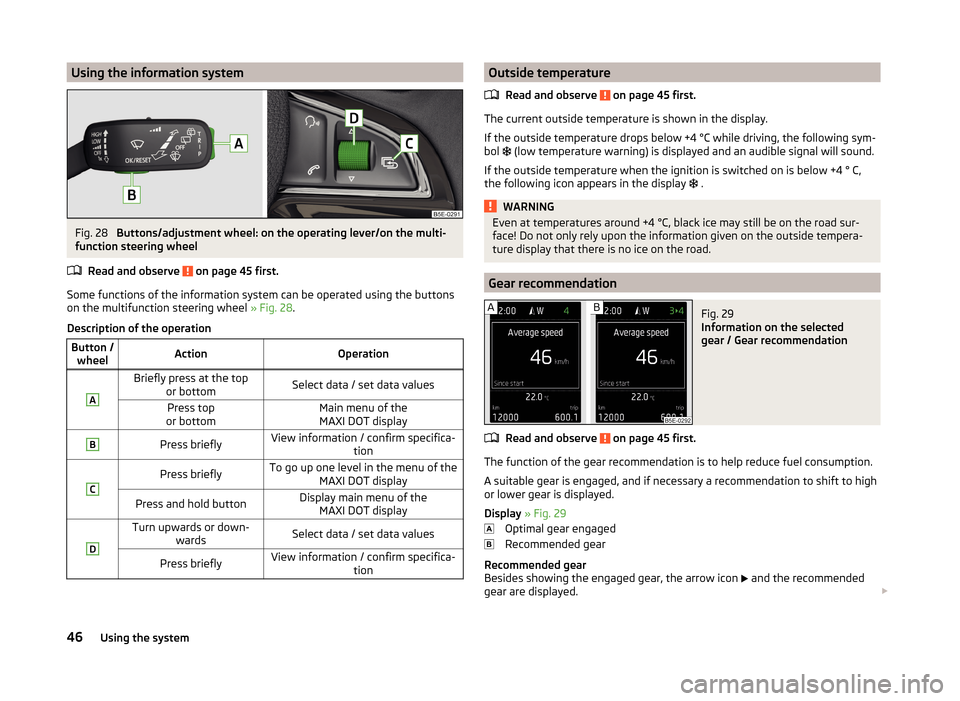
Some functions of the information system can be operated using the buttons
on the multifunction steering wheel » Fig. 28.
Description of the operation
Button / wheelActionOperationABriefly press at the top or bottomSelect data / set data valuesPress top
or bottomMain menu of the MAXI DOT displayBPress brieflyView information / confirm specifica- tionCPress brieflyTo go up one level in the menu of theMAXI DOT displayPress and hold buttonDisplay main menu of theMAXI DOT displayDTurn upwards or down- wardsSelect data / set data valuesPress brieflyView information / confirm specifica- tionOutside temperature
Read and observe
on page 45 first.
The current outside temperature is shown in the display.
If the outside temperature drops below +4 °C while driving, the following sym-
bol
(low temperature warning) is displayed and an audible signal will sound.
If the outside temperature when the ignition is switched on is below +4 ° C,
the following icon appears in the display
.
WARNINGEven at temperatures around +4 °C, black ice may still be on the road sur-
face! Do not only rely upon the information given on the outside tempera-
ture display that there is no ice on the road.
Gear recommendation
Fig. 29
Information on the selected
gear / Gear recommendation
Read and observe on page 45 first.
The function of the gear recommendation is to help reduce fuel consumption.
A suitable gear is engaged, and if necessary a recommendation to shift to high
or lower gear is displayed.
Display » Fig. 29
Optimal gear engaged
Recommended gear
Recommended gear
Besides showing the engaged gear, the arrow icon
and the recommended
gear are displayed.
46Using the system
Page 50 of 280
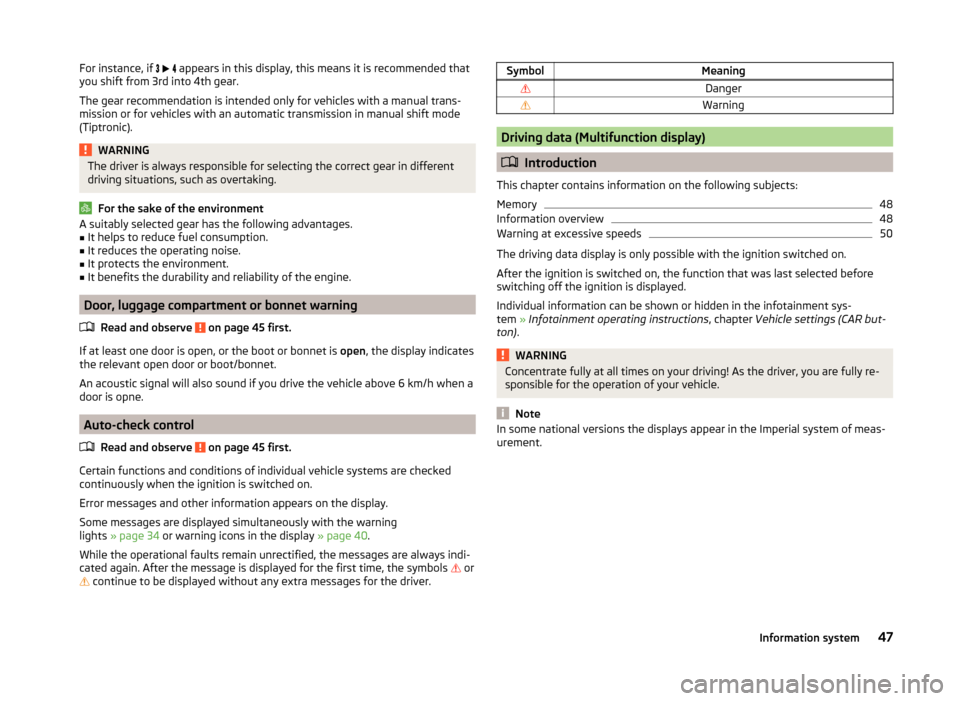
For instance, if appears in this display, this means it is recommended that
you shift from 3rd into 4th gear.
The gear recommendation is intended only for vehicles with a manual trans-
mission or for vehicles with an automatic transmission in manual shift mode
(Tiptronic).WARNINGThe driver is always responsible for selecting the correct gear in different
driving situations, such as overtaking.
For the sake of the environment
A suitably selected gear has the following advantages.■It helps to reduce fuel consumption.■
It reduces the operating noise.
■
It protects the environment.
■
It benefits the durability and reliability of the engine.
Door, luggage compartment or bonnet warning
Read and observe
on page 45 first.
If at least one door is open, or the boot or bonnet is open, the display indicates
the relevant open door or boot/bonnet.
An acoustic signal will also sound if you drive the vehicle above 6 km/h when a
door is opne.
Auto-check control
Read and observe
on page 45 first.
Certain functions and conditions of individual vehicle systems are checked
continuously when the ignition is switched on.
Error messages and other information appears on the display.
Some messages are displayed simultaneously with the warning
lights » page 34 or warning icons in the display » page 40.
While the operational faults remain unrectified, the messages are always indi- cated again. After the message is displayed for the first time, the symbols
or
continue to be displayed without any extra messages for the driver.
SymbolMeaningDangerWarning
Driving data (Multifunction display)
Introduction
This chapter contains information on the following subjects:
Memory
48
Information overview
48
Warning at excessive speeds
50
The driving data display is only possible with the ignition switched on.
After the ignition is switched on, the function that was last selected before
switching off the ignition is displayed.
Individual information can be shown or hidden in the infotainment sys-
tem » Infotainment operating instructions , chapter Vehicle settings (CAR but-
ton) .
WARNINGConcentrate fully at all times on your driving! As the driver, you are fully re-
sponsible for the operation of your vehicle.
Note
In some national versions the displays appear in the Imperial system of meas-
urement.47Information system
Page 51 of 280
MemoryFig. 30
Memory display: MAXI DOT dis-
play (
)/segment display (
)
Read and observe on page 47 first.
In memory the values of some driving data information (e.g. average fuel con-
sumption) are recorded.
The driving data operate using three memories.
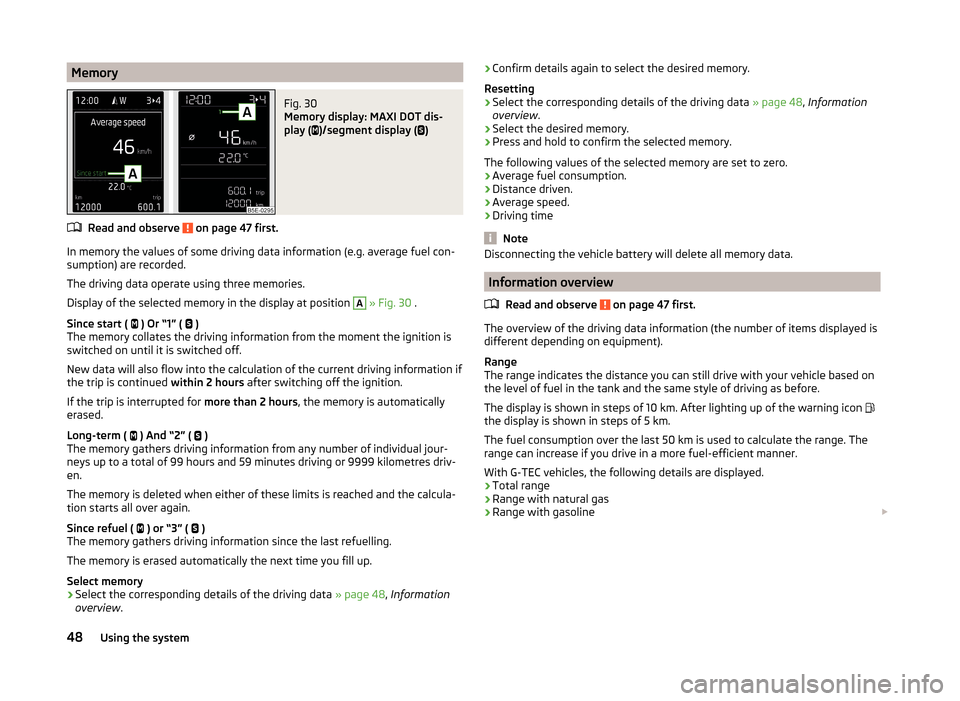
Display of the selected memory in the display at position
A
» Fig. 30 .
Since start ( ) Or “1” (
)
The memory collates the driving information from the moment the ignition is
switched on until it is switched off.
New data will also flow into the calculation of the current driving information if
the trip is continued within 2 hours after switching off the ignition.
If the trip is interrupted for more than 2 hours, the memory is automatically
erased.
Long-term ( ) And “2” (
)
The memory gathers driving information from any number of individual jour-
neys up to a total of 99 hours and 59 minutes driving or 9999 kilometres driv-
en.
The memory is deleted when either of these limits is reached and the calcula-
tion starts all over again.
Since refuel ( ) or “3” (
)
The memory gathers driving information since the last refuelling.
The memory is erased automatically the next time you fill up.
Select memory
›
Select the corresponding details of the driving data » page 48, Information
overview .
›Confirm details again to select the desired memory.
Resetting›
Select the corresponding details of the driving data » page 48, Information
overview .
›
Select the desired memory.
›
Press and hold to confirm the selected memory.
The following values of the selected memory are set to zero. › Average fuel consumption.
› Distance driven.
› Average speed.
› Driving time
Note
Disconnecting the vehicle battery will delete all memory data.
Information overview
Read and observe
on page 47 first.
The overview of the driving data information (the number of items displayed is
different depending on equipment).
Range
The range indicates the distance you can still drive with your vehicle based on
the level of fuel in the tank and the same style of driving as before.
The display is shown in steps of 10 km. After lighting up of the warning icon
the display is shown in steps of 5 km.
The fuel consumption over the last 50 km is used to calculate the range. The
range can increase if you drive in a more fuel-efficient manner.
With G-TEC vehicles, the following details are displayed.
› Total range
› Range with natural gas
› Range with gasoline
48Using the system
Page 53 of 280
Along with the consumption data, a list of the three consumers with the larg-
est share of fuel consumption (e.g. air conditioning and similar devices) is dis-
played.
Refuelling amount 1)
After the consumption of about 10 litres of fuel from the fully refuelled tank, an amount of fuel is displayed in l. This amount can now be safely refilled.
Natural gas quality
The details of the quality of natural gas are displayed as a percentage of be-
tween 70% to 100%.
The higher the value of natural gas, the lower is the consumption.
Coolant temperature
If the engine oil temperature is in the range 80-110 °C, the engine operating
temperature is reached.
If the temperature lies below 80 °C or above 110 °C, avoid high engine revs, full
throttle and high engine loads.
Warning at excessive speeds
Read and observe
on page 47 first.
The system allows you to set a speed limit and when this is reached, an acous-
tic warning signal sounds.
The following warning message is shown in the display. Speed … km exceeded.
SPEED TOO HIGH
Adjust the speed limit while the vehicle is stationary
›
Select the menu item Warning at (
) or
(
).
›
Activate the speed limit option by confirming this menu item.
›
Set the desired speed limit, e.g. 50 km/h.
›
Store the speed limit by confirming the set value, or wait several seconds;
your settings will be saved automatically.
This allows you to set the speed in 5 km/h intervals.
Adjusting the speed limit while the vehicle is moving
›
Select the menu item Warning at (
) or
(
).
› Drive at the desired speed, e.g. 50 km/h.›Confirm the current speed as the speed limit.
If you wish to adjust the set speed limit, you can do so in 5 km/h intervals (e.g.
the accepted speed of 47 km/h increases to 50 km/h or decreases to 45 km/h).›
Store the speed limit, or wait several seconds; your settings will be saved au-
tomatically.
Change or disable speed limit
›
Select the menu item Warning at (
) or
(
).
›
By confirming the stored value, the speed limit is disabled.
›
By reconfirming, the option to change the speed limit is activated.
The speed limit set mode is stored even after the ignition is switched off and
on. After a gap between driving exceeding 2 hours, the pre-set speed limit is
deactivated.
MAXI DOT display
Introduction
This chapter contains information on the following subjects:
Main menu
51
Lap timer (Stop watch)
51
Compass point display
52
Eco-tips
52
The MAXI DOT display provides you with information about the current operat-
ing state of your vehicle. The information display also provides you with data
(depending on the equipment installed in the vehicle) relating to the Infotain-
ment, multi-functional indicator, etc.
WARNINGConcentrate fully at all times on your driving! As the driver, you are fully re-
sponsible for the operation of your vehicle.1)
Only valid for some countries.
50Using the system
Page 55 of 280
Measure split time
› During the timing, select the menu item
Split time. The split time data is dis-
played for about 5 seconds in the display.
The split time can be measured repeatedly during a round.
Stop measurement › During the timing, press the menu item
Stop.
The time measurement is stopped, the following functions are now available.
■ Continue - Continue measurement of the current lap time
■ New lap - Start measurement of the next lap time.
■ Abort lap - Cancel the timer (the aborted lap time is not stored)
■ Hang up - End timing (the aborted lap time is stored)
Evaluate recorded times
› Select the menu item
Lap timer - Statistics .
The following information is displayed. › Fastest:
- The fastest lap
› Slowest:
- The slowest lap
› Average:
- The average lap time
› Overall time:
- The total of all the lap times
Reset measured times › Select the menu item
Lap timer - Statistics - Reset .WARNING■
Concentrate fully at all times on your driving! As the driver, you are fully
responsible for the operation of your vehicle.■
Only use the Lap timer system when you are in any traffic situation where
you have full control over the vehicle.
Note
■ The system allows the measurement of up to 11 lap times.■The measurement of a single lap time is terminated after 99 h, 59 min. and
59 sec. After this time has been reached, measurement of the new lap time
starts automatically.■
The measured times cannot be reset individually.
■
If the measured times are not reset, then these are stored even after turning
off the ignition.
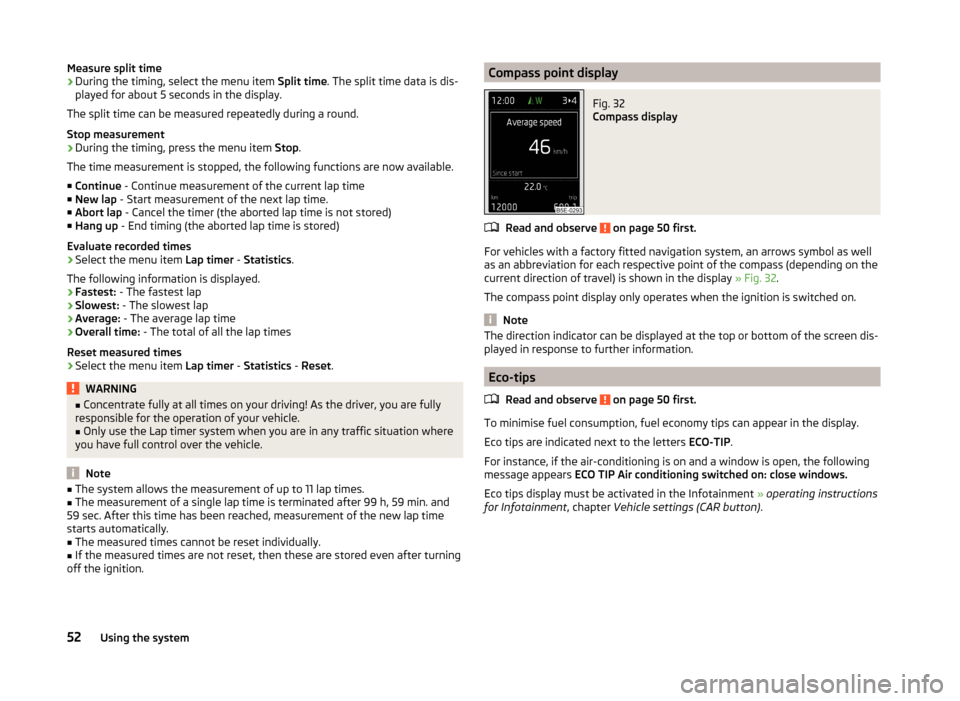
Compass point displayFig. 32
Compass display
Read and observe on page 50 first.
For vehicles with a factory fitted navigation system, an arrows symbol as well
as an abbreviation for each respective point of the compass (depending on the
current direction of travel) is shown in the display » Fig. 32.
The compass point display only operates when the ignition is switched on.
Note
The direction indicator can be displayed at the top or bottom of the screen dis-
played in response to further information.
Eco-tips
Read and observe
on page 50 first.
To minimise fuel consumption, fuel economy tips can appear in the display.
Eco tips are indicated next to the letters ECO-TIP.
For instance, if the air-conditioning is on and a window is open, the following
message appears ECO TIP Air conditioning switched on: close windows.
Eco tips display must be activated in the Infotainment » operating instructions
for Infotainment , chapter Vehicle settings (CAR button) .
52Using the system
Page 56 of 280
Service interval display
Introduction
This chapter contains information on the following subjects:
Displaying the distance and days until the next service interval
53
Service messages
53
Resetting the service interval display
53
The service interval display shows the time and mileage to the next service
event.
The information regarding the service intervals can be found in the service
schedule.
Note
Information is retained in the Service Interval Display even after the vehicle
battery is disconnected.
Displaying the distance and days until the next service interval
There is always the option to display the remaining days and miles until the
next service date in the display.
›
Switch on the ignition.
›
Press the button
6
» Fig. 22 on page 31 and hold down until the menu item
Service appears in the display.
›
Release the button
6
.
The icon appears in the display, as well as the following message for exam-
ple.
Oil change in ... km or Oil change in … days
OIL CHANGE IN ... DAYS or OIL CHANGE IN ...
Service messages
Messages before reaching the scheduled service date
Before the next service date has been reached, after switching on the ignition,
the symbol as well as a message about the mileage or days until the next
service event appears in the display.
This indicator decreases in steps of 100 km or in days.
Messages upon reaching scheduled service date
Once the service interval is reached, the icon appears in the display after the
ignition is switched on, as well as the following message, for example.
Oil change now!
OIL CHANGE NOW
Or Inspection now!
INSPECTION NOW
Or Oil change and inspection now!
OIL CHAN_ AND INSPECTION NOW
Resetting the service interval display
We recommend that the display reset is completed by a specialist garage.
We recommend that you do not reset the service interval display yourself. In-
correctly setting the service interval display could cause problems to the vehi-
cle.
Variable service interval
For vehicles with variable service intervals, after resetting the oil change serv-
ice display in a specialist garage, the values of the new service interval are dis-
played, which are based on the previous operating conditions of the vehicle.
These values are then continuously matched according to the actual operating
conditions of the vehicle.
53Information system