air condition SKODA OCTAVIA 2014 3.G / (5E) Owner's Guide
[x] Cancel search | Manufacturer: SKODA, Model Year: 2014, Model line: OCTAVIA, Model: SKODA OCTAVIA 2014 3.G / (5E)Pages: 280, PDF Size: 35.53 MB
Page 125 of 280
CAUTION■The running auxiliary heater consumes fuel from the vehicle tank and auto-
matically controls the filling level. If only a low quantity of fuel is present in the
fuel tank, the auxiliary heating switches off.■
The exhaust pipe of the auxiliary heating, which is located on the underside
of the vehicle, must not be clogged and the exhaust flow must not be blocked.
■
If the auxiliary heating is running, the vehicle battery discharges. If the auxili-
ary heating and ventilation has been operated several times over a longer peri-
od, the vehicle must be driven a few kilometres in order to recharge the vehi-
cle battery.
■
The air inlet in front of the windscreen must be free (e.g. of ice, snow or
leaves) to ensure that the auxiliary heating operates properly.
Note
■ The auxiliary heating switches on the blower B » Fig. 125 on page 119 orC » Fig. 126 on page 119 only if it has achieved a coolant temperature of ap-
prox. 50 °C.■
At low outside temperatures, this can result in a formation of water vapour in
the area of the engine compartment. This is quite normal and is not an operat-
ing problem.
■
So that warm air can flow into the vehicle interior after switching on the aux-
iliary heating, you must maintain the comfort temperature normally selected
by you, leave the fan switched on and leave the air outlet vents in an open po-
sition. It is recommended to put the air flow in the position
or
.
Switching on/off
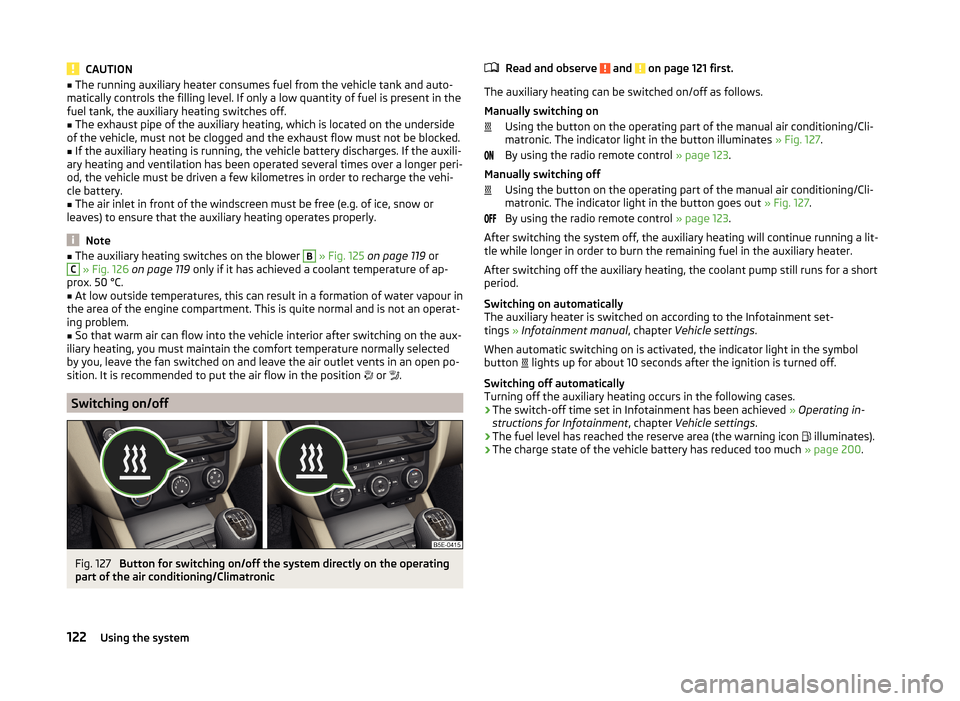
Fig. 127
Button for switching on/off the system directly on the operating
part of the air conditioning/Climatronic
Read and observe and on page 121 first.
The auxiliary heating can be switched on/off as follows.
Manually switching on Using the button on the operating part of the manual air conditioning/Cli-
matronic. The indicator light in the button illuminates » Fig. 127.
By using the radio remote control » page 123.
Manually switching off Using the button on the operating part of the manual air conditioning/Cli-
matronic. The indicator light in the button goes out » Fig. 127.
By using the radio remote control » page 123.
After switching the system off, the auxiliary heating will continue running a lit- tle while longer in order to burn the remaining fuel in the auxiliary heater.
After switching off the auxiliary heating, the coolant pump still runs for a short
period.
Switching on automatically
The auxiliary heater is switched on according to the Infotainment set-
tings » Infotainment manual , chapter Vehicle settings .
When automatic switching on is activated, the indicator light in the symbol
button lights up for about 10 seconds after the ignition is turned off.
Switching off automatically
Turning off the auxiliary heating occurs in the following cases.
› The switch-off time set in Infotainment has been achieved
» Operating in-
structions for Infotainment , chapter Vehicle settings .
› The fuel level has reached the reserve area (the warning icon
illuminates).
› The charge state of the vehicle battery has reduced too much
» page 200.
122Using the system
Page 126 of 280
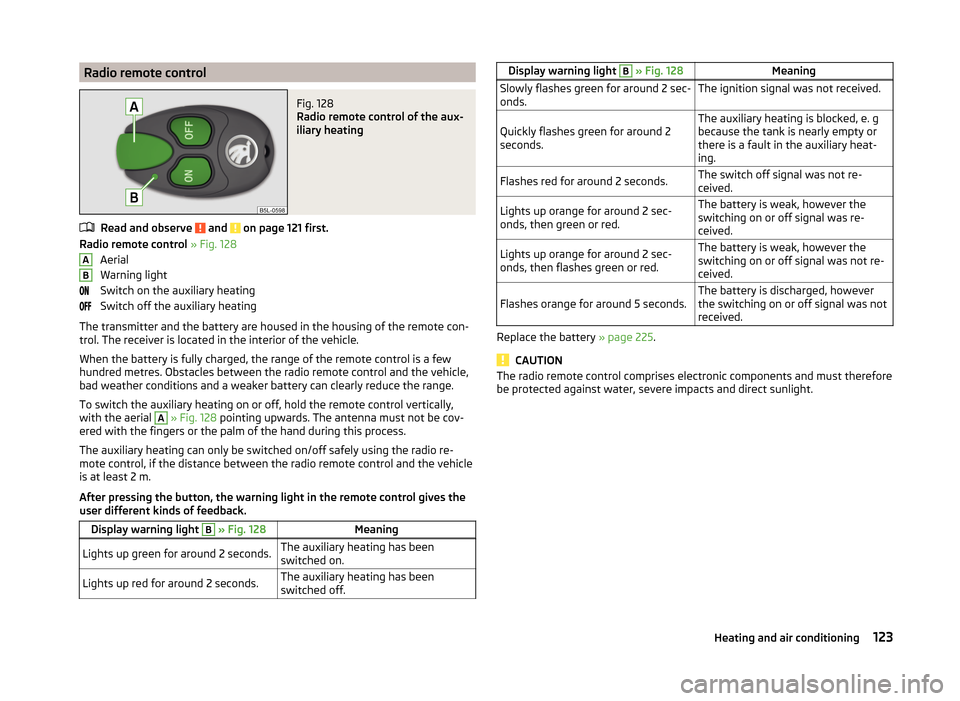
Radio remote controlFig. 128
Radio remote control of the aux-
iliary heating
Read and observe and on page 121 first.
Radio remote control » Fig. 128
Aerial
Warning light
Switch on the auxiliary heating
Switch off the auxiliary heating
The transmitter and the battery are housed in the housing of the remote con-
trol. The receiver is located in the interior of the vehicle.
When the battery is fully charged, the range of the remote control is a few
hundred metres. Obstacles between the radio remote control and the vehicle,
bad weather conditions and a weaker battery can clearly reduce the range.
To switch the auxiliary heating on or off, hold the remote control vertically,
with the aerial
A
» Fig. 128 pointing upwards. The antenna must not be cov-
ered with the fingers or the palm of the hand during this process.
The auxiliary heating can only be switched on/off safely using the radio re-
mote control, if the distance between the radio remote control and the vehicle
is at least 2 m.
After pressing the button, the warning light in the remote control gives the
user different kinds of feedback.
Display warning light B » Fig. 128MeaningLights up green for around 2 seconds.The auxiliary heating has been
switched on.Lights up red for around 2 seconds.The auxiliary heating has been
switched off.ABDisplay warning light B » Fig. 128MeaningSlowly flashes green for around 2 sec-
onds.The ignition signal was not received.Quickly flashes green for around 2
seconds.The auxiliary heating is blocked, e. g
because the tank is nearly empty or
there is a fault in the auxiliary heat-
ing.Flashes red for around 2 seconds.The switch off signal was not re-
ceived.Lights up orange for around 2 sec-
onds, then green or red.The battery is weak, however the
switching on or off signal was re-
ceived.Lights up orange for around 2 sec-
onds, then flashes green or red.The battery is weak, however the
switching on or off signal was not re-
ceived.Flashes orange for around 5 seconds.The battery is discharged, however
the switching on or off signal was not
received.
Replace the battery » page 225.
CAUTION
The radio remote control comprises electronic components and must therefore
be protected against water, severe impacts and direct sunlight.123Heating and air conditioning
Page 127 of 280

Communication
SmartGate
Introduction
This chapter contains information on the following subjects:
Connection with SmartGate
124
Smart Gate website
125
Password management
125
SmartGate is a system which transmits vehicle data via Wi-Fi.
The ŠKODA applications installed in a connected communications device (e.g.
phone, tablet, notebook) 1)
offer the possibility to further process the received
data.
Available applications and further information can be found on the ŠKODA
website.
WARNING■ The national legal regulations for using mobile communication devices in
a vehicle must be observed.■
Do not fit the equipment or fixtures onto airbag covers or within the im-
mediate deployment range of the airbags.
■
Never leave a connected device in the deployment area of an airbag, on a
seat, on the dash panel or any another area from where it can be thrown
during a sudden braking manoeuvre, an accident or a collision - risk of in-
jury.
Note
The Wi-Fi range is limited to the interior of the vehicle.
Connection with SmartGate
Read and observe
on page 124 first.
For a successful connection the following conditions must be met.
Wi-Fi is turned on in the device to be connected.
The ignition is switched on.
Connect›
Enable the connected device to search for available Wi-Fi networks (see op-
erating instructions for the connected device).
›
In the Found networks menu, select the connection to the
“SmartGate_ ... ”network 2)
.
›
Enter the password (the password is pre-set as the complete Vehicle Identi-
fication Number at the factory - enter in capital letters).
Disconnect the connection
The connection to SmartGate can be terminated in the following ways.
›
By disconnecting the connected device from SmartGate.
›
By turning off the Wi-Fi in the connected device.
›
By switching off the ignition and removing the key for more than 5 secs (for
vehicles with starter button, by turning off the engine and opening the driv-
er's door).
Automatic connection
The connection to SmartGate is automatically restored under the following
conditions.
Wi-Fi is turned on in the device to be connected.
The ignition is switched on.
The device to be connected has saved the password required for the con-
nection check.
Connection problems
If the connection fails, check the following points.
› Are the conditions for successful connection fulfilled?
› Is Smart Gate available in the list of available Wi-Fi networks?
› Has the password required for the connection check been entered?
› Is the password required for the connection check correct?
› Is the device to be connected still connected to another Wi-Fi network?
If the above items are ok but the connection still fails, contact a ŠKODA Part-
ner.
1)
The applications support communication devices with the Android operating system version 4.0.x and
higher, as well as iOS 7.xx and higher.
2)
The last six symbols of the VIN vehicle identification number of your vehicle are displayed at position ....
124Using the system
Page 133 of 280
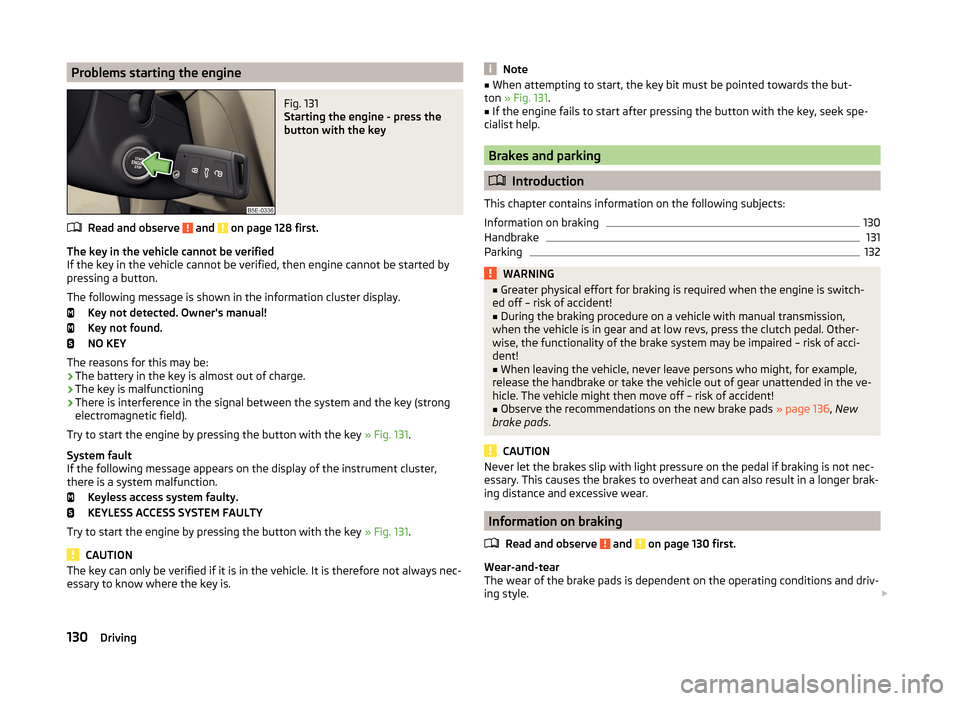
Problems starting the engineFig. 131
Starting the engine - press the
button with the key
Read and observe and on page 128 first.
The key in the vehicle cannot be verified
If the key in the vehicle cannot be verified, then engine cannot be started by pressing a button.
The following message is shown in the information cluster display. Key not detected. Owner's manual!
Key not found.
NO KEY
The reasons for this may be:
› The battery in the key is almost out of charge.
› The key is malfunctioning
› There is interference in the signal between the system and the key (strong
electromagnetic field).
Try to start the engine by pressing the button with the key » Fig. 131.
System fault
If the following message appears on the display of the instrument cluster,
there is a system malfunction.
Keyless access system faulty.
KEYLESS ACCESS SYSTEM FAULTY
Try to start the engine by pressing the button with the key » Fig. 131.
CAUTION
The key can only be verified if it is in the vehicle. It is therefore not always nec-
essary to know where the key is.Note■ When attempting to start, the key bit must be pointed towards the but-
ton » Fig. 131 .■
If the engine fails to start after pressing the button with the key, seek spe-
cialist help.
Brakes and parking
Introduction
This chapter contains information on the following subjects:
Information on braking
130
Handbrake
131
Parking
132WARNING■ Greater physical effort for braking is required when the engine is switch-
ed off – risk of accident!■
During the braking procedure on a vehicle with manual transmission,
when the vehicle is in gear and at low revs, press the clutch pedal. Other-
wise, the functionality of the brake system may be impaired – risk of acci-
dent!
■
When leaving the vehicle, never leave persons who might, for example,
release the handbrake or take the vehicle out of gear unattended in the ve-
hicle. The vehicle might then move off – risk of accident!
■
Observe the recommendations on the new brake pads » page 136, New
brake pads .
CAUTION
Never let the brakes slip with light pressure on the pedal if braking is not nec-
essary. This causes the brakes to overheat and can also result in a longer brak-
ing distance and excessive wear.
Information on braking
Read and observe
and on page 130 first.
Wear-and-tear
The wear of the brake pads is dependent on the operating conditions and driv-
ing style.
130Driving
Page 139 of 280
Reactivate the TCS and START-STOP when the desired speed has been
reached.WARNINGRapid acceleration, particularly on slippery roads, can lead to loss of control
of the vehicle – risk of accident!
Retraction and economical driving
Introduction
This chapter contains information on the following subjects:
Driving in
136
Tips for economical driving
136
The fuel consumption, degree of pollution and vehicle wear depend on driving
style, road condition, weather conditions and the like.
Driving in
Driving in the engine
The engine has to be run in during the first 1500 kilometres. During this period,
the driving style decides on the quality of the driving-in process.
During the first 1 000 km we recommend not driving faster than 3/4 of the
maximum permissible engine speed, not to drive at full throttle and to dis-
pense with the trailer.
In the area of 1,000 to 1,500 kilometres the engine load can be increased up
to the maximum permitted engine speed.
New tyres
New tyres have to be “run in” since they do not offer optimal grip at first.
Drive especially carefully for the first 500 km or so.
New brake pads
New brake pads have to first “grind in” because these do not initially have the
best possible braking effect.
Drive especially carefully for the first 200 km or so.
Tips for economical driving
To achieve the lowest possible fuel consumption, the following instructions
must be observed.
Looking ahead when driving
Avoid unnecessary acceleration and braking.
Switch in an energy saving and timely manner Observe the recommended gear » page 46.
Avoid full throttle and high speeds
Fuel consumption will be halved if only three-quarters of the possible top
speed of your vehicle is used.
Reducing idling
When the engine is switched off, such as when waiting in a traffic jam, the fuel
economy is already greater after 30 - 40 s than the fuel quantity which is re-
quired for engine re-start.
Avoid short distances
When driving a short distance of less than about 4 km, the engine cannot
reach its operating temperature. As long as the engine has not reached oper-
ating temperature, the fuel consumption is significantly higher than with the
engine hot.
Pay attention to the correct tyre inflation pressure being maintained
Further information » page 204.
Avoid unnecessary ballast
Per 100 kg of weight, consumption increases by about 1 l/100 km. At a speed of
100-120 km/h, a vehicle fitted with a roof rack cross member without a load
will use about 10 % more fuel than normal due to the increased aerodynamic
drag.
Saving electricity
Electrical consumers (e.g. seat heating, air conditioning and the like) only turn
on for as long as necessary.
In Infotainment, the display is shown of up to three consumers which are cur-
rently showing the highest degree of fuel consumption » Infotainment operat-
ing instructions , chapter Vehicle settings (CAR button) .136Driving
Page 140 of 280
Driving through water and driving off of made-up roads
Introduction
This chapter contains information on the following subjects:
Driving through water
137
Driving off paved roads
137WARNINGImmediately after driving through water, mud, slush and the like, braking
effectiveness will be temporarily impaired » page 130, Information on brak-
ing . For this reason, sudden and violent braking manoeuvres are to be
avoided - there is a risk of accident!
Driving through water
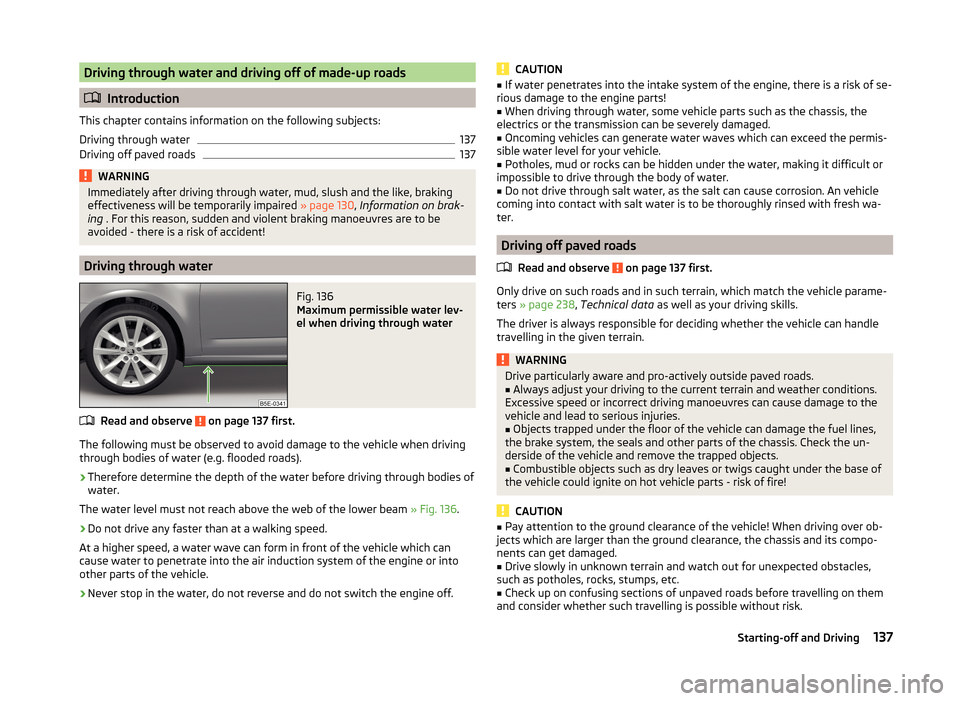
Fig. 136
Maximum permissible water lev-
el when driving through water
Read and observe on page 137 first.
The following must be observed to avoid damage to the vehicle when driving through bodies of water (e.g. flooded roads).
›
Therefore determine the depth of the water before driving through bodies of
water.
The water level must not reach above the web of the lower beam » Fig. 136.
›
Do not drive any faster than at a walking speed.
At a higher speed, a water wave can form in front of the vehicle which can
cause water to penetrate into the air induction system of the engine or into
other parts of the vehicle.
›
Never stop in the water, do not reverse and do not switch the engine off.
CAUTION■ If water penetrates into the intake system of the engine, there is a risk of se-
rious damage to the engine parts!■
When driving through water, some vehicle parts such as the chassis, the
electrics or the transmission can be severely damaged.
■
Oncoming vehicles can generate water waves which can exceed the permis-
sible water level for your vehicle.
■
Potholes, mud or rocks can be hidden under the water, making it difficult or
impossible to drive through the body of water.
■
Do not drive through salt water, as the salt can cause corrosion. An vehicle
coming into contact with salt water is to be thoroughly rinsed with fresh wa-
ter.
Driving off paved roads
Read and observe
on page 137 first.
Only drive on such roads and in such terrain, which match the vehicle parame-ters » page 238 , Technical data as well as your driving skills.
The driver is always responsible for deciding whether the vehicle can handle
travelling in the given terrain.
WARNINGDrive particularly aware and pro-actively outside paved roads.■Always adjust your driving to the current terrain and weather conditions.
Excessive speed or incorrect driving manoeuvres can cause damage to the
vehicle and lead to serious injuries.■
Objects trapped under the floor of the vehicle can damage the fuel lines,
the brake system, the seals and other parts of the chassis. Check the un-
derside of the vehicle and remove the trapped objects.
■
Combustible objects such as dry leaves or twigs caught under the base of
the vehicle could ignite on hot vehicle parts - risk of fire!
CAUTION
■ Pay attention to the ground clearance of the vehicle! When driving over ob-
jects which are larger than the ground clearance, the chassis and its compo-
nents can get damaged.■
Drive slowly in unknown terrain and watch out for unexpected obstacles,
such as potholes, rocks, stumps, etc.
■
Check up on confusing sections of unpaved roads before travelling on them
and consider whether such travelling is possible without risk.
137Starting-off and Driving
Page 144 of 280
WARNING■The system only serves to support and does not relieve the driver of the
responsibility for the vehicle operation.■
Moving persons or objects may not be recognized by the system sensors.
■
Under certain circumstances, surfaces of certain objects and types of
clothing cannot reflect the system signals. For this reason, such people or
objects may not be recognised by the system sensors.
■
External noise sources may affect the signals of the system sensors. Un-
der adverse conditions, this may cause objects or people not to be recog-
nised by the system.
■
You should satisfy yourself before reversing that there is no small obsta-
cle, such as a rock, thin post, trailer drawbar etc., in front or behind your ve-
hicle. Such obstacles may not be recognised by the system sensors.
CAUTION
■ Keep the system sensors » Fig. 139 on page 141 clean, and free from snow
and ice, and do not cover with any objects of any kind, otherwise the system
functioning may be limited.■
Under adverse weather conditions (heavy rain, water vapour, very low or
high temperatures etc.), the system functioning may be limited - “incorrect ob-
stacle detection”.
■
Additionally installed accessories such as bicycle carriers can impair the sys-
tem functioning.
Function
Fig. 138
Sampled areas and range of the sensors / system button (Ver-
sion 2, 3)
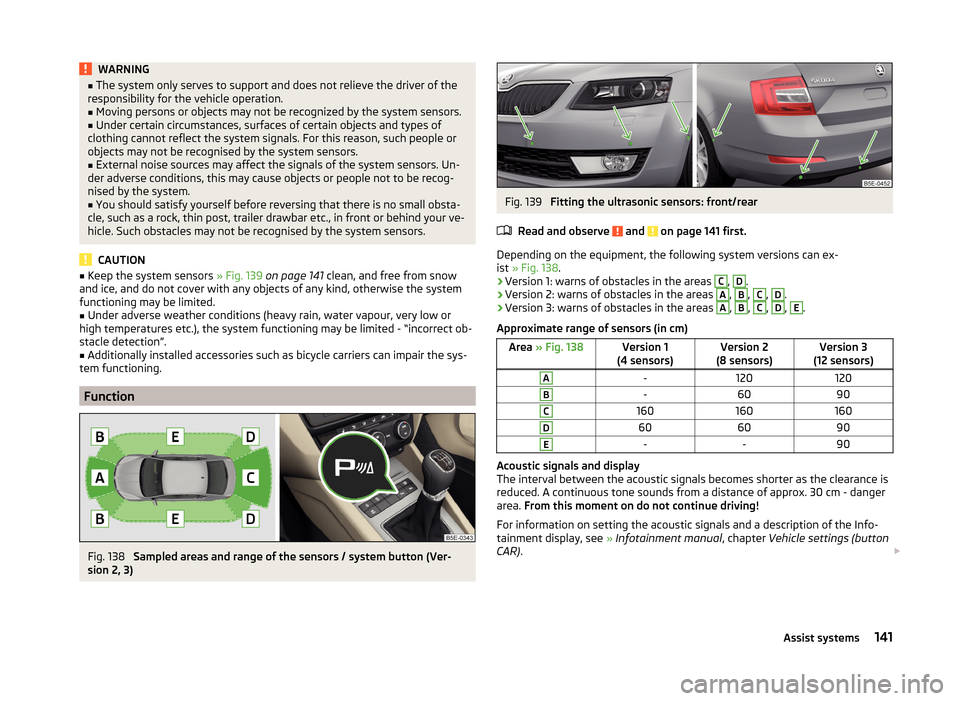
Fig. 139
Fitting the ultrasonic sensors: front/rear
Read and observe
and on page 141 first.
Depending on the equipment, the following system versions can ex-
ist » Fig. 138 .
› Version 1: warns of obstacles in the areas
C
,
D
.
› Version 2: warns of obstacles in the areas
A
,
B
,
C
,
D
.
› Version 3: warns of obstacles in the areas
A
,
B
,
C
,
D
,
E
.
Approximate range of sensors (in cm)
Area » Fig. 138Version 1
(4 sensors)Version 2
(8 sensors)Version 3
(12 sensors)A-120120B-6090C160160160D606090E--90
Acoustic signals and display
The interval between the acoustic signals becomes shorter as the clearance is
reduced. A continuous tone sounds from a distance of approx. 30 cm - danger
area. From this moment on do not continue driving!
For information on setting the acoustic signals and a description of the Info-
tainment display, see » Infotainment manual , chapter Vehicle settings (button
CAR) .
141Assist systems
Page 146 of 280
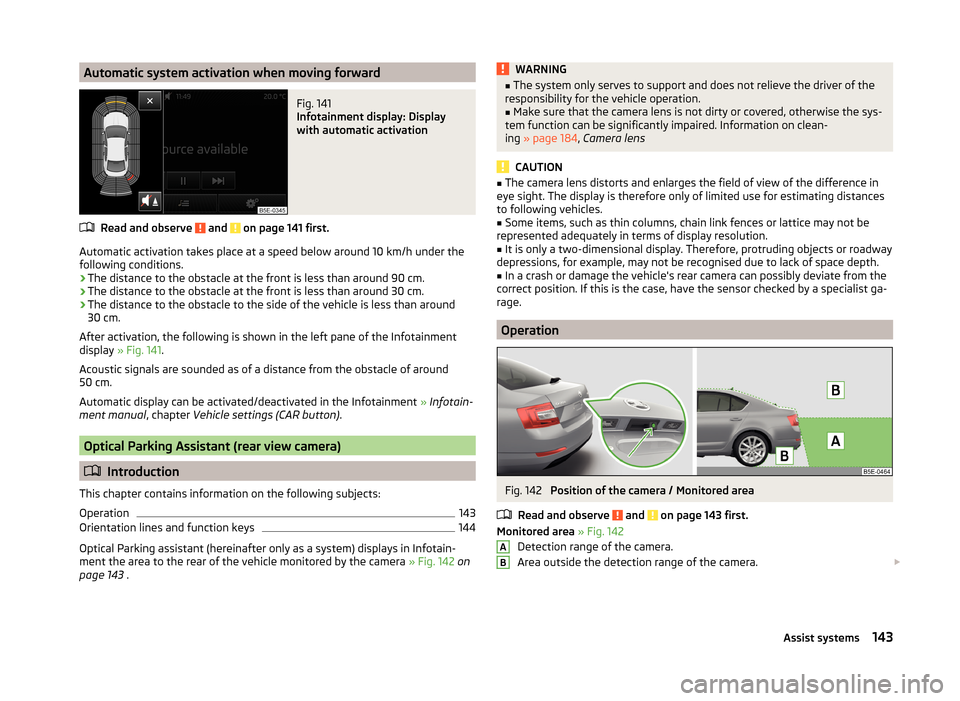
Automatic system activation when moving forwardFig. 141
Infotainment display: Display
with automatic activation
Read and observe and on page 141 first.
Automatic activation takes place at a speed below around 10 km/h under the following conditions.
› The distance to the obstacle at the front is less than around 90 cm.
› The distance to the obstacle at the front is less than around 30 cm.
› The distance to the obstacle to the side of the vehicle is less than around
30 cm.
After activation, the following is shown in the left pane of the Infotainment
display » Fig. 141 .
Acoustic signals are sounded as of a distance from the obstacle of around
50 cm.
Automatic display can be activated/deactivated in the Infotainment » Infotain-
ment manual , chapter Vehicle settings (CAR button) .
Optical Parking Assistant (rear view camera)
Introduction
This chapter contains information on the following subjects:
Operation
143
Orientation lines and function keys
144
Optical Parking assistant (hereinafter only as a system) displays in Infotain-
ment the area to the rear of the vehicle monitored by the camera » Fig. 142 on
page 143 .
WARNING■
The system only serves to support and does not relieve the driver of the
responsibility for the vehicle operation.■
Make sure that the camera lens is not dirty or covered, otherwise the sys-
tem function can be significantly impaired. Information on clean-
ing » page 184 , Camera lens
CAUTION
■
The camera lens distorts and enlarges the field of view of the difference in
eye sight. The display is therefore only of limited use for estimating distances
to following vehicles.■
Some items, such as thin columns, chain link fences or lattice may not be
represented adequately in terms of display resolution.
■
It is only a two-dimensional display. Therefore, protruding objects or roadway
depressions, for example, may not be recognised due to lack of space depth.
■
In a crash or damage the vehicle's rear camera can possibly deviate from the
correct position. If this is the case, have the sensor checked by a specialist ga-
rage.
Operation
Fig. 142
Position of the camera / Monitored area
Read and observe
and on page 143 first.
Monitored area » Fig. 142
Detection range of the camera.
Area outside the detection range of the camera.
AB143Assist systems
Page 152 of 280
This is only possible within the range which is permitted by the power output
and braking power of the engine.WARNINGIf the engine power or engine braking effect is insufficient to maintain the
set speed, the driver must take control of vehicle operation.
Operating Description
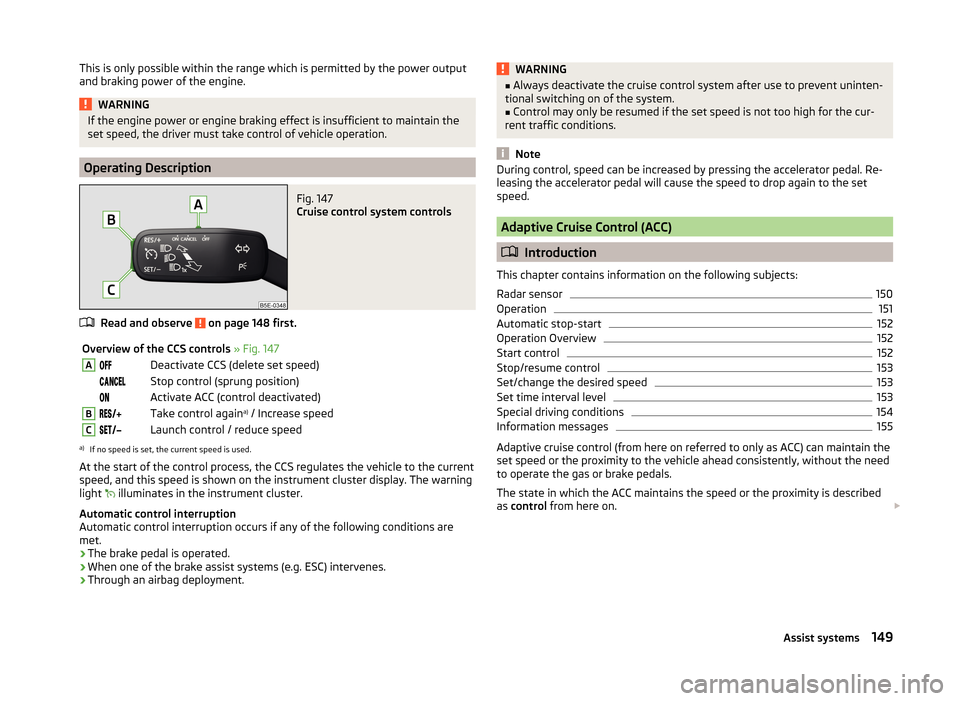
Fig. 147
Cruise control system controls
Read and observe on page 148 first.
Overview of the CCS controls » Fig. 147ADeactivate CCS (delete set speed) Stop control (sprung position) Activate ACC (control deactivated)BTake control again a)
/ Increase speedCLaunch control / reduce speeda)
If no speed is set, the current speed is used.
At the start of the control process, the CCS regulates the vehicle to the current
speed, and this speed is shown on the instrument cluster display. The warning
light illuminates in the instrument cluster.
Automatic control interruption
Automatic control interruption occurs if any of the following conditions are
met.
› The brake pedal is operated.
› When one of the brake assist systems (e.g. ESC) intervenes.
› Through an airbag deployment.
WARNING■
Always deactivate the cruise control system after use to prevent uninten-
tional switching on of the system.■
Control may only be resumed if the set speed is not too high for the cur-
rent traffic conditions.
Note
During control, speed can be increased by pressing the accelerator pedal. Re-
leasing the accelerator pedal will cause the speed to drop again to the set
speed.
Adaptive Cruise Control (ACC)
Introduction
This chapter contains information on the following subjects:
Radar sensor
150
Operation
151
Automatic stop-start
152
Operation Overview
152
Start control
152
Stop/resume control
153
Set/change the desired speed
153
Set time interval level
153
Special driving conditions
154
Information messages
155
Adaptive cruise control (from here on referred to only as ACC) can maintain the
set speed or the proximity to the vehicle ahead consistently, without the need
to operate the gas or brake pedals.
The state in which the ACC maintains the speed or the proximity is described
as control from here on.
149Assist systems
Page 153 of 280
WARNING■The system only serves to support and does not relieve the driver of the
responsibility for the vehicle operation.■
The driver must always be ready to take over steering of the vehicle him-
self (accelerate or brake).
■
Always adapt your speed and safety proximity to the vehicle ahead to the
current visibility, weather, road and traffic conditions.
WARNING■ The ACC does not react when approaching a stationary obstacle, such as
traffic jams, vehicle breakdowns or vehicles waiting at a traffic light.■
The ACC does not respond to crossing or oncoming objects.
■
If the ACC does not decelerate fast enough, immediately apply the vehi-
cle's foot brake.
WARNINGFor safety reasons, do not use the ACC under the following conditions.■When driving in turning lanes, motorway exits or construction sites, to
avoid an unwanted acceleration to the stored speed.■
When visibility is poor, (e.g. fog, heavy rain, thick snowfall).
■
When road conditions are poor (e.g. ice, slippery road, gravel, dirt road).
■
When driving around “sharp” bends.
■
When riding on a steep gradient / high slope.
CAUTION
The control may automatically switch off when some brake assist systems (e.g.
ESC) intervene, when the maximum permissible engine speed is exceeded, etc.
Note
■ The ACC is designed primarily for use on motorways.■The ACC reduces the speed by automatically releasing the accelerator or by
means of a braking procedure as appropriate. If the brakes are used for an au-
tomatic speed reduction at any moments, then the brake light illuminates.■
In case of failure of more than one brake light on the vehicle or on the elec-
trically connected trailer, the ACC becomes unavailable.
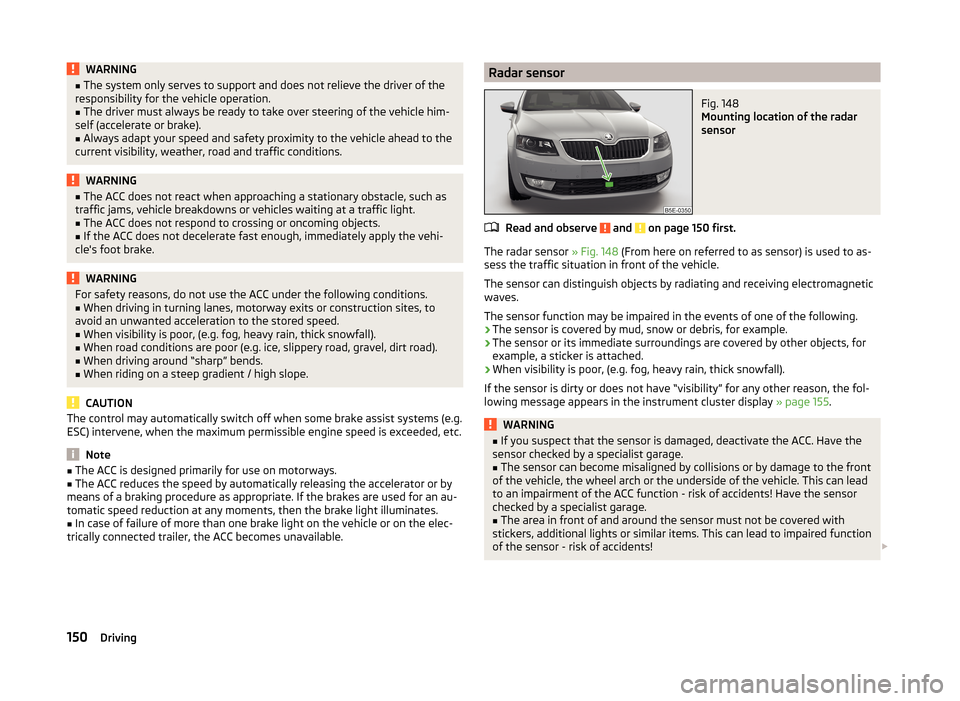
Radar sensorFig. 148
Mounting location of the radar
sensor
Read and observe and on page 150 first.
The radar sensor » Fig. 148 (From here on referred to as sensor) is used to as-
sess the traffic situation in front of the vehicle.
The sensor can distinguish objects by radiating and receiving electromagnetic waves.
The sensor function may be impaired in the events of one of the following.
› The sensor is covered by mud, snow or debris, for example.
› The sensor or its immediate surroundings are covered by other objects, for
example, a sticker is attached.
› When visibility is poor, (e.g. fog, heavy rain, thick snowfall).
If the sensor is dirty or does not have “visibility” for any other reason, the fol- lowing message appears in the instrument cluster display » page 155.
WARNING■
If you suspect that the sensor is damaged, deactivate the ACC. Have the
sensor checked by a specialist garage.■
The sensor can become misaligned by collisions or by damage to the front
of the vehicle, the wheel arch or the underside of the vehicle. This can lead
to an impairment of the ACC function - risk of accidents! Have the sensor
checked by a specialist garage.
■
The area in front of and around the sensor must not be covered with
stickers, additional lights or similar items. This can lead to impaired function
of the sensor - risk of accidents!
150Driving