lock SKODA OCTAVIA 2014 3.G / (5E) Repair Manual
[x] Cancel search | Manufacturer: SKODA, Model Year: 2014, Model line: OCTAVIA, Model: SKODA OCTAVIA 2014 3.G / (5E)Pages: 280, PDF Size: 35.53 MB
Page 137 of 280
N – Neutral
The power transmission to the drive wheels is interrupted in this mode.D
/
S
- mode for driving forward (Normal program) / mode for driving
forward (Sport program)
The system switches from one mode to the other by moving the selector lever
into the spring-loaded position
» Fig. 134 .
In mode D or S, the forward gears are shifted automatically depending on the
engine load, the operation of the accelerator pedal, the vehicle speed, and the
selected driving mode .
In mode S , the forward gears are shifted automatically up and down at high-
er engine speeds than in mode D.
If the Sport driving mode is selected with the engine running » page 160, Se-
lection of travel mode (Driving Mode Selection) , the transmission is automati-
cally set in the S mode.
E – Economical driving mode
If the driving mode Eco or Individual (engine - Eco) » page 160 is selected and
the selection lever is in the setting D/S, transmission is automatically set in
mode E . This mode cannot be selected with the selector lever.
In mode E , the forward gears are shifted automatically up and down at lower
engine speeds than in mode D.
Selector lever lock
Read and observe
and on page 133 first.
The selector lever is locked in mode P and N to prevent that the forward driv-
ing is selected accidentally, thereby setting the vehicle in motion.
The selector lever is locked only when the vehicle is stationary and at speeds
up to 5 km/h.
The selector lever lock is indicated by the illumination of the warning light .
The selector lever is not locked when quickly moving across the position N
(e.g. from R to D/S ). This, for example, helps to rock out a vehicle that is stuck,
e.g. in a bank of snow. The selector lever lock will engage if the lever is in posi-
tion N for more than approx. 2 seconds without the brake pedal being de-
pressed.
Releasing selector lever from mode P or N (selector lever lock)›Press the brake pedal and the lock button at the same time in the direction
of 1
» Fig. 134 on page 133 .
Just depress the brake pedal, if you would like to change from the mode N to
D/S .
Defective selector lever lock
If the selector lever lock is defective or its power supply is interrupted (e.g. dis-
charged vehicle battery, faulty fuse), the selector lever can no longer be moved
out of position P in the normal manner and the vehicle can no longer be driven.
The selector lever must be unlocked specially » page 226.
Note
If you want to move the selector lever from mode P to mode D/S or vice versa,
move the selector lever quickly. This prevents that you accidentally select
mode R or N.
Manual shifting of gears (Tiptronic)
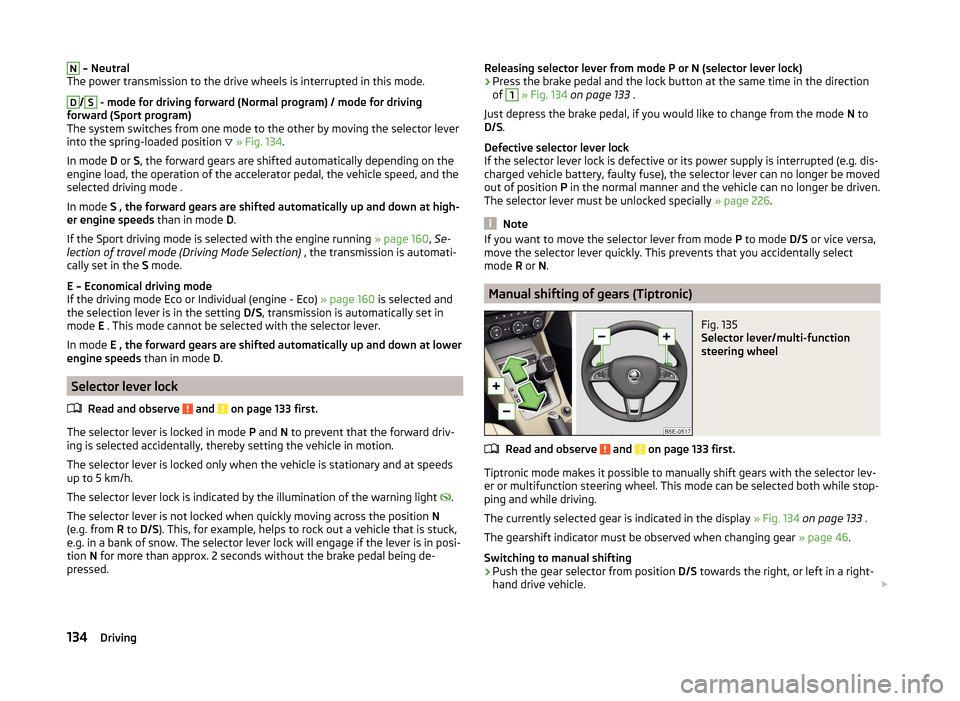
Fig. 135
Selector lever/multi-function
steering wheel
Read and observe and on page 133 first.
Tiptronic mode makes it possible to manually shift gears with the selector lev-
er or multifunction steering wheel. This mode can be selected both while stop-
ping and while driving.
The currently selected gear is indicated in the display » Fig. 134 on page 133 .
The gearshift indicator must be observed when changing gear » page 46.
Switching to manual shifting
›
Push the gear selector from position D/S towards the right, or left in a right-
hand drive vehicle.
134Driving
Page 138 of 280
When switching to the manual shifting while driving, the current gear is main-
tained.
Shifting up gears›
Push the selector lever forwards
+
» Fig. 135 .
›
Pull the right-hand paddle +
» Fig. 135 briefly towards the steering wheel.
Shifting down gears
›
Push the selector lever backwards
-
» Fig. 135 .
›
Pull the left-hand paddle -
» Fig. 135 briefly towards the steering wheel.
Temporarily switching to manual shifting in position D/S
›
Pull one of the -/+ paddles
» Fig. 135 briefly towards the steering wheel .
If you do not pull one of the rocker switches -
/+ for more than 1 Minute, man-
ual shifting of gears is deactivated. You can also deactivate the temporary
switch to manual shifting by pulling the right rocker switch +
towards the
steering wheel for more than 1 second.
Note
■ It may be beneficial, for example, when travelling downhill, to use manual
shifting of gears. Shifting to a lower gear reduces the load on the brakes and
hence the wear of the brakes » page 130.■
When accelerating, the gearbox automatically shifts up into the higher gear
just before the maximum permissible engine speed is reached.
■
If a lower gear is selected, the gearbox does not shift down until there is no
risk of the engine overrevving.
Starting-off and driving
Read and observe
and on page 133 first.
Starting off
›
Start the engine.
›
Firmly depress and hold the brake pedal.
›
Press the lock button in the direction of
1
» Fig. 134 on page 133 and hold.
›
Move the selector lever into the desired position » page 133 and then release
the lock button.
›
Release the brake pedal and accelerate.
Stopping (while the car is moving)
›
Depress the brake pedal and bring the vehicle to a stop.
› Keep holding the brake pedal until driving is resumed.
The selector lever position N does not have to be selected when stopping for a
short time, such as at a cross roads.
Kickdown
The kickdown function allows you to achieve the maximum acceleration of
your vehicle while driving.
When the accelerator pedal is fully depressed, the kickdown function is activa-
ted in any forward driving mode.
The gearbox shifts down one or more gears depending on the vehicle speed
and engine speed, and the vehicle accelerates.
The gearbox does not shift up into the highest gear until the engine has
reached its maximum revolutions for this gear range.
Driving in neutral position in mode E (freewheel)›
Move the selector lever into the position D/S.
›
Select the Eco driving mode or Individual (Eco Engine) » page 160, Selection
of travel mode (Driving Mode Selection) .
›
Take the foot off the accelerator pedal.
The vehicle moves without the braking effect of the engine.
The gear is selected again automatically, when you briefly depress the acceler-
ator brake pedal or pull the left rocker switch -
towards the steering
wheel » page 134 , Manual shifting of gears (Tiptronic) .
This function is not available when towing a trailer.
Launch control 1)
The launch control function allows the vehicle in mode S or Tiptronic to reach
its maximum acceleration when starting off.
›
Disable the TCS » page 138, Braking and stabilisation systems .
›
START STOP deactivate » page 159, Manually deactivating/activating the
system .
›
Fully depress and hold the brake pedal with your left foot.
›
Fully depress the accelerator pedal with your right foot.
›
Release the brake pedal.
The vehicle starts off with maximum acceleration.
1)
This function is only valid for some engines.
135Starting-off and Driving
Page 141 of 280
Assist systems
Braking and stabilisation systems
Introduction
This chapter contains information on the following subjects:
Electronic Stability Control (ESC)
138
Antilock Braking System (ABS)
138
Traction Control System (TCS)
139
Electronic Differential Lock (EDL and XDS)
139
Driver Steering Recommendation (DSR)
139
Hydraulic Brake Assist (HBA)
140
Hill Hold Control (HHC)
140
Multi-collision brake (MCB)
140
Trailer stabilisation (TSA)
140
This chapter deals with the functions of the braking and stabilisation systems,
with the error indicator referred to in chapter » page 34, Warning lights .
The braking and stabilisation systems are automatically activated each time
the ignition is switched on.
WARNING■ A lack of fuel can cause irregular engine running or cause the engine to
shut down. The brake assist systems would then fail to function – risk of
accident!■
The increased safety provided by the brake assist systems must not
tempt you to take safety risks – risk of accident!
■
Always adjust your speed and driving style to the current visibility, weath-
er, road and traffic conditions.
Electronic Stability Control (ESC)
Read and observe
on page 138 first.
The ESC improves vehicle stability in dynamic driving situations, such as when
the vehicle starts to skid.
The ESC monitors whether the desired direction of the current vehicle motion
is occurring. In case of any deviation (e.g. oversteer), the ESC automatically
brakes individual wheels to maintain the desired direction.
During an intervention of the system, the warning light flashes in the instru-
ment cluster.
Enable/disable ESC Sport
ESC Sport allows for sportier driving style. The activation of the ESC sport
leads to the ASR being deactivated and no ESC interventions will occur in the
event of slight over- or under-steering occurring.
The activation or deactivation of the ESC sports can be done in one of two
ways.
› By pressing the Symbol key
for the activation and briefly pressing the but-
ton for the deactivation » Fig. 137 on page 139 .
› In Infotainment
» Operating instructions for Infotainment , chapter Vehicle
settings (CAR button) .
Upon activation, in the instrument cluster the indicator light comes on and
the display shows the following message.
ESC sport: Limited driving stability.
ESC SPORT
Upon deactivation, in the instrument cluster the control indicator turns off
and the display shows the following message.
Stabilisation control (ESC) activated.
ESC ON
Antilock Braking System (ABS)
Read and observe
on page 138 first.
ABS prevents the wheels locking when braking. Thus helping the driver to
maintain control of the vehicle.
The intervention of the ABS is noticeable from the pulsating movements of
the brake pedal which is accompanied by noises.
When the ABS system is active, do not brake periodically or reduce the pres- sure on the brake pedal.
138Driving
Page 142 of 280
Traction Control System (TCS)Fig. 137
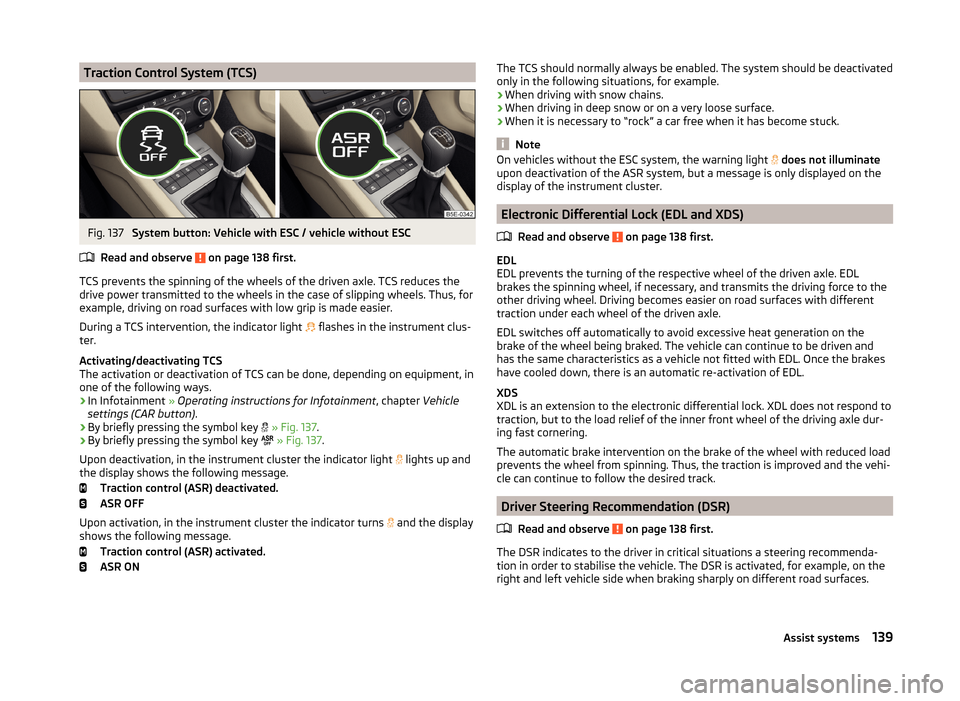
System button: Vehicle with ESC / vehicle without ESC
Read and observe
on page 138 first.
TCS prevents the spinning of the wheels of the driven axle. TCS reduces the
drive power transmitted to the wheels in the case of slipping wheels. Thus, for
example, driving on road surfaces with low grip is made easier.
During a TCS intervention, the indicator light flashes in the instrument clus-
ter.
Activating/deactivating TCS
The activation or deactivation of TCS can be done, depending on equipment, in
one of the following ways.
› In Infotainment
» Operating instructions for Infotainment , chapter Vehicle
settings (CAR button) .
› By briefly pressing the symbol key
» Fig. 137 .
› By briefly pressing the symbol key
» Fig. 137 .
Upon deactivation, in the instrument cluster the indicator light lights up and
the display shows the following message.
Traction control (ASR) deactivated.
ASR OFF
Upon activation, in the instrument cluster the indicator turns and the display
shows the following message.
Traction control (ASR) activated.
ASR ON
The TCS should normally always be enabled. The system should be deactivated
only in the following situations, for example.
› When driving with snow chains.
› When driving in deep snow or on a very loose surface.
› When it is necessary to “rock” a car free when it has become stuck.
Note
On vehicles without the ESC system, the warning light
does not illuminate
upon deactivation of the ASR system, but a message is only displayed on the
display of the instrument cluster.
Electronic Differential Lock (EDL and XDS)
Read and observe
on page 138 first.
EDL
EDL prevents the turning of the respective wheel of the driven axle. EDL
brakes the spinning wheel, if necessary, and transmits the driving force to the
other driving wheel. Driving becomes easier on road surfaces with different
traction under each wheel of the driven axle.
EDL switches off automatically to avoid excessive heat generation on the
brake of the wheel being braked. The vehicle can continue to be driven and
has the same characteristics as a vehicle not fitted with EDL. Once the brakes
have cooled down, there is an automatic re-activation of EDL.
XDS
XDL is an extension to the electronic differential lock. XDL does not respond to
traction, but to the load relief of the inner front wheel of the driving axle dur-
ing fast cornering.
The automatic brake intervention on the brake of the wheel with reduced load
prevents the wheel from spinning. Thus, the traction is improved and the vehi-
cle can continue to follow the desired track.
Driver Steering Recommendation (DSR)
Read and observe
on page 138 first.
The DSR indicates to the driver in critical situations a steering recommenda-
tion in order to stabilise the vehicle. The DSR is activated, for example, on the
right and left vehicle side when braking sharply on different road surfaces.
139Assist systems
Page 172 of 280
Hitch and trailer
Hitch
Introduction
This chapter contains information on the following subjects:
Description
169
Adjusting the ready position
170
Correctly adjusted ready position
170
Assembling the ball rod - 1st step
171
Assembling the ball rod - 2nd step
171
Check proper fitting
172
Removing the ball rod - 1st step
172
Removing the ball rod - 2nd step
173
Accessories
173
The maximum trailer drawbar load is 75 kg.
For vehicles with all-wheel drive, the maximum trailer nose weight is 80 kg.
With G-TEC-vehicles, the maximum trailer drawbar load is 56 kg .
WARNING■
Before each time you make a journey when using the ball rod, check that
it is seated correctly and is secured in the mounting recess.■
Do not use the ball rod if it is not correctly inserted into the mounting re-
cess and secured.
■
Do not use the towing hitch if it is damaged or if there are parts missing.
■
Do not perform any modifications or changes to the towing device.
■
Never release the ball rod while the trailer is still coupled.
■
Keep the mounting recess of the towing device clean at all times. Such
dirt prevents the ball rod from being attached securely!
CAUTION
■ Take care when using the ball rod - there is a risk of paint damage to the
bumper.■
When the ball rod is removed always place the cover onto the mounting re-
cess - there is a danger of soiling the mounting recess.
Note■ Operation and maintenance of the tow hitch » page 185.■The towing vehicle by means of the detachable ball rod » page 223.
Description
Fig. 166
Support for the hitch equipment / ball bar / key (Version 1 and 2)
Read and observe
and on page 169 first.
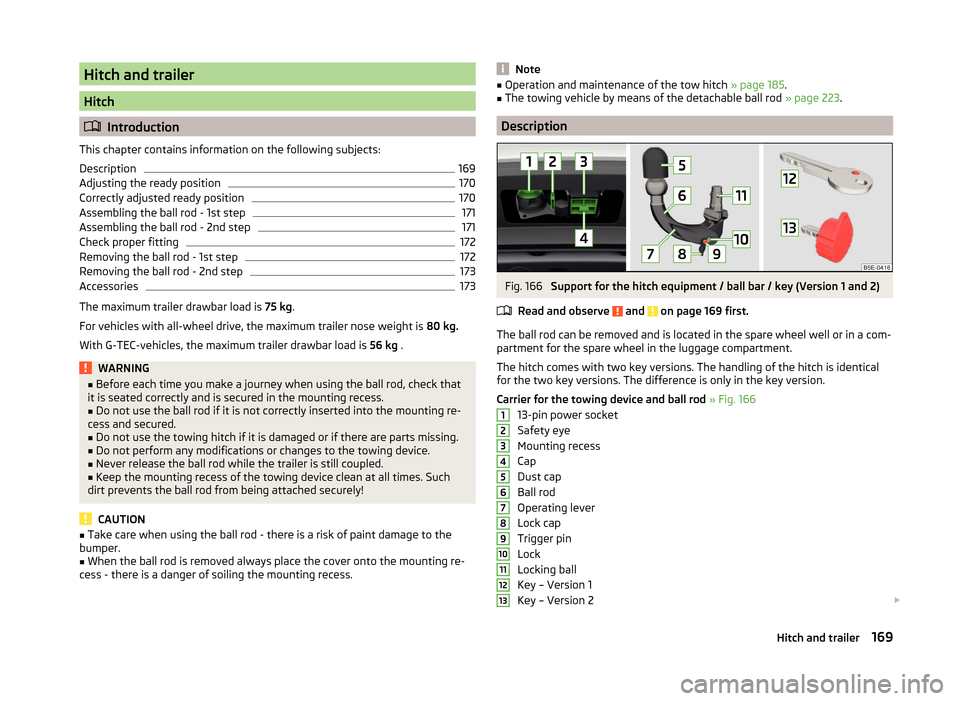
The ball rod can be removed and is located in the spare wheel well or in a com- partment for the spare wheel in the luggage compartment.
The hitch comes with two key versions. The handling of the hitch is identical
for the two key versions. The difference is only in the key version.
Carrier for the towing device and ball rod » Fig. 166
13-pin power socket
Safety eye
Mounting recess
Cap
Dust cap
Ball rod
Operating lever
Lock cap
Trigger pin
Lock
Locking ball
Key – Version 1
Key – Version 2
12345678910111213169Hitch and trailer
Page 173 of 280
NoteIf you lose the key, please get in touch with a specialist garage.
Adjusting the ready position
Fig. 167
1st Step: Key Version 1 / key Version 2
Fig. 168
2nd step: both key versions
Read and observe and on page 169 first.
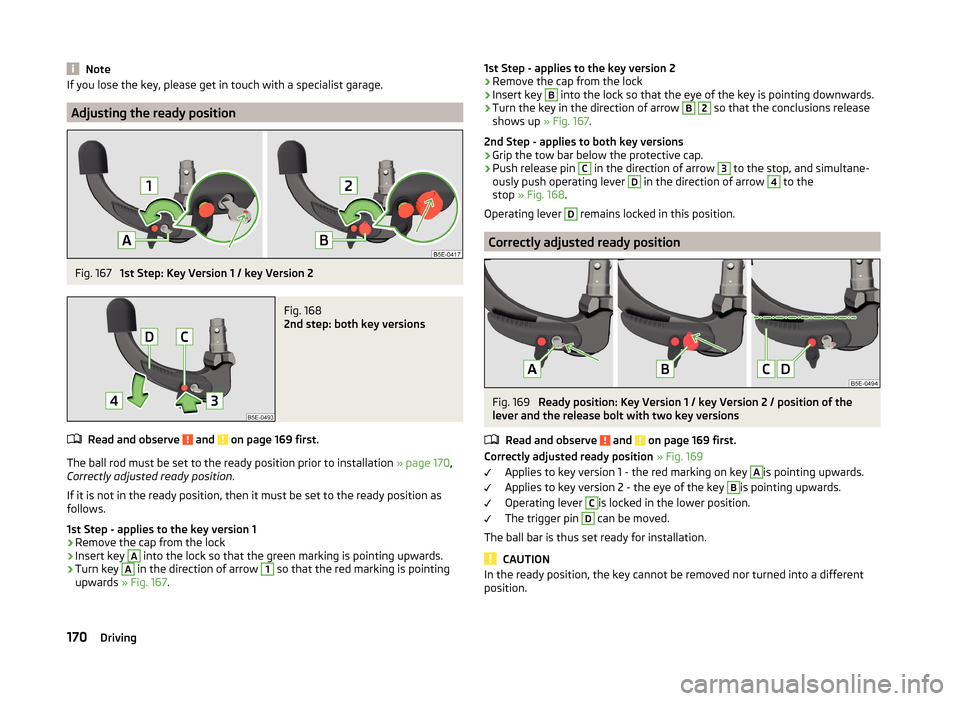
The ball rod must be set to the ready position prior to installation » page 170,
Correctly adjusted ready position .
If it is not in the ready position, then it must be set to the ready position as
follows.
1st Step - applies to the key version 1
›
Remove the cap from the lock
›
Insert key
A
into the lock so that the green marking is pointing upwards.
›
Turn key
A
in the direction of arrow
1
so that the red marking is pointing
upwards » Fig. 167.
1st Step - applies to the key version 2›Remove the cap from the lock›
Insert key
B
into the lock so that the eye of the key is pointing downwards.
›
Turn the key in the direction of arrow
B
2
so that the conclusions release
shows up » Fig. 167.
2nd Step - applies to both key versions
›
Grip the tow bar below the protective cap.
›
Push release pin
C
in the direction of arrow
3
to the stop, and simultane-
ously push operating lever
D
in the direction of arrow
4
to the
stop » Fig. 168 .
Operating lever
D
remains locked in this position.
Correctly adjusted ready position
Fig. 169
Ready position: Key Version 1 / key Version 2 / position of the
lever and the release bolt with two key versions
Read and observe
and on page 169 first.
Correctly adjusted ready position » Fig. 169
Applies to key version 1 - the red marking on key
A
is pointing upwards.
Applies to key version 2 - the eye of the key
B
is pointing upwards.
Operating lever
C
is locked in the lower position.
The trigger pin
D
can be moved.
The ball bar is thus set ready for installation.
CAUTION
In the ready position, the key cannot be removed nor turned into a different
position.170Driving
Page 174 of 280
Assembling the ball rod - 1st stepFig. 170
Insert ball rod / trigger bolt in the extended state
Read and observe
and on page 169 first.
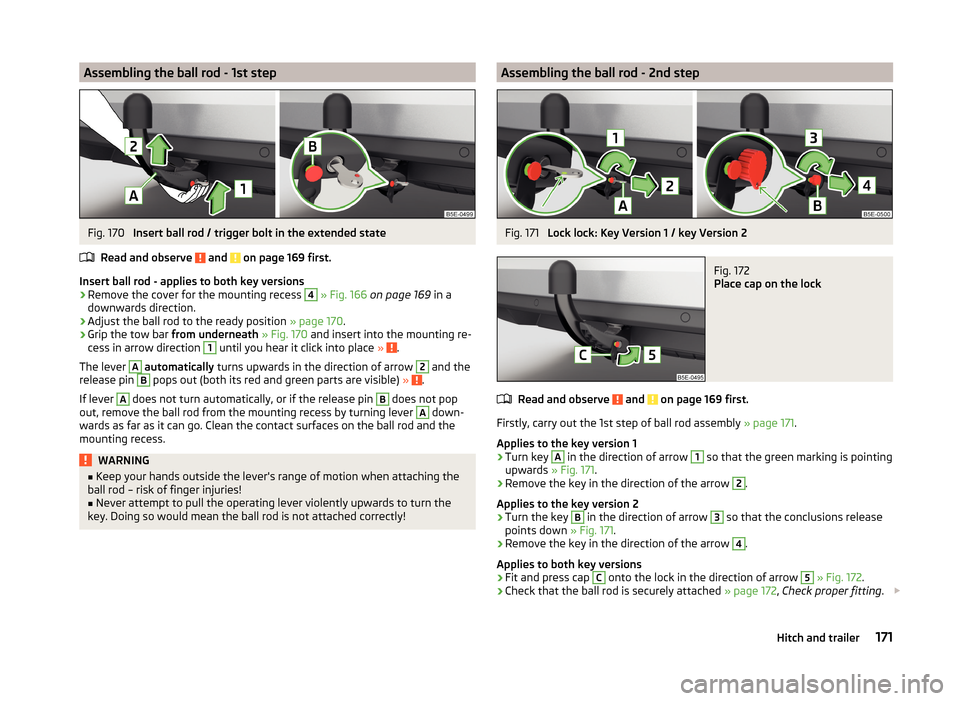
Insert ball rod - applies to both key versions
›
Remove the cover for the mounting recess
4
» Fig. 166 on page 169 in a
downwards direction.
›
Adjust the ball rod to the ready position » page 170.
›
Grip the tow bar from underneath » Fig. 170 and insert into the mounting re-
cess in arrow direction
1
until you hear it click into place » .
The lever
A
automatically turns upwards in the direction of arrow
2
and the
release pin
B
pops out (both its red and green parts are visible) » .
If lever
A
does not turn automatically, or if the release pin
B
does not pop
out, remove the ball rod from the mounting recess by turning lever
A
down-
wards as far as it can go. Clean the contact surfaces on the ball rod and the
mounting recess.
WARNING■ Keep your hands outside the lever's range of motion when attaching the
ball rod – risk of finger injuries!■
Never attempt to pull the operating lever violently upwards to turn the
key. Doing so would mean the ball rod is not attached correctly!
Assembling the ball rod - 2nd stepFig. 171
Lock lock: Key Version 1 / key Version 2
Fig. 172
Place cap on the lock
Read and observe and on page 169 first.
Firstly, carry out the 1st step of ball rod assembly » page 171.
Applies to the key version 1
›
Turn key
A
in the direction of arrow
1
so that the green marking is pointing
upwards » Fig. 171.
›
Remove the key in the direction of the arrow
2
.
Applies to the key version 2
›
Turn the key
B
in the direction of arrow
3
so that the conclusions release
points down » Fig. 171.
›
Remove the key in the direction of the arrow
4
.
Applies to both key versions
›
Fit and press cap
C
onto the lock in the direction of arrow
5
» Fig. 172 .
›
Check that the ball rod is securely attached » page 172, Check proper fitting .
171Hitch and trailer
Page 175 of 280
CAUTIONAfter removing the key, always replace the cap on the lock – risk of lock get-
ting dirty.
Check proper fitting
Fig. 173
Duly fortified ball head
Read and observe and on page 169 first.
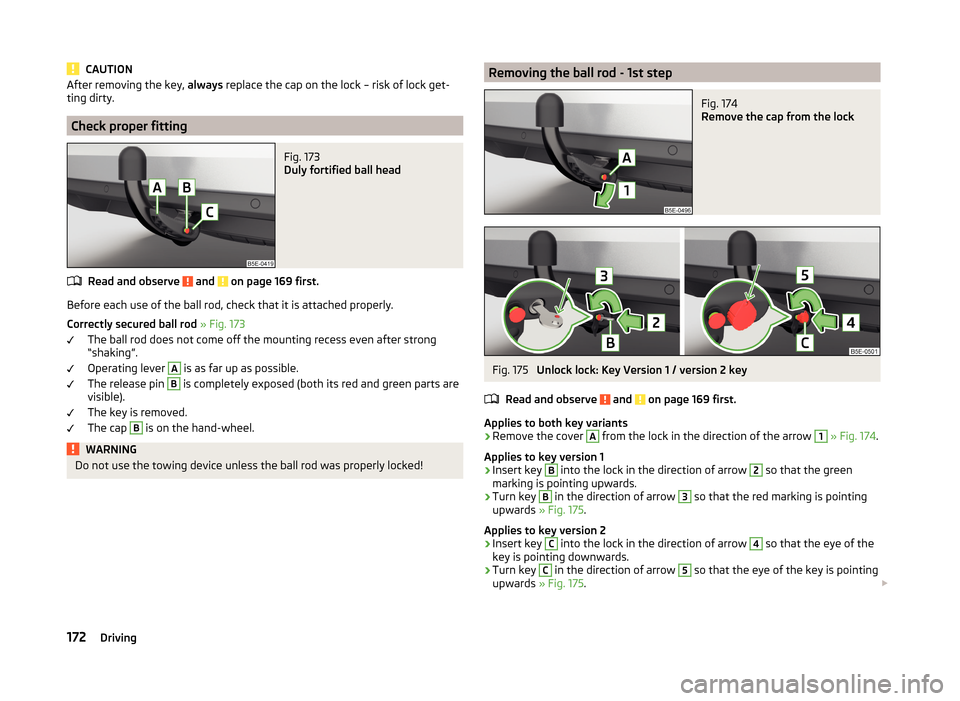
Before each use of the ball rod, check that it is attached properly.
Correctly secured ball rod » Fig. 173
The ball rod does not come off the mounting recess even after strong
“shaking”.
Operating lever
A
is as far up as possible.
The release pin
B
is completely exposed (both its red and green parts are
visible).
The key is removed.
The cap
B
is on the hand-wheel.
WARNINGDo not use the towing device unless the ball rod was properly locked!Removing the ball rod - 1st stepFig. 174
Remove the cap from the lock
Fig. 175
Unlock lock: Key Version 1 / version 2 key
Read and observe
and on page 169 first.
Applies to both key variants
›
Remove the cover
A
from the lock in the direction of the arrow
1
» Fig. 174 .
Applies to key version 1
›
Insert key
B
into the lock in the direction of arrow
2
so that the green
marking is pointing upwards.
›
Turn key
B
in the direction of arrow
3
so that the red marking is pointing
upwards » Fig. 175.
Applies to key version 2
›
Insert key
C
into the lock in the direction of arrow
4
so that the eye of the
key is pointing downwards.
›
Turn key
C
in the direction of arrow
5
so that the eye of the key is pointing
upwards » Fig. 175.
172Driving
Page 179 of 280
Trailer operation
Driving speed
For safety reasons, do not drive faster than 80 km/h when hitching a trailer.
Immediately reduce your speed as soon as even the slightest swaying of the
trailer is detected. Never attempt to stop the trailer from “swaying” by acceler-
ating.
Brakes
Apply the brakes in good time! If the trailer is fitted with a trailer brake, apply
the brakes gently at first, then brake firmly. This will avoid brake jolts resulting
from the trailer wheels locking.
On downhill sections shift down a gear in good time to also use the engine as
a brake.
Engine overheating
If the needle for the coolant temperature gauge moves into the right-hand
area or the red area of the scale, the speed must be reduced immediately.
Stop and switch off the engine if the warning symbol in the instrument clus-
ter » page 41 lights up.
The following information must be observed » page 41,
Coolant
.
The coolant temperature can be reduced by switching on the heating.WARNING■ Always drive particularly carefully with the trailer.■Adapt your speed to the conditions of the road surface and to the traffic
situation.
CAUTION
If you tow a trailer frequently, you should also have your vehicle inspected be-
tween service intervals.
Anti-theft alarm system
If the vehicle is locked, the alarm is activated when the electrical connection to
the trailer is interrupted.
Always switch off the anti-theft alarm system before a trailer is coupled or un-
coupled » page 59 .
Conditions for including a trailer in the anti-theft alarm system.
The vehicle is factory-fitted with an anti-theft alarm system and a towing
device.
The trailer is electrically connected to the towing vehicle by means of the
trailer socket.
The electrical system of the vehicle and trailer is functional.
the vehicle is locked with the vehicle key and the anti-theft alarm system
is activated.
CAUTION
For technical reasons, trailers with rear LED lights cannot be connected to the
anti-theft alarm system.176Driving
Page 184 of 280
Washing by handRead and observe
and on page 180 first.
Soak the dirt with plenty of water and rinse as well as possible.
Clean the vehicle with a soft sponge, a washing glove or a washing brush.
Work from the top to the bottom – starting with the roof.
For stubborn dirt, agents specifically intended for this purpose are to be used. Wash out the sponge or washing glove thoroughly at short intervals.
Clean wheels, door sills and similar parts last. Use a second sponge for such areas.
Give the vehicle a good rinse after washing it and dry it off using a chamois
leather.
WARNINGProtect your hands and arms from sharp-edged metal parts when cleaning
the underfloor or the inside of the wheel housings or the wheel trims – risk
of cuts!
CAUTION
■ Only apply slight pressure when cleaning the vehicle's paintwork.■Do not wash your vehicle in bright sunlight – risk of paint damage.
Automatic car wash systems
Read and observe
and on page 180 first.
The usual precautionary measures must be taken before washing the vehicle
in an automatic car wash system (e.g. closing the windows and the sliding/tilt-
ing roof etc.).
If your vehicle is fitted with any particular attached parts, such as a spoiler,
roof rack system, two-way radio aerial etc., it is best to consult the operator of
the car wash system beforehand.
After an automatic wash with wax treatment, the lips of the wipers should be
cleaned with cleaning agents specially designed for the purpose, and then de-
greased.
CAUTIONFold in the exterior mirrors to prevent damage before washing the vehicle in
an automatic car wash system. Never manually fold in electric exterior mirrors -
always use the electric controls.
Washing with a high-pressure cleaner
Read and observe
and on page 180 first.
When washing the vehicle with a high-pressure cleaner, the instructions for
use of the equipment must be observed. This applies in particular to the pres-
sure used and to the spraying distance .
Maintain a sufficiently large distance to the parking aid sensors and soft mate-
rials such as rubber hoses or insulation material.
CAUTION
■ If washing the vehicle in the winter using a hose or high-pressure cleaner,
ensure that the jet of water is not aimed directly at the locking cylinders or the
door/panel joints – risk of freezing!■
To avoid damaging the parking aid sensors while cleaning with high-pressure
cleaners or steam jets, the sensors must only be directly sprayed for short pe-
riods while a minimum distance of 10 cm must be observed.
Note
See also Washing cars with decorative films using a high-pressure clean-
er » page 183 .
Cleaning vehicle exterior
Introduction
This chapter contains information on the following subjects:
Vehicle paint work
182
Plastic parts
182
Rubber seals
183
Chrome parts
183
Decorative films
183
Windows and external mirrors
183
Headlight glasses
184
Camera lens
184
181Care and maintenance