fuel pressure SKODA OCTAVIA 2014 3.G / (5E) Swing Infotinment Car Radio Manual
[x] Cancel search | Manufacturer: SKODA, Model Year: 2014, Model line: OCTAVIA, Model: SKODA OCTAVIA 2014 3.G / (5E)Pages: 50, PDF Size: 4.34 MB
Page 16 of 50
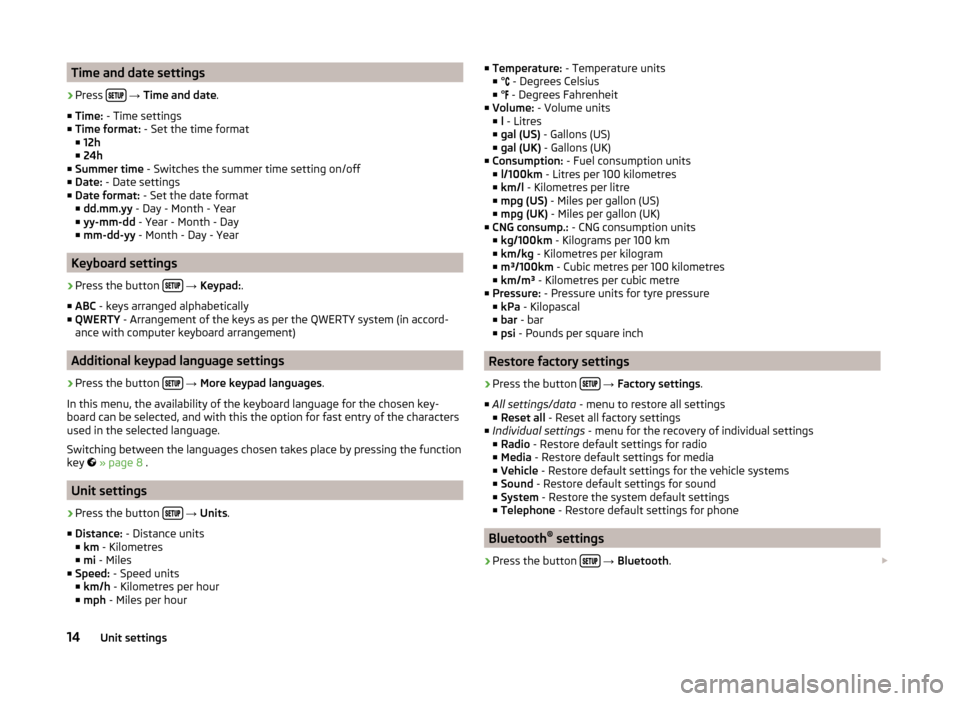
Time and date settings›
Press
→ Time and date .
■ Time: - Time settings
■ Time format: - Set the time format
■ 12h
■ 24h
■ Summer time - Switches the summer time setting on/off
■ Date: - Date settings
■ Date format: - Set the date format
■ dd.mm.yy - Day - Month - Year
■ yy-mm-dd - Year - Month - Day
■ mm-dd-yy - Month - Day - Year
Keyboard settings
›
Press the button
→ Keypad: .
■ ABC - keys arranged alphabetically
■ QWERTY - Arrangement of the keys as per the QWERTY system (in accord-
ance with computer keyboard arrangement)
Additional keypad language settings
›
Press the button
→ More keypad languages .
In this menu, the availability of the keyboard language for the chosen key-
board can be selected, and with this the option for fast entry of the characters
used in the selected language.
Switching between the languages chosen takes place by pressing the function
key
» page 8 .
Unit settings
›
Press the button
→ Units .
■ Distance: - Distance units
■ km - Kilometres
■ mi - Miles
■ Speed: - Speed units
■ km/h - Kilometres per hour
■ mph - Miles per hour
■
Temperature: - Temperature units
■ ° - Degrees Celsius
■ °
- Degrees Fahrenheit
■ Volume: - Volume units
■ l - Litres
■ gal (US) - Gallons (US)
■ gal (UK) - Gallons (UK)
■ Consumption: - Fuel consumption units
■ l/100km - Litres per 100 kilometres
■ km/l - Kilometres per litre
■ mpg (US) - Miles per gallon (US)
■ mpg (UK) - Miles per gallon (UK)
■ CNG consump.: - CNG consumption units
■ kg/100km - Kilograms per 100 km
■ km/kg - Kilometres per kilogram
■ m³/100km - Cubic metres per 100 kilometres
■ km/m³ - Kilometres per cubic metre
■ Pressure: - Pressure units for tyre pressure
■ kPa - Kilopascal
■ bar - bar
■ psi - Pounds per square inch
Restore factory settings
›
Press the button
→ Factory settings .
■ All settings/data - menu to restore all settings
■ Reset all - Reset all factory settings
■ Individual settings - menu for the recovery of individual settings
■ Radio - Restore default settings for radio
■ Media - Restore default settings for media
■ Vehicle - Restore default settings for the vehicle systems
■ Sound - Restore default settings for sound
■ System - Restore the system default settings
■ Telephone - Restore default settings for phone
Bluetooth ®
settings
›
Press the button
→ Bluetooth .
14Unit settings
Page 40 of 50
■Engine: - Set the engine (drive) characteristics
■ Normal - Normal
■ Sport - Sports
■ Eco - Economical
■ ACC: - Set the vehicle acceleration when adaptive cruise control is activa-
ted
■ Normal - Normal
■ Sport - Sports
■ Eco - Economical
■ Cornering light: - Set the characteristics of the adaptive headlights
■ Normal - Normal
■ Sport - Sports
■ Eco - Economical
■ Air conditioning - Sets the characteristics of Climatronic
■ Normal - Normal
■ Eco - Economical
■ Reset mode - Setting for all menu items in the Individual mode to Normal
■ Cancel - Keep the current settings
■ Reset - Set all menu items to Normal
Note
If you do not operate the unit for longer than approx. 10 seconds in the "Select
driving mode" menu, it will switch to the last selected menu or switch itself off.
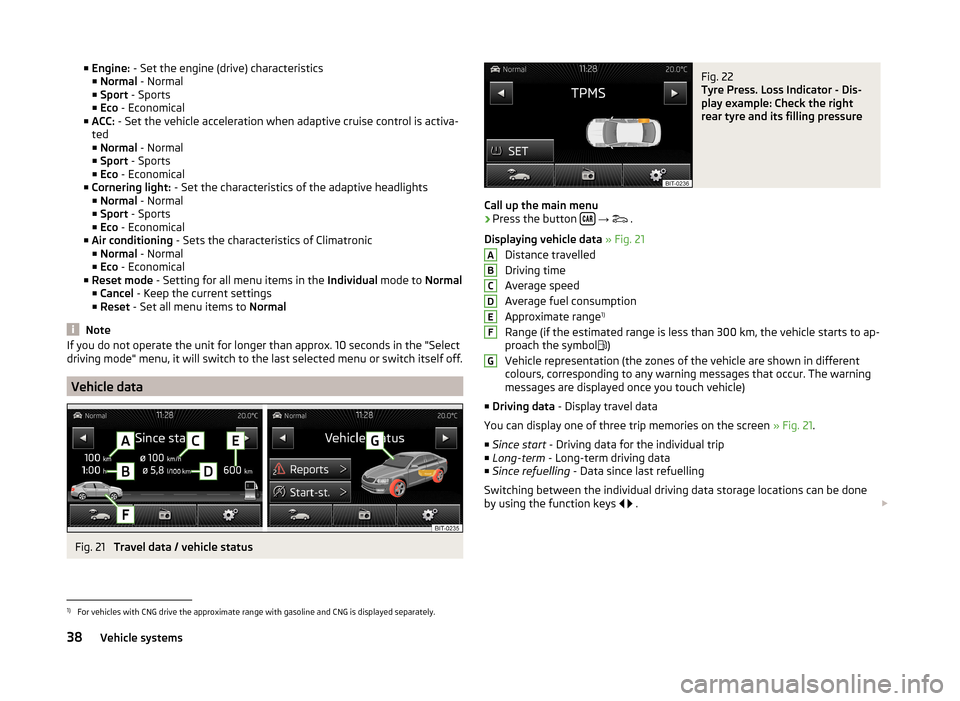
Vehicle data
Fig. 21
Travel data / vehicle status
Fig. 22
Tyre Press. Loss Indicator - Dis-
play example: Check the right
rear tyre and its filling pressure
Call up the main menu
›
Press the button
→
.
Displaying vehicle data » Fig. 21
Distance travelled
Driving time
Average speed
Average fuel consumption
Approximate range 1)
Range (if the estimated range is less than 300 km, the vehicle starts to ap-
proach the symbol )
Vehicle representation (the zones of the vehicle are shown in different
colours, corresponding to any warning messages that occur. The warning
messages are displayed once you touch vehicle)
■ Driving data - Display travel data
You can display one of three trip memories on the screen » Fig. 21.
■ Since start - Driving data for the individual trip
■ Long-term - Long-term driving data
■ Since refuelling - Data since last refuelling
Switching between the individual driving data storage locations can be done
by using the function keys
.
ABCDEFG1)
For vehicles with CNG drive the approximate range with gasoline and CNG is displayed separately.
38Vehicle systems
Page 41 of 50
■Conv. cons. Displays up to three consumers which have the largest share of
fuel consumption and displays the fuel consumption to run all convenience
systems
■ Veh. status - Displays vehicle status » Fig. 21 or tyre pressure monitoring in-
formation
■ Veh. status - Displays vehicle status information
■ - No message /
Announcements - warning messages relating to ve-
hicle status or number of messages (if there is only one message, one
warning message text is displayed)
■ Start-st. - Display information about the status of the START-STOP
system
■ Tyre Press. Loss Indicator - Tyre pressure monitoring function » Fig. 22
■
SET - Start a new calibration process
Switching between the individual menus can be done by using the function
keys
.
Note
After pressing the button the last displayed view from the menu is shown
.
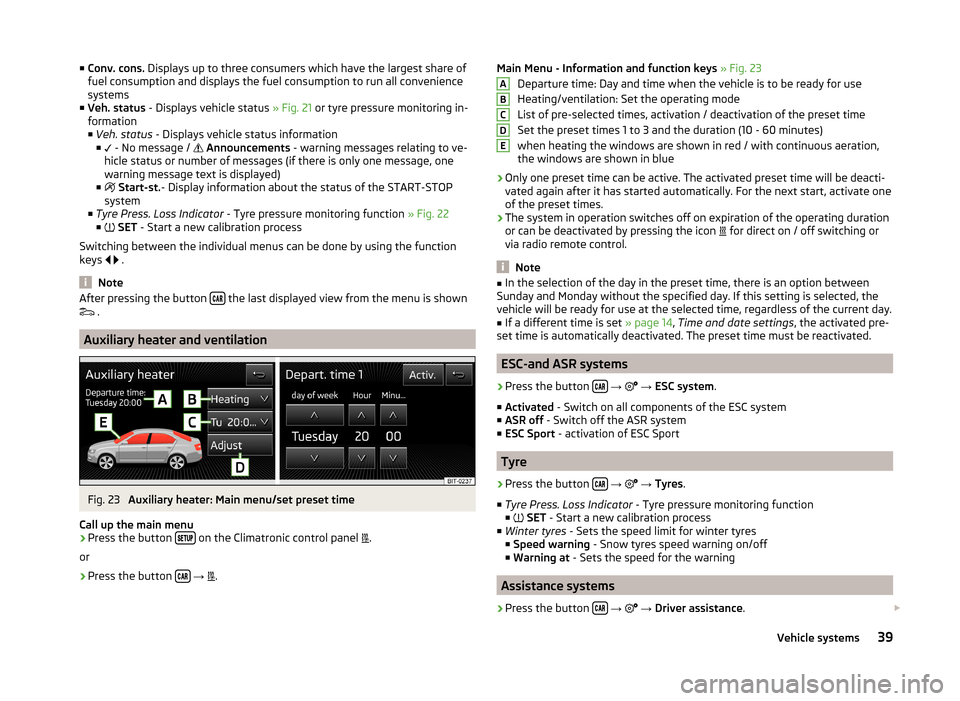
Auxiliary heater and ventilation
Fig. 23
Auxiliary heater: Main menu/set preset time
Call up the main menu
›
Press the button on the Climatronic control panel
.
or
›
Press the button
→
.
Main Menu - Information and function keys
» Fig. 23
Departure time: Day and time when the vehicle is to be ready for use
Heating/ventilation: Set the operating mode
List of pre-selected times, activation / deactivation of the preset time
Set the preset times 1 to 3 and the duration (10 - 60 minutes) when heating the windows are shown in red / with continuous aeration,the windows are shown in blue
› Only one preset time can be active. The activated preset time will be deacti-
vated again after it has started automatically. For the next start, activate one
of the preset times.
› The system in operation switches off on expiration of the operating duration
or can be deactivated by pressing the icon for direct on / off switching or
via radio remote control.
Note
■ In the selection of the day in the preset time, there is an option between
Sunday and Monday without the specified day. If this setting is selected, the
vehicle will be ready for use at the selected time, regardless of the current day.■
If a different time is set » page 14, Time and date settings , the activated pre-
set time is automatically deactivated. The preset time must be reactivated.
ESC-and ASR systems
›
Press the button
→
→ ESC system .
■ Activated - Switch on all components of the ESC system
■ ASR off - Switch off the ASR system
■ ESC Sport - activation of ESC Sport
Tyre
›
Press the button
→
→ Tyres .
■ Tyre Press. Loss Indicator - Tyre pressure monitoring function
■
SET - Start a new calibration process
■ Winter tyres - Sets the speed limit for winter tyres
■ Speed warning - Snow tyres speed warning on/off
■ Warning at - Sets the speed for the warning
Assistance systems
›
Press the button
→
→ Driver assistance .
ABCDE39Vehicle systems