warning light SKODA OCTAVIA 2015 3.G / (5E) Owner's Guide
[x] Cancel search | Manufacturer: SKODA, Model Year: 2015, Model line: OCTAVIA, Model: SKODA OCTAVIA 2015 3.G / (5E)Pages: 268, PDF Size: 37.54 MB
Page 70 of 268
Note■The headlights may mist up temporarily. When the driving lights are switched
on, the light outlet surfaces are free from mist after a short period, although
the headlight lenses may still be misted up in the peripheral areas. This mist
has no influence on the life of the lighting system.■
If the visibility is poor and the lights are not on (except daytime running light)
the brightness of the instrument lighting reduces to alert the driver to switch
on the lights in due time.
■
The brightness of the instrument lighting with the lights on (except daytime
running lights) can be set in the Infotainment » Owner´s Manual Infotainment ,
chapter CAR - Vehicle Settings .
Operating the lights
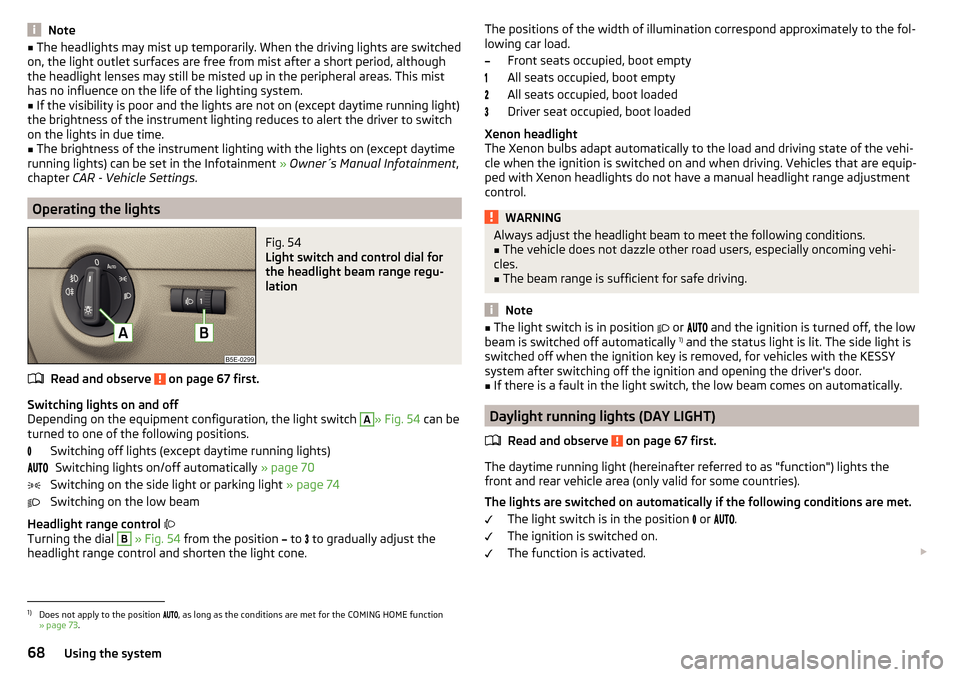
Fig. 54
Light switch and control dial for
the headlight beam range regu-
lation
Read and observe on page 67 first.
Switching lights on and off
Depending on the equipment configuration, the light switch
A
» Fig. 54 can be
turned to one of the following positions.
Switching off lights (except daytime running lights)Switching lights on/off automatically » page 70
Switching on the side light or parking light » page 74
Switching on the low beam
Headlight range control
Turning the dial
B
» Fig. 54 from the position
to
to gradually adjust the
headlight range control and shorten the light cone.
The positions of the width of illumination correspond approximately to the fol-
lowing car load.
Front seats occupied, boot empty
All seats occupied, boot empty
All seats occupied, boot loaded
Driver seat occupied, boot loaded
Xenon headlight
The Xenon bulbs adapt automatically to the load and driving state of the vehi-
cle when the ignition is switched on and when driving. Vehicles that are equip-
ped with Xenon headlights do not have a manual headlight range adjustment
control.WARNINGAlways adjust the headlight beam to meet the following conditions.■The vehicle does not dazzle other road users, especially oncoming vehi-
cles.■
The beam range is sufficient for safe driving.
Note
■ The light switch is in position or and the ignition is turned off, the low
beam is switched off automatically 1)
and the status light is lit. The side light is
switched off when the ignition key is removed, for vehicles with the KESSY
system after switching off the ignition and opening the driver's door.■
If there is a fault in the light switch, the low beam comes on automatically.
Daylight running lights (DAY LIGHT)
Read and observe
on page 67 first.
The daytime running light (hereinafter referred to as "function") lights the
front and rear vehicle area (only valid for some countries).
The lights are switched on automatically if the following conditions are met. The light switch is in the position
or
.
The ignition is switched on.
The function is activated.
1)
Does not apply to the position
, as long as the conditions are met for the COMING HOME function
» page 73 .
68Using the system
Page 71 of 268
Activating/deactivating function on vehicles with Infotainment
The function can be disabled/enabled in the Infotainment » Owner´s Manual
Infotainment , chapter CAR - vehicle settings .
Deactivating on vehicles without Infotainment›
Switch off the ignition.
›
Pull the indicator / main beam lever towards the steering wheel, push down
and hold in this position.
›
Switch on the ignition.
›
Hold the lever in this position for min. 3 seconds after switching on the igni-
tion.
The deactivation of the function is confirmed by an audible signal.
Activating on vehicles without Infotainment
›
Switch off the ignition.
›
Pull the indicator / main beam lever towards the steering wheel, push up and
hold in this position.
›
Switch on the ignition.
›
Hold the lever in this position for min. 3 seconds after switching on the igni-
tion.
The activation of the function is confirmed by an audible signal.
WARNINGAlways switch on the low beam when visibility is poor.
Turn signal and main beam
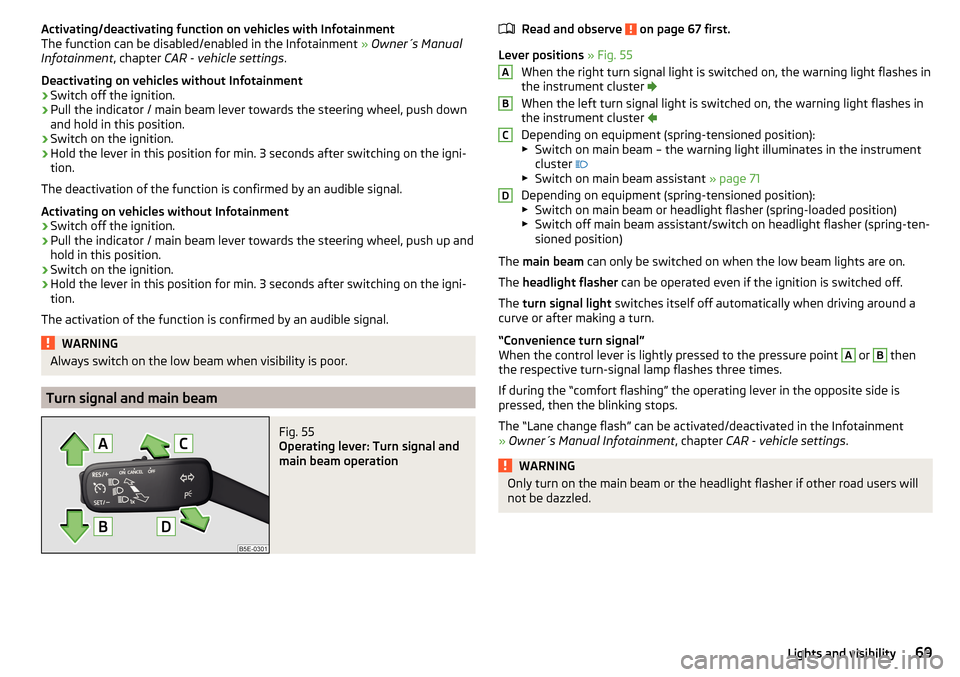
Fig. 55
Operating lever: Turn signal and
main beam operation
Read and observe on page 67 first.
Lever positions » Fig. 55
When the right turn signal light is switched on, the warning light flashes in
the instrument cluster
When the left turn signal light is switched on, the warning light flashes in
the instrument cluster
Depending on equipment (spring-tensioned position):
▶ Switch on main beam – the warning light illuminates in the instrument
cluster
▶ Switch on main beam assistant » page 71
Depending on equipment (spring-tensioned position): ▶ Switch on main beam or headlight flasher (spring-loaded position)
▶ Switch off main beam assistant/switch on headlight flasher (spring-ten-
sioned position)
The main beam can only be switched on when the low beam lights are on.
The headlight flasher can be operated even if the ignition is switched off.
The turn signal light switches itself off automatically when driving around a
curve or after making a turn.
“Convenience turn signal”
When the control lever is lightly pressed to the pressure point
A
or
B
then
the respective turn-signal lamp flashes three times.
If during the “comfort flashing” the operating lever in the opposite side is
pressed, then the blinking stops.
The “Lane change flash” can be activated/deactivated in the Infotainment
» Owner´s Manual Infotainment , chapter CAR - vehicle settings .
WARNINGOnly turn on the main beam or the headlight flasher if other road users will
not be dazzled.ABCD69Lights and visibility
Page 73 of 268
Dynamic cornering lights
The cone of light in front of the vehicle is adjusted to the steering angle so
that the road in the curve is illuminated. This function is active at speeds
greater than 10 km/h and in all system modes.
travel mode
If the travel mode is activated, there is no automatic cone of light adaptation
in front of the vehicle.
The travel mode can be activated/deactivated in the Infotainment » Owner´s
Manual Infotainment , chapter CAR - vehicle settings .
Economy mode
When the Eco driving mode » page 157 is activated the system is in Economy
mode and there is no direction dependent light cone adaptation in front of the
vehicle.WARNINGIf there is a system malfunction the headlights are automatically lowered
to the emergency position, which prevents a possible dazzling of oncoming
traffic. This reduces the cone of light in front of the vehicle. Drive carefully
and visit a specialist garage as soon as possible.
High-beam assistant (Light Assist)
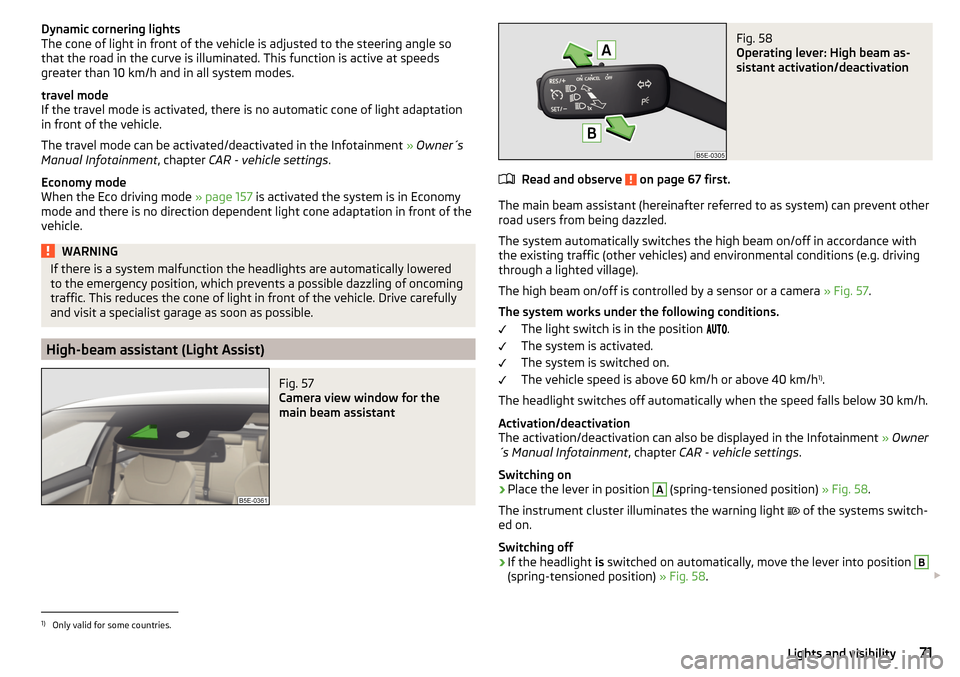
Fig. 57
Camera view window for the
main beam assistant
Fig. 58
Operating lever: High beam as-
sistant activation/deactivation
Read and observe on page 67 first.
The main beam assistant (hereinafter referred to as system) can prevent other
road users from being dazzled.
The system automatically switches the high beam on/off in accordance with
the existing traffic (other vehicles) and environmental conditions (e.g. driving
through a lighted village).
The high beam on/off is controlled by a sensor or a camera » Fig. 57.
The system works under the following conditions. The light switch is in the position .
The system is activated.
The system is switched on.
The vehicle speed is above 60 km/h or above 40 km/h 1)
.
The headlight switches off automatically when the speed falls below 30 km/h.
Activation/deactivation
The activation/deactivation can also be displayed in the Infotainment » Owner
´s Manual Infotainment , chapter CAR - vehicle settings .
Switching on
›
Place the lever in position
A
(spring-tensioned position) » Fig. 58.
The instrument cluster illuminates the warning light of the systems switch-
ed on.
Switching off
›
If the headlight is switched on automatically, move the lever into position
B
(spring-tensioned position) » Fig. 58.
1)
Only valid for some countries.
71Lights and visibility
Page 74 of 268
The warning light goes out. The high beam turns off.›
If the headlight is not currently switched on automatically, move the lever in-
to position
A
(spring-tensioned position) .
The warning light
goes out. The high beam turns on.
Information message
The messages and information are indicated in the instrument cluster display.
Fault: Light AssistLIGHT ASSIST FAULT
Seek help from a specialist garage.
Light Assist: clean the windscreen!WINDSCREEN PLEASE CLEAN
Check for any obstacles on the windscreen in the viewing area of the sensors
of camera.
WARNINGThe system only serves as a support and does not relieve the driver of his
or her responsibility to check the headlights and low beam and, if necessa-
ry, to switch on the lights depending on the light conditions. The manual
operation may be required for example, in the following situations.■
When visibility is poor, e.g. fog, heavy rain, thick snowfall.
■
Passing poorly lit road users, e.g. cyclists or pedestrians.
■
When driving around “sharp” bends.
■
Driving through poorly-lit locations.
■
The camera or sensor viewing range is obstructed by an obstacle.
CAUTION
Do not attach any stickers or similar objects to the windscreen in front of the
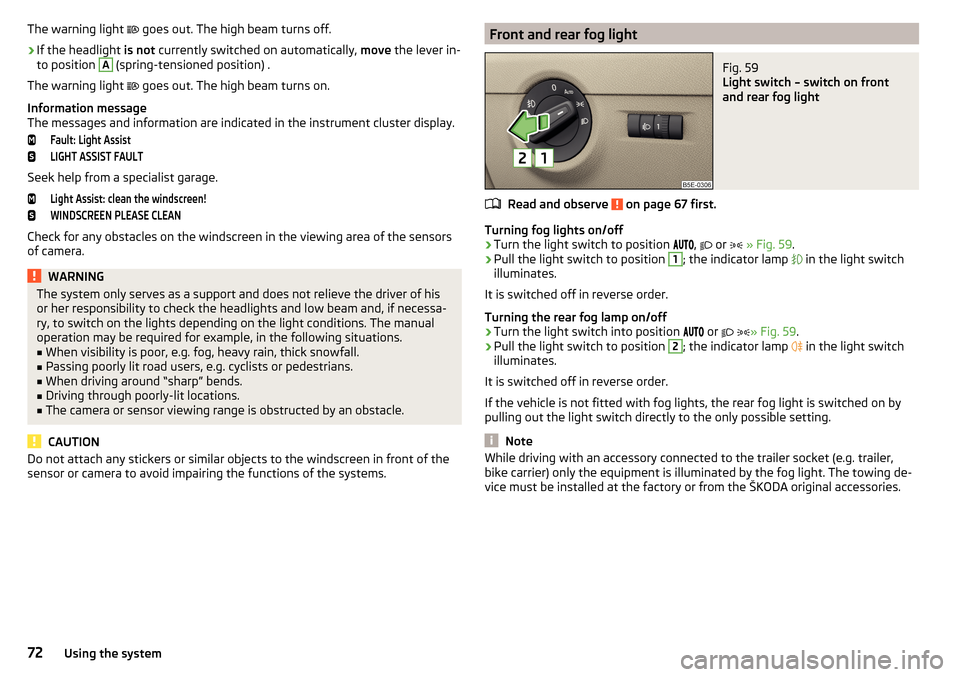
sensor or camera to avoid impairing the functions of the systems.Front and rear fog lightFig. 59
Light switch – switch on front
and rear fog light
Read and observe on page 67 first.
Turning fog lights on/off
›
Turn the light switch to position ,
or
» Fig. 59 .
›
Pull the light switch to position
1
; the indicator lamp
in the light switch
illuminates.
It is switched off in reverse order.
Turning the rear fog lamp on/off
›
Turn the light switch into position or
» Fig. 59
.
›
Pull the light switch to position
2
; the indicator lamp
in the light switch
illuminates.
It is switched off in reverse order.
If the vehicle is not fitted with fog lights, the rear fog light is switched on by pulling out the light switch directly to the only possible setting.
Note
While driving with an accessory connected to the trailer socket (e.g. trailer,
bike carrier) only the equipment is illuminated by the fog light. The towing de-
vice must be installed at the factory or from the ŠKODA original accessories.72Using the system
Page 75 of 268
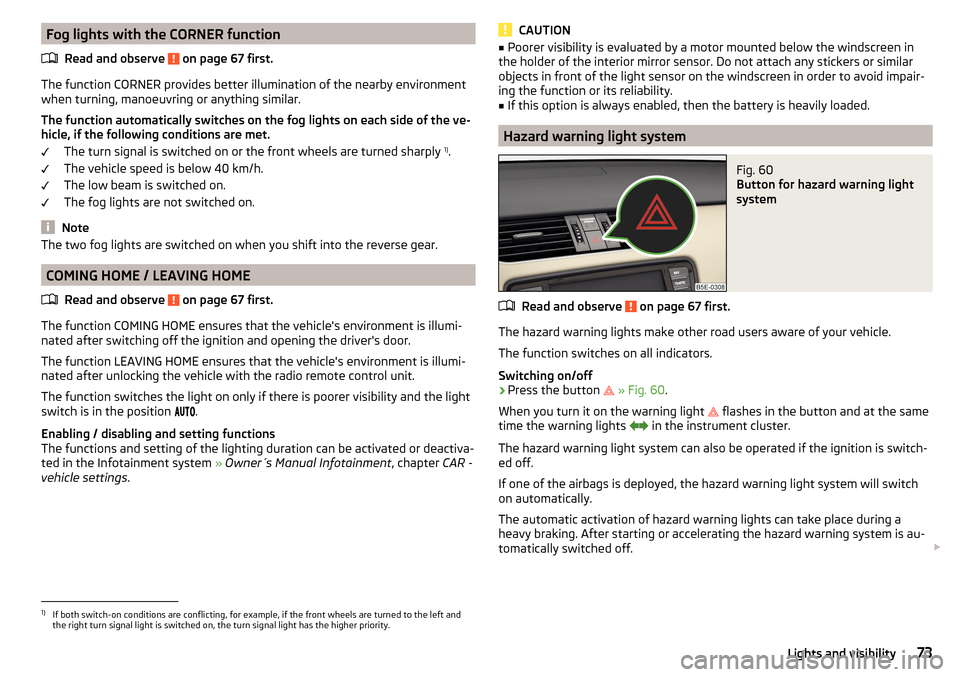
Fog lights with the CORNER functionRead and observe
on page 67 first.
The function CORNER provides better illumination of the nearby environment
when turning, manoeuvring or anything similar.
The function automatically switches on the fog lights on each side of the ve- hicle, if the following conditions are met.
The turn signal is switched on or the front wheels are turned sharply 1)
.
The vehicle speed is below 40 km/h.
The low beam is switched on.
The fog lights are not switched on.
Note
The two fog lights are switched on when you shift into the reverse gear.
COMING HOME / LEAVING HOME
Read and observe
on page 67 first.
The function COMING HOME ensures that the vehicle's environment is illumi-
nated after switching off the ignition and opening the driver's door.
The function LEAVING HOME ensures that the vehicle's environment is illumi-
nated after unlocking the vehicle with the radio remote control unit.
The function switches the light on only if there is poorer visibility and the light
switch is in the position .
Enabling / disabling and setting functions
The functions and setting of the lighting duration can be activated or deactiva-
ted in the Infotainment system » Owner´s Manual Infotainment , chapter CAR -
vehicle settings .
CAUTION■
Poorer visibility is evaluated by a motor mounted below the windscreen in
the holder of the interior mirror sensor. Do not attach any stickers or similar
objects in front of the light sensor on the windscreen in order to avoid impair-
ing the function or its reliability.■
If this option is always enabled, then the battery is heavily loaded.
Hazard warning light system
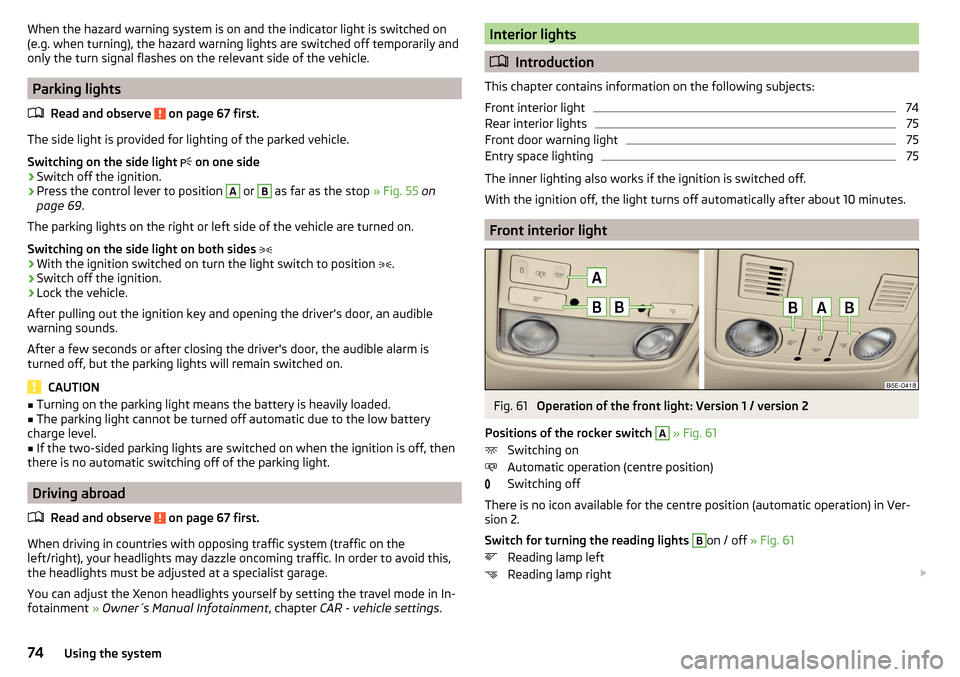
Fig. 60
Button for hazard warning light
system
Read and observe on page 67 first.
The hazard warning lights make other road users aware of your vehicle.
The function switches on all indicators.
Switching on/off
›
Press the button
» Fig. 60 .
When you turn it on the warning light
flashes in the button and at the same
time the warning lights
in the instrument cluster.
The hazard warning light system can also be operated if the ignition is switch-
ed off.
If one of the airbags is deployed, the hazard warning light system will switch
on automatically.
The automatic activation of hazard warning lights can take place during a
heavy braking. After starting or accelerating the hazard warning system is au-
tomatically switched off.
1)
If both switch-on conditions are conflicting, for example, if the front wheels are turned to the left and
the right turn signal light is switched on, the turn signal light has the higher priority.
73Lights and visibility
Page 76 of 268
When the hazard warning system is on and the indicator light is switched on
(e.g. when turning), the hazard warning lights are switched off temporarily and
only the turn signal flashes on the relevant side of the vehicle.
Parking lights
Read and observe
on page 67 first.
The side light is provided for lighting of the parked vehicle.
Switching on the side light
on one side
›
Switch off the ignition.
›
Press the control lever to position
A
or
B
as far as the stop » Fig. 55 on
page 69 .
The parking lights on the right or left side of the vehicle are turned on.
Switching on the side light on both sides
›
With the ignition switched on turn the light switch to position .
›
Switch off the ignition.
›
Lock the vehicle.
After pulling out the ignition key and opening the driver's door, an audible
warning sounds.
After a few seconds or after closing the driver's door, the audible alarm is
turned off, but the parking lights will remain switched on.
CAUTION
■ Turning on the parking light means the battery is heavily loaded.■The parking light cannot be turned off automatic due to the low battery
charge level.■
If the two-sided parking lights are switched on when the ignition is off, then
there is no automatic switching off of the parking light.
Driving abroad
Read and observe
on page 67 first.
When driving in countries with opposing traffic system (traffic on the
left/right), your headlights may dazzle oncoming traffic. In order to avoid this,
the headlights must be adjusted at a specialist garage.
You can adjust the Xenon headlights yourself by setting the travel mode in In- fotainment » Owner´s Manual Infotainment , chapter CAR - vehicle settings .
Interior lights
Introduction
This chapter contains information on the following subjects:
Front interior light
74
Rear interior lights
75
Front door warning light
75
Entry space lighting
75
The inner lighting also works if the ignition is switched off.
With the ignition off, the light turns off automatically after about 10 minutes.
Front interior light
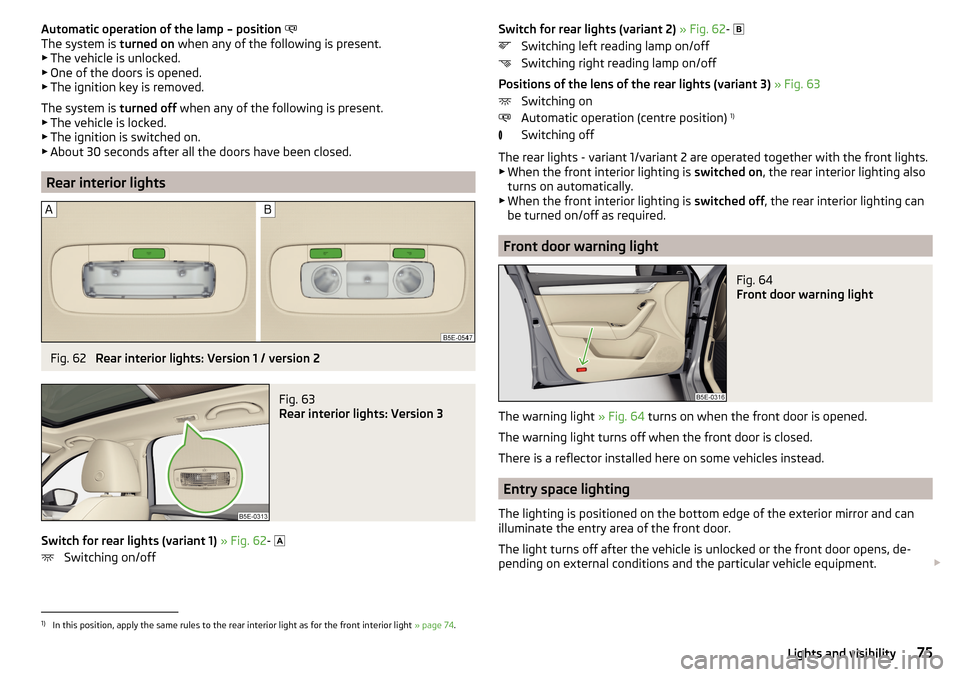
Fig. 61
Operation of the front light: Version 1 / version 2
Positions of the rocker switch
A
» Fig. 61
Switching on
Automatic operation (centre position)
Switching off
There is no icon available for the centre position (automatic operation) in Ver-
sion 2.
Switch for turning the reading lights
B
on / off » Fig. 61
Reading lamp left
Reading lamp right
74Using the system
Page 77 of 268
Automatic operation of the lamp – position
The system is turned on when any of the following is present.
▶ The vehicle is unlocked.
▶ One of the doors is opened.
▶ The ignition key is removed.
The system is turned off when any of the following is present.
▶ The vehicle is locked.
▶ The ignition is switched on.
▶ About 30 seconds after all the doors have been closed.
Rear interior lights
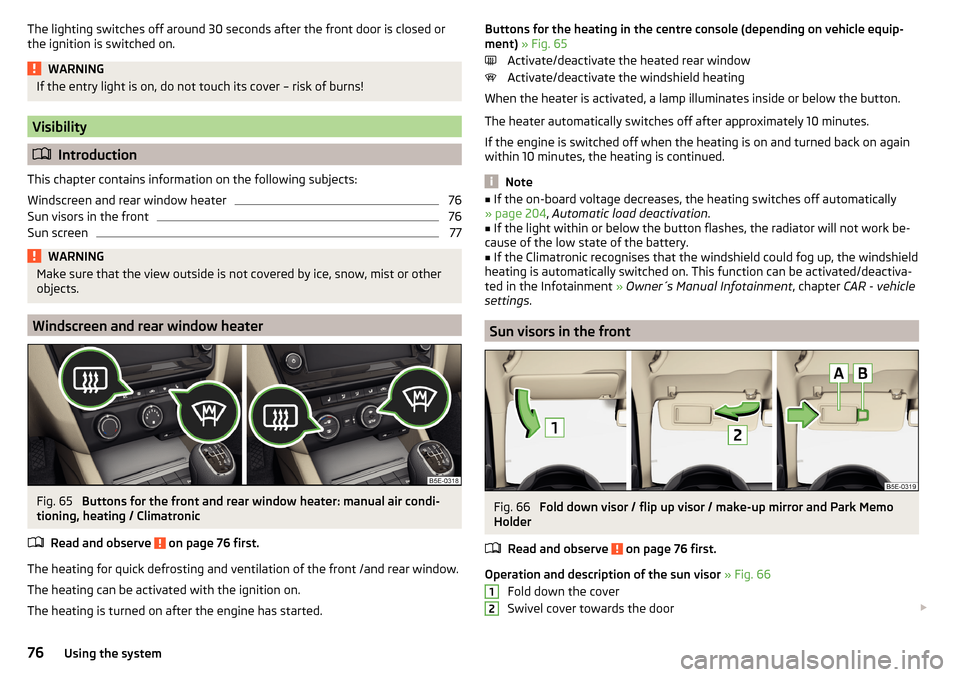
Fig. 62
Rear interior lights: Version 1 / version 2
Fig. 63
Rear interior lights: Version 3
Switch for rear lights (variant 1) » Fig. 62 -
Switching on/off
Switch for rear lights (variant 2) » Fig. 62 -
Switching left reading lamp on/off
Switching right reading lamp on/off
Positions of the lens of the rear lights (variant 3) » Fig. 63
Switching on
Automatic operation (centre position) 1)
Switching off
The rear lights - variant 1/variant 2 are operated together with the front lights.
▶ When the front interior lighting is switched on, the rear interior lighting also
turns on automatically.
▶ When the front interior lighting is switched off, the rear interior lighting can
be turned on/off as required.
Front door warning light
Fig. 64
Front door warning light
The warning light » Fig. 64 turns on when the front door is opened.
The warning light turns off when the front door is closed.
There is a reflector installed here on some vehicles instead.
Entry space lighting
The lighting is positioned on the bottom edge of the exterior mirror and can
illuminate the entry area of the front door.
The light turns off after the vehicle is unlocked or the front door opens, de-
pending on external conditions and the particular vehicle equipment.
1)
In this position, apply the same rules to the rear interior light as for the front interior light
» page 74.
75Lights and visibility
Page 78 of 268
The lighting switches off around 30 seconds after the front door is closed or
the ignition is switched on.WARNINGIf the entry light is on, do not touch its cover – risk of burns!
Visibility
Introduction
This chapter contains information on the following subjects:
Windscreen and rear window heater
76
Sun visors in the front
76
Sun screen
77WARNINGMake sure that the view outside is not covered by ice, snow, mist or other
objects.
Windscreen and rear window heater
Fig. 65
Buttons for the front and rear window heater: manual air condi-
tioning, heating / Climatronic
Read and observe
on page 76 first.
The heating for quick defrosting and ventilation of the front /and rear window.
The heating can be activated with the ignition on.
The heating is turned on after the engine has started.
Buttons for the heating in the centre console (depending on vehicle equip-
ment) » Fig. 65
Activate/deactivate the heated rear window
Activate/deactivate the windshield heating
When the heater is activated, a lamp illuminates inside or below the button.
The heater automatically switches off after approximately 10 minutes.
If the engine is switched off when the heating is on and turned back on again
within 10 minutes, the heating is continued.
Note
■ If the on-board voltage decreases, the heating switches off automatically
» page 204 , Automatic load deactivation .■
If the light within or below the button flashes, the radiator will not work be-
cause of the low state of the battery.
■
If the Climatronic recognises that the windshield could fog up, the windshield
heating is automatically switched on. This function can be activated/deactiva-
ted in the Infotainment » Owner´s Manual Infotainment , chapter CAR - vehicle
settings .
Sun visors in the front
Fig. 66
Fold down visor / flip up visor / make-up mirror and Park Memo
Holder
Read and observe
on page 76 first.
Operation and description of the sun visor » Fig. 66
Fold down the cover
Swivel cover towards the door
1276Using the system
Page 79 of 268
Make-up mirror with cover (the cover can be pushed in the direction of the
arrow)
Parking ticket holderWARNINGWhen objects are attached to the sun visor, the visor can not be pivoted to
the side windows. This might result in injuries to the occupants if the head
airbag is deployed.
Sun screen
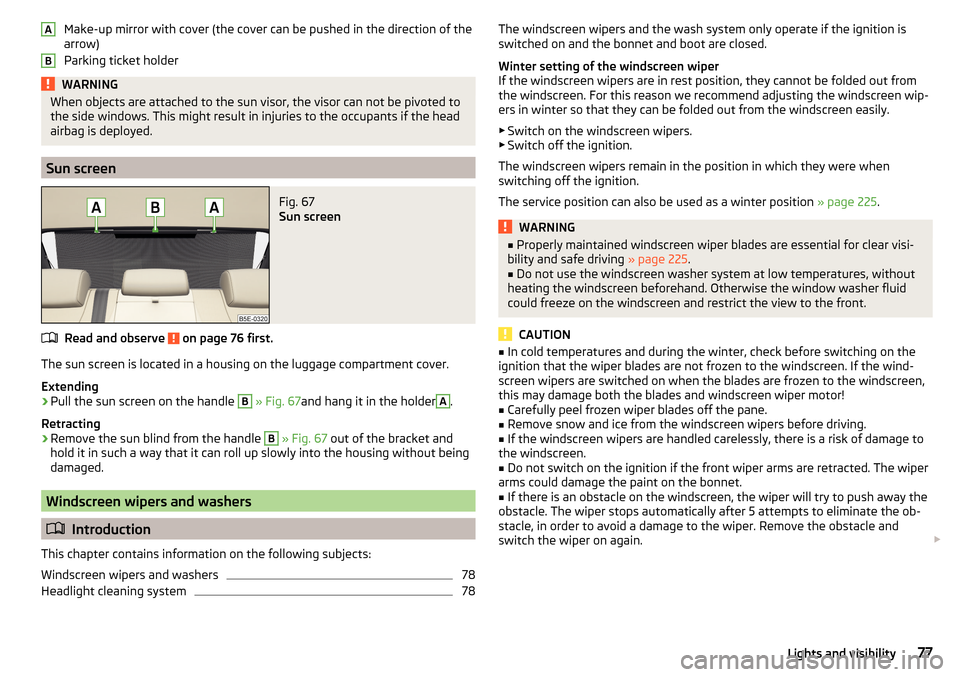
Fig. 67
Sun screen
Read and observe on page 76 first.
The sun screen is located in a housing on the luggage compartment cover.
Extending
›
Pull the sun screen on the handle
B
» Fig. 67 and hang it in the holder
A
.
Retracting
›
Remove the sun blind from the handle
B
» Fig. 67 out of the bracket and
hold it in such a way that it can roll up slowly into the housing without being
damaged.
Windscreen wipers and washers
Introduction
This chapter contains information on the following subjects:
Windscreen wipers and washers
78
Headlight cleaning system
78ABThe windscreen wipers and the wash system only operate if the ignition is
switched on and the bonnet and boot are closed.
Winter setting of the windscreen wiper
If the windscreen wipers are in rest position, they cannot be folded out from
the windscreen. For this reason we recommend adjusting the windscreen wip-
ers in winter so that they can be folded out from the windscreen easily.
▶ Switch on the windscreen wipers.
▶ Switch off the ignition.
The windscreen wipers remain in the position in which they were when
switching off the ignition.
The service position can also be used as a winter position » page 225.WARNING■
Properly maintained windscreen wiper blades are essential for clear visi-
bility and safe driving » page 225.■
Do not use the windscreen washer system at low temperatures, without
heating the windscreen beforehand. Otherwise the window washer fluid
could freeze on the windscreen and restrict the view to the front.
CAUTION
■ In cold temperatures and during the winter, check before switching on the
ignition that the wiper blades are not frozen to the windscreen. If the wind-
screen wipers are switched on when the blades are frozen to the windscreen,
this may damage both the blades and windscreen wiper motor!■
Carefully peel frozen wiper blades off the pane.
■
Remove snow and ice from the windscreen wipers before driving.
■
If the windscreen wipers are handled carelessly, there is a risk of damage to
the windscreen.
■
Do not switch on the ignition if the front wiper arms are retracted. The wiper
arms could damage the paint on the bonnet.
■
If there is an obstacle on the windscreen, the wiper will try to push away the
obstacle. The wiper stops automatically after 5 attempts to eliminate the ob-
stacle, in order to avoid a damage to the wiper. Remove the obstacle and
switch the wiper on again.
77Lights and visibility
Page 81 of 268
The headlight washer system works under the following conditions.The ignition is switched on.
The low beam is switched on.
The outside temperature is about -12° C to +39° C.
To ensure the correct functioning of the system, even in winter, this needs to be regularly cleared of snow and ice, e.g. free with a de-icing spray.
Rear mirror
Introduction
This chapter contains information on the following subjects:
Interior mirror dimming
79
Exterior mirrors
80WARNING■ Convex (curved outward) or aspheric exterior mirrors increase the field of
vision. They do, however, make objects appear smaller in the mirror. These
mirrors are therefore only of limited use for estimating distances to the fol-
lowing vehicles.■
Whenever possible use the interior mirror for estimating the distances to
the following vehicles.
WARNINGThe mirrors with automatic dimming contain an electrolyte liquid which can
escape if mirror glass is broken.■
The leaking electrolytic fluid can irritate the skin, eyes and breath appara-
tus.
■
If your eyes or skin come into contact with the electrolytic fluid, immedi-
ately wash the affected area for a few minutes long with a lot of water. If
necessary get medical assistance.
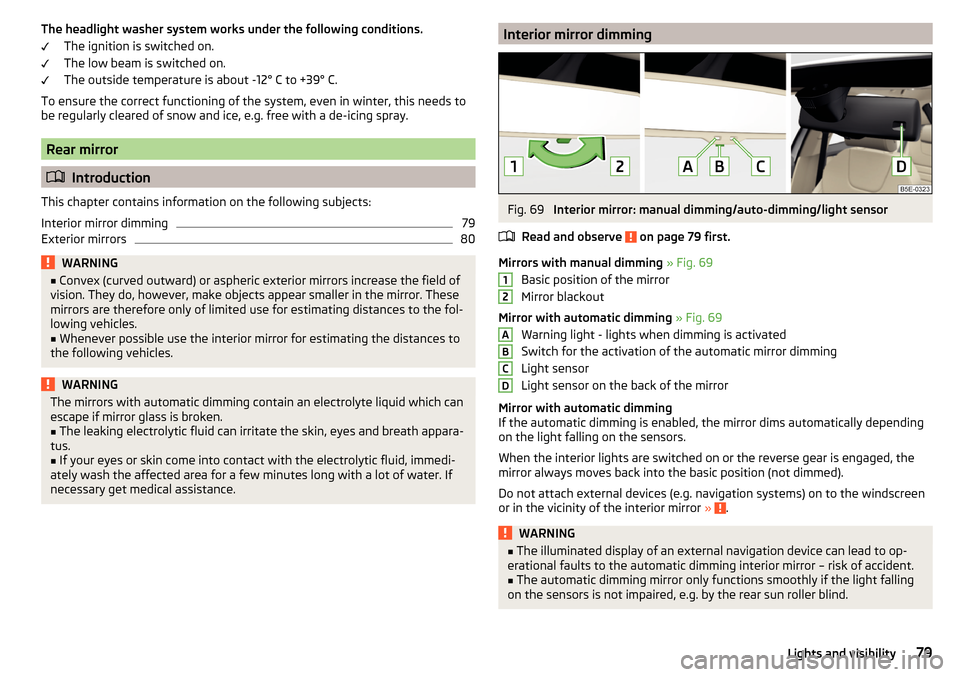
Interior mirror dimmingFig. 69
Interior mirror: manual dimming/auto-dimming/light sensor
Read and observe
on page 79 first.
Mirrors with manual dimming » Fig. 69
Basic position of the mirror
Mirror blackout
Mirror with automatic dimming » Fig. 69
Warning light - lights when dimming is activated
Switch for the activation of the automatic mirror dimming
Light sensor
Light sensor on the back of the mirror
Mirror with automatic dimming
If the automatic dimming is enabled, the mirror dims automatically depending
on the light falling on the sensors.
When the interior lights are switched on or the reverse gear is engaged, the
mirror always moves back into the basic position (not dimmed).
Do not attach external devices (e.g. navigation systems) on to the windscreen
or in the vicinity of the interior mirror »
.
WARNING■
The illuminated display of an external navigation device can lead to op-
erational faults to the automatic dimming interior mirror – risk of accident.■
The automatic dimming mirror only functions smoothly if the light falling
on the sensors is not impaired, e.g. by the rear sun roller blind.
12ABCD79Lights and visibility