lock SKODA OCTAVIA 2015 3.G / (5E) Service Manual
[x] Cancel search | Manufacturer: SKODA, Model Year: 2015, Model line: OCTAVIA, Model: SKODA OCTAVIA 2015 3.G / (5E)Pages: 268, PDF Size: 37.54 MB
Page 90 of 268
›Fold the backrest in the direction of the arrow 2.
In the undivided seat back, press the release handles A
on both sides of the
seat back at the same time.
Folding forward from the luggage compartment
There is a lever on the left side of the luggage compartment for unlocking the
left rear seat backrest.
There is a lever on the right side of the luggage compartment for unlocking
the right and the middle rear seat backrests.
Before folding the seat backrest forward, check that there are no objects on
the rear seat.
On vehicles with a net partition, the left and then the right and middle rear
seat backrest must first be unlocked. The net partition must be rolled up in the
housing.
›
Pull the lever in the direction of the arrow » Fig. 82.
The respective seat rest is unlocked and folded forward if applicable.
Folding backwards
›
Pull the rear outer seat belt
C
to the side panel in the direction of arrow
3
» Fig. 81 .
›
Subsequently, fold back the backrest in the opposite direction of the arrow
2
until the release handle
A
clicks into place - by pulling on the seat back-
rest.
›
Make sure that the red pin
B
is hidden.
In the undivided seat back, pull the two outer belts to the side panel. The re-
lease handles
A
must be locked audibly on both sides of the seat backrest.
The red pen
B
should not be visible on any of the two sides of the seat back.
WARNING■ If rear seats are occupied, make sure that the respective seat backrests
are properly engaged.■
After folding back the seat back, the seat belts must be ready for use.
■
The seat backrests must be securely locked in position so that no objects
in the luggage compartment can slide into the passenger compartment on
sudden braking – risk of injury.
■
When transporting objects in the luggage compartment that has been en-
larged by folding the backrest forward, ensure the safety of the passengers
transported on the other rear seats.
CAUTION■ Ensure that the seat belts are not damaged when operating the seat backr-
ests. Under no circumstances must the rear seat belts be jammed by the fol-
ded back seat backrests.■
Before folding the seat back forward, check whether there are any objects
on the rear seat - there is a danger of damaging these items or the seat back
and the seat.
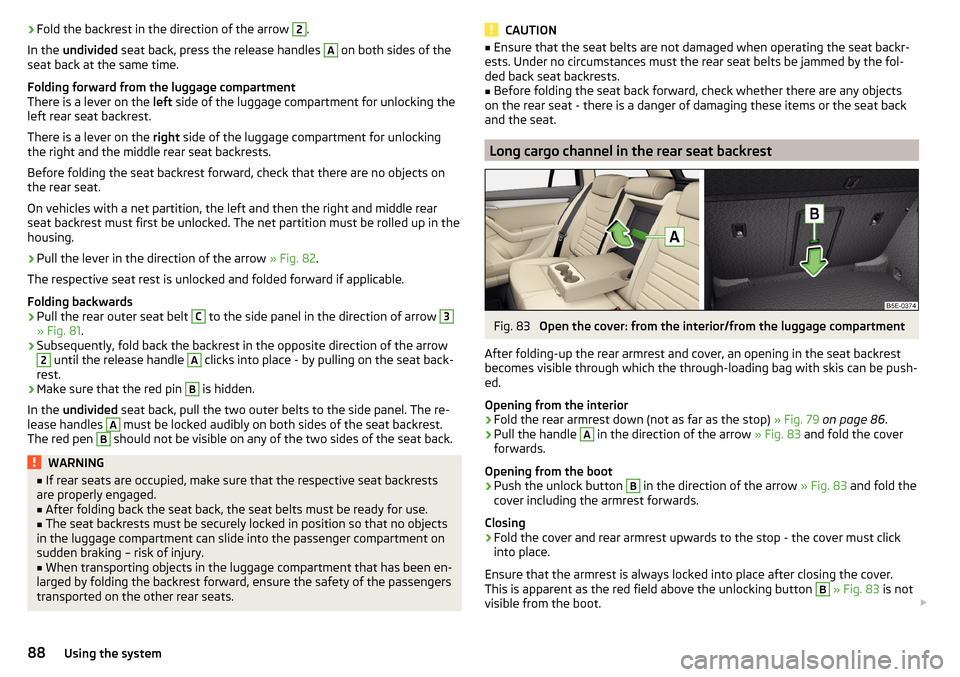
Long cargo channel in the rear seat backrest
Fig. 83
Open the cover: from the interior/from the luggage compartment
After folding-up the rear armrest and cover, an opening in the seat backrest
becomes visible through which the through-loading bag with skis can be push-
ed.
Opening from the interior
›
Fold the rear armrest down (not as far as the stop) » Fig. 79 on page 86 .
›
Pull the handle
A
in the direction of the arrow » Fig. 83 and fold the cover
forwards.
Opening from the boot
›
Push the unlock button
B
in the direction of the arrow » Fig. 83 and fold the
cover including the armrest forwards.
Closing
›
Fold the cover and rear armrest upwards to the stop - the cover must click
into place.
Ensure that the armrest is always locked into place after closing the cover.
This is apparent as the red field above the unlocking button
B
» Fig. 83 is not
visible from the boot.
88Using the system
Page 93 of 268
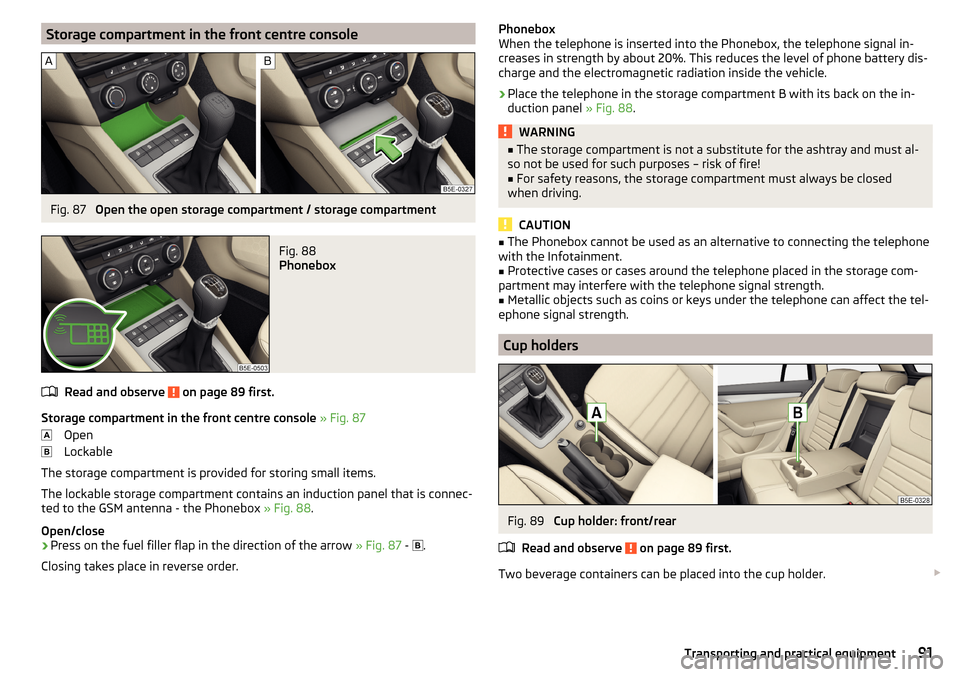
Storage compartment in the front centre consoleFig. 87
Open the open storage compartment / storage compartment
Fig. 88
Phonebox
Read and observe on page 89 first.
Storage compartment in the front centre console » Fig. 87
Open
Lockable
The storage compartment is provided for storing small items.
The lockable storage compartment contains an induction panel that is connec-
ted to the GSM antenna - the Phonebox » Fig. 88.
Open/close
›
Press on the fuel filler flap in the direction of the arrow » Fig. 87 -
.
Closing takes place in reverse order.
Phonebox
When the telephone is inserted into the Phonebox, the telephone signal in-
creases in strength by about 20%. This reduces the level of phone battery dis-
charge and the electromagnetic radiation inside the vehicle.›
Place the telephone in the storage compartment B with its back on the in-
duction panel » Fig. 88.
WARNING■
The storage compartment is not a substitute for the ashtray and must al-
so not be used for such purposes – risk of fire!■
For safety reasons, the storage compartment must always be closed
when driving.
CAUTION
■ The Phonebox cannot be used as an alternative to connecting the telephone
with the Infotainment.■
Protective cases or cases around the telephone placed in the storage com-
partment may interfere with the telephone signal strength.
■
Metallic objects such as coins or keys under the telephone can affect the tel-
ephone signal strength.
Cup holders
Fig. 89
Cup holder: front/rear
Read and observe
on page 89 first.
Two beverage containers can be placed into the cup holder.
91Transporting and practical equipment
Page 96 of 268
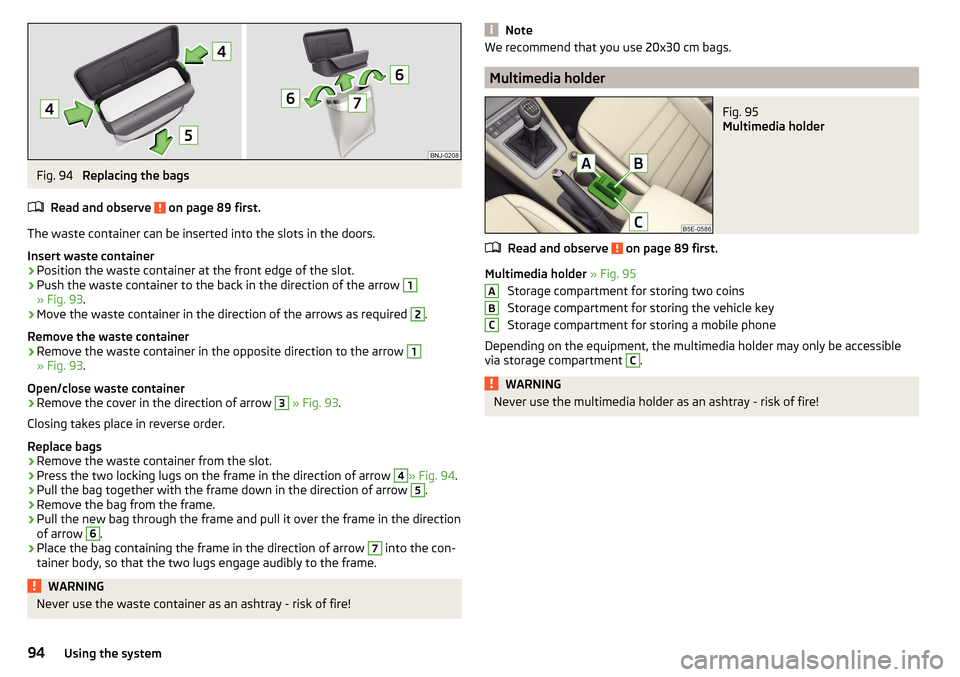
Fig. 94
Replacing the bags
Read and observe
on page 89 first.
The waste container can be inserted into the slots in the doors.
Insert waste container
›
Position the waste container at the front edge of the slot.
›
Push the waste container to the back in the direction of the arrow
1
» Fig. 93 .
›
Move the waste container in the direction of the arrows as required
2
.
Remove the waste container
›
Remove the waste container in the opposite direction to the arrow
1
» Fig. 93 .
Open/close waste container
›
Remove the cover in the direction of arrow
3
» Fig. 93 .
Closing takes place in reverse order.
Replace bags
›
Remove the waste container from the slot.
›
Press the two locking lugs on the frame in the direction of arrow
4
» Fig. 94 .
›
Pull the bag together with the frame down in the direction of arrow
5
.
›
Remove the bag from the frame.
›
Pull the new bag through the frame and pull it over the frame in the direction
of arrow
6
.
›
Place the bag containing the frame in the direction of arrow
7
into the con-
tainer body, so that the two lugs engage audibly to the frame.
WARNINGNever use the waste container as an ashtray - risk of fire!NoteWe recommend that you use 20x30 cm bags.
Multimedia holder
Fig. 95
Multimedia holder
Read and observe on page 89 first.
Multimedia holder » Fig. 95
Storage compartment for storing two coins
Storage compartment for storing the vehicle key
Storage compartment for storing a mobile phone
Depending on the equipment, the multimedia holder may only be accessible
via storage compartment
C
.
WARNINGNever use the multimedia holder as an ashtray - risk of fire!ABC94Using the system
Page 97 of 268
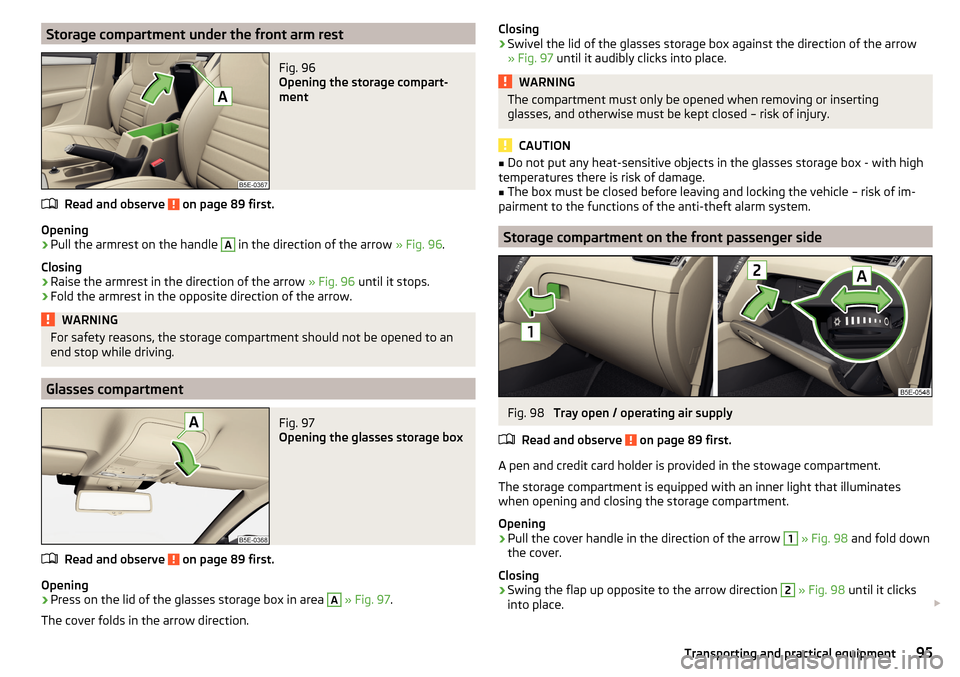
Storage compartment under the front arm restFig. 96
Opening the storage compart-
ment
Read and observe on page 89 first.
Opening
›
Pull the armrest on the handle
A
in the direction of the arrow » Fig. 96.
Closing
›
Raise the armrest in the direction of the arrow » Fig. 96 until it stops.
›
Fold the armrest in the opposite direction of the arrow.
WARNINGFor safety reasons, the storage compartment should not be opened to an
end stop while driving.
Glasses compartment
Fig. 97
Opening the glasses storage box
Read and observe on page 89 first.
Opening
›
Press on the lid of the glasses storage box in area
A
» Fig. 97 .
The cover folds in the arrow direction.
Closing›Swivel the lid of the glasses storage box against the direction of the arrow
» Fig. 97 until it audibly clicks into place.WARNINGThe compartment must only be opened when removing or inserting
glasses, and otherwise must be kept closed – risk of injury.
CAUTION
■ Do not put any heat-sensitive objects in the glasses storage box - with high
temperatures there is risk of damage.■
The box must be closed before leaving and locking the vehicle – risk of im-
pairment to the functions of the anti-theft alarm system.
Storage compartment on the front passenger side
Fig. 98
Tray open / operating air supply
Read and observe
on page 89 first.
A pen and credit card holder is provided in the stowage compartment.
The storage compartment is equipped with an inner light that illuminates
when opening and closing the storage compartment.
Opening
›
Pull the cover handle in the direction of the arrow
1
» Fig. 98 and fold down
the cover.
Closing
›
Swing the flap up opposite to the arrow direction
2
» Fig. 98 until it clicks
into place.
95Transporting and practical equipment
Page 99 of 268
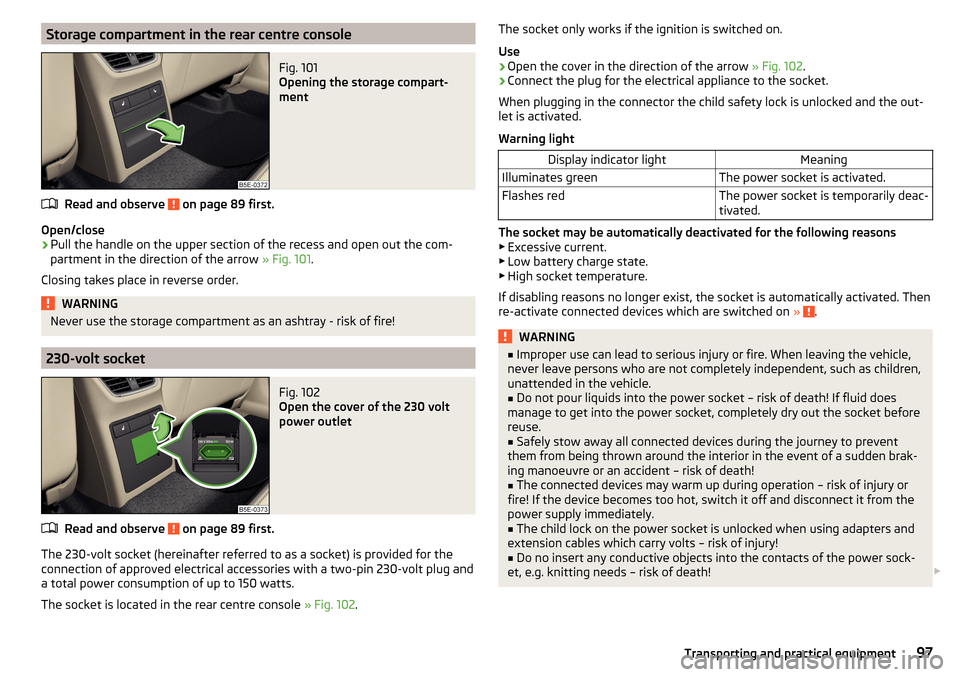
Storage compartment in the rear centre consoleFig. 101
Opening the storage compart-
ment
Read and observe on page 89 first.
Open/close
›
Pull the handle on the upper section of the recess and open out the com-
partment in the direction of the arrow » Fig. 101.
Closing takes place in reverse order.
WARNINGNever use the storage compartment as an ashtray - risk of fire!
230-volt socket
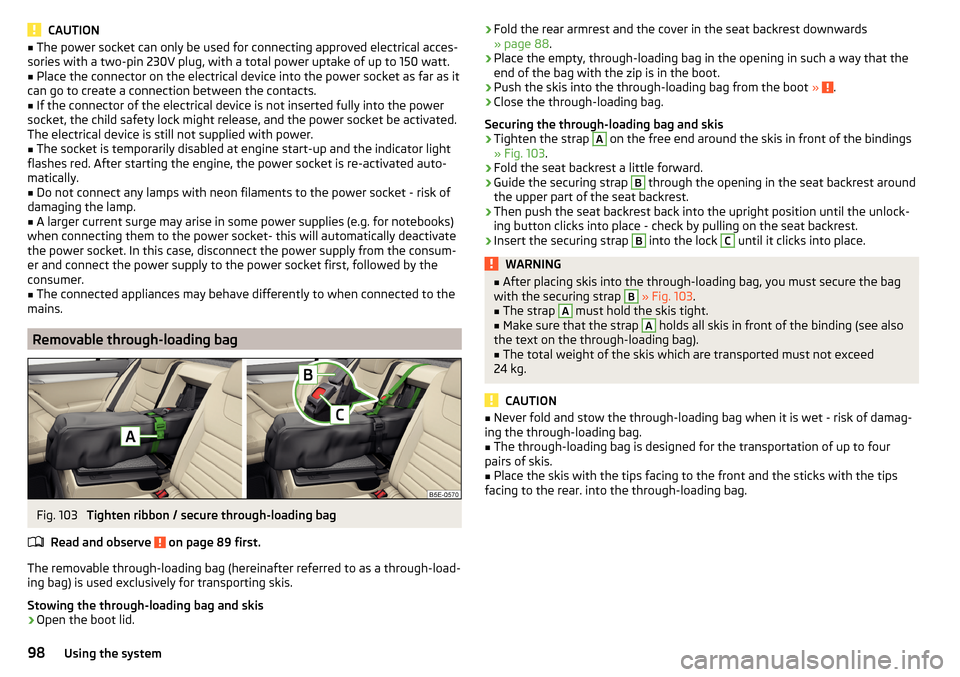
Fig. 102
Open the cover of the 230 volt
power outlet
Read and observe on page 89 first.
The 230-volt socket (hereinafter referred to as a socket) is provided for the
connection of approved electrical accessories with a two-pin 230-volt plug and
a total power consumption of up to 150 watts.
The socket is located in the rear centre console » Fig. 102.
The socket only works if the ignition is switched on.
Use›
Open the cover in the direction of the arrow » Fig. 102.
›
Connect the plug for the electrical appliance to the socket.
When plugging in the connector the child safety lock is unlocked and the out-
let is activated.
Warning light
Display indicator lightMeaningIlluminates greenThe power socket is activated.Flashes redThe power socket is temporarily deac-
tivated.
The socket may be automatically deactivated for the following reasons ▶ Excessive current.
▶ Low battery charge state.
▶ High socket temperature.
If disabling reasons no longer exist, the socket is automatically activated. Then
re-activate connected devices which are switched on »
.
WARNING■
Improper use can lead to serious injury or fire. When leaving the vehicle,
never leave persons who are not completely independent, such as children,
unattended in the vehicle.■
Do not pour liquids into the power socket – risk of death! If fluid does
manage to get into the power socket, completely dry out the socket before
reuse.
■
Safely stow away all connected devices during the journey to prevent
them from being thrown around the interior in the event of a sudden brak-
ing manoeuvre or an accident – risk of death!
■
The connected devices may warm up during operation – risk of injury or
fire! If the device becomes too hot, switch it off and disconnect it from the
power supply immediately.
■
The child lock on the power socket is unlocked when using adapters and
extension cables which carry volts – risk of injury!
■
Do no insert any conductive objects into the contacts of the power sock-
et, e.g. knitting needs – risk of death!
97Transporting and practical equipment
Page 100 of 268
CAUTION■The power socket can only be used for connecting approved electrical acces-
sories with a two-pin 230V plug, with a total power uptake of up to 150 watt.■
Place the connector on the electrical device into the power socket as far as it
can go to create a connection between the contacts.
■
If the connector of the electrical device is not inserted fully into the power
socket, the child safety lock might release, and the power socket be activated.
The electrical device is still not supplied with power.
■
The socket is temporarily disabled at engine start-up and the indicator light
flashes red. After starting the engine, the power socket is re-activated auto-
matically.
■
Do not connect any lamps with neon filaments to the power socket - risk of
damaging the lamp.
■
A larger current surge may arise in some power supplies (e.g. for notebooks)
when connecting them to the power socket- this will automatically deactivate
the power socket. In this case, disconnect the power supply from the consum-
er and connect the power supply to the power socket first, followed by the
consumer.
■
The connected appliances may behave differently to when connected to the
mains.
Removable through-loading bag
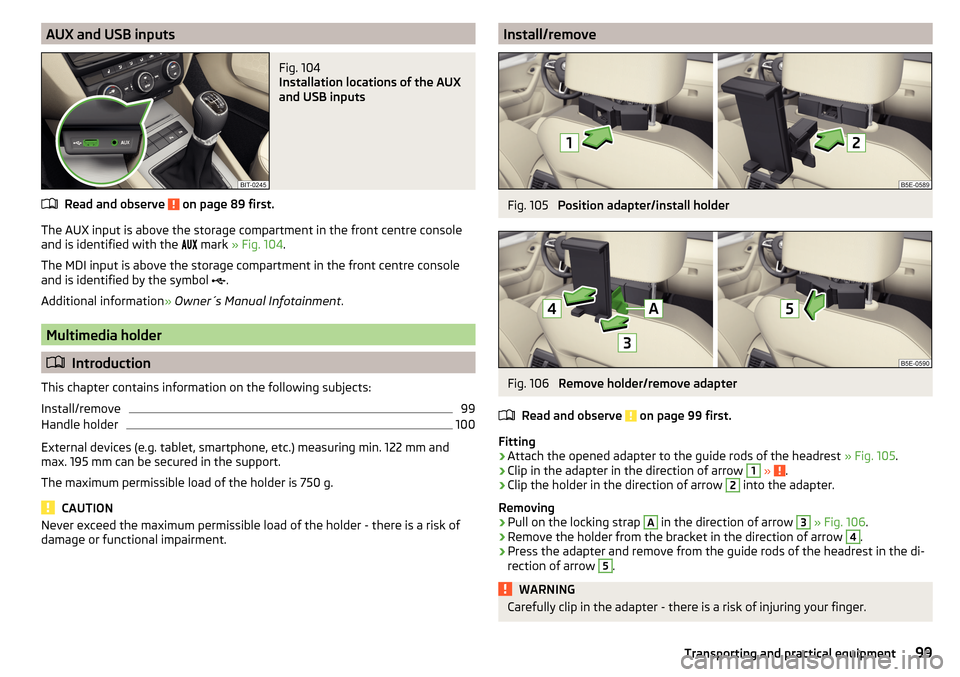
Fig. 103
Tighten ribbon / secure through-loading bag
Read and observe
on page 89 first.
The removable through-loading bag (hereinafter referred to as a through-load-
ing bag) is used exclusively for transporting skis.
Stowing the through-loading bag and skis
›
Open the boot lid.
› Fold the rear armrest and the cover in the seat backrest downwards
» page 88 .›
Place the empty, through-loading bag in the opening in such a way that the
end of the bag with the zip is in the boot.
›
Push the skis into the through-loading bag from the boot » .
›
Close the through-loading bag.
Securing the through-loading bag and skis
›
Tighten the strap
A
on the free end around the skis in front of the bindings
» Fig. 103 .
›
Fold the seat backrest a little forward.
›
Guide the securing strap
B
through the opening in the seat backrest around
the upper part of the seat backrest.
›
Then push the seat backrest back into the upright position until the unlock-
ing button clicks into place - check by pulling on the seat backrest.
›
Insert the securing strap
B
into the lock
C
until it clicks into place.
WARNING■ After placing skis into the through-loading bag, you must secure the bag
with the securing strap B » Fig. 103 .■
The strap
A
must hold the skis tight.
■
Make sure that the strap
A
holds all skis in front of the binding (see also
the text on the through-loading bag).
■
The total weight of the skis which are transported must not exceed
24 kg.
CAUTION
■ Never fold and stow the through-loading bag when it is wet - risk of damag-
ing the through-loading bag.■
The through-loading bag is designed for the transportation of up to four
pairs of skis.
■
Place the skis with the tips facing to the front and the sticks with the tips
facing to the rear. into the through-loading bag.
98Using the system
Page 101 of 268
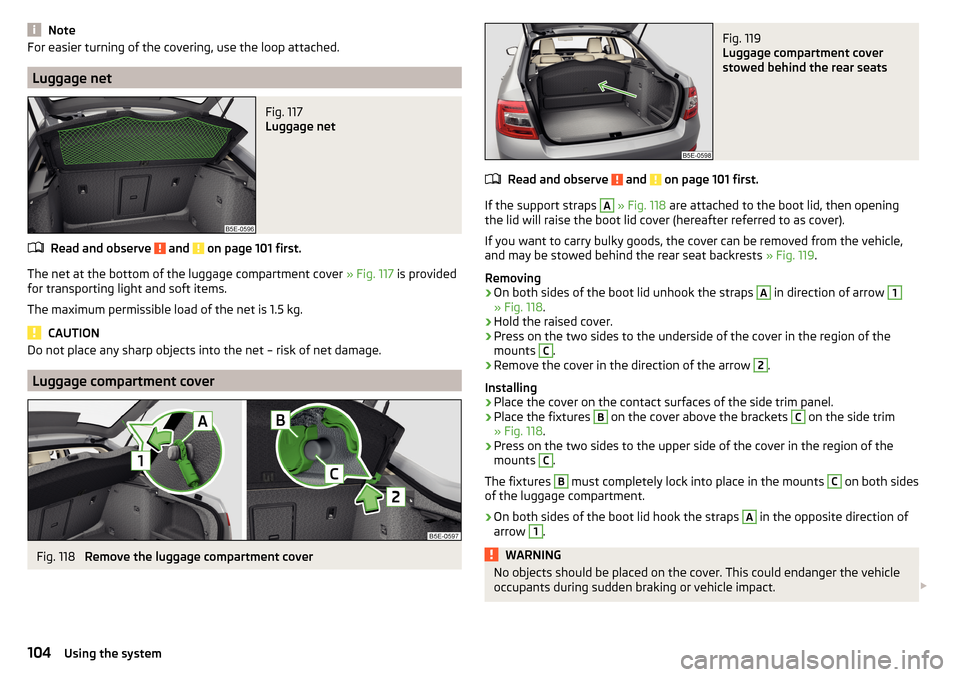
AUX and USB inputsFig. 104
Installation locations of the AUX
and USB inputs
Read and observe on page 89 first.
The AUX input is above the storage compartment in the front centre console and is identified with the mark
» Fig. 104 .
The MDI input is above the storage compartment in the front centre console
and is identified by the symbol .
Additional information » Owner´s Manual Infotainment .
Multimedia holder
Introduction
This chapter contains information on the following subjects:
Install/remove
99
Handle holder
100
External devices (e.g. tablet, smartphone, etc.) measuring min. 122 mm and
max. 195 mm can be secured in the support.
The maximum permissible load of the holder is 750 g.
CAUTION
Never exceed the maximum permissible load of the holder - there is a risk of
damage or functional impairment.Install/removeFig. 105
Position adapter/install holder
Fig. 106
Remove holder/remove adapter
Read and observe
on page 99 first.
Fitting
›
Attach the opened adapter to the guide rods of the headrest » Fig. 105.
›
Clip in the adapter in the direction of arrow
1
» .
›
Clip the holder in the direction of arrow
2
into the adapter.
Removing
›
Pull on the locking strap
A
in the direction of arrow
3
» Fig. 106 .
›
Remove the holder from the bracket in the direction of arrow
4
.
›
Press the adapter and remove from the guide rods of the headrest in the di-
rection of arrow
5
.
WARNINGCarefully clip in the adapter - there is a risk of injuring your finger.99Transporting and practical equipment
Page 106 of 268
NoteFor easier turning of the covering, use the loop attached.
Luggage net
Fig. 117
Luggage net
Read and observe and on page 101 first.
The net at the bottom of the luggage compartment cover » Fig. 117 is provided
for transporting light and soft items.
The maximum permissible load of the net is 1.5 kg.
CAUTION
Do not place any sharp objects into the net – risk of net damage.
Luggage compartment cover
Fig. 118
Remove the luggage compartment cover
Fig. 119
Luggage compartment cover
stowed behind the rear seats
Read and observe and on page 101 first.
If the support straps
A
» Fig. 118 are attached to the boot lid, then opening
the lid will raise the boot lid cover (hereafter referred to as cover).
If you want to carry bulky goods, the cover can be removed from the vehicle, and may be stowed behind the rear seat backrests » Fig. 119.
Removing
›
On both sides of the boot lid unhook the straps
A
in direction of arrow
1
» Fig. 118 .
›
Hold the raised cover.
›
Press on the two sides to the underside of the cover in the region of the
mounts
C
.
›
Remove the cover in the direction of the arrow
2
.
Installing
›
Place the cover on the contact surfaces of the side trim panel.
›
Place the fixtures
B
on the cover above the brackets
C
on the side trim
» Fig. 118 .
›
Press on the two sides to the upper side of the cover in the region of the
mounts
C
.
The fixtures
B
must completely lock into place in the mounts
C
on both sides
of the luggage compartment.
›
On both sides of the boot lid hook the straps
A
in the opposite direction of
arrow
1
.
WARNINGNo objects should be placed on the cover. This could endanger the vehicle
occupants during sudden braking or vehicle impact. 104Using the system
Page 107 of 268

CAUTION■When closing the boot lid, jamming and damage to the cover or the side trim
panel can occur if handled incorrectly. The following guidelines must be ob-
served. ■ The recesses in the cover B
» Fig. 118 must lock in the holders in the side
trim panel
C
.
■ The items which are transported must not exceed the height of the cover.
■ The cover must not be jammed in the surrounding seal of the luggage com-
partment lid when it is in the raised position. ■ There must be no object in the gap between the cover in the raise position
and the rear backrest.
Roll-up cover
Fig. 120
Roll-up cover: pull out/roll/remove
Fig. 121
Remove the side panels of the luggage compartment/stow the
roll-up luggage compartment cover
Read and observe and on page 101 first.
Extending
›
Grasp the cover on the handle
A
and pull it out in the direction of the arrow
1
until it clicks » Fig. 120.
Retracting
›
Push the cover in the area of handle
A
in the direction of the arrow
2
» Fig. 120 .
The cover rolls up automatically.
Removing/inserting
The fully rolled luggage compartment cover can be removed.
›
Press on the side of the cross bar in the direction of arrow
3
and remove
the cover in the arrow direction
4
» Fig. 120 .
Insertion takes place in reverse order.
Stowage
If the vehicle is equipped with the variable loading floor, then the removable
roll-up luggage compartment cover can be stowed in the recesses of the lug-
gage compartment side trim.
›
Fold the variable loading floor into the upper position » page 108.
›
Remove the side covers of the luggage compartment in the direction of the
arrow
1
» Fig. 121 .
›
Remove the roll-up luggage compartment cover » Fig. 120.
›
Insert the front part of the roll-up luggage compartment cover under a por-
tion of the side trim
D
» Fig. 121 on the left.
›
Fold the rear part of the roll-up luggage compartment cover in the direction
of arrow
2
» .
›
Replace the side trims of the luggage compartment in the opposite direction
of the arrow
1
.
›
Fold out the variable loading floor to the upper position » page 108.
WARNINGNo objects should be placed on the foldable boot cover. This could endan-
ger the vehicle occupants during sudden braking or vehicle impact.
CAUTION
If you want to stow the roll-up luggage compartment cover and the roof rack
at the same time , then it is necessary that the rear part of the roll-up luggage
compartment is covering the rear roof rack.105Transporting and practical equipment
Page 112 of 268
If the crossbar is hooked into the receptacle E to the left for example, then
press on the crossbar in the direction of the arrow 1 and insert into the re-
ceptacle E
to the right.
›
Make sure that the crossbar is firmly seated in the fittings
E
.
›
Fold back part of the roll-up luggage compartment cover
A
in the opposite
direction of the arrow » Fig. 130.
Using the net partition behind the rear seats
›
Fold out part of the roll-up luggage compartment cover
A
in the direction of
the arrow » Fig. 130.
›
Press on the crossbar and remove it from the receptacles
E
, first on one
side, then on the other side » Fig. 131.
›
Hold the crossbar
C
in such a way that the net partition can slowly roll up
into the housing
D
without being damaged.
›
Fold back part of the roll-up luggage compartment cover
A
in the opposite
direction of the arrow » Fig. 130.
CAUTION
If the net partition blocks when pulling it out of the housing, push the release
lever B in the direction of the arrow » Fig. 130.
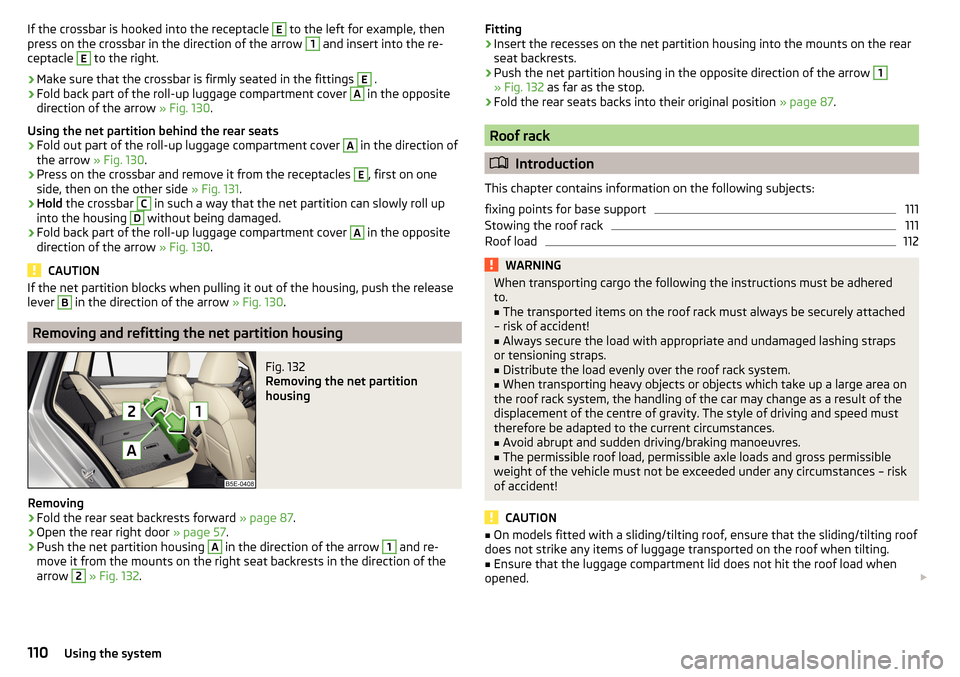
Removing and refitting the net partition housing
Fig. 132
Removing the net partition
housing
Removing
›
Fold the rear seat backrests forward » page 87.
›
Open the rear right door » page 57.
›
Push the net partition housing
A
in the direction of the arrow
1
and re-
move it from the mounts on the right seat backrests in the direction of the
arrow
2
» Fig. 132 .
Fitting›Insert the recesses on the net partition housing into the mounts on the rear
seat backrests.›
Push the net partition housing in the opposite direction of the arrow
1
» Fig. 132 as far as the stop.
›
Fold the rear seats backs into their original position » page 87.
Roof rack
Introduction
This chapter contains information on the following subjects:
fixing points for base support
111
Stowing the roof rack
111
Roof load
112WARNINGWhen transporting cargo the following the instructions must be adhered
to.■
The transported items on the roof rack must always be securely attached
– risk of accident!
■
Always secure the load with appropriate and undamaged lashing straps
or tensioning straps.
■
Distribute the load evenly over the roof rack system.
■
When transporting heavy objects or objects which take up a large area on
the roof rack system, the handling of the car may change as a result of the
displacement of the centre of gravity. The style of driving and speed must
therefore be adapted to the current circumstances.
■
Avoid abrupt and sudden driving/braking manoeuvres.
■
The permissible roof load, permissible axle loads and gross permissible
weight of the vehicle must not be exceeded under any circumstances – risk
of accident!
CAUTION
■ On models fitted with a sliding/tilting roof, ensure that the sliding/tilting roof
does not strike any items of luggage transported on the roof when tilting.■
Ensure that the luggage compartment lid does not hit the roof load when
opened.
110Using the system