mirror SKODA OCTAVIA 2015 3.G / (5E) Owner's Manual
[x] Cancel search | Manufacturer: SKODA, Model Year: 2015, Model line: OCTAVIA, Model: SKODA OCTAVIA 2015 3.G / (5E)Pages: 268, PDF Size: 37.54 MB
Page 4 of 268
Table of Contents
On-board literature4
Notes
5
Structure and more information about the
Owner's Manual
6
Abbreviations
Safety
Passive Safety
8
General information
8
Correct and safe seated position
8
Seat belts
11
Using seat belts
11
Inertia reel and belt pretensioners
13
Airbag system
14
Description of the airbag system
14
Airbag overview
15
Deactivating airbags
19
Transporting children safely
20
Child seat
20
Fastening elements
23
Using the system
Cockpit
27
Overview
26
Instruments and warning lights
28
Instrument cluster
28
Warning lights
31
Information system
40
Driver information system
40
Driving data (Multifunction display)
41
MAXI DOT display
44Service interval display49SmartGate50
Unlocking and opening
53
Unlocking and locking
53
Anti-theft alarm system
58
Luggage compartment lid
59
Electric boot lid
60
Window operations
61
Panorama sliding/tilting roof
64
Lights and visibility
67
Lights
67
Interior lights
74
Visibility
76
Windscreen wipers and washers
77
Rear mirror
79
Seats and head restraints
81
Seats and head restraints
81
Seat features
85
Transporting and practical equipment
89
Useful equipment
89
Multimedia holder
99
Luggage compartment and transport of
cargo
100
Variable loading floor in the luggage
compartment (Estate)
107
Net partition
109
Roof rack
110
Heating and ventilation
112
Heating, manual air conditioning system,
Climatronic
112
Auxiliary heating (auxiliary heating and
ventilation)
117Driving
Starting-off and Driving120
Starting and stopping the engine using the
key
120
Starting and stopping the engine at the push
of the button
122
START-STOPsystem
124
Brakes and parking
126
Manual shifting of gears and pedals
128
Automatic gearbox
129
Running-in and economical driving
132
Avoiding damage to your vehicle
134
Assist systems
135
General information
135
Braking and stabilisation systems
135
OFF ROAD-mode
138
Parking aid (ParkPilot)
140
Rear View Camera
143
Park Assist
144
Cruise Control System
148
Adaptive Cruise Control (ACC)
150
Front Assist
155
Selection of the driving mode (Driving Mode
Selection)
157
Proactive passenger protection (Crew Protect
Assist)
160
Lane Departure Warning (Lane Assist)
160
Traffic sign recognition
162
Fatigue detection
164
Tyre pressure monitoring
165
Hitch and trailer
167
Hitch
167
Trailer
1722Table of Contents
Page 10 of 268
Safety
Passive Safety
General information
Introduction
This chapter contains information on the following subjects:
Before setting off
8
Driving safety
8
In this section of the instructions you will find important information, tips and
notes on the subject of passive safety.
We have combined everything here which you should be familiar with, for ex-
ample, regarding seat belts, airbags, safety of children and anything similar.
You will find further information on safety, which concerns you and those trav-
elling with you, in the following chapters of this Owner's Manual.
The complete on-board literature should therefore always be in the vehicle.
This applies in particular, if you rent out or sell the vehicle.
Before setting off
For your own safety and the safety of the people travelling with you, please
pay attention to the following points before setting off.
▶ Ensure that the lighting and the turn signal system are functioning properly.
▶ Ensure that the function of the wipers and the condition of the wiper blades
are free of any defects.
▶ Ensure that all of the windows offer good visibility to the outside.
▶ Adjust the rear-view mirror so that vision to the rear is guaranteed.
▶ Ensure that the mirrors are not covered.
▶ Check the tyre inflation pressure.
▶ Check the engine oil, brake fluid and coolant level.
▶ Secure all items of luggage.
▶ Do not exceed the permissible axle loads and permissible gross weight of the
vehicle.
▶ Close all doors as well as the bonnet and boot lid.
▶ Ensure that no objects can obstruct the pedals.
▶
Protect children in suitable child seats with correctly fastened seat belts
» page 20 , Transporting children safely .
▶ Adopt the correct seated position » page 8, Correct and safe seated posi-
tion . Tell your passengers to assume the correct seated position.
Driving safety
The driver is fully responsible for himself and passengers, especially children. If
your driving safety is effected, you place yourself and the oncoming traffic at
risk.
The following guidelines must therefore be observed. ▶ Do not become distracted from concentrating on the traffic situation, (e.g. by
your passengers or mobile phone calls).
▶ Never drive when your driving ability is impaired, (e.g. due to medication, al-
cohol or drugs).
▶ Keep to the traffic regulations and the permissible speed limit.
▶ Always adjust the driving speed to the road, traffic and weather conditions.
▶ Take regular breaks on long journeys (at least every two hours).
The following list contains instructions for the Passenger which, if not ob-
served, may cause serious injuries or death. ▶ Do not lean against the dash panel.
▶ Do not put your feet on the dash panel.
The following list contains instructions for all Passengers which, if not ob-
served, may cause serious injuries or death. ▶ Do not sit only on the front area of the seat.
▶ Do not sit facing to the side.
▶ Do not lean out of the window.
▶ Do not put your limbs out of the window.
▶ Do not put your feet on the seat upholstery.
Correct and safe seated position
Introduction
This chapter contains information on the following subjects:
Correct seat position of the driver
9
Adjusting the steering wheel position
9
Correct seated position for the front passenger
10
Correct seated position for the passengers in the rear seats
10
8Safety
Page 29 of 268
Using the system
Cockpit
OverviewElectrical power windows
62
Electric exterior mirror adjustment
80
Door opening lever
57
Air outlet vents
116
Parking ticket holder
90
Operating lever (depending on equipment):
▶ Turn signal light, headlight and parking light, headlight
flasher
69
▶ Speed regulating system
148
▶Headlight assist
71
Steering wheel:
▶ With horn
▶ With driver’s front airbag
15
▶With buttons for operating the information system
40
Instrument cluster
28
Operating lever:
▶ Windscreen wiper and wash system
77
▶Information system
45
Infotainment » Owner's Manual for Infotainment
Air outlet vents
116
Button for hazard warning light system
73
Warning light for the front seat passenger airbag
19
Interior rear-view mirror
79
Storage compartment on the front passenger side
95
Front passenger airbag
15
External Infotainment module (in the front passenger storage
compartment) » Owner's Manual Infotainment
Key switch for switching off the front passenger airbag (in front
passenger storage compartment)
19
Air outlet vents
116
Door opening lever
57
Power window in the front passenger door
63123456789101112131415161718192021Light switch68
Bonnet release lever
195
Storage compartment on the driver's side
90
Fuse box (behind the storage compartment on the driver's
side)
227
Operating lever for adaptive cruise control
152
Lever for adjusting the steering wheel
9
Depending on equipment fitted:
▶ Ignition lock
121
▶Starter button
122
Pedals
128
Handbrake lever
127
Depending on equipment fitted:
▶ Gearshift lever (manual gearbox)
128
▶Selector lever (automatic gearbox)
129
Depending on equipment fitted:
▶ 12-Volt power socket
93
▶Cigarette lighter
92
Bar with keys depending on the equipment fitted:
▶ Central locking system
55
▶
START STOP
124
▶
Traction control TCS
136
▶
Electronic Stability Control ESC
136
▶
/
Selection of travel mode
157
▶
Park Assist
144
▶
Parking aid
140
▶
Tyre pressure monitoring system
165
Shelf/phone box
91
USB/AUX input
» Infotainment Owner's Manual , chap-
ter USB/AUX Inputs
Depending on equipment fitted:
▶ Operating controls for the heating
113
▶Operating controls for the air conditioning system
113
▶Operating controls for Climatronic
114
Note
The layout of the controls on right-hand drive vehicles differs partially from
that shown in » Fig. 21. The symbols on the controls and switches are the same
as for left-hand drive models.222324252627282930313233343527Cockpit
Page 55 of 268
Unlocking and opening
Unlocking and locking
Introduction
This chapter contains information on the following subjects:
Locking/unlocking using the key via the lock cylinder
54
Unlocking/locking with the remote control key
54
Unlocking / locking - KESSY
55
Locking and unlocking the vehicle with the central locking button
55
Safe securing system
56
Individual settings
56
Opening/closing a door
57
Child safety lock
57
Malfunctions
57
Your car is equipped with a central locking system.
The central locking system allows you to lock and unlock all doors, the fuel fill-
er flap and the boot lid at the same time. The functions of the central locking
system can be individually adjusted » page 56.
After unlocking, depending on vehicle equipment and setting the following is
valid for the central locking. ▶ The turn signal lights flash twice as confirmation that the vehicle has been
unlocked.
▶ An double audible signal sounds additionally on vehicles which are fitted
with the anti-theft alarm system.
▶ The doors, the boot lid and the fuel filler flap are unlocked.
▶ The interior lamp illuminates.
▶ The SafeLock system is switched off.
▶ The indicator light in the driver door stops flashing.
▶ The exterior mirrors are set into the driving position.
▶ The anti-theft alarm system is deactivated.
After locking, depending on vehicle equipment and setting the following is
valid for the central locking. ▶ The turn signal lights flash once as confirmation that the vehicle has been
locked.
▶ An audible signal sounds additionally on vehicles which are fitted with the
anti-theft alarm system.
▶ The doors, the boot lid and the fuel filler flap are locked.
▶ The interior lamp goes out.
▶ The SafeLock system is switched on.
▶ The warning light in the driver door begins flashing.
▶ The exterior mirrors are folded back into the park position.
▶ The anti-theft alarm system is activated.
If the doors or the luggage compartment lid remain open after the vehicle has
been locked, the turn signal lights do not flash until they have been closed.
Protection against unwanted vehicle unlocking
If the vehicle is unlocked and a door or the boot lid not opened within the next
45 seconds, the vehicle will lock again automatically and the safe securing sys-
tem or anti-theft alarm system will be switched back on.WARNING■ Never leave the key in the vehicle when you exit the vehicle. Unauthor-
ized persons, such as children, for example, could lock the car, turn on the
ignition or start the engine - there is a danger of injury and accidents!■
When leaving the vehicle, never leave persons who are not completely in-
dependent, such as children, unattended in the vehicle. These individuals
might not be able to leave the vehicle on their own or to help themselves.
Can be fatal at very high or very low temperatures!
CAUTION
■ Each key contains electronic components; therefore it must be protected
against moisture and severe shocks.■
Keep the groove of the keys absolutely clean. Impurities (textile fibres, dust,
etc.) have a negative effect on the functionality of the locking cylinder and ig-
nition lock.
■
If the driver's door has been opened, the vehicle cannot be locked.
53Unlocking and opening
Page 64 of 268
The windows can be operated electrically from the following locations; all win-
dows from the driver's seat and also via the buttons for the windows in the
passenger door or the rear doors.WARNINGThe windows should be closed carefully – risk of injury!
CAUTION
■ In the event that the windows are frozen, first of all remove the ice
» page 184 , Windows and external mirrors and only then operate the window
lift. Otherwise, the window sealing and the window lift mechanism could be
damaged.■
Make sure that the windows are closed whenever you leave the locked vehi-
cle.
For the sake of the environment
At high speeds, you should keep the windows closed to prevent unnecessarily high fuel consumption.
Note
When driving always use the existing heating, air conditioning and ventilation
system for ventilating the interior of the vehicle. If the windows are opened,
dust as well as other dirt can get into the vehicle and in addition the wind
noise is more at certain speeds.
Mechanical window lefter
Fig. 47
Window operation: left/right
Read and observe and on page 62 first.
Using the respective window crank only one window can be operated mechan-
ically.
Opening
›
Lift the crank in the direction of arrow
A
» Fig. 47 .
Closing
›
Turn the crank in the direction of the arrow
B
» Fig. 47 .
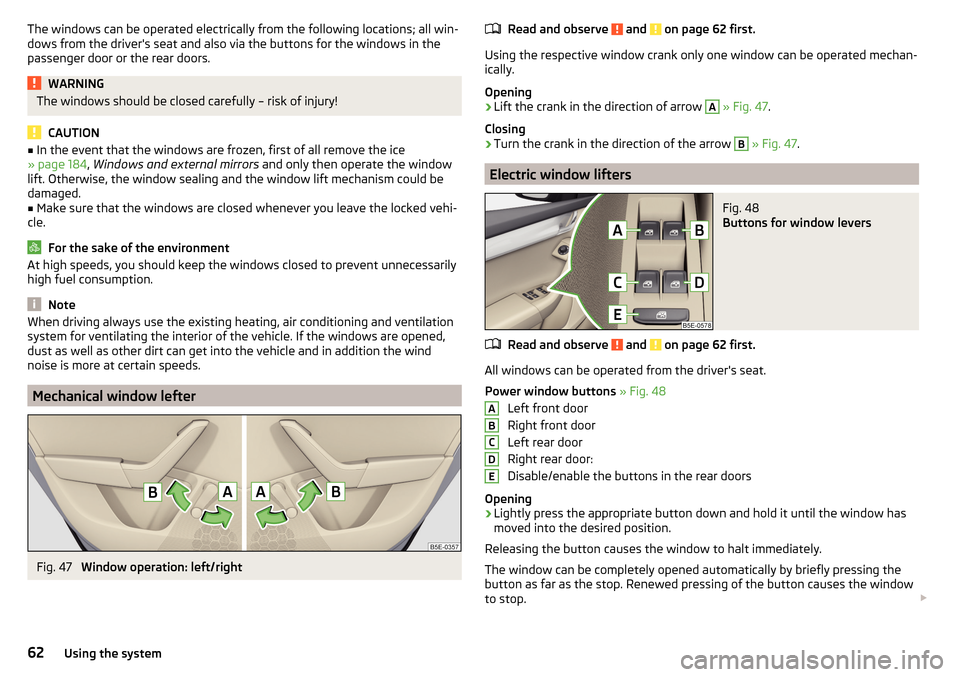
Electric window lifters
Fig. 48
Buttons for window levers
Read and observe and on page 62 first.
All windows can be operated from the driver's seat.
Power window buttons » Fig. 48
Left front door
Right front door
Left rear door
Right rear door:
Disable/enable the buttons in the rear doors
Opening
›
Lightly press the appropriate button down and hold it until the window has
moved into the desired position.
Releasing the button causes the window to halt immediately.
The window can be completely opened automatically by briefly pressing the
button as far as the stop. Renewed pressing of the button causes the window
to stop.
ABCDE62Using the system
Page 72 of 268
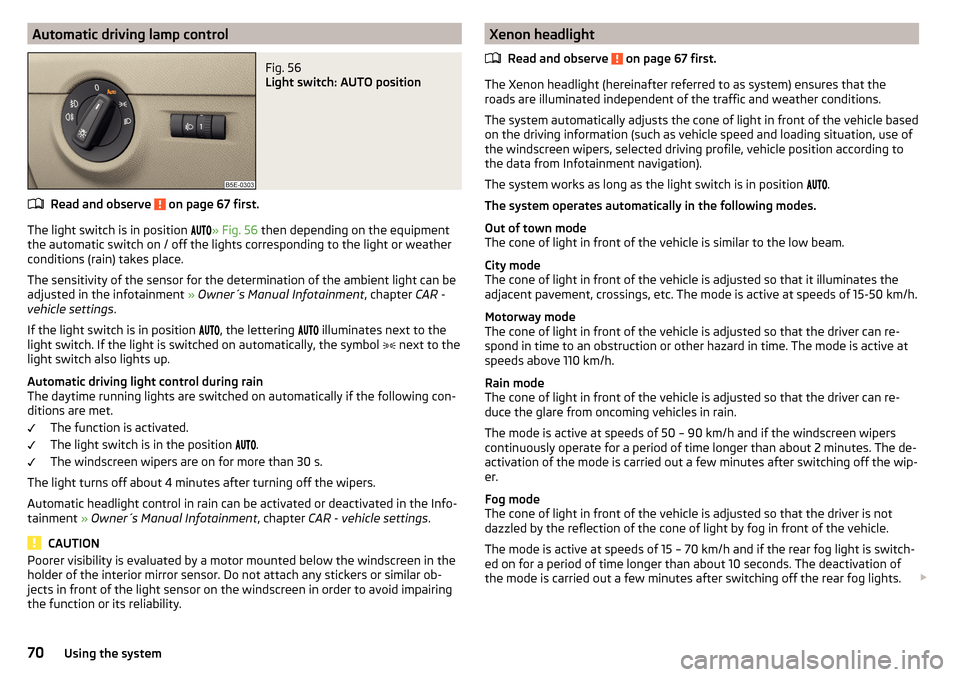
Automatic driving lamp controlFig. 56
Light switch: AUTO position
Read and observe on page 67 first.
The light switch is in position » Fig. 56
then depending on the equipment
the automatic switch on / off the lights corresponding to the light or weather
conditions (rain) takes place.
The sensitivity of the sensor for the determination of the ambient light can be
adjusted in the infotainment » Owner´s Manual Infotainment , chapter CAR -
vehicle settings .
If the light switch is in position , the lettering
illuminates next to the
light switch. If the light is switched on automatically, the symbol next to the
light switch also lights up.
Automatic driving light control during rain
The daytime running lights are switched on automatically if the following con-
ditions are met.
The function is activated.
The light switch is in the position .
The windscreen wipers are on for more than 30 s.
The light turns off about 4 minutes after turning off the wipers.
Automatic headlight control in rain can be activated or deactivated in the Info-
tainment » Owner´s Manual Infotainment , chapter CAR - vehicle settings .
CAUTION
Poorer visibility is evaluated by a motor mounted below the windscreen in the
holder of the interior mirror sensor. Do not attach any stickers or similar ob-
jects in front of the light sensor on the windscreen in order to avoid impairing
the function or its reliability.Xenon headlight
Read and observe
on page 67 first.
The Xenon headlight (hereinafter referred to as system) ensures that the
roads are illuminated independent of the traffic and weather conditions.
The system automatically adjusts the cone of light in front of the vehicle based
on the driving information (such as vehicle speed and loading situation, use of
the windscreen wipers, selected driving profile, vehicle position according to
the data from Infotainment navigation).
The system works as long as the light switch is in position
.
The system operates automatically in the following modes.
Out of town mode
The cone of light in front of the vehicle is similar to the low beam.
City mode
The cone of light in front of the vehicle is adjusted so that it illuminates the
adjacent pavement, crossings, etc. The mode is active at speeds of 15-50 km/h.
Motorway mode
The cone of light in front of the vehicle is adjusted so that the driver can re-
spond in time to an obstruction or other hazard in time. The mode is active at
speeds above 110 km/h.
Rain mode
The cone of light in front of the vehicle is adjusted so that the driver can re-
duce the glare from oncoming vehicles in rain.
The mode is active at speeds of 50 – 90 km/h and if the windscreen wipers
continuously operate for a period of time longer than about 2 minutes. The de-
activation of the mode is carried out a few minutes after switching off the wip-
er.
Fog mode
The cone of light in front of the vehicle is adjusted so that the driver is not
dazzled by the reflection of the cone of light by fog in front of the vehicle.
The mode is active at speeds of 15 – 70 km/h and if the rear fog light is switch-
ed on for a period of time longer than about 10 seconds. The deactivation of
the mode is carried out a few minutes after switching off the rear fog lights.
70Using the system
Page 75 of 268
Fog lights with the CORNER functionRead and observe
on page 67 first.
The function CORNER provides better illumination of the nearby environment
when turning, manoeuvring or anything similar.
The function automatically switches on the fog lights on each side of the ve- hicle, if the following conditions are met.
The turn signal is switched on or the front wheels are turned sharply 1)
.
The vehicle speed is below 40 km/h.
The low beam is switched on.
The fog lights are not switched on.
Note
The two fog lights are switched on when you shift into the reverse gear.
COMING HOME / LEAVING HOME
Read and observe
on page 67 first.
The function COMING HOME ensures that the vehicle's environment is illumi-
nated after switching off the ignition and opening the driver's door.
The function LEAVING HOME ensures that the vehicle's environment is illumi-
nated after unlocking the vehicle with the radio remote control unit.
The function switches the light on only if there is poorer visibility and the light
switch is in the position .
Enabling / disabling and setting functions
The functions and setting of the lighting duration can be activated or deactiva-
ted in the Infotainment system » Owner´s Manual Infotainment , chapter CAR -
vehicle settings .
CAUTION■
Poorer visibility is evaluated by a motor mounted below the windscreen in
the holder of the interior mirror sensor. Do not attach any stickers or similar
objects in front of the light sensor on the windscreen in order to avoid impair-
ing the function or its reliability.■
If this option is always enabled, then the battery is heavily loaded.
Hazard warning light system
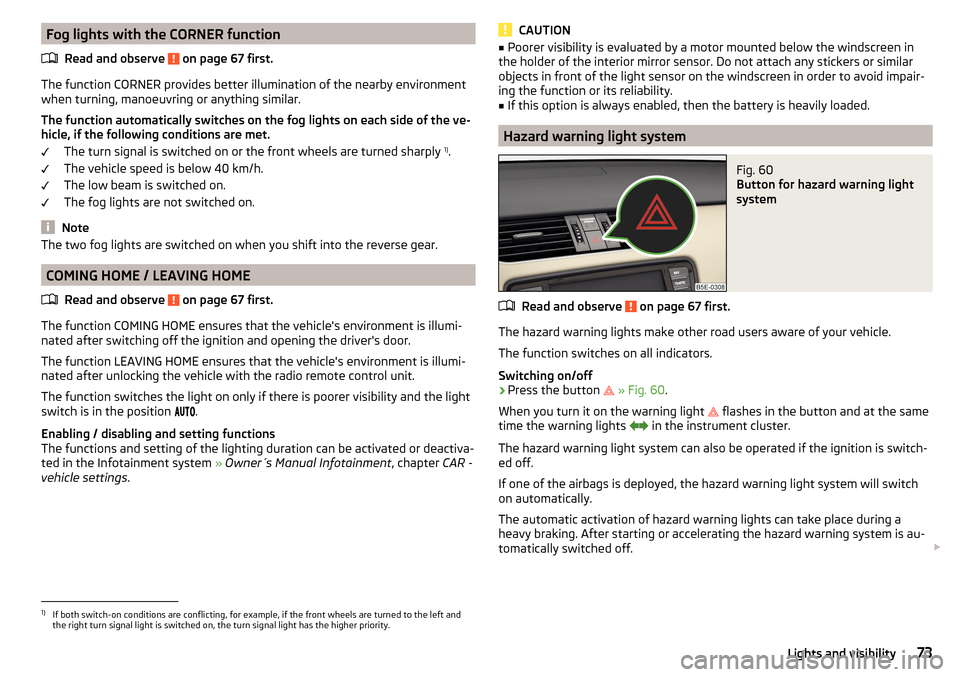
Fig. 60
Button for hazard warning light
system
Read and observe on page 67 first.
The hazard warning lights make other road users aware of your vehicle.
The function switches on all indicators.
Switching on/off
›
Press the button
» Fig. 60 .
When you turn it on the warning light
flashes in the button and at the same
time the warning lights
in the instrument cluster.
The hazard warning light system can also be operated if the ignition is switch-
ed off.
If one of the airbags is deployed, the hazard warning light system will switch
on automatically.
The automatic activation of hazard warning lights can take place during a
heavy braking. After starting or accelerating the hazard warning system is au-
tomatically switched off.
1)
If both switch-on conditions are conflicting, for example, if the front wheels are turned to the left and
the right turn signal light is switched on, the turn signal light has the higher priority.
73Lights and visibility
Page 77 of 268
Automatic operation of the lamp – position
The system is turned on when any of the following is present.
▶ The vehicle is unlocked.
▶ One of the doors is opened.
▶ The ignition key is removed.
The system is turned off when any of the following is present.
▶ The vehicle is locked.
▶ The ignition is switched on.
▶ About 30 seconds after all the doors have been closed.
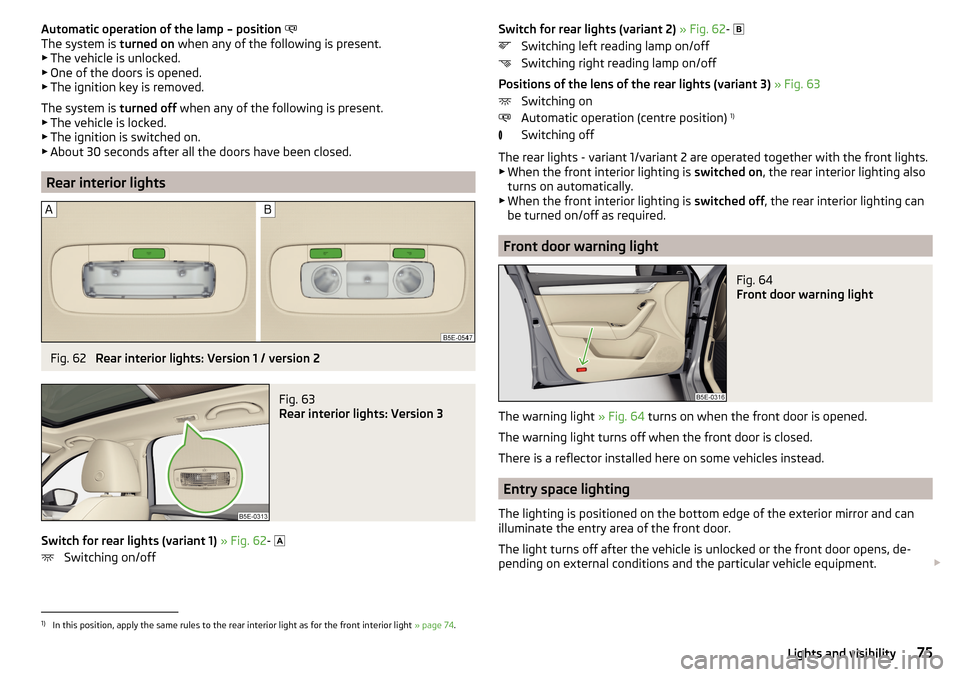
Rear interior lights
Fig. 62
Rear interior lights: Version 1 / version 2
Fig. 63
Rear interior lights: Version 3
Switch for rear lights (variant 1) » Fig. 62 -
Switching on/off
Switch for rear lights (variant 2) » Fig. 62 -
Switching left reading lamp on/off
Switching right reading lamp on/off
Positions of the lens of the rear lights (variant 3) » Fig. 63
Switching on
Automatic operation (centre position) 1)
Switching off
The rear lights - variant 1/variant 2 are operated together with the front lights.
▶ When the front interior lighting is switched on, the rear interior lighting also
turns on automatically.
▶ When the front interior lighting is switched off, the rear interior lighting can
be turned on/off as required.
Front door warning light
Fig. 64
Front door warning light
The warning light » Fig. 64 turns on when the front door is opened.
The warning light turns off when the front door is closed.
There is a reflector installed here on some vehicles instead.
Entry space lighting
The lighting is positioned on the bottom edge of the exterior mirror and can
illuminate the entry area of the front door.
The light turns off after the vehicle is unlocked or the front door opens, de-
pending on external conditions and the particular vehicle equipment.
1)
In this position, apply the same rules to the rear interior light as for the front interior light
» page 74.
75Lights and visibility
Page 78 of 268
The lighting switches off around 30 seconds after the front door is closed or
the ignition is switched on.WARNINGIf the entry light is on, do not touch its cover – risk of burns!
Visibility
Introduction
This chapter contains information on the following subjects:
Windscreen and rear window heater
76
Sun visors in the front
76
Sun screen
77WARNINGMake sure that the view outside is not covered by ice, snow, mist or other
objects.
Windscreen and rear window heater
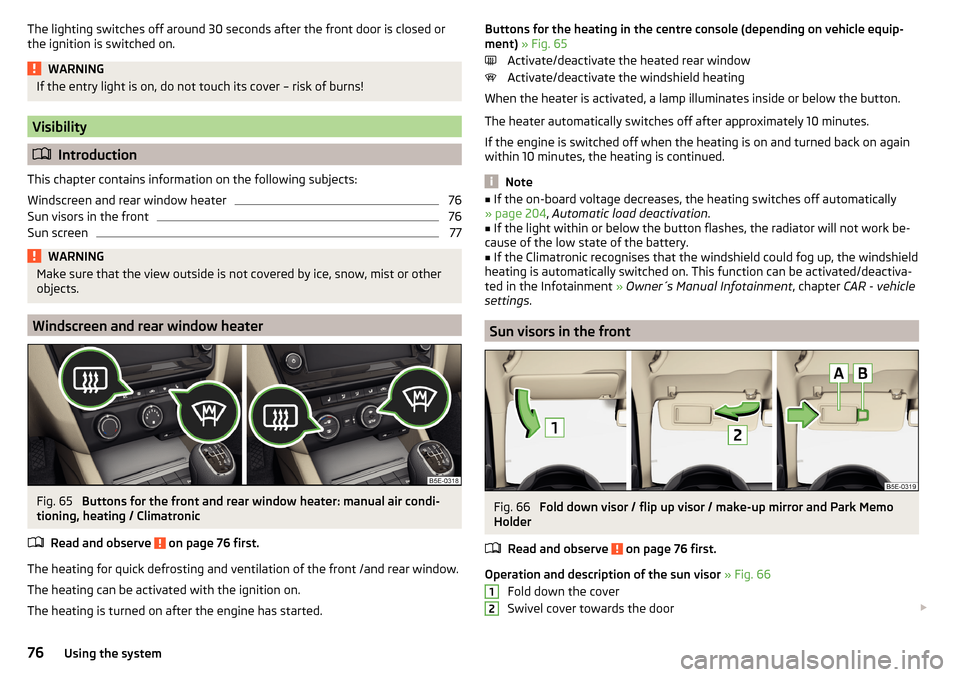
Fig. 65
Buttons for the front and rear window heater: manual air condi-
tioning, heating / Climatronic
Read and observe
on page 76 first.
The heating for quick defrosting and ventilation of the front /and rear window.
The heating can be activated with the ignition on.
The heating is turned on after the engine has started.
Buttons for the heating in the centre console (depending on vehicle equip-
ment) » Fig. 65
Activate/deactivate the heated rear window
Activate/deactivate the windshield heating
When the heater is activated, a lamp illuminates inside or below the button.
The heater automatically switches off after approximately 10 minutes.
If the engine is switched off when the heating is on and turned back on again
within 10 minutes, the heating is continued.
Note
■ If the on-board voltage decreases, the heating switches off automatically
» page 204 , Automatic load deactivation .■
If the light within or below the button flashes, the radiator will not work be-
cause of the low state of the battery.
■
If the Climatronic recognises that the windshield could fog up, the windshield
heating is automatically switched on. This function can be activated/deactiva-
ted in the Infotainment » Owner´s Manual Infotainment , chapter CAR - vehicle
settings .
Sun visors in the front
Fig. 66
Fold down visor / flip up visor / make-up mirror and Park Memo
Holder
Read and observe
on page 76 first.
Operation and description of the sun visor » Fig. 66
Fold down the cover
Swivel cover towards the door
1276Using the system
Page 79 of 268
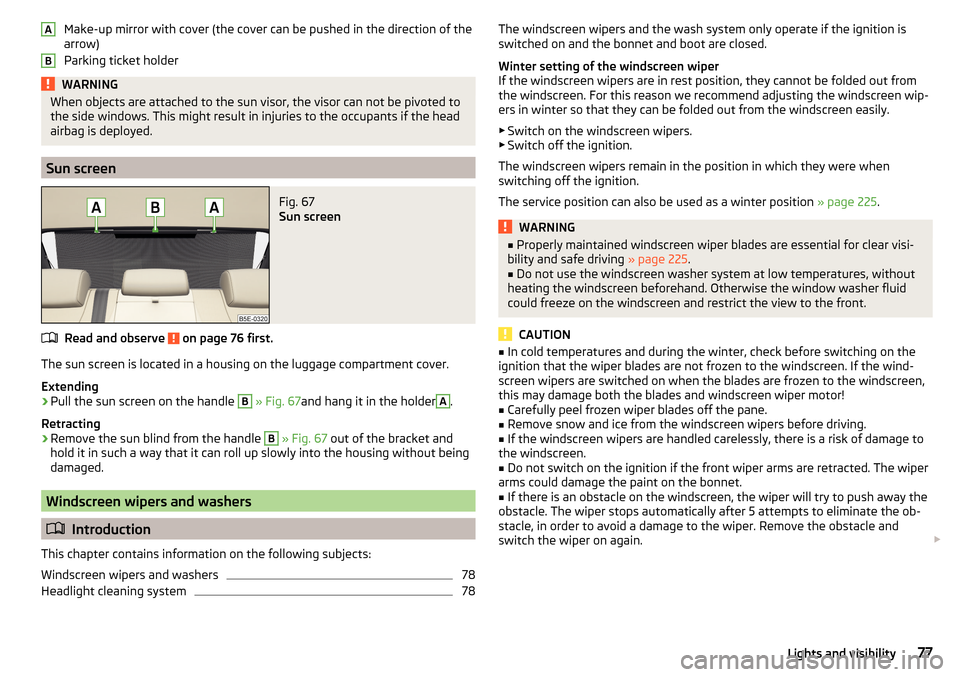
Make-up mirror with cover (the cover can be pushed in the direction of the
arrow)
Parking ticket holderWARNINGWhen objects are attached to the sun visor, the visor can not be pivoted to
the side windows. This might result in injuries to the occupants if the head
airbag is deployed.
Sun screen
Fig. 67
Sun screen
Read and observe on page 76 first.
The sun screen is located in a housing on the luggage compartment cover.
Extending
›
Pull the sun screen on the handle
B
» Fig. 67 and hang it in the holder
A
.
Retracting
›
Remove the sun blind from the handle
B
» Fig. 67 out of the bracket and
hold it in such a way that it can roll up slowly into the housing without being
damaged.
Windscreen wipers and washers
Introduction
This chapter contains information on the following subjects:
Windscreen wipers and washers
78
Headlight cleaning system
78ABThe windscreen wipers and the wash system only operate if the ignition is
switched on and the bonnet and boot are closed.
Winter setting of the windscreen wiper
If the windscreen wipers are in rest position, they cannot be folded out from
the windscreen. For this reason we recommend adjusting the windscreen wip-
ers in winter so that they can be folded out from the windscreen easily.
▶ Switch on the windscreen wipers.
▶ Switch off the ignition.
The windscreen wipers remain in the position in which they were when
switching off the ignition.
The service position can also be used as a winter position » page 225.WARNING■
Properly maintained windscreen wiper blades are essential for clear visi-
bility and safe driving » page 225.■
Do not use the windscreen washer system at low temperatures, without
heating the windscreen beforehand. Otherwise the window washer fluid
could freeze on the windscreen and restrict the view to the front.
CAUTION
■ In cold temperatures and during the winter, check before switching on the
ignition that the wiper blades are not frozen to the windscreen. If the wind-
screen wipers are switched on when the blades are frozen to the windscreen,
this may damage both the blades and windscreen wiper motor!■
Carefully peel frozen wiper blades off the pane.
■
Remove snow and ice from the windscreen wipers before driving.
■
If the windscreen wipers are handled carelessly, there is a risk of damage to
the windscreen.
■
Do not switch on the ignition if the front wiper arms are retracted. The wiper
arms could damage the paint on the bonnet.
■
If there is an obstacle on the windscreen, the wiper will try to push away the
obstacle. The wiper stops automatically after 5 attempts to eliminate the ob-
stacle, in order to avoid a damage to the wiper. Remove the obstacle and
switch the wiper on again.
77Lights and visibility