park assist SKODA OCTAVIA 2016 3.G / (5E) User Guide
[x] Cancel search | Manufacturer: SKODA, Model Year: 2016, Model line: OCTAVIA, Model: SKODA OCTAVIA 2016 3.G / (5E)Pages: 324, PDF Size: 48.85 MB
Page 209 of 324

When activating, an alarm sounds and the symbol illuminates in the button.
Deactivation
On vehicles with Version 1, the system can be deactivated by moving out of re-
verse gear.
For vehicles with version 2 and 3, the system is automatically deactivated by
pressing the
button or at a speed above 15 km/h (the
symbol in the but-
ton goes out).
Fault display
If a warning signal sounds for 3 seconds after activating the system and there
is no obstacle close to your car, this indicates a system fault. The fault is also
indicated by the symbol flashing in the button. Seek help from a specialist
garage.
Note
The system can only be activated with the button at a speed of below 15
km/h.
Automatic system activation when moving forward
Fig. 247
Infotainment screen: Display
with automatic activation
Read and observe and on page 204 first.
The automatic system activation occurs when moving forward at a speed be-
low 10 km/h when the vehicle approaches an obstacle.
After activation, the following is shown in the left pane of the Infotainment
screen » Fig. 247 .
Acoustic signals are sounded as of a distance from the obstacle of around
50 cm.
The automatic display can be activated / deactivated in Infotain-
ment » page 205 .
Reversing camera
Introduction
This chapter contains information on the following subjects:
Operation
208
Guidelines and function surfaces
208
The rear view camera (following as system) helps the driver when parking and
manoeuvring by displaying the area behind the vehicle on the Infotainment
screen (hereinafter only known as screen).
WARNING■ The general information relating to the use of assistance systems must
be observed » page 199, in section Introduction .■
The camera may not be soiled or obscured, otherwise the system function
will be significantly affected - there is a risk of an accident. For information
on cleaning » page 245.
CAUTION
■
The camera image is distorted by contrast with eyesight. For this reason, the
screen display is only of limited use for estimating distances to following vehi-
cles.■
Some items, such as thin columns, chain link fences or lattice, may not be
represented adequately in terms of screen resolution.
■
In a crash or damage the vehicle's rear camera can possibly deviate from the
correct position. If this is the case, have the sensor checked by a specialist ga-
rage.
Note
The camera is equipped with a cleaning system » page 73. The spraying is car-
ried out automatically when the rear window is sprayed.207Assist systems
Page 210 of 324
OperationFig. 248
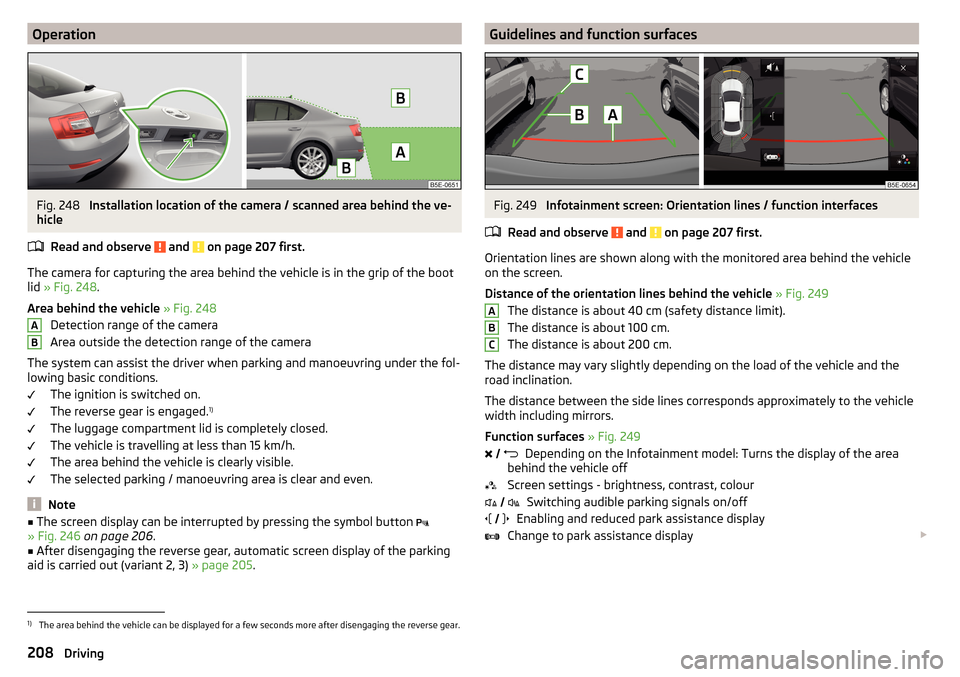
Installation location of the camera / scanned area behind the ve-
hicle
Read and observe
and on page 207 first.
The camera for capturing the area behind the vehicle is in the grip of the bootlid » Fig. 248 .
Area behind the vehicle » Fig. 248
Detection range of the camera
Area outside the detection range of the camera
The system can assist the driver when parking and manoeuvring under the fol-
lowing basic conditions.
The ignition is switched on.
The reverse gear is engaged. 1)
The luggage compartment lid is completely closed.
The vehicle is travelling at less than 15 km/h.
The area behind the vehicle is clearly visible.
The selected parking / manoeuvring area is clear and even.
Note
■ The screen display can be interrupted by pressing the symbol button
» Fig. 246 on page 206 .■
After disengaging the reverse gear, automatic screen display of the parking
aid is carried out (variant 2, 3) » page 205.
ABGuidelines and function surfacesFig. 249
Infotainment screen: Orientation lines / function interfaces
Read and observe
and on page 207 first.
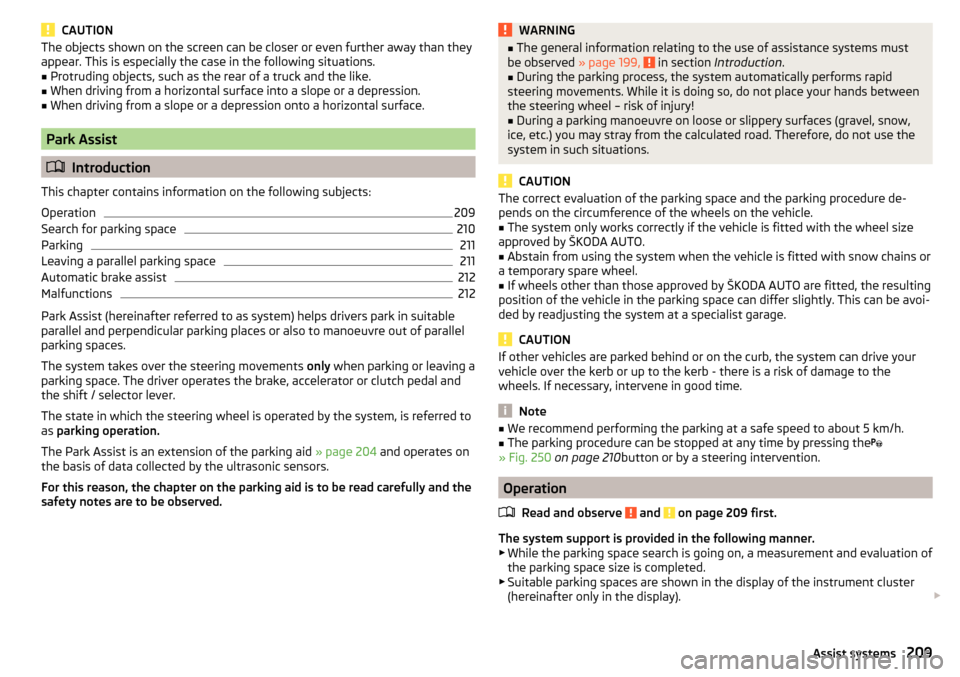
Orientation lines are shown along with the monitored area behind the vehicle
on the screen.
Distance of the orientation lines behind the vehicle » Fig. 249
The distance is about 40 cm (safety distance limit).
The distance is about 100 cm.
The distance is about 200 cm.
The distance may vary slightly depending on the load of the vehicle and the
road inclination.
The distance between the side lines corresponds approximately to the vehicle
width including mirrors.
Function surfaces » Fig. 249
Depending on the Infotainment model: Turns the display of the area
behind the vehicle off
Screen settings - brightness, contrast, colour Switching audible parking signals on/off
Enabling and reduced park assistance display
Change to park assistance display
ABC
1)
The area behind the vehicle can be displayed for a few seconds more after disengaging the reverse gear.
208Driving
Page 211 of 324
CAUTIONThe objects shown on the screen can be closer or even further away than they
appear. This is especially the case in the following situations.■
Protruding objects, such as the rear of a truck and the like.
■
When driving from a horizontal surface into a slope or a depression.
■
When driving from a slope or a depression onto a horizontal surface.
Park Assist
Introduction
This chapter contains information on the following subjects:
Operation
209
Search for parking space
210
Parking
211
Leaving a parallel parking space
211
Automatic brake assist
212
Malfunctions
212
Park Assist (hereinafter referred to as system) helps drivers park in suitable
parallel and perpendicular parking places or also to manoeuvre out of parallel
parking spaces.
The system takes over the steering movements only when parking or leaving a
parking space. The driver operates the brake, accelerator or clutch pedal and
the shift / selector lever.
The state in which the steering wheel is operated by the system, is referred to
as parking operation.
The Park Assist is an extension of the parking aid » page 204 and operates on
the basis of data collected by the ultrasonic sensors.
For this reason, the chapter on the parking aid is to be read carefully and the safety notes are to be observed.
WARNING■ The general information relating to the use of assistance systems must
be observed » page 199, in section Introduction .■
During the parking process, the system automatically performs rapid
steering movements. While it is doing so, do not place your hands between
the steering wheel – risk of injury!
■
During a parking manoeuvre on loose or slippery surfaces (gravel, snow,
ice, etc.) you may stray from the calculated road. Therefore, do not use the
system in such situations.
CAUTION
The correct evaluation of the parking space and the parking procedure de-
pends on the circumference of the wheels on the vehicle.■
The system only works correctly if the vehicle is fitted with the wheel size
approved by ŠKODA AUTO.
■
Abstain from using the system when the vehicle is fitted with snow chains or
a temporary spare wheel.
■
If wheels other than those approved by ŠKODA AUTO are fitted, the resulting
position of the vehicle in the parking space can differ slightly. This can be avoi-
ded by readjusting the system at a specialist garage.
CAUTION
If other vehicles are parked behind or on the curb, the system can drive your
vehicle over the kerb or up to the kerb - there is a risk of damage to the
wheels. If necessary, intervene in good time.
Note
■ We recommend performing the parking at a safe speed to about 5 km/h.■The parking procedure can be stopped at any time by pressing the
» Fig. 250 on page 210 button or by a steering intervention.
Operation
Read and observe
and on page 209 first.
The system support is provided in the following manner.▶ While the parking space search is going on, a measurement and evaluation of
the parking space size is completed.
▶ Suitable parking spaces are shown in the display of the instrument cluster
(hereinafter only in the display).
209Assist systems
Page 213 of 324
ParkingFig. 251
Display
Read and observe
and on page 209 first.
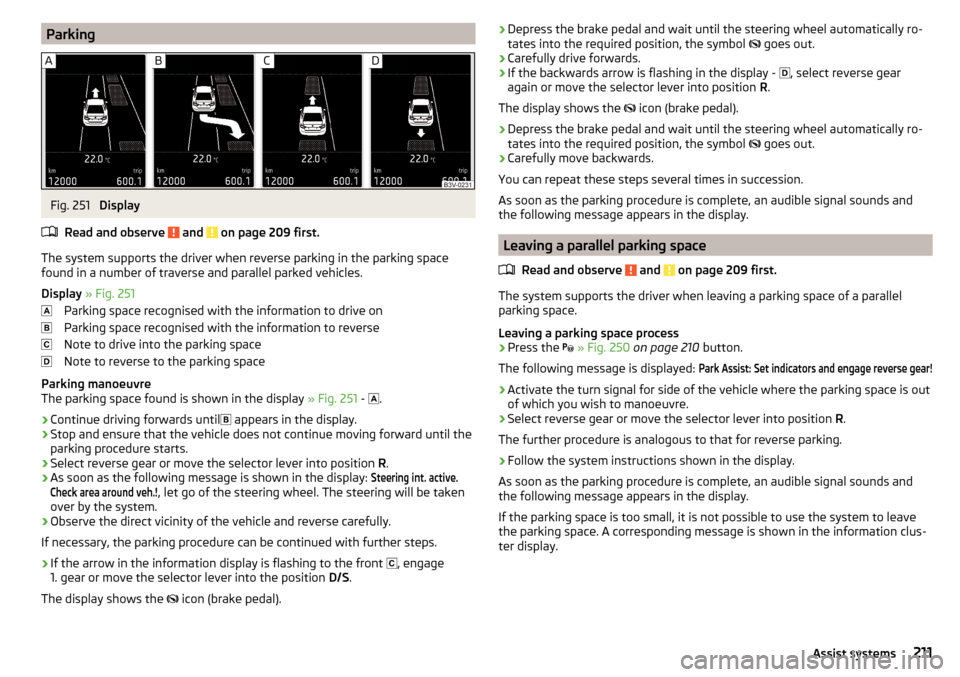
The system supports the driver when reverse parking in the parking space
found in a number of traverse and parallel parked vehicles.
Display » Fig. 251
Parking space recognised with the information to drive on
Parking space recognised with the information to reverse
Note to drive into the parking space
Note to reverse to the parking space
Parking manoeuvre
The parking space found is shown in the display » Fig. 251 -
.
›
Continue driving forwards until
appears in the display.
›
Stop and ensure that the vehicle does not continue moving forward until the
parking procedure starts.
›
Select reverse gear or move the selector lever into position R.
›
As soon as the following message is shown in the display:
Steering int. active.Check area around veh.!
, let go of the steering wheel. The steering will be taken
over by the system.
›
Observe the direct vicinity of the vehicle and reverse carefully.
If necessary, the parking procedure can be continued with further steps.
›
If the arrow in the information display is flashing to the front , engage
1. gear or move the selector lever into the position D/S.
The display shows the icon (brake pedal).
›Depress the brake pedal and wait until the steering wheel automatically ro-
tates into the required position, the symbol goes out.›
Carefully drive forwards.
›
If the backwards arrow is flashing in the display -
, select reverse gear
again or move the selector lever into position R.
The display shows the
icon (brake pedal).
›
Depress the brake pedal and wait until the steering wheel automatically ro-
tates into the required position, the symbol
goes out.
›
Carefully move backwards.
You can repeat these steps several times in succession.
As soon as the parking procedure is complete, an audible signal sounds and the following message appears in the display.
Leaving a parallel parking space
Read and observe
and on page 209 first.
The system supports the driver when leaving a parking space of a parallel
parking space.
Leaving a parking space process
›
Press the
» Fig. 250 on page 210 button.
The following message is displayed:
Park Assist: Set indicators and engage reverse gear!›
Activate the turn signal for side of the vehicle where the parking space is out
of which you wish to manoeuvre.
›
Select reverse gear or move the selector lever into position R.
The further procedure is analogous to that for reverse parking.
›
Follow the system instructions shown in the display.
As soon as the parking procedure is complete, an audible signal sounds and
the following message appears in the display.
If the parking space is too small, it is not possible to use the system to leave
the parking space. A corresponding message is shown in the information clus-
ter display.
211Assist systems
Page 214 of 324
Automatic brake assistRead and observe
and on page 209 first.
Automatic brake assist when speeding
If a velocity of 7 km / h is exceeded during the parking manoeuvre for the first
time, the speed will be automatically reduced by the system to less than 7 km /
h. This prevents the parking manoeuvre from aborting.
Automatic emergency braking
If the system detects a risk of collision during parking, automatic emergency
braking takes place to prevent a collision.
The parking is terminated by the emergency braking.
CAUTION
The automatic emergency braking is not triggered by the system when the
parking process stops due to the speed of 7 km/h being exceeded!
Malfunctions
Read and observe
and on page 209 first.
If, for some unknown reason, the system is not available, an appropriate mes-
sage appears in the display of the instrument cluster.
System unavailable
If the system is not available because the vehicle has a fault, a message ap-
pears concerning the unavailability. Seek help from a specialist garage.
System fault
In the case of a system fault, an error message appears. Seek help from a spe-
cialist garage.
Cruise Control System
Introduction
This chapter contains information on the following subjects:
Operation
212
Operation description
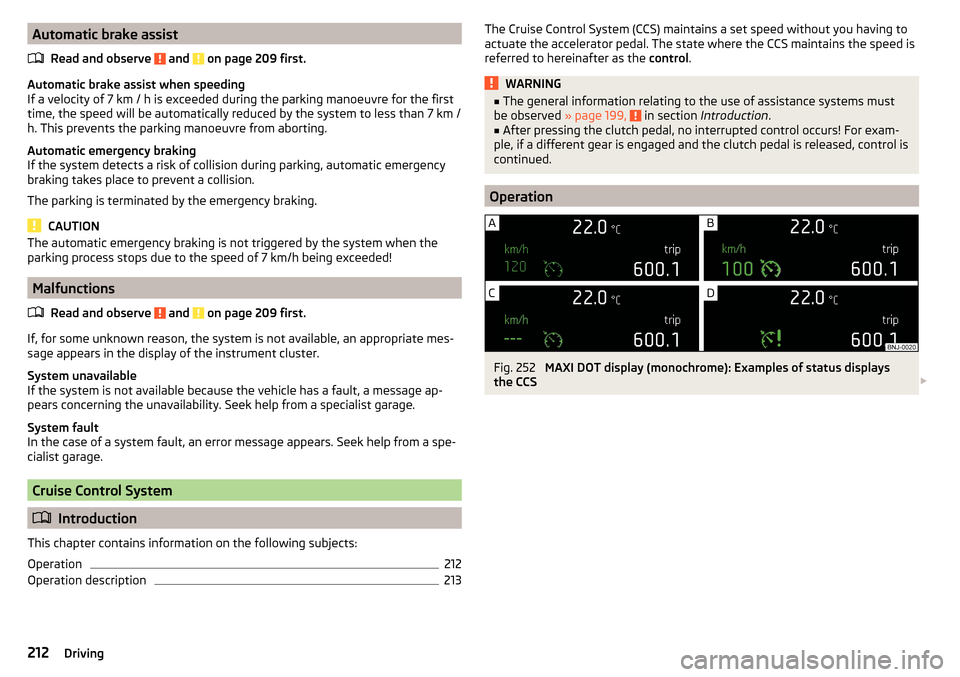
213The Cruise Control System (CCS) maintains a set speed without you having to
actuate the accelerator pedal. The state where the CCS maintains the speed is
referred to hereinafter as the control.WARNING■
The general information relating to the use of assistance systems must
be observed » page 199, in section Introduction .■
After pressing the clutch pedal, no interrupted control occurs! For exam-
ple, if a different gear is engaged and the clutch pedal is released, control is
continued.
Operation
Fig. 252
MAXI DOT display (monochrome): Examples of status displays
the CCS
212Driving
Page 260 of 324
Specification - The brake fluid must comply with the standard VW 501 14 (this
standard meets the requirements of FMVSS 116 DOT4).WARNING■ The following instructions must be followed at all times when working on
the engine compartment » page 252.■
If the fluid level drops significantly within a short time or if it drops below
the “MIN” » Fig. 295mark, this may be an indication of a leak in the brake
system.
Stop driving - There is a risk of an accident! Seek help from a
specialist garage.
Note
■ The brake fluid is changed as part of a compulsory inspection service.■A low brake fluid level which is too low is indicated by the warning light
being shown on the display of the instrument cluster as well as the corre-
sponding message » page 33. We still recommend inspecting the brake fluid
level in the reservoir from time to time.
Vehicle battery
Introduction
This chapter contains information on the following subjects:
Check condition
259
Charging
259
Disconnect/reconnect and change
260
The vehicle battery represents a power source for the motor to start and for the supply of electrical consumers in the car.
Automatic consumer shutdown - Discharge protection of the vehicle battery
The on-board power supply system tries to prevent the vehicle battery from
discharging in the following ways when it is subject to heavy loading. ▶ By increasing the engine idle speed.
▶ Through the power limitation of certain loads.
▶ By switching off some loads(heated seats, heated rear window) for as long
as necessary.
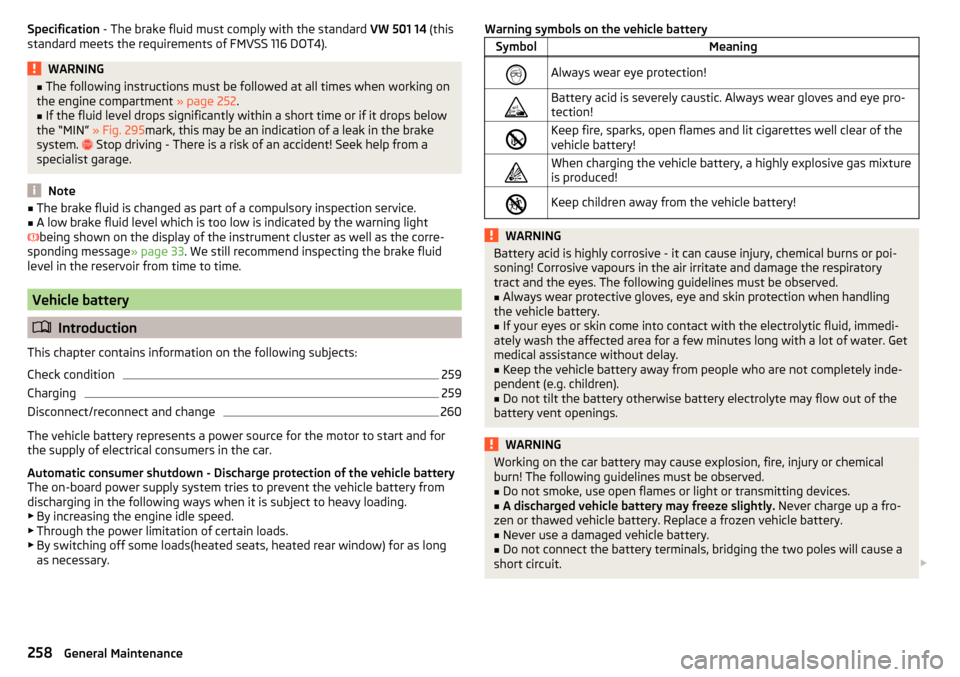
Warning symbols on the vehicle batterySymbolMeaningAlways wear eye protection!Battery acid is severely caustic. Always wear gloves and eye pro-
tection!Keep fire, sparks, open flames and lit cigarettes well clear of the
vehicle battery!When charging the vehicle battery, a highly explosive gas mixture
is produced!Keep children away from the vehicle battery!WARNINGBattery acid is highly corrosive - it can cause injury, chemical burns or poi-
soning! Corrosive vapours in the air irritate and damage the respiratory
tract and the eyes. The following guidelines must be observed.■
Always wear protective gloves, eye and skin protection when handling
the vehicle battery.
■
If your eyes or skin come into contact with the electrolytic fluid, immedi-
ately wash the affected area for a few minutes long with a lot of water. Get
medical assistance without delay.
■
Keep the vehicle battery away from people who are not completely inde-
pendent (e.g. children).
■
Do not tilt the battery otherwise battery electrolyte may flow out of the
battery vent openings.
WARNINGWorking on the car battery may cause explosion, fire, injury or chemical
burn! The following guidelines must be observed.■
Do not smoke, use open flames or light or transmitting devices.
■
A discharged vehicle battery may freeze slightly. Never charge up a fro-
zen or thawed vehicle battery. Replace a frozen vehicle battery.
■
Never use a damaged vehicle battery.
■
Do not connect the battery terminals, bridging the two poles will cause a
short circuit.
258General Maintenance
Page 282 of 324
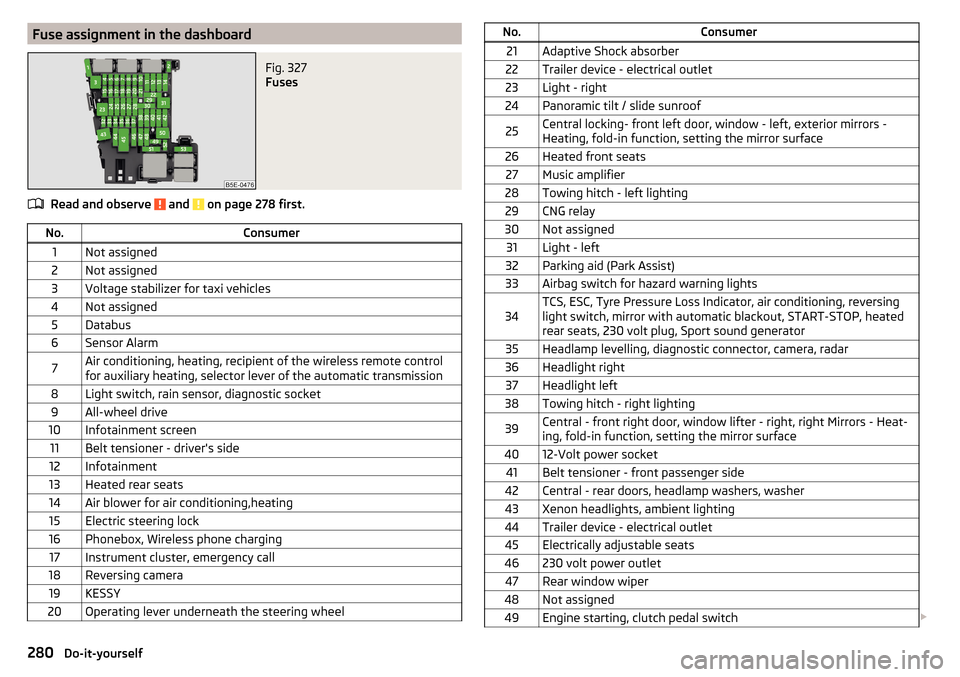
Fuse assignment in the dashboardFig. 327
Fuses
Read and observe and on page 278 first.
No.Consumer1Not assigned2Not assigned3Voltage stabilizer for taxi vehicles4Not assigned5Databus6Sensor Alarm7Air conditioning, heating, recipient of the wireless remote control
for auxiliary heating, selector lever of the automatic transmission8Light switch, rain sensor, diagnostic socket9All-wheel drive10Infotainment screen11Belt tensioner - driver's side12Infotainment13Heated rear seats14Air blower for air conditioning,heating15Electric steering lock16Phonebox, Wireless phone charging17Instrument cluster, emergency call18Reversing camera19KESSY20Operating lever underneath the steering wheelNo.Consumer21Adaptive Shock absorber22Trailer device - electrical outlet23Light - right24Panoramic tilt / slide sunroof25Central locking- front left door, window - left, exterior mirrors -
Heating, fold-in function, setting the mirror surface26Heated front seats27Music amplifier28Towing hitch - left lighting29CNG relay30Not assigned31Light - left32Parking aid (Park Assist)33Airbag switch for hazard warning lights34TCS, ESC, Tyre Pressure Loss Indicator, air conditioning, reversing
light switch, mirror with automatic blackout, START-STOP, heated
rear seats, 230 volt plug, Sport sound generator35Headlamp levelling, diagnostic connector, camera, radar36Headlight right37Headlight left38Towing hitch - right lighting39Central - front right door, window lifter - right, right Mirrors - Heat-
ing, fold-in function, setting the mirror surface4012-Volt power socket41Belt tensioner - front passenger side42Central - rear doors, headlamp washers, washer43Xenon headlights, ambient lighting44Trailer device - electrical outlet45Electrically adjustable seats46230 volt power outlet47Rear window wiper48Not assigned49Engine starting, clutch pedal switch 280Do-it-yourself
Page 309 of 324
LeverACC216
Cruise control213
Front Assist220
Operation of the information system43
Turn signal/main beam65
Windscreen wipers72, 73
Liability for defects5
light High-beam assistant
67
Light64
Cockpit69
COMING HOME / LEAVING HOME68
Daytime running lights65
Flash65
Fog lights/rear fog light67
Fog lights with CORNER function68
Hazard warning light system68
Headlight cleaning system73
Parking light68
Replacing bulbs282
Turn signal/main beam65
Xenon headlight66
Light Assist See high-beam assistant
67
Lighting Entry space
69
Interior lighting69
Luggage compartment93
Lights Abroad
69
Automatic driving light control66
Dipped beam64
Headlight range control64
Parking lights64
Switching on and off64
Warning lights32
List of available stations
134
of telephone contacts158
With folder / track list138
List of paired external devices153
List of traffic reports185
Load291
Lock Individual settings
53
KESSY52
Key51
Locking Central locking button
53
in case of emergency276
Remote control52
Lock steering lock188
Long cargo channel89
Longitude169
Luggage compartment93
Compartment with cargo element99
Cover97
Fastening elements94
Fastening the flooring96
Fixing nets95
Floor covering on both sides96
foldable hook96
Folding double hooks96
Lighting93
Net on the luggage compartment cover97
Net partition102
Roll-up cover98
Storage compartments under the floor cover- ing
99
unlock manually276
Unlock the boot lid276
Variable loading floor100
Luggage compartment cover97
Roll-up cover98
Luggage storage Multi-function pocket
100
M
Main beam
65
Warning light37
Main menu Apple CarPlay167
CAR187
Images144
Media136
Media Command147
MirrorLink®168
Navigation170
Radio133
SmartLink165
SMS161
Video DVD145
Waypoint mode183
Manage favourites132
Manage Favourites126
Manage memory128
Managing paired devices153
Managing saved routes183
Manoeuvre Graphical driving recommendations
180
Nav. announcements181
Manoeuvring205
Manual air conditioning Air distribution control
107
Controls105
Manual gear changing See Gear changing
193
Map Automatic scale
177
Display170
Display of traffic signs128
Display options176
Display options in the split screen178
Fast Map177
Lane guidance128
Main menu170
Manual scale177
Map alignment178
Operation170
POI display128
307Index
Page 311 of 324
Manage memory128
Map128
Map alignment178
Map scale177
Most common routes181
My destinations175
Navigation data170
nav. announcements129
Nav. announcements181
Options for map display176
Options for map display in the split screen178
Preferred type of route128
Route179
Route calculation179
Route change182
Route details181
Route display176
Route display in the split screen178
Route guidance179
Route information181
Route list183
Route options128
Search for destination171
Set to128
Split screen171
Status line129
Top speeds129
Traffic jam ahead186
Traffic reports (TMC)185
Trailer towing180
Transit point182
Update navigation data170
Update the navigation data129
Version information129
Voice control119
Waypoint mode183
Navigation data170
nav. announcements129
Nav. announcements181
Net partition102
Nets95, 97
Network Data connection124
Data roaming124
Set124
set to126
Values of the downloaded data124
New route183
NGVs see CNG
252
O
OFF ROAD
203
ABS204
ASR204
EDS204
ESC204
Hill Descent Assistant203
Operation203
OFF ROAD mode203
Warning light40
oil see Engine oil
256
Oil Information messages
38
Oil changing Engine oil
255
On-board computer see multifunction display
44
Online Owner's Manual8
Operating weight289
Operation Images
144
Media136
MirrorLink®168
Radio133
Telephone151
Original accessories241
overview cockpit
29
OverviewEngine compartment254
Fuses278
Warning lights32
Own POI categories175
P
Pairing process
153
Park205
Parking aid204
Park assist Parking
211
Park Assist209
Automatic brake assist212
Leaving a parallel parking space211
Malfunctions212
Operation209
Search for parking space210
Parking193
Park Assist209
Reversing camera207
Parking aid204
Automatic system activation when moving for- ward
207
Operation205
Parking assistance Activation / deactivation
206
Parking lights64
Parking sensors Display Infotainment screen
206
Settings in Infotainment205
Parking spot173
Parking the vehicle see Parking
193
ParkPilot204
Settings in Infotainment205
Parts replacement240
309Index