vent SKODA OCTAVIA 2016 3.G / (5E) User Guide
[x] Cancel search | Manufacturer: SKODA, Model Year: 2016, Model line: OCTAVIA, Model: SKODA OCTAVIA 2016 3.G / (5E)Pages: 324, PDF Size: 48.85 MB
Page 26 of 324
Adjust the height of the front passenger seat belt so that the belt does not
“jam” in the return pulley. In the event of an accident, there is the risk of in-
jury to the neck of the child carried due to the seat belt!WARNING■ Never use a rear-facing child seat on the front passenger seat if the pas-
senger airbag is activated. This child safety seat is positioned in the deploy-
ment area of the front passenger airbag. The airbag may cause the child se-
vere, or even fatal injuries, in the event of it being deployed.■
Once a child seat in which the child is transported with its back to the di-
rection of travel is no longer being used on the passenger seat, the front
passenger airbag should be reactivated.
Use of a child seat on the front passenger seat (variant 2)
Applies to Taiwan
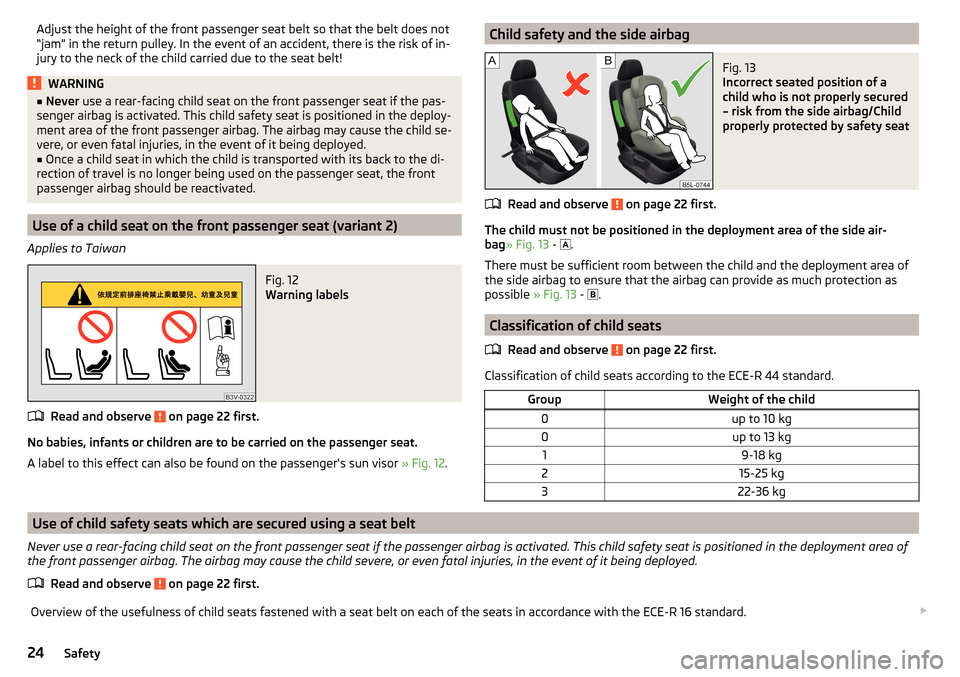
Fig. 12
Warning labels
Read and observe on page 22 first.
No babies, infants or children are to be carried on the passenger seat.
A label to this effect can also be found on the passenger's sun visor » Fig. 12.
Child safety and the side airbagFig. 13
Incorrect seated position of a
child who is not properly secured
– risk from the side airbag/Child
properly protected by safety seat
Read and observe on page 22 first.
The child must not be positioned in the deployment area of the side air-
bag » Fig. 13 -
.
There must be sufficient room between the child and the deployment area of
the side airbag to ensure that the airbag can provide as much protection as
possible » Fig. 13 -
.
Classification of child seats
Read and observe
on page 22 first.
Classification of child seats according to the ECE-R 44 standard.
GroupWeight of the child0up to 10 kg0up to 13 kg19-18 kg215-25 kg322-36 kg
Use of child safety seats which are secured using a seat belt
Never use a rear-facing child seat on the front passenger seat if the passenger airbag is activated. This child safety seat is positioned in the deployment area of the front passenger airbag. The airbag may cause the child severe, or even fatal injuries, in the event of it being deployed.
Read and observe
on page 22 first.
Overview of the usefulness of child seats fastened with a seat belt on each of the seats in accordance with the ECE-R 16 standard. 24Safety
Page 27 of 324
GroupFront passenger seatRear seatsExternalRear seat centre0
up to 10 kgUUU0
up to 13 kgUUU1
9-18 kgUUU2
15-25 kgUUU3
22-36 kgUUU
Child seat category “Universal” - a child seat designed for fastening on
the seat with the seat belt.
Fastening elements
Introduction
This chapter contains information on the following subjects:
Attachment points of the -system
25
Use of child safety seats with the
system
25
Attachment points of the
system
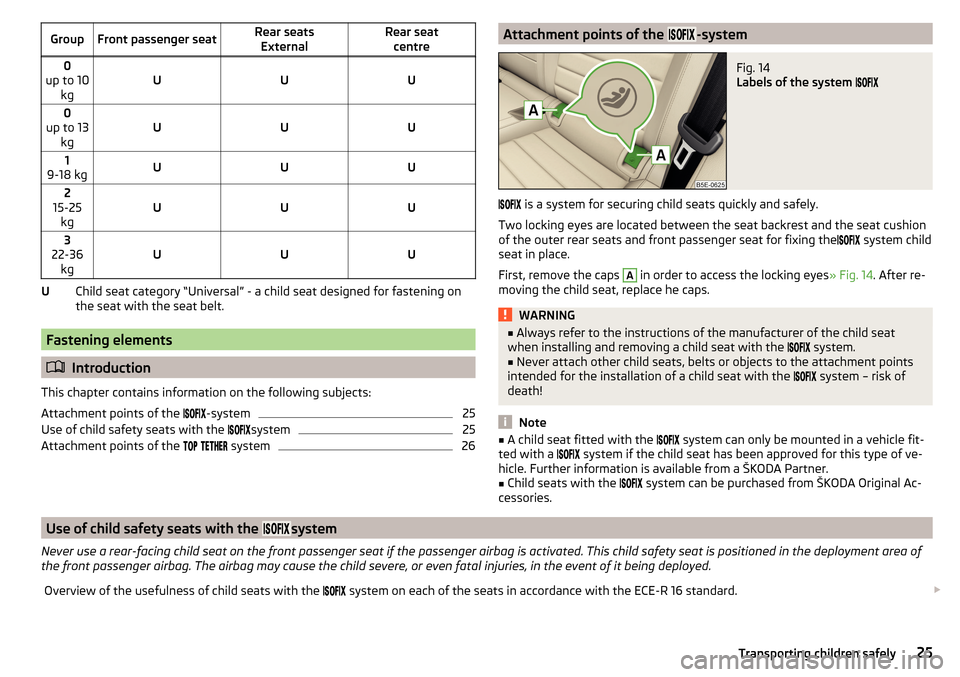
26UAttachment points of the -systemFig. 14
Labels of the system
is a system for securing child seats quickly and safely.
Two locking eyes are located between the seat backrest and the seat cushion of the outer rear seats and front passenger seat for fixing the system child
seat in place.
First, remove the caps
A
in order to access the locking eyes » Fig. 14. After re-
moving the child seat, replace he caps.
WARNING■ Always refer to the instructions of the manufacturer of the child seat
when installing and removing a child seat with the system.■
Never attach other child seats, belts or objects to the attachment points
intended for the installation of a child seat with the
system – risk of
death!
Note
■ A child seat fitted with the system can only be mounted in a vehicle fit-
ted with a system if the child seat has been approved for this type of ve-
hicle. Further information is available from a ŠKODA Partner.■
Child seats with the
system can be purchased from ŠKODA Original Ac-
cessories.
Use of child safety seats with the system
Never use a rear-facing child seat on the front passenger seat if the passenger airbag is activated. This child safety seat is positioned in the deployment area of
the front passenger airbag. The airbag may cause the child severe, or even fatal injuries, in the event of it being deployed.Overview of the usefulness of child seats with the system on each of the seats in accordance with the ECE-R 16 standard. 25Transporting children safely
Page 31 of 324
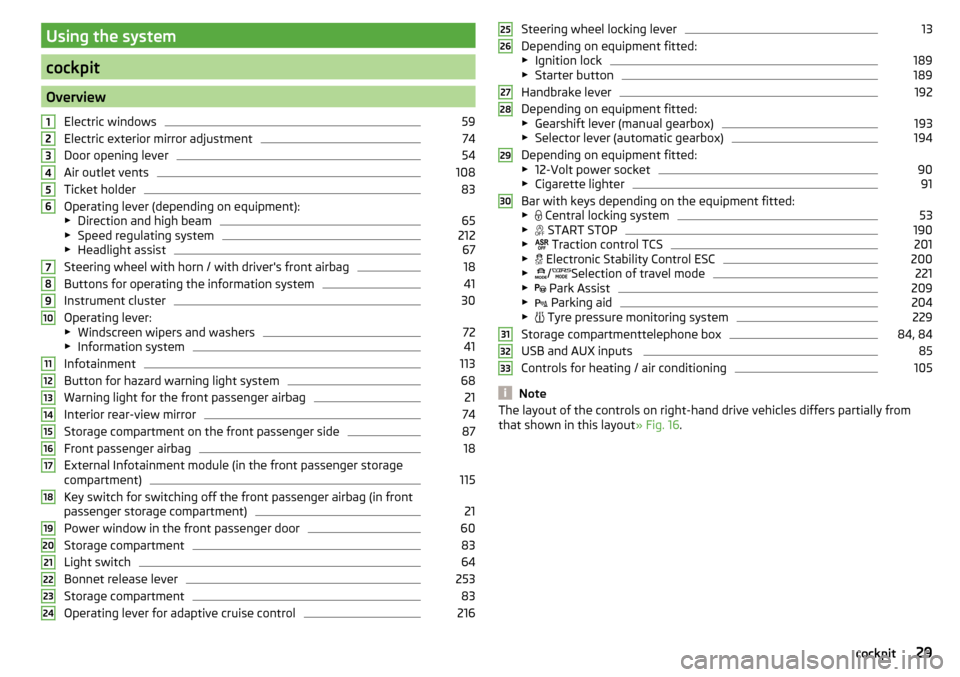
Using the system
cockpit
OverviewElectric windows
59
Electric exterior mirror adjustment
74
Door opening lever
54
Air outlet vents
108
Ticket holder
83
Operating lever (depending on equipment):
▶ Direction and high beam
65
▶Speed regulating system
212
▶Headlight assist
67
Steering wheel with horn / with driver's front airbag
18
Buttons for operating the information system
41
Instrument cluster
30
Operating lever:
▶ Windscreen wipers and washers
72
▶Information system
41
Infotainment
113
Button for hazard warning light system
68
Warning light for the front passenger airbag
21
Interior rear-view mirror
74
Storage compartment on the front passenger side
87
Front passenger airbag
18
External Infotainment module (in the front passenger storage
compartment)
115
Key switch for switching off the front passenger airbag (in front
passenger storage compartment)
21
Power window in the front passenger door
60
Storage compartment
83
Light switch
64
Bonnet release lever
253
Storage compartment
83
Operating lever for adaptive cruise control
216123456789101112131415161718192021222324Steering wheel locking lever13
Depending on equipment fitted:
▶ Ignition lock
189
▶Starter button
189
Handbrake lever
192
Depending on equipment fitted:
▶ Gearshift lever (manual gearbox)
193
▶Selector lever (automatic gearbox)
194
Depending on equipment fitted:
▶ 12-Volt power socket
90
▶Cigarette lighter
91
Bar with keys depending on the equipment fitted:
▶ Central locking system
53
▶
START STOP
190
▶
Traction control TCS
201
▶
Electronic Stability Control ESC
200
▶
/
Selection of travel mode
221
▶
Park Assist
209
▶
Parking aid
204
▶
Tyre pressure monitoring system
229
Storage compartmenttelephone box
84, 84
USB and AUX inputs
85
Controls for heating / air conditioning
105
Note
The layout of the controls on right-hand drive vehicles differs partially from
that shown in this layout » Fig. 16.25262728293031323329cockpit
Page 37 of 324
Emission control systemRead and observe
on page 33 first.
lights up – there is a fault in the emission control system. The system
makes it possible to drive on in emergency mode - there may be a noticeable
reduction in engine performance.
▶ You can drive on, exercising appropriate caution. Seek assistance from a spe-
cialist garage immediately.
Preheating unit (diesel)
Read and observe
on page 33 first.
flashes – there is a fault in the engine management system. The system
makes possible operation emergency mode - there may be a noticeable reduc-
tion in engine performance.
There is a fault in the glow plug system if the warning light does not come
on or illuminates continuously.
▶ You can drive on, exercising appropriate caution. Seek assistance from a spe-
cialist garage immediately.
EPC warning light (petrol)
Read and observe
on page 33 first.
lights up – there is a fault in the engine management system. The system
makes it possible to drive on in emergency mode - there may be a noticeable
reduction in engine performance.
▶ You can drive on, exercising appropriate caution. Seek assistance from a spe-
cialist garage immediately.
Safety systems
Read and observe
on page 33 first.
System fault
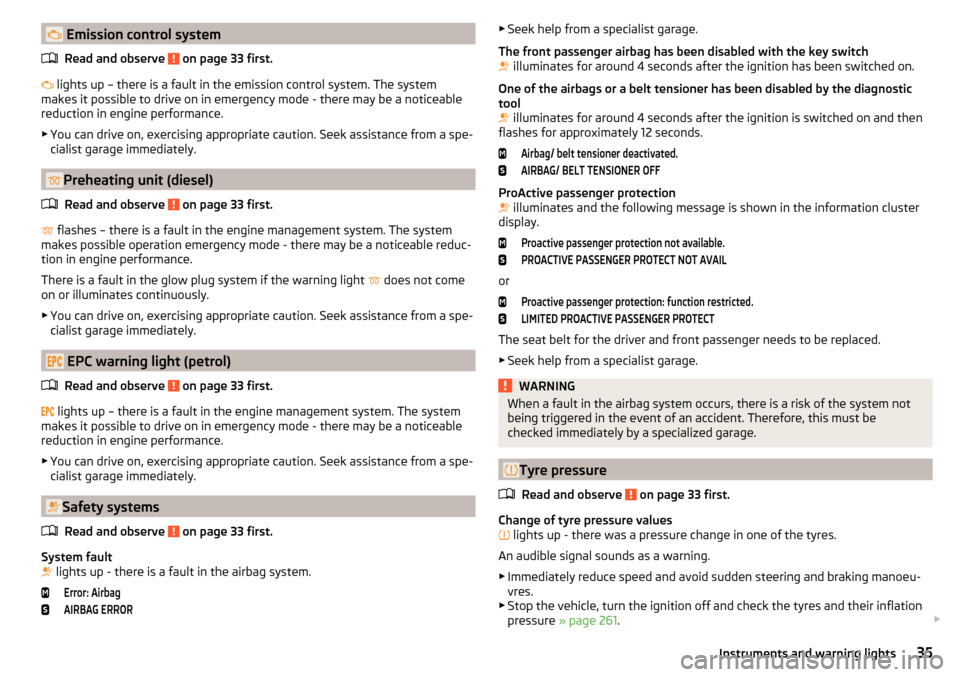
lights up - there is a fault in the airbag system.
Error: AirbagAIRBAG ERROR▶
Seek help from a specialist garage.
The front passenger airbag has been disabled with the key switch
illuminates for around 4 seconds after the ignition has been switched on.
One of the airbags or a belt tensioner has been disabled by the diagnostic
tool
illuminates for around 4 seconds after the ignition is switched on and then
flashes for approximately 12 seconds.Airbag/ belt tensioner deactivated.AIRBAG/ BELT TENSIONER OFF
ProActive passenger protection
illuminates and the following message is shown in the information cluster
display.
Proactive passenger protection not available.PROACTIVE PASSENGER PROTECT NOT AVAIL
or
Proactive passenger protection: function restricted.LIMITED PROACTIVE PASSENGER PROTECT
The seat belt for the driver and front passenger needs to be replaced.
▶ Seek help from a specialist garage.
WARNINGWhen a fault in the airbag system occurs, there is a risk of the system not
being triggered in the event of an accident. Therefore, this must be
checked immediately by a specialized garage.
Tyre pressure
Read and observe
on page 33 first.
Change of tyre pressure values
lights up - there was a pressure change in one of the tyres.
An audible signal sounds as a warning. ▶ Immediately reduce speed and avoid sudden steering and braking manoeu-
vres.
▶ Stop the vehicle, turn the ignition off and check the tyres and their inflation
pressure » page 261 .
35Instruments and warning lights
Page 50 of 324
Note■The system allows the measurement of up to 11 lap times.■measurement of the individual lap time is ended after 99 h., 59 min. and 59
sec. After this time has been reached, measurement of the new lap time starts
automatically.■
The measured times cannot be reset individually.
■
If the measured times are not reset, then these are stored even after turning
off the ignition.
Service interval display
Introduction
This chapter contains information on the following subjects:
Displaying the distance and days until the next service interval
48
Service messages
48
Resetting the service interval display
48
The service interval display shows the kilometres or days until the next service
event.
Information regarding service intervals » page 242.
Displaying the distance and days until the next service interval
Fig. 29
Button in the instrument cluster
›
Switch on the ignition.
›
Press and hold the button
A
» Fig. 29 until the
Service menu item
is shown in
the display.
›
Release the button
A
.
In the display, the symbol
appears for 4 seconds along with the following
message for the kilometres or days to the next service appointment.
Information regarding the remaining kilometres and days until the next service can also be displayed in Infotainment by tapping
→ →
Service
.
Service messages
Messages before reaching the scheduled service date
Before the next service date has been reached, after switching on the ignition,
the symbol
as well as a message about the mileage or days until the next
service event appears in the display.
Messages upon reaching scheduled service date
Once the service interval is reached, the symbol
appears in the display after
the ignition is switched on, together with the message.
Resetting the service interval display
We recommend that the display reset is completed by a specialist garage.
We recommend that you do not reset the service interval display yourself. In-
correctly setting the service interval display could cause problems to the vehi-
cle.
Variable service interval
For vehicles with variable service intervals, after resetting the oil change serv-
ice display in a specialist garage, the values of the new service interval are dis-
played, which are based on the previous operating conditions of the vehicle.
These values are then continuously matched according to the actual operating
conditions of the vehicle.
SmartGate
Introduction to the subject
Fig. 30
Information about SmartGate on
the ŠKODA websites
48Using the system
Page 55 of 324
If the boot lid is closed after locking the vehicle and the key with which the
vehicle was locked remains in the luggage compartment, the lid is automatical-
ly unlatched (partially opened). After automatically unlocking, the turn signal
lights will flash four times. The boot lid remains unlatched (partially opened);
the other doors remain locked.
CAUTION
Some types of gloves can affect the unlocking or locking device via the sen-
sors in the door handle.
Vehicle locking / unlocking with the central locking button
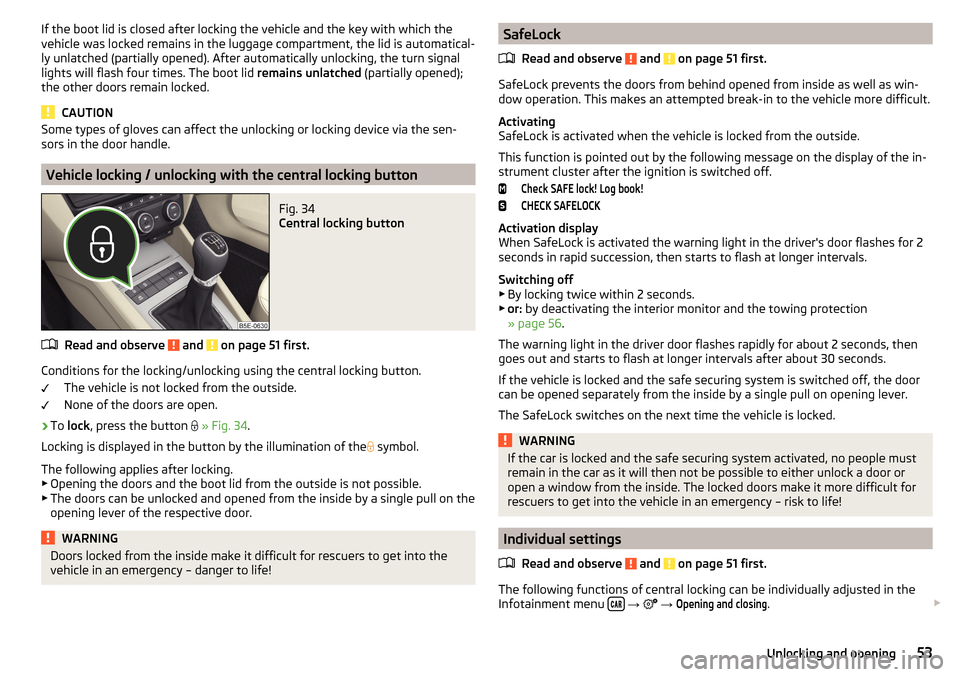
Fig. 34
Central locking button
Read and observe and on page 51 first.
Conditions for the locking/unlocking using the central locking button.
The vehicle is not locked from the outside.
None of the doors are open.
›
To lock , press the button
» Fig. 34 .
Locking is displayed in the button by the illumination of the
symbol.
The following applies after locking. ▶ Opening the doors and the boot lid from the outside is not possible.
▶ The doors can be unlocked and opened from the inside by a single pull on the
opening lever of the respective door.
WARNINGDoors locked from the inside make it difficult for rescuers to get into the
vehicle in an emergency – danger to life!SafeLock
Read and observe
and on page 51 first.
SafeLock prevents the doors from behind opened from inside as well as win-dow operation. This makes an attempted break-in to the vehicle more difficult.
Activating
SafeLock is activated when the vehicle is locked from the outside.
This function is pointed out by the following message on the display of the in-
strument cluster after the ignition is switched off.
Check SAFE lock! Log book!CHECK SAFELOCK
Activation display
When SafeLock is activated the warning light in the driver's door flashes for 2
seconds in rapid succession, then starts to flash at longer intervals.
Switching off ▶ By locking twice within 2 seconds.
▶ or: by deactivating the interior monitor and the towing protection
» page 56 .
The warning light in the driver door flashes rapidly for about 2 seconds, then
goes out and starts to flash at longer intervals after about 30 seconds.
If the vehicle is locked and the safe securing system is switched off, the door
can be opened separately from the inside by a single pull on opening lever.
The SafeLock switches on the next time the vehicle is locked.
WARNINGIf the car is locked and the safe securing system activated, no people must
remain in the car as it will then not be possible to either unlock a door or
open a window from the inside. The locked doors make it more difficult for
rescuers to get into the vehicle in an emergency – risk to life!
Individual settings
Read and observe
and on page 51 first.
The following functions of central locking can be individually adjusted in theInfotainment menu
→
→
Opening and closing
.
53Unlocking and opening
Page 56 of 324
All doors
This function allows you to unlock all doors, the boot lid and the fuel filler flap.
Single door
The function allows you to unlock only the driver's door and the fuel filler flap
with the radio remote control. KESSY allows the unlocking of a single door
which is in the vicinity of the key, as well as the fuel filler flap. The other doors
and the boot lid are only unlocked once the door handle is unlocked or
touched.
Doors on a vehicle side
This function enables you to unlock both doors on the driver's side and the
fuel filler flap with the radio remote control unit. KESSY allows the unlocking of
both doors which are in the vicinity of the key, as well as the fuel filler flap. The
other doors and the boot lid are only unlocked once the door handle is un-
locked or touched.
Automatic locking/unlocking
This function enables the locking of all doors and the boot lid from a speed of
15 km / h. Opening the doors and the boot lid from the outside is not possible.
The renewed unlocking of the doors and the boot lid is carried out when the
ignition key is removed or when the door is opened from inside (depending on
the individual setting for the central locking system).
Opening / closing door
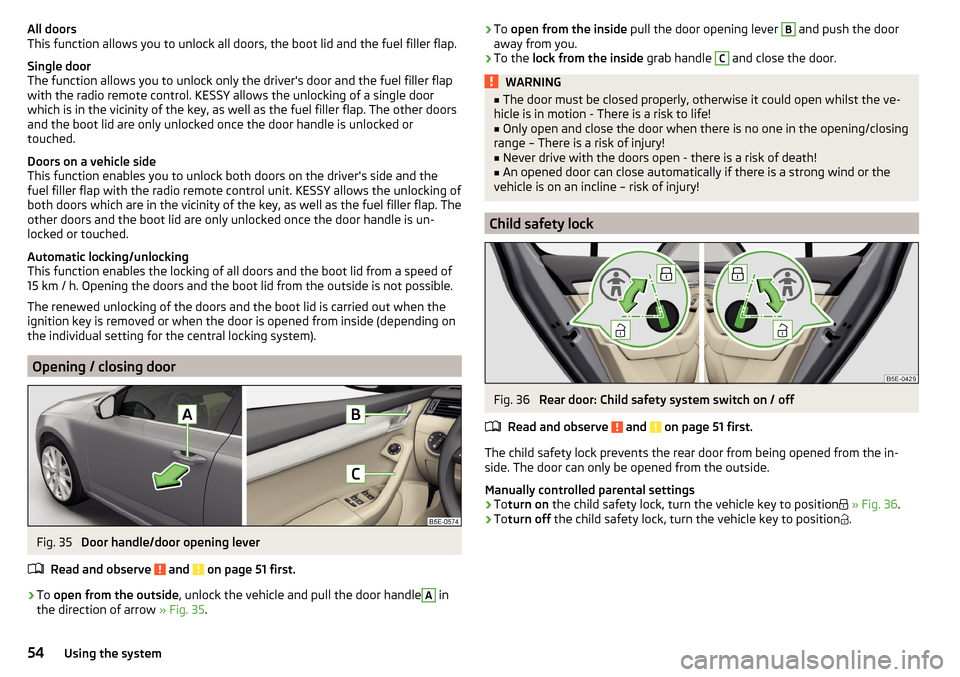
Fig. 35
Door handle/door opening lever
Read and observe
and on page 51 first.
›
To open from the outside , unlock the vehicle and pull the door handle
A
in
the direction of arrow » Fig. 35.
›To
open from the inside pull the door opening lever B and push the door
away from you.›
To the lock from the inside grab handle
C
and close the door.
WARNING■
The door must be closed properly, otherwise it could open whilst the ve-
hicle is in motion - There is a risk to life!■
Only open and close the door when there is no one in the opening/closing
range – There is a risk of injury!
■
Never drive with the doors open - there is a risk of death!
■
An opened door can close automatically if there is a strong wind or the
vehicle is on an incline – risk of injury!
Child safety lock
Fig. 36
Rear door: Child safety system switch on / off
Read and observe
and on page 51 first.
The child safety lock prevents the rear door from being opened from the in- side. The door can only be opened from the outside.
Manually controlled parental settings
›
To turn on the child safety lock, turn the vehicle key to position
» Fig. 36 .
›
Toturn off the child safety lock, turn the vehicle key to position
.
54Using the system
Page 59 of 324
NoteButtonA » Fig. 38 is disabled when starting off or driving at a speed of over 5
km/h. The button is reactivated when the vehicle has stopped and a door is
opened.
Delayed locking of the boot lid
Read and observe
on page 56 first.
If the boot lid is unlocked with the button on the key, then the boot lid is
automatically locked after closing.
The period after which the boot lid is locked automatically can be extended by
a specialist garage.
CAUTION
There is a risk of unwanted entry into the vehicle before the boot lid is locked
automatically.
Electric boot lid
Introduction
This chapter contains information on the following subjects:
Description of operation
58
Set the top position of the lid
58
Malfunctions
58
The boot lid (hereinafter referred to as lid) can be operated electrically and
manually in the event of an emergency » page 58.
WARNING■
Ensure that the lock is properly engaged after closing the lid. Otherwise,
the lid might open suddenly while the vehicle is moving, even if the lid was
locked – There is a risk of an accident!■
Never drive with the lid open or unlatched, as otherwise exhaust gases
may get into the interior of the vehicle – risk of poisoning!
■
Only open and close the lid when no one is located in the opening/closing
range – risk of injury!
WARNING (Continued)■ Make sure that when closing the lid, no body parts are crushed – risk of
injury!■
When you open the boot lid make sure that there are no persons in the
opening area of the lid - there is a danger of injury!
CAUTION
Do not attempt to close the lid manually during the electrical closing process -
there is a risk of damaging the electric lid operation.
CAUTION
■ Check that no objects are located in the opening/closing area which could
hinder the movement (e.g. cargo on the roof rack or on the trailer etc.) - there
is a risk of damage to the lid!■
In certain circumstances, if the lid is loaded (e.g by a thick layer of snow), the
opening process of the lid can be interrupted. Remove the snow from the lid to
re-enable the electrical operation.
■
If the lid closes automatically (e.g. under load of snow), you will hear an inter-
mittent beep.
■
Always close the flap before disconnecting the battery.
57Unlocking and opening
Page 63 of 324

If the obstacle prevents the window from being closed during the next 10 sec-
onds, the closing process is interrupted once again and the window goes down
by several centimetres.
If you attempt to close the window again within 10 seconds of the window be-
ing moved down for the second time, even though the obstacle was not yet
been removed, the closing process is only stopped. During this time it is not
possible to automatically close the window. The force limiter is still switched
on.
The force limiter is only not operational if you attempt to close the window
again within the next 10 seconds – the window will now close with full force!
If you wait longer than 10 seconds, the force limiter is switched on again.
Window convenience operation
Read and observe
and on page 59 first.
The convenience operation for the window offers the option to open/close all
the windows at once (or only the window in the driver's door). The function of
convenience operation can be individually adjusted in the Infotainment menu
→
→
Opening and closing
.
Opening
›
Press and hold the button on the key.
›
Or
Switch off the ignition, open the driver's door and hold the key
A
until it
stops in the open position » Fig. 41 on page 60 .
›
orKeep the key in the locking cylinder of the driver's door in the unlock posi-
tion until all electrically operated windows are open.
Closing
›
Press and hold the button on the key.
›
Or
Switch off the ignition, open the driver's door and hold the key
A
until it
stops in the closed position » Fig. 41 on page 60 .
›
orKeep the key in the locking cylinder of the driver's door in the lock position
until all the electrically operated windows are closed.
›
In the KESSY system, hold your finger on the sensor on the outside of the
door handle of the front door » Fig. 33 on page 52 .
The convenience operation will only function correctly if all the windows auto- matically open/close properly.
Convenience opening or closing the window using the key in the driver's door
locking cylinder is only possible within 45 seconds of locking the vehicle.
The movement of the window is stopped immediately when the respective
button is released.
Malfunctions
Read and observe
and on page 59 first.
Repeatedly opening and closing the window can cause the window mecha-
nism to overheat and become temporarily blocked. You will be able to operate
the window again as soon as the operating mechanism has cooled down.
After disconnecting the vehicle battery, automatic opening / closing of the
window can be deactivated. In this case, the system must be activated as fol-
lows.
Window in the driver door
›
Switch on the ignition.
›
Pull the top edge of the button and close the window.
›
Release the button.
›
Pull up the respective button and hold for 1 second.
Windows in the other doors
›
Switch on the ignition.
›
Press the respective key above and close the window.
›
Release the button.
›
Pull up the respective button above and hold for 1 second.
Panoramic tilt / slide sunroof
Introduction
This chapter contains information on the following subjects:
Operation
62
Force limiter
62
Convenience operation of the sliding / tilting roof
62
Activate operation of the tilt / slide sunroof
62
Manually operated sunblind
63
Electrically operated sunblind
63
Activating operation of the sunshade
63
The panoramic tilt / slide sunroof (hereinafter referred to as tilt / slide sunroof)
can only be operated when the ignition is turned on and when the outdoor
temperature is above -20 °C.
61Unlocking and opening
Page 64 of 324

The sliding/tilting roof can still be operated for approx. 10 minutes after
switching the ignition off. After opening the driver or front passenger door, it
is no longer possible to operate the sliding/tilting roof.WARNINGWhen operating the tilt/slide sunroof and the sunshade, proceed with cau-
tion to avoid causing crushing injuries – risk of injury!
CAUTION
■ During the winter it may be necessary to remove any ice and snow in the vi-
cinity of the sliding/tilting roof before opening it to prevent any damage to the
opening mechanism.■
Always close the sliding/tilting roof before disconnecting the battery.
Operation
Fig. 43
Operation of the tilting / sliding sunroof
Read and observe
and on page 62 first.
Operation of the tilting / sliding sunroof » Fig. 43
Open fully
Open to the low-noise position
Open partially
Close completely
Opening (switch in position
)
Resetting (switch in position
)
A12After turning the switch one stop to position (spring-tensioned position),
the tilt / slide sunroof stops in the position in which the intensity of the wind
noise is low. After turning the switch further to position
, the tilt / slide sun-
roof opens up to the stop.
Force limiter
Read and observe
and on page 62 first.
The sliding/tilting roof is fitted with a force limiter.
If there is an obstacle, the closing process is stopped and the glass pane re-
tracts by several centimetres.
WARNINGIf the tilting / sliding sunroof is closed, by pulling on the recess of the
switch in the direction of arrow 2, » Fig. 43 on page 62 and the closing
process is hindered by an obstacle, then at the third attempt at closing, the
force limitation will cease to function (if less than 5 s passes between the
individual attempts to close). The tilt / slide sunroof closes with full force -
this can cause injury.
Convenience operation of the sliding / tilting roof
Read and observe
and on page 62 first.
The convenience operation makes it possible to open or close the sliding/tilt-
ing roof using the key or the KESSY system via the sensor in the door handle of
the front door.
›
To open out , press and hold the
button on the key.
›
Or:
Hold the key in the unlock position in the driver's door lock.
›
To close , press and hold the
button (with KESSY, hold your finger on the
sensor on the outside of the door handle of the front door).
›
Or Hold the key in the lock position in the driver's door lock.
By interrupting the locking process, the closing operation is interrupted.
Activate operation of the tilt / slide sunroof
Read and observe
and on page 62 first.
If the tilt / slide sunroof stops working (e.g. after disconnecting and connecting
the battery), then the operation must be reactivated.
62Using the system