change time SKODA OCTAVIA 2016 3.G / (5E) Owner's Guide
[x] Cancel search | Manufacturer: SKODA, Model Year: 2016, Model line: OCTAVIA, Model: SKODA OCTAVIA 2016 3.G / (5E)Pages: 324, PDF Size: 48.85 MB
Page 284 of 324
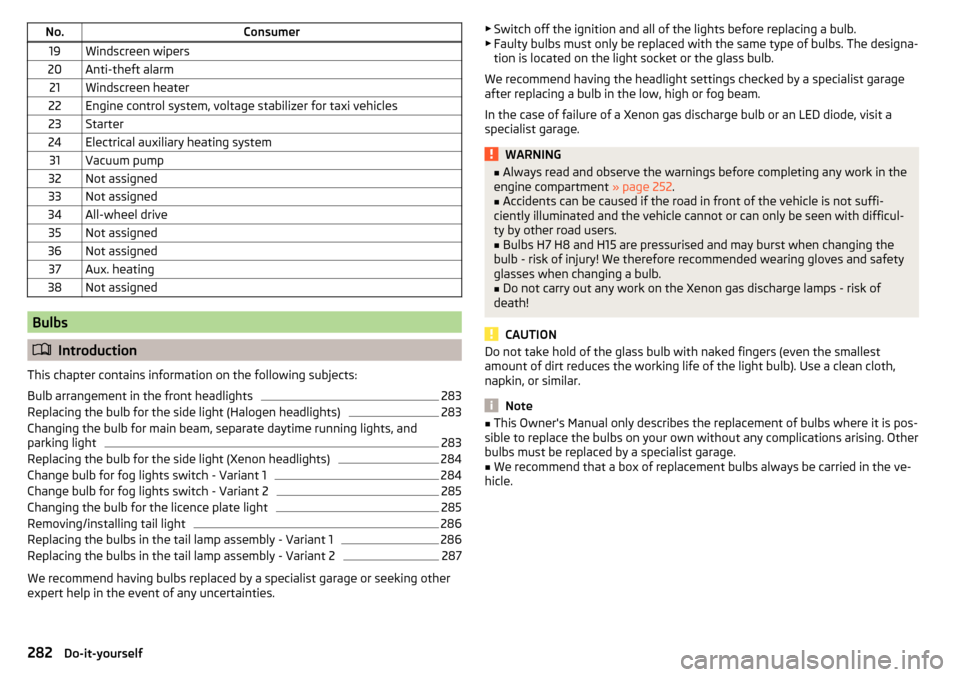
No.Consumer19Windscreen wipers20Anti-theft alarm21Windscreen heater22Engine control system, voltage stabilizer for taxi vehicles23Starter24Electrical auxiliary heating system31Vacuum pump32Not assigned33Not assigned34All-wheel drive35Not assigned36Not assigned37Aux. heating38Not assigned
Bulbs
Introduction
This chapter contains information on the following subjects:
Bulb arrangement in the front headlights
283
Replacing the bulb for the side light (Halogen headlights)
283
Changing the bulb for main beam, separate daytime running lights, and
parking light
283
Replacing the bulb for the side light (Xenon headlights)
284
Change bulb for fog lights switch - Variant 1
284
Change bulb for fog lights switch - Variant 2
285
Changing the bulb for the licence plate light
285
Removing/installing tail light
286
Replacing the bulbs in the tail lamp assembly - Variant 1
286
Replacing the bulbs in the tail lamp assembly - Variant 2
287
We recommend having bulbs replaced by a specialist garage or seeking other
expert help in the event of any uncertainties.
▶ Switch off the ignition and all of the lights before replacing a bulb.
▶ Faulty bulbs must only be replaced with the same type of bulbs. The designa-
tion is located on the light socket or the glass bulb.
We recommend having the headlight settings checked by a specialist garage after replacing a bulb in the low, high or fog beam.
In the case of failure of a Xenon gas discharge bulb or an LED diode, visit a
specialist garage.WARNING■ Always read and observe the warnings before completing any work in the
engine compartment » page 252.■
Accidents can be caused if the road in front of the vehicle is not suffi-
ciently illuminated and the vehicle cannot or can only be seen with difficul-
ty by other road users.
■
Bulbs H7 H8 and H15 are pressurised and may burst when changing the
bulb - risk of injury! We therefore recommended wearing gloves and safety
glasses when changing a bulb.
■
Do not carry out any work on the Xenon gas discharge lamps - risk of
death!
CAUTION
Do not take hold of the glass bulb with naked fingers (even the smallest
amount of dirt reduces the working life of the light bulb). Use a clean cloth,
napkin, or similar.
Note
■ This Owner's Manual only describes the replacement of bulbs where it is pos-
sible to replace the bulbs on your own without any complications arising. Other
bulbs must be replaced by a specialist garage.■
We recommend that a box of replacement bulbs always be carried in the ve-
hicle.
282Do-it-yourself
Page 308 of 324
High beam assistantWarning light39
Hill Start Assist (HHC)202
hitch235
Hitch230
home address128
Home address174
Home Page Android Auto
166
Hook96
horn29
I
I-PAD holder
92
Ignition lock189
Images Display
126
Main menu144
Operation144
safe removal of the data source124
Select Image Source144
Set to126
Image viewer144
Immobiliser188
Import contacts126, 132
Import destinations175
Import my destinations175
In an emergency Changing a wheel
266
Inertia reels17
Information about the towing process273
Information call157
Information system41
Auto Check Control41
Door alarm41
Eco tips41
Gear recommendation42
Lap timer47
MAXI DOT display46
Multifunction display44
Service interval display48
Stop watch47
Infotainment Auxiliary heating (auxiliary heating and ventila-tion)
110
connect to the telephone152
Restart117
Software update122
Infotainment display Driving data
45
Infotainment Hotspot163
Infotainment language123, 130
Infotainment menu CAR
187
Media (video)145
Sound122
Infotainment menus118
Infotainment operation116
Infotainment screen116
Infotainment operation using an application in the external device
119
Infotainment screen123, 130
Areas116
Important information115
keyboard117
Maintenance115
Operation116
Input screen Language characters
130
Input screen with keyboard117
Instrument cluster30
Auto check control42
Warning lights32
interior light69, 70
Interior monitor56
Intermediate target179
ISOFIX25
J
Jack
266
Jukebox141
Jump-starting272
K
KESSY Unlocking / locking
52
key Starting / stopping the engine
189
Switch on/off ignition189
Key Change battery
275
Lock51
Unlock51
keyboard117
L
L-band
126
Lamp failure Warning light
39
Lamps Warning light
39
Lane Assist Malfunctions
226
See lane departure warning224
Settings in Infotainment225
Warning light36
Lane Departure Warning224
Activation / deactivation226
Operation225
Settings in Infotainment225
Lane recommendation180
Language characters123
Lap timer47
Last destinations173
Latitude169
LEAVING HOME68
306Index
Page 314 of 324
SettingAuxiliary heating (auxiliary heating and ventila-tion)
109
Headrests80
Mirror74
Positions of the variable loading floor101
Seat belt height16
Seats76
settings Images
126
Infotainment language123, 130
Infotainment screen123, 130
Video DVD126
Settings Additional keyboard languages
123, 130
Advanced settings129
AUX126
Bluetooth124, 126, 131
Codecs126
Configuration wizard118
DAB125, 132
Data connection124
Equalizer122
External device data transfer123
FM125, 131
Fuel options129
Information regarding the version of the navi- gation data
129
infotainment122
Infotainment130
Manage favourites159
Manage memory128
Map128
Media126, 132
Navigation128
Nav. announcements129
Network124
Pin code126
Radio125, 131
Reset to factory settings124, 187
Restore factory settings131
Route options128
SmartLink128
Software update122
Software updates131
Sound122, 130
Sound system122
Subwoofer122
Surround122
System information122, 125, 131
Telephone126, 132
Text messages126
Time and date123, 130
Top speeds129
Units123, 130
Update software125
User profile159
Vehicle187
Voice control124
Volume118
WLAN124
Settings Call126
Setting the Clock
42
Setup122, 130
Show POIs on the map176
SIM card Change PIN code
154
Data connection164
Insert154
PIN code154
Remove154
Sliding/tilting roof Activating operation of the sunshade
63
SmartGate connection using Wi-Fi direct
49
Connection via Wi-Fi49
introductory information48
Password/PIN code change50
Setting50
SmartLink Android Auto166
Apple CarPlay167
Main menu165
MirrorLink®167
Set to128
SMS161
New161
Operation161
Received162
Snow chains263
sockets 12-volt power socket in the luggage compart- ment
90
12-volt socket in the interior90
Sockets 230 V
90
Software update122
Software Update125
Software updates131
Sound122, 130
Sound system122
Spare wheel262
Removing / stowing267
Speed limitations180
Speed symbol263
Split screen Audio
171
Compass171
Manoeuvre171
Map171
Menus171
Most frequent routes171
Satellite data171
Turn on/off171
Waypoint tour171
Spoiler241
SSID124
Stabilisation system200
Stability Control (ESC)200
312Index