display SKODA OCTAVIA 2016 3.G / (5E) Workshop Manual
[x] Cancel search | Manufacturer: SKODA, Model Year: 2016, Model line: OCTAVIA, Model: SKODA OCTAVIA 2016 3.G / (5E)Pages: 324, PDF Size: 48.85 MB
Page 131 of 324
■Waypoint tour - Delete item in the Waypoint mode menu (applies to Infotain-
ment Columbus)
■Most frequent routes
- Delete the most travelled routes
nav. announcements
›
In the Navigation main menu, tap on the function surface
→
Nav. announce-ments
.
■
Volume
- Volume control of the nav. announcements
■
Entertainment fading (nav. announce.)
- Setting the fading of the audio volume (e.g.
radio volume.) with nav. announcements
■
Nav. announcements:
- Setting the playback method of nav. announcements
■
Comprehensive
- All nav. announcements
■
Brief
- Short nav. announcements
■
Only in the event of issues
- Only nav. announcements when a route is changed
■
No navigation sound during call
- Activate/ deactivate non-playback of nav. an-
nouncements during a telephone call
■
Note: “My POIs”
- Turn on/off an audible indication when approaching a custom
POI (if supported by the imported custom POI) (applies to Infotainment Co-
lumbus)
Top speeds
›
In the Navigation main menu, tap on the function surface
→
Top speeds
.
The maximum speed limits for the current country are displayed.
With the function switched on
Note: national border crossed
» page 129 , Advanced
settings display the country-specific speed limits when crossing international
borders.
Fuel options
›
In the Navigation main menu, tap on the function surface
→
Fuel options
.
■
Select preferred fuel station
- Select your preferred fuel station brand (the selec-
ted station brand will be displayed in the first three positions of the list)
■
Fuel warning
-Turn on- / Off the display of a warning message with the option
to visit the nearest petrol station when the fuel level reaches the reserve
area
Version information›
In the Navigation main menu, tap on the function surface
→
Version infor-mation
.
A list of countries is displayed that exist for the navigation data, together with
the date of the last update.
An update of the navigation data can be carried out by tapping the functional
surface
Update (SD / USB)
.
The information on updating the navigation data is to be obtained from a
ŠKODA partner or on the following ŠKODA Internet pages.
http://go.skoda.eu/updateportal
Advanced settings
›
In the Navigation main menu, tap on the function surface
→
Advanced set-tings
.
■
Time display:
- Select the time display in the status line
■ - Estimated arrival time at destination
■ - Estimated travelling time to the destination
■
Status line:
- Selection of the target type, for which the status line, the route
and travel time are displayed (Here it is also determined which destination
type after selecting
→
is displayed on the map)
■ - Route destination
■ - Next waypoint
■
Note: national border crossed
- Switching on/off the display for information on na-
tional speed limits when crossing the national border
■
Demo mode
- Switch on/off guidance in demo mode
■
Define demo mode starting point
- Specifying the start point of the route guidance
in the demo mode by entering the address or the current vehicle position
129Infotainment settings - Columbus, Amundsen, Bolero
Page 132 of 324
Infotainment settings - Swing
Infotainment system settings
Sound settings
›
Press the button.
■
Volume
- Volume settings
■
Max. switch-on volume.
- Sets the maximum volume when Infotainment is
turned on
■
Message
- Adjustment of traffic announcements volume (TP)
■
Speed-dependent volume adjustment
- Volume increases as speed increases
■
Entert. Fading
- Lowers the audio volume (e.g. radio volume) with activated
parking aid
■
AUX volume
- Sets the volume for the device connected through AUX
■
BT audio:
- Volume setting of the device connected via Bluetooth ®
audio pro-
file
■
Balance - Fader
- Sets the balance between left and right, front and rear
■
Bass - Mid - Treble
- Setting the equaliser
■
Confirmation tone
- Switch on/off audible tone when touching the screen
Display settings
›
Press the button, then tap the function surface
Screen
.
■
Switch off screen (in 10 seconds)
- Enable / disable the automatic power off func-
tion 1)
■
Brightness:
- Adjusts the brightness of the screen
■
Confirmation tone
- Switch on/off audible tone when touching the screen
■
Show clock in standby mode
- Time and date displayed on the screen when the
ignition is switched on and Infotainment is switched off
Time and date settings
›
Press the button, then tap the function surface
Time and date
.
■
Time:
- Time settings
■
Time format:
- Specify the time format
■
Summer time
- Switches the summer setting on/off
■Automatic summer time - Switch on/off the automatic switch to daylight saving
time
■Date:
- Date settings
■
Date format:
- Setting the date format
Setting the Infotainment language
›
Press the button, then tap the function surface
Language
.
›
Select the Infotainment language.
Additional keypad language settings
›
Press the
button, then tap the function surface
Additional keypad languages
.
In this menu, a keyboard language set can be added to allow the entering of
characters other than those in the currently selected language.
Unit settings
›
Press the button, then tap the function surface
Units
.
■
Distance:
- Distance units
■
Speed:
- Speed units
■
Temperature:
- Temperature units
■
Volume:
- Volume units
■
Consumption:
- Fuel units
■
CNG consump.:
- CNG consumption units
■
Pressure:
- Pressure units for tire pressure
Safe removal of the data source
›
Press the button, then tap the function surface
Remove SD card safely
/
Re-move USB Safely
.
The appropriate message concerning the safe removal of the source is dis-
played in the screen.
Now the external source can be removed or separated.
1)
Infotainment turns the screen off when no touch screen is performed or none of the keys are pressed /
rotated for more than 10 seconds.
130Infotainment
Page 133 of 324

Restore factory settings›
Press the button, then tap the function surface
Factory settings
.
In this menu, individual settings or all settings can be restored at the same
time.
Bluetooth ®
settings
›
Press the button, then tap the function surface
Bluetooth
.
■
Bluetooth
- Switch on/off Bluetooth ®
function
■
Visibility:
- Switch on/off the visibility of the Bluetooth ®
device for Bluetooth ®
devices
■
1st name
- Changing the name of the Bluetooth ®
unit
■
Paired devices
- Display the list of coupled Bluetooth ®
devices
■
Find devices
- Searches for available Bluetooth ®
devices
■
BT audio (A2DP/AVRCP)
- Turn on/off the ability to connect a Bluetooth, ®
audio
device (e.g. MP3 player, tablet etc...)
System information
›
Press the button, then tap the function surface
System information
.
■
Update software
- Update software (e.g. Bluetooth ®
)
■ Bluetooth: ... Version number of the Bluetooth ®
software
■ Device part number: ... - Infotainment part number
■ Hardware: ... - Hardware version
■ Software: ... - Software version
The information on available software updates is obtained from a ŠKODA part-
ner or from the following ŠKODA Internet pages.
http://go.skoda.eu/infotainment
Radio menu settings
Settings for all broadcasting areas
›
Tap on the function surface in the Radio main menu
.
■Scan - Automatic play short portions of all available stations in the current
frequency range
■Arrow buttons:
- Setting the function of the function surfaces
■
Presets
- Switch between stations stored under the preset buttons
■
Stations
- Switch between all available stations of the selected broadcasting
range
■
Traffic program (TP)
- Switches traffic programme on/off
■
Radio text
- Switching the text display radio (FM and DAB) on and off
■
Kind of stat. list:
- Sort types of radio stations in the station list (DAB)
■
Global
- Alphanumeric station sorting with filtering option according to the
transmitted program type
■
Hierarchical
- Station sorting according to their assigned parent station
groups (Ensemble) - Tree structure of the list
■
Station logos
- Manual management of station logos
■
Delete presets
- Delete the stations stored under preset buttons
■
Advanced settings
- Other settings that are different depending on the selected
broadcasting range (FM and DAB)
Advanced Settings (FM)
›
Select the FM band in the Radio main menu and tap on the function surface
→
Advanced settings
.
■
RDS Regional:
- Switch on/off the automatic tracking of related regional sta-
tions
■
Automatic
- Auto-selects the station with the best reception at the moment.
If you lose reception in the given the region, Infotainment will automatical-
ly set another available region.
■
Fixed
- Maintains the selected regional station continuously. When the sig-
nal is lost, another station must be set manually.
■
Alternative frequency (AF)
- Search for alternative frequencies of the station cur-
rently being played to on/off
■
Radio Data System (RDS)
- enable/disable RDS function (receiving additional in-
formation from the station) 1)
■
Sort stations:
- Sort types of radio stations in the station list (FM)
■
Group
- Sort by transmitted program type
■
ABC
- alphabetical order according to station name
1)
Only valid for some countries.
131Infotainment settings - Swing
Page 134 of 324
Advanced Settings (DAB)›
In the Radio main menu, select the DAB range and tap on the function sur-
face
→
Advanced settings
.
■
DAB traffic announcements
- Switch on/off DAB announcements
■
Other DAB messages
- Switch on/off other announcements (e.g., warnings, re-
gional weather, sports reports, financial news)
■
DAB station tracking
- Switch on/off automatic DAB station tracking on another
frequency or in other station groups
■
Aut. DAB - FM switching
- switches on/off auto-switching from DAB to the FM
frequency band if the DAB signal is lost
Automatic change from DAB to FM
In the event of bad DAB reception, the device tries to find an FM station.
The station name is followed by ( ) while the station is being received on the
FM band. When the corresponding DAB station is received again, the system
automatically switches from FM to DAB.
If a DAB station is also not available in the FM band due to poor reception, In-
fotainment will be switched to mute.
Media menu settings
›
Tap the function surface in the Media main menu
.
■
Sound
- sound settings
■
Mix/repeat inc. subfolders
- Switch on/off the title display including subfolders
■
Bluetooth
- Settings for the Bluetooth ®
function
■
Traffic program (TP)
- Switches traffic programme on/off
■
Activate AUX
- Enables / disables the AUX input
■
Remove SD card safely
- Safe removal of the inserted SD storage card
■
Remove USB safely
- safe removal of the external device connected to the USB
input
Telephone menu settings
›
In the Telephone main menu, tap on the function surface,
.
■
Hands-free
- Switching a call to the phone / back to Infotainment (the menu
item is displayed during a call)
■
Select telephone
- Search for available telephones/list of paired telephones/se-
lect telephone
■
Find
- search for available phones
■Bluetooth - Bluetooth ®
settings
■User profile
- user profile settings
■
Manage favourites
- set the function surfaces for your favourite contacts
■
Sort by:
- Arrangement of the phone contact list
■
Surname
- Sort by contact name
■
1st name
- Sort by contact's first name
■
Imp. contacts
- Import telephone contacts
■
Select ring tone
- Selecting the ring tone
■
Remember your mobile
- Turn on/off the warning mode before forgetting the
phone in the vehicle (if the phone was connected to Infotainment)
■
Simultaneous calls
- enable/disable the option to hold two concurrent calls
132Infotainment
Page 135 of 324
Radio
Operation
Introduction to the subject
Infotainment allows analogue radio reception of FM and AM frequency ranges
as well as DAB digital radio reception.
CAUTION
■ For vehicles with window antennas do not stick foil or metal coated stickers
to the window - Radio signal reception could be affected.■
Car parks, tunnels, tall buildings or mountains can interfere with the radio
signal even causing it to fail completely.
Main menu
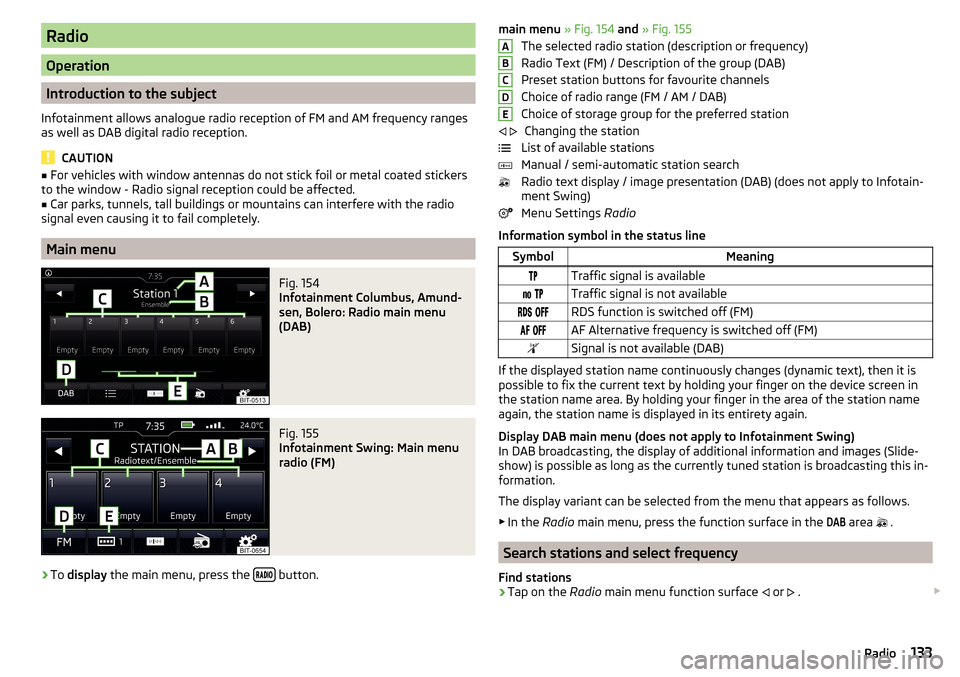
Fig. 154
Infotainment Columbus, Amund-
sen, Bolero: Radio main menu
(DAB)
Fig. 155
Infotainment Swing: Main menu
radio (FM)
›
To display the main menu, press the button.
main menu
» Fig. 154 and » Fig. 155
The selected radio station (description or frequency)
Radio Text (FM) / Description of the group (DAB)
Preset station buttons for favourite channels
Choice of radio range (FM / AM / DAB) Choice of storage group for the preferred station Changing the station
List of available stations
Manual / semi-automatic station search
Radio text display / image presentation (DAB) (does not apply to Infotain-
ment Swing)
Menu Settings Radio
Information symbol in the status lineSymbolMeaningTraffic signal is available Traffic signal is not available RDS function is switched off (FM) AF Alternative frequency is switched off (FM)Signal is not available (DAB)
If the displayed station name continuously changes (dynamic text), then it is
possible to fix the current text by holding your finger on the device screen in
the station name area. By holding your finger in the area of the station name
again, the station name is displayed in its entirety again.
Display DAB main menu (does not apply to Infotainment Swing)
In DAB broadcasting, the display of additional information and images (Slide- show) is possible as long as the currently tuned station is broadcasting this in-
formation.
The display variant can be selected from the menu that appears as follows. ▶ In the Radio main menu, press the function surface in the
DAB
area
.
Search stations and select frequency
Find stations
›
Tap on the Radio main menu function surface
or
.
ABCDE
133Radio
Page 136 of 324
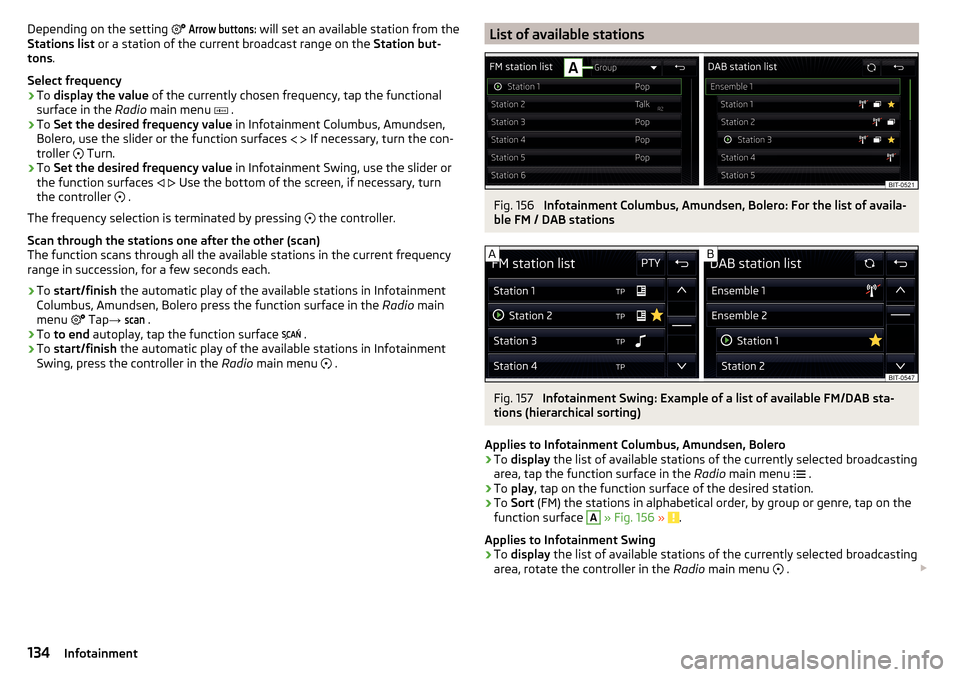
Depending on the setting Arrow buttons: will set an available station from the
Stations list or a station of the current broadcast range on the Station but-
tons .
Select frequency›
To display the value of the currently chosen frequency, tap the functional
surface in the Radio main menu
.
›
To Set the desired frequency value in Infotainment Columbus, Amundsen,
Bolero, use the slider or the function surfaces
If necessary, turn the con-
troller
Turn.
›
To Set the desired frequency value in Infotainment Swing, use the slider or
the function surfaces
Use the bottom of the screen, if necessary, turn
the controller .
The frequency selection is terminated by pressing the controller.
Scan through the stations one after the other (scan)
The function scans through all the available stations in the current frequency
range in succession, for a few seconds each.
›
To start/finish the automatic play of the available stations in Infotainment
Columbus, Amundsen, Bolero press the function surface in the Radio main
menu Tap
→
scan
.
›
To to end autoplay, tap the function surface
.
›
To
start/finish the automatic play of the available stations in Infotainment
Swing, press the controller in the Radio main menu
.
List of available stationsFig. 156
Infotainment Columbus, Amundsen, Bolero: For the list of availa-
ble FM / DAB stations
Fig. 157
Infotainment Swing: Example of a list of available FM/DAB sta-
tions (hierarchical sorting)
Applies to Infotainment Columbus, Amundsen, Bolero
›
To display the list of available stations of the currently selected broadcasting
area, tap the function surface in the Radio main menu
.
›
To play , tap on the function surface of the desired station.
›
To Sort (FM) the stations in alphabetical order, by group or genre, tap on the
function surface
A
» Fig. 156 » .
Applies to Infotainment Swing
›
To display the list of available stations of the currently selected broadcasting
area, rotate the controller in the Radio main menu
.
134Infotainment
Page 138 of 324
Assign a station logo›Tap on the function surface in the Radio main menu →
Station logos
.›
Tap on an occupied station button and select the data carrier (SD card, USB).
›
Search for and select the desired station logo on the respective data carrier.
Remove station logo
›
Tap on the function surface in the Radio main menu
→
Station logos
.
›
Tap on the station button from which you want to remove a logo.
›
or The function surface
All
to delete the logos of all the station buttons si-
multaneously.
›
Confirm / cancel the removal.
Note
■ The following image formats are supported: jpg, gif, png, bmp (we recom-
mend using the png format).■
Maximum resolution 400x240 pixels.
TP Traffic program
›
To switch on/off traffic monitoring in the main menu Radio, tap on the func-
tion surface
→
Traffic program (TP)
.
During a traffic announcement, it is possible to cancel the current announce-
ment if necessary by deactivating traffic monitoring.
Note
■ If the station that is currently set does not transmit traffic reports or the sig-
nal is not available, then Infotainment automatically searches in the back-
ground for another TP station.■
During playback in the Media menu or a station in the AM radio range, traffic
news is received from the previously selected FM radio range.
Media
Operation
Main menu
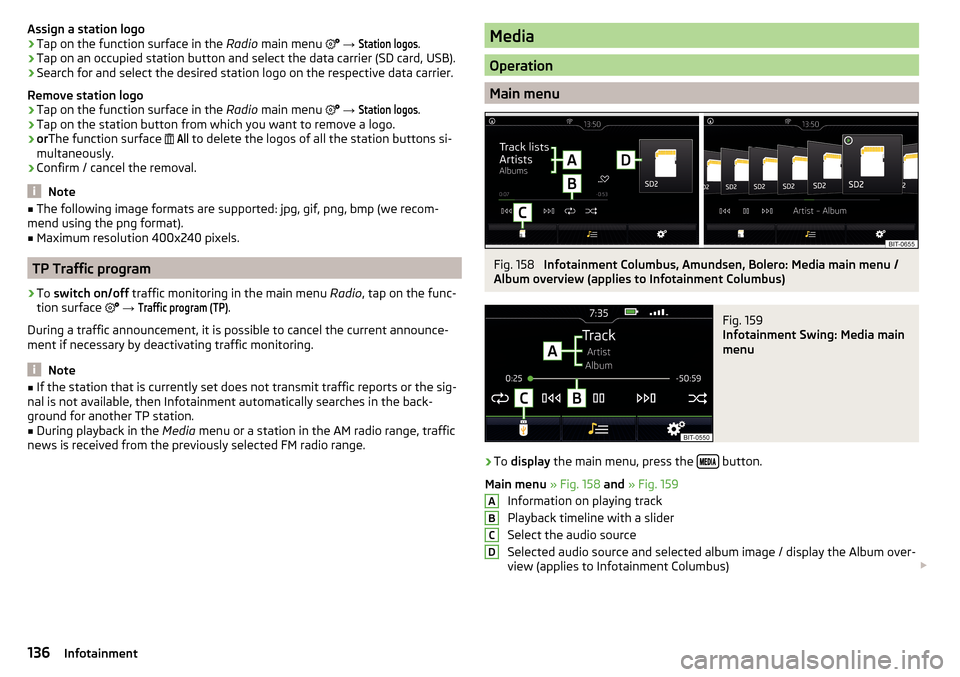
Fig. 158
Infotainment Columbus, Amundsen, Bolero: Media main menu /
Album overview (applies to Infotainment Columbus)
Fig. 159
Infotainment Swing: Media main
menu
›
To display the main menu, press the button.
Main menu » Fig. 158 and » Fig. 159
Information on playing track
Playback timeline with a slider
Select the audio source
Selected audio source and selected album image / display the Album over-
view (applies to Infotainment Columbus)
ABCD136Infotainment
Page 139 of 324
Depending on the audio source type:
▶ Folder/Title list
▶ Multimedia database
Media menu settings
Album overview (valid for Infotainment Columbus)
By touching with your finger in the area D
» Fig. 158 a list of albums is dis-
played. Movement within the album list can be performed by moving a finger
across the screen to the right/left or by rotating the controller
. After 10 sec-
onds since the last operation, the main menu is displayed.
Note
■ Information concerning the given title appears on the screen, if they are stor-
ed as what are called ID3 Tags on the audio source. If no ID3 tag is available,
only the title name is displayed.■
The remaining playback time indicated does not correspond to the actual re-
maining playback time for titles with variable bitrates.
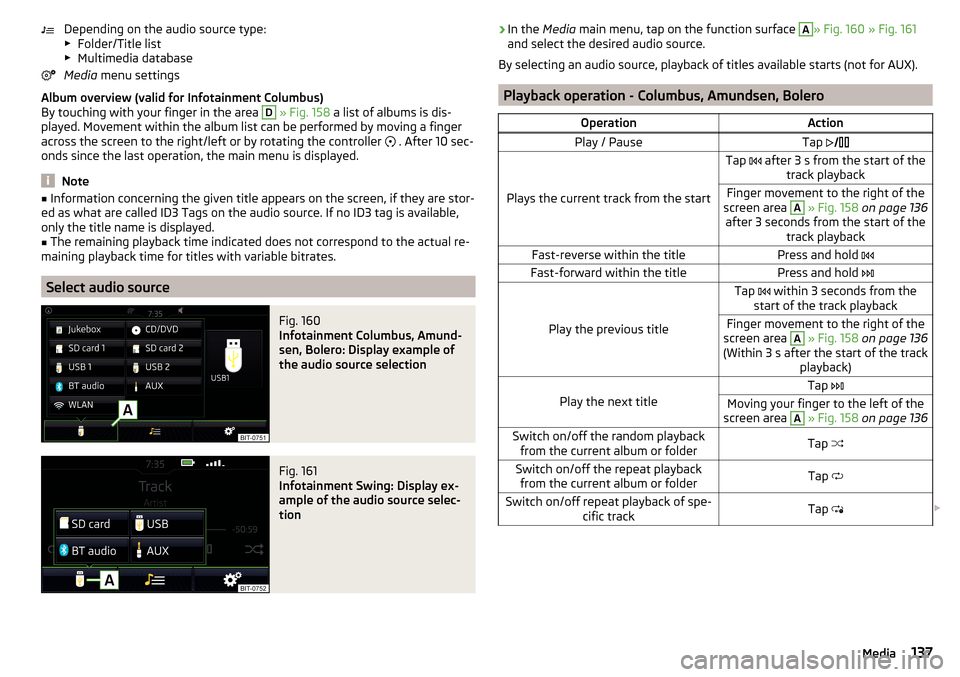
Select audio source
Fig. 160
Infotainment Columbus, Amund-
sen, Bolero: Display example of
the audio source selection
Fig. 161
Infotainment Swing: Display ex-
ample of the audio source selec-
tion
› In the
Media main menu, tap on the function surface A» Fig. 160 » Fig. 161
and select the desired audio source.
By selecting an audio source, playback of titles available starts (not for AUX).
Playback operation - Columbus, Amundsen, Bolero
OperationActionPlay / PauseTap
Plays the current track from the start
Tap after 3 s from the start of the
track playbackFinger movement to the right of the
screen area A
» Fig. 158 on page 136
after 3 seconds from the start of the track playbackFast-reverse within the titlePress and hold Fast-forward within the titlePress and hold
Play the previous title
Tap within 3 seconds from the
start of the track playbackFinger movement to the right of the
screen area A
» Fig. 158 on page 136
(Within 3 s after the start of the track playback)Play the next title
Tap Moving your finger to the left of the
screen area A
» Fig. 158 on page 136Switch on/off the random playback
from the current album or folderTap Switch on/off the repeat playback
from the current album or folderTap Switch on/off repeat playback of spe-
cific trackTap 137Media
Page 140 of 324
OperationActionSearch (applies to sources with dis-playable multimedia database) (ap- plies to Infotainment Columbus)Tap Turn on / off playback of similar tracks
according to information from what is
called the ID3-Tag (applies to Infotain- ment Columbus)
Tap
The movement within the track is possible by finger touching the timeline
B
» Fig. 158
on page 136 .
Playback operation - Swing
OperationActionPlay / PauseTap Play the previous titleTap within 3 seconds from the
start of the track playbackPlays the current track from the startTap after 3 s from the start of the
track playbackFast-reverse within the titlePress and hold Fast-forward within the titlePress and hold Play the next titleTap Switch on/off the random playback
from the current album or folderTap Switch on/off the repeat playback
from the current album or folderTap Switch on/off repeat playback of spe-
cific trackTap
The movement within the track is possible by finger touching the timeline
B
» Fig. 158 on page 136 .
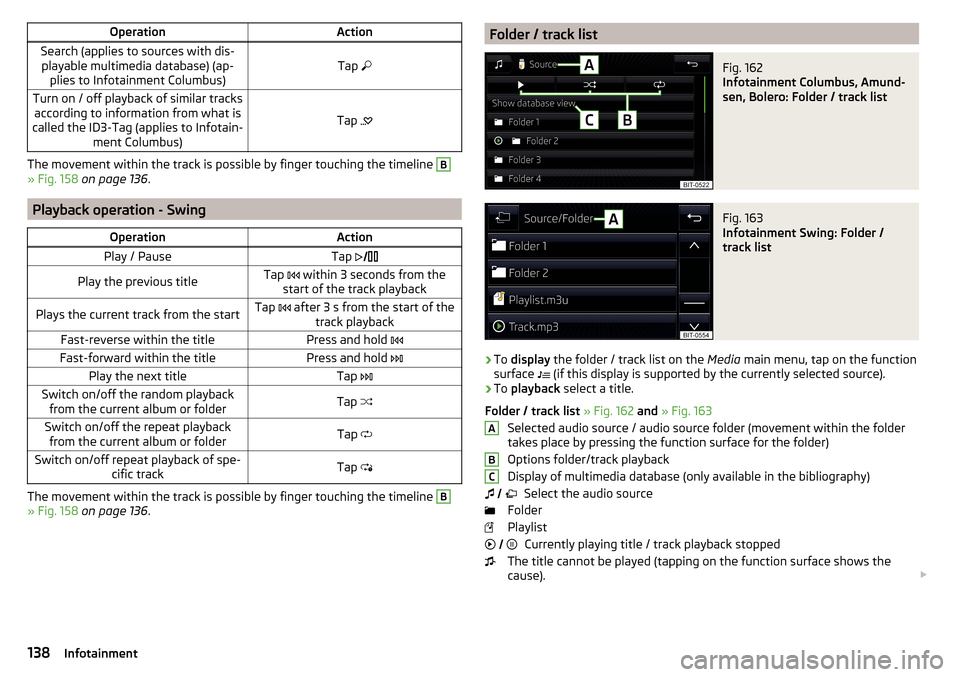
Folder / track listFig. 162
Infotainment Columbus, Amund-
sen, Bolero: Folder / track list
Fig. 163
Infotainment Swing: Folder /
track list
›
To display the folder / track list on the Media main menu, tap on the function
surface (if this display is supported by the currently selected source).
›
To
playback select a title.
Folder / track list » Fig. 162 and » Fig. 163
Selected audio source / audio source folder (movement within the folder
takes place by pressing the function surface for the folder)
Options folder/track playback
Display of multimedia database (only available in the bibliography) Select the audio source
Folder
Playlist Currently playing title / track playback stopped
The title cannot be played (tapping on the function surface shows the
cause).
ABC
138Infotainment
Page 141 of 324
Note■In the list, the first 1000 entries (titles, directories etc.) are displayed with the
oldest creation date.■
The scanning speed of the folder / track list depends on the connection
speed and volume of data.
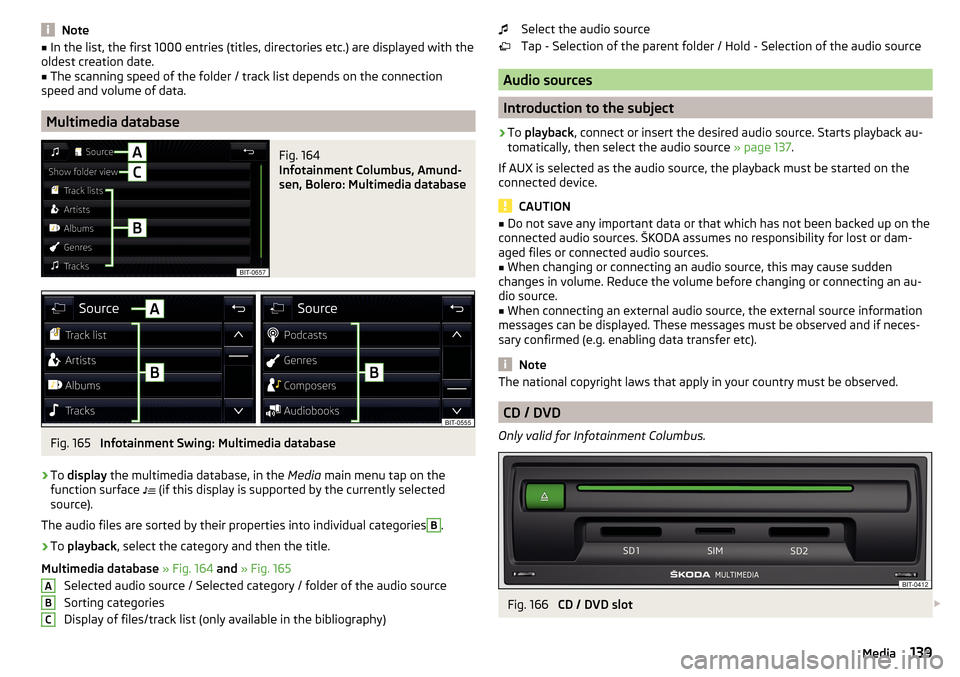
Multimedia database
Fig. 164
Infotainment Columbus, Amund-
sen, Bolero: Multimedia database
Fig. 165
Infotainment Swing: Multimedia database
›
To display the multimedia database, in the Media main menu tap on the
function surface (if this display is supported by the currently selected
source).
The audio files are sorted by their properties into individual categories
B
.
›
To playback , select the category and then the title.
Multimedia database » Fig. 164 and » Fig. 165
Selected audio source / Selected category / folder of the audio source
Sorting categories
Display of files/track list (only available in the bibliography)
ABCSelect the audio source
Tap - Selection of the parent folder / Hold - Selection of the audio source
Audio sources
Introduction to the subject
›
To playback , connect or insert the desired audio source. Starts playback au-
tomatically, then select the audio source » page 137.
If AUX is selected as the audio source, the playback must be started on the
connected device.
CAUTION
■ Do not save any important data or that which has not been backed up on the
connected audio sources. ŠKODA assumes no responsibility for lost or dam-
aged files or connected audio sources.■
When changing or connecting an audio source, this may cause sudden
changes in volume. Reduce the volume before changing or connecting an au-
dio source.
■
When connecting an external audio source, the external source information
messages can be displayed. These messages must be observed and if neces-
sary confirmed (e.g. enabling data transfer etc).
Note
The national copyright laws that apply in your country must be observed.
CD / DVD
Only valid for Infotainment Columbus.
Fig. 166
CD / DVD slot
139Media