USB SKODA OCTAVIA 2016 3.G / (5E) Owner's Manual
[x] Cancel search | Manufacturer: SKODA, Model Year: 2016, Model line: OCTAVIA, Model: SKODA OCTAVIA 2016 3.G / (5E)Pages: 324, PDF Size: 48.85 MB
Page 31 of 324
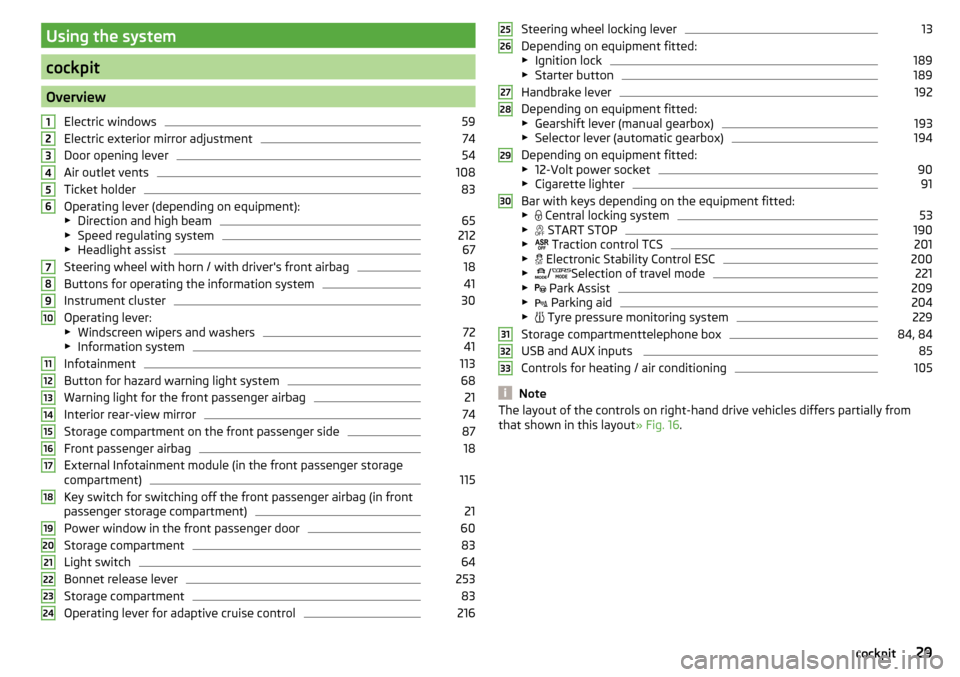
Using the system
cockpit
OverviewElectric windows
59
Electric exterior mirror adjustment
74
Door opening lever
54
Air outlet vents
108
Ticket holder
83
Operating lever (depending on equipment):
▶ Direction and high beam
65
▶Speed regulating system
212
▶Headlight assist
67
Steering wheel with horn / with driver's front airbag
18
Buttons for operating the information system
41
Instrument cluster
30
Operating lever:
▶ Windscreen wipers and washers
72
▶Information system
41
Infotainment
113
Button for hazard warning light system
68
Warning light for the front passenger airbag
21
Interior rear-view mirror
74
Storage compartment on the front passenger side
87
Front passenger airbag
18
External Infotainment module (in the front passenger storage
compartment)
115
Key switch for switching off the front passenger airbag (in front
passenger storage compartment)
21
Power window in the front passenger door
60
Storage compartment
83
Light switch
64
Bonnet release lever
253
Storage compartment
83
Operating lever for adaptive cruise control
216123456789101112131415161718192021222324Steering wheel locking lever13
Depending on equipment fitted:
▶ Ignition lock
189
▶Starter button
189
Handbrake lever
192
Depending on equipment fitted:
▶ Gearshift lever (manual gearbox)
193
▶Selector lever (automatic gearbox)
194
Depending on equipment fitted:
▶ 12-Volt power socket
90
▶Cigarette lighter
91
Bar with keys depending on the equipment fitted:
▶ Central locking system
53
▶
START STOP
190
▶
Traction control TCS
201
▶
Electronic Stability Control ESC
200
▶
/
Selection of travel mode
221
▶
Park Assist
209
▶
Parking aid
204
▶
Tyre pressure monitoring system
229
Storage compartmenttelephone box
84, 84
USB and AUX inputs
85
Controls for heating / air conditioning
105
Note
The layout of the controls on right-hand drive vehicles differs partially from
that shown in this layout » Fig. 16.25262728293031323329cockpit
Page 84 of 324

WARNINGIf you are sensitive to pain and/or temperature, e.g. through medication,
paralysis or because of chronic illness (e.g. diabetes), we recommend not to
use the seat heating. If the seat heating is used, we recommend to make
regular breaks in your journey when driving long distances, so that the
body can recuperate from the stress of the journey. Please consult your
doctor, who can evaluate your specific condition.
CAUTION
The following instructions must be observed to avoid damage to the seats.■Do not kneel on the seats or otherwise apply concentrated pressure to them.■
Do not switch on the heating for unoccupied seats.
■
Do not switch on the heating for seats which have objects on them (e.g. a
child seat, bag or similar).
■
Do not switch on the heating for seats which have seat covers or protective
covers on them.
Note
If the on-board voltage decreases, the seat heating switches off automatically
» page 258 , Automatic consumer shutdown - Discharge protection of the ve-
hicle battery .Useful features
Interior fittings
Introduction
This chapter contains information on the following subjects:
Ticket holder
83
Storage compartment on the driver's side
83
Stowage compartments in the doors
83
Storage compartment in the front centre console
84
Phonebox
84
USB and AUX input
85
Cup holders
85
Waste container
85
Multimedia holder
86
Storage compartment under the front arm rest
86
Glasses compartment
87
Storage compartment on the front passenger side
87
Storage compartment for umbrella
87
Clothes hook
88
Storage pockets on the rear sides of the front seats
88
Storage compartment in the rear centre console
88
Long cargo channel
89
Removable through-loading bag
89WARNING■ Do not place anything on the dash panel. These objects might slide or fall
down when driving and may distract you from concentrating on the traffic –
There is a risk of an accident!■
Make sure that while driving no objects can enter the driver's footwell -
There is a risk of an accident!
■
Do not transport any objects on the front passenger seat except objects
(e.g. child safety seat) provided for this purpose – risk of accident!
■
No objects should be placed in the storage compartments nor in the
drinks holders; the vehicle occupants could be endangered if there is sud-
den braking or the vehicle collides with something.
82Using the system
Page 86 of 324
WARNINGThe storage compartmentA » Fig. 77 is to be used exclusively for storing
objects which do not stick out - danger of restricting the effectiveness of
the side airbags.
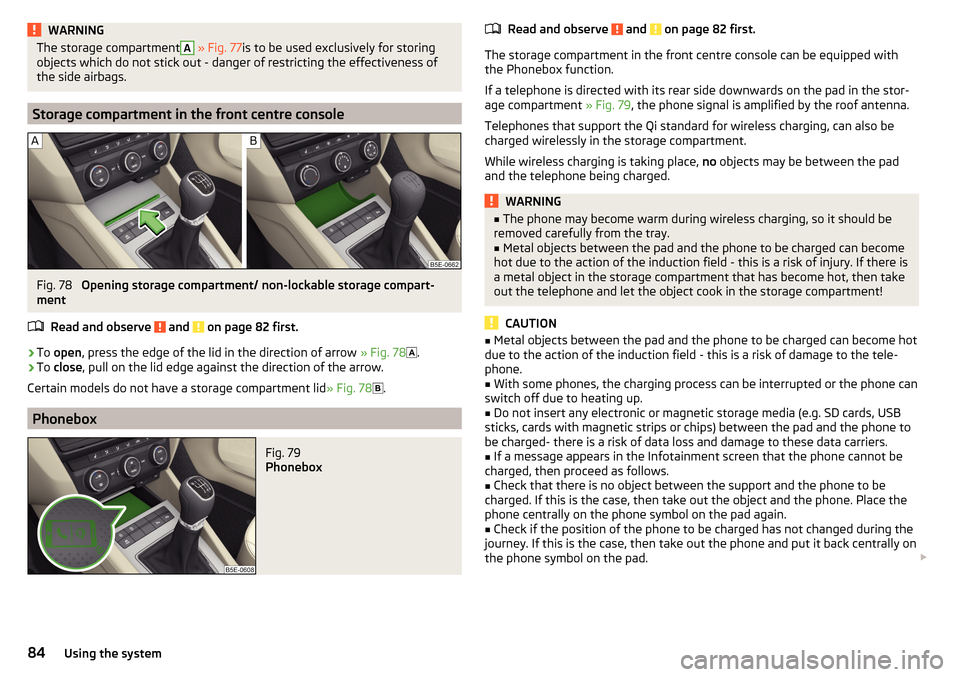
Storage compartment in the front centre console
Fig. 78
Opening storage compartment/ non-lockable storage compart-
ment
Read and observe
and on page 82 first.
›
To open , press the edge of the lid in the direction of arrow » Fig. 78
.
›
To close , pull on the lid edge against the direction of the arrow.
Certain models do not have a storage compartment lid » Fig. 78
.
Phonebox
Fig. 79
Phonebox
Read and observe and on page 82 first.
The storage compartment in the front centre console can be equipped with
the Phonebox function.
If a telephone is directed with its rear side downwards on the pad in the stor-
age compartment » Fig. 79, the phone signal is amplified by the roof antenna.
Telephones that support the Qi standard for wireless charging, can also be
charged wirelessly in the storage compartment.
While wireless charging is taking place, no objects may be between the pad
and the telephone being charged.
WARNING■ The phone may become warm during wireless charging, so it should be
removed carefully from the tray.■
Metal objects between the pad and the phone to be charged can become
hot due to the action of the induction field - this is a risk of injury. If there is
a metal object in the storage compartment that has become hot, then take
out the telephone and let the object cook in the storage compartment!
CAUTION
■ Metal objects between the pad and the phone to be charged can become hot
due to the action of the induction field - this is a risk of damage to the tele-
phone.■
With some phones, the charging process can be interrupted or the phone can
switch off due to heating up.
■
Do not insert any electronic or magnetic storage media (e.g. SD cards, USB
sticks, cards with magnetic strips or chips) between the pad and the phone to
be charged- there is a risk of data loss and damage to these data carriers.
■
If a message appears in the Infotainment screen that the phone cannot be
charged, then proceed as follows.
■
Check that there is no object between the support and the phone to be
charged. If this is the case, then take out the object and the phone. Place the
phone centrally on the phone symbol on the pad again.
■
Check if the position of the phone to be charged has not changed during the
journey. If this is the case, then take out the phone and put it back centrally on
the phone symbol on the pad.
84Using the system
Page 87 of 324
Note■At the start of the wireless charging, the appropriate message appears on
the Infotainment screen.■
For optimum telephone signal strength and uninterrupted wireless charging,
we recommend placing the phone in the storage compartment without the
protective sleeve, if possible.
■
Insert a max. 160x84 mm into the storage compartment.
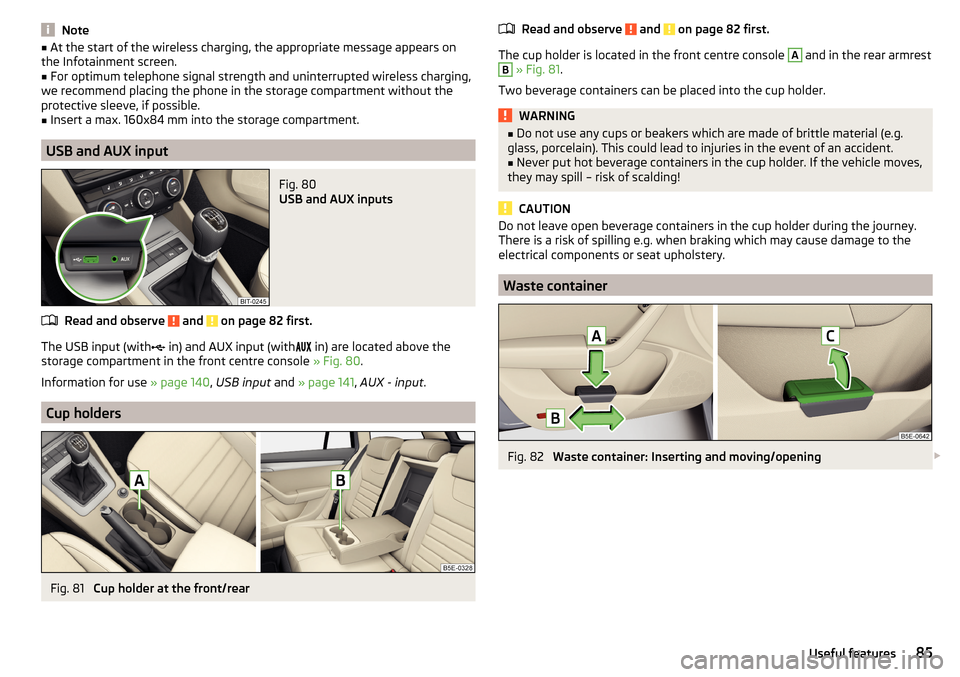
USB and AUX input
Fig. 80
USB and AUX inputs
Read and observe and on page 82 first.
The USB input (with
in) and AUX input (with
in) are located above the
storage compartment in the front centre console » Fig. 80.
Information for use » page 140, USB input and » page 141 , AUX - input .
Cup holders
Fig. 81
Cup holder at the front/rear
Read and observe and on page 82 first.
The cup holder is located in the front centre console
A
and in the rear armrest
B
» Fig. 81 .
Two beverage containers can be placed into the cup holder.
WARNING■ Do not use any cups or beakers which are made of brittle material (e.g.
glass, porcelain). This could lead to injuries in the event of an accident.■
Never put hot beverage containers in the cup holder. If the vehicle moves,
they may spill – risk of scalding!
CAUTION
Do not leave open beverage containers in the cup holder during the journey.
There is a risk of spilling e.g. when braking which may cause damage to the
electrical components or seat upholstery.
Waste container
Fig. 82
Waste container: Inserting and moving/opening
85Useful features
Page 130 of 324

■Forward calls - Setting forwarding of incoming calls (valid for Infotainment Co-
lumbus with the SIM card slot in the external module) ■All calls
- Forward all incoming calls
■
If engaged
- Forwarding incoming calls during a telephone call
■
If not available
- Forwarding the incoming calls when the vehicle is outside
the reach of the telephone service provider signal
■
If no answer
- Redirecting incoming calls when the incoming call is not an-
swered
SmartLink menu settings
›
In the SmartLink main menu, tap on the function surface
.
■
Activate data transfer for ŠKODA apps
- Turning data transfer on and off for ŠKODA
applications
■ MirrorLink® - Settings of the system MirrorLink ®
■
Screen orientation:
- Setting the screen orientation
■
Landscape
- Width display
■
Portrait
- Height display
■
Rotated 180 degrees
- Turn on / off the 180 ° inversion
■
Allow MirrorLink® notification to be shown
- Turn on / off the display of messages
of Mirror link ®
applications on the Infotainment screen
Navigation menu settings
Route options
›
In the Navigation main menu, tap on the function surface
Tap on
→
routeoptions
.
■
Suggest 3 alternative routes
- Switch on/off the menu for alternative routes (eco-
nomical, fast, short)
■
Route:
- Setting the preferred route
■
Most frequent routes
- Show/hide the menu of the most frequent routes in the
split screen
■
Dynamic route
- Switch on/off dynamic route recalculation due to TMC traffic
reports
■
Avoid motorways
- Switch on/off the non-use of motorways in the route cal-
culation
■
Avoid ferries and motorail trains
- Switch on/off the non-use of ferries and mo-
torail trains in the route calculation
■
Avoid toll roads
- Switch on/off use of toll roads for route calculation
■
Avoid tunnels
- Switch on/off use of tunnels for route calculation
■
Avoid routes requiring toll stickers - Switch use of routes requiring toll stickers
on/off for route calculation
■Show available toll stickers
- Selection of countries for which a valid toll sticker is
required (routes requiring toll stickers are used for route calculation)
■
Include trailer
- Turn on / off the setting to take a trailer into account for
route calculation » page 180
Map
›
In the Navigation main menu, tap on the function surface
Tap on →
Map
.
■
Show road signs
- Switch on/off the display of traffic signs
■
Lane guidance
- Display of lane guidance on/off
■
Show favourites
- Switch on/off the display of favourites
■
Show POIs
- Switch on/off the display of POIs
■
Select categories for POIs
- Selection of the displayed category POIs
■
Show brands for POIs
- Switch on/off the company logos available for the POIs
shown
Manage memory
›
In the Navigation main menu, tap on the function surface
→
Manage memo-ry
.
■
Sort Contacts:
- Setting the arrangement of the phonebook
■
By surname
- Sorting by the contact surname
■
By first name
- Sorting by the contact first name
■
Define home address
- Enter the home address
■
Delete My POIs
- Deleting own POI categories (Personal POI)
■
Update My POIs (SD / USB)
- Import / update your own POI categories (Personal
POI)
■
Import destinations (SD/USB)
- Import destinations in vCard format
■
Delete user data
- Delete user data (by pressing the function surface
Delete
and
confirm the deletion) ■
Last destinations
- Delete the last destinations
■
Dest. memory
- Delete the stored destinations
■
Routes
- Delete saved routes
■
My points of interest (Personal POI)
- Delete the custom POIs
■
Entered cities
- Delete the history of places already entered via the address
■
Home address
- Delete the stored home address
■
Flagged destination
- Delete the flagged destination
128Infotainment
Page 131 of 324
■Waypoint tour - Delete item in the Waypoint mode menu (applies to Infotain-
ment Columbus)
■Most frequent routes
- Delete the most travelled routes
nav. announcements
›
In the Navigation main menu, tap on the function surface
→
Nav. announce-ments
.
■
Volume
- Volume control of the nav. announcements
■
Entertainment fading (nav. announce.)
- Setting the fading of the audio volume (e.g.
radio volume.) with nav. announcements
■
Nav. announcements:
- Setting the playback method of nav. announcements
■
Comprehensive
- All nav. announcements
■
Brief
- Short nav. announcements
■
Only in the event of issues
- Only nav. announcements when a route is changed
■
No navigation sound during call
- Activate/ deactivate non-playback of nav. an-
nouncements during a telephone call
■
Note: “My POIs”
- Turn on/off an audible indication when approaching a custom
POI (if supported by the imported custom POI) (applies to Infotainment Co-
lumbus)
Top speeds
›
In the Navigation main menu, tap on the function surface
→
Top speeds
.
The maximum speed limits for the current country are displayed.
With the function switched on
Note: national border crossed
» page 129 , Advanced
settings display the country-specific speed limits when crossing international
borders.
Fuel options
›
In the Navigation main menu, tap on the function surface
→
Fuel options
.
■
Select preferred fuel station
- Select your preferred fuel station brand (the selec-
ted station brand will be displayed in the first three positions of the list)
■
Fuel warning
-Turn on- / Off the display of a warning message with the option
to visit the nearest petrol station when the fuel level reaches the reserve
area
Version information›
In the Navigation main menu, tap on the function surface
→
Version infor-mation
.
A list of countries is displayed that exist for the navigation data, together with
the date of the last update.
An update of the navigation data can be carried out by tapping the functional
surface
Update (SD / USB)
.
The information on updating the navigation data is to be obtained from a
ŠKODA partner or on the following ŠKODA Internet pages.
http://go.skoda.eu/updateportal
Advanced settings
›
In the Navigation main menu, tap on the function surface
→
Advanced set-tings
.
■
Time display:
- Select the time display in the status line
■ - Estimated arrival time at destination
■ - Estimated travelling time to the destination
■
Status line:
- Selection of the target type, for which the status line, the route
and travel time are displayed (Here it is also determined which destination
type after selecting
→
is displayed on the map)
■ - Route destination
■ - Next waypoint
■
Note: national border crossed
- Switching on/off the display for information on na-
tional speed limits when crossing the national border
■
Demo mode
- Switch on/off guidance in demo mode
■
Define demo mode starting point
- Specifying the start point of the route guidance
in the demo mode by entering the address or the current vehicle position
129Infotainment settings - Columbus, Amundsen, Bolero
Page 132 of 324
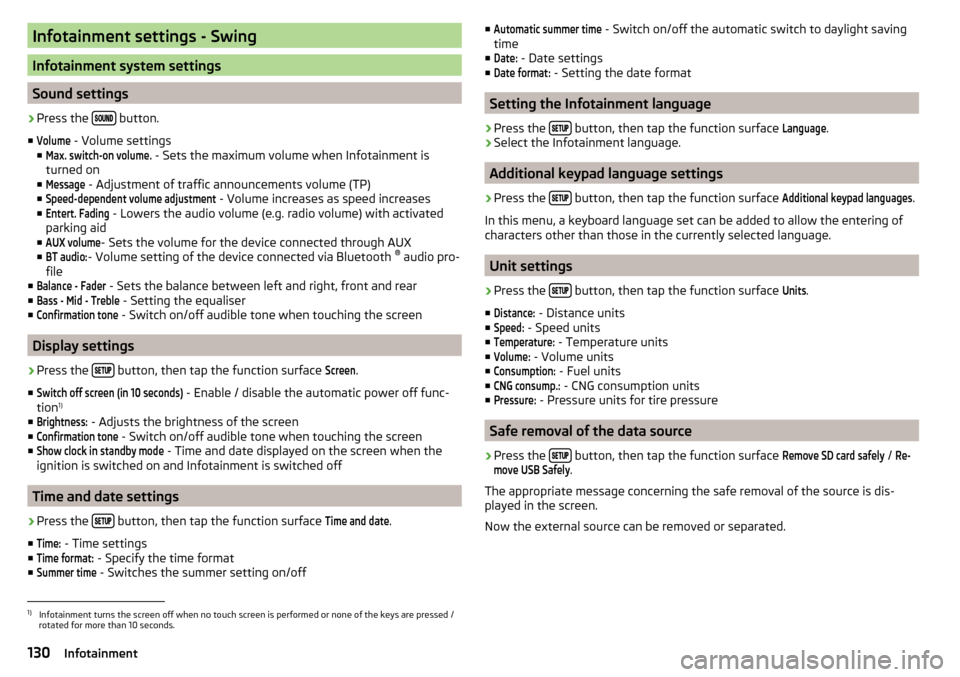
Infotainment settings - Swing
Infotainment system settings
Sound settings
›
Press the button.
■
Volume
- Volume settings
■
Max. switch-on volume.
- Sets the maximum volume when Infotainment is
turned on
■
Message
- Adjustment of traffic announcements volume (TP)
■
Speed-dependent volume adjustment
- Volume increases as speed increases
■
Entert. Fading
- Lowers the audio volume (e.g. radio volume) with activated
parking aid
■
AUX volume
- Sets the volume for the device connected through AUX
■
BT audio:
- Volume setting of the device connected via Bluetooth ®
audio pro-
file
■
Balance - Fader
- Sets the balance between left and right, front and rear
■
Bass - Mid - Treble
- Setting the equaliser
■
Confirmation tone
- Switch on/off audible tone when touching the screen
Display settings
›
Press the button, then tap the function surface
Screen
.
■
Switch off screen (in 10 seconds)
- Enable / disable the automatic power off func-
tion 1)
■
Brightness:
- Adjusts the brightness of the screen
■
Confirmation tone
- Switch on/off audible tone when touching the screen
■
Show clock in standby mode
- Time and date displayed on the screen when the
ignition is switched on and Infotainment is switched off
Time and date settings
›
Press the button, then tap the function surface
Time and date
.
■
Time:
- Time settings
■
Time format:
- Specify the time format
■
Summer time
- Switches the summer setting on/off
■Automatic summer time - Switch on/off the automatic switch to daylight saving
time
■Date:
- Date settings
■
Date format:
- Setting the date format
Setting the Infotainment language
›
Press the button, then tap the function surface
Language
.
›
Select the Infotainment language.
Additional keypad language settings
›
Press the
button, then tap the function surface
Additional keypad languages
.
In this menu, a keyboard language set can be added to allow the entering of
characters other than those in the currently selected language.
Unit settings
›
Press the button, then tap the function surface
Units
.
■
Distance:
- Distance units
■
Speed:
- Speed units
■
Temperature:
- Temperature units
■
Volume:
- Volume units
■
Consumption:
- Fuel units
■
CNG consump.:
- CNG consumption units
■
Pressure:
- Pressure units for tire pressure
Safe removal of the data source
›
Press the button, then tap the function surface
Remove SD card safely
/
Re-move USB Safely
.
The appropriate message concerning the safe removal of the source is dis-
played in the screen.
Now the external source can be removed or separated.
1)
Infotainment turns the screen off when no touch screen is performed or none of the keys are pressed /
rotated for more than 10 seconds.
130Infotainment
Page 134 of 324
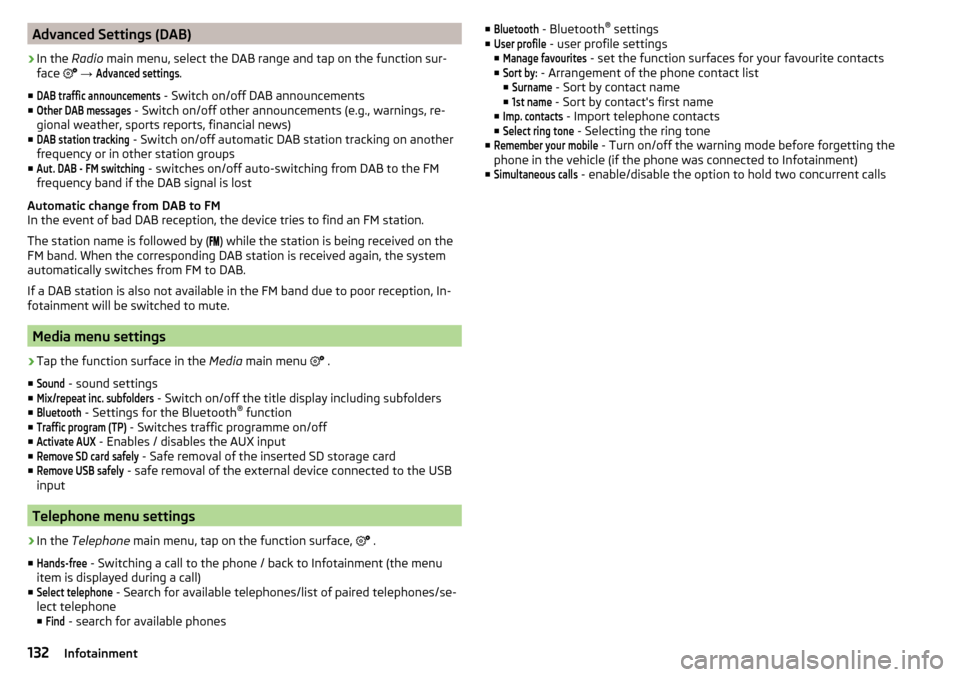
Advanced Settings (DAB)›
In the Radio main menu, select the DAB range and tap on the function sur-
face
→
Advanced settings
.
■
DAB traffic announcements
- Switch on/off DAB announcements
■
Other DAB messages
- Switch on/off other announcements (e.g., warnings, re-
gional weather, sports reports, financial news)
■
DAB station tracking
- Switch on/off automatic DAB station tracking on another
frequency or in other station groups
■
Aut. DAB - FM switching
- switches on/off auto-switching from DAB to the FM
frequency band if the DAB signal is lost
Automatic change from DAB to FM
In the event of bad DAB reception, the device tries to find an FM station.
The station name is followed by ( ) while the station is being received on the
FM band. When the corresponding DAB station is received again, the system
automatically switches from FM to DAB.
If a DAB station is also not available in the FM band due to poor reception, In-
fotainment will be switched to mute.
Media menu settings
›
Tap the function surface in the Media main menu
.
■
Sound
- sound settings
■
Mix/repeat inc. subfolders
- Switch on/off the title display including subfolders
■
Bluetooth
- Settings for the Bluetooth ®
function
■
Traffic program (TP)
- Switches traffic programme on/off
■
Activate AUX
- Enables / disables the AUX input
■
Remove SD card safely
- Safe removal of the inserted SD storage card
■
Remove USB safely
- safe removal of the external device connected to the USB
input
Telephone menu settings
›
In the Telephone main menu, tap on the function surface,
.
■
Hands-free
- Switching a call to the phone / back to Infotainment (the menu
item is displayed during a call)
■
Select telephone
- Search for available telephones/list of paired telephones/se-
lect telephone
■
Find
- search for available phones
■Bluetooth - Bluetooth ®
settings
■User profile
- user profile settings
■
Manage favourites
- set the function surfaces for your favourite contacts
■
Sort by:
- Arrangement of the phone contact list
■
Surname
- Sort by contact name
■
1st name
- Sort by contact's first name
■
Imp. contacts
- Import telephone contacts
■
Select ring tone
- Selecting the ring tone
■
Remember your mobile
- Turn on/off the warning mode before forgetting the
phone in the vehicle (if the phone was connected to Infotainment)
■
Simultaneous calls
- enable/disable the option to hold two concurrent calls
132Infotainment
Page 137 of 324
›To
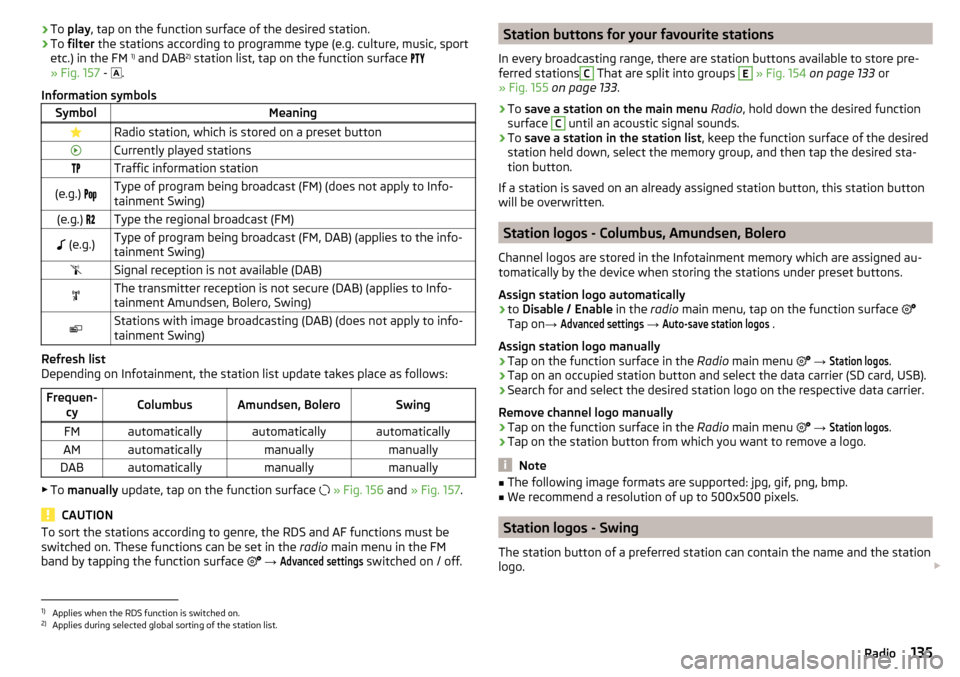
play , tap on the function surface of the desired station.›To filter the stations according to programme type (e.g. culture, music, sport
etc.) in the FM 1)
and DAB 2)
station list, tap on the function surface
» Fig. 157 -
.
Information symbolsSymbolMeaningRadio station, which is stored on a preset buttonCurrently played stationsTraffic information station(e.g.) Type of program being broadcast (FM) (does not apply to Info-
tainment Swing)(e.g.) Type the regional broadcast (FM) (e.g.)Type of program being broadcast (FM, DAB) (applies to the info-
tainment Swing)Signal reception is not available (DAB)The transmitter reception is not secure (DAB) (applies to Info-
tainment Amundsen, Bolero, Swing)Stations with image broadcasting (DAB) (does not apply to info-
tainment Swing)
Refresh list
Depending on Infotainment, the station list update takes place as follows:
Frequen- cyColumbusAmundsen, BoleroSwingFMautomaticallyautomaticallyautomaticallyAMautomaticallymanuallymanuallyDABautomaticallymanuallymanually
▶To manually update, tap on the function surface
» Fig. 156 and » Fig. 157 .
CAUTION
To sort the stations according to genre, the RDS and AF functions must be
switched on. These functions can be set in the radio main menu in the FM
band by tapping the function surface
→ Advanced settings
switched on / off.
Station buttons for your favourite stations
In every broadcasting range, there are station buttons available to store pre-
ferred stationsC
That are split into groups
E
» Fig. 154 on page 133 or
» Fig. 155 on page 133 .
›
To save a station on the main menu Radio , hold down the desired function
surface
C
until an acoustic signal sounds.
›
To save a station in the station list , keep the function surface of the desired
station held down, select the memory group, and then tap the desired sta-
tion button.
If a station is saved on an already assigned station button, this station button will be overwritten.
Station logos - Columbus, Amundsen, Bolero
Channel logos are stored in the Infotainment memory which are assigned au-
tomatically by the device when storing the stations under preset buttons.
Assign station logo automatically
›
to Disable / Enable in the radio main menu, tap on the function surface
Tap on →
Advanced settings
→
Auto-save station logos
.
Assign station logo manually
›
Tap on the function surface in the Radio main menu
→
Station logos
.
›
Tap on an occupied station button and select the data carrier (SD card, USB).
›
Search for and select the desired station logo on the respective data carrier.
Remove channel logo manually
›
Tap on the function surface in the Radio main menu
→
Station logos
.
›
Tap on the station button from which you want to remove a logo.
Note
■
The following image formats are supported: jpg, gif, png, bmp.■We recommend a resolution of up to 500x500 pixels.
Station logos - Swing
The station button of a preferred station can contain the name and the station
logo.
1)
Applies when the RDS function is switched on.
2)
Applies during selected global sorting of the station list.
135Radio
Page 138 of 324
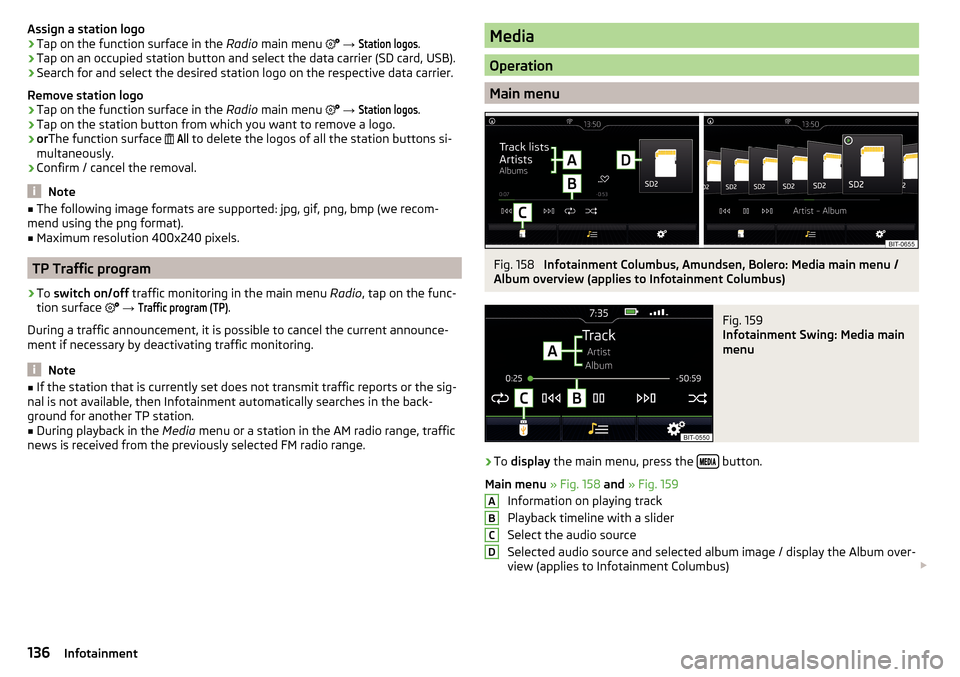
Assign a station logo›Tap on the function surface in the Radio main menu →
Station logos
.›
Tap on an occupied station button and select the data carrier (SD card, USB).
›
Search for and select the desired station logo on the respective data carrier.
Remove station logo
›
Tap on the function surface in the Radio main menu
→
Station logos
.
›
Tap on the station button from which you want to remove a logo.
›
or The function surface
All
to delete the logos of all the station buttons si-
multaneously.
›
Confirm / cancel the removal.
Note
■ The following image formats are supported: jpg, gif, png, bmp (we recom-
mend using the png format).■
Maximum resolution 400x240 pixels.
TP Traffic program
›
To switch on/off traffic monitoring in the main menu Radio, tap on the func-
tion surface
→
Traffic program (TP)
.
During a traffic announcement, it is possible to cancel the current announce-
ment if necessary by deactivating traffic monitoring.
Note
■ If the station that is currently set does not transmit traffic reports or the sig-
nal is not available, then Infotainment automatically searches in the back-
ground for another TP station.■
During playback in the Media menu or a station in the AM radio range, traffic
news is received from the previously selected FM radio range.
Media
Operation
Main menu
Fig. 158
Infotainment Columbus, Amundsen, Bolero: Media main menu /
Album overview (applies to Infotainment Columbus)
Fig. 159
Infotainment Swing: Media main
menu
›
To display the main menu, press the button.
Main menu » Fig. 158 and » Fig. 159
Information on playing track
Playback timeline with a slider
Select the audio source
Selected audio source and selected album image / display the Album over-
view (applies to Infotainment Columbus)
ABCD136Infotainment