lights SKODA OCTAVIA TOUR 2010 2.G / (1Z) Owner's Guide
[x] Cancel search | Manufacturer: SKODA, Model Year: 2010, Model line: OCTAVIA TOUR, Model: SKODA OCTAVIA TOUR 2010 2.G / (1Z)Pages: 199, PDF Size: 12.09 MB
Page 35 of 199
Unlocking and locking
34
Unlocking all doors and the boot lid
– Press button page 33, fig. 25. The symbol
goes out in the button.
The following applies if you have locked your vehicle using the button :
It is not possible to open the doors or the boot lid from the outside (safety feature,
e.g. when stopping at traffic lights etc.).
You can unlock the doors individually from the inside and open them by pulling the
door opening lever.
As long as one door is opened
3), the vehicle cannot be locked in order to avoid
inadvertently locking the key in the vehicle.
In the event of an accident in which the airbags are deployed, the locked doors are
automatically unlocked from the inside in orde r to enable rescuers to gain access to
the vehicle.
By pressing and holding the button or , you can conveniently close or open the
windows page 41.
WARNING
The central locking system al so operates if the ignition is switched off. All the
doors and the boot lid are locked. Children should never be left unattended in
the vehicle since it is difficult to prov ide assistance from the outside when the
doors are locked. Locked doors make it difficult for rescuers to get into the
vehicle in an emergency - hazard!
Note
The door opening lever and the buttons for the central locking system do not operate
if the safe securing system is activated.
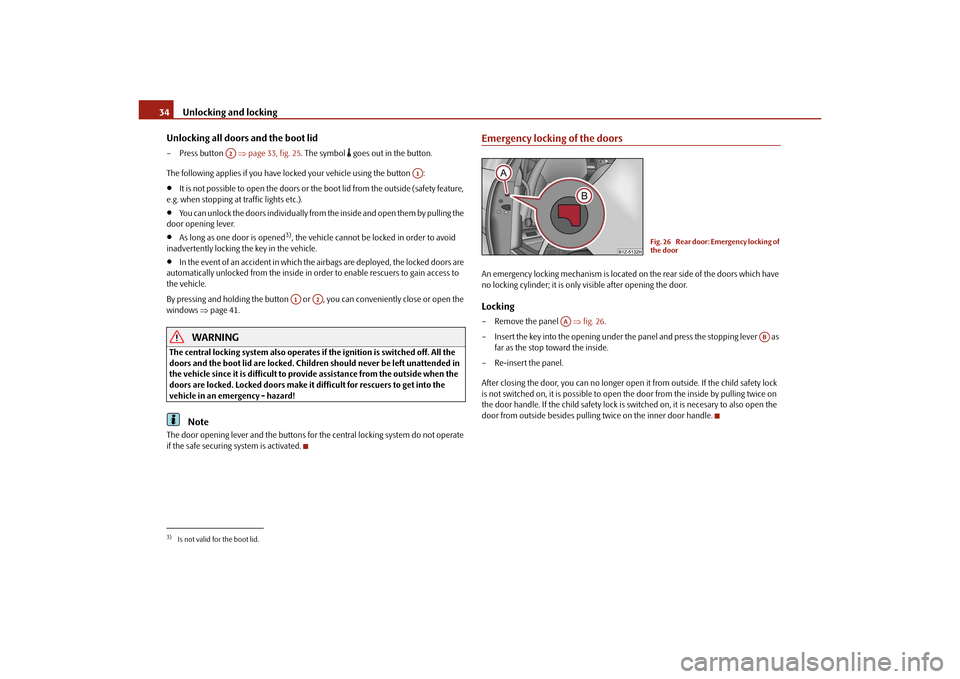
Emergency locking of the doorsAn emergency locking mechanism is located on the rear side of the doors which have
no locking cylinder; it is only visible after opening the door.Locking– Remove the panel fig. 26 .
– Insert the key into the opening under the panel and press the stopping lever as
far as the stop toward the inside.
– Re-insert the panel.
After closing the door, you can no longer open it from outside. If the child safety lock
is not switched on, it is possible to open the door from the inside by pulling twice on
the door handle. If the child sa fety lock is switched on, it is necesary to also open the
door from outside besides pulling twice on the inner door handle.
3)Is not valid for the boot lid.
A2
A1
A1
A2
Fig. 26 Rear door: Emergency locking of
the door
AA
AB
s2bs.2.book Page 34 Monday, September 27, 2010 9:53 AM
Page 38 of 199
Unlocking and locking37
Using the system
Safety
Driving Tips
General Maintenance
Breakdown assistance
Technical Data
Deactivating safe securing system– Press button twice in 2 seconds. Further information page 32.Boot lid remote release
– Press button for about 2 second. Further information page 35.Folding out of the key– Press button .Folding up of the key– Press button and collapse the key bit in the housing.
The turn signal lights flash twice as confir mation that the vehicle has been unlocked.
The vehicle will lock again automatically if you unlock the vehicle using button but
do not open a door or the boot lid within th e next 30 seconds. This function is intended
to prevent the car being unlocked unintentionally.
Display of the locking
The turn signal lights flash once to confir m that the vehicle has been correctly locked.
If the vehicle is locked by pressing the bu tton and some doors or the boot lid are
not closed, the turn signal lights flash only after closing.
WARNING
If the vehicle is locked from the outside and the safe securing system is acti-
vated, there must not be any person in the vehicle as it is then not possible to
open either a door or a window from th e inside. The locked doors make it more
difficult for rescuers to get into the vehicle in an emergency - hazard!
Note
Operate the radio remote control only when the doors and boot lid are closed and
you have visual contact with the vehicle.
Once in the car, you must not press the lock button
of the radio remote control
before inserting the key into the ignition lo ck in order to avoid the car being inadvert- ently locked and the alarm system* being sw
itched on. Should this happen, press the
unlock button
of the radio remote control.
Synchronisation of the remote controlIf the vehicle cannot be unlocked by actuating the remote control system then it is
possible that the code in the key and the control unit in the vehicle are no longer
synchronised. This can occur when the button s on the radio-operated key are actuated
a number of times outside of the operative range of the equipment or the battery on
the remote control was replaced.
This means it is necessary to synchronise the code as follows:
Press any button on the remote control.
pressing of the button means that the door will unlock with the key within 1
minute.
Anti-theft alarm system*DescriptionThe anti-theft alarm system increases the level of protection against people seeking to
break into the vehicle. The system triggers audible and visual warning signals if an
attempt is made to break into the vehicle.
How is the alarm system activated?
The anti-theft alarm system is activated au tomatically when the vehicle is locked with
the key on the closed driver's door or by us ing the radio remote control. It is activated
30 seconds after locking the door.
How is the alarm system deactivated?
The anti-theft alarm system is deactivated if the vehicle is unlocked by only using the
radio remote control. The vehicle is automati cally locked again if the vehicle is not
opened within 30 seconds after reactivating the anti-theft alarm system.
Once you unlock the vehicle by inserting the ke y into the driver door you then have to
insert the key into the ignition lock and sw itch the ignition on within 15 seconds after
A3A2A4A4
A1
A3
s2bs.2.book Page 37 Monday, September 27, 2010 9:53 AM
Page 39 of 199
Unlocking and locking
38
opening the door in order to deactiva te the anti-theft alarm system. The alarm will be
triggered if you do not switch on the ignition within 15 seconds.
When is the alarm triggered?
The following security areas of the locked vehicle are monitored:
Bonnet,
Boot lid,
Doors,
Ignition lock,
vehicle's angle of inclinationpage 38, “Interior monitor* and Towing protection
monitoring*”,
Vehicle interior page 38, “Interior monitor* and Towing protection moni-
toring*”,
A drop in voltage of the on-board power supply.
An alarm is immediately triggered if either of the two battery terminals is disconnected
while the anti-theft alarm system is activated.
How is the alarm switched off?
You switch the alarm off if you unlock the vehi cle with the radio remote control or if you
switch the ignition on.Note
The working life of the alarm siren is 6 years. More detailed information is available
by a specialist garage.
Before leaving the vehicle, check that all the doors and windows are closed in order
to ensure that the anti-theft alarm system is fully operational.
Coding of the radio remote control and th e receiver unit precludes the use of the
radio remote control from other vehicles.
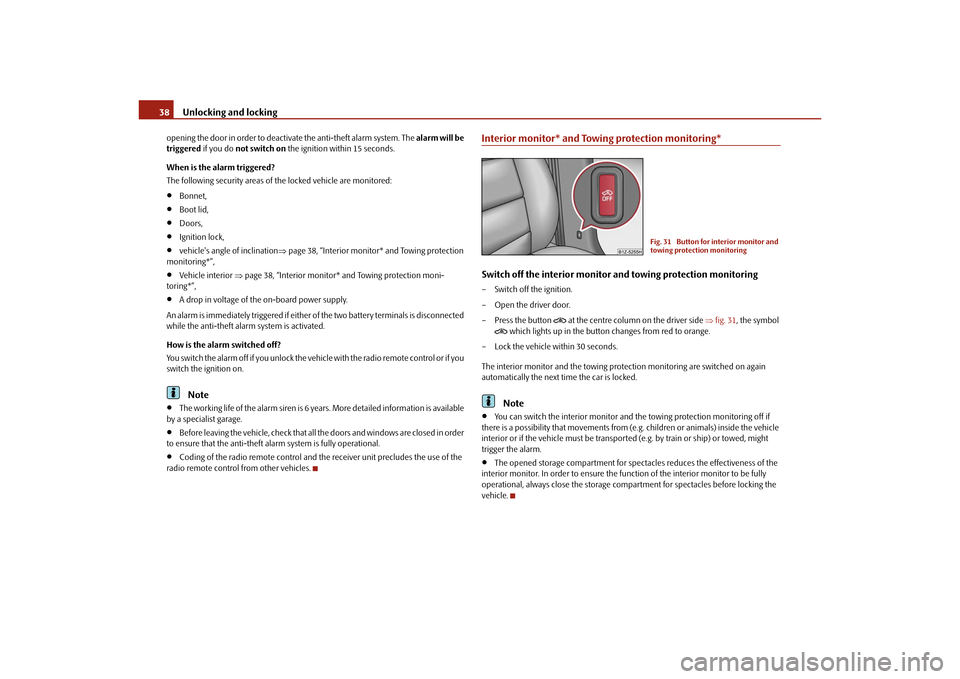
Interior monitor* and Towing protection monitoring*Switch off the interior monitor and towing protection monitoring– Switch off the ignition.
– Open the driver door.
–Press the button
at the centre column on the driver side fig. 31 , the symbol
which lights up in the button changes from red to orange.
– Lock the vehicle within 30 seconds.
The interior monitor and the towing protec tion monitoring are switched on again
automatically the next ti me the car is locked.Note
You can switch the interior monitor and th e towing protection monitoring off if
there is a possibility that movements from (e.g. children or animals) inside the vehicle
interior or if the vehicle must be transported (e.g. by train or ship) or towed, might
trigger the alarm.
The opened storage compartment for spectacles reduces the effectiveness of the
interior monitor. In order to ensure the func tion of the interior monitor to be fully
operational, always close the storage comp artment for spectacles before locking the
vehicle.
Fig. 31 Button for interior monitor and
towing protection monitoring
s2bs.2.book Page 38 Monday, September 27, 2010 9:53 AM
Page 40 of 199
Unlocking and locking39
Using the system
Safety
Driving Tips
General Maintenance
Breakdown assistance
Technical Data
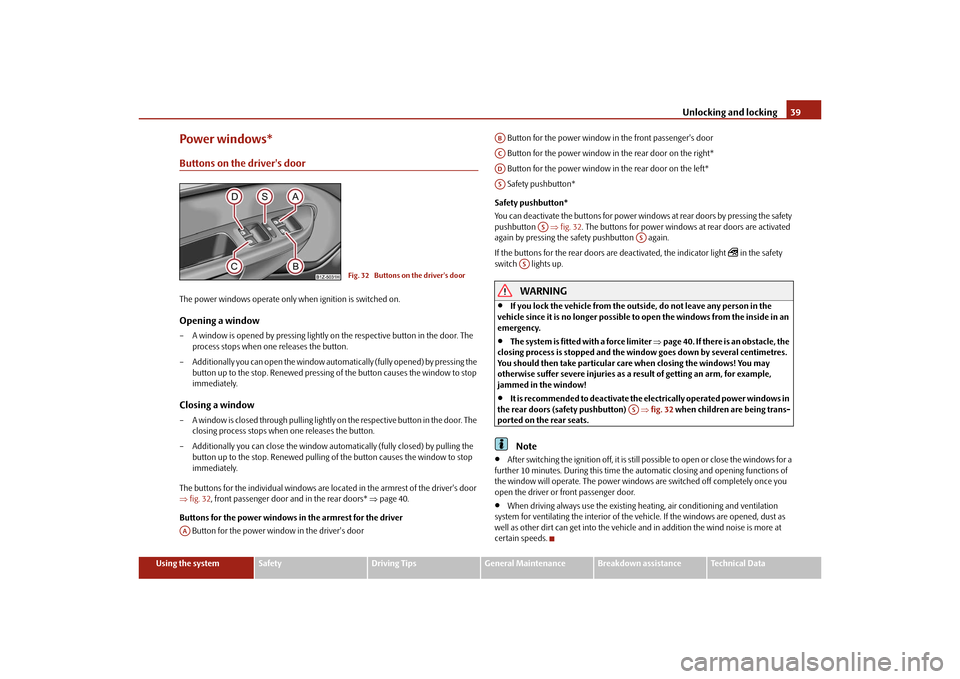
Power windows*Buttons on the driver's doorThe power windows operate only when ignition is switched on.Opening a window – A window is opened by pressing lightly on the respective button in the door. The
process stops when one releases the button.
– Additionally you can open the window automatically (fully opened) by pressing the button up to the stop. Renewe d pressing of the button causes the window to stop
immediately.Closing a window– A window is closed through pulling lightly on the respective button in the door. The closing process stops when one releases the button.
– Additionally you can close the window auto matically (fully closed) by pulling the
button up to the stop. Renewed pulling of the button causes the window to stop
immediately.
The buttons for the individual windows are located in the armrest of the driver's door
fig. 32 , front passenger door and in the rear doors* page 40.
Buttons for the power windows in the armrest for the driver Button for the power window in the driver's door Button for the power window in the front passenger's door
Button for the power window in the rear door on the right*
Button for the power window in the rear door on the left*
Safety pushbutton*
Safety pushbutton*
You can deactivate the buttons for power wind ows at rear doors by pressing the safety
pushbutton fig. 32 . The buttons for power windows at rear doors are activated
again by pressing the safety pushbutton again.
If the buttons for the rear doors are deactivated, the indicator light
in the safety
switch lights up.
WARNING
If you lock the vehicle from the outside, do not leave any person in the
vehicle since it is no longer possible to open the windows from the inside in an
emergency.
The system is fitted with a force limiter page 40. If there is an obstacle, the
closing process is stopped and the window goes down by several centimetres.
You should then take particular care when closing the windows! You may
otherwise suffer severe injuries as a re sult of getting an arm, for example,
jammed in the window!
It is recommended to deactivate the el ectrically operated power windows in
the rear doors (safety pushbutton) fig. 32 when children are being trans-
ported on the rear seats.Note
After switching the ignition off, it is still possible to open or close the windows for a
further 10 minutes. During this time the au tomatic closing and opening functions of
the window will operate. The power window s are switched off completely once you
open the driver or front passenger door.
When driving always use the existing he ating, air conditioning and ventilation
system for ventilating the interior of the vehicle. If the windows are opened, dust as
well as other dirt can get into the vehicle an d in addition the wind noise is more at
certain speeds.
Fig. 32 Buttons on the driver's door
AA
ABACADAS
AS
AS
AS
AS
s2bs.2.book Page 39 Monday, September 27, 2010 9:53 AM
Page 43 of 199
Lights and Visibility
42
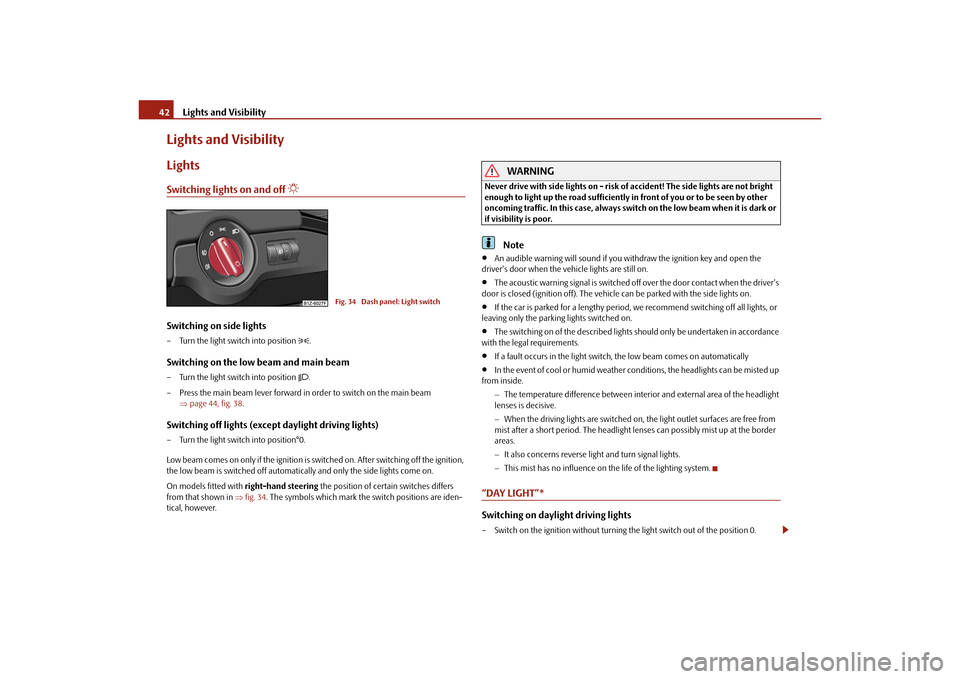
Lights and VisibilityLightsSwitching lights on and off
Switching on side lights– Turn the light switch into position
.
Switching on the low beam and main beam– Turn the light switch into position
.
– Press the main beam lever forward in order to switch on the main beam page 44, fig. 38 .
Switching off lights (except daylight driving lights)– Turn the light switch into position°0.
Low beam comes on only if the ignition is switched on. After switching off the ignition,
the low beam is switched off automatica lly and only the side lights come on.
On models fitted with right-hand steering the position of certain switches differs
from that shown in fig. 34 . The symbols which mark the switch positions are iden-
tical, however.
WARNING
Never drive with side lights on - risk of accident! The side lights are not bright
enough to light up the road sufficiently in front of you or to be seen by other
oncoming traffic. In this case, always switch on the low beam when it is dark or
if visibility is poor.
Note
An audible warning will sound if you wi thdraw the ignition key and open the
driver's door when the vehicle lights are still on.
The acoustic warning signal is switched off over the door contact when the driver's
door is closed (ignition off). The vehicle can be parked with the side lights on.
If the car is parked for a lengthy period, we recommend switching off all lights, or
leaving only the parking lights switched on.
The switching on of the described lights should only be undertaken in accordance
with the legal requirements.
If a fault occurs in the light switch , the low beam comes on automatically
In the event of cool or humid weather conditions, the headlights can be misted up
from inside.
The temperature difference between interior and external area of the headlight
lenses is decisive.
When the driving lights are switched on, the light outlet surfaces are free from
mist after a short period. The headlight lens es can possibly mist up at the border
areas.
It also concerns reverse light and turn signal lights.
This mist has no influence on th e life of the lighting system.
“DAY LIGHT”* Switching on daylight driving lights– Switch on the ignition without turning the light switch out of the position 0.
Fig. 34 Dash panel: Light switch
s2bs.2.book Page 42 Monday, September 27, 2010 9:53 AM
Page 44 of 199
Lights and Visibility43
Using the system
Safety
Driving Tips
General Maintenance
Breakdown assistance
Technical Data
Deactivating the function daylight driving lights– Pull the turn signal light lever towards the steering wheel up to 3 seconds after
switching on the ignition and at the same time, slide it to the bottom and hold it in
this position for at least 3 seconds.Activating the function daylight driving lights– Pull the turn signal light lever towards the steering wheel up to 3 seconds after
switching on the ignition and at the same time, slide it to the top and hold it in this
position for at least 3 seconds.
The daytime driving light is a combination of low-beam and parking light (front and
rear), including licence plate light.
When the daylight driving lights are switched on, the lighting of the instrument cluster
is switched on as well.Fog lights*
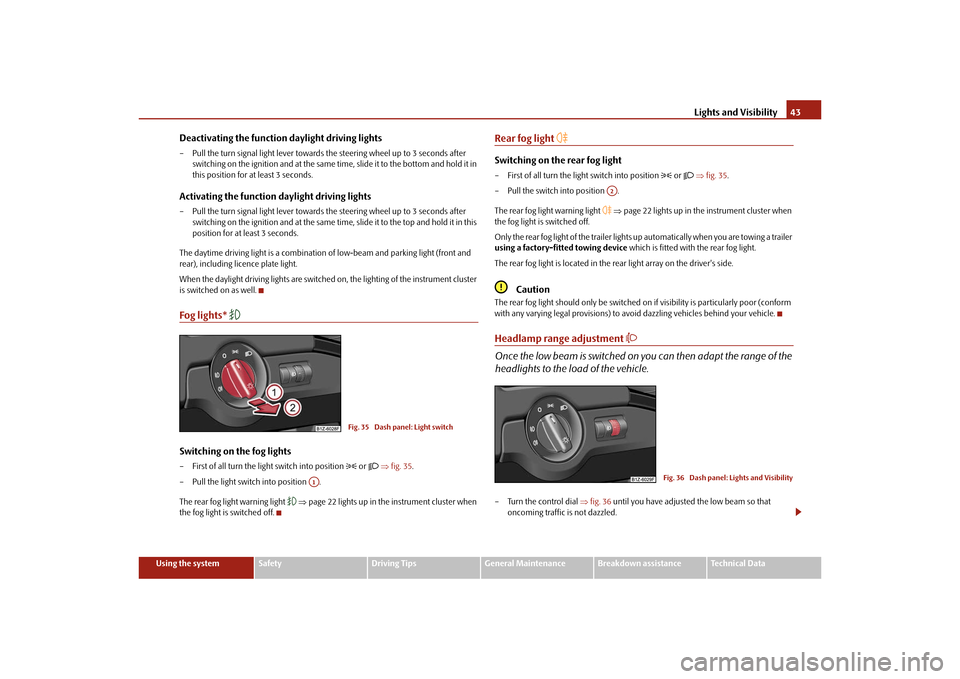
Switching on the fog lights– First of all turn the light switch into position
or fig. 35 .
– Pull the light switch into position .
The rear fog light warning light
page 22 lights up in the instrument cluster when
the fog light is switched off.
Rear fog light
Switching on the rear fog light– First of all turn the light switch into position
or fig. 35 .
– Pull the switch into position .
The rear fog light warning light
page 22 lights up in the instrument cluster when
the fog light is switched off.
Only the rear fog light of the trailer lights up automatically when you are towing a trailer
using a factory-fitted towing device which is fitted with the rear fog light.
The rear fog light is located in the rear light array on the driver's side.
Caution
The rear fog light should only be switched on if visibility is particularly poor (conform
with any varying legal provisions) to avoi d dazzling vehicles behind your vehicle.Headlamp range adjustment
Once the low beam is switched on you can then adapt the range of the
headlights to the load of the vehicle.– Turn the control dial fig. 36 until you have adjusted the low beam so that
oncoming traffic is not dazzled.
Fig. 35 Dash panel: Light switch
A1
A2
Fig. 36 Dash panel: Lights and Visibility
s2bs.2.book Page 43 Monday, September 27, 2010 9:53 AM
Page 45 of 199
Lights and Visibility
44
Settings
The positions correspond approximately to the following vehicle loads:
Front seats occupied, luggage compartment empty.
All seats occupied, luggage compartment empty.
All seats occupied, luggage compartment laden.
Driver seat occupied, lu ggage compartment laden.
Caution
Set the headlight beam adjustment in su ch a way as to avoid dazzling oncoming
traffic.Switch for hazard warning lights
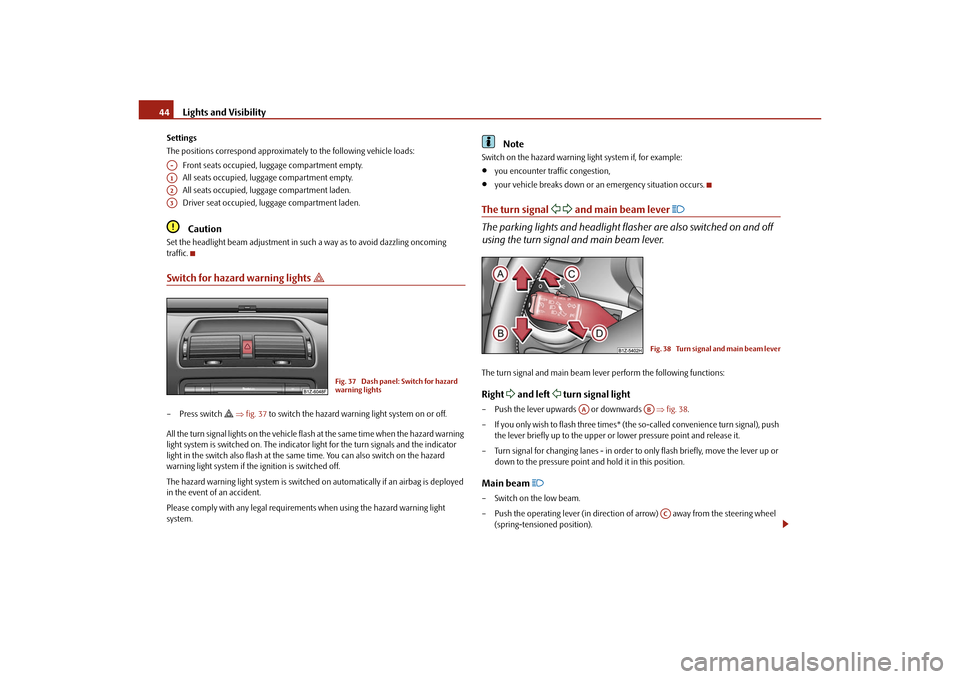
– Press switch
fig. 37 to switch the hazard warning light system on or off.
All the turn signal lights on the vehicle flas h at the same time when the hazard warning
light system is switched on. The indicator light for the turn signals and the indicator
light in the switch also flash at the same time. You can also switch on the hazard
warning light system if the ignition is switched off.
The hazard warning light system is switched on automatically if an airbag is deployed
in the event of an accident.
Please comply with any legal requirements when using the hazard warning light
system.
Note
Switch on the hazard warning light system if, for example:
you encounter traffic congestion,
your vehicle breaks down or an emergency situation occurs.
The turn signal
and main beam lever
The parking lights and headlight flasher are also switched on and off
using the turn signal and main beam lever.The turn signal and main beam le ver perform the following functions:Right
and left
turn signal light
– Push the lever upwards or downwards fig. 38 .
– If you only wish to flash three times* (the so-called convenience turn signal), push
the lever briefly up to the upper or lower pressure point and release it.
– Turn signal for changing lanes - in order to only flash briefly, move the lever up or down to the pressure point and hold it in this position.Main beam
– Switch on the low beam.
– Push the operating lever (in direction of arrow) away from the steering wheel
(spring-tensioned position).
A-A1A2A3
Fig. 37 Dash panel: Switch for hazard
warning lights
Fig. 38 Turn signal and main beam lever
AA
AB
AC
s2bs.2.book Page 44 Monday, September 27, 2010 9:53 AM
Page 46 of 199
Lights and Visibility45
Using the system
Safety
Driving Tips
General Maintenance
Breakdown assistance
Technical Data
– Pull the lever towards the steering wheel (spring-tensioned position) in direction
of arrow - the main beam light goes off.
Headlight flasher
– Pull the lever towards the steering wheel (spring-tensioned position) in direction of arrow - the main beam and warning light
in the instrument cluster come
on.
Parking light
– Switch off the ignition.
– Push the lever up or down - the right-hand or left-hand parking light is switched on.
Information concerning the function of the lights.
The turn signal system only operates when the igniti on is switched on. The corre-
sponding indicator light
or in the instrument cluster also flashes.
The turn signal is automatically cancelled after negotiating a curve.
The indicator light flashes at twice its normal rate if a bulb of the turn signal light
fails.
The side light and rear light on the appropriate side of the vehicle are switched on
when the parking light is selected. The parking light only operates if the ignition is
switched off.Caution
Use main beam or the headlight flasher only if this does not risk dazzling other road
users.
Note
If you have switched on the right or left tu rn signal light and you switch off the igni-
tion, the parking light is not automatically switched on.
Use only in accordance with the legal requirements the described lighting and
signal systems.
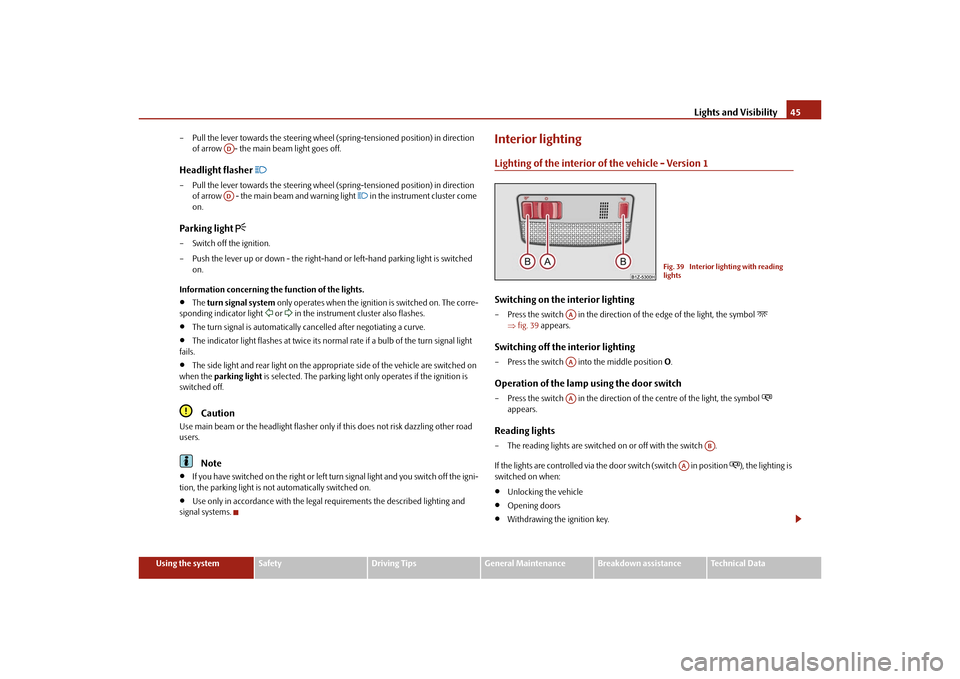
Interior lightingLighting of the interior of the vehicle - Version 1Switching on the interior lighting– Press the switch in the direction of the edge of the light, the symbol
fig. 39 appears.
Switching off the interior lighting– Press the switch into the middle position O.Operation of the lamp using the door switch– Press the switch in the direction of the centre of the light, the symbol
appears.
Reading lights– The reading lights are switched on or off with the switch .
If the lights are controlled via the door switch (switch in position
), the lighting is
switched on when:
Unlocking the vehicle
Opening doors
Withdrawing the ignition key.
ADAD
Fig. 39 Interior lighting with reading
lights
AAAAAA
AB
AA
s2bs.2.book Page 45 Monday, September 27, 2010 9:53 AM
Page 47 of 199
Lights and Visibility
46
If the lights are controlled via the door switch (switch in position
), the lighting is
switched off when:
the vehicle is locked,
the ignition is switched on.
auto switch-off - about 30 seconds after all the doors have been closed.
If the doors remain open, the switch in position
, the interior lighting switches
off automatically after around 10 minutes to stop the battery from running down.
Note
We recommend having these bulbs replaced by a specialist garage.Vehicle interior lighting version 2Switching on the interior lighting– Turn the switch to position
fig. 40 .
Switching off the interior lighting– Turn the switch to position O.Operation of the lamp using the door switch– Turn the switch to position
.
The same principles ap ply for interior lighting version 2 as for page 45, “Lighting of
the interior of the vehicle - Version 1”.
Luggage compartment lightThe lighting comes on automatically when th e boot lid is opened. If the lid remains
open for more than about 10 minutes, the luggage compartment lighting switches off
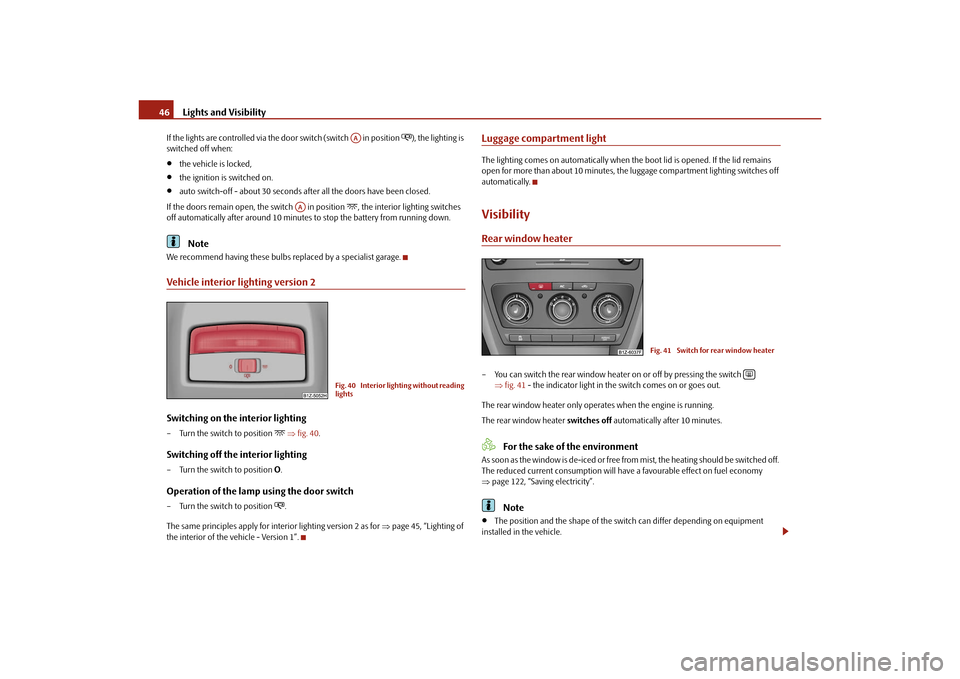
automatically.VisibilityRear window heater– You can switch the rear window heater on or off by pressing the switch
fig. 41 - the indicator light in the switch comes on or goes out.
The rear window heater only oper ates when the engine is running.
The rear window heater switches off automatically after 10 minutes.
For the sake of the environment
As soon as the window is de-iced or free fr om mist, the heating should be switched off.
The reduced current consumption will have a favourable effect on fuel economy
page 122, “Saving electricity”.
Note
The position and the shape of the switch can differ depending on equipment
installed in the vehicle.
AA
AA
Fig. 40 Interior lighting without reading
lights
Fig. 41 Switch for rear window heater
s2bs.2.book Page 46 Monday, September 27, 2010 9:53 AM
Page 48 of 199
Lights and Visibility47
Using the system
Safety
Driving Tips
General Maintenance
Breakdown assistance
Technical Data
If the on-board voltage drops, the rear window heater is switched off automatically,
in order to provide sufficient electrical energy for the engine control.
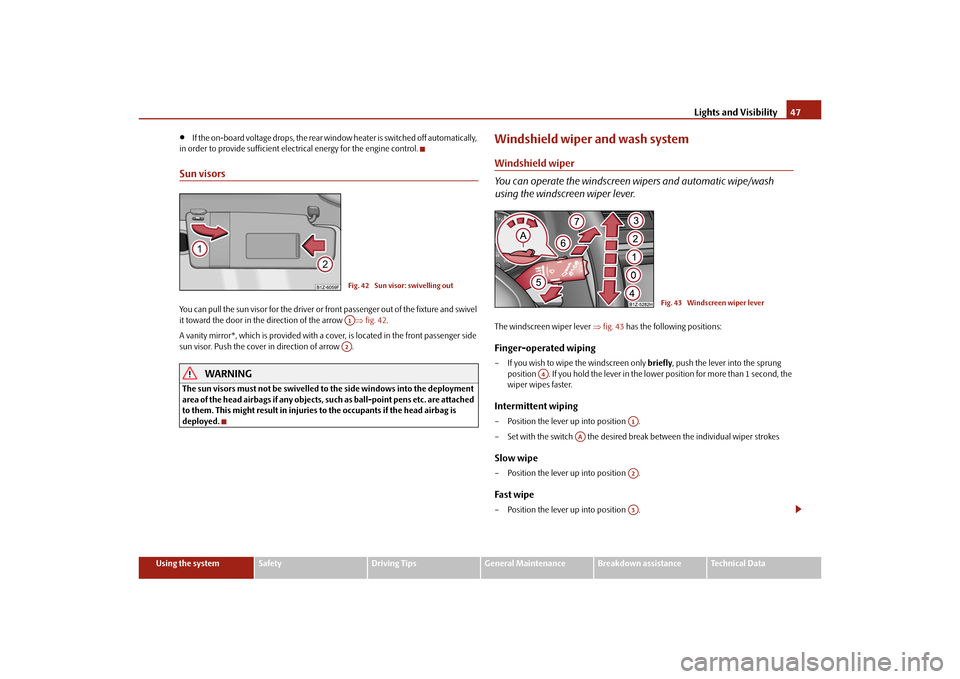
Sun visorsYou can pull the sun visor for the driver or front passenger out of the fixture and swivel
it toward the door in the direction of the arrow fig. 42 .
A vanity mirror*, which is provided with a cover, is located in the front passenger side
sun visor. Push the cover in direction of arrow .
WARNING
The sun visors must not be swivelled to the side windows into the deployment
area of the head airbags if any objects, such as ball-point pens etc. are attached
to them. This might result in injuries to the occupants if the head airbag is
deployed.
Windshield wiper and wash systemWindshield wiper
You can operate the windscreen wipers and automatic wipe/wash
using the windscreen wiper lever.The windscreen wiper lever fig. 43 has the following positions:Finger-operated wiping– If you wish to wipe the windscreen only briefly, push the lever into the sprung
position . If you hold the lever in the lower position for more than 1 second, the
wiper wipes faster.Intermittent wiping– Position the lever up into position .
– Set with the switch the desired brea k between the individual wiper strokesSlow wipe– Position the lever up into position .Fast wipe– Position the lever up into position .
Fig. 42 Sun visor: swivelling outA1A2
Fig. 43 Windscreen wiper lever
A4
A1
AA
A2A3
s2bs.2.book Page 47 Monday, September 27, 2010 9:53 AM