phone SKODA RAPID 2012 1.G User Guide
[x] Cancel search | Manufacturer: SKODA, Model Year: 2012, Model line: RAPID, Model: SKODA RAPID 2012 1.GPages: 180, PDF Size: 4.36 MB
Page 88 of 180

Connecting the mobile phone to the hands-free system
To connect a mobile phone with the hands-free system, the two devices must be
paired. Detailed information on this is provided in the operating instructions for
your mobile phone.
The following steps must be carried out for the connection 1)
.
› Activate Bluetooth ®
and the visibility of your mobile phone on your telephone.
› Switch on the ignition.
› Select the menu
Phone – New user in the information display and wait until
the control unit has completed the search.
› Select your mobile phone from the menu of the units found.
› Confirm the PIN 2
)
.
› If the hands-free system announces (as standard
SKODA_BT) on the display of
the mobile phone, enter the PIN 2)
within 30 seconds and wait, until the connec-
tion is established 3)
.
› After terminating the connection, confirm the creation of a new user profile in
the information display.
If there is no free space available to create a new user profile, delete an existing
user profile.
During the connecting procedure, no other mobile phone may be connected with
the hands-free system.
Up to four mobile phones can be paired with the hands-free system, whereby on-
ly one mobile phone can communicate with the hands-free system.
The visibility of the hands-free system is automatically switched off 3
minutes af-
ter the ignition is switched on and is also deactivated when the mobile phone has
connected to the hands-free system. Restoring the visibility of the hands-free system
If you have not managed to connect your mobile phone with the hands-free sys-
tem within 3
minutes of switching on the ignition, the visibility of the hands-free
system can be reestablished for 3 minutes in the following ways.
› By turning the ignition off and on.
› By turning voice control off and on.
› Via the information display in the menu item Bluetooth
– Visibility.
Creating a connection with an already paired mobile phone
After switching on the ignition, the connection is automatically established for
the already paired mobile phone 3)
. Check on your mobile phone if the automatic
connection has been established.
Disconnecting the connection
› By withdrawing the ignition key.
› By disconnecting the hands-free system in the mobile phone.
› By disconnecting the user in the information display in the menu
Bluetooth –
User .
Solving connection problems
If the system announces No paired phone found, check the operating state of the
mobile phone.
› Is the mobile phone switched on?
› Is the PIN code entered?
› Is Bluetooth ®
active?
› Is the visibility of the mobile phone active?
› Has the mobile phone already been paired with the hands-free system? Ð Symbols in the information display
Symbol Importance
Charge status of the phone battery a)
Signal strength a)
£1)
On vehicles fitted with the Amundsen+ navigation system, this function can be accessed via the navi-
gation system menu; refer to the operating instructions for the Amundsen+ navigation system.
2) Depending on the Bluetooth ®
version on the mobile phone, an automatically generated 6-digit PIN is
either displayed or the PIN 1234 has to be entered manually.
3) Some mobile phones have a menu, in which the authorisation for establishing a Bluetooth ®
connec-
tion is completed by inputting a code. If the authorisation input is required, it must always be per-
formed when re-establishing the Bluetooth connection.
86 Using the system
Page 89 of 180

Symbol
Importance
a phone is connected to the hands-free system.
The hands-free system is visible to other devices.
A multimedia unit is connected to the hands-free system.a)
This function is only supported by some mobile phones. ÐOperate the telephone via the information display
The following menu points can be selected in the menu Phone.
■ Phone book
■ Dial number 1)
■ Call register
■ Voice mailbox
■ Bluetooth 1)
■ Settings 2)
■ Back
Phone book
In the menu point Phone book is the list of the loaded contacts from the tele-
phone memory and the SIM card of the mobile phone.
Dial number
Any telephone number can be entered in the menu point Dial number. The re-
quired numbers must be selected one after the other using adjustment wheel
and confirmed by pressing the adjustment wheel. You can select numbers 0 - 9,
symbols , , #, and functions Cancel, Call, and Delete .
Call register
The following menu items can be selected in the menu item Call register.
■ Missed calls
■ Dialled numbers
■ Received calls
Voice mailbox
In the menu Voice mailbox , it is possible to set the number of the voice mailbox 1)
and then dial the number. Bluetooth
The following menu items can be selected in the menu
Bluetooth.
■ User – the overview of the stored users
■ New user – Search for new mobile phones that are in the reception range
■ Visibility – Switching on the visibility of the telephone unit for other devices
■ Media player
■ Active device
■ Paired devices
■ Search
■ Phone name – the possibility to change the name of the telephone unit (pre-set
SKODA UHV)
Settings
The following menu items can be selected in the menu Settings.
■ Phone book
■ Update 1)
■ List
■ Surname
■ First name
■ Ring tone
Back
Return in the Start menu of the telephone. Ð Voice control
Dialogue
The period of time during which the system is ready to receive voice commands
and to carry them out is called a dialogue. The system gives audible feedback and
guides you if necessary through the relevant functions.
Optimum understanding of the voice commands depends on several factors.
› Speak with a normal tone of voice without intonation and excessive pauses.
› Avoid a bad pronunciation.
› Close the doors, windows and sliding roof, to reduce or stop disturbing exterior
noise. £1)
On vehicles fitted with the Amundsen+ navigation system, this function can be accessed via the navi-
gation system menu; refer to the operating instructions for the Amundsen+ navigation system.
2) This function is not available in vehicles fitted with the Amundsen+ navigation system.
87
Communication
Page 90 of 180

›
It is recommended to speak louder at higher speeds, so that the tone of your
voice is louder than the increased surrounding noise.
› During the dialogue, limit additional noise in the vehicle, e.g. passengers talking
at the same time.
› Do not speak, if the system makes an announcement.
The microphone for voice control is inserted in the moulded headliner and direc-
ted to the driver and front passenger. Therefore the driver and the front passen-
ger can operate the equipment.
Entering a phone number
The telephone number can be entered as a continuous series of individually spo-
ken digits (the whole number at once) or in the form of digital blocks (separated
by short pauses). After each order of digits (separation through brief voice pause)
all of the digits detected up to now are repeated by the system.
The digits 0 – 9, symbols +, , # are permitted. The system detects no continuous
digit combinations such as twenty-three, but only individually spoken digits (two,
three).
Switching on voice control
By briefly pressing the button 2
on the multi-function steering wheel
» page 85,
Operating the phone on the multifunction steering wheel .
Switching off voice control
If the system is currently playing a message, you will need to end the message
currently being played by briefly pressing the button 2
on the multi-function
steering wheel.
If the system expects a voice command, you can end the dialogue yourself:
› with the
CANCEL voice command;
› by briefly pressing the button 2
on the multifunction steering wheel.
Note
■ The dialogue of an incoming call is immediately interrupted.
■ The voice control is only possible in vehicles fitted with a multi-function steer-
ing wheel with telephone control. Ð Voice commands
Basic voice commands Voice command Action
HELP After this command the system repeats all possible
commands.
CALL XYZ This command calls up the contact from the phone
book.
PHONE BOOK After this command, for example, the phone book
can be repeated back to you, a voice entry for the
contact can be updated or deleted, etc.
CALL HISTORY Lists of dialled numbers, missed calls, etc.
DIAL NUMBER After this command, a telephone number can be en-
tered to establish a connection with the requested
party.
REDIAL After this command the system calls the last dialled
number.
MUSIC a)
Play music from the mobile phone or another paired
device.
FURTHER OPTIONS After this command the system offers additional
context-dependent commands.
SETTINGS Selection for setting Bluetooth ®
, dialogue etc.
CANCEL The dialogue is ended. a)
On vehicles fitted with the Amundsen+ navigation system, this function can be accessed via the navi-
gation system menu; refer to the operating instructions for the Amundsen+ navigation system.
If a voice command is not detected, the system answers with
“Sorry?” and a new
entry can be completed. After the 2nd error the system repeats the aid. After the
3rd error the answer “Cancelled ” is given and the dialogue is ended.
Store voice recording of a contact
If automatic name recognition does not work reliably for some contacts, you can
choose to save your own voice entry for the contact in the menu Phone book –
Voice Tag – Record .
Your own voice entry can also be saved using the voice control in the menu FUR-
THER OPTIONS . Ð
88 Using the system
Page 91 of 180
Multimedia
Music playback via Bluetooth
®
The universal telephone preinstallation GSM II makes it possible to play back mu-
sic via Bluetooth ®
from the devices such as MP3 player, mobile phone or note-
book.
To ensure the music can be played back via Bluetooth ®
, it is necessary to connect
the terminal device with the hands-free system in the menu Phone – Bluetooth –
Media player. The music playback process is performed on the connected device.
The universal telephone preinstallation GSM
II ensures that the music played back
via the hands-free system can be controlled with the remote control » page 88,
Voice commands . Note
The device being connected must support the Bluetooth ®
A2DP profile; refer to
the operating instructions for the relevant device being connected. ÐOperating the radio and navigation system on the multifunction steering wheel
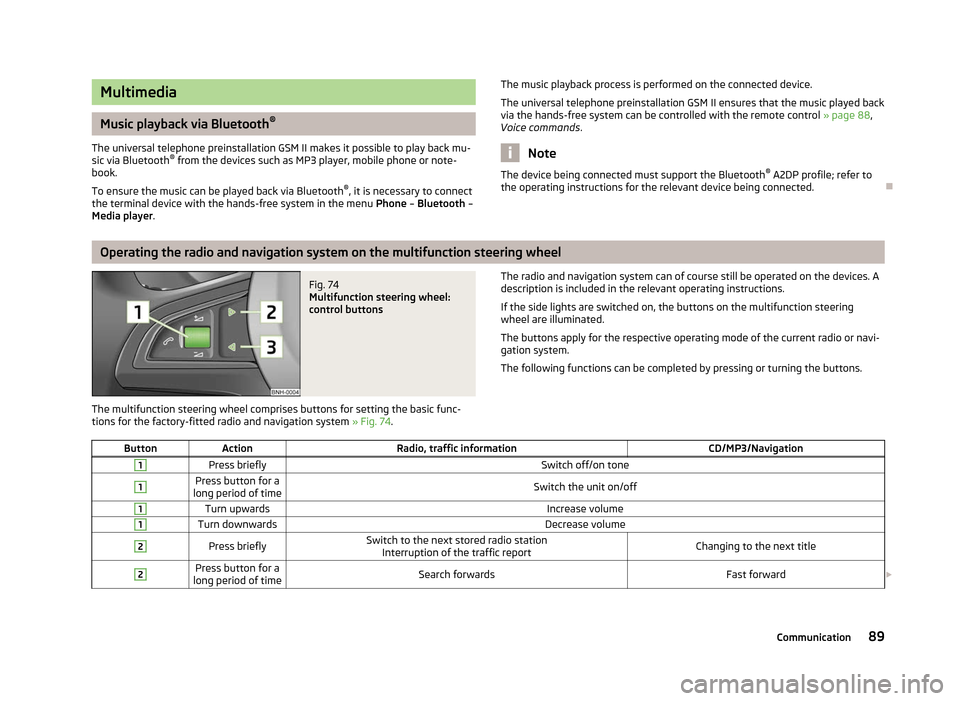
Fig. 74
Multifunction steering wheel:
control buttons
The multifunction steering wheel comprises buttons for setting the basic func-
tions for the factory-fitted radio and navigation system » Fig. 74. The radio and navigation system can of course still be operated on the devices. A
description is included in the relevant operating instructions.
If the side lights are switched on, the buttons on the multifunction steering
wheel are illuminated.
The buttons apply for the respective operating mode of the current radio or navi-
gation system.
The following functions can be completed by pressing or turning the buttons.
Button Action Radio, traffic information CD/MP3/Navigation1
Press briefly
Switch off/on tone1 Press button for a
long period of time Switch the unit on/off1
Turn upwards
Increase volume1
Turn downwards
Decrease volume2
Press briefly
Switch to the next stored radio station
Interruption of the traffic report Changing to the next title2 Press button for a
long period of time Search forwards
Fast forward£ 89
Communication
Page 92 of 180

Button
Action Radio, traffic information CD/MP3/Navigation3
Press briefly
Switch to the previous stored radio station
Interruption of the traffic report Changing to the previous title3 Press button for a
long period of time Search backwards
Fast rewindNote
■ The functions of button 1
are different for vehicles fitted with a universal tele-
phone preinstallation GSM
II » page 85.
■ The loudspeakers in the vehicle are adjusted to the power output of the radio
and navigation system of 4x20°W. ÐAUX-IN und MDI input ports
Fig. 75
AUX input/MDI input
For a description of use, refer to the operating instructions for the relevant radio
or navigation system.
AUX input
The AUX input is located in the following places:
› Between the front seats in the centre console
» Fig. 75 – ;
› Above the storage box of the front centre console
» Fig. 75 – ;
› On the front of the Amundsen+ navigation system.
The AUX input is used to connect external audio sources (e.g. iPod or mp3 player)
via the factory-fitted radio or navigation system. Multi-Device Interface (MDI) input
The MDI input is located above the storage box of the front centre con-
sole » Fig. 75 –
.
The MDI input comprises AUX and MDI inputs.
The MDI input is used to connect external audio sources (e.g. iPod or mp3 player)
and to play back audio from these devices via the factory-fitted radio or naviga-
tion system.
You need to use the correct adapter, available from
ŠKODA Original Accessories,
to connect audio sources e.g., iPod.
USB input
You can also use the USB input » Fig. 75 – to connect e.g., a USB stick contain-
ing audio files. Audio play back starts as soon as you connect the USB stick. Ð
90 Using the system
Page 94 of 180
What influences the driving safety?
First read and observe the introductory information and safety warn-
ings on page 91.
The driver is fully responsible for himself and his occupants. If your driving safety
is effected, you place yourself and the oncoming traffic at risk.
The following guidelines must therefore be observed. › Do not get distracted from concentrating on the traffic situation, e.g. by your
passengers or mobile phone calls.
› Never drive when your driving ability is impaired, e.g. through medication, alco-
hol, drugs.
› Keep to the traffic regulations and the permissible speed limit.
› Always adjust the driving speed to the road, traffic and weather conditions.
› Take regular breaks on long journeys – at least every two hours. ÐCorrect seated position
ä
Introduction
This chapter contains information on the following subjects:
Correct seated position for the driver 93
Correct seated position for the front passenger 93
Correct seated position for the occupants on the rear seats 93
Examples of an incorrect seated position 94
WARNING
■ The front seats and the head restraints must always be adjusted to match
the body size of the seat occupant as well as the seat belts must always be
correctly fastened in order to provide an optimal protection for you and your
occupants.
■ Always assume the correct seated position before setting off and do not
change this position while driving. Also advise your passengers to adopt the
correct seated position and not to change this position while the car is mov-
ing.
ä WARNING (Continued)
■ If the occupant adopts an incorrect seated position, he is exposed to life-
threatening injuries, in case he is hit by a deployed airbag.
■ If the occupants on the rear seats are not sitting upright, the risk of injury is
increased due to incorrect routing of the seat belt.
■ The driver must maintain a distance of at least 25 cm to the steering wheel.
The front passenger must maintain a distance of at least 25 cm to the dash
panel. Not maintaining this minimum distance will mean that the airbag sys-
tem will not be able to properly protect you – hazard!
■ When driving, hold the steering wheel with both hands firmly on the outer
edge in the 9 o'clock and 3
o'clock position. Never hold the steering wheel in
the 12 o'clock position or in any other way (e.g. in the middle or inner edge of
the steering wheel). In such cases, you could severely injure the arms, hands
and head when the driver airbag is deployed.
■ The seat backrests must not be angled too far back when driving otherwise
this will affect proper operation of the seat belts and of the airbag system –
risk of injury!
■ Ensure that there are no objects in the driver's footwell as they may get
caught behind the pedals when driving or applying the braking. You would
then no longer be able to operate the clutch, brake or accelerate.
■ Always keep your feet in the footwell when the car is being driven – never
place your feet on the instrument panel, out of the window or on the surfaces
of the seats. You will be exposed to increased risk of injury if it becomes nec-
essary to apply the brake or in the event of an accident. If an airbag is de-
ployed, you may suffer fatal injuries when adopting an incorrect seated posi-
tion! Ð
92 Safety
Page 103 of 180
The airbag allows the gas to flow out of the inflated airbag in a controlled manner
(depending on the load of the particular car occupant) in order to cushion head
and chest areas. The airbag then deflates subsequently to such an extent, after
an accident, to again provide a clear view forward.
WARNING
■ For the driver and front passenger, it is important to maintain a distance of
at least 25 cm to the steering wheel or dashboard A
» Fig. 83. Not maintain-
ing this minimum distance will mean that the airbag system will not be able to
properly protect you – hazard! The front seats and the head restraints must
always also be correctly adjusted to match the body size of the occupant.
■ The airbag develops enormous forces when triggered, which can lead to in-
juries if the sitting position or seated position is not correct.
■ There must not by any further persons, animals or objects positioned be-
tween the front seated occupants and the deployment area of the airbag. ■ Never transport children on the front seat of a vehicle without using a prop-
er restraint system. If airbags are deployed in the event of an accident, the
child might suffer severe or even fatal injuries!
■ It is essential to always switch off the front passenger airbag when attach-
ing a child safety seat to the front passenger seat where the child is seated
with its back facing in direction of travel » page 103, Deactivating airbags. If
this is not done, there is a risk of the child suffering severe or even fatal inju-
ries if the front passenger airbag is deployed. When transporting a child on
the front passenger seat, pay attention to any relevant national regulations
regarding the use of child safety seats.
■ The steering wheel and the surface of the airbag module in the dash panel
on the passenger side must not have stickers attached, be covered or modi-
fied in any other way. These parts should only be cleaned with a cloth that is
dry or has been moistened with water. No objects such as cup holders, mobile
phone mounts, etc. must be attached to the covers of the airbag modules or
be located within their immediate vicinity.
■ Never place objects on the surface of the front passenger airbag module in
the dash panel. Ð Side airbags
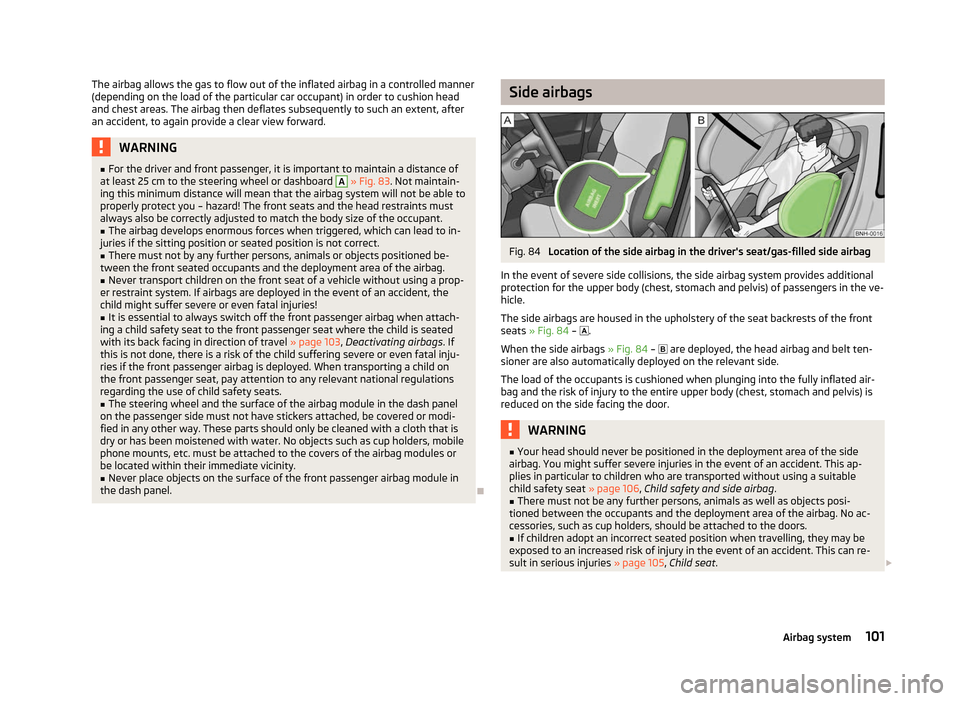
Fig. 84
Location of the side airbag in the driver's seat/gas-filled side airbag
In the event of severe side collisions, the side airbag system provides additional
protection for the upper body (chest, stomach and pelvis) of passengers in the ve-
hicle.
The side airbags are housed in the upholstery of the seat backrests of the front
seats » Fig. 84 – .
When the side airbags » Fig. 84 – are deployed, the head airbag and belt ten-
sioner are also automatically deployed on the relevant side.
The load of the occupants is cushioned when plunging into the fully inflated air-
bag and the risk of injury to the entire upper body (chest, stomach and pelvis) is
reduced on the side facing the door. WARNING
■ Your head should never be positioned in the deployment area of the side
airbag. You might suffer severe injuries in the event of an accident. This ap-
plies in particular to children who are transported without using a suitable
child safety seat » page 106, Child safety and side airbag .
■ There must not be any further persons, animals as well as objects posi-
tioned between the occupants and the deployment area of the airbag. No ac-
cessories, such as cup holders, should be attached to the doors. ■ If children adopt an incorrect seated position when travelling, they may be
exposed to an increased risk of injury in the event of an accident. This can re-
sult in serious injuries » page 105, Child seat. £
101
Airbag system
Page 159 of 180
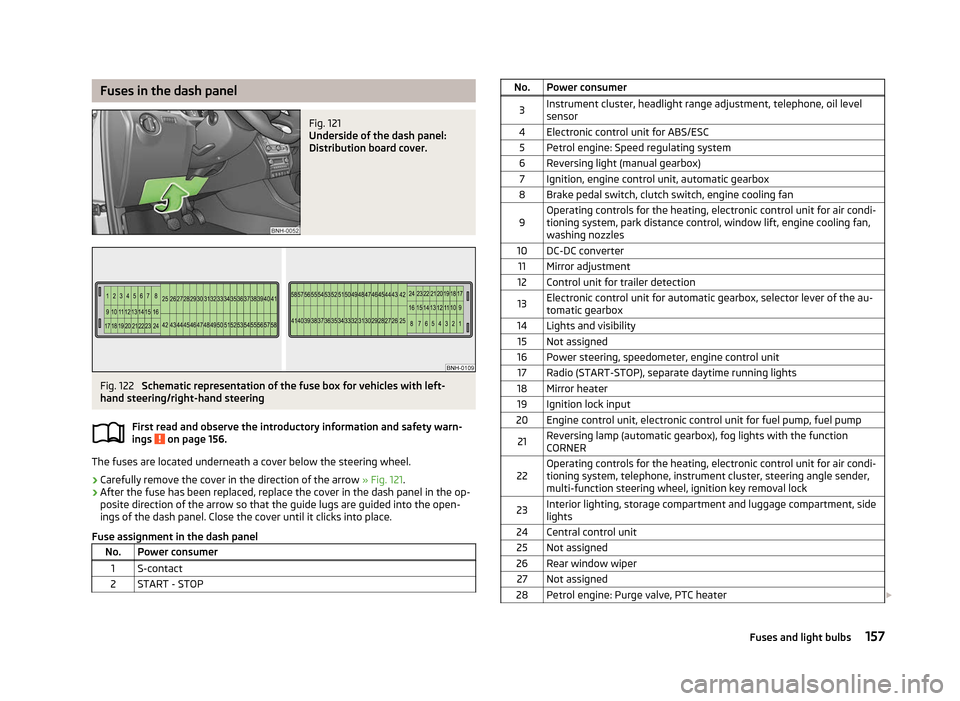
Fuses in the dash panel
Fig. 121
Underside of the dash panel:
Distribution board cover. Fig. 122
Schematic representation of the fuse box for vehicles with left-
hand steering/right-hand steering
First read and observe the introductory information and safety warn-
ings on page 156.
The fuses are located underneath a cover below the steering wheel.
› Carefully remove the cover in the direction of the arrow
» Fig. 121.
› After the fuse has been replaced, replace the cover in the dash panel in the op-
posite direction of the arrow so that the guide lugs are guided into the open-
ings of the dash panel. Close the cover until it clicks into place.
Fuse assignment in the dash panel No. Power consumer
1 S-contact
2 START - STOP ä No. Power consumer
3 Instrument cluster, headlight range adjustment, telephone, oil level
sensor
4 Electronic control unit for ABS/ESC 5 Petrol engine: Speed regulating system
6 Reversing light (manual gearbox) 7 Ignition, engine control unit, automatic gearbox
8 Brake pedal switch, clutch switch, engine cooling fan
9 Operating controls for the heating, electronic control unit for air condi-
tioning system, park distance control, window lift, engine cooling fan,
washing nozzles
10 DC-DC converter 11 Mirror adjustment
12 Control unit for trailer detection
13 Electronic control unit for automatic gearbox, selector lever of the au-
tomatic gearbox
14 Lights and visibility 15 Not assigned
16 Power steering, speedometer, engine control unit 17 Radio (START-STOP), separate daytime running lights
18 Mirror heater 19 Ignition lock input
20 Engine control unit, electronic control unit for fuel pump, fuel pump
21 Reversing lamp (automatic gearbox), fog lights with the function
CORNER
22 Operating controls for the heating, electronic control unit for air condi-
tioning system, telephone, instrument cluster, steering angle sender,
multi-function steering wheel, ignition key removal lock
23 Interior lighting, storage compartment and luggage compartment, side
lights
24 Central control unit 25 Not assigned
26 Rear window wiper 27 Not assigned
28 Petrol engine: Purge valve, PTC heater £ 157
Fuses and light bulbs
Page 174 of 180

F
Fire extinguisher 145
First-aid kit 145
Floor mats 74
Front airbag 100
Front seats 44
Fuel 124
Diesel 126
Fuel gauge 9
refer to Fuel 124
Refuelling 124
Unleaded petrol 125
Fuel consumption 110
Fuses Assignment 156
Replacing 156
G
Gear Recommended gear 11
General view Cockpit 7
Glow plug system – indicator light 21
GSM 84
H
Handbrake 72
HBA 72
Head airbag 102
Headlight cleaning system Headlight cleaning system 41
Headlights Driving abroad 113
Headlight cleaning system 41
Head restraint 46Heating 60
Defrosting windows 61
Exterior mirror 42
Rear window 39
Recirculated air mode 61
Seats 46
Heating rear window 39
HHC 72
Horn 7
I
Ignition 70
Ignition lock 70
Immobiliser 69
Information display see MAXI DOT 14
Instrument cluster 8
see Instrument cluster 8
Interior monitor 29
ISOFIX 107
J
Jacking points Raise vehicle 148
Jump-starting 152
L
Lever Main beam 36
Turn signal 36
Light Cockpit 38
Fog lights 35
Fog lights with the function CORNER 37
Hazard warning light system 37
Headlight flasher 36
Main beam 36
Parking light 34Rear fog light 35
Replacing bulbs 159
Turn signal 36
Lights Daytime running lights 35
Headlamp range adjustment 36
Low beam 34
Parking light 37
Parking light on both sides 37
Switching lights on and off 34
Warning lights 16
Loads 164
Lock Central locking system 27
Locking Emergency locking 30
Remote control 28
Locking and unlocking from the inside 27
M
MAXI DOT 14
Main menu 14
Settings 15
Maximum speed 167
MDI 90
Mirror Exterior mirror 42
Make-up 39
Manual dimming interior mirror 42
Mobile phone 84
Connecting to the hands-free system 86
Multifunction display Functions 11
Memory 12
Operation 12
Multimedia 89
172 Index
Page 176 of 180

START STOP
Jump-starting 153
Steering force assistance 69
Steering wheel 69
Storage 54
Storage compartments 54
Sun visors 39
Switching off the engine 70
T
Taking care of the vehicle Artificial leather 122
Material coverings 122
Materials 122
Natural leather 122
Seat belts 123
Taking care of your vehicle 117
Automatic car wash system 118
Chrome parts 119
Cleaning the wheels 121
Door lock cylinders 120
Headlight lenses 120
High-pressure cleaner 118
Plastic parts 119
Polishing the paintwork 119
Preservation 119
Rubber seals 120
Washing 118
Washing by hand 118
Wash system 118
TCS Warning light 20
Technical data 164
Telephone 84
Tiptronic 79
see automatic gearbox 81
Tool 145
TOP TETHER 108
Towing 153
Towing a trailer 115Towing eye 154
Towing protection 29
Traction control 73
Trailer 115
Towing a trailer 115
Transport Boot 48
Roof rack system 51
Transporting children safely 105
Two-way radio systems 84
Type plate 164
Tyre repair 149
Tyres see Wheels and tyres 139
U
Underbody protection 121
unlock Central locking system 26
Unlocking Remote control 28
Uphill start assist 72
USB 90
V
Vehicle battery Automatic load deactivation 136
Charging 135
Checking the electrolyte level 135
Operation in winter 135
Replacing 136
Safety instructions 133
Vehicle Condition see Auto Check Control 16
Vehicle data sticker 164
Vehicle dimensions 165
Vehicle key 24
Vehicle tool kit 145Visors
see Sun visors 39
W
Warning lights 16
Warning symbols see Warning lights 16
Warning triangle 145
Washing 117
Automatic car wash system 118
by hand 118
Chrome parts 119
High-pressure cleaner 118
Weights 164
Wheel bolts Anti-theft wheel bolt 149
Caps 141
Loosening and tightening 148
Wheels 137
Wheels and tyres Changing a wheel 146
Full wheel trim 141
General information 137
Handling wheels and tyres 139
new tyres 139
Service life of tyres 138
Snow chains 143
Spare wheel 140
Wheel bolts 142
Winter tyres 142
Windows De-icing 120
See Electrical power windows 31
Windscreen washer fluid Checking 132
Replenishing 132
Warning light 22
Winter 132
Windscreen washer system 132
Windscreen wipers 40
174 Index