lights SKODA RAPID 2013 1.G Owner's Guide
[x] Cancel search | Manufacturer: SKODA, Model Year: 2013, Model line: RAPID, Model: SKODA RAPID 2013 1.GPages: 226, PDF Size: 15.16 MB
Page 46 of 226
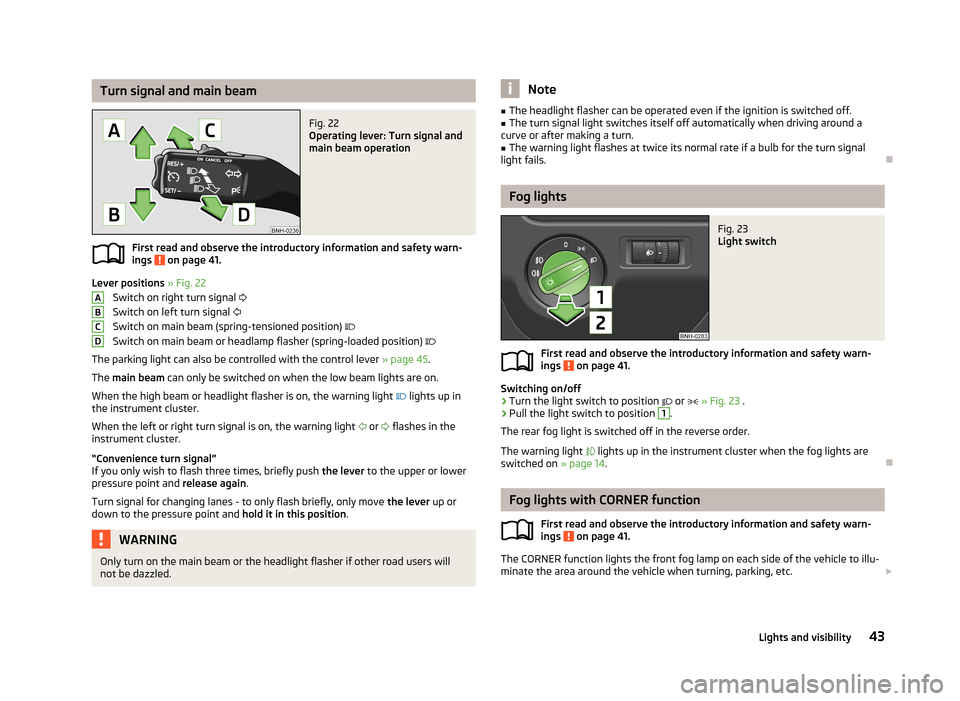
Turn signal and main beamFig. 22
Operating lever: Turn signal and
main beam operation
First read and observe the introductory information and safety warn-
ings on page 41.
Lever positions » Fig. 22
Switch on right turn signal
Switch on left turn signal
Switch on main beam (spring-tensioned position)
Switch on main beam or headlamp flasher (spring-loaded position)
The parking light can also be controlled with the control lever » page 45.
The main beam can only be switched on when the low beam lights are on.
When the high beam or headlight flasher is on, the warning light
lights up in
the instrument cluster.
When the left or right turn signal is on, the warning light
or
flashes in the
instrument cluster.
“Convenience turn signal”
If you only wish to flash three times, briefly push the lever to the upper or lower
pressure point and release again.
Turn signal for changing lanes - to only flash briefly, only move the lever up or
down to the pressure point and hold it in this position.
WARNINGOnly turn on the main beam or the headlight flasher if other road users will
not be dazzled.ABCDNote■ The headlight flasher can be operated even if the ignition is switched off.■The turn signal light switches itself off automatically when driving around a
curve or after making a turn.■
The warning light flashes at twice its normal rate if a bulb for the turn signal
light fails.
Fog lights
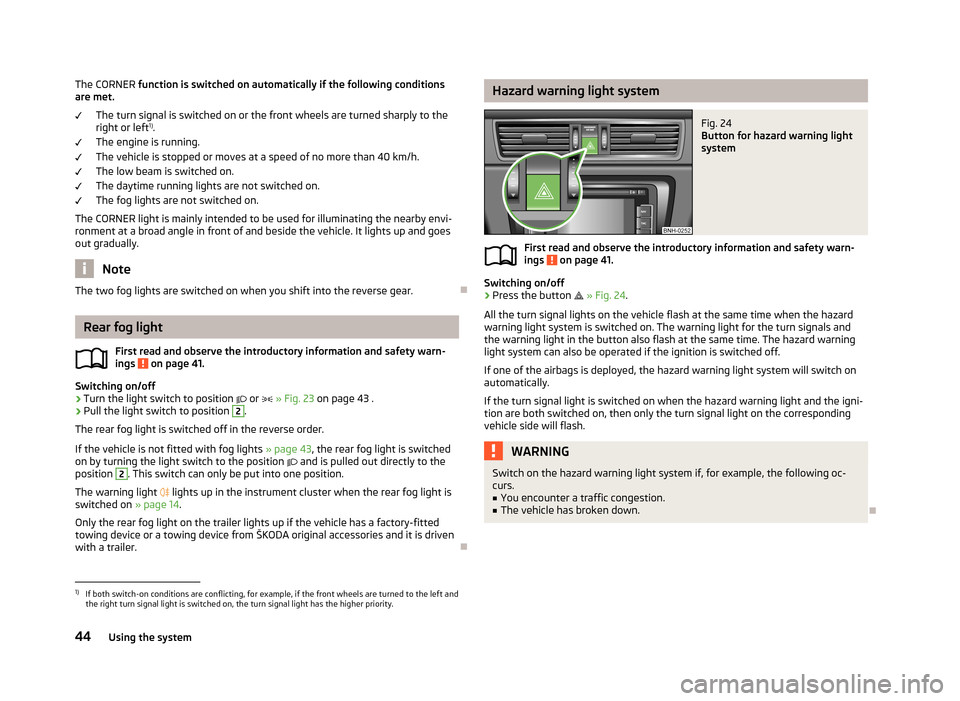
Fig. 23
Light switch
First read and observe the introductory information and safety warn-
ings on page 41.
Switching on/off
›
Turn the light switch to position
or
» Fig. 23 .
›
Pull the light switch to position
1
.
The rear fog light is switched off in the reverse order.
The warning light
lights up in the instrument cluster when the fog lights are
switched on » page 14.
Fog lights with CORNER function
First read and observe the introductory information and safety warn-
ings
on page 41.
The CORNER function lights the front fog lamp on each side of the vehicle to illu-
minate the area around the vehicle when turning, parking, etc.
43Lights and visibility
Page 47 of 226
The CORNER function is switched on automatically if the following conditions
are met.
The turn signal is switched on or the front wheels are turned sharply to the
right or left 1)
.
The engine is running.
The vehicle is stopped or moves at a speed of no more than 40 km/h. The low beam is switched on.
The daytime running lights are not switched on.
The fog lights are not switched on.
The CORNER light is mainly intended to be used for illuminating the nearby envi-
ronment at a broad angle in front of and beside the vehicle. It lights up and goes
out gradually.
Note
The two fog lights are switched on when you shift into the reverse gear.
Rear fog light
First read and observe the introductory information and safety warn-
ings
on page 41.
Switching on/off
›
Turn the light switch to position
or
» Fig. 23 on page 43 .
›
Pull the light switch to position
2
.
The rear fog light is switched off in the reverse order.
If the vehicle is not fitted with fog lights » page 43, the rear fog light is switched
on by turning the light switch to the position
and is pulled out directly to the
position
2
. This switch can only be put into one position.
The warning light
lights up in the instrument cluster when the rear fog light is
switched on » page 14.
Only the rear fog light on the trailer lights up if the vehicle has a factory-fitted
towing device or a towing device from ŠKODA original accessories and it is driven
with a trailer.
Hazard warning light systemFig. 24
Button for hazard warning light
system
First read and observe the introductory information and safety warn-
ings on page 41.
Switching on/off
›
Press the button
» Fig. 24 .
All the turn signal lights on the vehicle flash at the same time when the hazard
warning light system is switched on. The warning light for the turn signals and
the warning light in the button also flash at the same time. The hazard warning
light system can also be operated if the ignition is switched off.
If one of the airbags is deployed, the hazard warning light system will switch on
automatically.
If the turn signal light is switched on when the hazard warning light and the igni- tion are both switched on, then only the turn signal light on the corresponding
vehicle side will flash.
WARNINGSwitch on the hazard warning light system if, for example, the following oc-
curs.■
You encounter a traffic congestion.
■
The vehicle has broken down.
1)
If both switch-on conditions are conflicting, for example, if the front wheels are turned to the left and
the right turn signal light is switched on, the turn signal light has the higher priority.
44Using the system
Page 48 of 226
Parking lightFirst read and observe the introductory information and safety warn-
ings
on page 41.
Parking light switching on
›
Switch off the ignition.
›
Place the control lever into position
A
or
B
as far as it can go » Fig. 22 on
page 43 - the parking light on the right/left-hand side of the vehicle is switched
on.
Switching on the side light on both sides
›
Turn the light switch
A
to position » Fig. 21 on page 41 and lock the vehicle.
Note
■
The parking light can only be activated if the ignition is switched off.■If the right or left turn signal light has been switched on and the ignition is
switched off, the parking light is not automatically switched on.■
On vehicles with a MAXI DOT display, the symbol in the light switch also
lights up when the two-sided parking light is switched on.
Interior lighting
Front interior lighting – version 1
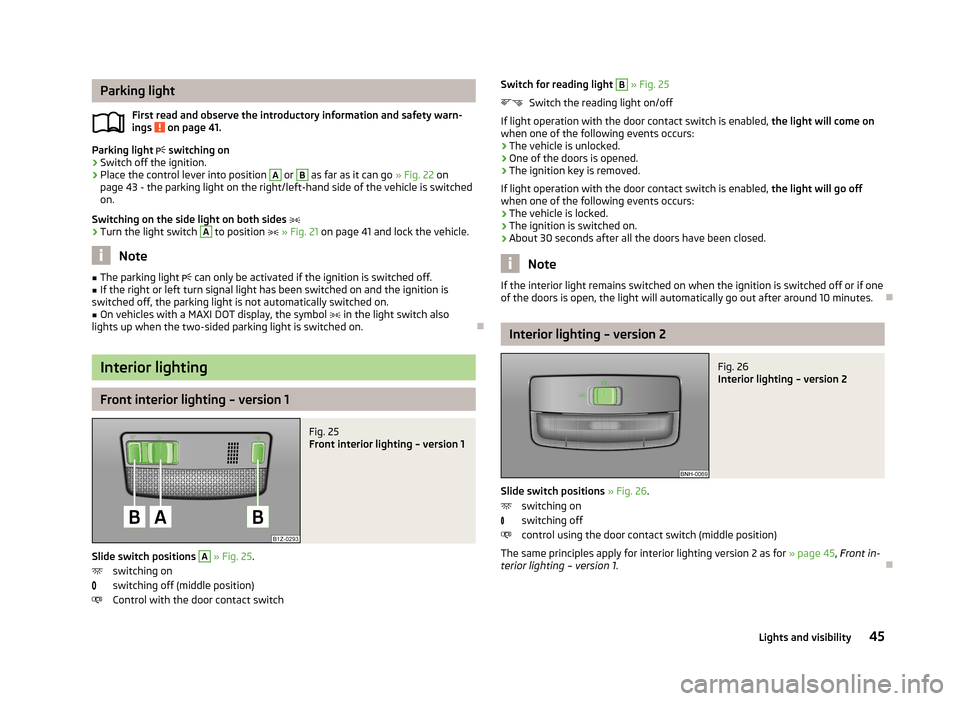
Fig. 25
Front interior lighting – version 1
Slide switch positions
A
» Fig. 25 .
switching on
switching off (middle position)
Control with the door contact switch
Switch for reading light B » Fig. 25
Switch the reading light on/off
If light operation with the door contact switch is enabled, the light will come on
when one of the following events occurs:
› The vehicle is unlocked.
› One of the doors is opened.
› The ignition key is removed.
If light operation with the door contact switch is enabled, the light will go off
when one of the following events occurs:
› The vehicle is locked.
› The ignition is switched on.
› About 30 seconds after all the doors have been closed.
Note
If the interior light remains switched on when the ignition is switched off or if one
of the doors is open, the light will automatically go out after around 10 minutes.
Interior lighting – version 2
Fig. 26
Interior lighting – version 2
Slide switch positions » Fig. 26 .
switching on
switching off
control using the door contact switch (middle position)
The same principles apply for interior lighting version 2 as for » page 45, Front in-
terior lighting – version 1 .
45Lights and visibility
Page 50 of 226
Rear window heaterFig. 29
Dash panel: Button for rear win-
dow heater
First read and observe the introductory information given on page 46.
Explanation of graphic » Fig. 29
Switch the rear window heater on/off
When the heater is switched on, a lamp lights up inside the button.
The rear window heater only operates when the engine is running.
The rear window heater switches off automatically after approx. 7 minutes.
For the sake of the environment
The heating should be switched off as soon as the window is de-iced or free from
mist. The reduced current consumption will have a favourable effect on fuel econ-
omy » page 108 , Saving electrical energy .
Note
■
If the on-board voltage drops, the rear window heater switches off automatical-
ly, in order to provide sufficient electrical energy for the engine con-
trol » page 174 , Automatic load deactivation .■
If the light is flashing inside the button the heater is off due to low battery.
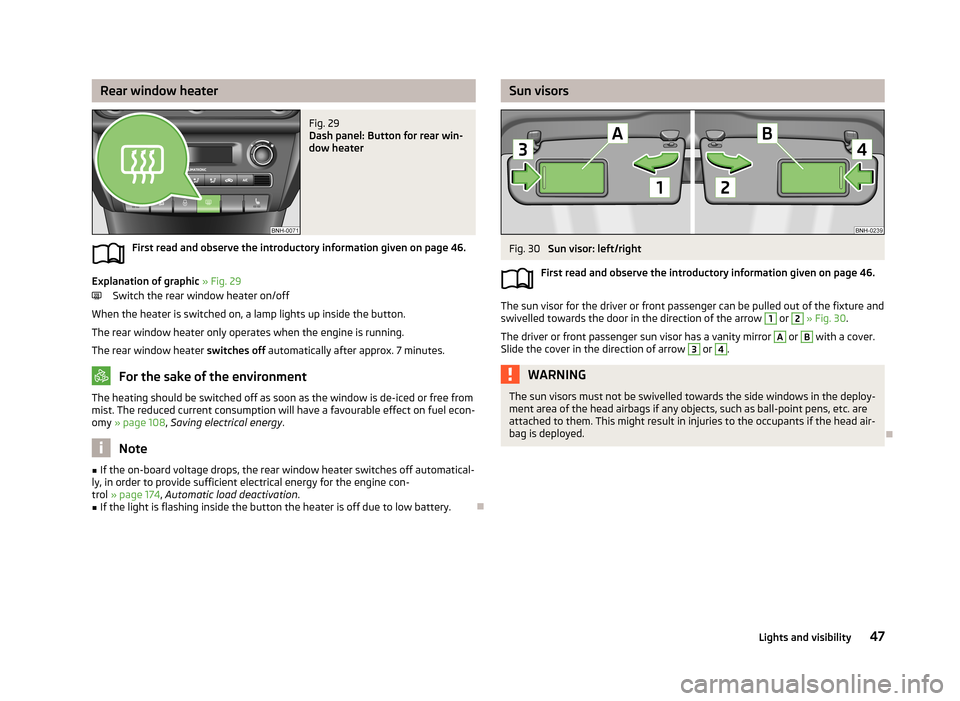
Sun visorsFig. 30
Sun visor: left/right
First read and observe the introductory information given on page 46.
The sun visor for the driver or front passenger can be pulled out of the fixture and
swivelled towards the door in the direction of the arrow
1
or
2
» Fig. 30 .
The driver or front passenger sun visor has a vanity mirror
A
or
B
with a cover.
Slide the cover in the direction of arrow
3
or
4
.
WARNINGThe sun visors must not be swivelled towards the side windows in the deploy-
ment area of the head airbags if any objects, such as ball-point pens, etc. are attached to them. This might result in injuries to the occupants if the head air-
bag is deployed.
47Lights and visibility
Page 52 of 226
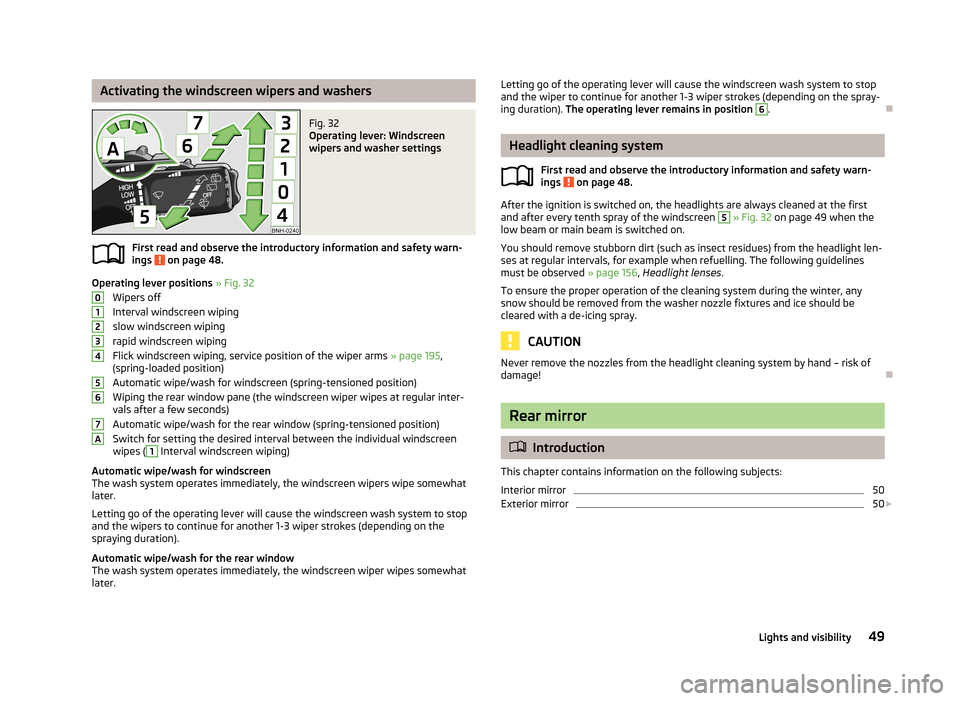
Activating the windscreen wipers and washersFig. 32
Operating lever: Windscreen
wipers and washer settings
First read and observe the introductory information and safety warn-
ings on page 48.
Operating lever positions » Fig. 32
Wipers off
Interval windscreen wiping
slow windscreen wiping
rapid windscreen wiping
Flick windscreen wiping, service position of the wiper arms » page 195,
(spring-loaded position)
Automatic wipe/wash for windscreen (spring-tensioned position) Wiping the rear window pane (the windscreen wiper wipes at regular inter- vals after a few seconds)
Automatic wipe/wash for the rear window (spring-tensioned position)
Switch for setting the desired interval between the individual windscreen wipes (
1
Interval windscreen wiping)
Automatic wipe/wash for windscreen
The wash system operates immediately, the windscreen wipers wipe somewhat
later.
Letting go of the operating lever will cause the windscreen wash system to stop
and the wipers to continue for another 1-3 wiper strokes (depending on the
spraying duration).
Automatic wipe/wash for the rear window The wash system operates immediately, the windscreen wiper wipes somewhatlater.
01234567ALetting go of the operating lever will cause the windscreen wash system to stop
and the wiper to continue for another 1-3 wiper strokes (depending on the spray-
ing duration). The operating lever remains in position 6
.
Headlight cleaning system
First read and observe the introductory information and safety warn-
ings
on page 48.
After the ignition is switched on, the headlights are always cleaned at the first
and after every tenth spray of the windscreen
5
» Fig. 32 on page 49 when the
low beam or main beam is switched on.
You should remove stubborn dirt (such as insect residues) from the headlight len-
ses at regular intervals, for example when refuelling. The following guidelines
must be observed » page 156, Headlight lenses .
To ensure the proper operation of the cleaning system during the winter, any
snow should be removed from the washer nozzle fixtures and ice should be
cleared with a de-icing spray.
CAUTION
Never remove the nozzles from the headlight cleaning system by hand – risk of
damage!
Rear mirror
Introduction
This chapter contains information on the following subjects:
Interior mirror
50
Exterior mirror
50
49Lights and visibility
Page 54 of 226
Folding in the exterior mirrors
The whole exterior mirror can be manually folded towards the side windows. To
put it back into its original position, it should be folded back from the side window until it audibly clicks into place.
51Lights and visibility
Page 57 of 226
›To re-insert the head restraint, push it far enough down into the seat backrest
until the locking button audibly clicks into place.WARNING■ The head restraints must be correctly adjusted in order to offer effective
protection for the occupants in the event of an accident.■
Never drive with the head restraints removed - risk of injury.
■
If the rear seats are occupied, the rear head restraint must not be in the
lower position.
Note
For the sport seats, the head restraints are integrated into the front seat backr-
ests. These headrests cannot be adjusted by height or removed.
Seat features
Introduction
This chapter contains information on the following subjects:
Front seat heating
54
Front armrest
55
Rear armrest
55
Rear seat backrests
55
Front seat heating
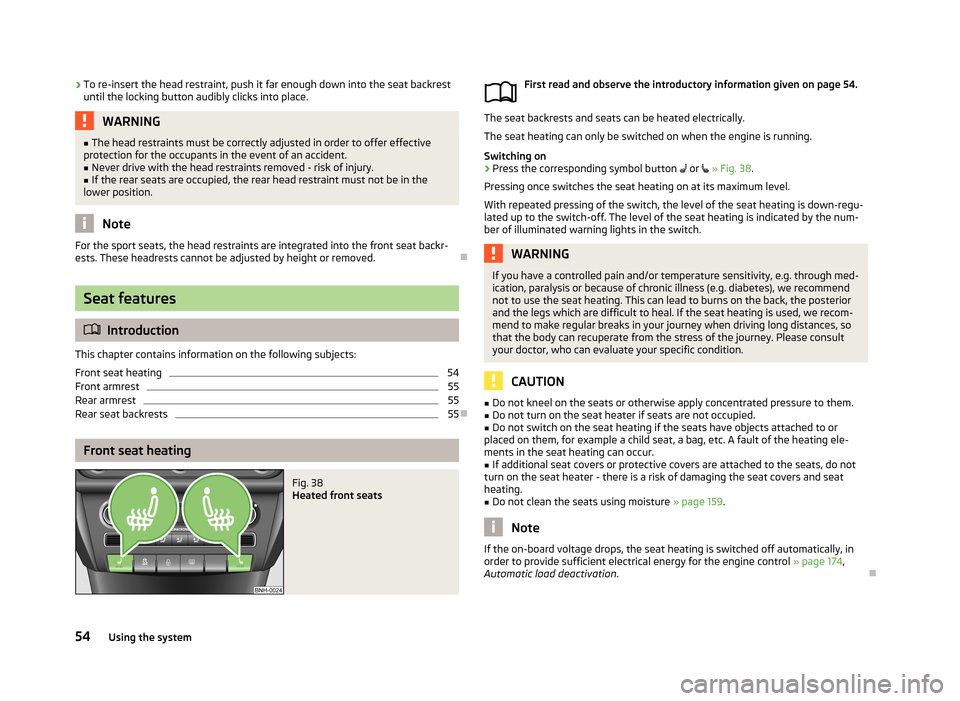
Fig. 38
Heated front seats
First read and observe the introductory information given on page 54.
The seat backrests and seats can be heated electrically. The seat heating can only be switched on when the engine is running.
Switching on
›
Press the corresponding symbol button or » Fig. 38 .
Pressing once switches the seat heating on at its maximum level.
With repeated pressing of the switch, the level of the seat heating is down-regu- lated up to the switch-off. The level of the seat heating is indicated by the num-
ber of illuminated warning lights in the switch.
WARNINGIf you have a controlled pain and/or temperature sensitivity, e.g. through med-
ication, paralysis or because of chronic illness (e.g. diabetes), we recommend
not to use the seat heating. This can lead to burns on the back, the posterior
and the legs which are difficult to heal. If the seat heating is used, we recom-
mend to make regular breaks in your journey when driving long distances, so
that the body can recuperate from the stress of the journey. Please consult
your doctor, who can evaluate your specific condition.
CAUTION
■ Do not kneel on the seats or otherwise apply concentrated pressure to them.■Do not turn on the seat heater if seats are not occupied.■
Do not switch on the seat heating if the seats have objects attached to or
placed on them, for example a child seat, a bag, etc. A fault of the heating ele-
ments in the seat heating can occur.
■
If additional seat covers or protective covers are attached to the seats, do not
turn on the seat heater - there is a risk of damaging the seat covers and seat
heating.
■
Do not clean the seats using moisture » page 159.
Note
If the on-board voltage drops, the seat heating is switched off automatically, in
order to provide sufficient electrical energy for the engine control » page 174,
Automatic load deactivation .
54Using the system
Page 66 of 226
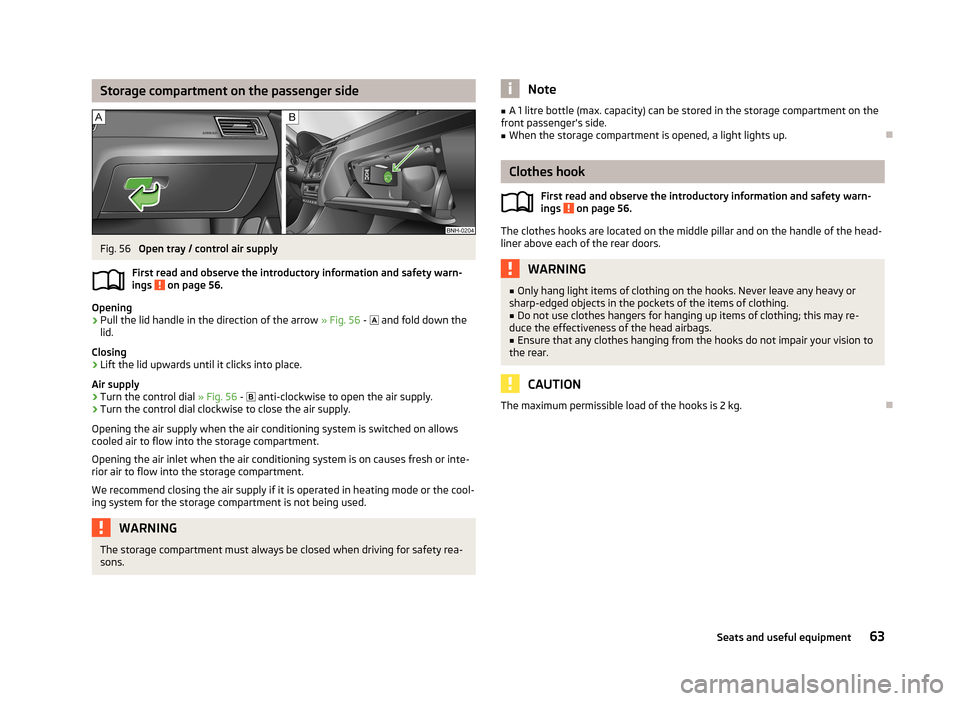
Storage compartment on the passenger sideFig. 56
Open tray / control air supply
First read and observe the introductory information and safety warn- ings
on page 56.
Opening
›
Pull the lid handle in the direction of the arrow » Fig. 56 -
and fold down the
lid.
Closing
›
Lift the lid upwards until it clicks into place.
Air supply
›
Turn the control dial » Fig. 56 -
anti-clockwise to open the air supply.
›
Turn the control dial clockwise to close the air supply.
Opening the air supply when the air conditioning system is switched on allows cooled air to flow into the storage compartment.
Opening the air inlet when the air conditioning system is on causes fresh or inte-rior air to flow into the storage compartment.
We recommend closing the air supply if it is operated in heating mode or the cool- ing system for the storage compartment is not being used.
WARNINGThe storage compartment must always be closed when driving for safety rea-
sons.Note■ A 1 litre bottle (max. capacity) can be stored in the storage compartment on the
front passenger's side.■
When the storage compartment is opened, a light lights up.
Clothes hook
First read and observe the introductory information and safety warn-ings
on page 56.
The clothes hooks are located on the middle pillar and on the handle of the head-
liner above each of the rear doors.
WARNING■ Only hang light items of clothing on the hooks. Never leave any heavy or
sharp-edged objects in the pockets of the items of clothing.■
Do not use clothes hangers for hanging up items of clothing; this may re-
duce the effectiveness of the head airbags.
■
Ensure that any clothes hanging from the hooks do not impair your vision to
the rear.
CAUTION
The maximum permissible load of the hooks is 2 kg.
63Seats and useful equipment
Page 82 of 226
We recommend that you leave the air outlet vents 3 » Fig. 77 on page 76 in the
open position in all operating modes.
Note
If the air distribution is positioned only towards the windows, the total amount of
air is used to defrost the windows and thus no air will be fed to the footwell. This
can lead to restriction of the heating comfort.
Recirculated air mode
First read and observe the introductory information given on page 77.
Recirculated air mode prevents polluted air outside the vehicle from getting into
the vehicle, e.g. when driving through a tunnel or in a traffic jam.
Switching on/off
›
Press the symbol button
.
The indicator light in the button lights up.
›
Press the symbol button
again.
The indicator light in the button goes out.
Recirculated air mode is switched off automatically if the air distribution control
C
» Fig. 78 on page 78 is turned to position
. Recirculated air mode can be
switched on again from this position by repeatedly pressing the symbol button
.
WARNINGNever leave recirculated air mode switched on over a longer period of time, as
“stale air” can cause driver and passenger fatigue, reduce attention levels and also cause the windows to mist up. Increased risk of accident. Switch off recir-
culated air mode as soon as the windows start to mist up.
Air conditioning system (manual air conditioning
system)
Introduction
This chapter contains information on the following subjects: Control elements
80
Adjusting
81
Recirculated air mode
81
The cooling system only operates if the following conditions are met. The cooling system is switched on » page 80, Control elements .
The engine is running.
The outside temperature is above approx. +2 °C.
The blower switch is switched on (positions 1-4).
If the desired interior temperature can also be achieved without activating the cooling system, fresh air mode should be selected.
The cooling system is switched off at excessive coolant temperatures in order to guarantee a cooling effect when the engine is under a high load.
CAUTION
■ Under certain circumstances, air at a temperature of about 5 °C can flow out of
the vents when the cooling system is switched on.■
Lengthy and uneven distribution of the air flow out of the vents (especially
around the feet) and large differences in temperature, for example, when getting
out of the vehicle, can cause susceptible individuals to catch a cold.
Note
We recommend that you have the air conditioning system cleaned by a specialist
garage once every year.79Heating and air-conditioning
Page 83 of 226
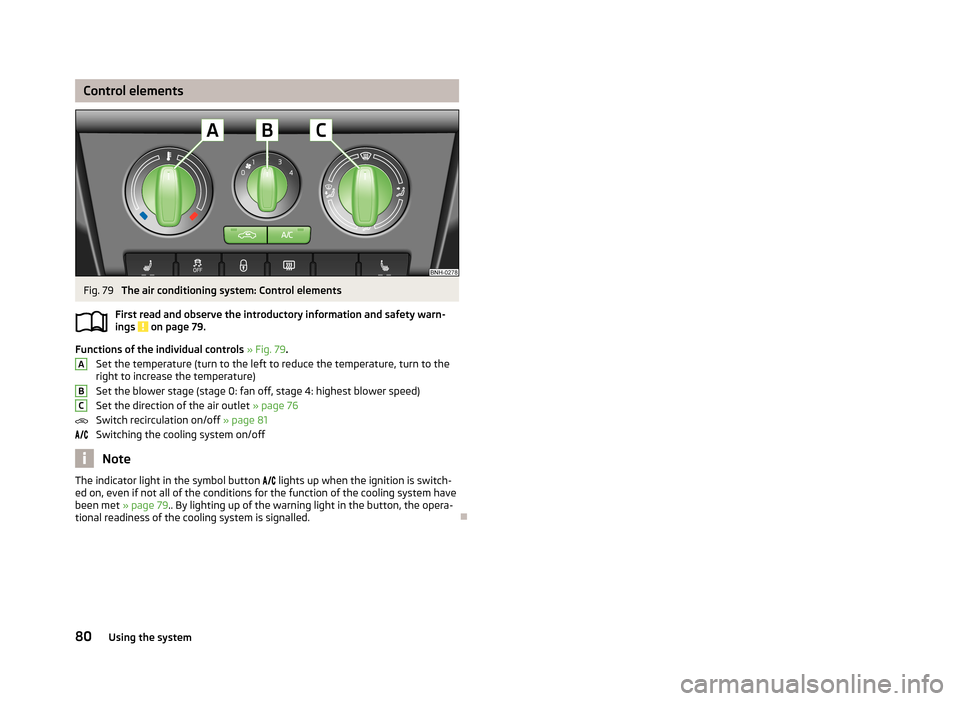
Control elementsFig. 79
The air conditioning system: Control elements
First read and observe the introductory information and safety warn- ings
on page 79.
Functions of the individual controls » Fig. 79 .
Set the temperature (turn to the left to reduce the temperature, turn to the
right to increase the temperature)
Set the blower stage (stage 0: fan off, stage 4: highest blower speed)
Set the direction of the air outlet » page 76
Switch recirculation on/off » page 81
Switching the cooling system on/off
Note
The indicator light in the symbol button lights up when the ignition is switch-
ed on, even if not all of the conditions for the function of the cooling system have
been met » page 79.. By lighting up of the warning light in the button, the opera-
tional readiness of the cooling system is signalled.
ABC80Using the system