window SKODA RAPID 2013 1.G Owner's Guide
[x] Cancel search | Manufacturer: SKODA, Model Year: 2013, Model line: RAPID, Model: SKODA RAPID 2013 1.GPages: 226, PDF Size: 15.16 MB
Page 81 of 226
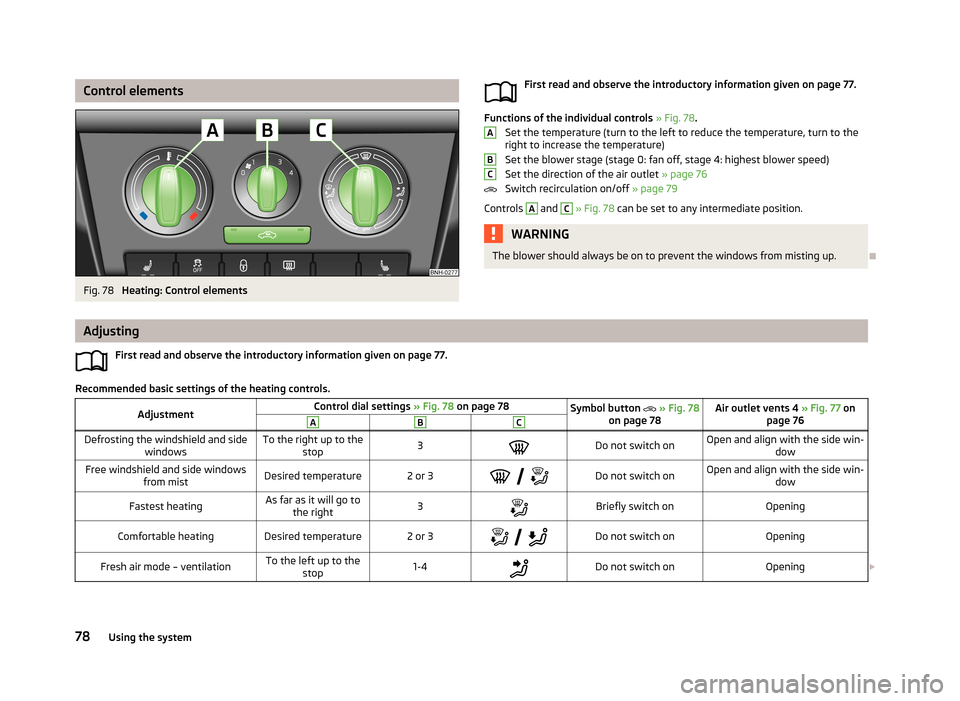
Control elementsFig. 78
Heating: Control elements
First read and observe the introductory information given on page 77.
Functions of the individual controls » Fig. 78 .
Set the temperature (turn to the left to reduce the temperature, turn to the right to increase the temperature)
Set the blower stage (stage 0: fan off, stage 4: highest blower speed)
Set the direction of the air outlet » page 76
Switch recirculation on/off » page 79
Controls
A
and
C
» Fig. 78 can be set to any intermediate position.
WARNINGThe blower should always be on to prevent the windows from misting up.
ABC
Adjusting
First read and observe the introductory information given on page 77.
Recommended basic settings of the heating controls.
AdjustmentControl dial settings » Fig. 78 on page 78Symbol button » Fig. 78
on page 78Air outlet vents 4 » Fig. 77 on
page 76ABCDefrosting the windshield and side windowsTo the right up to thestop3Do not switch onOpen and align with the side win- dowFree windshield and side windows
from mistDesired temperature2 or 3
Do not switch onOpen and align with the side win-
dowFastest heatingAs far as it will go tothe right3Briefly switch onOpeningComfortable heatingDesired temperature2 or 3
Do not switch onOpeningFresh air mode – ventilationTo the left up to the
stop1-4Do not switch onOpening 78Using the system
Page 82 of 226
We recommend that you leave the air outlet vents 3 » Fig. 77 on page 76 in the
open position in all operating modes.
Note
If the air distribution is positioned only towards the windows, the total amount of
air is used to defrost the windows and thus no air will be fed to the footwell. This
can lead to restriction of the heating comfort.
Recirculated air mode
First read and observe the introductory information given on page 77.
Recirculated air mode prevents polluted air outside the vehicle from getting into
the vehicle, e.g. when driving through a tunnel or in a traffic jam.
Switching on/off
›
Press the symbol button
.
The indicator light in the button lights up.
›
Press the symbol button
again.
The indicator light in the button goes out.
Recirculated air mode is switched off automatically if the air distribution control
C
» Fig. 78 on page 78 is turned to position
. Recirculated air mode can be
switched on again from this position by repeatedly pressing the symbol button
.
WARNINGNever leave recirculated air mode switched on over a longer period of time, as
“stale air” can cause driver and passenger fatigue, reduce attention levels and also cause the windows to mist up. Increased risk of accident. Switch off recir-
culated air mode as soon as the windows start to mist up.
Air conditioning system (manual air conditioning
system)
Introduction
This chapter contains information on the following subjects: Control elements
80
Adjusting
81
Recirculated air mode
81
The cooling system only operates if the following conditions are met. The cooling system is switched on » page 80, Control elements .
The engine is running.
The outside temperature is above approx. +2 °C.
The blower switch is switched on (positions 1-4).
If the desired interior temperature can also be achieved without activating the cooling system, fresh air mode should be selected.
The cooling system is switched off at excessive coolant temperatures in order to guarantee a cooling effect when the engine is under a high load.
CAUTION
■ Under certain circumstances, air at a temperature of about 5 °C can flow out of
the vents when the cooling system is switched on.■
Lengthy and uneven distribution of the air flow out of the vents (especially
around the feet) and large differences in temperature, for example, when getting
out of the vehicle, can cause susceptible individuals to catch a cold.
Note
We recommend that you have the air conditioning system cleaned by a specialist
garage once every year.79Heating and air-conditioning
Page 84 of 226
AdjustingFirst read and observe the introductory information and safety warnings
on page 79.
Recommended basic settings of the air conditioning controls.
AdjustmentControl dial settings » Fig. 79 on page 80Symbol button » Fig. 79 on page 80Air outlet vents 4 » Fig. 77
on page 76ABCDefrost/defog windscreen and side windows a)Desired tempera-
ture3 or 4Do not switch onAutomatically switched onb)Open and align with the side
windowFastest heatingAs far as it will goto the right3Briefly switch onSwitched offOpeningComfortable heatingDesired tempera-
ture2 or 3
Do not switch onSwitched offOpeningThe fastest coolingTo the left up to
the stopbriefly 4, then 2 or 3Briefly switch on c)ActivatedOpeningComfortable coolingDesired tempera-
ture1, 2 or 3Do not switch onActivatedOpen and align to the roofFresh air mode – ventilationTo the left up tothe stopDesired positionDo not switch onSwitched offOpeninga)
We recommend that you do not use this setting in countries with high humidity levels. This can result in heavy cooling of the window glass and the following fogging from outside.
b)
Automatic switch-on can be deactivated by pressing the symbol button .
c)
Under certain conditions, recirculated air mode
» page 81 may switch on automatically; the indicator light will then light up in the symbol button
.
We recommend that you leave the air outlet vents
3 » Fig. 77 on page 76 in the
open position in all operating modes.
Recirculated air mode
First read and observe the introductory information and safety warn-ings
on page 79.
Recirculated air mode prevents polluted air outside the vehicle from getting into
the vehicle, e.g. when driving through a tunnel or in a traffic jam.
Switching on/off
›
Press the symbol button
.
The indicator light in the button lights up.
› Press the symbol button
again.
The indicator light in the button goes out.
Recirculated air mode is switched off automatically if the air distribution controlC
» Fig. 79 on page 80 is turned to position . Recirculated air mode can be
switched on again from this position by repeatedly pressing the symbol button
.
WARNINGNever leave recirculated air mode switched on over a longer period of time, as
“stale air” can cause driver and passenger fatigue, reduce attention levels and also cause the windows to mist up. Increased risk of accident. Switch off recir-
culated air mode as soon as the windows start to mist up.
81Heating and air-conditioning
Page 86 of 226
Air flow to the windows
Air flow to the upper body
Air flow in the footwell
Switch recirculation on/off » page 83
Switching the cooling system on/off » page 83
Note
Do not stick anything onto or cover the interior temperature sensor 11 » Fig. 80
as this could impair the functioning of the Climatronic.
automatic mode
First read and observe the introductory information given on page 82.
The automatic mode is used in order to maintain a constant temperature and to
demist the windows in the interior of the car.
Recommended setting for all periods of the year
›
Set the desired temperature, we recommend 22 °C.
›
Press the button
.
The display shows
(pos.
4
» Fig. 80 on page 82).
›
Set the air outlet vents 3 and 4 » Fig. 77 on page 76 so that the air flow is direc-
ted slightly upwards.
Automatic mode can be switched off by pressing one of the buttons for the air
distribution or by increasing/decreasing the blower speed. The temperature is
nevertheless regulated.
Switching the cooling system on/off
First read and observe the introductory information given on page 82.
›
Press the button
.
The symbol
(pos.
8
» Fig. 80 on page 82) appears in the display.
›
Press button
once more.
The
symbol in the display goes out.
After the cooling system is switched off, only the ventilation function remains ac-
tive, whereby the lowest temperature that can be reached is the outside temper- ature.
Setting the temperature
First read and observe the introductory information given on page 82.
Setting temperature
›
Switch on the ignition.
›
Turn the control dial
1
» Fig. 80 on page 82 to the left or to the right to in-
crease or decrease the temperature.
The set temperature value appears in the display (pos.
2
» Fig. 80 on page 82).
Switching between Celsius and Fahrenheit
›
Press and hold the
and
buttons simultaneously.
The information appears in the display in the desired temperature measuring unit
(pos.
3
» Fig. 80 on page 82).
The interior temperature can be set between +18 °C and +29 ℃. The interior tem-
perature is regulated automatically within this range.
If you select the temperature below +18 ℃, “LO” appears in the display.
If you select a temperature higher than +29 ℃, “HI” appears in the display.
In both limit positions the Climatronic operates at maximum cooling or heating
capacity, respectively. The temperature is not automatically regulated in this case.
CAUTION
Lengthy and uneven distribution of the air flow out of the vents (especially
around the feet) and large differences in temperature, for example, when getting
out of the vehicle, can cause susceptible individuals to catch a cold.
recirculated air mode
First read and observe the introductory information given on page 82.
Recirculated air mode prevents polluted air outside the vehicle from getting into
the vehicle, e.g. when driving through a tunnel or in a traffic jam.
83Heating and air-conditioning
Page 87 of 226
Switching on/off›Press the symbol button .
The symbol (pos. 7
» Fig. 80 on page 82) appears in the display.
›
Press the symbol button again.
The symbol in the display goes out.
WARNINGNever leave recirculated air mode switched on over a longer period of time, as
“stale air” can cause driver and passenger fatigue, reduce attention levels and
also cause the windows to mist up. Increased risk of accident. Switch off recir-
culated air mode as soon as the windows start to mist up.
Note
If recirculated air mode is switched on for around 15 minutes, the symbol will
begin to flash in the display as a sign that recirculated air mode has been switch-
ed on for a long time. If the recirculated air mode is not switched off, the symbol
flashes for around 5 minutes.
Controlling blower
First read and observe the introductory information given on page 82.
The Climatronic system controls the blower stages automatically in line with the
interior temperature. However, the blower level can be manually adjusted to suit
your particular needs.
›
Turn the control dial
10
» Fig. 80 on page 82 to the left or to the right to in-
crease or decrease the blower speed.
If the blower is switched off, the Climatronic system is switched off.
The set blower speed is shown by displaying the corresponding number of seg-
ments in icon
9
in the display.
WARNING■ “Stale air” may result in fatigue in the driver and occupants, reduce attention
levels and also cause the windows to mist up. The risk of having an accident
increases.■
Do not switch off the Climatronic system for longer than necessary.
■
Switch on the Climatronic system as soon as the windows mist up.
Defrosting windscreen
First read and observe the introductory information given on page 82.
Switching on/off
›
Press the symbol button
» Fig. 80 on page 82.
The symbol
(pos.
5
» Fig. 80 on page 82) appears in the display.
›
Press the symbol button
again or press the
button.
The
symbol in the display goes out.
More air flows out of the air outlet vents 1 and 2 » Fig. 77 on page 76. The temper-
ature control is controlled automatically.
84Using the system
Page 93 of 226
Bluetooth
The following menu items can be selected from the Bluetooth menu item.
■ User - Overview of the stored telephones
■ New user - Search for new mobile phones that are in the reception range
■ Visibility - Switches on the visibility of the hands-free system for other devices
■ Media player - Playback via Bluetooth ®
■ Active device - Connected device
■ Paired devices - List of paired devices
■ Search - Device search
■ Phone name - option to change the name of the phone (default SKODA_BT)
Settings
The following menu items can be selected from the Settings menu item.
■ Telephone book - Phonebook
■ Update - Update the phone book 1)
■ List - Arrange the entries in the phone book
■ Surname - Arrange according to surname
■ First name - Arrange according to first name
■ Ring tone - Ring tone setting
Back
Return in the Start menu of the telephone.
Voice control
Introduction
This chapter contains information on the following subjects:
Dialogue – version 1
90
Dialogue – version 2
91
Voice commands
92
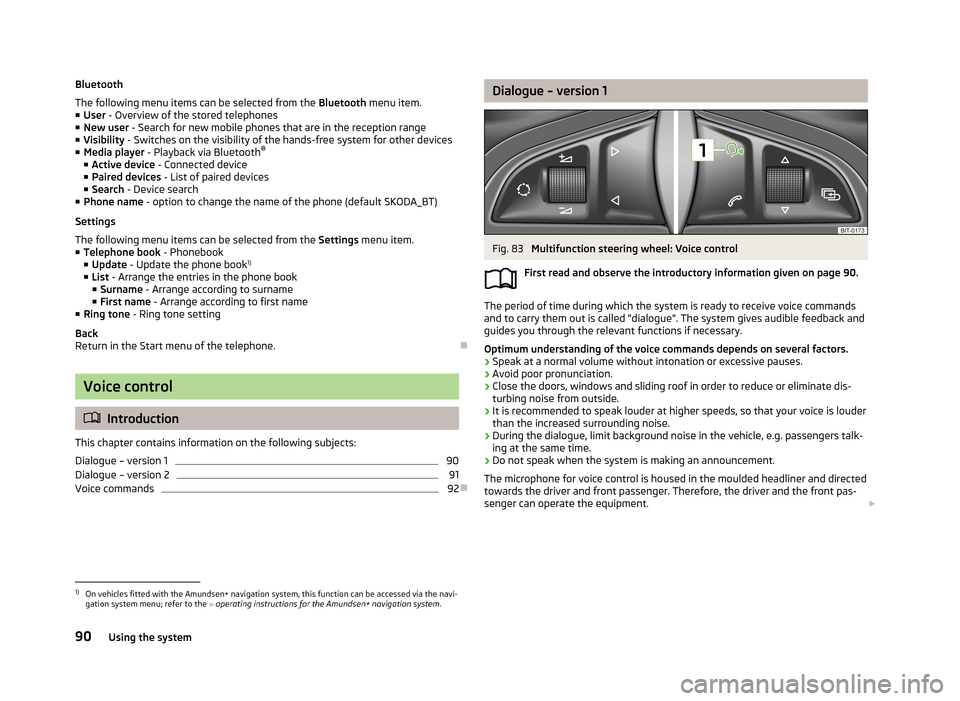
Dialogue – version 1Fig. 83
Multifunction steering wheel: Voice control
First read and observe the introductory information given on page 90.
The period of time during which the system is ready to receive voice commands and to carry them out is called "dialogue". The system gives audible feedback and
guides you through the relevant functions if necessary.
Optimum understanding of the voice commands depends on several factors.
› Speak at a normal volume without intonation or excessive pauses.
› Avoid poor pronunciation.
› Close the doors, windows and sliding roof in order to reduce or eliminate dis-
turbing noise from outside.
› It is recommended to speak louder at higher speeds, so that your voice is louder
than the increased surrounding noise.
› During the dialogue, limit background noise in the vehicle, e.g. passengers talk-
ing at the same time.
› Do not speak when the system is making an announcement.
The microphone for voice control is housed in the moulded headliner and directed
towards the driver and front passenger. Therefore, the driver and the front pas-
senger can operate the equipment.
1)
On vehicles fitted with the Amundsen+ navigation system, this function can be accessed via the navi-
gation system menu; refer to the » operating instructions for the Amundsen+ navigation system .
90Using the system
Page 94 of 226
Entering a phone number
The telephone number can be entered as a continuous sequence of numbers spo-
ken one after the other (the whole number at once) or in the form of digit blocks
(separated by short pauses). After each string of digits (separated by a brief pause
in speaking), all of the digits detected up to now are repeated by the system.
The digits 0-9 and symbols +, , # are permitted. The system does not recognize
any combination of connected numbers, e.g. "twenty-three".
Switching on voice control
Briefly press the button 1
» Fig. 83 on the multifunction steering wheel.
Switching off voice control
If the system is currently playing a message, the message that is currently being
played must be terminated by briefly pressing button
1
» Fig. 83 on the multi-
function steering wheel.
If the system is expecting a voice command, you can end the dialogue yourself:
› with the
CANCEL voice command;
› by briefly pressing the button
1
» Fig. 83 on the multifunction steering wheel.
Note
■
The dialogue is immediately terminated in the event of an incoming call.■The voice control is only possible in vehicles fitted with a multifunction steering
wheel with telephone control.
Dialogue – version 2
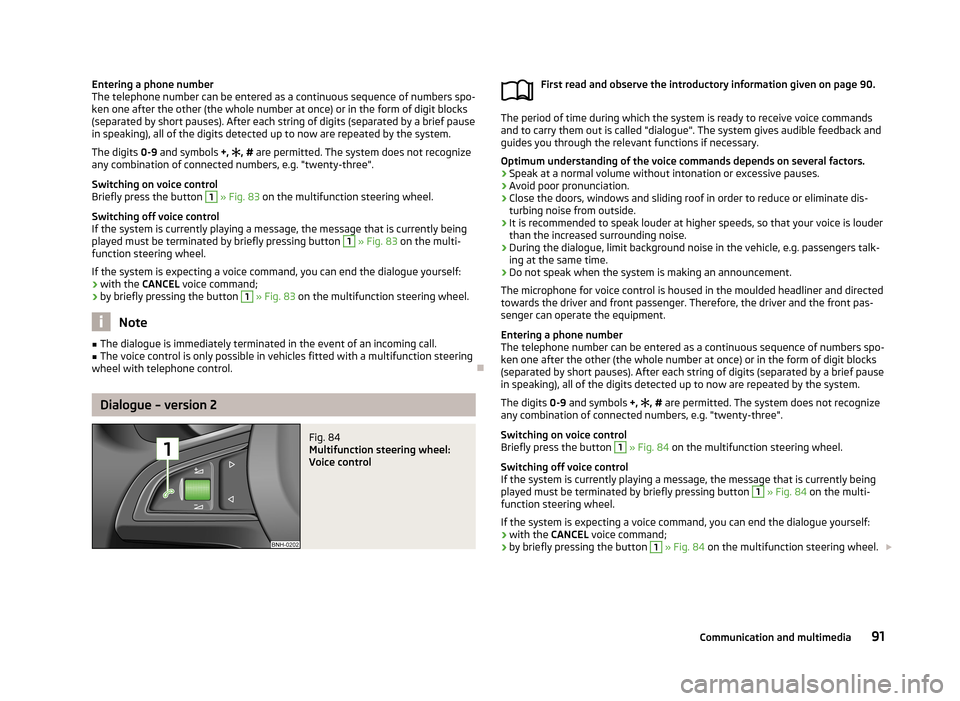
Fig. 84
Multifunction steering wheel:
Voice control
First read and observe the introductory information given on page 90.
The period of time during which the system is ready to receive voice commands and to carry them out is called "dialogue". The system gives audible feedback and
guides you through the relevant functions if necessary.
Optimum understanding of the voice commands depends on several factors. › Speak at a normal volume without intonation or excessive pauses.
› Avoid poor pronunciation.
› Close the doors, windows and sliding roof in order to reduce or eliminate dis-
turbing noise from outside.
› It is recommended to speak louder at higher speeds, so that your voice is louder
than the increased surrounding noise.
› During the dialogue, limit background noise in the vehicle, e.g. passengers talk-
ing at the same time.
› Do not speak when the system is making an announcement.
The microphone for voice control is housed in the moulded headliner and directed towards the driver and front passenger. Therefore, the driver and the front pas-
senger can operate the equipment.
Entering a phone number
The telephone number can be entered as a continuous sequence of numbers spo-
ken one after the other (the whole number at once) or in the form of digit blocks
(separated by short pauses). After each string of digits (separated by a brief pause
in speaking), all of the digits detected up to now are repeated by the system.
The digits 0-9 and symbols +,
, # are permitted. The system does not recognize
any combination of connected numbers, e.g. "twenty-three".
Switching on voice control
Briefly press the button
1
» Fig. 84 on the multifunction steering wheel.
Switching off voice control
If the system is currently playing a message, the message that is currently being
played must be terminated by briefly pressing button
1
» Fig. 84 on the multi-
function steering wheel.
If the system is expecting a voice command, you can end the dialogue yourself:
› with the
CANCEL voice command;
› by briefly pressing the button
1
» Fig. 84 on the multifunction steering wheel.
91Communication and multimedia
Page 129 of 226
Safety
Passive Safety
General information
Introduction
This chapter contains information on the following subjects:
Safety equipment
126
Before setting off
126
What influences the driving safety?
127
In this section you will find important information, tips and notes on the subject
of passive safety in your vehicle.
We have combined everything here which you should be familiar with, for exam- ple, regarding seat belts, airbags, child seats and safety of children.
WARNING■ This chapter contains important information on how to use the vehicle for
the driver and his occupants.■
You can find further information on safety concerning you and those travel-
ling with you in the following chapters of this owner's manual.
■
The complete on-board literature should always be in the vehicle. This ap-
plies in particular, if you rent out or sell the vehicle.
Safety equipment
First read and observe the introductory information and safety warn-ings
on page 126.
The following list contains only part of the safety equipment in your vehicle.
› Three-point seat belts for all the seats.
› Belt force limiters for the front seats.
› Belt tensioners for the front seats.
› Seat belt height adjusters for the front seats.
› Front airbag for the driver and the front passenger.
› Side airbags.
› Head airbags.
› Anchoring points for child seats using the ISOFIX system.
› Anchoring points for child seats using the TOP TETHER system.
› Head restraints adjustable for height 1)
.
› Adjustable steering column.
The specified safety equipment works together, in order to optimally protect you and those travelling with you in accident situations.
The safety equipment does not protect you or the people travelling with you, if
you or your occupants adopt an incorrect seated position or the equipment is not
correctly adjusted or used.
If the seat belt is not fastened properly, this may result in injuries if an airbag is
activated in the event of an accident.
Before setting off
First read and observe the introductory information and safety warn-
ings
on page 126.
For your own safety and the safety of the people travelling with you, please pay
attention to the following points before setting off.
› Ensure that the lighting and the turn signal system are functioning properly.
› Check the tyre inflation pressure.
› Ensure that all of the windows offer good visibility to the outside.
› Secure all items of luggage
» page 64.
› Ensure that no objects can obstruct the pedals.
1)
Not valid for sports seat.
126Safety
Page 131 of 226
WARNINGInformation for the front passenger■Maintain a distance of at least 25 cm to the dash panel. Not maintaining this
minimum distance will mean that the airbag system will not be able to proper-
ly protect you – risk to life!■
Always keep your feet in the footwell when the car is being driven – never
place your feet on the dash panel, out of the window or on the surfaces of the
seats. You will be exposed to increased risk of injury when braking or in the
event of an accident. If an airbag is deployed, you may suffer fatal injuries
when adopting an incorrect seated position!
Correct seated position for the driver
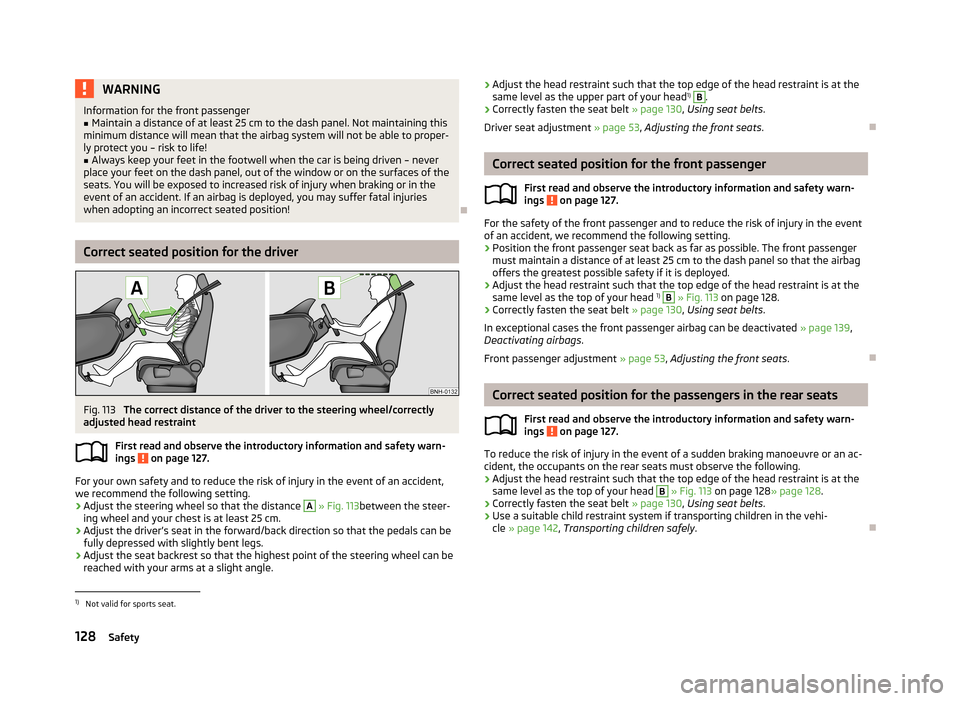
Fig. 113
The correct distance of the driver to the steering wheel/correctly
adjusted head restraint
First read and observe the introductory information and safety warn-ings
on page 127.
For your own safety and to reduce the risk of injury in the event of an accident,
we recommend the following setting.
› Adjust the steering wheel so that the distance
A
» Fig. 113 between the steer-
ing wheel and your chest is at least 25 cm.
› Adjust the driver’s seat in the forward/back direction so that the pedals can be
fully depressed with slightly bent legs.
› Adjust the seat backrest so that the highest point of the steering wheel can be
reached with your arms at a slight angle.
› Adjust the head restraint such that the top edge of the head restraint is at the
same level as the upper part of your head 1)
B.
› Correctly fasten the seat belt
» page 130, Using seat belts .
Driver seat adjustment » page 53, Adjusting the front seats .
Correct seated position for the front passenger
First read and observe the introductory information and safety warn-ings
on page 127.
For the safety of the front passenger and to reduce the risk of injury in the event
of an accident, we recommend the following setting.
› Position the front passenger seat back as far as possible. The front passenger
must maintain a distance of at least 25 cm to the dash panel so that the airbag
offers the greatest possible safety if it is deployed.
› Adjust the head restraint such that the top edge of the head restraint is at the
same level as the top of your head 1)
B
» Fig. 113 on page 128.
› Correctly fasten the seat belt
» page 130, Using seat belts .
In exceptional cases the front passenger airbag can be deactivated » page 139,
Deactivating airbags .
Front passenger adjustment » page 53, Adjusting the front seats .
Correct seated position for the passengers in the rear seats
First read and observe the introductory information and safety warn-
ings
on page 127.
To reduce the risk of injury in the event of a sudden braking manoeuvre or an ac-
cident, the occupants on the rear seats must observe the following.
› Adjust the head restraint such that the top edge of the head restraint is at the
same level as the top of your head
B
» Fig. 113 on page 128 » page 128.
› Correctly fasten the seat belt
» page 130, Using seat belts .
› Use a suitable child restraint system if transporting children in the vehi-
cle » page 142 , Transporting children safely .
1)
Not valid for sports seat.
128Safety
Page 132 of 226
Examples of incorrect seated positionsFirst read and observe the introductory information and safety warn-
ings
on page 127.
Maximum seat belt protection is only achieved if seat belts are fastened correctly.
Incorrect seated positions considerably reduce the protective functions of the
seat belts and therefore increase the risk of injury due to an incorrect routing of
the seat belt.
The driver is fully responsible for himself and passengers, especially children.
Never allow a passenger to adopt an incorrect seated position when the car is
moving.
The following list contains instructions which, if not observed, may cause serious injuries or death. This list is not complete, however we would like you to familiar-
ise yourself with this subject.
Observe the following instructions while driving. › Do not stand up.
› Do not stand on the seats.
› Do not kneel on the seats.
› Do not tilt the seat backrest too far back.
› Do not lean against the dash panel.
› Do not lie on the rear seats.
› Do not sit only on the front part of the seat.
› Do not sit facing to the side.
› Do not lean out of the window.
› Do not put your feet out of the window.
› Do not put your feet on the dash panel.
› Do not put your feet on the seat cushion.
› Do not allow anybody to travel in the footwell.
› Do not drive without fastening your seat belt.
› Do not delay in the luggage compartment.
129Passive Safety