clutch SKODA RAPID 2013 1.G Owner's Manual
[x] Cancel search | Manufacturer: SKODA, Model Year: 2013, Model line: RAPID, Model: SKODA RAPID 2013 1.GPages: 226, PDF Size: 15.16 MB
Page 10 of 226
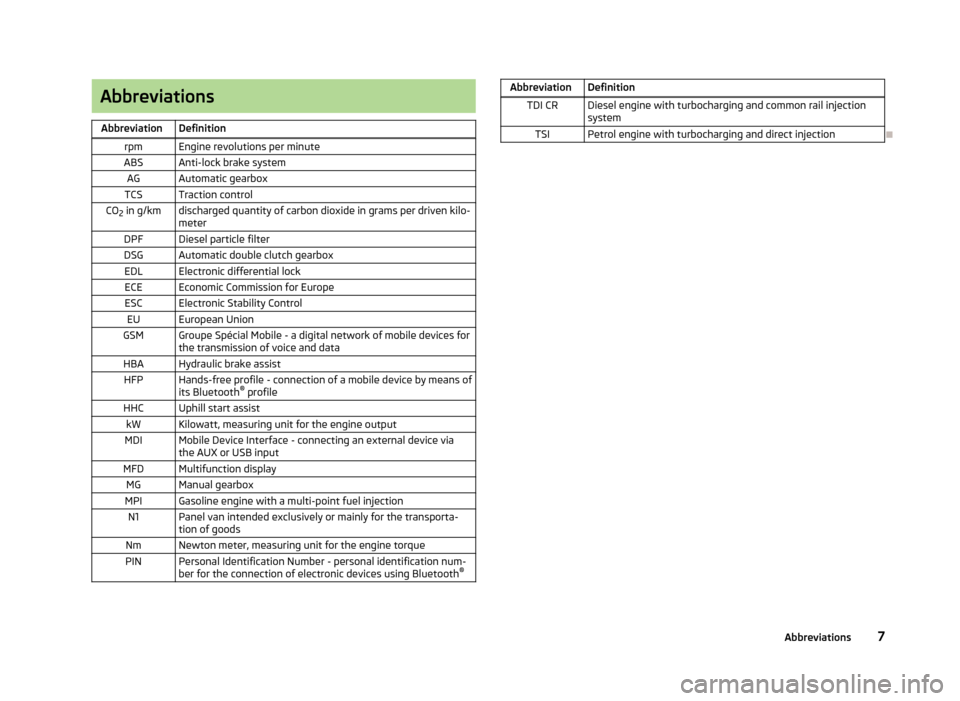
AbbreviationsAbbreviationDefinitionrpmEngine revolutions per minuteABSAnti-lock brake systemAGAutomatic gearboxTCSTraction controlCO2 in g/kmdischarged quantity of carbon dioxide in grams per driven kilo-
meterDPFDiesel particle filterDSGAutomatic double clutch gearboxEDLElectronic differential lockECEEconomic Commission for EuropeESCElectronic Stability ControlEUEuropean UnionGSMGroupe Spécial Mobile - a digital network of mobile devices for the transmission of voice and dataHBAHydraulic brake assistHFPHands-free profile - connection of a mobile device by means of
its Bluetooth ®
profileHHCUphill start assistkWKilowatt, measuring unit for the engine outputMDIMobile Device Interface - connecting an external device via
the AUX or USB inputMFDMultifunction displayMGManual gearboxMPIGasoline engine with a multi-point fuel injectionN1Panel van intended exclusively or mainly for the transporta-
tion of goodsNmNewton meter, measuring unit for the engine torquePINPersonal Identification Number - personal identification num-
ber for the connection of electronic devices using Bluetooth ®AbbreviationDefinitionTDI CRDiesel engine with turbocharging and common rail injection
systemTSIPetrol engine with turbocharging and direct injection
7Abbreviations
Page 16 of 226
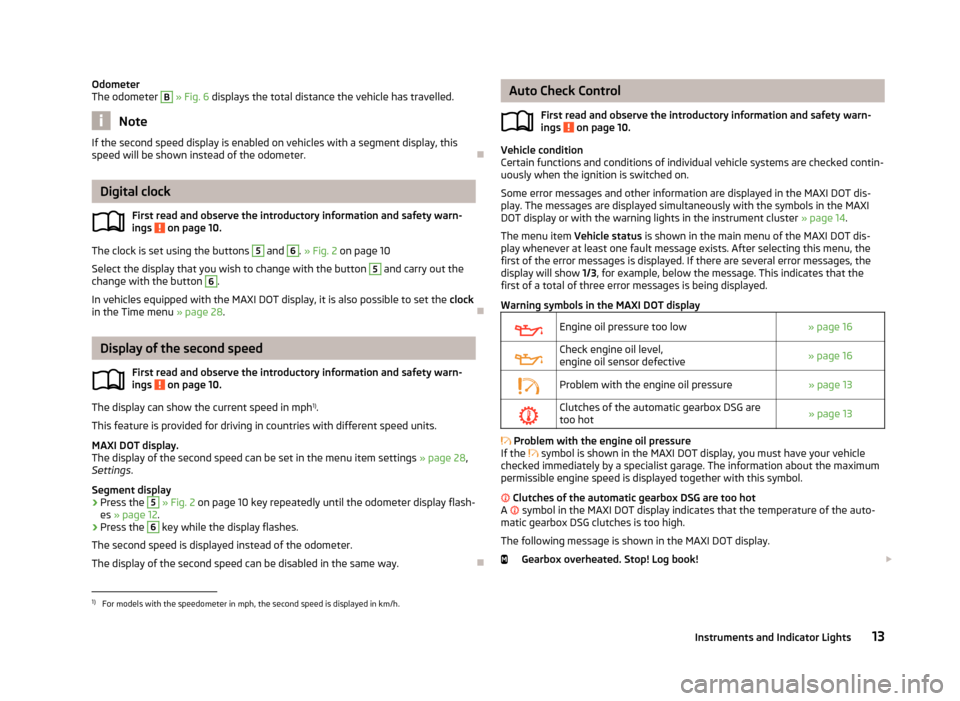
Odometer
The odometer B » Fig. 6 displays the total distance the vehicle has travelled.
Note
If the second speed display is enabled on vehicles with a segment display, this
speed will be shown instead of the odometer.
Digital clock
First read and observe the introductory information and safety warn-ings
on page 10.
The clock is set using the buttons
5
and
6
. » Fig. 2 on page 10
Select the display that you wish to change with the button
5
and carry out the
change with the button
6
.
In vehicles equipped with the MAXI DOT display, it is also possible to set the clock
in the Time menu » page 28.
Display of the second speed
First read and observe the introductory information and safety warn-
ings
on page 10.
The display can show the current speed in mph 1)
.
This feature is provided for driving in countries with different speed units.
MAXI DOT display.
The display of the second speed can be set in the menu item settings » page 28,
Settings .
Segment display
›
Press the
5
» Fig. 2 on page 10 key repeatedly until the odometer display flash-
es » page 12 .
›
Press the
6
key while the display flashes.
The second speed is displayed instead of the odometer. The display of the second speed can be disabled in the same way.
Auto Check Control
First read and observe the introductory information and safety warn-
ings
on page 10.
Vehicle condition
Certain functions and conditions of individual vehicle systems are checked contin-
uously when the ignition is switched on.
Some error messages and other information are displayed in the MAXI DOT dis-play. The messages are displayed simultaneously with the symbols in the MAXI DOT display or with the warning lights in the instrument cluster » page 14.
The menu item Vehicle status is shown in the main menu of the MAXI DOT dis-
play whenever at least one fault message exists. After selecting this menu, the
first of the error messages is displayed. If there are several error messages, the
display will show 1/3, for example, below the message. This indicates that the
first of a total of three error messages is being displayed.
Warning symbols in the MAXI DOT display
Engine oil pressure too low» page 16Check engine oil level,
engine oil sensor defective» page 16Problem with the engine oil pressure» page 13Clutches of the automatic gearbox DSG are too hot» page 13
Problem with the engine oil pressure
If the
symbol is shown in the MAXI DOT display, you must have your vehicle
checked immediately by a specialist garage. The information about the maximum
permissible engine speed is displayed together with this symbol.
Clutches of the automatic gearbox DSG are too hot
A
symbol in the MAXI DOT display indicates that the temperature of the auto-
matic gearbox DSG clutches is too high.
The following message is shown in the MAXI DOT display. Gearbox overheated. Stop! Log book!
1)
For models with the speedometer in mph, the second speed is displayed in km/h.
13Instruments and Indicator Lights
Page 55 of 226
Seats and useful equipment
Adjusting the seats
Introduction
This chapter contains information on the following subjects:
Adjusting the front seats
53
Head restraints
53
The driver's seat should be adjusted in such a way that the pedals can be fully
pressed to the floor with slightly bent legs.
The seat backrest on the driver's seat should be adjusted in such a way that the
upper point of the steering wheel can be easily reached with slightly bent arms.
Correct adjustment of the seats is particularly important for the following: › Reaching the controls safely and quickly,
› A relaxed and fatigue-free body position.
› Achieving the maximum protection offered by the seat belts and the airbag
system.
WARNINGGeneral information■Caution when adjusting the seat! You may suffer injuries or bruises as a re-
sult of adjusting the seat without paying proper attention.■
The seat backrests must not be tilted too far back when driving, as this will
impair the function of the seat belts and of the airbag system – risk of injury!
■
Never carry more people than the number of seats in the vehicle.
■
Each occupant must correctly fasten the seat belt belonging to the seat.
Children must be fastened » page 142, Transporting children safely with a
suitable restraint system.
■
The front seats and head restraints must be adjusted to match the body
size at all times and the seat belt must always be fastened properly to provide
the most effective levels of protection to the passengers.
■
Do not carry any objects on the front passenger seat, except objects de-
signed for this purpose (e.g. child seats) – risk of accident!
WARNINGInformation for the driver■Only adjust the driver's seat when the vehicle is stationary – risk of accident!■
Maintain a distance of at least 25 cm to the steering wheel. Not maintaining
this minimum distance will mean that the airbag system will not be able to
properly protect you - hazard!
■
Ensure that there are no objects in the driver's footwell, as these may get
caught in the pedal apparatus when driving or braking » page 101. You would
then no longer be able to operate the clutch, brake or accelerate.
WARNINGInformation for the front passenger■Maintain a distance of at least 25 cm to the dash panel. Not maintaining this
minimum distance will mean that the airbag system will not be able to proper-
ly protect you – risk to life!■
Always keep your feet in the footwell when the car is being driven – never
place your feet on the dash panel, out of the window or on the surfaces of the
seats. You will be exposed to increased risk of injury when braking or in the
event of an accident. If an airbag is deployed, you may suffer fatal injuries
when adopting an incorrect seated position!
Note
After a certain time, play can develop within the adjustment mechanism of the
backrest angle.
52Using the system
Page 59 of 226
Folding backwards›If you removed the head restraint, you need to reinsert it with the backrest til-ted slightly forwards.›
Then push the seat backrest back into the upright position until the locking but-
ton
B
clicks into place – check by pulling on the seat backrest » .
›
Make sure that the red pin
C
is hidden.
WARNING■
The belts and the belt locks must be in their original position after folding
back the seat backrests – they must be ready to use.■
The seat backrests must be securely locked in position so that no objects in
the luggage compartment can slide into the passenger compartment on sud- den braking – risk of injury.
■
Ensure that the rear seat backrests are properly engaged. Only then can the
seat belt for the middle seat reliably fulfil its function.
CAUTION
Ensure that the seat belts are not damaged when operating the seat backrests. Under no circumstances must the rear seat belts be jammed by the folded back
seat backrests.
Practical equipment
Introduction
This chapter contains information on the following subjects:
Car park ticket holder
56
Storage compartments in the doors
57
Holder for reflective vest
57
Storage compartments in centre console
58
Cup holders
58
Cigarette lighter
59
Ashtray
59
12-volt power outlet
60
Waste container
60
Multimedia holder
61
Storage compartment in the front arm rest
62Glasses storage box62Storage compartment on the passenger side63
Clothes hook
63
Storage pockets on the front seats
64
Meshed pockets on the front seat backrests
64WARNING■ Do not place anything on the dash panel. These objects might slide or fall
down when driving (when accelerating or cornering) and may distract you
from concentrating on the traffic – there is the risk of an accident.■
When driving, ensure that no objects from the centre console or from other
storage compartments can get into the driver's footwell. You would then no
longer be able to apply the brakes or operate the clutch or accelerator pedal –
risk of accident!
■
No objects should be placed in the storage compartments nor in the drinks
holders; the vehicle occupants could be endangered if there is sudden braking
or the vehicle collides with something.
■
Ash and cigarette or cigar stubs must only be discarded in ashtrays!
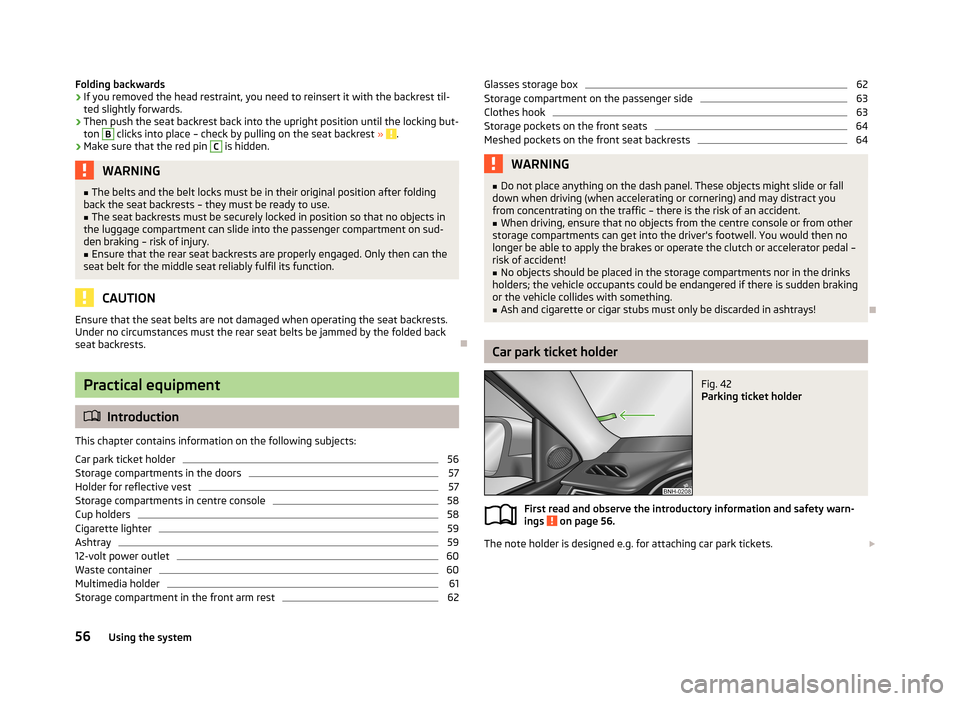
Car park ticket holder
Fig. 42
Parking ticket holder
First read and observe the introductory information and safety warn-
ings on page 56.
The note holder is designed e.g. for attaching car park tickets.
56Using the system
Page 102 of 226
›Depress and hold the clutch pedal (vehicles with a manual gearbox) or brake
pedal (vehicles with an automatic gearbox) until the engine starts.›
Turn the key into position
3
to the stop and release immediately after the en-
gine has been started – do not apply the accelerator.
After letting go, the vehicle key will return to position
2
.
›
Release the handbrake.
If the engine does not start within 10 seconds, turn the key to position
1
. Repeat
the start-up process after approx. half a minute.
Vehicles with manual transmission
The engine will not start if the clutch pedal is not depressed.
The following message is shown in the information cluster display.
Depress clutch to start.
CLUTCH
Vehicles with automatic transmission
The engine will not start if the brake pedal is not depressed.
The warning light
lights up in the instrument cluster and the following mes-
sage appears in the display.
Apply the brake to start.
BRAKE
CAUTION
If the engine does not start up after a second attempt, the fuse for the fuel pump may have a fault. Check the fuse and replace if necessary » page 197, Fuses in
the dash panel , or seek assistance from a specialist garage.
Switching off the engine
First read and observe the introductory information and safety warn-ings
on page 97.
Switch off the engine by turning the ignition key into position
1
» Fig. 90 on
page 98.
For vehicles with automatic transmission, the ignition key can only be removed if
the selector lever is in position P.
Brakes
Introduction
This chapter contains information on the following subjects:
Information on braking
100
Handbrake
100WARNING■ Greater physical effort is required for braking when the engine is switched
off – risk of accident!■
The clutch pedal must be actuated when braking on a vehicle with manual
transmission, when the vehicle is in gear and at low revs. Otherwise, the func-
tion of the brake booster may be impaired – risk of accident!
■
Never leave children unattended in the vehicle. The children might, for ex-
ample, release the handbrake or take the vehicle out of gear. The vehicle
could then start to move – risk of accident!
WARNING■ In the event of damage occurring to the standard fitted front spoiler or the
retrofitting of another front spoiler, wheel hubs etc. » page 149, Service work,
adjustments and technical alterations , It must be ensured that the air supply
to the front brakes is not impaired. The front brakes may overheat, which can
have a negative impact on the functioning of the braking system – risk of acci-
dent!
CAUTION
■ Observe the recommendations on the new brake pads » page 105.■Never let the brakes slip with light pressure on the pedal if braking is not neces-
sary. This causes the brakes to overheat and can also result in a longer braking distance and excessive wear.
99Starting-off and Driving
Page 104 of 226
WARNINGPlease note that the handbrake must be fully released. A handbrake which is
only partially released can result in the rear brakes overheating. This can have a negative effect on the operation of the brake system – risk of accident!
Manual gear changing and pedals
Introduction
This chapter contains information on the following subjects:
Manual gear changing
101
Pedals
101
Manual gear changing
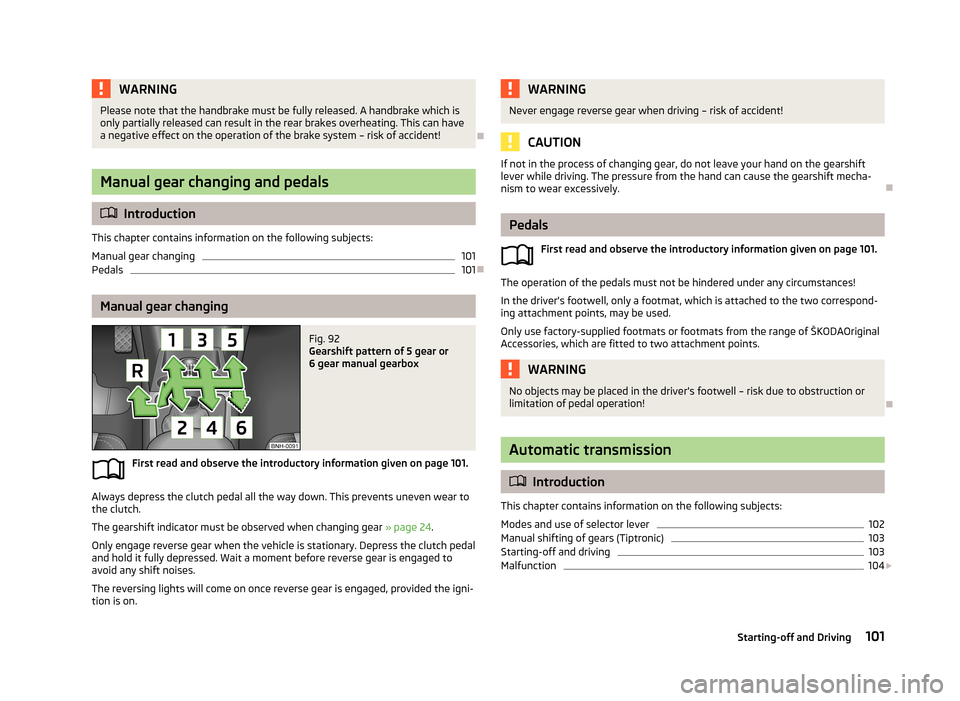
Fig. 92
Gearshift pattern of 5 gear or
6 gear manual gearbox
First read and observe the introductory information given on page 101.
Always depress the clutch pedal all the way down. This prevents uneven wear to
the clutch.
The gearshift indicator must be observed when changing gear » page 24.
Only engage reverse gear when the vehicle is stationary. Depress the clutch pedal
and hold it fully depressed. Wait a moment before reverse gear is engaged to
avoid any shift noises.
The reversing lights will come on once reverse gear is engaged, provided the igni- tion is on.
WARNINGNever engage reverse gear when driving – risk of accident!
CAUTION
If not in the process of changing gear, do not leave your hand on the gearshift
lever while driving. The pressure from the hand can cause the gearshift mecha-nism to wear excessively.
Pedals
First read and observe the introductory information given on page 101.
The operation of the pedals must not be hindered under any circumstances!
In the driver's footwell, only a footmat, which is attached to the two correspond- ing attachment points, may be used.
Only use factory-supplied footmats or footmats from the range of ŠKODAOriginal Accessories, which are fitted to two attachment points.
WARNINGNo objects may be placed in the driver's footwell – risk due to obstruction or
limitation of pedal operation!
Automatic transmission
Introduction
This chapter contains information on the following subjects:
Modes and use of selector lever
102
Manual shifting of gears (Tiptronic)
103
Starting-off and driving
103
Malfunction
104
101Starting-off and Driving
Page 107 of 226
›Press and hold the lock button
» Fig. 94 on page 102.›Move the selector lever into position P and then release the locking button.
Kickdown
The kickdown function allows you to achieve the maximum acceleration of your
vehicle while driving.
When the accelerator pedal is fully depressed, the kickdown function is activated
in any forward driving mode.
The gearbox shifts down one or more gears depending on the vehicle speed and engine speed, and the vehicle accelerates.
The gearbox does not shift up into the highest gear until the engine has reached
its maximum revolutions for this gear range.WARNINGRapid acceleration, particularly on slippery roads, can lead to loss of vehicle
control – risk of accident!
Malfunction
First read and observe the introductory information and safety warn-
ings
on page 101.
Emergency programme
The transmission switches to the emergency programme, if there is a fault in the
automatic gearbox system.
Indications of an activated emergency programme include the following.
› Only certain gears are selected.
› The reverse gear
R cannot be used.
› Shifting gears in Tiptronic mode is not possible.
Gearbox overheating
The gearbox may become too hot due to frequent repeated starting or stop-and-
go traffic, for example. Overheating is indicated by the warning light » page 13,
Clutches of the automatic gearbox DSG are too hot .
Defective selector lever lock
If the selector lever lock is defective or its power supply is interrupted (e.g. dis-
charged vehicle battery, faulty fuse), the selector lever can no longer be moved
out of position P in the normal manner, and the vehicle can no longer be driven.
The selector lever must be emergency released » page 195.
NoteIf the gearbox has switched to the emergency programme, visit a specialist ga-
rage.
Running in
Introduction
This chapter contains information on the following subjects:
New engine
104
New tyres
105
New brake pads
105
New engine
First read and observe the introductory information given on page 104.
The engine has to be run in during the first 1 500 kilometres.
Up to 1 000 kilometres
›
Do not drive faster than 3/4 of the maximum speed of the gear in use, i.e. 3/4 of
the maximum permissible engine speed.
›
No full throttle.
›
Avoid high engine speeds.
›
Do not tow a trailer.
From 1 000 up to 1 500 kilometres
Gradually increase the power output of the engine up to the full speed of the
gear engaged, i.e. up to the maximum permissible engine speed.
The red scale of the rev counter indicates the range in which the system beginsto limit the engine speed.
During the first operating hours the engine has higher internal friction than later until all of the moving parts have harmonized. The driving style which you adopt
during the first approx.1 500 kilometres plays a decisive part in the success of running in your car.
Never drive at unnecessarily high engine speeds even after the running-in period.
104Driving
Page 118 of 226
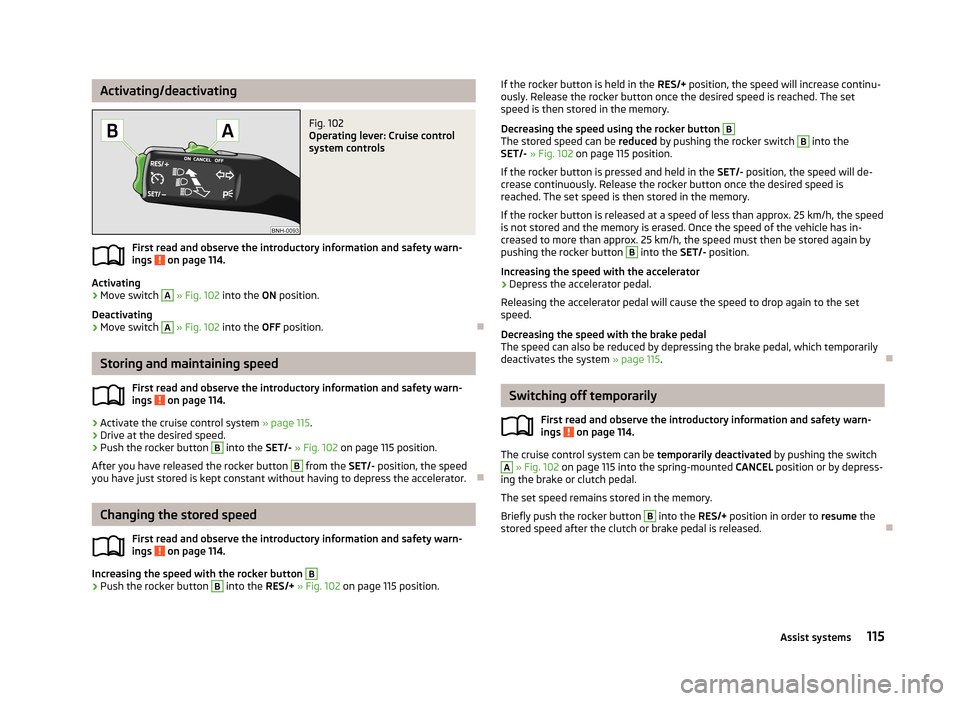
Activating/deactivatingFig. 102
Operating lever: Cruise control
system controls
First read and observe the introductory information and safety warn-
ings on page 114.
Activating
›
Move switch
A
» Fig. 102 into the ON position.
Deactivating
›
Move switch
A
» Fig. 102 into the OFF position.
Storing and maintaining speed
First read and observe the introductory information and safety warn-
ings
on page 114.
›
Activate the cruise control system » page 115.
›
Drive at the desired speed.
›
Push the rocker button
B
into the SET/- » Fig. 102 on page 115 position.
After you have released the rocker button
B
from the SET/- position, the speed
you have just stored is kept constant without having to depress the accelerator.
Changing the stored speed
First read and observe the introductory information and safety warn-
ings
on page 114.
Increasing the speed with the rocker button
B›
Push the rocker button
B
into the RES/+ » Fig. 102 on page 115 position.
If the rocker button is held in the RES/+ position, the speed will increase continu-
ously. Release the rocker button once the desired speed is reached. The set speed is then stored in the memory.
Decreasing the speed using the rocker button B
The stored speed can be reduced by pushing the rocker switch
B
into the
SET/- » Fig. 102 on page 115 position.
If the rocker button is pressed and held in the SET/- position, the speed will de-
crease continuously. Release the rocker button once the desired speed is
reached. The set speed is then stored in the memory.
If the rocker button is released at a speed of less than approx. 25 km/h, the speedis not stored and the memory is erased. Once the speed of the vehicle has in-
creased to more than approx. 25 km/h, the speed must then be stored again by
pushing the rocker button
B
into the SET/- position.
Increasing the speed with the accelerator
›
Depress the accelerator pedal.
Releasing the accelerator pedal will cause the speed to drop again to the set
speed.
Decreasing the speed with the brake pedal
The speed can also be reduced by depressing the brake pedal, which temporarily
deactivates the system » page 115.
Switching off temporarily
First read and observe the introductory information and safety warn-
ings
on page 114.
The cruise control system can be temporarily deactivated by pushing the switch
A
» Fig. 102 on page 115 into the spring-mounted CANCEL position or by depress-
ing the brake or clutch pedal.
The set speed remains stored in the memory.
Briefly push the rocker button
B
into the RES/+ position in order to resume the
stored speed after the clutch or brake pedal is released.
115Assist systems
Page 119 of 226
START-STOP
Introduction
This chapter contains information on the following subjects:
Starting/shutting down the engine
116
Operating conditions of the system
117
Manually activating/deactivating the system
117
Information messages
118
The START-STOP system helps you to save fuel while at the same time reducing
harmful exhaust emissions and CO 2 emissions.
The function is automatically activated each time the ignition is switched on.
In the start-stop mode, the engine automatically switches to the vehicle's idle phase, e.g. when stopped at traffic lights. The engine restarts automatically
where necessary.
The system can work only if the following basic conditions are met. The driver's door is closed.
The driver has fastened the seat belt. The bonnet is closed.The driving speed was higher than 4 km/h after the last stop.
No trailer is coupled.
WARNING■ The brake servo unit and power steering only operate if the engine is run-
ning.■
Never let the vehicle roll with the engine switched off.
CAUTION
Always deactivate the START-STOP system before driving through wa-
ter » page 109 .Note■
If the driver's seat belt is removed for more than approx. 30 seconds or the driv-
er's door is opened during stop mode on vehicles with manual transmission or au- tomatic transmission (when the selector lever in position P), the engine must be
started manually.■
After manually starting the engine on vehicles with manual transmission, auto-
matic engine shut down is not possible until the vehicle has travelled the re-
quired minimum distance for START-STOP mode.
■
If, on vehicles with automatic transmission, the selector lever positions D, S or N
are selected after driving in reverse, the vehicle will first need to achieve a speed
of over 10 km/h before automatic engine shut down can take place again.
■
Changes to the outdoor temperature can have an effect on the internal temper-
ature of the vehicle battery even after several hours. If the vehicle remains out-
doors for a long time in minus temperatures or in direct sunlight, it can take sev-
eral hours until the internal temperature of the vehicle battery reaches a suitable temperature for proper operation of the START STOP system.
■
If Climatronic is running in automatic mode, the engine may not switch off auto-
matically under certain conditions.
Starting/shutting down the engine
First read and observe the introductory information and safety warn-ings
on page 116.
Vehicles with manual transmission
›
Stop the vehicle (where necessary, apply the handbrake).
›
Put the gear stick into Neutral.
›
Release the clutch pedal.
Automatic engine shut down (STOP phase) takes place. The warning symbol
appears in the instrument cluster display.
›
Depress the clutch pedal.
The automatic start procedure takes place again (START phase). The warning
symbol
goes out.
Vehicles with automatic transmission
›
Bring the vehicle to a stop and depress the brake pedal.
Automatic engine shut down takes place. The warning symbol
appears in the
instrument cluster display.
›
Release the brake pedal.
116Driving
Page 130 of 226
›Adjust the mirrors, the front seat and head restraint to your body size.
› Advise your passengers to adjust the head restraints to their body size.
› Protect children in suitable child seats with correctly fastened seat
belts » page 142 , Transporting children safely .
› Adopt the correct seated position
» page 127. Tell your passengers to assume
the correct seated position.
› Correctly fasten the seat belt. Also inform passengers to fasten the seat belt
correctly » page 130 .
What influences the driving safety?
First read and observe the introductory information and safety warn-ings
on page 126.
The driver is fully responsible for himself and his occupants. If your driving safety
is effected, you place yourself and the oncoming traffic at risk.
The following guidelines must therefore be observed. › Do not become distracted from concentrating on the traffic situation, e.g. by
your passengers or mobile phone calls.
› Never drive when your driving ability is impaired, e.g. due to medication, alcohol
or drugs.
› Keep to the traffic regulations and the permissible speed limit.
› Always adjust the driving speed to the road, traffic and weather conditions.
› Take regular breaks on long journeys – at least every two hours.
Correct seated position
Introduction
This chapter contains information on the following subjects:
Correct seated position for the driver
128
Correct seated position for the front passenger
128
Correct seated position for the passengers in the rear seats
128
Examples of incorrect seated positions
129WARNINGGeneral information■The front seats and head restraints must be adjusted to match the body
size at all times and the seat belt must always be fastened properly to provide the most effective levels of protection to the passengers.■
If the occupant adopts an incorrect seated position, he is exposed to life-
threatening injuries, in case he is hit by a deployed airbag.
■
If the occupants on the rear seats are not sitting upright, the risk of injury is
increased due to incorrect routing of the seat belt.
■
The seat backrests must not be tilted too far back when driving, as this will
impair the function of the seat belts and of the airbag system – risk of injury!
WARNINGInformation for the driver■Always assume the correct seated position before setting off and do not
change this position while driving. Also advise your passengers to adopt the
correct seated position and not to change this position while the car is mov-
ing.■
Maintain a distance of at least 25 cm to the steering wheel. Not maintaining
this minimum distance will mean that the airbag system will not be able to
properly protect you - hazard!
■
When driving, hold the steering wheel with both hands firmly on the outer
edge in the 9 o'clock and 3 o'clock position. Never hold the steering wheel in
the 12 o'clock position or in any other way (e.g. in the middle or inner edge of
the steering wheel). In such cases, you could severely injure the arms, hands
and head when the driver airbag is deployed.
■
Ensure that there are no objects in the driver's footwell as they may get
caught behind the pedals when driving or applying the braking. You would then no longer be able to operate the clutch, brake or accelerate.
127Passive Safety