key SKODA RAPID 2013 1.G Owner's Manual
[x] Cancel search | Manufacturer: SKODA, Model Year: 2013, Model line: RAPID, Model: SKODA RAPID 2013 1.GPages: 226, PDF Size: 15.16 MB
Page 12 of 226
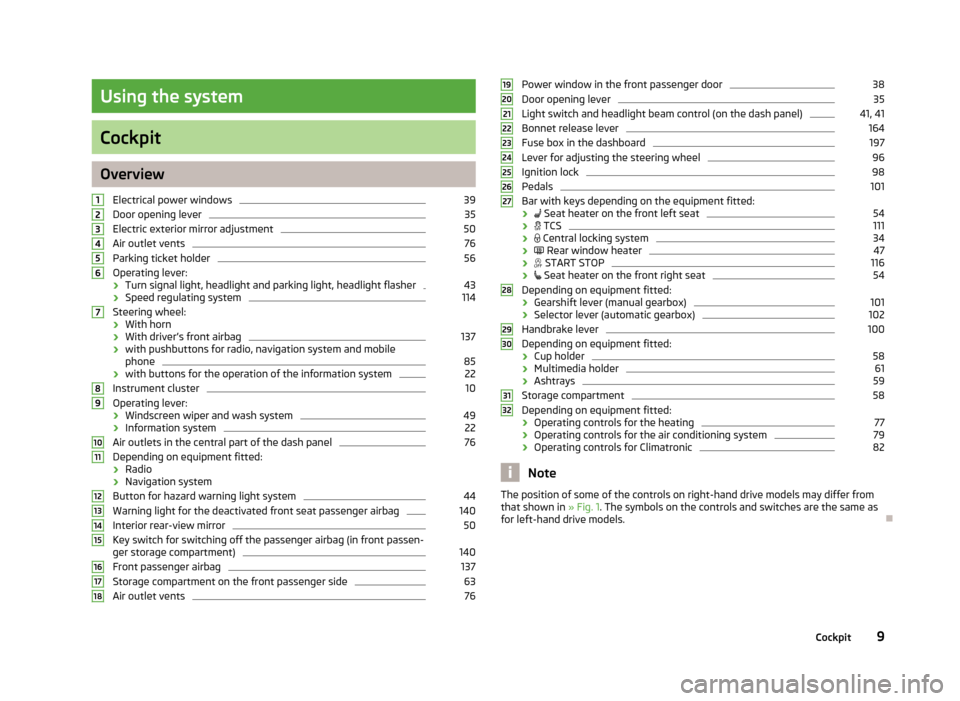
Using the system
Cockpit
OverviewElectrical power windows
39
Door opening lever
35
Electric exterior mirror adjustment
50
Air outlet vents
76
Parking ticket holder
56
Operating lever:
› Turn signal light, headlight and parking light, headlight flasher
43
›
Speed regulating system
114
Steering wheel:
› With horn
› With driver’s front airbag
137
›with pushbuttons for radio, navigation system and mobile
phone
85
› with buttons for the operation of the information system
22
Instrument cluster
10
Operating lever:
› Windscreen wiper and wash system
49
›
Information system
22
Air outlets in the central part of the dash panel
76
Depending on equipment fitted:
› Radio
› Navigation system
Button for hazard warning light system
44
Warning light for the deactivated front seat passenger airbag
140
Interior rear-view mirror
50
Key switch for switching off the passenger airbag (in front passen-
ger storage compartment)
140
Front passenger airbag
137
Storage compartment on the front passenger side
63
Air outlet vents
76123456789101112131415161718Power window in the front passenger door38Door opening lever35
Light switch and headlight beam control (on the dash panel)
41, 41
Bonnet release lever
164
Fuse box in the dashboard
197
Lever for adjusting the steering wheel
96
Ignition lock
98
Pedals
101
Bar with keys depending on the equipment fitted:
›
Seat heater on the front left seat
54
›
TCS
111
›
Central locking system
34
›
Rear window heater
47
›
START STOP
116
›
Seat heater on the front right seat
54
Depending on equipment fitted:
› Gearshift lever (manual gearbox)
101
›Selector lever (automatic gearbox)
102
Handbrake lever
100
Depending on equipment fitted:
› Cup holder
58
›
Multimedia holder
61
›Ashtrays
59
Storage compartment
58
Depending on equipment fitted:
› Operating controls for the heating
77
›
Operating controls for the air conditioning system
79
›Operating controls for Climatronic
82
Note
The position of some of the controls on right-hand drive models may differ from
that shown in » Fig. 1. The symbols on the controls and switches are the same as
for left-hand drive models.19202122232425262728293031329Cockpit
Page 14 of 226
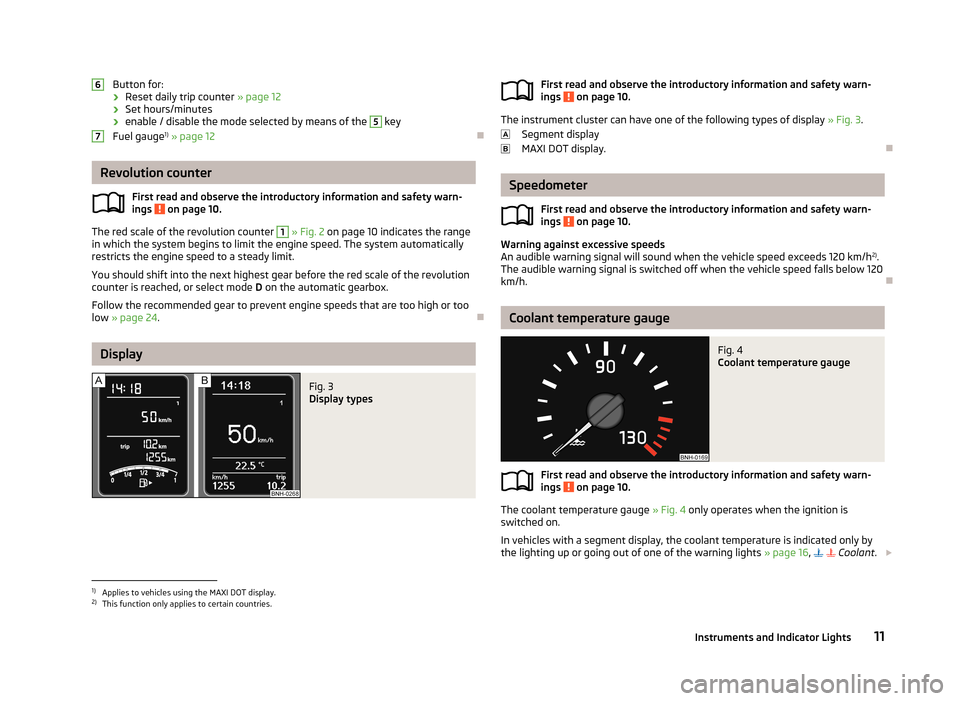
Button for:
› Reset daily trip counter
» page 12
› Set hours/minutes
› enable / disable the mode selected by means of the 5
key
Fuel gauge 1)
» page 12
Revolution counter
First read and observe the introductory information and safety warn-ings
on page 10.
The red scale of the revolution counter
1
» Fig. 2 on page 10 indicates the range
in which the system begins to limit the engine speed. The system automatically
restricts the engine speed to a steady limit.
You should shift into the next highest gear before the red scale of the revolution
counter is reached, or select mode D on the automatic gearbox.
Follow the recommended gear to prevent engine speeds that are too high or too
low » page 24 .
Display
Fig. 3
Display types
67First read and observe the introductory information and safety warn-
ings on page 10.
The instrument cluster can have one of the following types of display » Fig. 3.
Segment display
MAXI DOT display.
Speedometer
First read and observe the introductory information and safety warn-
ings
on page 10.
Warning against excessive speeds
An audible warning signal will sound when the vehicle speed exceeds 120 km/h 2)
.
The audible warning signal is switched off when the vehicle speed falls below 120
km/h.
Coolant temperature gauge
Fig. 4
Coolant temperature gauge
First read and observe the introductory information and safety warn-
ings on page 10.
The coolant temperature gauge » Fig. 4 only operates when the ignition is
switched on.
In vehicles with a segment display, the coolant temperature is indicated only by
the lighting up or going out of one of the warning lights » page 16,
Coolant
.
1)
Applies to vehicles using the MAXI DOT display.
2)
This function only applies to certain countries.
11Instruments and Indicator Lights
Page 16 of 226
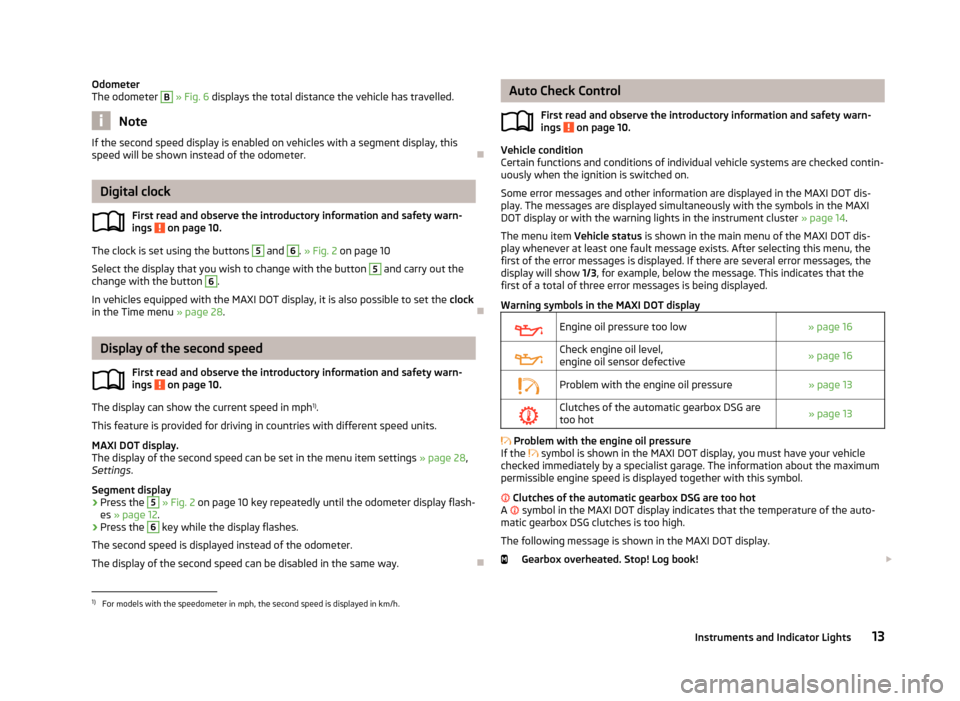
Odometer
The odometer B » Fig. 6 displays the total distance the vehicle has travelled.
Note
If the second speed display is enabled on vehicles with a segment display, this
speed will be shown instead of the odometer.
Digital clock
First read and observe the introductory information and safety warn-ings
on page 10.
The clock is set using the buttons
5
and
6
. » Fig. 2 on page 10
Select the display that you wish to change with the button
5
and carry out the
change with the button
6
.
In vehicles equipped with the MAXI DOT display, it is also possible to set the clock
in the Time menu » page 28.
Display of the second speed
First read and observe the introductory information and safety warn-
ings
on page 10.
The display can show the current speed in mph 1)
.
This feature is provided for driving in countries with different speed units.
MAXI DOT display.
The display of the second speed can be set in the menu item settings » page 28,
Settings .
Segment display
›
Press the
5
» Fig. 2 on page 10 key repeatedly until the odometer display flash-
es » page 12 .
›
Press the
6
key while the display flashes.
The second speed is displayed instead of the odometer. The display of the second speed can be disabled in the same way.
Auto Check Control
First read and observe the introductory information and safety warn-
ings
on page 10.
Vehicle condition
Certain functions and conditions of individual vehicle systems are checked contin-
uously when the ignition is switched on.
Some error messages and other information are displayed in the MAXI DOT dis-play. The messages are displayed simultaneously with the symbols in the MAXI DOT display or with the warning lights in the instrument cluster » page 14.
The menu item Vehicle status is shown in the main menu of the MAXI DOT dis-
play whenever at least one fault message exists. After selecting this menu, the
first of the error messages is displayed. If there are several error messages, the
display will show 1/3, for example, below the message. This indicates that the
first of a total of three error messages is being displayed.
Warning symbols in the MAXI DOT display
Engine oil pressure too low» page 16Check engine oil level,
engine oil sensor defective» page 16Problem with the engine oil pressure» page 13Clutches of the automatic gearbox DSG are too hot» page 13
Problem with the engine oil pressure
If the
symbol is shown in the MAXI DOT display, you must have your vehicle
checked immediately by a specialist garage. The information about the maximum
permissible engine speed is displayed together with this symbol.
Clutches of the automatic gearbox DSG are too hot
A
symbol in the MAXI DOT display indicates that the temperature of the auto-
matic gearbox DSG clutches is too high.
The following message is shown in the MAXI DOT display. Gearbox overheated. Stop! Log book!
1)
For models with the speedometer in mph, the second speed is displayed in km/h.
13Instruments and Indicator Lights
Page 23 of 226
Airbag systemFirst read and observe the introductory information and safety warn-ings
on page 14.
If the warning light lights up, there is a fault in the airbag system.
The following message is shown in the MAXI DOT display. Error: Airbag
The operational capability of the airbag system is monitored electronically, includ-
ing when one of the airbags is switched off.
If a front, side or head airbag or belt tensioner has been switched off using thevehicle system tester:
› The indicator light
lights up for around 4 seconds after the ignition is switch-
ed on and then flashes for around 12 seconds.
The following message is shown in the MAXI DOT display. Airbag/belt tensioner deactivated.
If the air bag was switched off using the key-operated switch on the side of the
dash panel on the passenger side:
› The indicator light
comes on for around 4 seconds after the ignition has been
switched on.
› Switched off airbags are indicated by the indicator light
in the
logo lighting up in the middle of the dash panel » Fig. 123 on page 140.
WARNINGIf there is a fault, have the airbag system checked immediately by a specialist
garage. Otherwise, there is a risk of the airbag not being activated in the
event of an accident.
Tyre inflation pressure
First read and observe the introductory information and safety warn-
ings
on page 14.
The indicator light
lights up , if there is a substantial drop in inflation pressure
in one of the tyres. Check and adjust the pressure in all tyres » page 175.
If the indicator light
flashes , there is a fault in the system.
Seek assistance from a specialist garage immediately.
Further information » page 178, Tyre pressure monitor .
Note
If the vehicle battery has been disconnected and then reconnected, the indicator
light comes on after switching on the ignition. If the indicator light does not go
out after moving a short distance, this means that there is an error in the system. Seek assistance from a specialist garage immediately.
Windscreen washer fluid level
First read and observe the introductory information and safety warn-ings
on page 14.
If the windscreen washer fluid level is too low, the warning light
comes on.
The following message is shown in the MAXI DOT display. Top up wash fluid!
Top up with liquid » page 165, Windscreen washer system .
Turn signal system
First read and observe the introductory information and safety warn-ings
on page 14.
Either the left
or right
indicator light flashes depending on the position of
the operating lever.
If there is a fault in the turn signal system, the indicator light flashes at twice its
normal rate.
Switching off the hazard warning light system is switched on will cause all of the
turn signal lights as well as both warning lights to flash.
Further information » page 43, Turn signal and main beam .
20Using the system
Page 34 of 226
Unlocking and opening
Unlocking and locking
Introduction
This chapter contains information on the following subjects:
Vehicle key
32
Unlocking/locking with the key
32
Unlocking/locking with the remote control
33
Safe securing system
33
Individual settings
34
Locking/unlocking the vehicle from the inside
34
Child safety lock
35
Opening/closing a door
35
Your car is equipped with a central locking system.
The central locking system allows you to lock and unlock all doors, the fuel filler
flap 1)
and tailgate at the same time.
The safe securing system » page 33 is integrated in the central locking system.
Once the car is locked from the outside, the door locks are automatically blocked
by the safe securing system »
.
The following is true after unlocking
› The doors, the boot lid and the fuel filler flap 1)
are unlocked.
› The interior light, which is switched by the door contact, comes on.
› The safe securing system is switched off.
› The indicator light in the driver door stops flashing.
› The anti-theft alarm system is deactivated 2)
.
The following is true after locking
› The doors, the boot lid and the fuel filler flap 1)
are locked.
› The interior lights connected over the door contact go off.
› The safe securing system is switched on.
›
The warning light in the driver door begins flashing.
› The anti-theft alarm system is activated 2)
.
Displaying an error
If the indicator light in the driver's door initially flashes quickly for around 2 sec-
onds, and then lights up for 30 seconds without interruption before flashing
again slowly, you will need to seek the assistance of a specialist garage.WARNING■ If the car is locked and the safe securing system activated, no people must
remain in the car as it will then not be possible to either unlock a door or open
a window from the inside. The locked doors make it more difficult for rescuers
to get into the vehicle in an emergency – risk to life!■
Locked doors prevent unwanted entry into the vehicle from outside, for ex-
ample at road crossings.
Note
■ In the event of an accident in which the airbags are deployed, the locked doors
are automatically unlocked in order to enable rescuers to gain access to the vehi- cle.■
Only the driver's door can be unlocked or locked using the key if the central
locking system fails » page 32. The other doors and the tailgate can be emer-
gency locked or emergency released. ■ Emergency locking of the door » page 194.
■ Emergency unlocking of the boot lid » page 194.
1)
Applies to vehicles with a lockable fuel filler cap.
2)
Applies to vehicles with an anti-theft alarm system.
31Unlocking and opening
Page 35 of 226
Vehicle keyFig. 11
Key: without/with remote control
First read and observe the introductory information and safety warn- ings
on page 31.
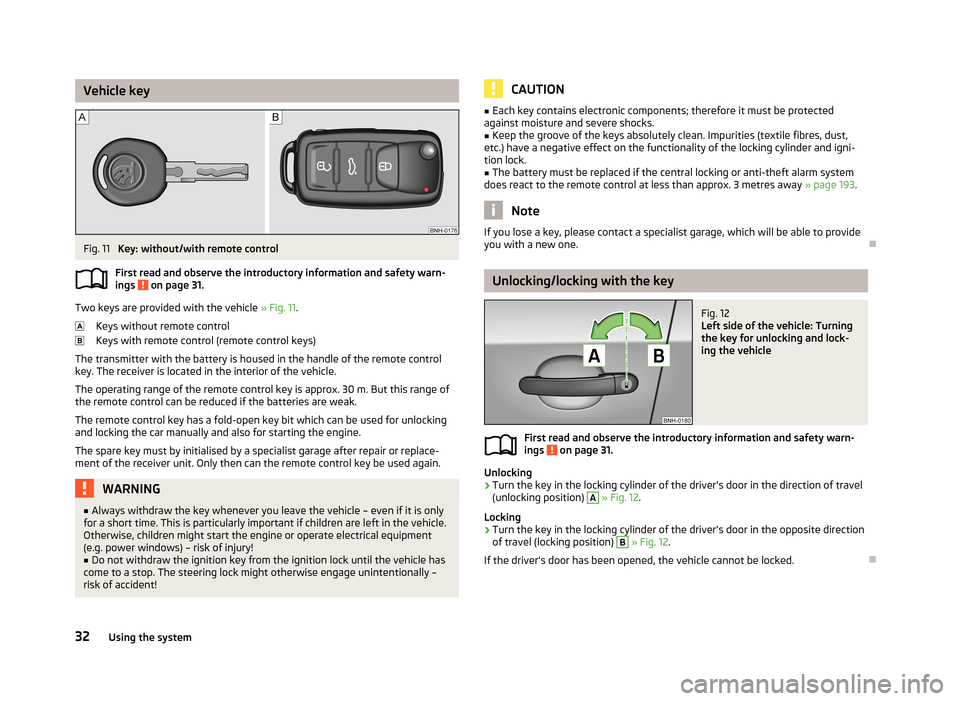
Two keys are provided with the vehicle » Fig. 11.
Keys without remote control
Keys with remote control (remote control keys)
The transmitter with the battery is housed in the handle of the remote control key. The receiver is located in the interior of the vehicle.
The operating range of the remote control key is approx. 30 m. But this range ofthe remote control can be reduced if the batteries are weak.
The remote control key has a fold-open key bit which can be used for unlocking
and locking the car manually and also for starting the engine.
The spare key must by initialised by a specialist garage after repair or replace-
ment of the receiver unit. Only then can the remote control key be used again.
WARNING■ Always withdraw the key whenever you leave the vehicle – even if it is only
for a short time. This is particularly important if children are left in the vehicle.
Otherwise, children might start the engine or operate electrical equipment
(e.g. power windows) – risk of injury!■
Do not withdraw the ignition key from the ignition lock until the vehicle has
come to a stop. The steering lock might otherwise engage unintentionally –
risk of accident!
CAUTION■ Each key contains electronic components; therefore it must be protected
against moisture and severe shocks.■
Keep the groove of the keys absolutely clean. Impurities (textile fibres, dust,
etc.) have a negative effect on the functionality of the locking cylinder and igni-
tion lock.
■
The battery must be replaced if the central locking or anti-theft alarm system
does react to the remote control at less than approx. 3 metres away » page 193.
Note
If you lose a key, please contact a specialist garage, which will be able to provide
you with a new one.
Unlocking/locking with the key
Fig. 12
Left side of the vehicle: Turning
the key for unlocking and lock-
ing the vehicle
First read and observe the introductory information and safety warn-
ings on page 31.
Unlocking
›
Turn the key in the locking cylinder of the driver's door in the direction of travel
(unlocking position)
A
» Fig. 12 .
Locking
›
Turn the key in the locking cylinder of the driver's door in the opposite direction
of travel (locking position)
B
» Fig. 12 .
If the driver's door has been opened, the vehicle cannot be locked.
32Using the system
Page 36 of 226
Unlocking/locking with the remote controlFig. 13
Remote control key
First read and observe the introductory information and safety warn-
ings on page 31.
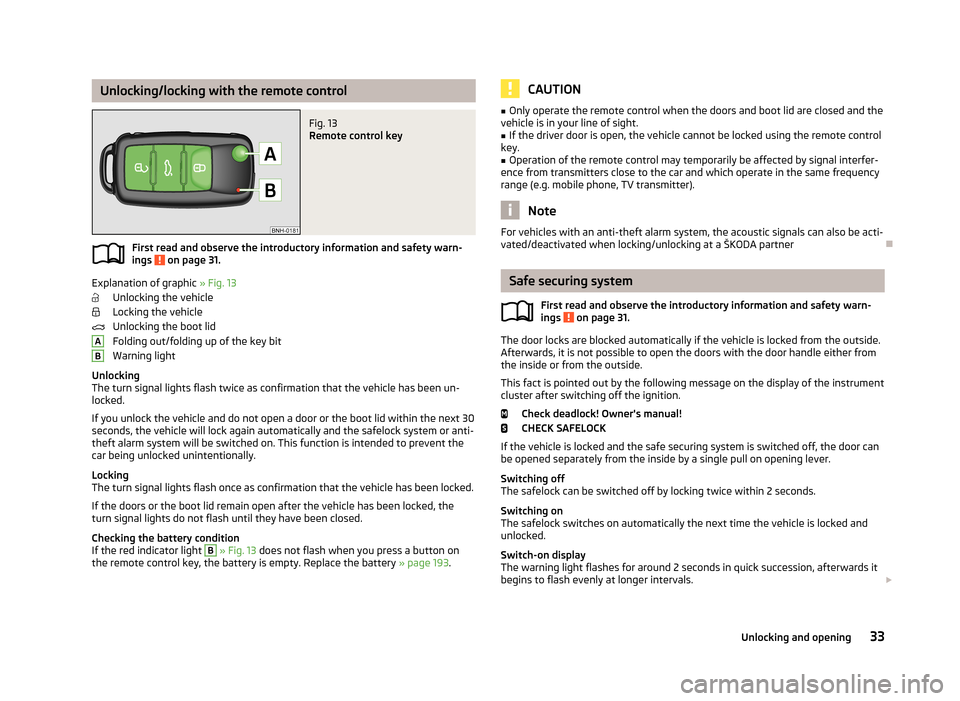
Explanation of graphic » Fig. 13
Unlocking the vehicle
Locking the vehicle
Unlocking the boot lid
Folding out/folding up of the key bit Warning light
Unlocking
The turn signal lights flash twice as confirmation that the vehicle has been un-
locked.
If you unlock the vehicle and do not open a door or the boot lid within the next 30 seconds, the vehicle will lock again automatically and the safelock system or anti-
theft alarm system will be switched on. This function is intended to prevent the car being unlocked unintentionally.
Locking
The turn signal lights flash once as confirmation that the vehicle has been locked.
If the doors or the boot lid remain open after the vehicle has been locked, the
turn signal lights do not flash until they have been closed.
Checking the battery condition
If the red indicator light
B
» Fig. 13 does not flash when you press a button on
the remote control key, the battery is empty. Replace the battery » page 193.
ABCAUTION■
Only operate the remote control when the doors and boot lid are closed and the
vehicle is in your line of sight.■
If the driver door is open, the vehicle cannot be locked using the remote control
key.
■
Operation of the remote control may temporarily be affected by signal interfer-
ence from transmitters close to the car and which operate in the same frequency
range (e.g. mobile phone, TV transmitter).
Note
For vehicles with an anti-theft alarm system, the acoustic signals can also be acti-
vated/deactivated when locking/unlocking at a ŠKODA partner
Safe securing system
First read and observe the introductory information and safety warn-
ings
on page 31.
The door locks are blocked automatically if the vehicle is locked from the outside.
Afterwards, it is not possible to open the doors with the door handle either from
the inside or from the outside.
This fact is pointed out by the following message on the display of the instrument
cluster after switching off the ignition.
Check deadlock! Owner's manual!CHECK SAFELOCK
If the vehicle is locked and the safe securing system is switched off, the door can be opened separately from the inside by a single pull on opening lever.
Switching off
The safelock can be switched off by locking twice within 2 seconds.
Switching on
The safelock switches on automatically the next time the vehicle is locked and
unlocked.
Switch-on display
The warning light flashes for around 2 seconds in quick succession, afterwards it
begins to flash evenly at longer intervals.
33Unlocking and opening
Page 37 of 226
Switch-off display
The indicator light in the driver door flashes for about 2 seconds fast, goes out
and starts to flash at longer intervals after about 30 seconds.WARNINGIf the car is locked and the safe securing system activated, no people must re- main in the car as it will then not be possible to either unlock a door or open a
window from the inside. The locked doors make it more difficult for rescuers
to get into the vehicle in an emergency – risk to life!
Note
This function only applies to certain countries.
Individual settings
First read and observe the introductory information and safety warn-
ings
on page 31.
Opening a single door
This function makes it possible to only unlock the driver's door. The other doors
remain locked and are only unlocked when the command is repeated.
Automatic locking/unlocking
All doors are locked from a speed of around 15 km/h. The button in the handle of
the boot lid is deactivated.
If the ignition key is withdrawn, the car is then automatically unlocked again. In addition, it is possible for the driver or front passenger to unlock the car by press- ing the central locking button
.
The vehicle doors can be unlocked and opened at any time by pulling once on the door opening lever.
Note
Individual settings can be carried out in a specialist workshop.
Locking/unlocking the vehicle from the insideFig. 14
Central locking button
First read and observe the introductory information and safety warn-ings on page 31.
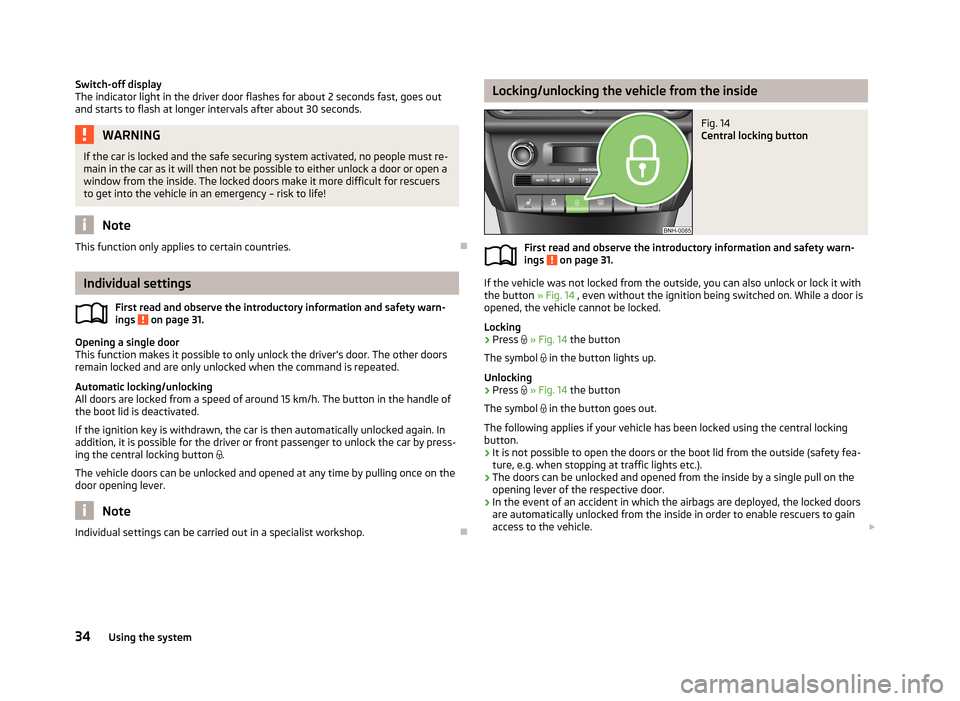
If the vehicle was not locked from the outside, you can also unlock or lock it with
the button » Fig. 14 , even without the ignition being switched on. While a door is
opened, the vehicle cannot be locked.
Locking
›
Press
» Fig. 14 the button
The symbol
in the button lights up.
Unlocking
›
Press
» Fig. 14 the button
The symbol
in the button goes out.
The following applies if your vehicle has been locked using the central locking button.
› It is not possible to open the doors or the boot lid from the outside (safety fea-
ture, e.g. when stopping at traffic lights etc.).
› The doors can be unlocked and opened from the inside by a single pull on the
opening lever of the respective door.
› In the event of an accident in which the airbags are deployed, the locked doors
are automatically unlocked from the inside in order to enable rescuers to gain access to the vehicle.
34Using the system
Page 38 of 226
WARNING■Doors locked from the inside make it difficult for rescuers to get into the ve-
hicle in an emergency – risk to life!■
Never leave children in the vehicle unattended.
Note
If the safelock system is switched on » page 33, the door opening lever and the
central locking buttons do not work.
Child safety lock
Fig. 15
Parental Control: Left rear door
First read and observe the introductory information and safety warn-
ings on page 31.
The child safety lock prevents the corresponding rear door from being opened
from the inside. The door can only be opened from the outside.
You can switch the child safety lock on and off using the vehicle key.
Switching on
›
Turn the slot of the safety lock in the direction of the arrow » Fig. 15 (mirror-
inverted on the right-hand door).
Switching off
›
Turn the slot of the safety lock in the opposite direction to the arrow » Fig. 15
(mirror-inverted on the right-hand door).
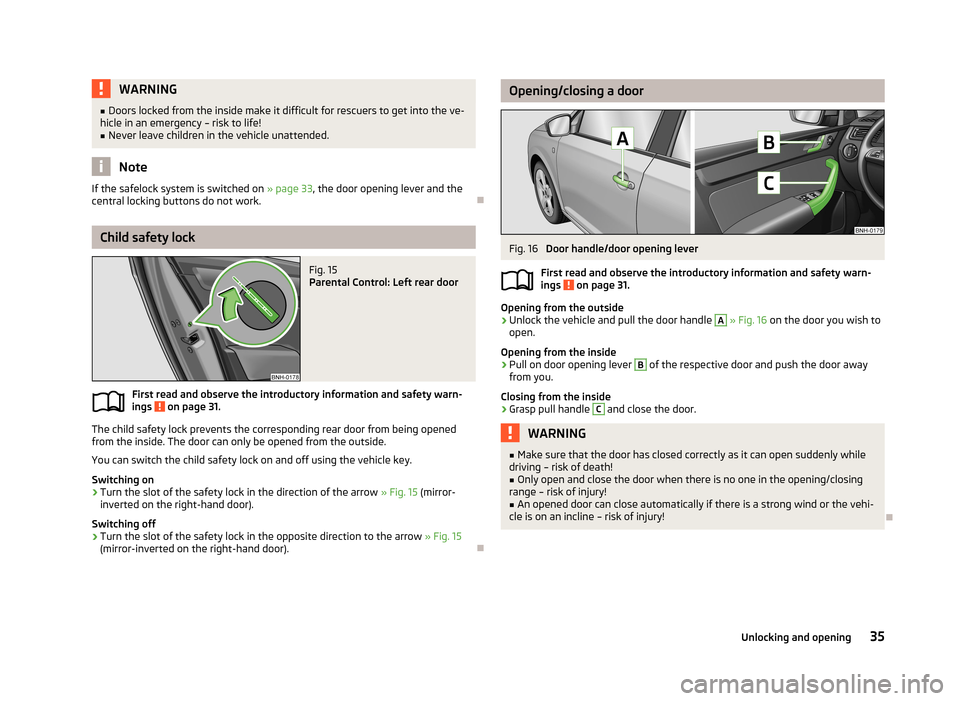
Opening/closing a doorFig. 16
Door handle/door opening lever
First read and observe the introductory information and safety warn- ings
on page 31.
Opening from the outside
›
Unlock the vehicle and pull the door handle
A
» Fig. 16 on the door you wish to
open.
Opening from the inside
›
Pull on door opening lever
B
of the respective door and push the door away
from you.
Closing from the inside
›
Grasp pull handle
C
and close the door.
WARNING■ Make sure that the door has closed correctly as it can open suddenly while
driving – risk of death!■
Only open and close the door when there is no one in the opening/closing
range – risk of injury!
■
An opened door can close automatically if there is a strong wind or the vehi-
cle is on an incline – risk of injury!
35Unlocking and opening
Page 39 of 226
Anti-theft alarm system
Introduction
This chapter contains information on the following subjects:
Activating/deactivating
36
Interior monitor and towing protection
36
The anti-theft alarm system increases the level of protection against vehicle break-ins. If an attempt is made to break into the vehicle, the system triggers au-
dible and visual warning signals (hereafter referred to only as alarm).
An alarm is triggered when the following monitored areas of the vehicle have afault.
› Bonnet.
› Boot lid.
› Doors.
› Ignition lock.
› Vehicle inclination
» page 36.
› Interior of car
» page 36.
› A drop in voltage of the on-board power supply.
› Socket of the factory-fitted towing device
» page 124, Driving with a trailer .
An alarm is immediately triggered if either of the two battery terminals is discon-
nected while the alarm system is activated.
The alarm is switched off by unlocking the vehicle or switching on the ignition.
CAUTION
Before leaving the vehicle, check that the doors and windows are closed in order
to ensure that the anti-theft alarm system is fully operational.
Note
The working life of the alarm siren is 5 years.
Activating/deactivating
First read and observe the introductory information and safety warn-ings
on page 36.
Activating
The alarm system is activated automatically approximately 30 seconds after the vehicle is locked.
If the vehicle is unlocked and a door or the boot lid not opened within the next
30 seconds, the vehicle will lock again automatically and the safe securing system
or anti-theft alarm system will be switched back on. This function is intended to
prevent the car being unlocked unintentionally.
Deactivating
The alarm system is deactivated automatically after the vehicle is unlocked. If the vehicle is not opened within 30 seconds, the alarm system is automatically activa-ted again.
Note
If the vehicle is unlocked by inserting the key into the driver door, the key must
be inserted into the ignition lock and the ignition switched on within 15 seconds
of unlocking the door to deactivate the alarm system.
Interior monitor and towing protection
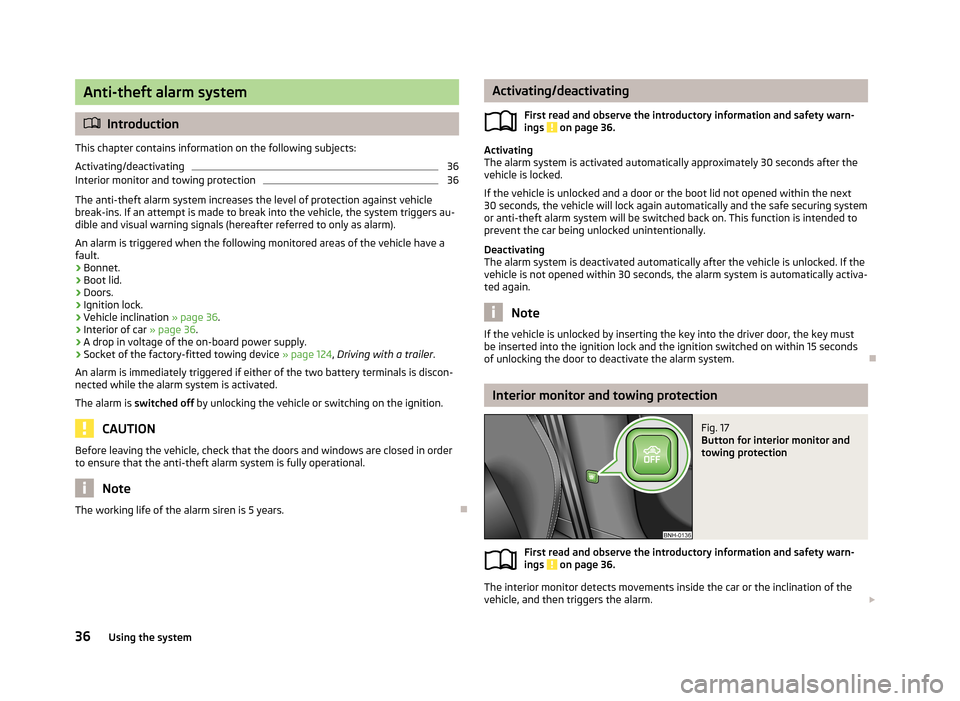
Fig. 17
Button for interior monitor and
towing protection
First read and observe the introductory information and safety warn-
ings on page 36.
The interior monitor detects movements inside the car or the inclination of the vehicle, and then triggers the alarm.
36Using the system