ECU SKODA RAPID 2016 1.G User Guide
[x] Cancel search | Manufacturer: SKODA, Model Year: 2016, Model line: RAPID, Model: SKODA RAPID 2016 1.GPages: 184, PDF Size: 27.06 MB
Page 67 of 184
›To
remove , hold the locking button A in the direction of arrow 1, at the
same time, using a flat screwdriver with a max. width of 5 mm, press the
locking button in the opening B
in the direction of arrow
2
and pull out the
rest in the direction of arrow
3
» Fig. 59 .
›
To insert , push the headrest into the seat backrest in the direction of arrow
4
until the locking button clicks into place.
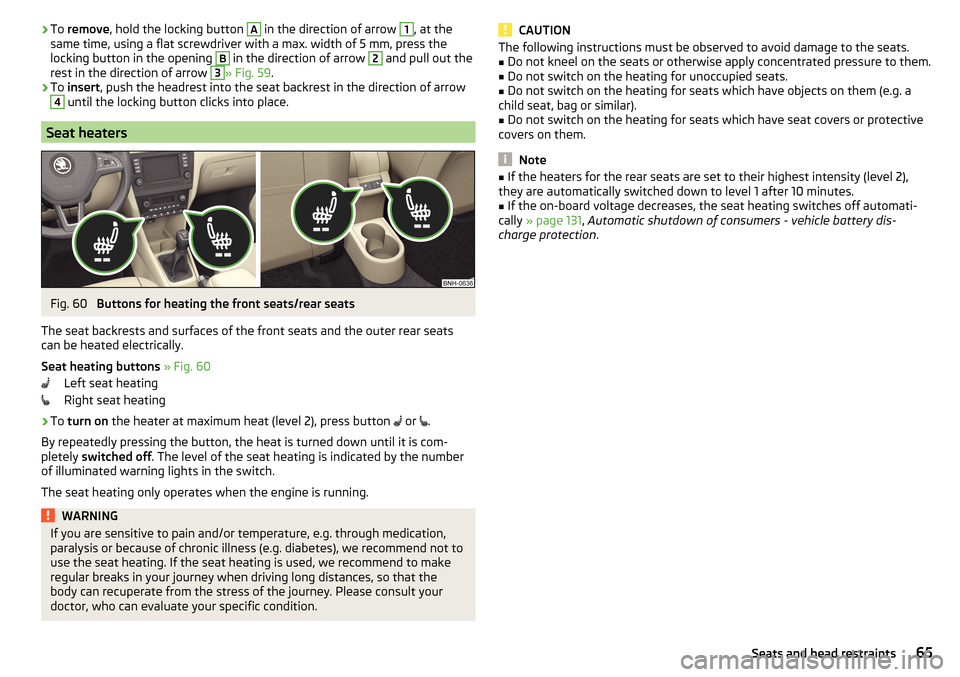
Seat heaters
Fig. 60
Buttons for heating the front seats/rear seats
The seat backrests and surfaces of the front seats and the outer rear seats
can be heated electrically.
Seat heating buttons » Fig. 60
Left seat heating
Right seat heating
›
To turn on the heater at maximum heat (level 2), press button
or
.
By repeatedly pressing the button, the heat is turned down until it is com-
pletely switched off . The level of the seat heating is indicated by the number
of illuminated warning lights in the switch.
The seat heating only operates when the engine is running.
WARNINGIf you are sensitive to pain and/or temperature, e.g. through medication,
paralysis or because of chronic illness (e.g. diabetes), we recommend not to
use the seat heating. If the seat heating is used, we recommend to make
regular breaks in your journey when driving long distances, so that the
body can recuperate from the stress of the journey. Please consult your
doctor, who can evaluate your specific condition.CAUTIONThe following instructions must be observed to avoid damage to the seats.■Do not kneel on the seats or otherwise apply concentrated pressure to them.■
Do not switch on the heating for unoccupied seats.
■
Do not switch on the heating for seats which have objects on them (e.g. a
child seat, bag or similar).
■
Do not switch on the heating for seats which have seat covers or protective
covers on them.
Note
■ If the heaters for the rear seats are set to their highest intensity (level 2),
they are automatically switched down to level 1 after 10 minutes.■
If the on-board voltage decreases, the seat heating switches off automati-
cally » page 131 , Automatic shutdown of consumers - vehicle battery dis-
charge protection .
65Seats and head restraints
Page 75 of 184
The maximum permissible load of each of the pockets is 150 g.
Tablet holder
Introduction
This chapter contains information on the following subjects:
Install / remove
73
Handle holder
73
External devices (e.g. tablet, smartphone, etc.) measuring min. 122 mm and
max. 195 mm can be secured in the support.
The maximum permissible load of the compartment is 750 g.
CAUTION
Never exceed the maximum permissible load of the holder - there is a risk of
damage or functional impairment.
Install / remove
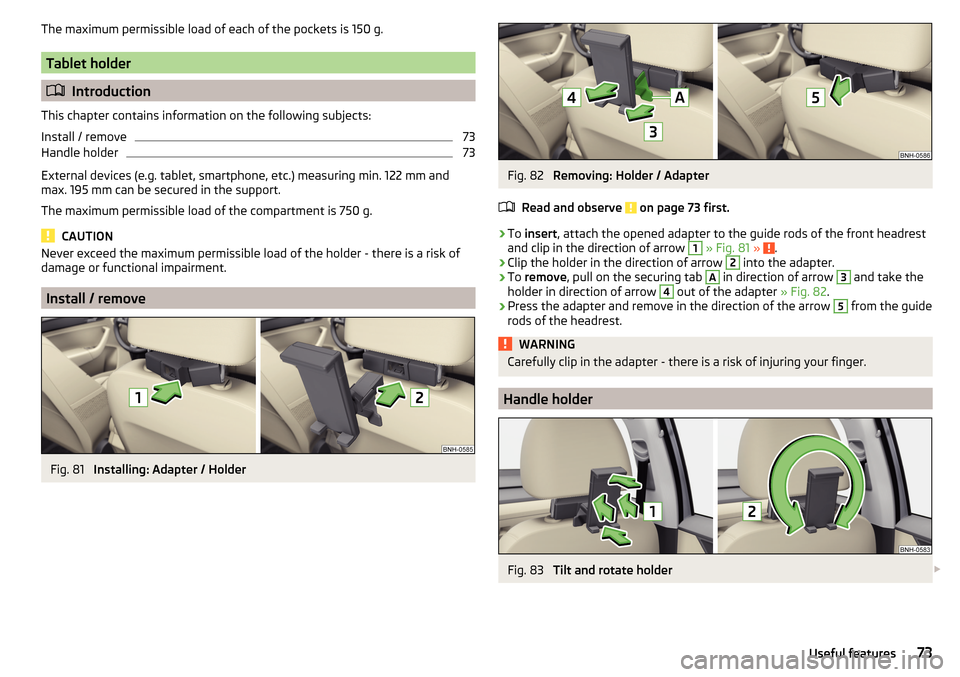
Fig. 81
Installing: Adapter / Holder
Fig. 82
Removing: Holder / Adapter
Read and observe
on page 73 first.
›
To insert , attach the opened adapter to the guide rods of the front headrest
and clip in the direction of arrow
1
» Fig. 81 » .
›
Clip the holder in the direction of arrow
2
into the adapter.
›
To remove , pull on the securing tab
A
in direction of arrow
3
and take the
holder in direction of arrow
4
out of the adapter » Fig. 82.
›
Press the adapter and remove in the direction of the arrow
5
from the guide
rods of the headrest.
WARNINGCarefully clip in the adapter - there is a risk of injuring your finger.
Handle holder
Fig. 83
Tilt and rotate holder
73Useful features
Page 76 of 184
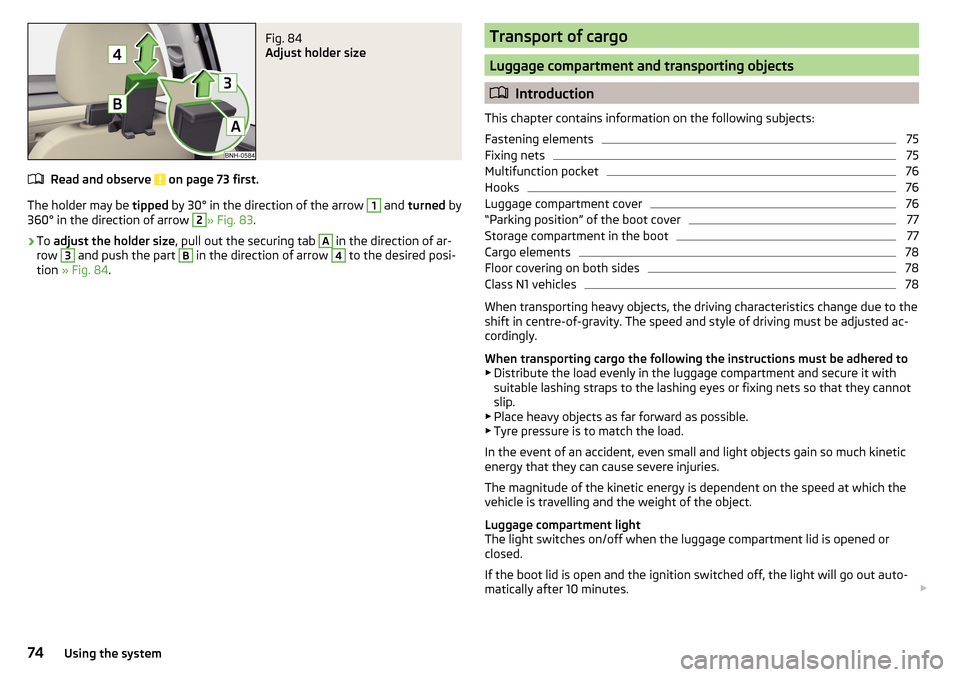
Fig. 84
Adjust holder size
Read and observe on page 73 first.
The holder may be tipped by 30° in the direction of the arrow
1
and turned by
360° in the direction of arrow
2
» Fig. 83 .
›
To adjust the holder size , pull out the securing tab
A
in the direction of ar-
row
3
and push the part
B
in the direction of arrow
4
to the desired posi-
tion » Fig. 84 .
Transport of cargo
Luggage compartment and transporting objects
Introduction
This chapter contains information on the following subjects:
Fastening elements
75
Fixing nets
75
Multifunction pocket
76
Hooks
76
Luggage compartment cover
76
“Parking position” of the boot cover
77
Storage compartment in the boot
77
Cargo elements
78
Floor covering on both sides
78
Class N1 vehicles
78
When transporting heavy objects, the driving characteristics change due to the
shift in centre-of-gravity. The speed and style of driving must be adjusted ac-
cordingly.
When transporting cargo the following the instructions must be adhered to
▶ Distribute the load evenly in the luggage compartment and secure it with
suitable lashing straps to the lashing eyes or fixing nets so that they cannot
slip.
▶ Place heavy objects as far forward as possible.
▶ Tyre pressure is to match the load.
In the event of an accident, even small and light objects gain so much kinetic
energy that they can cause severe injuries.
The magnitude of the kinetic energy is dependent on the speed at which the
vehicle is travelling and the weight of the object.
Luggage compartment light
The light switches on/off when the luggage compartment lid is opened or
closed.
If the boot lid is open and the ignition switched off, the light will go out auto-
matically after 10 minutes.
74Using the system
Page 77 of 184
WARNING■Never exceed the maximum permissible load of the respective fasteners,
nets, hooks etc. Heavy objects were not secured sufficiently – risk of injury!■
Do not exceed the permissible axle loads and permissible gross weight of
the vehicle – risk of accident!
■
An unsecured dirt or improperly attached load could slip during a sudden
manoeuvre or in an accident - danger of injury!
■
Loose cargo could hit a deployed airbag and injure occupants – danger of
death!
■
When transporting loads in the luggage compartment that has been en-
larged by folding the rear seats forward, ensure the safety of the passen-
gers transported on the other rear seats .
CAUTION
■ Never exceed the maximum permissible load of the respective fasteners,
nets, hooks etc. - these could be damaged.■
Please ensure that the heating elements for the rear window heater are not
damaged as a result of abrasive objects.
■
Do not place sharp objects in the nets and storage compartments in the lug-
gage compartment - there is a risk of damage to the net as well as the com-
partments.
■
Put the items in the storage compartments carefully and not load these
punctiform - there is a risk of damage to the compartments.
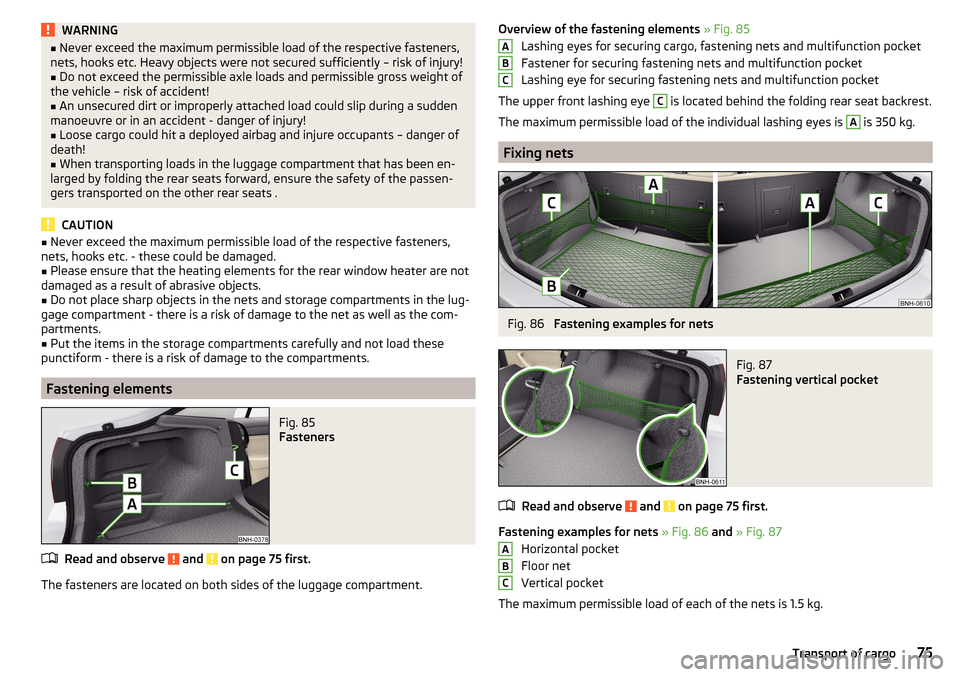
Fastening elements
Fig. 85
Fasteners
Read and observe and on page 75 first.
The fasteners are located on both sides of the luggage compartment.
Overview of the fastening elements » Fig. 85
Lashing eyes for securing cargo, fastening nets and multifunction pocket
Fastener for securing fastening nets and multifunction pocket
Lashing eye for securing fastening nets and multifunction pocket
The upper front lashing eye C
is located behind the folding rear seat backrest.
The maximum permissible load of the individual lashing eyes is
A
is 350 kg.
Fixing nets
Fig. 86
Fastening examples for nets
Fig. 87
Fastening vertical pocket
Read and observe and on page 75 first.
Fastening examples for nets » Fig. 86 and » Fig. 87
Horizontal pocket
Floor net
Vertical pocket
The maximum permissible load of each of the nets is 1.5 kg.
ABCABC75Transport of cargo
Page 78 of 184
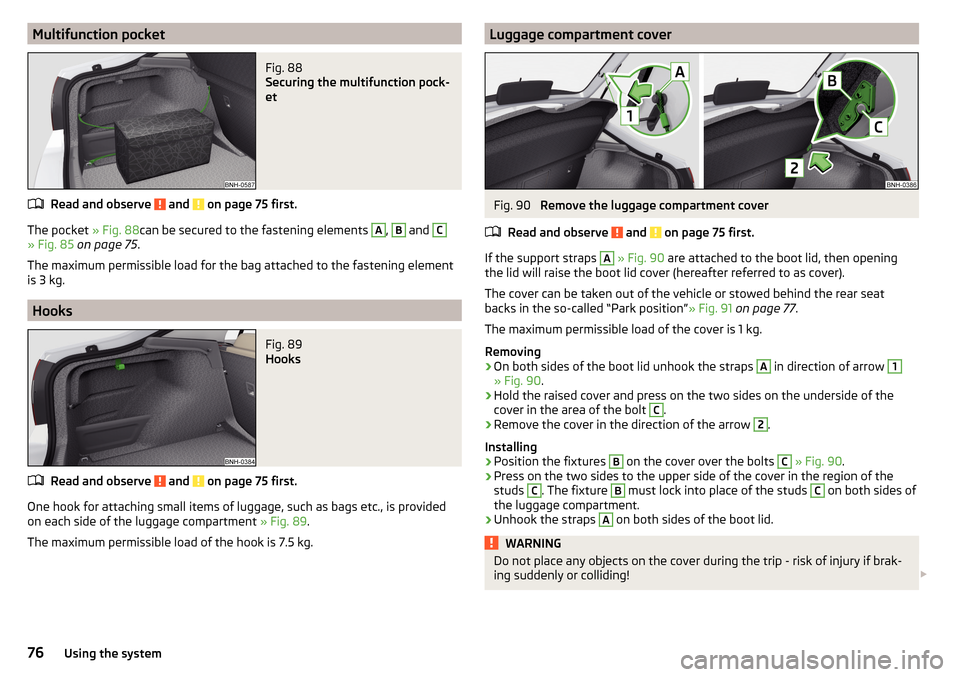
Multifunction pocketFig. 88
Securing the multifunction pock-
et
Read and observe and on page 75 first.
The pocket » Fig. 88can be secured to the fastening elements
A
,
B
and
C
» Fig. 85 on page 75 .
The maximum permissible load for the bag attached to the fastening element
is 3 kg.
Hooks
Fig. 89
Hooks
Read and observe and on page 75 first.
One hook for attaching small items of luggage, such as bags etc., is provided
on each side of the luggage compartment » Fig. 89.
The maximum permissible load of the hook is 7.5 kg.
Luggage compartment coverFig. 90
Remove the luggage compartment cover
Read and observe
and on page 75 first.
If the support straps
A
» Fig. 90 are attached to the boot lid, then opening
the lid will raise the boot lid cover (hereafter referred to as cover).
The cover can be taken out of the vehicle or stowed behind the rear seat
backs in the so-called “Park position” » Fig. 91 on page 77 .
The maximum permissible load of the cover is 1 kg.
Removing
›
On both sides of the boot lid unhook the straps
A
in direction of arrow
1
» Fig. 90 .
›
Hold the raised cover and press on the two sides on the underside of the
cover in the area of the bolt
C
.
›
Remove the cover in the direction of the arrow
2
.
Installing
›
Position the fixtures
B
on the cover over the bolts
C
» Fig. 90 .
›
Press on the two sides to the upper side of the cover in the region of the
studs
C
. The fixture
B
must lock into place of the studs
C
on both sides of
the luggage compartment.
›
Unhook the straps
A
on both sides of the boot lid.
WARNINGDo not place any objects on the cover during the trip - risk of injury if brak-
ing suddenly or colliding! 76Using the system
Page 80 of 184
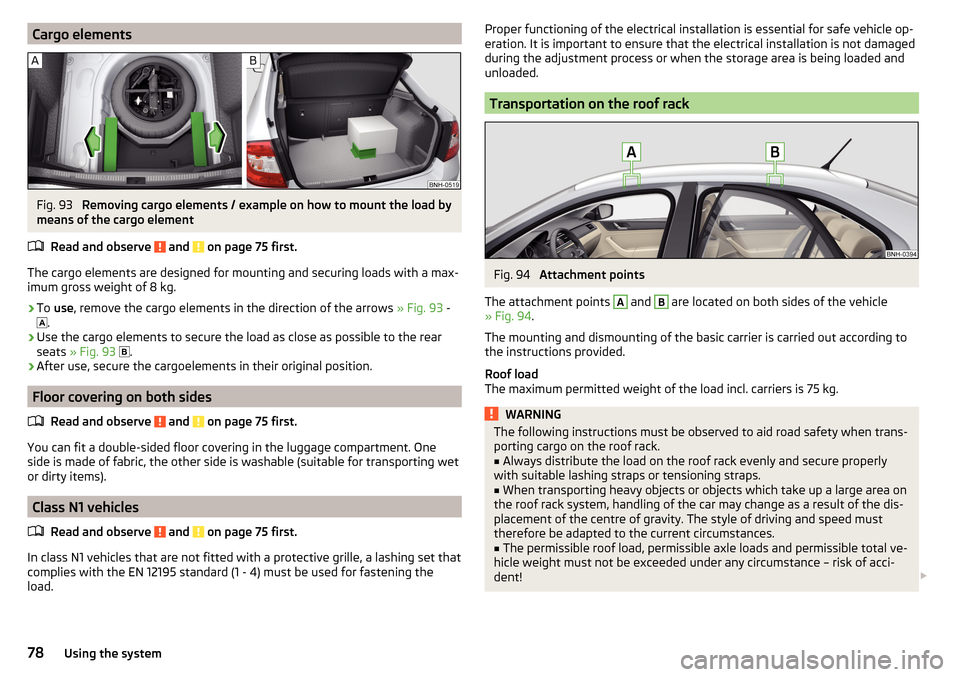
Cargo elementsFig. 93
Removing cargo elements / example on how to mount the load by
means of the cargo element
Read and observe
and on page 75 first.
The cargo elements are designed for mounting and securing loads with a max-imum gross weight of 8 kg.
›
To use , remove the cargo elements in the direction of the arrows » Fig. 93 -
.
›
Use the cargo elements to secure the load as close as possible to the rear
seats » Fig. 93
.
›
After use, secure the cargoelements in their original position.
Floor covering on both sides
Read and observe
and on page 75 first.
You can fit a double-sided floor covering in the luggage compartment. One
side is made of fabric, the other side is washable (suitable for transporting wet
or dirty items).
Class N1 vehicles
Read and observe
and on page 75 first.
In class N1 vehicles that are not fitted with a protective grille, a lashing set that
complies with the EN 12195 standard (1 - 4) must be used for fastening the
load.
Proper functioning of the electrical installation is essential for safe vehicle op-
eration. It is important to ensure that the electrical installation is not damaged
during the adjustment process or when the storage area is being loaded and
unloaded.
Transportation on the roof rack
Fig. 94
Attachment points
The attachment points
A
and
B
are located on both sides of the vehicle
» Fig. 94 .
The mounting and dismounting of the basic carrier is carried out according to
the instructions provided.
Roof load
The maximum permitted weight of the load incl. carriers is 75 kg.
WARNINGThe following instructions must be observed to aid road safety when trans- porting cargo on the roof rack.■
Always distribute the load on the roof rack evenly and secure properly
with suitable lashing straps or tensioning straps.
■
When transporting heavy objects or objects which take up a large area on
the roof rack system, handling of the car may change as a result of the dis-
placement of the centre of gravity. The style of driving and speed must
therefore be adapted to the current circumstances.
■
The permissible roof load, permissible axle loads and permissible total ve-
hicle weight must not be exceeded under any circumstance – risk of acci-
dent!
78Using the system
Page 89 of 184
The wear and tear on the brake pads is dependent on the operating condi-
tions and driving style. In difficult conditions (e.g. urban, sporty driving), the
condition of the brakes should be checked between services by a specialist ga-
rage.
Brake response can be slower if the brakes are covered in moisture or, in win-
ter, have a layer of ice or salt on them . The brakes should be cleaned and
dried by applying the brakes many times over »
.
Corrosion on the brake discs and dirt on the brake pads can occur if the vehicle
has been parked for a long period and if you do not make much use of the
braking system. The brakes are cleaned by applying the brakes several times
over »
.
Before negotiating a long or steep gradient , reduce speed and shift down a
gear. As a result, the braking effect of the engine will be used, reducing the
load on the brakes. If, nevertheless, there is a need for additional braking, it
should be carried out at intervals.
Emergency braking warning - if it is necessary to brake hard, the system may
cause the brake lights to automatically flash, to alert the traffic behind.
New brake pads must first be ““run in”” because these do not initially have the
best possible braking effect. Drive especially carefully for the first 200 km or
so.
If the brake fluid level is too low, it can cause faults in the braking system ;
the warning light will illuminate in the instrument cluster
» page 30,
Braking system
. If the warning light does not light up, yet the stopping dis-
tance is perceived to be longer than before, the driving style should be adap-
ted in view of the unknown cause of the problem, and braking kept to a mini-
mum - seek the help of a specialist garage without delay.
The brake booster increases the pressure generated with the brake pedal. The
brake booster only operates when the engine is running.
WARNING■ Greater physical effort is required for braking when the engine is switch-
ed off – risk of accident!■
The clutch pedal must be actuated when braking on a vehicle with man-
ual transmission, when the vehicle is in gear and at low revs. Otherwise,
the functionality of the brake system may be impaired – risk of accident!
WARNING (Continued)■ Do not depress the brake pedal, if there is no requirement to slow down.
This causes the brakes to overheat and can also result in a longer braking
distance and excessive wear - risk of accident!■
Only brake for the purpose of drying and cleaning the brake discs if the
traffic conditions permit this. Do not place any other road users in jeopardy.
■
Recommendations for new brake pads should be followed.
■
When stopping and parking, the parking brake should always be applied
firmly, otherwise the vehicle could move off - risk of accident!
■
If a front spoiler, full wheel trim, etc. is mounted retrospectively, it must
be ensured that the air supply to the front wheel brakes is not reduced.
Otherwise, the front brakes could be in danger of overheating – risk of acci-
dent!
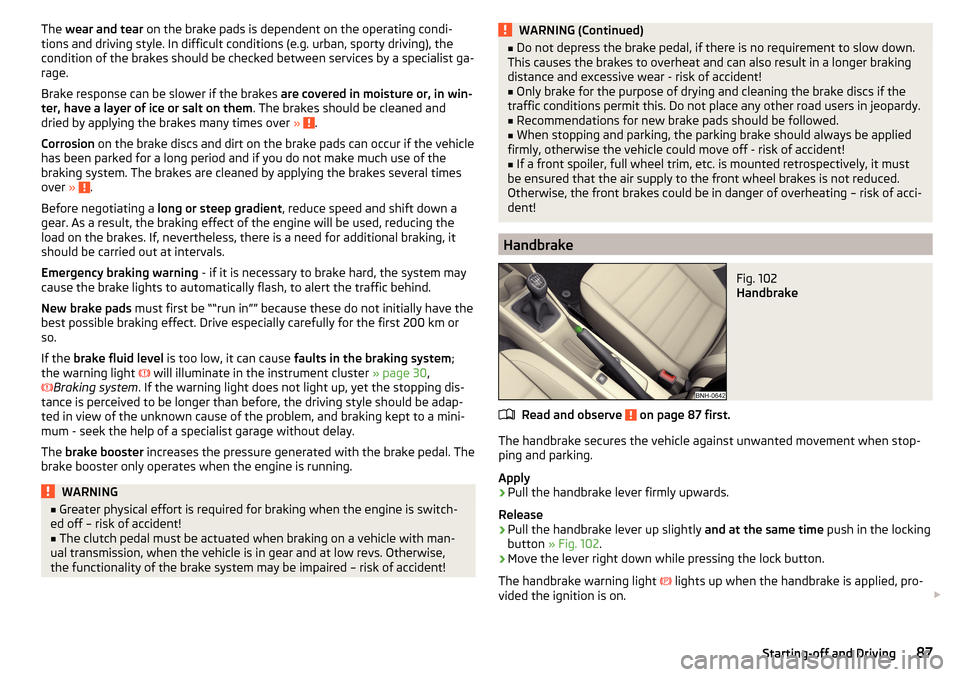
Handbrake
Fig. 102
Handbrake
Read and observe on page 87 first.
The handbrake secures the vehicle against unwanted movement when stop-
ping and parking.
Apply
›
Pull the handbrake lever firmly upwards.
Release
›
Pull the handbrake lever up slightly and at the same time push in the locking
button » Fig. 102 .
›
Move the lever right down while pressing the lock button.
The handbrake warning light
lights up when the handbrake is applied, pro-
vided the ignition is on.
87Starting-off and Driving
Page 91 of 184
Only a floor mat (ex-factory or from the ŠKODA Original Accessories range)
which can be secured to the attachment points should be used in the driver's
footwell.WARNINGThere should be no objects in the driver's footwell, otherwise the pedal op-
eration can be impeded - risk of accident!
Automatic gearbox
Introduction
This chapter contains information on the following subjects:
Select selector lever position
89
Selector lever lock
90
Manual shifting (Tiptronic)
90
Starting-off and driving
91
The automatic transmission performs an automatic gear change irrespective of
the engine load, the operation of the accelerator, the vehicle speed and the
selected driving mode.
The modes of the automatic transmission can be adjusted by the driver by
means of the selector lever.
WARNING■ Do not accelerate when selecting drive mode prior to moving off - risk of
accident!■
Never move the selector lever to mode R or P when driving – risk of acci-
dent!
■
If the vehicle stalls, with engine running, in the D, S , R or Tiptronic mode,
then the vehicle must be prevented from rolling away by means of the
brake pedal, parking brake or using the Auto Hold function. Even when the
engine is idling, the power transmission is never completely interrupted –
the vehicle crawls forward.
■
When leaving the vehicle, the selector lever must always be set to P. Oth-
erwise, the vehicle could be set in motion - risk of accident!
CAUTION
If you want to move the selector lever from position N to position D / S whilst
driving, the engine must be running at idling speed.Select selector lever positionFig. 104
Selector lever/display
Read and observe and on page 89 first.
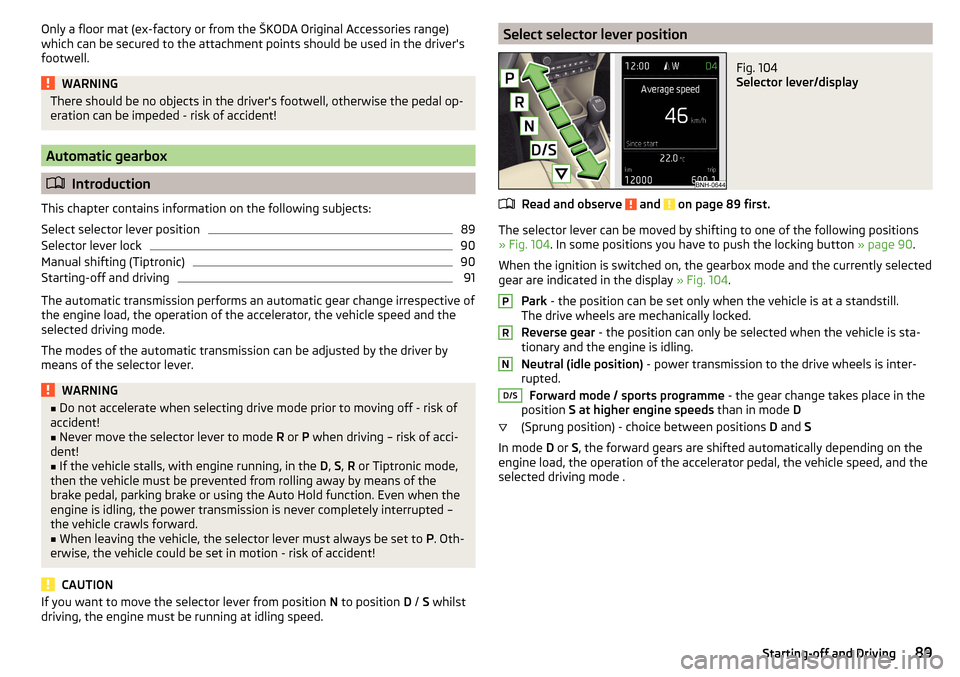
The selector lever can be moved by shifting to one of the following positions
» Fig. 104 . In some positions you have to push the locking button » page 90.
When the ignition is switched on, the gearbox mode and the currently selected
gear are indicated in the display » Fig. 104.
Park - the position can be set only when the vehicle is at a standstill.
The drive wheels are mechanically locked.
Reverse gear - the position can only be selected when the vehicle is sta-
tionary and the engine is idling.
Neutral (idle position) - power transmission to the drive wheels is inter-
rupted.
Forward mode / sports programme - the gear change takes place in the
position S at higher engine speeds than in mode D
(Sprung position) - choice between positions D and S
In mode D or S, the forward gears are shifted automatically depending on the
engine load, the operation of the accelerator pedal, the vehicle speed, and the
selected driving mode .
PRND/S89Starting-off and Driving
Page 110 of 184
Towing device and trailer
Hitch
Introduction
This chapter contains information on the following subjects:
Description
108
Adjusting the ready position
109
Check the setting of the standby position
109
Assembling the bar ball - Step 1
110
Assembling the bar ball - Step 2
110
Check proper fitting
111
Removing the bar ball - Step 1.
111
Removing the bar ball - Step 2.
111
Vertical load with mounted accessories
112
The maximum trailer nose weight when towing a trailer is 50 kg. Other infor-
mation (e.g. on the nameplate of the towing device) provide information only
about the test values of the device.
WARNING■ Check that the tow bar is seated correctly and is secured in the mounting
recess before the start of every journey.■
When the ball rod is not properly secured in the receiving shaft, it could
be damaged or incomplete, and should not be used - there is a risk of acci-
dent.
■
Do not modify or adapt the towing device in any way.
■
Keep the mounting recess of the towing equipment clean at all times.
Such dirt prevents the ball head from being attached securely.
DescriptionFig. 129
Carrier for the towing device/tow bar
Read and observe
on page 108 first.
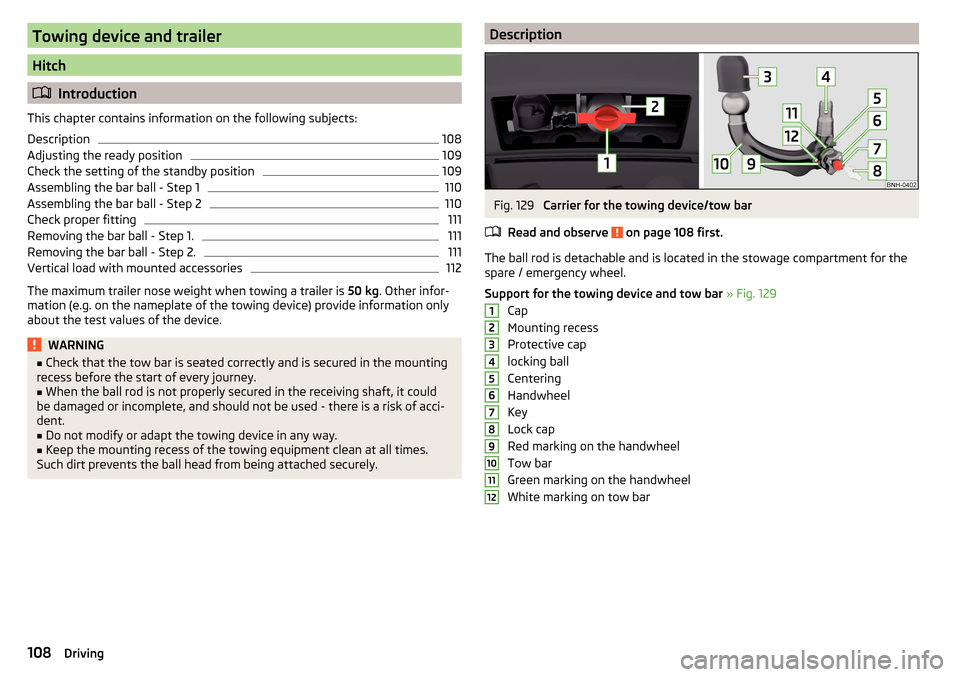
The ball rod is detachable and is located in the stowage compartment for the
spare / emergency wheel.
Support for the towing device and tow bar » Fig. 129
Cap
Mounting recess
Protective cap
locking ball
Centering
Handwheel
Key
Lock cap
Red marking on the handwheel
Tow bar
Green marking on the handwheel
White marking on tow bar
123456789101112108Driving
Page 112 of 184
Assembling the bar ball - Step 1Fig. 133
Remove cap for receiving shaft / use ball bar
Read and observe
on page 108 first.
The tow bar must be set to the standby position » page 109, Check the setting
of the standby position . If this is not in the standby position, then it must be
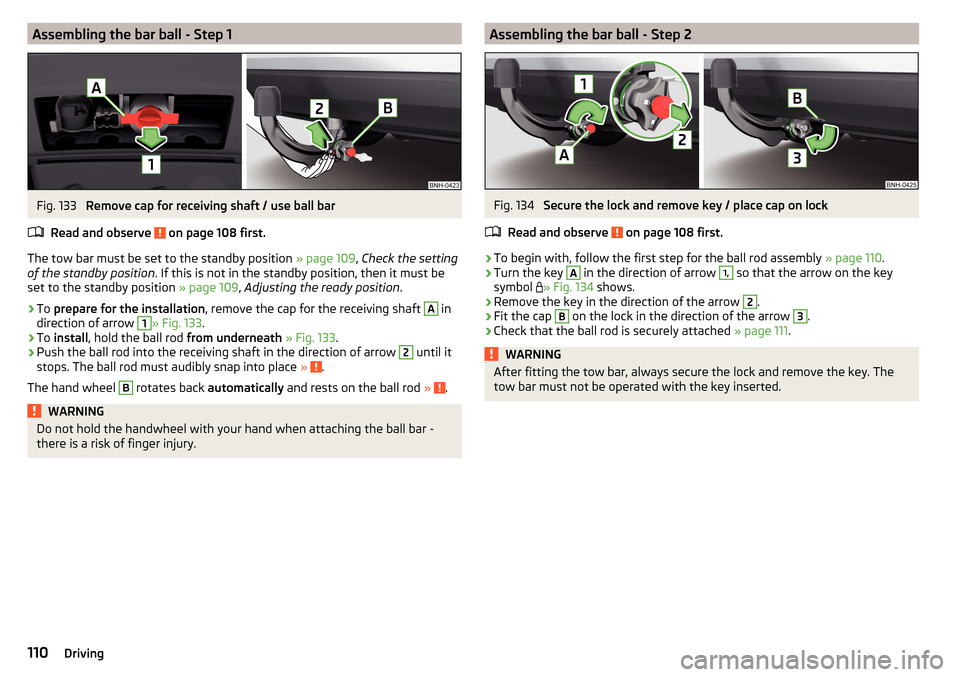
set to the standby position » page 109, Adjusting the ready position .
›
To prepare for the installation , remove the cap for the receiving shaft
A
in
direction of arrow
1
» Fig. 133 .
›
To install , hold the ball rod from underneath » Fig. 133 .
›
Push the ball rod into the receiving shaft in the direction of arrow
2
until it
stops. The ball rod must audibly snap into place » .
The hand wheel
B
rotates back automatically and rests on the ball rod » .
WARNINGDo not hold the handwheel with your hand when attaching the ball bar -
there is a risk of finger injury.Assembling the bar ball - Step 2Fig. 134
Secure the lock and remove key / place cap on lock
Read and observe
on page 108 first.
›
To begin with, follow the first step for the ball rod assembly » page 110.
›
Turn the key
A
in the direction of arrow
1,
so that the arrow on the key
symbol » Fig. 134
shows.
›
Remove the key in the direction of the arrow
2
.
›
Fit the cap
B
on the lock in the direction of the arrow
3
.
›
Check that the ball rod is securely attached » page 111.
WARNINGAfter fitting the tow bar, always secure the lock and remove the key. The
tow bar must not be operated with the key inserted.110Driving