buttons SKODA RAPID SPACEBACK 2013 1.G User Guide
[x] Cancel search | Manufacturer: SKODA, Model Year: 2013, Model line: RAPID SPACEBACK, Model: SKODA RAPID SPACEBACK 2013 1.GPages: 193, PDF Size: 14.8 MB
Page 163 of 193

Replacing the battery in the remote control keyFig. 148
Remove cover/take out battery
Read and observe
on page 160 first.
The battery change is carried out as follows.
›
Flip out the key.
›
Press off the battery cover
A
» Fig. 148 with your thumb or using a flat
screwdriver in the region of the arrows
1
.
›
Remove the discharged battery from the key by pressing the battery down in
the region of the arrow
2
.
›
Insert the new battery.
›
Place the battery cover
A
on the key and press it down until it clicks into
place.
Note
■ The key has to be synchronised if the vehicle cannot be unlocked or locked
with the remote control key after replacing the battery » page 161.■
If a key has an affixed decorative cover, this will be destroyed when the bat-
tery is replaced. A replacement cover can be purchased from a ŠKODA Partner.
Synchronising the remote control
Read and observe
on page 160 first.
If the vehicle does not unlock when pressing the remote control, the key may
not be synchronised. This can occur when the buttons on the remote control
key are actuated a number of times outside of the operative range of the
equipment or the battery in the remote control key has been replaced.
Synchronise the key as follows.
› Press any button on the remote control key.›Pressing of the button means that the door will unlock with the key within 1
minute.
Emergency unlocking/locking
Introduction
This chapter contains information on the following subjects:
Locking the door without a locking cylinder
161
Unlocking the tailgate
162
Selector lever-emergency unlocking
162
Locking the door without a locking cylinder
Fig. 149
Emergency locking: Left/right rear door
An emergency locking mechanism is located on the face side of the doors
which have no locking cylinder. It is only visible after opening the door.
Emergency locking » Fig. 149
Cover
Door locked
Door unlocked
Before using the emergency closing mechanism, remove cover
A
» Fig. 149 .
After use, reinstall the cover into the corresponding hole in the door.
After closing the locked door, it cannot be opened from the outside. The door
is unlocked by pulling on the door opening lever and is then opened from the
outside.
A161Emergency equipment and self-help
Page 168 of 193
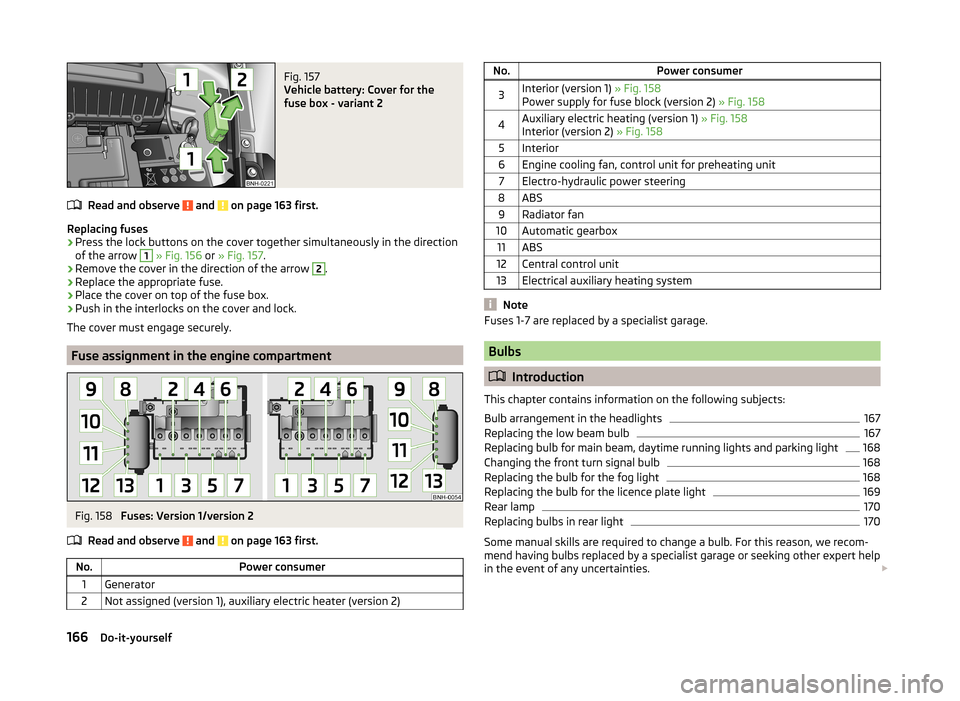
Fig. 157
Vehicle battery: Cover for the
fuse box - variant 2
Read and observe and on page 163 first.
Replacing fuses
›
Press the lock buttons on the cover together simultaneously in the direction
of the arrow
1
» Fig. 156 or » Fig. 157 .
›
Remove the cover in the direction of the arrow
2
.
›
Replace the appropriate fuse.
›
Place the cover on top of the fuse box.
›
Push in the interlocks on the cover and lock.
The cover must engage securely.
Fuse assignment in the engine compartment
Fig. 158
Fuses: Version 1/version 2
Read and observe
and on page 163 first.
No.Power consumer1Generator2Not assigned (version 1), auxiliary electric heater (version 2)No.Power consumer3Interior (version 1) » Fig. 158
Power supply for fuse block (version 2) » Fig. 1584Auxiliary electric heating (version 1) » Fig. 158
Interior (version 2) » Fig. 1585Interior6Engine cooling fan, control unit for preheating unit7Electro-hydraulic power steering8ABS9Radiator fan10Automatic gearbox11ABS12Central control unit13Electrical auxiliary heating system
Note
Fuses 1-7 are replaced by a specialist garage.
Bulbs
Introduction
This chapter contains information on the following subjects:
Bulb arrangement in the headlights
167
Replacing the low beam bulb
167
Replacing bulb for main beam, daytime running lights and parking light
168
Changing the front turn signal bulb
168
Replacing the bulb for the fog light
168
Replacing the bulb for the licence plate light
169
Rear lamp
170
Replacing bulbs in rear light
170
Some manual skills are required to change a bulb. For this reason, we recom-
mend having bulbs replaced by a specialist garage or seeking other expert help
in the event of any uncertainties.
166Do-it-yourself
Page 183 of 193

Brake fluid137
Checking138
Information messages31
brake pedal (automatic gearbox) indicator light
36
brakes Driving in
104
Brakes Brake booster
99
Brake fluid138
Braking and stabilisation systems106
Handbrake100
Information messages31
Brakes and parking99
Braking Information on braking
99
Breakdown kit155
bulb rear lamp
170
Bulbs Replacing
166
Buttons in the driver's door Electric power windows
51
C
Car computer See multifunction display
39
Care and maintenance119
Car park ticket holder69
Carrier83
Cavity protection125
Central locking45
Central locking button48
Change Engine oil
134
Changing Front turn signal bulb
168
Wheels151
Changing a wheel Follow-up work153
Preliminary work151
Removing and attaching a wheel152
Charging a vehicle battery140
Check Fit ball head properly
114
Checking Battery electrolyte level
140
Brake fluid138
Coolant137
Engine oil135
Oil level135
Windscreen washer fluid134
Checks Statutory checks
119
Children and safety20
Child safety Side airbag
21
Child safety lock48
Child seat Classification
22
ISOFIX22
on the front passenger seat20
TOP TETHER23
Use of child seats22
Use of ISOFIX child seats23
Chrome parts see vehicle care
124
Cigarette lighter70
cleaning chrome parts
124
Cleaning Alcantara
128
and maintaining belts128
artificial leather128
headlight glasses125
materials128
natural leather127
plastic parts124
seats covers of the electrically heated seats128
wheels126
Cleaning safety belt
128
Cleaning seat covers
128
Cleaning the interior artificial leather
128
Seat covers128
Cleaning the outside of the vehicle Decorative films
124
Cleaning the vehicle exterior Cavity protection
125
Door locking cylinder125
Headlight glasses125
Under-body protection126
wheels126
Windows and external mirrors125
Cleaning vehicle122
Cleaning vehicle exterior123
Plastic parts124
Rubber seals124
Vehicle paint work123
Wiper blades126
Clean interior Safety belt
128
clean outside of vehicle chrome parts
124
Climatronic air distribution control
85
Operating elements87
Clothes hook74
Cockpit 12-Volt power outlet
71
Ashtray71
Cigarette lighter70
General view25
Lights58
storage compartments68
useful equipment68
181Index
Page 184 of 193

COMING HOME57
compartments68
Computer See multifunction display
39
convenience turn signal55
Coolant136
Checking137
Information messages32
Replenishing137
Temperature gauge27
Warning light32
Cooling system cost-effective use
88
malfunctions88
CORNER See Fog lights with CORNER function
56
Correct seated position7
Driver7
Front passenger8
Instructions9
Rear seats9
Counter for distance driven28
cruise control operation
108
operation description109
Cruise control system Warning light
36
Cruise Control System108
Cup holders70
D
DAY LIGHT See Daytime running lights
54
Daytime running lights54
Dazzle see sun screen of the panoramic roof
60
De-icing windows
125
Deactivating an airbag18
Decorative films124
Defrosting rear window59
Delayed locking of the boot lid see boot lid
51
Departure angle175
Diesel refer to Fuel
131
Diesel fuel Operation in winter
131
Diesel particle filter Information notices
34
Warning light34
Digital Clock Time
29
Dipstick135
Disconnecting and reconnecting vehicle battery
141
Display27
Compass points43
Coolant temperature27
Fuel supply28
Gear changes38
Service intervals43
Display a low temperature38
Display of the second speed29
Disposal Acceptance and recycling of used vehicles
121
Distance driven28
Door Child safety lock
48
Closing49
Emergency locking161
Opening49
Warning light for open door31
Door open Warning light
31
Double-sided floor covering79
Driving Driving through water105
Emissions173
Fuel consumption173
Maximum speed176
off made-up roads105
Driving economically Tips
104
Driving in Brake linings
104
the engine104
Tyres104
Driving off made-up roads105
Driving through water105
Driving with a trailer116
E
Economical driving and environmental friendli- ness
104
EDL107
Electrical power windows Button in the driver's door
51
Button in the rear door52
Buttons in the driver's door52
Electronic Differential Lock (EDL)107
Electronic immobilizer97
Electronic Stability Control (ESC)106
Emergency Changing a wheel
151
Hazard warning light system57
jump-starting158
Jump-starting157
Locking the door without a locking cylinder161
Selector lever-unlocking162
Towing the vehicle158
Towing the vehicle using the tow hitch160
Tyre repair155
Unlocking the tailgate162
emergency equipment reflective vest
149
182Index