wheel SKODA RAPID SPACEBACK 2013 1.G User Guide
[x] Cancel search | Manufacturer: SKODA, Model Year: 2013, Model line: RAPID SPACEBACK, Model: SKODA RAPID SPACEBACK 2013 1.GPages: 193, PDF Size: 14.8 MB
Page 42 of 193

Display of the selected memory in the display at the position A » Fig. 26
Single-trip memory
Total trip memory
Select memory›
Select the corresponding element of the multifunction display » page 40.
Confirm the element again to switch between the individual memories.
Resetting
›
Select the corresponding element of the multifunction display » page 40.
›
Select the desired memory.
›
Press and hold button
B
or adjustment wheel
D
» Fig. 24 on page 37 .
Single-trip memory (memory 1)
The single-trip memory collates the driving information from the moment the
ignition is switched on until it is switched off.
New data will also flow into the calculation of the current driving information if
the trip is continued within 2 hours after switching off the ignition.
If the trip is interrupted for more than 2 hours, the memory is automatically
erased.
Total-trip memory (memory 2)
The total-trip memory gathers data from any number of individual journeys up
to a total of 19 hours and 59 minutes or 1 999 kilometres driven ( ), and a total
of 99 hours and 59 minutes or 9 999 kilometres driven ( ).
The memory is deleted when either of these limits is reached and the calcula-
tion starts all over again.
Unlike the single-trip memory, the total-trip memory is not deleted after a pe-
riod of interruption of driving of 2 hours.
The following values of the selected memory are set to zero. › Average fuel consumption.
› Distance driven.
› Average speed.
› Driving time
Note
Disconnecting the vehicle battery will delete all memory data.Information overview
Read and observe
and on page 39 first.
The information overview of the Multifunction Display (the number of itemsdisplayed is different depending on equipment).
Outside temperature
The current outside temperature is displayed.
For vehicles with a MAXI DOT display this information is always shown.
Driving time
The time travelled since the memory was last erased is displayed.
If you want to measure the time travelled from a particular moment in time,
reset the memory to zero at that point in time » page 39, Memory .
The maximum time indicated in both memories is 19 hours and 59 minutes ( )
and 99 hours and 59 minutes ( ). The indicator is set back to zero if this period
is exceeded.
Current fuel consumption
The current fuel consumption level is displayed in litres/100 km 1)
. You can use
this information to adapt your driving style to the desired fuel consumption.
The display appears in litres/hour if the vehicle is stationary or driving at a low
speed 2)
.
Average fuel consumption
The average fuel consumption since the memory was last erased is displayed
in litres/100 km 1)
.
If you wish to determine the average fuel consumption over a certain period of time, you must set the memory at the start of the new measurement to
zero » page 39 , Memory . After erasing the memory, no value is displayed until
you have driven approx. 300 m.
The display is updated regularly while you are driving.
Range
The range indicates the distance you can still drive with your vehicle based on
the level of fuel in the tank and with the same style of driving as before.
1)
On some models in certain countries, the display appears in kilometres/litre.
2)
On some models in certain countries, – -.- km/ltr. is displayed when the vehicle is stationary.
40Using the system
Page 44 of 193
MAXI DOT display
Introduction
This chapter contains information on the following subjects:
Main menu
42
Settings
42
Compass point display
43
The MAXI DOT display provides you with information about the current operat-
ing state of your vehicle. Depending on the vehicle equipment, it also provides
you with data relating to the radio, multifunction display (MFD), mobile phone,
navigation system, automatic gearbox » page 101 and devices connected via
the MDI input.
WARNINGConcentrate fully at all times on your driving! As the driver, you are fully re-
sponsible for the operation of your vehicle.
CAUTION
Pull out the ignition key if coming in contact with the display (e.g. when clean-
ing) to prevent any possible damage.
Main menu
Read and observe
and on page 42 first.
Press and hold button
A
or
C
» Fig. 24 on page 37 to activate the MAIN
MENU . By briefly pressing the
C
button you will reach one level higher.
Main menu items (depending on vehicle equipment) ■ MFD (Multifunction display) » page 39
■ Audio » Operating instructions for the radio
■ Navigation » Operating instructions for the navigation system
■ Phone » page 89 ;
■ Vehicle status » page 29
■ Settings » page 42
The Audio and Navigation menu items are only displayed when the factory-fit-
ted radio or navigation system is switched on.
Note■ If warning messages are displayed, these messages must be verified to ac-
cess the main menu » page 37, Using the information system .■
If the display is not activated at that moment, the menu always shifts to one
of the higher levels after approx. 10 seconds.
■
Using the factory-fitted radio or navigation system » Radio operating in-
structions or» navigation system operating instructions .
Settings
Read and observe
and on page 42 first.
You can change certain settings by means of the MAXI DOT display. The cur-
rent menu item is shown in the top of the display under a line.
The following information can be selected (depending on the equipment in- stalled in the vehicle).
Language
You can set the language for the display texts here.
MFD data
Activate or deactivate certain displays of the multifunction display here.
Time
The time, time format (12 or 24 hour indicator) and the changeover between
summer/winter time can be set here.
Winter tyres
Here, the speed and the switching on and off of the acoustic signals when ex-
ceeding this speed can be adjusted. This function is, for example, used for win-
ter tyres where the maximum permissible speed is lower than the maximum
speed of the vehicle » page 142, Tyres and wheel rims .
As soon as the parking procedure is completed, an audible signal sounds and
the following message appears in the information display.
Winter tyres: max. speed ... km/h.
Units
The units for the temperature, consumption and distance driven can be set
here.
42Using the system
Page 58 of 193

The light turns off about 4 minutes after turning off the wipers.
CAUTION
Do not attach any stickers or similar objects in front of the light sensor on the
windscreen to avoid impairing the function or its reliability.
Fog lights
Fig. 39
Light switch - Switch front and
rear fog light
Read and observe on page 53 first.
Switching on/off
›
Turn the light switch to position
or
» Fig. 39 .
›
Pull the light switch to position
1
.
The rear fog light is switched off in the reverse order.
The warning light
» page 30 lights up in the instrument cluster when the
fog lights are switched on.
Fog lights with CORNER function
Read and observe
on page 53 first.
The CORNER function lights the front fog lamp on each side of the vehicle to
illuminate the area around the vehicle when turning, parking, etc.
The CORNER function is switched on automatically if the following conditions
are met.
The turn signal is switched on or the front wheels are turned sharply to
the right or left 1)
.
The engine is running.
The vehicle is stopped or moves at a speed of no more than 40 km/h.
The low beam is switched on or the light switch is in the position
and
the low beam is switched on.
The daytime running lights are not switched on.
The fog lights are not switched on.
Note
The two fog lights are switched on when you shift into the reverse gear.
Rear fog light
Read and observe
on page 53 first.
Switching on/off
›
Turn the light switch to position or
» Fig. 39 on page 56 .
›
Pull the light switch to position
2
.
The rear fog light is switched off in the reverse order.
If the vehicle is not fitted with fog lights » page 56, the rear fog light is switch-
ed on by turning the light switch to the position and is pulled out directly to
the position
2
. This switch can only be put into one position.
The warning light
» page 30 lights up in the instrument cluster when the
rear fog light is switched on.
Only the rear fog light on the trailer lights up if the vehicle has a factory-fitted
towing device or a towing device from ŠKODA original accessories and it is
driven with a trailer.
1)
If both switch-on conditions are conflicting, for example, if the front wheels are turned to the left and
the right turn signal light is switched on, the turn signal light has the higher priority.
56Using the system
Page 66 of 193
Seats and head restraints
Seats and head restraints
Introduction
This chapter contains information on the following subjects:
Adjusting the front seats
64
Head restraints - adjusting height
65
Head restraints - Removing and installing
65
The driver's seat should be adjusted in such a way that the pedals can be fully
pressed to the floor with slightly bent legs.
The seat backrest on the driver's seat should be adjusted in such a way that the upper point of the steering wheel can be easily reached with slightly bent
arms.
Correct adjustment of the seats is particularly important for the following rea-
sons.
› Reaching the controls safely and quickly.
› A relaxed and fatigue-free body position.
› Achieving the maximum protection offered by the seat belts and the airbag
system.
WARNING■ Only adjust the driver's seat when the vehicle is stationary – risk of acci-
dent!■
Caution when adjusting the seat! You may suffer injuries or bruises as a
result of adjusting the seat without paying proper attention.
■
Never carry more people than the number of seats in the vehicle.
■
Do not carry any objects on the front passenger seat, except objects de-
signed for this purpose (e.g. child seats) – risk of accident!
Note
After a certain time, play can develop within the adjustment mechanism of the
backrest angle.Adjusting the front seatsFig. 49
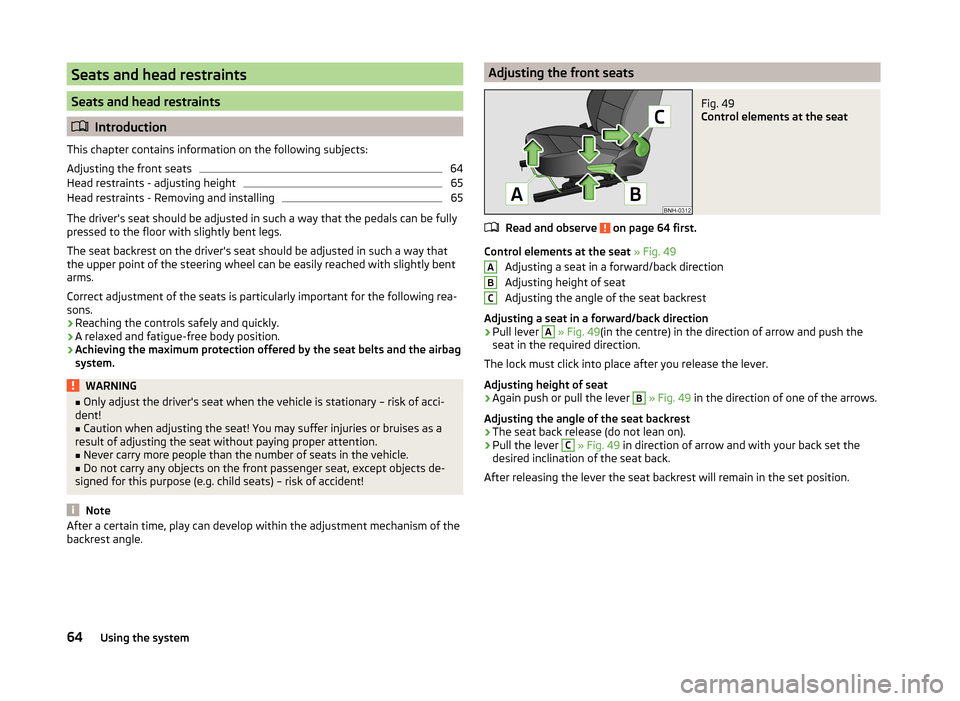
Control elements at the seat
Read and observe on page 64 first.
Control elements at the seat » Fig. 49
Adjusting a seat in a forward/back direction
Adjusting height of seat
Adjusting the angle of the seat backrest
Adjusting a seat in a forward/back direction
›
Pull lever
A
» Fig. 49 (in the centre) in the direction of arrow and push the
seat in the required direction.
The lock must click into place after you release the lever.
Adjusting height of seat
›
Again push or pull the lever
B
» Fig. 49 in the direction of one of the arrows.
Adjusting the angle of the seat backrest
›
The seat back release (do not lean on).
›
Pull the lever
C
» Fig. 49 in direction of arrow and with your back set the
desired inclination of the seat back.
After releasing the lever the seat backrest will remain in the set position.
ABC64Using the system
Page 91 of 193
Communication and multimedia
Universal telephone installation GSM II
Introduction
This chapter contains information on the following subjects:
Introductory information
89
Internal Phonebook
90
Operating the phone on the multifunction steering wheel
90
Symbols in the display
91
Connecting the mobile phone to the hands-free system
91
Telephone operation in the MAXI DOT display
92
ŠKODA permits the operation of mobile phones and two-way radio systems
with a professionally installed external aerial and a maximum transmission
power of up to 10 watts.
Please consult a ŠKODA Partner for information about the possibility of instal-
ling and operating mobile phones and two-way radio systems with a transmis-
sion power of more than 10 W.
Operating mobile phones or two-way radio systems may interfere with the
functionality of the electronic systems in your vehicle.
The reasons for this are as follows:
› no external aerial;
› external aerial incorrectly installed;
› transmission power greater than 10 watts.
WARNING■
Concentrate fully at all times on your driving! As the driver, you are fully
responsible for the operation of your vehicle.■
The national regulations for using a mobile phone in a vehicle must be
observed.
■
If a mobile phone or a two-way radio system is operated in a vehicle with-
out an external aerial or an external aerial which has been installed incor-
rectly, this can increase the strength of the electromagnetic field inside the
vehicle.
■
Two-way radio systems, mobile phones or mounts must not be installed
on airbag covers or within the immediate deployment range of the airbags.
WARNING (Continued)■ Never leave a mobile phone on a seat, on the dash panel or in any area
where it can become a projectile during a sudden braking manoeuvre, an
accident or a collision — risk of injury.■
The Bluetooth ®
function must be switched off by a specialist company
before the vehicle can be transported by air.
Note
■ We recommend that the installation of mobile phones and two-way radio
systems in a vehicle be carried out by a specialist garage.■
Not all mobile phones that enable Bluetooth ®
communication are compatible
with the universal telephone pre-installation GSM II. You can ask a ŠKODA
Partner whether your telephone is compatible with the GSM II universal tele-
phone fitting.
■
The range of the Bluetooth ®
connection to the hands-free system is restric-
ted to the vehicle interior. The range is dependent on local factors, e.g. obsta-
cles between the devices and mutual interferences with other devices. If your
mobile phone is in a jacket pocket, for example, this can lead to difficulties
when establishing a connection with the hands-free-system or transferring
data.
Introductory information
Read and observe
on page 89 first.
The universal telephone pre-installation GSM II (hands-free system) includes a
convenience mode for the mobile phone via voice control, the multifunction
steering wheel, the radio or navigation system.
The universal telephone pre-installation GSM II comprises the following func-
tions.
› Phone Phonebook
» page 90.
› Convenience operation of the telephone via the multifunction steering
wheel » page 90 .
› Telephone operation in the MAXI DOT display
» page 92.
› Voice control of the telephone
» page 93.
› Music playback from the telephone or other multimedia units
» page 95.
All communication between a mobile phone and your vehicle's hands-free sys-
tem is established with the help of Bluetooth ®
technology.
89Communication and multimedia
Page 92 of 193
Internal PhonebookRead and observe
on page 89 first.
An internal phonebook is part of the hands-free system. This phone phone-book can be used depending on the type of mobile phone.
After the first connection of the telephone, the system begins to load the
phone book from the phone and the SIM card into the memory of the control
unit.
Each time the telephone has established a new connection with the hands-
free system, an update of the relevant phone book is performed. The updating
can take a few minutes. During this time the phone book, which was stored af-
ter the last update was completed, is available. Newly stored telephone num-
bers are only shown after the updating has ended.
The update is interrupted if a telephone event (e.g. incoming or outgoing call,
voice control dialogue) occurs during the updating procedure. After the tele-
phone event has ended, the updating starts anew.
The internal phonebook provides 2,500 free memory locations. Each contact
can contain up to 4 numbers.
If the number of contacts loaded exceeds 2,500, the phone book is not com-
plete.
Operating the phone on the multifunction steering wheel
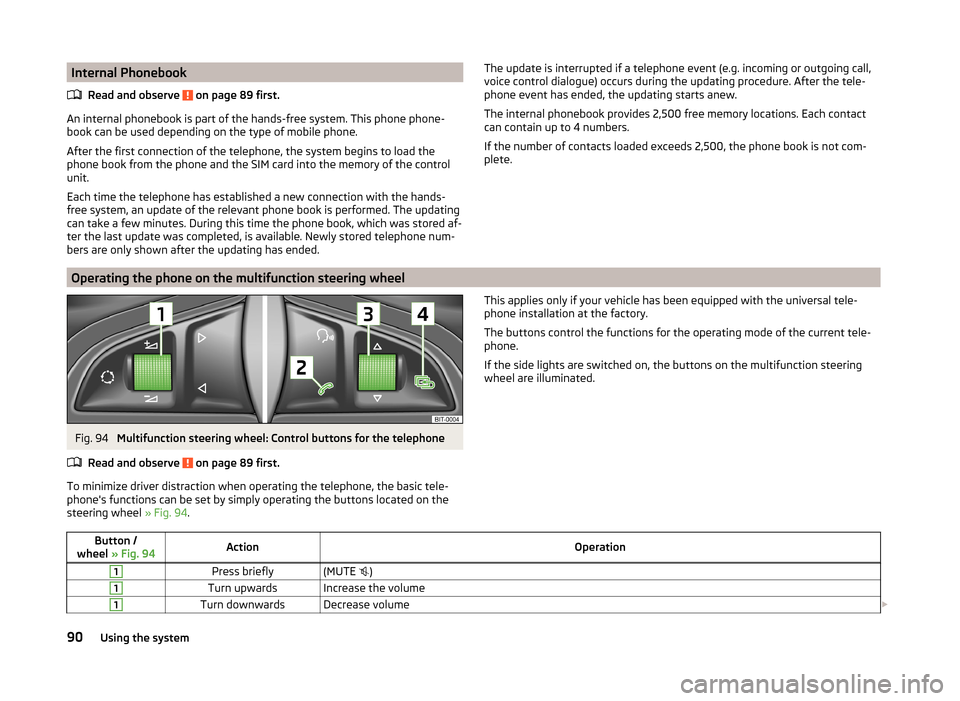
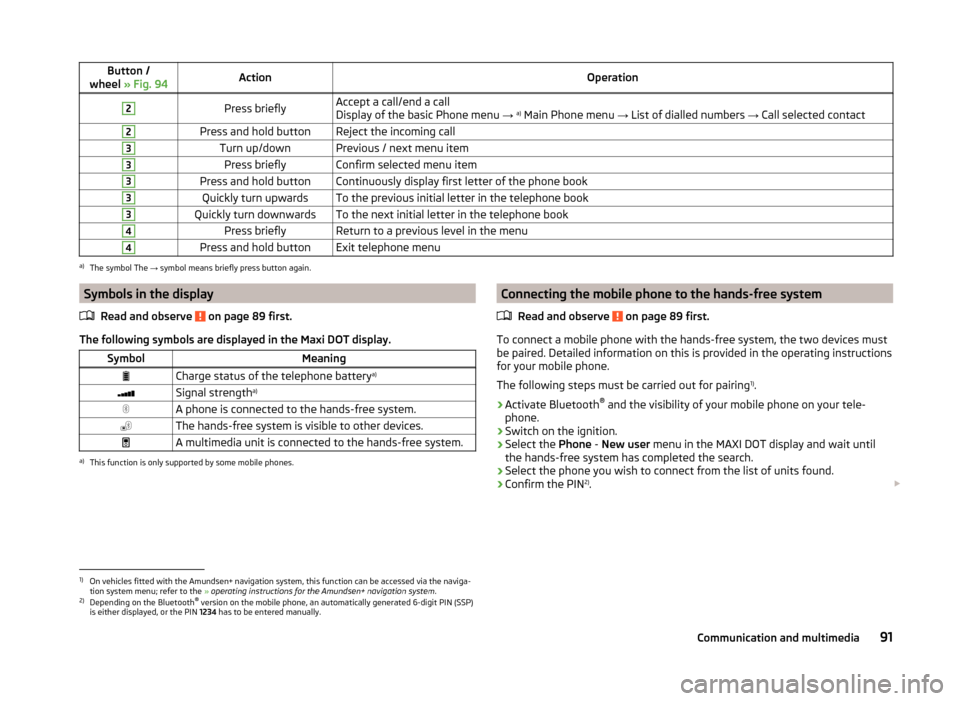
Fig. 94
Multifunction steering wheel: Control buttons for the telephone
Read and observe
on page 89 first.
To minimize driver distraction when operating the telephone, the basic tele-
phone's functions can be set by simply operating the buttons located on the
steering wheel » Fig. 94.
This applies only if your vehicle has been equipped with the universal tele-
phone installation at the factory.
The buttons control the functions for the operating mode of the current tele-
phone.
If the side lights are switched on, the buttons on the multifunction steering wheel are illuminated.Button /
wheel » Fig. 94ActionOperation1Press briefly(MUTE )1Turn upwardsIncrease the volume1Turn downwardsDecrease volume 90Using the system
Page 93 of 193
Button /
wheel » Fig. 94ActionOperation2Press brieflyAccept a call/end a call
Display of the basic Phone menu → a)
Main Phone menu → List of dialled numbers → Call selected contact2Press and hold buttonReject the incoming call3Turn up/downPrevious / next menu item3Press brieflyConfirm selected menu item3Press and hold buttonContinuously display first letter of the phone book3Quickly turn upwardsTo the previous initial letter in the telephone book3Quickly turn downwardsTo the next initial letter in the telephone book4Press brieflyReturn to a previous level in the menu4Press and hold buttonExit telephone menua)
The symbol The → symbol means briefly press button again.
Symbols in the display
Read and observe
on page 89 first.
The following symbols are displayed in the Maxi DOT display.
SymbolMeaningCharge status of the telephone battery a)Signal strengtha)A phone is connected to the hands-free system.The hands-free system is visible to other devices.A multimedia unit is connected to the hands-free system.a)
This function is only supported by some mobile phones.
Connecting the mobile phone to the hands-free system
Read and observe
on page 89 first.
To connect a mobile phone with the hands-free system, the two devices mustbe paired. Detailed information on this is provided in the operating instructions
for your mobile phone.
The following steps must be carried out for pairing 1)
.
›
Activate Bluetooth ®
and the visibility of your mobile phone on your tele-
phone.
›
Switch on the ignition.
›
Select the Phone - New user menu in the MAXI DOT display and wait until
the hands-free system has completed the search.
›
Select the phone you wish to connect from the list of units found.
›
Confirm the PIN 2)
.
1)
On vehicles fitted with the Amundsen+ navigation system, this function can be accessed via the naviga-
tion system menu; refer to the » operating instructions for the Amundsen+ navigation system .
2)
Depending on the Bluetooth®
version on the mobile phone, an automatically generated 6-digit PIN (SSP)
is either displayed, or the PIN 1234 has to be entered manually.
91Communication and multimedia
Page 95 of 193
Dial number
Any telephone number can be entered in the Dial number menu item. The re-
quired numbers must be selected one after the other using adjustment wheel
and confirmed by pressing the adjustment wheel. You can select digits 0-9,
symbols
,
, # and the Cancel, Call and Delete functions.
Call register
The following menu items can be selected in the Call register menu item.
■ Missed calls
■ Dialled numbers
■ Received calls
Voice mailbox
In the Voice mailbox menu item, you can set the number of the voice mailbox 1)
and then dial the number.
Bluetooth
The following menu items can be selected from the Bluetooth menu item.
■ User - Overview of the stored telephones
■ New user - Search for new mobile phones that are in the reception range
■ Visibility - Switches on the visibility of the hands-free system for other devi-
ces
■ Media player - Playback via Bluetooth ®
■ Active device - Connected device
■ Paired devices - List of paired devices
■ Find - Device search
■ Phone name - option to change the name of the phone (default SKODA_BT)
Settings
The following menu items can be selected from the Settings menu item.
■ Phone book - Phonebook
■ Update - Update the phone book 1)
■ List - Arrange the entries in the phone book
■ Surname - Arrange according to surname
■ Surname - Sort by contact name
■ Ring tone - Ring tone setting
Back
Return in the Start menu of the telephone.Voice control
Introduction
This chapter contains information on the following subjects:
Dialogue
93
Voice commands
94
Dialogue
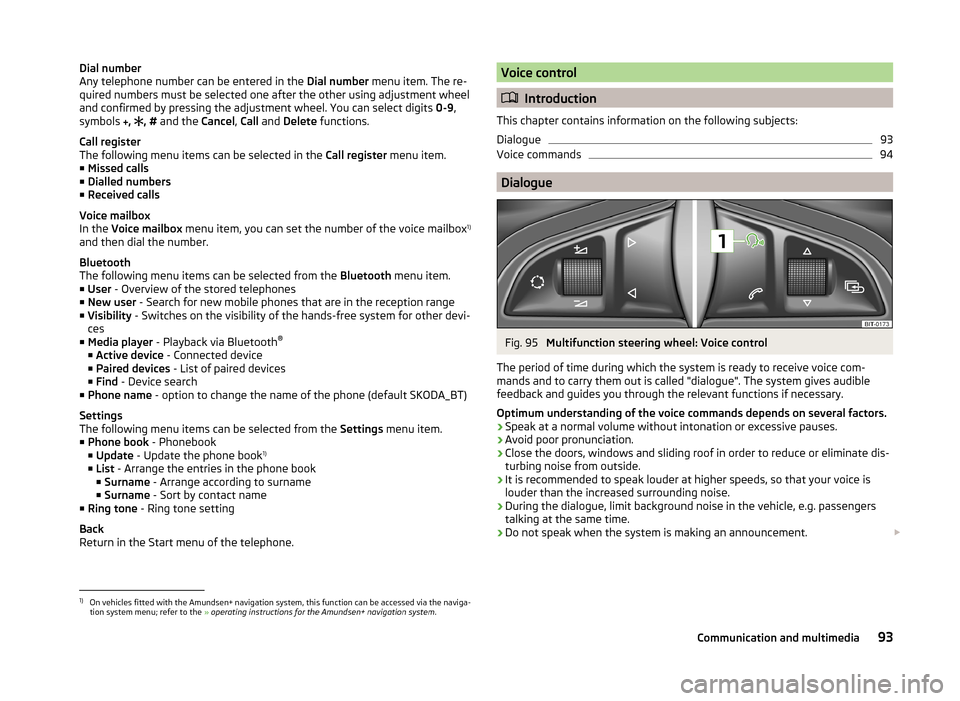
Fig. 95
Multifunction steering wheel: Voice control
The period of time during which the system is ready to receive voice com-
mands and to carry them out is called "dialogue". The system gives audible
feedback and guides you through the relevant functions if necessary.
Optimum understanding of the voice commands depends on several factors. › Speak at a normal volume without intonation or excessive pauses.
› Avoid poor pronunciation.
› Close the doors, windows and sliding roof in order to reduce or eliminate dis-
turbing noise from outside.
› It is recommended to speak louder at higher speeds, so that your voice is
louder than the increased surrounding noise.
› During the dialogue, limit background noise in the vehicle, e.g. passengers
talking at the same time.
› Do not speak when the system is making an announcement.
1)
On vehicles fitted with the Amundsen+ navigation system, this function can be accessed via the naviga-
tion system menu; refer to the » operating instructions for the Amundsen+ navigation system .
93Communication and multimedia
Page 96 of 193
The microphone for voice control is housed in the moulded headliner and di-
rected towards the driver and front passenger. Therefore, the driver and the
front passenger can operate the equipment.
Entering a phone number
The telephone number can be entered as a continuous sequence of numbers
spoken one after the other (the whole number at once) or in the form of digit
blocks (separated by short pauses). After each string of digits (separated by a
brief pause in speaking), all of the digits detected up to now are repeated by
the system.
The digits 0-9 and symbols
+, , # are permitted. The system does not recog-
nize any combination of connected numbers, e.g. "twenty-three".
Switching on voice control
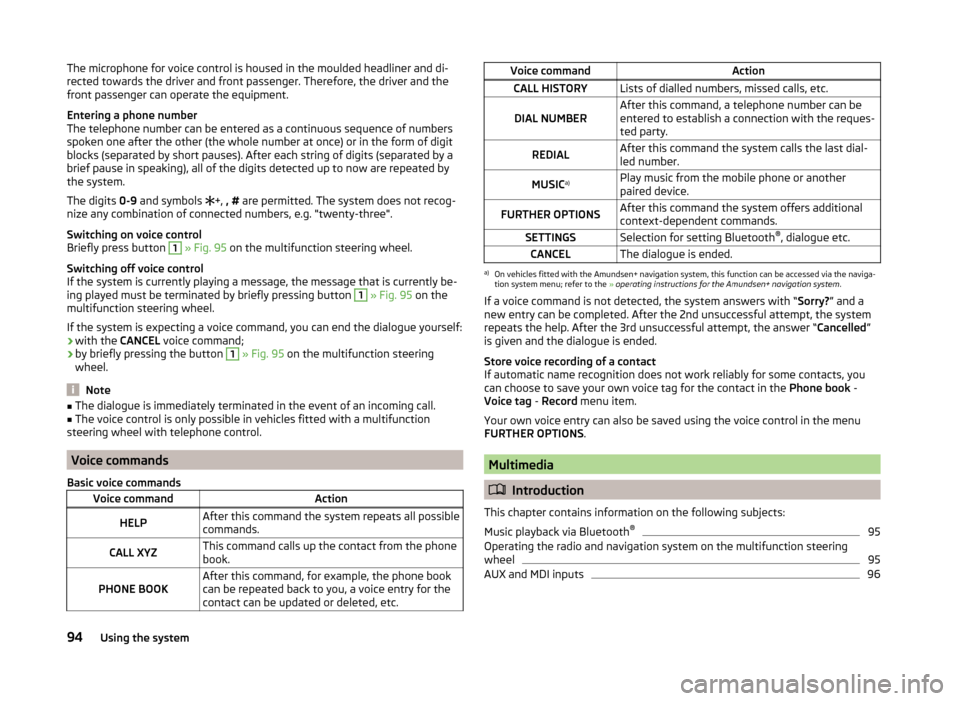
Briefly press button 1
» Fig. 95 on the multifunction steering wheel.
Switching off voice control
If the system is currently playing a message, the message that is currently be-
ing played must be terminated by briefly pressing button
1
» Fig. 95 on the
multifunction steering wheel.
If the system is expecting a voice command, you can end the dialogue yourself:
› with the
CANCEL voice command;
› by briefly pressing the button
1
» Fig. 95 on the multifunction steering
wheel.
Note
■ The dialogue is immediately terminated in the event of an incoming call.■The voice control is only possible in vehicles fitted with a multifunction
steering wheel with telephone control.
Voice commands
Basic voice commands
Voice commandActionHELPAfter this command the system repeats all possible
commands.CALL XYZThis command calls up the contact from the phone
book.PHONE BOOKAfter this command, for example, the phone book
can be repeated back to you, a voice entry for the
contact can be updated or deleted, etc.Voice commandActionCALL HISTORYLists of dialled numbers, missed calls, etc.DIAL NUMBERAfter this command, a telephone number can be
entered to establish a connection with the reques-
ted party.REDIALAfter this command the system calls the last dial-
led number.MUSIC a)Play music from the mobile phone or another
paired device.FURTHER OPTIONSAfter this command the system offers additional
context-dependent commands.SETTINGSSelection for setting Bluetooth ®
, dialogue etc.CANCELThe dialogue is ended.a)
On vehicles fitted with the Amundsen+ navigation system, this function can be accessed via the naviga-
tion system menu; refer to the » operating instructions for the Amundsen+ navigation system .
If a voice command is not detected, the system answers with “ Sorry?” and a
new entry can be completed. After the 2nd unsuccessful attempt, the system
repeats the help. After the 3rd unsuccessful attempt, the answer “ Cancelled”
is given and the dialogue is ended.
Store voice recording of a contact
If automatic name recognition does not work reliably for some contacts, you
can choose to save your own voice tag for the contact in the Phone book -
Voice tag - Record menu item.
Your own voice entry can also be saved using the voice control in the menu
FURTHER OPTIONS .
Multimedia
Introduction
This chapter contains information on the following subjects:
Music playback via Bluetooth ®
95
Operating the radio and navigation system on the multifunction steering
wheel
95
AUX and MDI inputs
9694Using the system
Page 97 of 193
Music playback via Bluetooth®
The universal telephone pre-installation GSM II makes it possible to play back
music via Bluetooth ®
from the devices such as MP3 player, mobile phone or
notebook.
To ensure that music can be played via Bluetooth ®
, you must first pair the de-
vice with the hands-free system in the Phone - Bluetooth - Media player
menu.The music playback process is performed on the connected device.
The universal telephone pre-installation GSM II ensures that the music played back via the hands-free system can be controlled with the remote con-
trol » page 94 , Voice commands .
Note
The device being connected must support the Bluetooth ®
A2DP profile; refer
to the operating instructions for the relevant device being connected.
Operating the radio and navigation system on the multifunction steering wheel
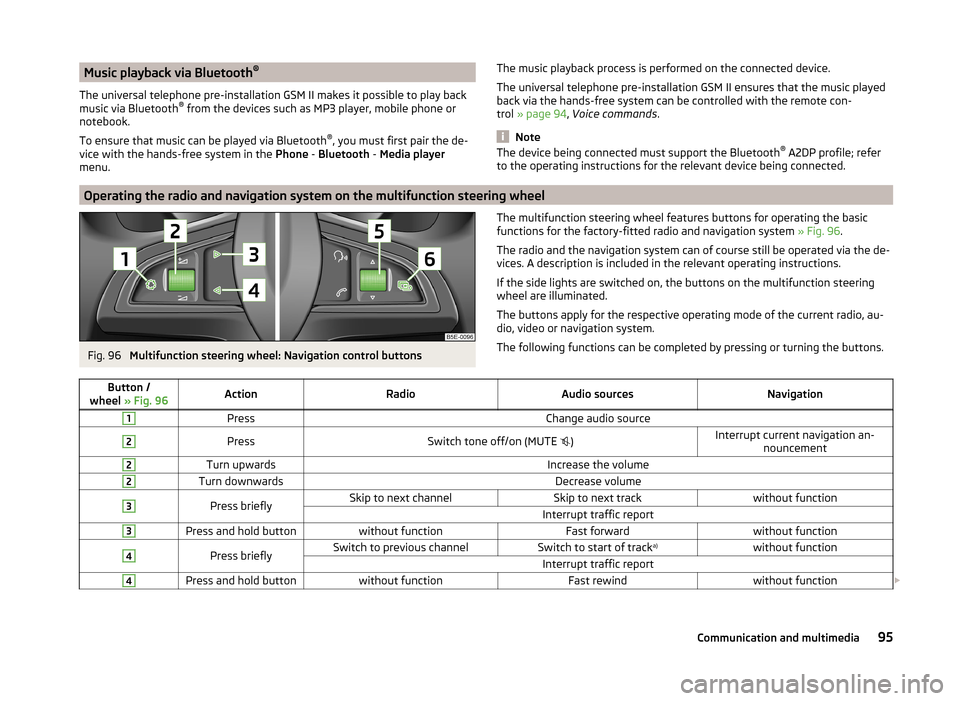
Fig. 96
Multifunction steering wheel: Navigation control buttons
The multifunction steering wheel features buttons for operating the basic
functions for the factory-fitted radio and navigation system » Fig. 96.
The radio and the navigation system can of course still be operated via the de- vices. A description is included in the relevant operating instructions.
If the side lights are switched on, the buttons on the multifunction steering wheel are illuminated.
The buttons apply for the respective operating mode of the current radio, au-
dio, video or navigation system.
The following functions can be completed by pressing or turning the buttons.Button /
wheel » Fig. 96ActionRadioAudio sourcesNavigation1PressChange audio source2PressSwitch tone off/on (MUTE )Interrupt current navigation an-
nouncement2Turn upwardsIncrease the volume2Turn downwardsDecrease volume3Press brieflySkip to next channelSkip to next trackwithout functionInterrupt traffic report3Press and hold buttonwithout functionFast forwardwithout function4Press brieflySwitch to previous channelSwitch to start of track a)without functionInterrupt traffic report4Press and hold buttonwithout functionFast rewindwithout function
95Communication and multimedia