service SKODA RAPID SPACEBACK 2013 1.G Owner's Manual
[x] Cancel search | Manufacturer: SKODA, Model Year: 2013, Model line: RAPID SPACEBACK, Model: SKODA RAPID SPACEBACK 2013 1.GPages: 193, PDF Size: 14.8 MB
Page 4 of 193
Terms used
The on-board literature contains the following terms relating to the service
work for your vehicle.
- a workshop that carries out specialist service tasks for
ŠKODA vehicles. A specialist garage can be a ŠKODA partner, a ŠKODA
service partner or an independent workshop.
- A Workshop that has been contractually authorised
by the manufacturer ŠKODA AUTO a.s. or its sales partner to perform
service tasks on ŠKODA vehicles and to sell ŠKODA Genuine Parts.
- A company that has been authorised by the manufacturer
ŠKODA AUTO a.s. or its sales partner to sell new ŠKODA vehicles and, when applicable, to service them using ŠKODA Genuine Parts and sell
ŠKODA Genuine Parts.
Owner's Manual
These operating instructions apply to all body variants of the vehicle and to all
related models.
This Owner's Manual describes all possible equipment variants without identi-
fying them as special equipment, model variants or market-dependent equip-
ment.
Consequently, your vehicle does not need to contain all of the equipment
components described in this Owner's Manual.
The level of equipment in your vehicle refers to your purchase contract for the
vehicle. More information is available from the ŠKODA Partner from whom you
bought the vehicle.
The illustrations can differ in minor details from your vehicle; they are only in-
tended for general information.
Supplementary Information (applies to Russia)
The full type approval number of the means of transport is indicated in the
registration documents.“Specialist garage”“ŠKODA service partner”“ŠKODA partner”
Page 5 of 193

Table of Contents
Abbreviations
Safety
Passive Safety
6
General information
6
Correct and safe seated position
7
Seat belts
10
Using seat belts
10
Inertia reels and belt tensioners
13
Airbag system
14
Description of the airbag system
14
Airbag overview
15
Deactivating airbags
18
Transporting children safely
20
Child seat
20
Fastening systems
22
Using the system
Cockpit
25
Overview
24
Instruments and Indicator Lights
26
Instrument cluster
26
Indicator lights
30
Information system
37
Driver information system
37
Multifunction display (MFD)
39
MAXI DOT display
42
Service interval display
43
Unlocking and opening
45
Unlocking and locking
45
Anti-theft alarm system
49Luggage compartment lid50Electric power windows51
Lights and visibility
53
Lights
53
Interior lighting
58
Visibility
59
Windscreen wipers and washers
60
Rear mirror
62
Seats and head restraints
64
Seats and head restraints
64
Seat features
66
Transporting and practical equipment
68
Useful equipment
68
Luggage compartment
75
Variable loading floor in the luggage
compartment (Estate)
80
Roof rack system
83
Heating and air conditioning
84
Heating, ventilation, cooling
84
Communication and multimedia
89
Universal telephone installation GSM II
89
Voice control
93
Multimedia
94
Driving
Starting-off and Driving
97
Starting and turning off the engine
97
Brakes and parking
99
Manual gear changing and pedals
100
Automatic gearbox
101
Driving in an economical driving style
104
Driving through water and driving off made-
up roads
105Assist systems106Braking and stabilisation systems106
Parking aid
107
Cruise Control System
108
START-STOP
109
Hitch and trailer
112
Hitch
112
Trailer
116
General Maintenance
Care and maintenance
119
Service work, adjustments and technical alterations
119
Washing vehicle
122
Cleaning vehicle exterior
123
Interior care
126
Inspecting and replenishing
129
Fuel
129
Engine compartment
131
Engine oil
134
Coolant
136
Brake fluid
137
Vehicle battery
138
Wheels
142
Tyres and wheel rims
142
Tyre control display
145
Reserve and temporary spare wheel
146
Winter operation
147
Do-it-yourself
Emergency equipment and self-help
149
Emergency equipment
149
Changing a wheel
151
Tyre repair
155
Jump-starting
157
Towing the vehicle
1583Table of Contents
Page 15 of 193
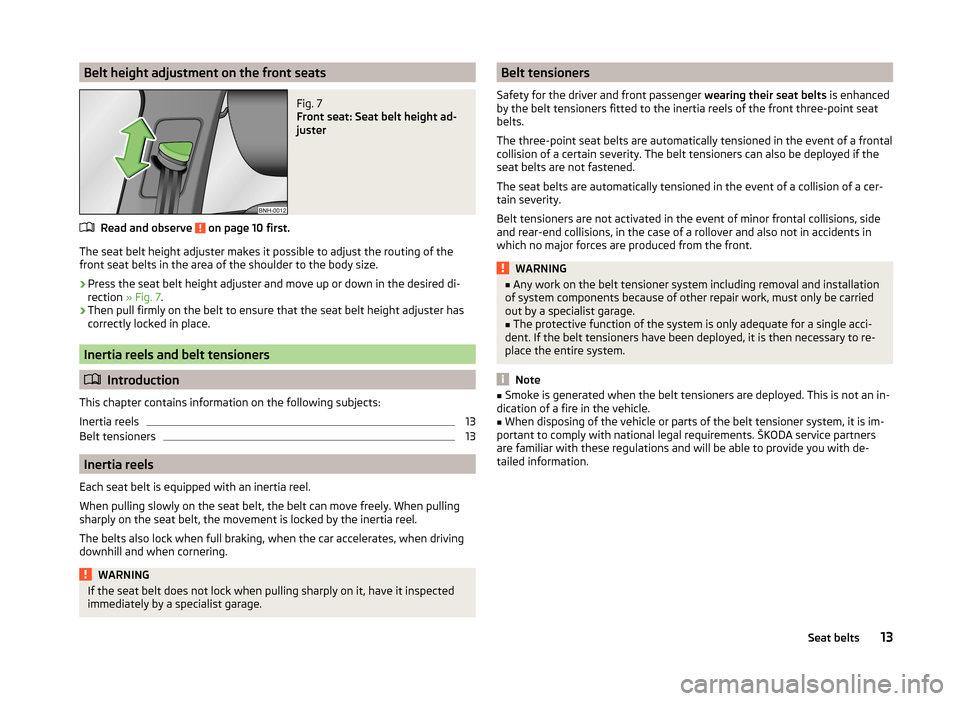
Belt height adjustment on the front seatsFig. 7
Front seat: Seat belt height ad-
juster
Read and observe on page 10 first.
The seat belt height adjuster makes it possible to adjust the routing of the
front seat belts in the area of the shoulder to the body size.
›
Press the seat belt height adjuster and move up or down in the desired di-
rection » Fig. 7.
›
Then pull firmly on the belt to ensure that the seat belt height adjuster has
correctly locked in place.
Inertia reels and belt tensioners
Introduction
This chapter contains information on the following subjects:
Inertia reels
13
Belt tensioners
13
Inertia reels
Each seat belt is equipped with an inertia reel.
When pulling slowly on the seat belt, the belt can move freely. When pulling
sharply on the seat belt, the movement is locked by the inertia reel.
The belts also lock when full braking, when the car accelerates, when driving
downhill and when cornering.
WARNINGIf the seat belt does not lock when pulling sharply on it, have it inspected
immediately by a specialist garage.Belt tensioners
Safety for the driver and front passenger wearing their seat belts is enhanced
by the belt tensioners fitted to the inertia reels of the front three-point seat
belts.
The three-point seat belts are automatically tensioned in the event of a frontal
collision of a certain severity. The belt tensioners can also be deployed if the
seat belts are not fastened.
The seat belts are automatically tensioned in the event of a collision of a cer-
tain severity.
Belt tensioners are not activated in the event of minor frontal collisions, side
and rear-end collisions, in the case of a rollover and also not in accidents in
which no major forces are produced from the front.WARNING■ Any work on the belt tensioner system including removal and installation
of system components because of other repair work, must only be carried
out by a specialist garage.■
The protective function of the system is only adequate for a single acci-
dent. If the belt tensioners have been deployed, it is then necessary to re-
place the entire system.
Note
■ Smoke is generated when the belt tensioners are deployed. This is not an in-
dication of a fire in the vehicle.■
When disposing of the vehicle or parts of the belt tensioner system, it is im-
portant to comply with national legal requirements. ŠKODA service partners
are familiar with these regulations and will be able to provide you with de-
tailed information.
13Seat belts
Page 20 of 193
WARNING (Continued)■The installation of impermissible accessories in the vicinity of the head
airbags can considerably impair the protection offered by the head airbag in
the event of it being deployed. When the deployed head airbag is inflated,
parts of the accessories fitted could be thrown into the interior of the car
and injure the occupants » page 119.■
The sun visors must not be swivelled towards the side windows in the
deployment area of the head airbags if any objects, such as ball-point pens,
etc. are attached to them. This might result in injuries to the occupants if
the head airbag is deployed.
■
There must not be any further persons, animals or objects positioned be-
tween the seated occupants and the deployment area of the airbag. In ad-
dition, none of the occupants should lean their head out of the window
when driving, or extend their arms and hands out of the window.
Note
In vehicles with head airbags, the lettering can be seen on the B column
cladding.
Deactivating airbags
Introduction
This chapter contains information on the following subjects:
Deactivating airbags
18
Deactivating the front passenger airbag
18
Deactivating airbags
Deactivating an airbag should be considered in cases such as the ones below. › If using a rear-facing child seat on the front passenger seat (due to different
legal regulations, the airbag must be deactivated if using a forwards-facing
child seat in some countries) » page 20, Transporting children safely .
› If it is not possible to maintain a distance of at least 25 cm between the mid-
dle of the steering wheel and chest, despite the driver's seat being correctly
adjusted.
› If special attachments are required in the area of the steering wheel because
of a physical disability.
› If different seats have been fitted (e.g. orthopaedic seats without side air-
bags).
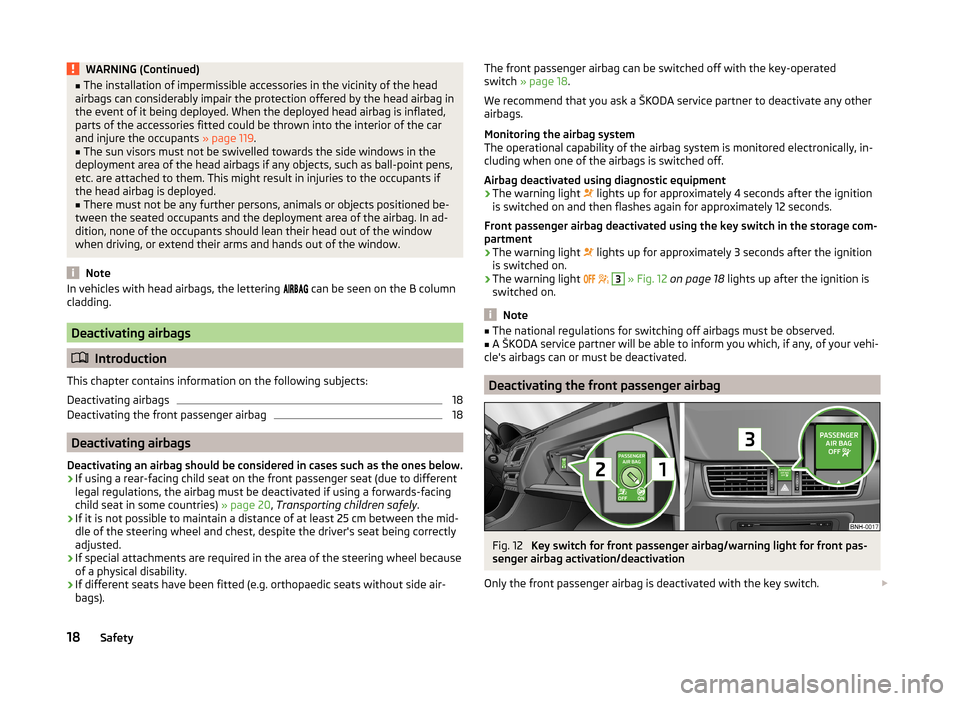
The front passenger airbag can be switched off with the key-operated
switch » page 18 .
We recommend that you ask a ŠKODA service partner to deactivate any other airbags.
Monitoring the airbag system
The operational capability of the airbag system is monitored electronically, in-
cluding when one of the airbags is switched off.
Airbag deactivated using diagnostic equipment › The warning light
lights up for approximately 4 seconds after the ignition
is switched on and then flashes again for approximately 12 seconds.
Front passenger airbag deactivated using the key switch in the storage com-
partment
› The warning light
lights up for approximately 3 seconds after the ignition
is switched on.
› The warning light
3
» Fig. 12 on page 18 lights up after the ignition is
switched on.
Note
■ The national regulations for switching off airbags must be observed.■A ŠKODA service partner will be able to inform you which, if any, of your vehi-
cle's airbags can or must be deactivated.
Deactivating the front passenger airbag
Fig. 12
Key switch for front passenger airbag/warning light for front pas-
senger airbag activation/deactivation
Only the front passenger airbag is deactivated with the key switch.
18Safety
Page 28 of 193
Instruments and Indicator Lights
Instrument cluster
Introduction
This chapter contains information on the following subjects:
Overview
26
Revolution counter
27
Display
27
Speedometer
27
Coolant temperature gauge
27
Fuel gauge
28
Counter for distance driven
28
29
Display of the second speed
29
Auto Check Control
29
The instrument cluster gives the driver basic information such as the current
speed, engine speed, the state of some vehicle systems and the like.
Fault display
If there is a fault in the instrument cluster, the Error message will appear in
the display.
Seek help from a specialist garage.
WARNINGConcentrate fully at all times on your driving! As the driver you are fully re-
sponsible for road safety.
Note
When the ignition is on, the instrument cluster is illuminated 1)
. The brightness
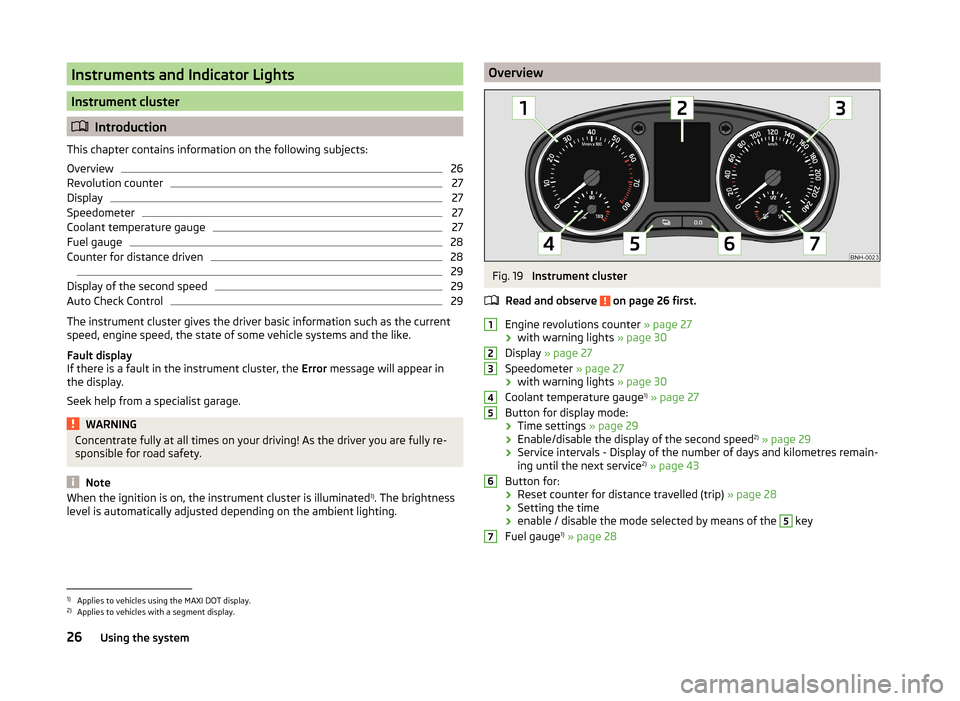
level is automatically adjusted depending on the ambient lighting.OverviewFig. 19
Instrument cluster
Read and observe
on page 26 first.
Engine revolutions counter » page 27
› with warning lights
» page 30
Display » page 27
Speedometer » page 27
› with warning lights
» page 30
Coolant temperature gauge 1)
» page 27
Button for display mode:
› Time settings
» page 29
› Enable/disable the display of the second speed 2)
» page 29
› Service intervals - Display of the number of days and kilometres remain-
ing until the next service 2)
» page 43
Button for: › Reset counter for distance travelled (trip)
» page 28
› Setting the time
› enable / disable the mode selected by means of the
5
key
Fuel gauge 1)
» page 28
12345671)
Applies to vehicles using the MAXI DOT display.
2)
Applies to vehicles with a segment display.
26Using the system
Page 29 of 193
Revolution counterRead and observe
on page 26 first.
The tachometer
1
» Fig. 19 on page 26 shows the actual engine speed per mi-
nute.
The beginning of the red scale range of the tachometer indicates the maxi-
mum permitted engine speed of a driven-in and operating warm engine.
You should shift into the next highest gear before the red scale of the revolu- tion counter is reached, or select mode D on the automatic gearbox.
The gear recommendation is important to note in order to maintain the opti-
mum engine speed » page 38.
CAUTION
The pointer of the tachometer must reach the red area for only a short time -
there is a risk of engine damage!
Display
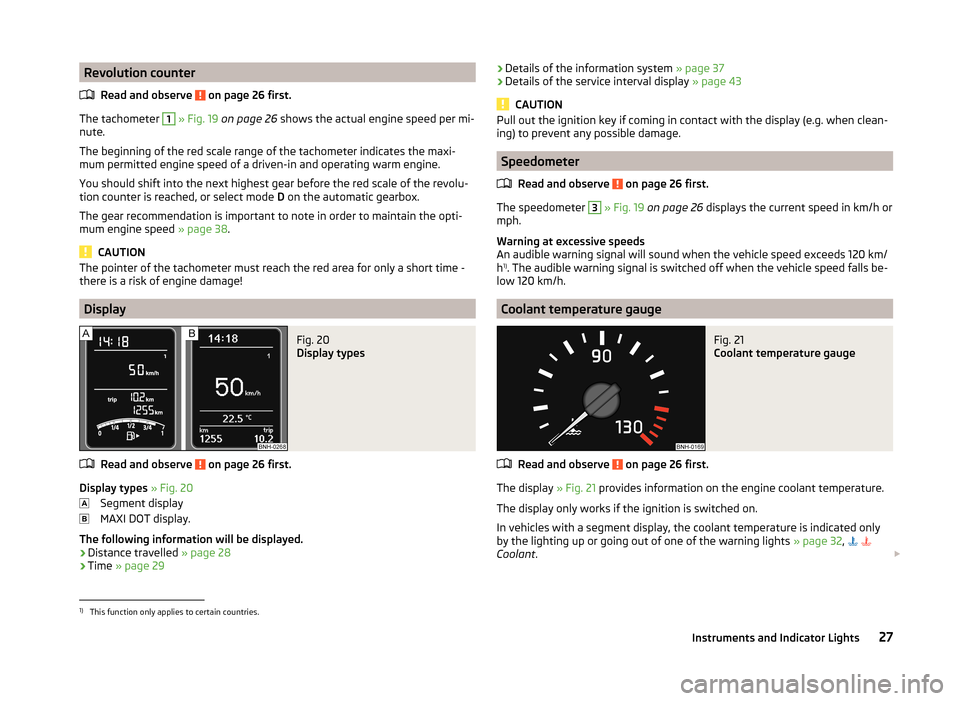
Fig. 20
Display types
Read and observe on page 26 first.
Display types » Fig. 20
Segment display
MAXI DOT display.
The following information will be displayed.
› Distance travelled
» page 28
› Time
» page 29
›Details of the information system
» page 37
› Details of the service interval display
» page 43
CAUTION
Pull out the ignition key if coming in contact with the display (e.g. when clean-
ing) to prevent any possible damage.
Speedometer
Read and observe
on page 26 first.
The speedometer
3
» Fig. 19 on page 26 displays the current speed in km/h or
mph.
Warning at excessive speeds
An audible warning signal will sound when the vehicle speed exceeds 120 km/
h 1)
. The audible warning signal is switched off when the vehicle speed falls be-
low 120 km/h.
Coolant temperature gauge
Fig. 21
Coolant temperature gauge
Read and observe on page 26 first.
The display » Fig. 21 provides information on the engine coolant temperature.
The display only works if the ignition is switched on.
In vehicles with a segment display, the coolant temperature is indicated only by the lighting up or going out of one of the warning lights » page 32,
Coolant .
1)
This function only applies to certain countries.
27Instruments and Indicator Lights
Page 37 of 193

CAUTION■As long as the warning light lights up, you must reckon with an increased
fuel consumption and in certain circumstances a power reduction of the en-
gine.■
Using diesel fuel with increased sulphur content can significantly reduce the
service life of the diesel particle filter. A ŠKODA Partner will be able to tell you
which countries use diesel fuel with increased sulphur content.
Note
■ To assist the combustion process of the soot particles in the filter, we recom-
mend that regularly driving short distances be avoided.■
If the engine is turned off during the filter cleaning process or shortly after-
wards, the cooling fan may turn on automatically for a few minutes.
Fuel reserve
Read and observe
on page 30 first.
The warning light
illuminates , if the fuel level is less than approx. 7 litres.
The following message is shown in the MAXI DOT display. Please refuel. Range: ...km
CAUTION
Never drive until the fuel tank is completely empty! The irregular supply of fuel
can cause misfiring. This can result in considerable damage to parts of the en-
gine and the exhaust system.
Note
The text in the display goes out only after refuelling and driving a short dis-
tance.
Airbag system
Read and observe
on page 30 first.
If the warning light
illuminates , there is a fault in the airbag system.
The following message is shown in the MAXI DOT display. Error: Airbag
The operational capability of the airbag system is monitored electronically, in- cluding when one of the airbags is switched off.
If a front, side or head airbag or belt tensioner has been switched off using
the vehicle system tester:
› The warning light
lights up for approx. 4 seconds after the ignition has
been turned on and the flashes for approximately another 12 seconds.
The following message is shown in the MAXI DOT display. Airbag / belt tensioner deactivated.
If the air bag was switched off using the key-operated switch on the side of
the dash panel on the passenger side:
› The warning light
lights up lights up for approximately 4 seconds after the
ignition is switched on;
› Switched off airbags are indicated by the indicator light
in the
logo lighting up in the middle of the dash panel
» Fig. 12 on
page 18 .WARNINGWhen a fault in the airbag system occurs, there is a risk of the system not
being triggered in the event of an accident. Therefore, this must be
checked immediately by a specialized company.
Tyre inflation pressure
Read and observe
on page 30 first.
The warning light
lights up , if there is a substantial drop in inflation pres-
sure in one of the tyres.
›
Check and adjust the pressure in all tyres » page 142.
If the warning light
flashes , there may be a fault in the tyre pressure moni-
toring system.
›
Stop the car, turn the ignition off and on again.
If the warning light
flashes again after re-starting the engine, then the help
of a professional service provider must be sought immediately.
Further information » page 146, Setting .
Note
If the vehicle battery has been disconnected and then reconnected, the indica-
tor light comes on after switching on the ignition. If the warning light
does not go out after moving a short distance, this means there is an error in
the system. Seek assistance from a specialist garage immediately.35Instruments and Indicator Lights
Page 39 of 193

Information system
Driver information system
Introduction
This chapter contains information on the following subjects:
Using the information system
37
Display a low temperature
38
Gear recommendation
38
Door, boot or engine compartment warning
39
The information system provides the driver with alerts and messages about in-
dividual vehicle systems.
This information and advice is shown in the instrument cluster display or indi-
cated by the illumination of the corresponding indicator light in the instrument
cluster.
The information system provides the following information and instructions
(depending on vehicle equipment).
› Data relating to the multi-function display (MFD)
» page 39.
› Data relating to the Maxi DOT display
» page 42.
› Service interval display
» page 43.
› Auto Check Control
» page 29.
› Selector lever positions for an automatic gearbox
» page 102.
WARNINGConcentrate fully at all times on your driving! As the driver, you are fully re-
sponsible for the operation of your vehicle.Using the information systemFig. 24
Buttons/dial: on the operating lever / on the multifunction steer-
ing wheel
Read and observe
on page 37 first.
Some functions of the information system can be operated using the buttons
on the multifunction steering wheel » Fig. 24.
Description of the operation
Button / wheel
» Fig. 2 4
ActionOperation
ABriefly press at the topor below for a longer timeSelect data / set data valuesPress top
or below for a longer timeDisplay main menu of the
MAXI DOT display » page 42BPress brieflyView information / confirm specificationCPress brieflyTo go up one level in the menu of the
MAXI DOT display » page 42Press and hold buttonDisplay main menu of the
MAXI DOT display » page 42DTurn upwards or down-
wardsSelect data / set data valuesPress brieflyView information / confirm specification37Information system
Page 45 of 193
Alt. speed dis.
Here, the display of the second speed in mph 1)
can be activated.
Further information » page 29, Display of the second speed .
Service
The days and kilometres remaining until the next service can be displayed
here.
Factory setting
The display functions can be restored to their factory settings here.
Compass point display
Read and observe
and on page 42 first.
For vehicles with a factory fitted navigation system, an abbreviation for eachpoint of the compass (depending on the current direction of travel) is shown
on the top left-hand corner of the display.
The compass point display only operates when the ignition is switched on.
Service interval display
Introduction
This chapter contains information on the following subjects:
Prompt in the MAXI DOT display
43
Prompt in the segment display
44
Resetting the service interval display
44
The service interval display shows the time and mileage to the next service
event.
The service due date is automatically displayed on the display and this infor-
mation can be displayed manually if necessary.
The kilometre indicator or the days indicator reduces in steps of 100 km or,
where applicable, days until the service due date is reached.
The information regarding the service intervals can be found in the service
schedule.
NoteInformation is retained in the Service Interval Display even after the vehicle
battery is disconnected.
Prompt in the MAXI DOT display
Oil change service
If an oil change service is due, the following message appears: Oil change in ...
km or ... days.
As soon as the service interval date has been reached, the message Oil
change now! appears once the ignition has been switched on.
Inspection
If an inspection is due, the following message appears: Inspection in ... km
or ... days.
As soon as the service interval date has been reached, the message Inspec-
tion now! appears once the ignition has been switched on.
Displaying the distance and days until the next service interval
You can view the remaining distance and days until the next service appoint-
ment at any time when the ignition is switched on by going to the Service
menu item » page 42, Settings or from the Vehicle status in the main menu of
the Maxi DOTdisplay. » page 42, Main menu .
The following message is displayed for 10 seconds. Oil change ... km / ... days
Inspection ... km / ... days
1)
For models with the speedometer in mph, the second speed is displayed in km/h.
43Information system
Page 46 of 193

Prompt in the segment displayFig. 27
Segment display: Example of a
message
Explanation of graphic » Fig. 27
Service due
Differentiating between types of service
Days remaining until the next service interval
Kilometres remaining until the next service interval 1)
Differentiating between types of service
The service type is determined by the number in position
A
» Fig. 27 .
Oil change service
Inspection
Service due
If a service becomes due, then the following information is displayed for about
10 seconds » Fig. 27.
› The number
1 or 2 is displayed in position
A
.
› The symbol
and the number of days remaining until the next service inter-
val are displayed in position
B
.
› The symbol
and the number of kilometres remaining until the next service
interval are displayed in position
C
.
As soon as the due date for the service has been reached, the flashing icon
and the message OIL CHNG or INSPEC_ appear in the display for about 20 sec-
onds after the ignition has been switched on.
Display the days and distance until the next service interval
Press button
5
» Fig. 19 on page 26 continuously at any time when the igni-
tion is switched on to display the remaining distance and days until the next
service interval.
ABCInformation on the oil change service is displayed at first, followed by informa-
tion on the inspection when button 5 is pressed again.
› The number
1 or 2 is displayed in position A
.
› The symbol
and the number of days remaining until the next service inter-
val are displayed in position
B
.
› The symbol
and the number of kilometres remaining until the next service
interval are displayed in position
C
.
Resetting the service interval display
We recommend that the display reset is completed by a specialist garage.
We recommend that you do not reset the service interval display yourself. In-
correctly setting the service interval display could cause problems to the vehi-
cle.
Variable service interval
For vehicles with variable service intervals, after resetting the oil change serv-
ice display, the values of a new service interval are displayed, which are based
on the previous operating conditions of the vehicle.
These values are then continuously matched according to the actual operating
conditions of the vehicle.
1)
The kilometres remaining until the next service interval are displayed instead of the odometer.
44Using the system