lights SKODA RAPID SPACEBACK 2014 1.G Owner's Guide
[x] Cancel search | Manufacturer: SKODA, Model Year: 2014, Model line: RAPID SPACEBACK, Model: SKODA RAPID SPACEBACK 2014 1.GPages: 204, PDF Size: 27.11 MB
Page 64 of 204
Automatic driving light control during rain
The low beam is switched on automatically if the following conditions are met.
The light switch is in position
» Fig. 41 .
Automatic wiping with rain - position 1
or wiping - position
2
or
3
is
turned on » page 66, Activating the windscreen wipers and washers .
The windscreen wipers are on for more than 15 s.
The light turns off about 4 minutes after turning off the wipers.
CAUTION
Do not attach any stickers or similar objects in front of the light sensor on the
windscreen to avoid impairing the function or its reliability.
Fog lights
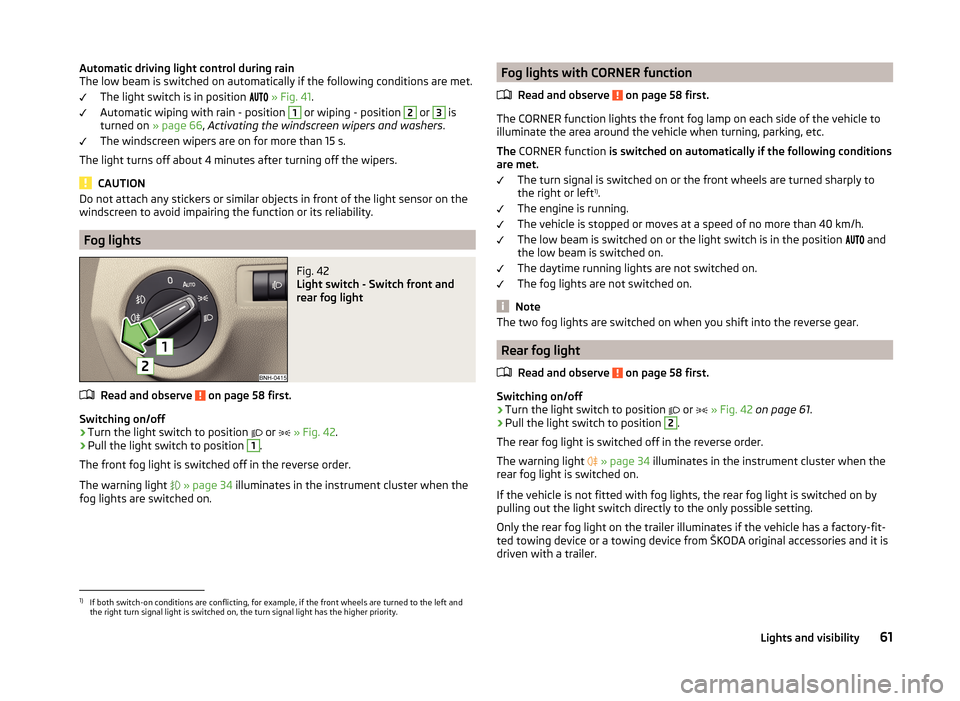
Fig. 42
Light switch - Switch front and
rear fog light
Read and observe on page 58 first.
Switching on/off
›
Turn the light switch to position
or
» Fig. 42 .
›
Pull the light switch to position
1
.
The front fog light is switched off in the reverse order.
The warning light
» page 34 illuminates in the instrument cluster when the
fog lights are switched on.
Fog lights with CORNER function
Read and observe
on page 58 first.
The CORNER function lights the front fog lamp on each side of the vehicle to
illuminate the area around the vehicle when turning, parking, etc.
The CORNER function is switched on automatically if the following conditions
are met.
The turn signal is switched on or the front wheels are turned sharply to
the right or left 1)
.
The engine is running.
The vehicle is stopped or moves at a speed of no more than 40 km/h.
The low beam is switched on or the light switch is in the position and
the low beam is switched on.
The daytime running lights are not switched on.
The fog lights are not switched on.
Note
The two fog lights are switched on when you shift into the reverse gear.
Rear fog light
Read and observe
on page 58 first.
Switching on/off
›
Turn the light switch to position or
» Fig. 42 on page 61 .
›
Pull the light switch to position
2
.
The rear fog light is switched off in the reverse order.
The warning light
» page 34 illuminates in the instrument cluster when the
rear fog light is switched on.
If the vehicle is not fitted with fog lights, the rear fog light is switched on by
pulling out the light switch directly to the only possible setting.
Only the rear fog light on the trailer illuminates if the vehicle has a factory-fit-
ted towing device or a towing device from ŠKODA original accessories and it is
driven with a trailer.
1)
If both switch-on conditions are conflicting, for example, if the front wheels are turned to the left and
the right turn signal light is switched on, the turn signal light has the higher priority.
61Lights and visibility
Page 65 of 204

COMING HOME / LEAVING HOMERead and observe
on page 58 first.
COMING HOME (hereinafter referred to only as a function) switches the light
automatically for a short time after leaving the vehicle.
LEAVING HOME (hereinafter referred to only as a function) switches the light
automatically for a short time when approaching the vehicle.
The function switches on the following light, depending on the equipment
fitted.
› Parking lights
› Low beam
› Entry lighting in the exterior mirrors
› Licence plate light
Poorer visibility is evaluated by sensor mounted in the holder of the interior
mirror.
COMING HOME
The lights are switched on automatically if the following conditions are met.
The light switch is in position
» Fig. 41 on page 60 .
The visibility in the vehicle environment is reduced.
The ignition is switched off.
The function was activated before leaving the vehicle by briefly switching
on the headlight flasher » page 60, Turn signal and main beam .
The driver's door was open - within 60 seconds after turning off the igni-
tion.
The light goes out 10 seconds after closing all of the doors and the boot lid.
If a door or the boot lid remains open, the light goes out after 60 seconds.
LEAVING HOME
The lights are switched on automatically if the following conditions are met.
The light switch is in position
» Fig. 41 on page 60 .
The visibility in the vehicle environment is reduced.
The ignition is switched off.
The vehicle was unlocked with the radio remote control.
The light goes off after 10 seconds or when locking the vehicle.
CAUTION■
Do not attach any stickers or similar objects in front of the light sensor on
the windscreen to avoid impairing the function or its reliability.■
If this function is activated constantly, the battery will be heavily discharged
particularly in short-haul travel.
Hazard warning light system
Fig. 43
Button for hazard warning light
system
Read and observe on page 58 first.
Switching on/off
›
Press the button
» Fig. 43 .
All the turn signal lights on the vehicle flash at the same time when the hazard
warning light system is switched on. The warning light for the turn signals and
the warning light in the button also flash at the same time. The hazard warn-
ing light system can also be operated if the ignition is switched off.
If one of the airbags is deployed, the hazard warning light system will switch
on automatically.
If the turn signal light is switched on when the hazard warning light and the
ignition are both switched on, then only the turn signal light on the corre-
sponding vehicle side will flash.
WARNINGSwitch on the hazard warning light system if, for example, the following oc-
curs.■
You encounter a traffic congestion.
■
The vehicle must may have to be parked on the roadside due to a fault.
62Using the system
Page 66 of 204
Parking lightRead and observe
on page 58 first.
The parking light is provided for a temporary lighting of the parked vehicle.
Parking light
switching on
›
Switch off the ignition.
›
Place the control lever into position
A
or
B
as far as it can go » Fig. 40 on
page 60 - the parking light on the right/left-hand side of the vehicle is
switched on.
If the right or left turn signal light has been switched on and the ignition is
switched off, the parking light is not automatically switched on.
Switching on the side light on both sides
›
Turn the light switch
A
to position
» Fig. 39 on page 58 and lock the ve-
hicle.
After pulling out the ignition key and opening the driver's door, an audible
warning sounds. After a few seconds or after closing the driver's door, the au-
dible alarm is turned off, but the parking lights will remain switched on.
On vehicles with an instrument cluster -version 1 » page 30 the light switch
symbol also illuminates when the two-sided parking light is switched on.
CAUTION
Turning on the parking light means the battery is heavily loaded, especially
over short distances.
Driving abroad
Read and observe
on page 58 first.
The low beam is set asymmetrically. It illuminates the side of the road on
which the vehicle is being driven to a greater extent.
When driving in countries with opposing traffic system (traffic on the left/
right), asymmetric headlight adjustment can dazzle oncoming traffic. In order
to avoid this, the headlights must be adjusted at a specialist garage.
Note
You can find out more information on adjusting the headlights at a specialist
garage.Interior lighting
Introduction
This chapter contains information on the following subjects:
Front interior light
63
Rear interior light
64
Note
With the ignition off, the light turns off automatically after about 10 minutes.
Front interior light
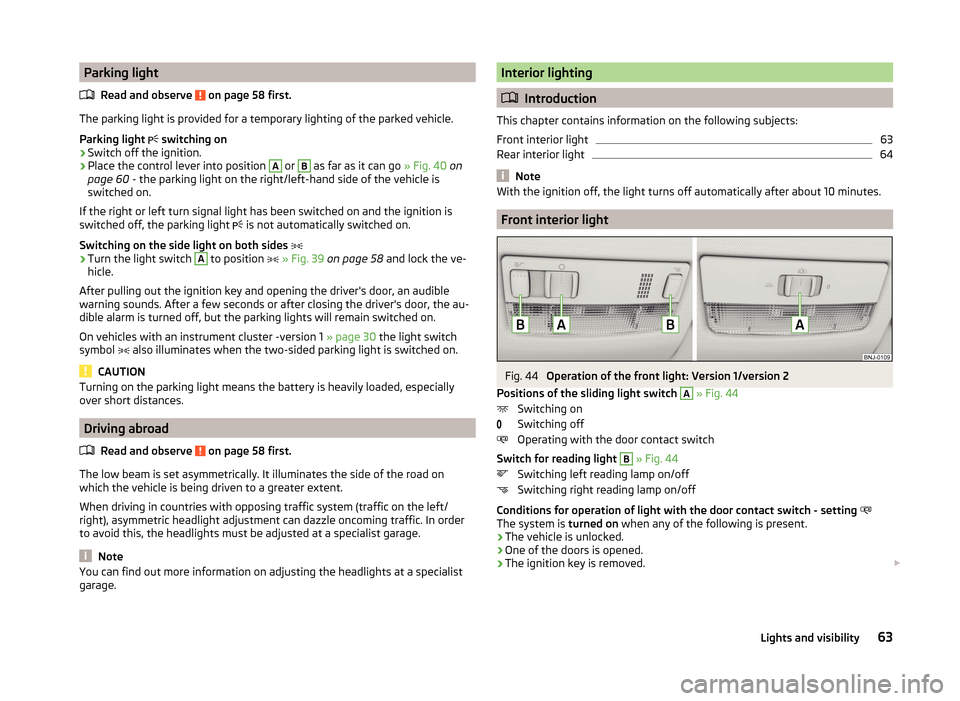
Fig. 44
Operation of the front light: Version 1/version 2
Positions of the sliding light switch
A
» Fig. 44
Switching on
Switching off
Operating with the door contact switch
Switch for reading light
B
» Fig. 44
Switching left reading lamp on/off
Switching right reading lamp on/off
Conditions for operation of light with the door contact switch - setting
The system is turned on when any of the following is present.
› The vehicle is unlocked.
› One of the doors is opened.
› The ignition key is removed.
63Lights and visibility
Page 67 of 204
The system is turned off when any of the following is present.
› The vehicle is locked.
› The ignition is switched on.
› About 30 seconds after all the doors have been closed.
Rear interior light
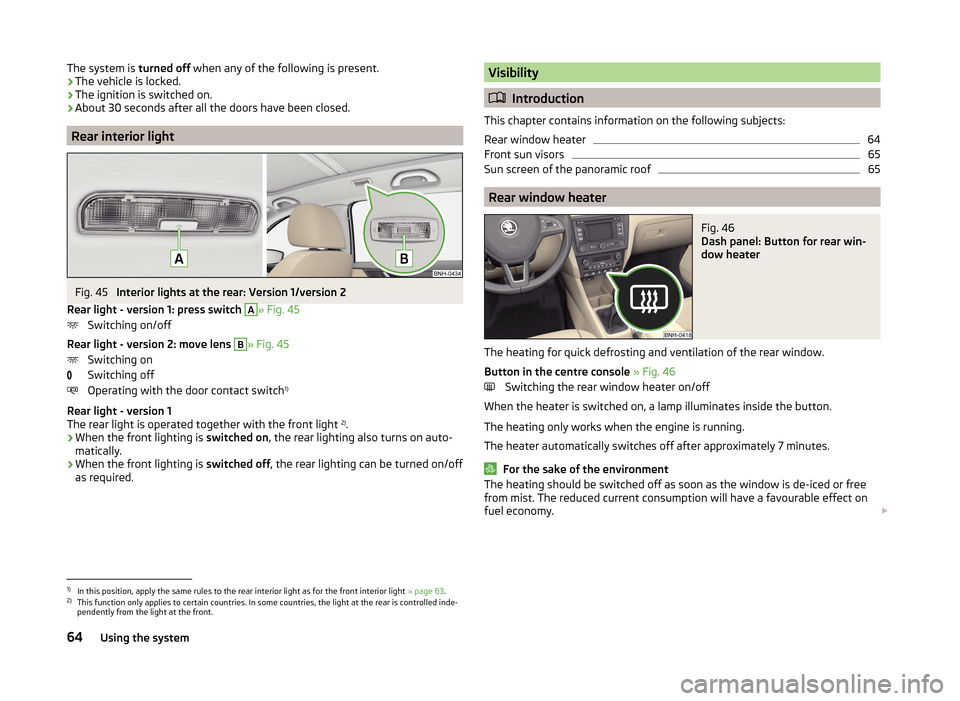
Fig. 45
Interior lights at the rear: Version 1/version 2
Rear light - version 1: press switch
A
» Fig. 45
Switching on/off
Rear light - version 2: move lens
B
» Fig. 45
Switching on
Switching off
Operating with the door contact switch 1)
Rear light - version 1
The rear light is operated together with the front light 2)
.
› When the front lighting is
switched on, the rear lighting also turns on auto-
matically.
› When the front lighting is
switched off, the rear lighting can be turned on/off
as required.
Visibility
Introduction
This chapter contains information on the following subjects:
Rear window heater
64
Front sun visors
65
Sun screen of the panoramic roof
65
Rear window heater
Fig. 46
Dash panel: Button for rear win-
dow heater
The heating for quick defrosting and ventilation of the rear window.
Button in the centre console » Fig. 46
Switching the rear window heater on/off
When the heater is switched on, a lamp illuminates inside the button.
The heating only works when the engine is running.
The heater automatically switches off after approximately 7 minutes.
For the sake of the environment
The heating should be switched off as soon as the window is de-iced or free
from mist. The reduced current consumption will have a favourable effect on
fuel economy. 1)
In this position, apply the same rules to the rear interior light as for the front interior light
» page 63.
2)
This function only applies to certain countries. In some countries, the light at the rear is controlled inde-
pendently from the light at the front.
64Using the system
Page 68 of 204
Note■If the on-board voltage drops, the heater switches off automatically, in order
to provide sufficient electrical energy for the engine control » page 151, Auto-
matic load deactivation .■
If the light is flashing inside the button the heater is off due to low battery.
Front sun visors
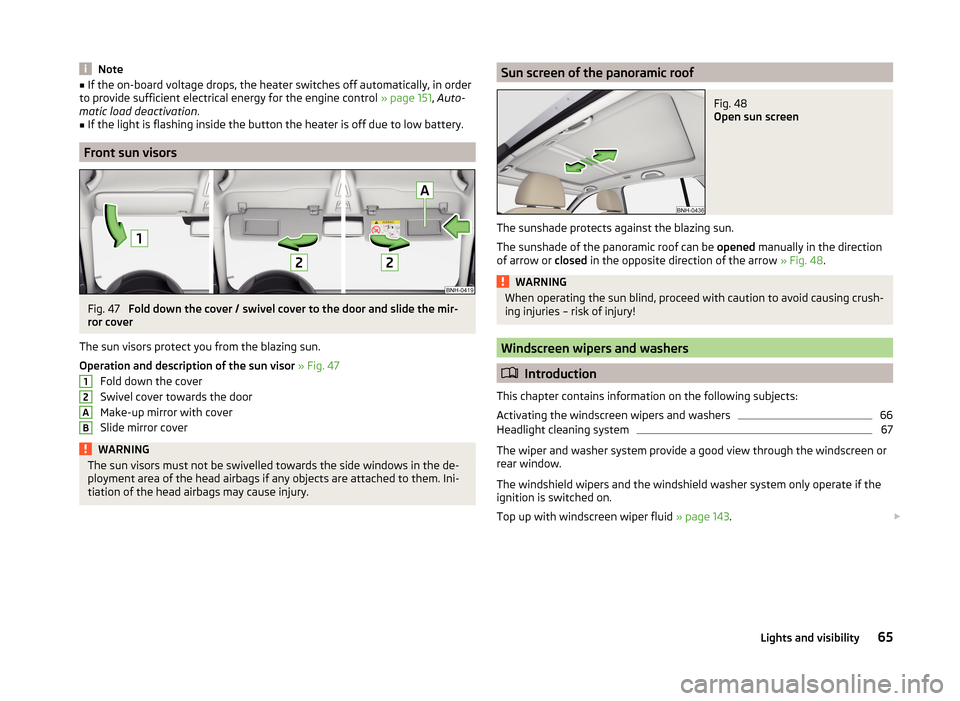
Fig. 47
Fold down the cover / swivel cover to the door and slide the mir-
ror cover
The sun visors protect you from the blazing sun.
Operation and description of the sun visor » Fig. 47
Fold down the cover
Swivel cover towards the door
Make-up mirror with cover
Slide mirror cover
WARNINGThe sun visors must not be swivelled towards the side windows in the de-
ployment area of the head airbags if any objects are attached to them. Ini-
tiation of the head airbags may cause injury.12ABSun screen of the panoramic roofFig. 48
Open sun screen
The sunshade protects against the blazing sun.
The sunshade of the panoramic roof can be opened manually in the direction
of arrow or closed in the opposite direction of the arrow » Fig. 48.
WARNINGWhen operating the sun blind, proceed with caution to avoid causing crush-
ing injuries – risk of injury!
Windscreen wipers and washers
Introduction
This chapter contains information on the following subjects:
Activating the windscreen wipers and washers
66
Headlight cleaning system
67
The wiper and washer system provide a good view through the windscreen or
rear window.
The windshield wipers and the windshield washer system only operate if the
ignition is switched on.
Top up with windscreen wiper fluid » page 143.
65Lights and visibility
Page 70 of 204

Letting go of the operating lever will cause the windscreen wash system to
stop and the wipers to continue for another 1 to 3 wiper strokes (depending on
the spraying duration).
Automatic wipe/wash for the rear window
The wash system operates immediately, the windscreen wiper wipes some-
what later.
Letting go of the operating lever will cause the windscreen wash system to
stop and the wiper to continue for another 1 to 3 wiper strokes (depending on
the spraying duration). The operating lever remains in position 6
.
Note
The rear window is wiped once automatically if the windscreen wipers are on
when reverse gear is selected.
Headlight cleaning system
Read and observe
and on page 66 first.
After the ignition is switched on, the headlights are always cleaned at the first
and after every tenth spray of the windscreen (setting
5
» Fig. 49 on
page 66 ), when the low beam or main beam is switched on.
You should remove stubborn dirt (such as insect residues) from the headlight
lenses at regular intervals, for example when refuelling. The following guide-
lines must be observed » page 134, Headlight glasses .
To ensure the proper operation of the cleaning system during the winter, any
snow should be removed from the washer nozzle fixtures and ice should be
cleared with a de-icing spray.
CAUTION
Never remove the nozzles from the headlight cleaning system by hand – risk of
damage!
Rear mirror
Introduction
This chapter contains information on the following subjects:
Interior mirror
67
Exterior mirror
68WARNING■ Make sure that the mirror is not covered by ice, snow, mist or other ob-
jects.■
Convex (curved outward) or aspheric exterior mirrors increase the field of
vision. They do, however, make objects appear smaller in the mirror. These
mirrors are therefore only of limited use for estimating distances to the fol-
lowing vehicles.
■
Whenever possible use the interior mirror for estimating the distances to
the following vehicles.
Interior mirror
Fig. 50
Interior mirror: manual dimming / auto-dimming / light sensor
Read and observe
on page 67 first.
Mirrors with manual dimming » Fig. 50
Basic position of the mirror
Mirror blackout
Mirror with automatic dimming » Fig. 50
Warning light - lights when dimming is activated
Switch for the activation of the automatic mirror dimming
Light sensor
Light sensor on the back of the mirror
Mirror with automatic dimming
If the automatic dimming is enabled, the mirror dims automatically depending
on the light falling on the sensors.
When the interior lights are switched on or the reverse gear is engaged, the
mirror always moves back into the basic position (not dimmed).
12ABCD67Lights and visibility
Page 74 of 204
›To re-insert the head restraint, push it far enough down in the direction of
arrow 7 into the seat backrest until the locking button clicks into place.WARNINGWith seats occupied, the respective head rests must be installed and adjus- ted correctly - there is a risk of fatal injury!
Note
For the sports seats, the head restraints are integrated into the front seat
backrests. These headrests cannot be removed.
Seat features
Introduction
This chapter contains information on the following subjects:
Front seat heating
71
Front armrest
72
Rear armrest
72
Seat backrests
72
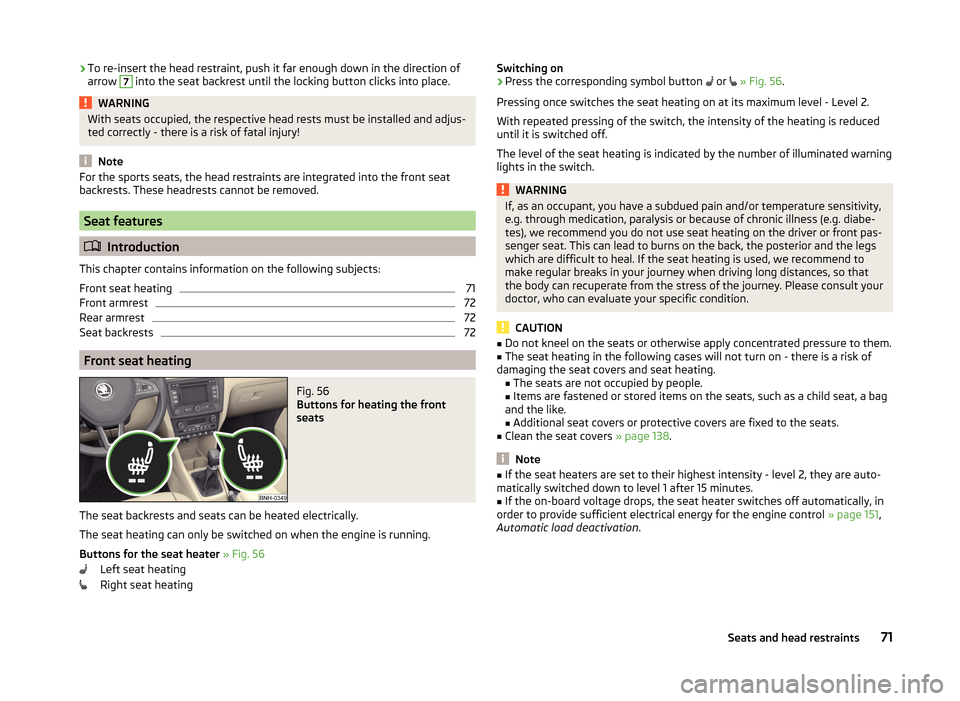
Front seat heating
Fig. 56
Buttons for heating the front
seats
The seat backrests and seats can be heated electrically.
The seat heating can only be switched on when the engine is running.
Buttons for the seat heater » Fig. 56
Left seat heating
Right seat heating
Switching on›Press the corresponding symbol button or » Fig. 56 .
Pressing once switches the seat heating on at its maximum level - Level 2.
With repeated pressing of the switch, the intensity of the heating is reduced
until it is switched off.
The level of the seat heating is indicated by the number of illuminated warning
lights in the switch.WARNINGIf, as an occupant, you have a subdued pain and/or temperature sensitivity,
e.g. through medication, paralysis or because of chronic illness (e.g. diabe-
tes), we recommend you do not use seat heating on the driver or front pas-
senger seat. This can lead to burns on the back, the posterior and the legs
which are difficult to heal. If the seat heating is used, we recommend to
make regular breaks in your journey when driving long distances, so that
the body can recuperate from the stress of the journey. Please consult your
doctor, who can evaluate your specific condition.
CAUTION
■ Do not kneel on the seats or otherwise apply concentrated pressure to them.■The seat heating in the following cases will not turn on - there is a risk of
damaging the seat covers and seat heating. ■The seats are not occupied by people.
■ Items are fastened or stored items on the seats, such as a child seat, a bag
and the like.
■ Additional seat covers or protective covers are fixed to the seats.■
Clean the seat covers » page 138.
Note
■
If the seat heaters are set to their highest intensity - level 2, they are auto-
matically switched down to level 1 after 15 minutes.■
If the on-board voltage drops, the seat heater switches off automatically, in
order to provide sufficient electrical energy for the engine control » page 151,
Automatic load deactivation .
71Seats and head restraints
Page 98 of 204

Internal PhonebookRead and observe
on page 94 first.
An internal phonebook is part of the hands-free system. This phone phone-
book can be used depending on the type of mobile phone.
After the first connection of the telephone, the system begins to load the
phone book from the phone and the SIM card into the memory of the control
unit.
Each time the telephone has established a new connection with the hands-
free system, an update of the relevant phone book is performed. The updating
can take a few minutes. During this time the phone book, which was stored af-
ter the last update was completed, is available. Newly stored telephone num-
bers are only shown after the updating has ended.
The update is interrupted if a telephone event (e.g. incoming or outgoing call,
voice control dialogue) occurs during the updating procedure. After the tele-
phone event has ended, the updating starts anew.
The internal phonebook provides 2,500 free memory locations. Each contact
can contain up to 4 numbers.
If the number of contacts loaded exceeds 2,500, the phone book is not com-
plete.
Operating the phone on the multifunction steering wheel
Fig. 95
Multifunction steering wheel: Control buttons for the telephone
Read and observe
on page 94 first.
To minimize driver distraction when operating the telephone, the basic tele-
phone's functions can be set by simply operating the buttons located on the
steering wheel » Fig. 95.
This applies only if your vehicle has been equipped with the universal tele-
phone installation at the factory.
The buttons control the functions for the operating mode of the current tele-
phone.
If the side lights are switched on, the buttons on the multifunction steering
wheel are illuminated.Button / adjust- ment
wheel » Fig. 95ActionOperation
1Press briefly(MUTE )1Turn upwardsIncrease volume 95Communication and multimedia
Page 103 of 204
Music playback via Bluetooth®
The universal telephone pre-installation GSM II makes it possible to play back
music via Bluetooth ®
from the devices such as MP3 player, mobile phone or
notebook.
To ensure that music can be played via Bluetooth ®
, you must first pair the de-
vice with the hands-free system in the Phone - Bluetooth - Media player
menu.The music playback process is performed on the connected device.
The universal telephone pre-installation GSM II ensures that the music played back via the hands-free system can be controlled with the remote con-
trol » page 99 , Voice commands .
Note
The device being connected must support the Bluetooth ®
A2DP profile; refer
to the operating instructions for the relevant device being connected.
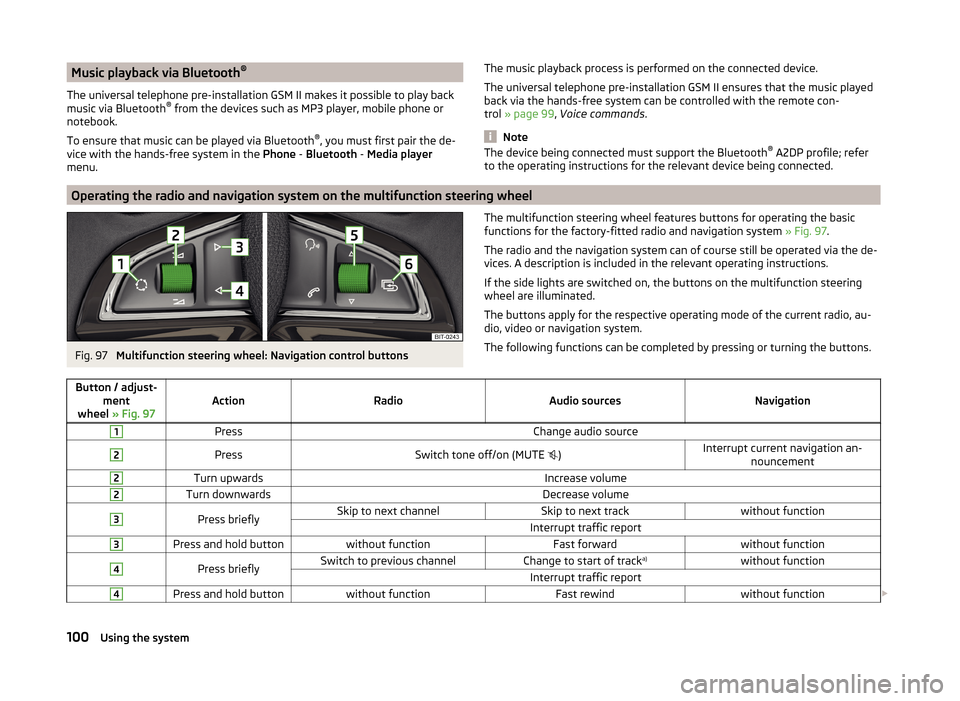
Operating the radio and navigation system on the multifunction steering wheel
Fig. 97
Multifunction steering wheel: Navigation control buttons
The multifunction steering wheel features buttons for operating the basic
functions for the factory-fitted radio and navigation system » Fig. 97.
The radio and the navigation system can of course still be operated via the de-
vices. A description is included in the relevant operating instructions.
If the side lights are switched on, the buttons on the multifunction steering wheel are illuminated.
The buttons apply for the respective operating mode of the current radio, au-
dio, video or navigation system.
The following functions can be completed by pressing or turning the buttons.Button / adjust- ment
wheel » Fig. 97ActionRadioAudio sourcesNavigation
1PressChange audio source2PressSwitch tone off/on (MUTE )Interrupt current navigation an-
nouncement2Turn upwardsIncrease volume2Turn downwardsDecrease volume3Press brieflySkip to next channelSkip to next trackwithout functionInterrupt traffic report3Press and hold buttonwithout functionFast forwardwithout function4Press brieflySwitch to previous channelChange to start of track a)without functionInterrupt traffic report4Press and hold buttonwithout functionFast rewindwithout function
100Using the system
Page 111 of 204

Manual gear changingFig. 101
Gear shift pattern of 5 gear or
6 gear manual gearbox
The individual gear positions are shown on the gear shift » Fig. 101.
The gear shift indicator must be observed when changing gear » page 43.
Always depress the clutch pedal all the way down. This prevents uneven wear
on the clutch.
Engaging reverse gear
›
Stop the vehicle.
›
The clutch pedal must be fully depressed.
›
Move the shift lever to the idle position, switch and press down.
›
Move the shift lever fully to the left and then forward into the Rposi-
tion » Fig. 101 .
The reversing lights will come on once the reverse gear is engaged, provided
the ignition is on.
WARNINGNever engage reverse gear when driving – risk of accident!
CAUTION
■ If not in the process of changing gear, do not leave your hand on the gear
shift lever while driving. The pressure from the hand can cause the gear shift
mechanism to wear excessively.■
When stopping on a slope, never try to keep the vehicle in position by using
the clutch and accelerator pedals – this may lead to damage to the clutch
parts.
Pedals
The operation of the pedals must not be hindered under any circumstances!
In the driver's foot well, only a foot mat, which is attached to the two corre-
sponding attachment points, may be used.
Only use factory-supplied foot mats or foot mats from the range of
ŠKODAOriginal Accessories, which are fitted to two the two required attach-
ment points.WARNINGNo objects may be placed in the driver's foot well – risk due to obstruction
or limitation of pedal operation!
Automatic gearbox
Introduction
This chapter contains information on the following subjects:
Modes and use of selector lever
109
Selector lever lock
109
Manual shifting of gears (Tiptronic)
110
Starting-off and driving
110
The automatic transmission performs automatic gear changes.
The modes for the automatic transmission can be adjusted by the driver by
means of the selector lever.
WARNING■ Never accelerate when the mode for moving forward is set with the se-
lector lever - there is a risk of accident!■
Never move the selector lever to mode R or P when driving – risk of acci-
dent!
■
When the vehicle is stationary and the engine is running, the vehicle must
be held in mode D, S or R with the brake pedal. Even when the engine is
idling, the power transmission is never completely interrupted – the vehicle
crawls forward.
■
When leaving the vehicle, the selector lever is always to be put in the P
mode. Otherwise the vehicle could then start to move and potentially cause
an accident.
108Driving